
SMK P SM 26 - Speaker Stand Extron - Free user manual and instructions
Find the device manual for free SMK P SM 26 Extron in PDF.


| Product Type | Speaker Stand |
| Brand | Extron |
| Model | SMK P SM 26 |
| Height Range | 1.2 m - 2.0 m (47.2 in - 78.7 in) |
| Maximum Load Capacity | 50 kg (110 lbs) |
| Main Material | Steel |
| Base Diameter | 350 mm (13.8 in) |
| Pole Diameter | 35 mm (1.38 in) |
| Color | Black |
| Weight | 8.5 kg (18.7 lbs) |
| Adjustment Mechanism | Clamp with locking knob |
| Base Type | Round steel plate with rubber feet |
| Speaker Mount Type | Top plate with foam padding and adjustable brackets |
| Warranty | 2 years |
| Included Accessories | Assembly tools, safety strap, rubber pads |
| Intended Use | Indoor/outdoor (stable surface) |
| Maintenance | Wipe with a dry cloth; check bolts periodically |
| Safety Certifications | CE, RoHS |
| Repairability | Spare parts available: mounting brackets, rubber feet, knobs |
Frequently Asked Questions - SMK P SM 26 Extron
User questions about SMK P SM 26 Extron
0 question about this device. Answer the ones you know or ask your own.
Ask a new question about this device
Download the instructions for your Speaker Stand in PDF format for free! Find your manual SMK P SM 26 - Extron and take your electronic device back in hand. On this page are published all the documents necessary for the use of your device. SMK P SM 26 by Extron.
USER MANUAL SMK P SM 26 Extron
SMK P SM 26/28 Pivot Mount Kit • Setup Guide
This setup guide contains installation information about the Extron SMK P SM 26/28 Pivot Mount Kit.
WARNING: Potential risk of severe injury. Installation and service must be performed by authorized personnel only.
ATTENTION: The final installation should be able to continuously support the speaker weight. The final installation should also be able to support any short term overloading. Since applications can vary considerably, it is assumed that the installer will exercise good judgment when selecting the mounting location, method, and hardware. Installation and service must be performed by authorized personnel only.
Installing the Pivot Mount Kit
The pivot mount enables the speaker to be positioned and locked at various angles due to the adjustable ball joint feature.
NOTE: Observe all applicable building codes and local ordinances when installing the speaker.
ATTENTION: Attaching a secondary support cable to the SM 26/28 speaker is required when using the pivot mount kit.
- Locate a suitable mounting location where the pivot mount will be installed. Allow for the dimensions of the SM 26 and SM 28, as shown below.
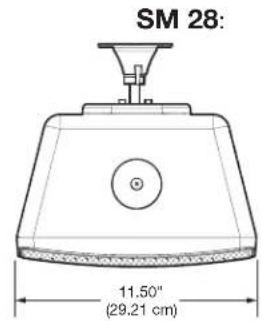


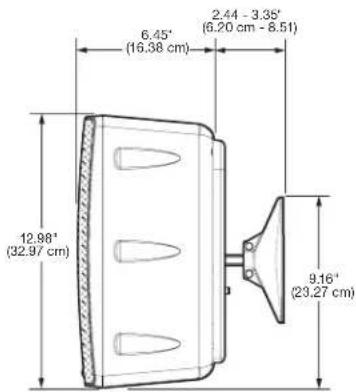
- All four mounting plate screw holes must be with at least two screws attached to a wall stud. Mark the four holes on the wall as indicated by the wall plate holes.
NOTE: Mounting hardware is not provided.
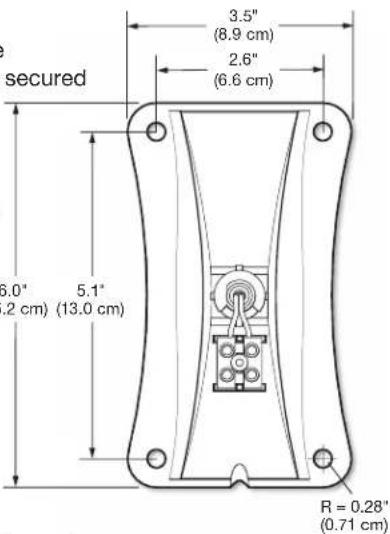
-
Drill the four holes for the wall plate.
-
Drill a hole for the speaker wire.
-
Route the speaker wire through the speaker wire hole while leaving enough slack for connection to the wall plate.
NOTE: If the speaker wire is not being routed through the wall, a notch on the wall plate allows the wire to enter the wall plate from a raceway.
- Attach speaker wires to the Euroblock on the wall plate.

SMK P SM 26/28 Pivot Mount Kit • Setup Guide (Continued)
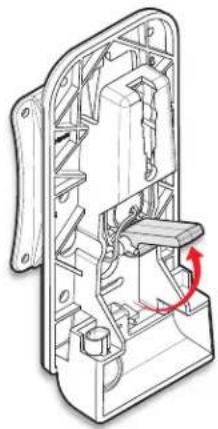
- Unlock the mounting plate from the pivot ball by moving the ball lever to the Up (horizontal) position.

natural_image
Technical line drawing of an internal mechanical assembly (no text or symbols visible)Pivot ball locked
natural_image
Technical line drawing of a mechanical assembly with internal components and a red curved arrow indicating rotation (no text or symbols)Pivot ball unlocked
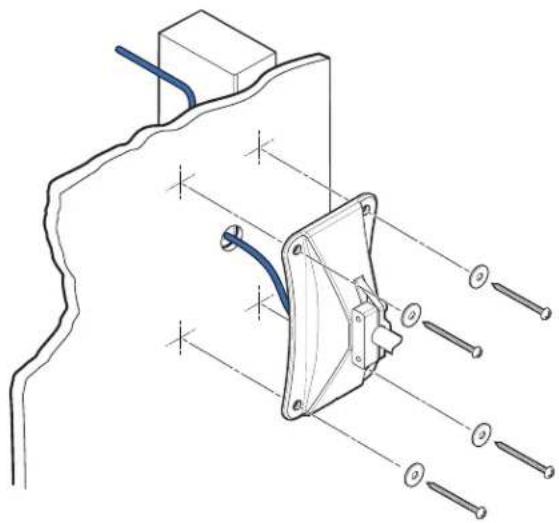
- Mount the wall plate to the wall using appropriate fasteners and washers in the four holes.
natural_image
Technical line drawing of a mechanical clamp or bracket assembly with pins and a blue cable (no text or symbols)- Loosen, but do not remove, the two locking screws that secure the pivot ball shaft to the wall plate, then extend the mounting plate to the desired position.

natural_image
Technical line drawing of a mechanical component with a red arrow indicating a specific feature (no text or symbols present)
- To aid in determining where the speaker tweeter is located before the speaker is actually mounted on the pivot mount, place the included tweeter alignment guide on the mounting plate of the pivot mount to determine the actual position of the tweeter after the speaker is installed.

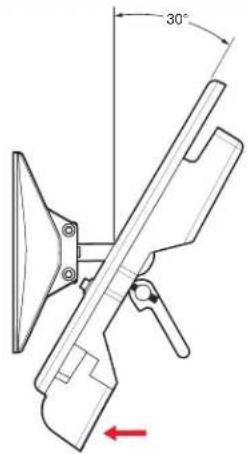
- Adjust the mounting plate to the desired position.
Articulation: a maximum angular movement of
• SM 26: 30° up, 30° down, 30° left, 30° right
• SM 28: 20irc up, 30irc down, 30irc left, 30irc right

natural_image
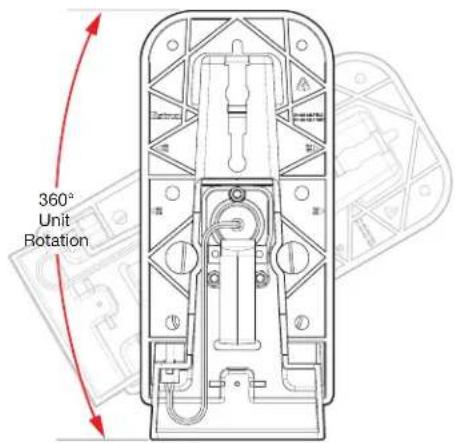
Technical line drawing of a mechanical device with internal components and a 30-degree rotation indicator (no text or symbols)Turn the unit to the right or the left.
SMK P SM 26/28 Pivot Mount Kit • Setup Guide (Continued)
Down position

Up position
Rotation: a maximum angular rotation of 360irc
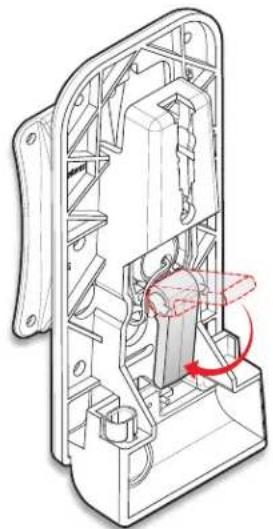
- Lock the ball joint lever (vertical down position) so that the mounting plate is securely locked in place.
natural_image
Technical line drawing of a mechanical device interior with internal components and a red rotation arrow indicating motion (no text or symbols)- Tighten the two screws to secure the pivot ball shaft to the wall plate.

- Install the speaker on the mounting plate so that the speaker is securely attached to the mounting plate.
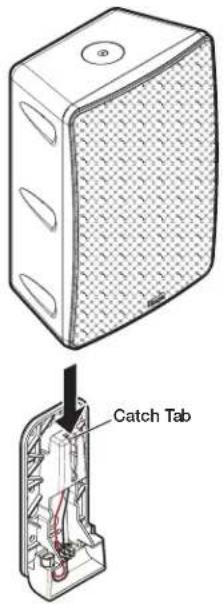
ATTENTION: By default, the SM 26/28 speaker is shipped unlocked. When attaching the speaker to the mounting plate be sure that the speaker is unlocked. Failure to place the speaker in the unlocked position will result in damage to the speaker lock mechanism should an attempt be made to attach the speaker to the mounting plate. See the SM 26 Setup Guide or SM 28 Setup Guide for further details.
SMK P SM 26/28 Pivot Mount Kit • Setup Guide (Continued)
- Attach a secondary support cable to the speaker.
ATTENTION: Do not allow any slack in the secondary support line.
SM 28:

- Insert the security key into the keyhole of the speaker grille and rotate the key to lock the speaker. There are three small raised "dimples" on the center of the grille surface that surrounds the keyhole.

- Check the position of the speaker. If the speaker needs to be repositioned, unlock the speaker if it had been previously locked using the included security key. Apply pressure to the grille with your finger over the "dimpled" keyhole to unlatch the speaker from the mounting plate while lifting up on the speaker. The ball joint lever can now be released (horizontal up position) and the speaker position readjusted.
NOTE: After repositioning the speaker, be sure to lock the ball joint lever (vertical down position) before installing the speaker.
SM 26:

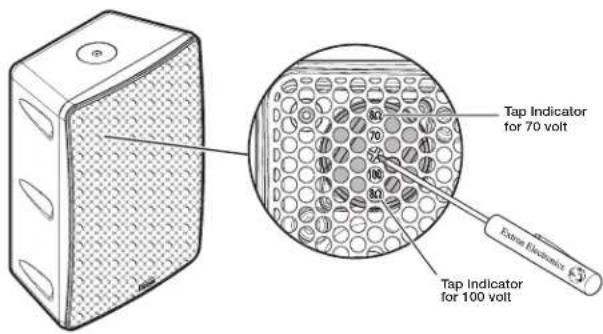
- If installing the SM 26T or SM 28T, use a small screwdriver to set the tap switch as needed (see the SM 26 Setup Guide or SM 28 Setup Guide for further details).
| Extron Headquarters+800.633.9875 Inside USA/Canada OnlyExtron USA - West Extron USA - East+1.714.491.1500 +1.919.850.1000+1.714.491.1517 FAX +1.919.850.1001 FAX | Extron Europe+800.3987.6673Inside Europe Only+31.33.453.4040+31.33.453.4050 FAX | Extron Asia+65.6383.4400+65.6383.4664 FAX | Extron Japan+81.3.3511.7655+81.3.3511.7656 FAX | Extron China+86.21.3760.1568+86.21.3760.1566 FAX | Extron Middle East+971.4.299.1800+971.4.299.1880 FAX | Extron Korea+82.2.3444.1571+82.2.3444.1576 FAX | Extron India1800.3070.3777(Inside India Only)+91.80.3056.3777+91.80.3055.3737 FAX |


Brand : Extron
Model : SMK P SM 26
Category : Speaker Stand