SDC 760 - Tumble dryer Equator - Free user manual and instructions
Find the device manual for free SDC 760 Equator in PDF.


| Product Type | Tumble Dryer |
| Brand | Equator |
| Model | SDC 760 |
| Dimensions (H x W x D) | 85 cm x 60 cm x 60 cm |
| Weight | 35 kg |
| Power Supply | 220-240 V, 50 Hz |
| Power Consumption | 2000 W |
| Energy Class | C |
| Drum Capacity | 7 kg |
| Drying Programs | Cotton, Synthetics, Delicates, Timed Drying, Cool Air |
| Special Functions | Anti-crease, Start Delay, Child Lock, Noise Reduction |
| Drying System | Condenser (Vented) |
| Noise Level | 65 dB(A) |
| Lint Filter | Removable, Clean after each cycle |
| Water Drain | Hose or Internal Tank |
| Safety Features | Overheating Protection, Door Lock, Child Lock |
| Maintenance | Clean lint filter, empty water tank, check condenser |
| Spare Parts Availability | Filters, belts, heating elements, door hinges |
| Repairability Index | 7.5 / 10 |
Frequently Asked Questions - SDC 760 Equator
User questions about SDC 760 Equator
0 question about this device. Answer the ones you know or ask your own.
Ask a new question about this device
Download the instructions for your Tumble dryer in PDF format for free! Find your manual SDC 760 - Equator and take your electronic device back in hand. On this page are published all the documents necessary for the use of your device. SDC 760 by Equator.
USER MANUAL SDC 760 Equator
natural_image
Line drawing of a white rectangular appliance with control panel and buttons (no text or symbols)OWNER'S MANUAL
Warranty
Equator Appliances undertakes to the consumer-owner to repair or, at our option, to replace any part of this product which proves to be defective in workmanship or material under normal personal, family or household use, in USA and Canada, for a period of one year from the date of original purchase. For commercial use, the product is warranted for a period of 90 Days. During this period, we will provide all labor and parts necessary to correct such defect, free of charge, if the appliance has been installed and operated in accordance with the written instructions with the appliance. Ready access to the appliance, for service, is the responsibility of the consumer-owner. Services would be provided from Monday to Friday between normal business hours.
Exclusions
In no event shall Equator Appliances be liable for incidental or consequential damages or for damages resulting from external causes such as abuse, misuse, incorrect voltage or acts of God. This warranty does not cover service calls which do not involve defective workmanship or materials covered by this warranty. Accordingly, diagnosis and repair costs for a service call which does not involve defective workmanship or materials will be the responsibility of the consumer-owner.
Most work is covered. The defining factor is, has the machine malfunctioned (Equator Appliances is responsible) or has the customer omitted or done something to cause the machine to malfunction (customer is responsible). Some states do not allow the exclusion or limitation of incidental or consequential damages, so the above limitation of exclusion may not apply to you.
This warranty is given by:
Equator Appliances
10222 Georgibelle Drive, Suite 200
Houston, Texas 77043-5249
For Service:
Call: 1-800-776-3538
Email: service@ApplianceDesk.com
Web: www.ApplianceDesk.com
Business hours: 9:00 am to 5:00 pm weekdays
You can register your Warranty by either of the following methods:
- Scan QR Code
- Open Smart Phone
- Open Camera
- Click the Link

-
Register online at ApplianceDesk.com/Warranty
-
QR Code is also used to obtain Product Information, Manuals and Updates
GENERAL
Since it is a responsibility of the consumer-owner to establish the warranty period by verifying the original purchase date, Equator Appliances recommends that a receipt, delivery slip or some other appropriate payment record be kept for that purpose.
This warranty gives you specific legal rights, and you may also have other rights which vary from State to State.
All rights reserved. Manual subject to change without notice.
Congratulations on your new Steam Dryer Closet!
In addition to its contemporary design, this is a highly sophisticated engineered product that will give you many years of satisfaction.
Here are some of the best reasons for buying your appliance for the ultimate laundry experience:
• All-in-one steaming, ironing and drying
- Refresh feature
- Fewer or no trips to the dry cleaner
- No more ironing
- Sanitizes and deodorizes
- Easy to use and maintain
Safety
- Keep air outlet clear of obstructions and do not touch this area as the high temperature could cause burns.
- When positioning the appliance, ensure the electrical cord is not trapped, damaged or near water.
- Do not place multiple portable socket-outlets at the rear of the appliance.
- Never unplug the appliance by pulling on the power cord. Grip the plug firmly and pull straight out to remove from wall socket.
- Do not use a damaged power cord.
- Do not use an extension cord.
- Do not open the appliance when it is operating, as the high temperature may cause burns or injuries.
- Children should be supervised to ensure that they do not climb in or play with the appliance.
- This appliance is not intended for use by persons (including children) with reduced physical, sensory or mental capabilities, or lack of experience and knowledge, unless they have been given supervision or instruction.
Safe Disposal
Before discarding the appliance, remove the door in order to prevent risk of child entrapment.
Please dispose of this appliance in accordance with local regulations.
California Proposition 65
WARNING: This product contains chemical known to the State of California to cause cancer and birth defects or other reproductive harm.
Installation
- Place indoors in a dry place.
- Place the appliance away from sources of heat and high humidity, and also away from areas or moisture and exposure to cold temperatures.
- Ensure the appliance is placed on a flat, level surface. The feet of the appliance can be adjusted to make it level.
- Plug the appliance into a dedicated, properly installed-grounded wall outlet.
- Check the plug and cable before you connect the power and make sure of the correct 110 voltage.
- Ensure that the plug is accessible.
- Before use, clean the outside and inside surfaces with a soft damp cloth.
Description
The Steam Dryer Closet is a perfect addition to use along with the washer and dryer. It is used instead of an iron to prevent and remove wrinkles from clothing. It is used for drying, steaming and sterilizing washed clothing. Items that can be steamed or dried include: pants, jeans, shirts, tops, scarves, jackets (cloth - not leather).
Advantages of the Steam Dryer Closet:
- An improvement on hand-held steamers
- Eliminates wrinkles, so no ironing is needed
• Alternative to dry cleaning (but may not replace it completely)
- Steam and UV light sanitizes, eliminates germs and odors
- Freshens and deodorizes clothes
Please do not use for drying shoes, fur, leather, sprayed fabrics, plastics, or other non-cloth materials.
Note: If a clothing care label specifically states “Dry Clean Only” then this item should be taken to a professional dry cleaner and should not be treated in this appliance.
Preparing to use the Steam Dryer Closet
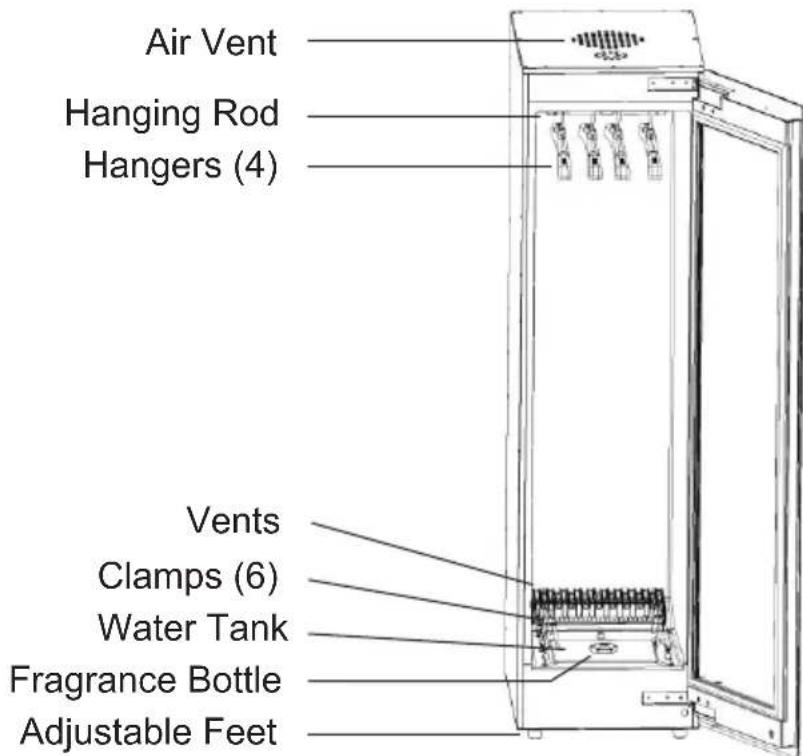
This appliance is intended for household use.
This appliance is to be used only for drying, steaming and sterilizing washed clothing.
Hangers - The Steam Dryer Closet comes equipped with 4 hangers. Hang the clothes, smooth the surfaces and ensure that the 4 hangers are placed in the grooves on the hanging rod. This allows for adequate spacing between the hanging clothes to achieve the best ironing and drying results. Do not add extra hangers with more clothes.
Hanging Rod - The mechanism in the hanging rod swings the clothes in an oscillating back and forth motion to achieve the effect of ironing clothes.
Vents - The vents at the base produce steam.
UV Light - The Ultraviolet (UV) Light at the top of the appliance sanitizes the clothes.
Clamps - There are 6 clamps attached to stretchable cords at the base of the appliance. These clamps can be pulled up and clamped onto the clothes, allowing the material to be stretched so that it can be steamed evenly to prevent wrinkles.
Water Tank - The steaming process uses water from the Water Tank, located at the base of the appliance.
- No plumbing is needed.
- The Water Tank must always be filled prior to using the appliance.
- If the Water Tank is not full, “Fill Water” will illuminate on the Control Panel.
Fragrance Bottle - optional (dilute fragrance with water)
A bottle is included for the option of adding a fragrance to the clothes being steamed and dried.
- The fragrance bottle is attached below the cover of the Water Tank.
- Remove the cover, unscrew the bottle and remove the bottle stopper.
- Add fragrance and water mixture to the bottle. Mixture should be 1 measure of fragrance to 9 measures of water.
- Replace the stopper on the bottle, screw it back below the Water Tank cover and then place the cover over the Water Tank.
Note: The clothes must be spun completely in the washer or if hand washed, the clothes must be wrung out thoroughly so that there is minimal moisture. This will increase the efficiency and time required to dry the clothes.
Control Panel
Use the Control Panel on the door of the Steam Dryer Closet to select the steaming, drying or sanitizing cycle.
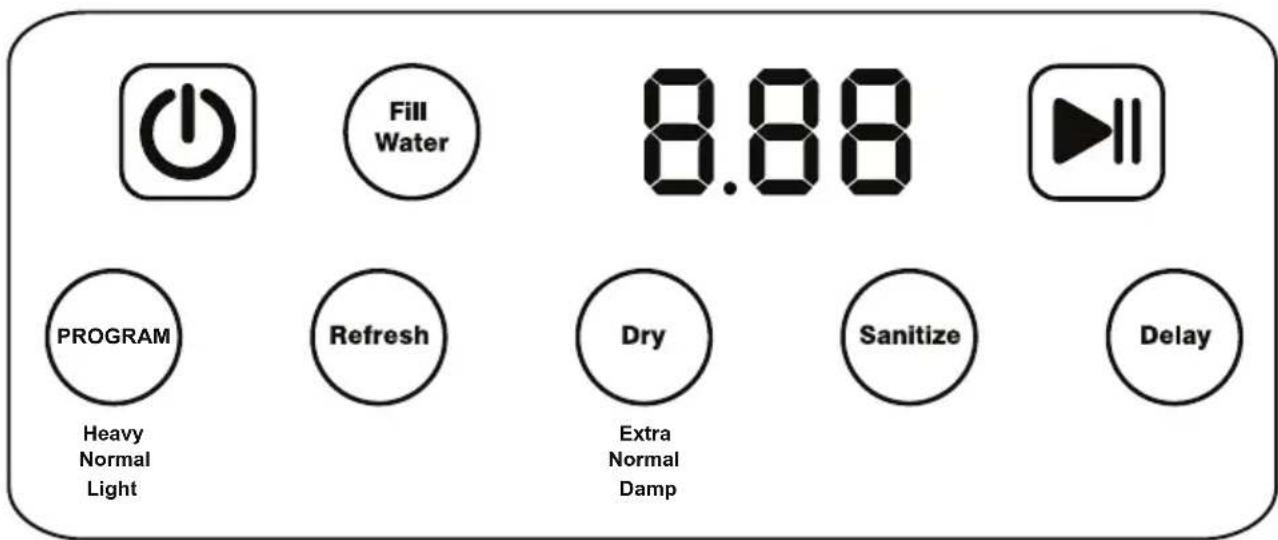
On/Off Power icon ⏻- Powers on the Steam Dryer Closet. All the selections on the Control Panel illuminate.
Program - Steam dries clothes. Select Heavy, Normal or Light cycle. The selected program will illuminate.
Refresh - Quickly steams and sanitizes dry clothes.
Dry - Dries washed wet clothes. Select the dry level: Extra, Normal or Damp Dry.
Sanitize - The UV light sanitizes clothes.
Delay - If you want to start the cycle at a later time use Delay. After selecting Program, Refresh, Dry, or Sanitize, you have the option of delaying when the steaming/drying begins. Each time you press Delay, the time increases in one-hour increments from 1 hour to 8 hours.
Start icon ▶- Begins the steaming/drying process. You may pause the cycle by pressing this icon ▶. Then press again to restart.
Fill Water - Fill Water will illuminate if there is no water in the Water Tank. The appliance will not operate and an error of Er3 will display on the Control Panel. Fill the Water Tank with water to resume operation.
Operation
Once the clothes have been hung up in the Steam Dryer Closet, close the door firmly and select the cycle on the Control Panel.
Program
This program first has high temperature steam, followed by drying and finally UV to sanitize.
-
Hang up damp or dry clothes
-
Press and hold the Power icon
-
Press Program to select Heavy, Normal or Light depending on the material to be steamed and dried. Each time you press Program, it illuminates Heavy, Normal or Light. Press Program until the selected program illuminates.
-
Press Start
The Program selection remains illuminated, and you can hear the steam starting.
The Display Panel shows the time for the program selected and then counts down the minutes until the end, when it goes off and the program is no longer illuminated.
- Heavy - 60 minutes
• Normal - 50 minutes
• Light - 40 minutes
Refresh
This is a quick 20 minutes cycle which uses steam, drying and UV light. This is recommended for clean clothes that are hanging in the closet which need a refresh and light ironing.
- Hang up dry clothes
- Press and hold the Power icon
- Press Refresh
- Press Start
Refresh remains illuminated and you can hear the steam starting.
Display Panel shows 20 minutes, and then counts down the minutes until the end, when it goes off and Refresh is no longer illuminated.
Dry
This cycle has only the drying function and is recommended for shirts, jeans and pants that would normally get wrinkled in the dryer. The Steam Dryer Closet will dry evenly and reduce or eliminate wrinkles.
- Hang up wet clothes
- Press and hold the Power icon
- Press Dry to select the level of dry: Extra, Normal or Damp
- Press Start
The Dry level selected will illuminate and you can hear the appliance is on.
The Display Panel shows the minutes based on the dry level selected, and then counts down the minutes until the end, when it goes off and the dry level is no longer illuminated.
- Extra - 120 minutes
• Normal - 90 minutes - Damp - 60 minutes
Sanitize
Only the UV light functions in this program to sterilize clothes.
- Hang up dry clothes
- Press and hold the Power icon
- Press Sanitize
- Press Start
Sanitize will illuminate and you can hear the appliance is on.
The Display Panel shows 10 minutes, and then counts down the minutes until the end, when it goes off and Sanitize is no longer illuminated.
Delay
The Delay function can be used with any of the 4 selections: Program, Refresh, Dry and Sanitize.
After you have pressed the Power Icon and one of the cycles, but before you press Start, you can press Delay to set a desired amount of time before the cycle begins.
Press Delay repeatedly to increase the time in 1-hour increments up to 8 hours. After the delay time is selected, remember to press Start.
The Display Panel shows the delay time selected, and then counts down until the time has elapsed. At this point, Delay goes off and the selected cycle begins.
The selected cycle remains illuminated, and the Display Panel shows the time for the selected cycle.
Maintenance
After the cycle ends, there may be residual water produced by the steam that remains at the base of the appliance.
Leave the door open so the water can evaporate and prevent mold. You can also use a cloth to wipe away the water.
Clean the outside and inside of the appliance regularly, using water and mild detergent.
Troubleshooting
In most cases, when your Steam Dryer Closet fails to work, the problems arising can be easily solved without having to call for a technician. Before calling for assistance, always check these points. Repairs should only be done by an authorized service agent.
| Problem Possible Cause Solution | ||
| Does not work | Power is not on or the unit is not connected to power source.Check fuse and Power socket. | Connect to PowerPlug in correctly |
| Control Panel does not work | The Control Panel is wet or dirty | Clean and dry the Control Panel |
| Cycle is complete but clothes are not dry | Clothes are heavy or thick Dry | clothes partially in a dryer and then use the Dry cycle |
| There is no steam Water Tank is empty Fill the Water Tank | ||
| The outside of the appliance is hot | When drying, heat may build up in the appliance | This is normal |
Error Codes
| Error Codes | Possible Cause | Solution |
| Er 1 Error in Control Board Call for service | ||
| Er 2 The door is openFaulty door sensor If error remains, call for service | Close the door | |
| Er 3 Water Tank does not have enough water | Fill water in Water Tank | |
Specifications Table
| Model | SDC 760 |
| Electrical | 110V / 60Hz |
| Total Hanging Capacity | 4 pcs / <33lbs (15kg) |
| Power Cord Length | 6 feet (1.8m) |
| Rated Power | 1500W |
| Net Weight | 137 lbs |
| Product Dimensions HxWxD (inches) | 60 x 16 x 22 |
natural_image
Simple geometric diagram of a circle with a horizontal line crossing through it (no text or symbols)EQUATOR®
ADVANCED Appliances ≡
Equator Advanced Appliances USA, founded in 1991, offers Efficient, High-Quality, and Innovative household appliances.
Our Mission is to simplify domestic chores and save Time, Space, and Energy.
Our Vision is to enhance our Customer's Quality of Life!
- Warranty
- Exclusions
- Equator Appliances
- For Service:
- GENERAL
- Congratulations on your new Steam Dryer Closet!
- Safety
- Safe Disposal
- California Proposition 65
- Installation
- Description
- Advantages of the Steam Dryer Closet:
- Preparing to use the Steam Dryer Closet
- Control Panel
- Operation
- Program
- Refresh
- Dry
- Sanitize
- Delay
- Maintenance
- Troubleshooting
- Specifications Table
- EQUATOR®
- ADVANCED Appliances ≡
Brand : Equator
Model : SDC 760
Category : Tumble dryer