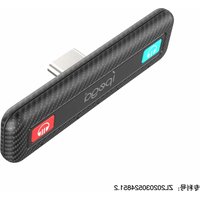
PG-SW063 - Camera IPEGA - Free user manual and instructions
Find the device manual for free PG-SW063 IPEGA in PDF.


| Product type | Digital camera |
| Model | PG-SW063 |
| Brand | IPEGA |
| Dimensions (approx.) | 10 x 6 x 3 cm |
| Weight (approx.) | 120 g |
| Power source | Built-in rechargeable lithium-ion battery, USB charging |
| Battery capacity | 600 mAh |
| Charging time | Approximately 2 hours |
| Main functions | Photo capture, video recording, playback, zoom |
| Image sensor | 5 MP CMOS |
| Storage | MicroSD card up to 32 GB (not included) |
| Connectivity | USB 2.0, mini HDMI |
| Display | 2.0 inch LCD screen |
| Care and cleaning | Wipe with a soft dry cloth; avoid water and solvents |
| Safety | Keep away from children; do not disassemble; avoid extreme temperatures |
| Spare parts and repairability | Contact IPEGA support for replacement parts; not user-serviceable |
| General information | Designed for everyday photography; compatible with Windows and Mac |
Frequently Asked Questions - PG-SW063 IPEGA
User questions about PG-SW063 IPEGA
0 question about this device. Answer the ones you know or ask your own.
Ask a new question about this device
Download the instructions for your Camera in PDF format for free! Find your manual PG-SW063 - IPEGA and take your electronic device back in hand. On this page are published all the documents necessary for the use of your device. PG-SW063 by IPEGA.
USER MANUAL PG-SW063 IPEGA
- This product is suitable for extracting audio from N.S/N-SL/P4 console and playing sound through wireless connection to wireless headsets/speakers;
- Connect console to power supply, no need to charge or connect to other power sources
- Small size and easy to use;
- Support to connect a single BT headset or connect two BT headsets at the same time;
Product Diagram Show:

Product Instructions:
- Turn on the BT headset/speaker to enter the searched connection state;
- Connect the product directly to the N.S console, the product will
automatically turn on, and the five indicator lights will be on for 5 Seconds at the same time -
Search for the paired BT I devices:
For the first connected BT headset/speaker, press and hold the BT I button for 2 seconds, the P1 LED flashes quickly, and the product will automatically search for pairing. After successful connection, P1 LED will always be on; -
Search for the paired BT II devices:
After successfully connecting to the first device, press and hold BT II button for
2 seconds, the P2 LED will flash quickly.
and the product will automatically
search for pairing. After successful connection, the P2 LED will always be on, and the P1/P2 LED are on at the same time, which means it has been successfully connected. The two BT devices play game sounds at the same time
- Back connection BT devices:
For BT headsets/speakers that have been searched for and paired,
connect the product and automatically connect back. The LED light flashes slowly during the back-connection search, and after the device is success fully connected, the Corresponding LED light will always be on;
-
If the product has been connected to some devices, when connecting to other new devices, press and hold the BT I button for 7 seconds to clear the previous connection information, so that the new device can be successfully paired quickly;
-
Press and hold the BT I button for 16 seconds to force a reset and shutdown. You need to reconnect the power supply to turn on
* Note: When two groups of BT are connected at the same time, two groups of BT shall have the same decoding rate type or two identical BT speakers and headsets are required);
Electrical Parameters:
Frequency range:2.402GHZ - 2.480GHZ
Transmission distance: 10 meters barrier-free transmission
BT version:5.0
Parts List:



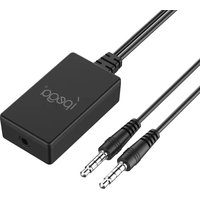
Audio Converter x 1 Manual x 1 USB-C to USB-A cable x 1
Patent NO.: ZL202030524851.2

Brand : IPEGA
Model : PG-SW063
Category : Camera