
SC-CW-05E - Battery charger Scanstrut - Free user manual and instructions
Find the device manual for free SC-CW-05E Scanstrut in PDF.


| Product Type | Battery Charger |
| Brand | Scanstrut |
| Model | SC-CW-05E |
| Input Voltage | 100-240 V AC, 50/60 Hz |
| Output Voltage | 12 V DC / 24 V DC (selectable) |
| Output Current | 5 A |
| Charging Stages | Automatic multi-stage (bulk, absorption, float) |
| Battery Compatibility | Lead-acid, AGM, Gel, Lithium (LiFePO4) |
| Waterproof Rating | IP66 (dust-tight, protected against powerful water jets) |
| Protection Features | Reverse polarity, overcurrent, overvoltage, short circuit, over-temperature |
| Dimensions (W x H x D) | 150 mm x 80 mm x 50 mm |
| Weight | 0.6 kg |
| Cable Length (AC) | 1.5 m |
| Cable Length (DC) | 1.0 m (with ring terminals) |
| Indicators | LED status lights (power, charging, fault) |
| Mounting | Wall-mountable with included bracket |
| Operating Temperature | -20°C to 50°C |
| Certifications | CE, RoHS, FCC |
| Recommended Use | Marine, RV, off-grid, automotive |
| Maintenance | Keep dry, clean contacts, check ventilation |
| Spare Parts Availability | Contact Scanstrut or authorized dealers |
Frequently Asked Questions - SC-CW-05E Scanstrut
User questions about SC-CW-05E Scanstrut
0 question about this device. Answer the ones you know or ask your own.
Ask a new question about this device
Download the instructions for your Battery charger in PDF format for free! Find your manual SC-CW-05E - Scanstrut and take your electronic device back in hand. On this page are published all the documents necessary for the use of your device. SC-CW-05E by Scanstrut.
USER MANUAL SC-CW-05E Scanstrut
ROKK Wireless - Edge 10W (SC-CW-05F)
Technical information.
Input voltage range :
10-30V DC (12/24V system)
Input current max:
2A
Output power:
10W (9.1V, 1.1A)
< 0.2W
Standby power draw:
Waterproof rating:
Certifications:
IPX6 front and back
Qi, CE, FCC, ROHS, UKCA,
UNECE R10 E24, C-Tick, IC, PSE
For latest tech info visit: www.scanstrut.com/rokk-wireless


READ IMPORTANT SAFETY INFORMATION LEAFLET BEFORE INSTALLING.
Part List:
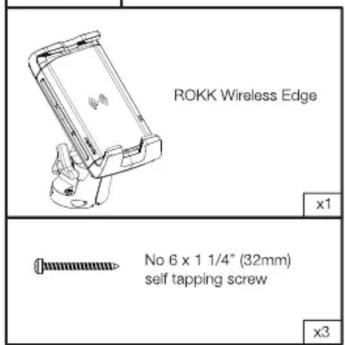
Tools Required:
| Ø6mm (0.24") drill bit | Drill bit (for pilot holes) | |
| Material | No. 6 Screw | |
| Pozi screwdriver | Soft Material E.g plywood | 2.5mm (3/32") |
| Hard Material E.g Fiberglass acrylic, hardwood | 3mm (1/8") | |
Warning Check Scale

DRILLING TEMPLATE SCALE 1:1


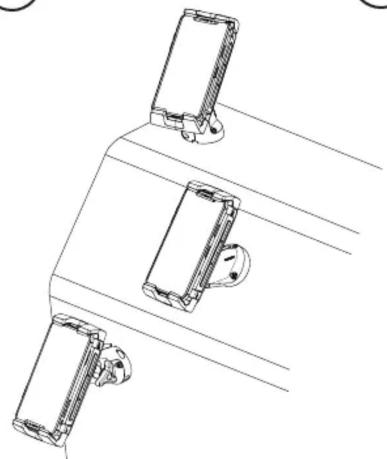
Select optimum mounting location.
natural_image
Line drawing of three mechanical components mounted on a base, no text or symbols present
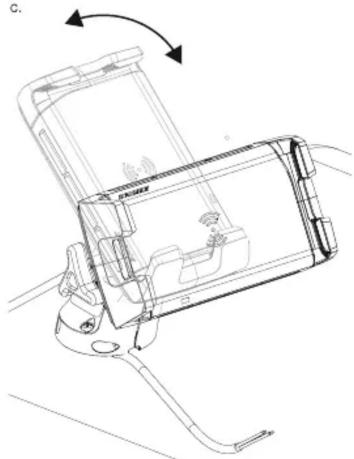
Check viewing angle (a), full jaw extension (b) and 90° adjustability (c).
a.

natural_image
Technical line drawing of a mechanical device with rotating components and directional arrows (no text or symbols)b.

natural_image
Technical line drawing of a mechanical device with no visible text or symbolsC.
natural_image
Technical line drawing of a device with internal components and directional arrows (no text or symbols)
Cut out drill template, check alignment and stick down.

- Drill ∅6mm (0.24") hole in the centre.
- Drill 3 pilot holes (see tools required table page 1).

- Lightly de-burr 6mm (0.24") hole.
- Feed wire through hole.
- Rotate to Landscape
- Apply sealant to 3 x holes.
- Evenly screw the mount into place.

Connect wires to 12/24V supply, ensuring a waterproof connection. Fuse according to input voltage and current.

natural_image
Technical line drawing of a mechanical assembly with no visible text or symbols
natural_image
Technical line drawing of a cutting tool with a circular base and alignment lines (no text or symbols)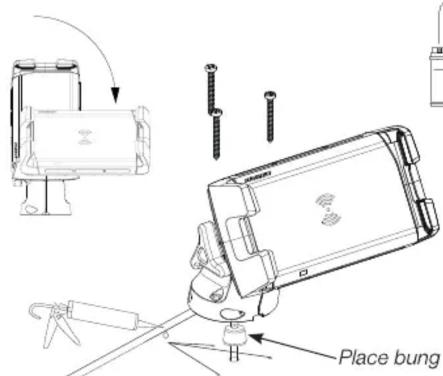

natural_image
Pure electrical circuit lines without any symbolsUSER GUIDE:
Place device centrally within the ROKK Wireless Edge jaws.
CARE: wash down carefully with fresh water.

Smart LED light guide:
Solid red
Product has power and ready to charge.
Solid green
Product charging.
Flashing red
- Foreign object detection:
metallic object placed on top
that is not Qi compatible.
or
- Thermal cutout:
internal temperature is too high/ low.
Wait for product to return to operating temperature.
Flashing green/red
Input current is too low.
This product is designed to securely mount phones under normal usage conditions. The end-user is entirely responsible for conditions in which their device is used. See WARRANTY section for further details.
Scanstrut recommends installation is carried out by a qualified electrician. No liability is accepted for damage and/or injury caused by incorrect installation.
WARNING:
This product is to be connected to a 12V DC or 24V DC battery power source only.
The power supply must be switched off before installation.
An appropriate fuse or circuit breaker must be used between the battery / power source and this product. Check for correct polarity of all wiring before switching the power on.
This product may contain high voltages. Do not tamper with the product.
This product is NOT approved for use in hazardous/flammable atmospheres. Do NOT install in a hazardous/flammable atmosphere e.g. engine room.
Before drilling any holes, ensure the area behind the mounting location is clear of wires, fuel and all other hazardous objects.
Ensure any holes cut will not significantly weaken the structure of the mounting surface.
If the product needs to be mounted outside, it must be mounted in a location safely above the waterline, where it is not at risk of being submerged.
IN EXTREME USAGE ENVIRONMENTS
PERFORMANCE MAY VARY.
CAUTION:
The product is designed specifically for the charging of Qi compatible devices.
The cable must be retained and not interfere with mechanical systems.
This product contains no user serviceable components. Do NOT attempt to repair or alter the product in any way.
This product will charge through non-metallic phone cases up to 3mm thick. Phone cases may alter overall charge performance.
When used in a very high/low ambient temperature/direct or prolonged sunlight the product may temporarily shut down, this is a safety feature of the electronics.
The IP rating is only valid if correctly installed as per these instructions and on a perfectly flat, non-porous, smooth surface.
When selecting a mounting location, avoid places exposed to heat-radiating appliances and poorly ventilated areas.
EMC INSTALLATION GUIDELINES:
Scanstrut products conform to Electromagnetic Compatibility (EMC) regulations, to ensure that electromagnetic interference between equipment is minimised.
Correct installation is required to ensure that electromagnetic interference is kept to a minimum.
WIRING:
When extending the cable from battery/power source to the product, ensure there is consistently a minimum of 10V being provided to the product. A wire gauge of 18AWG (0.82mm2) is recommended for any length of cable extension.
The schematic in step 6 is to illustrate how the product should be connected to a 12V DC or 24V DC battery/power supply.
ENVIRONMENTAL PROTECTION:
Waste electrical products should not be disposed of with household waste. Please recycle where facilities exist. Check with your Local Authority or retailer for recycling advice.
IMPORTANT:
Scanstrut Ltd. accepts no responsibility for any injuries or other damages arising from the use of their products in any circumstances.
WARRANTY:
A 2 year, non-transferrable warranty covers this Scanstrut product only and not any devices that are mounted in it or on it. No warranty is given for users' devices and users expose their devices to hazards, known or unknown, at their own risk.

- ROKK Wireless - Edge 10W (SC-CW-05F)
- Technical information.
- Smart LED light guide:
- Solid red
- Solid green
- Flashing red
- Flashing green/red
- Scanstrut recommends installation is carried out by a qualified electrician. No liability is accepted for damage and/or injury caused by incorrect installation.
- IN EXTREME USAGE ENVIRONMENTS
- PERFORMANCE MAY VARY.
Brand : Scanstrut
Model : SC-CW-05E
Category : Battery charger