FC10S - Pregnant Fluid - Free user manual and instructions
Find the device manual for free FC10S Fluid in PDF.


| Product Type | Wireless Speaker |
| Brand | Fluid |
| Model | FC10S |
| Dimensions (W x H x D) | 200 x 120 x 120 mm |
| Weight | 0.8 kg |
| Power Source | Built-in rechargeable battery (USB-C) |
| Battery Life | Up to 8 hours |
| Wireless Connectivity | Bluetooth 5.0 |
| Wired Input | 3.5mm AUX |
| Output Power | 10W (RMS) |
| Frequency Response | 80 Hz - 20 kHz |
| Impedance | 4 ohms |
| Driver Size | 2 x 2.5 inches |
| Controls | Power, Volume, Play/Pause, Next/Previous track |
| Built-in Microphone | Yes (hands-free calling) |
| Water Resistance | IPX5 |
| Material | Plastic with fabric grille |
| Color Options | Black, White |
| Accessories Included | USB-C charging cable, AUX cable, user manual |
| Care and Cleaning | Wipe with a soft dry cloth; avoid liquids |
| Safety Precautions | Do not expose to extreme temperatures; keep away from water |
| Repairability | Contact Fluid support for spare parts; battery not user-replaceable |
| General Information | Usage: indoor/outdoor portable speaker; compatible with most Bluetooth devices |
Frequently Asked Questions - FC10S Fluid
User questions about FC10S Fluid
0 question about this device. Answer the ones you know or ask your own.
Ask a new question about this device
Download the instructions for your Pregnant in PDF format for free! Find your manual FC10S - Fluid and take your electronic device back in hand. On this page are published all the documents necessary for the use of your device. FC10S by Fluid.
USER MANUAL FC10S Fluid
natural_image
Black electronic device with a circular vent grille and 'FluipD' logo on top (no text or symbols on body)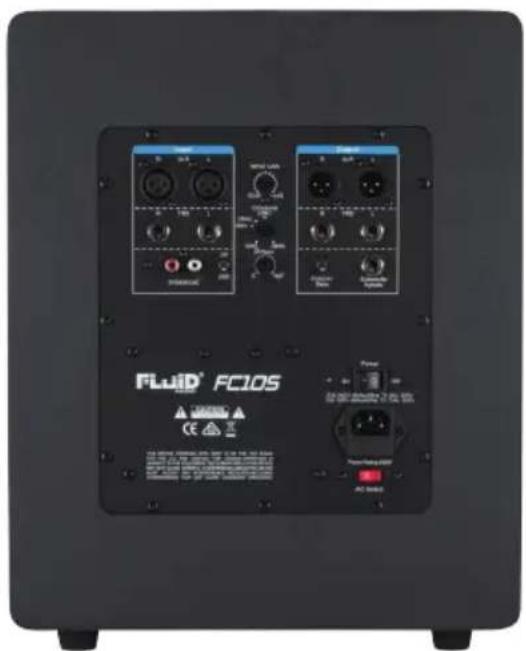
CLASSIC SERIES FC105
User Guide
Table of Contents
English
Introduction 2
What's Inside? 2
Fader Series FC10S Features 2
Front and Rear Panel Features 3
Installation 5
Connecting to Preamp or Computer Outputs 5
Positioning Your FC10S 6
Warranty 7
Appendix A - Technical Specifications 7
Introduction
Thank you for choosing the Fluid Audio Classic Series FC10S active reference subwoofer.
Fluid Audio is quickly becoming a house-hold name because the founders of the company have been designing speakers for over 23 years. They are also songwriters and musicians just like you and know exactly what is needed for tracking and mixing great music. Now, after painstaking tuning and voicing, Fluid Audio is proud to present the FC10S studio reference subwoofer.
The FC10S sounds great because it augments the low frequency response of your full range, L/R main monitors. This is crucial for most types of modern music production, and more importantly, creating a mix that will translate to your car, your home hi-fi or any other system.
The reason for this is the FC10S seamlessly blends with your L/R "main" monitors. This creates a well-balanced frequency response - so you won't hear any frequency louder or softer than any other - but also because it makes your bass sound punchy and responsive - not boomy or flabby.
Not only does the FC10S provide a clearer view into the music you are making (or just listening to) it also overcomes many of the limitations found in many other subwoofers. Using a high quality, low frequency speaker driver, the bass response sounds clear and transparent. Utilizing an angled port vent, it provides the benefits of both a front ported design with some additional bass "loading" off the ground. Along with a default flat setting, there is a "punchy" switch which boosts the response at 80Hz. There is also a variable phase knob, which allows you to precisely dial in the flat crossover to your mains. All features enable the FC10S to set a new standard in affordable studio monitoring. From Pro engineers at commercial studios to home studio owners, the FC10S sets a new, affordable standard in reference subwoofers.
What's Inside?
Your Fader Series FC10S box contains:
• One (1) FC10S active subwoofer
• One detachable AC power cord
• This users guide
Fader Series FC10S Features
1.Woofer
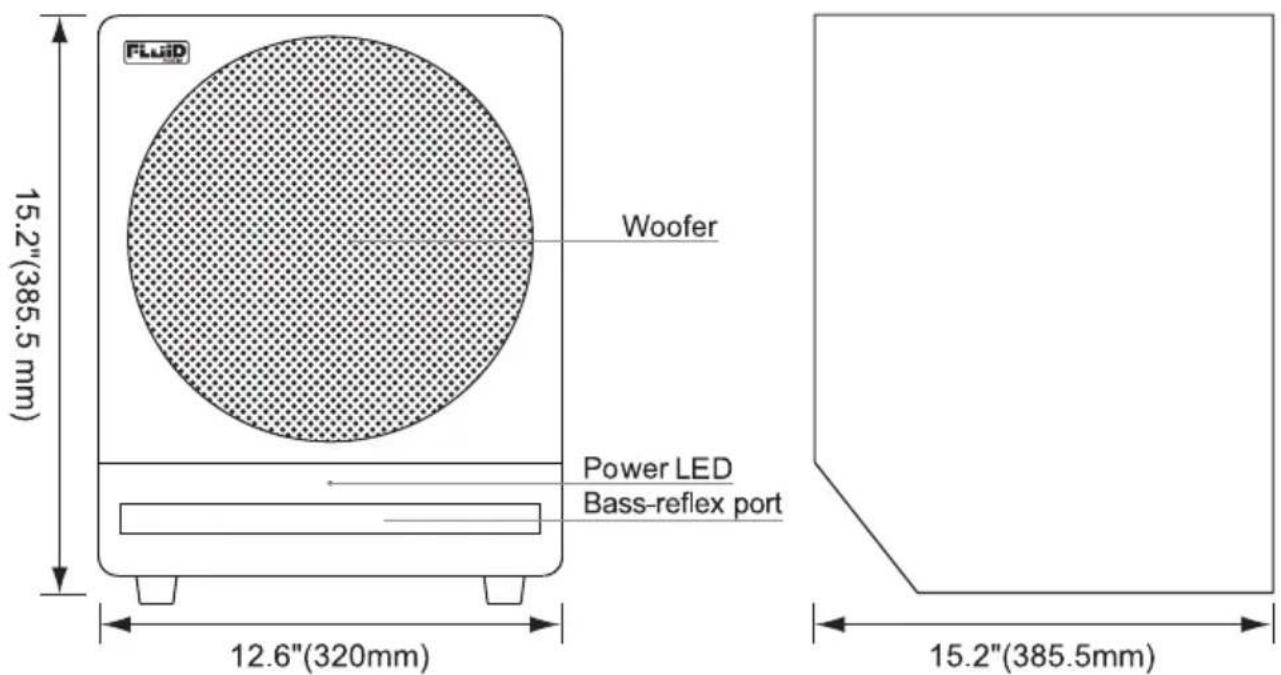
The subwoofer driver is 10"(203mm) in diameter and utilizes a powerful, low distortion magnet structure. That magnet drives a long throw, high temperature voice coil, which is mounted to a poly coated, mixed paper-pulp cone. The cone is anchored to the frame with a pliant butyl rubber surround which minimizes high frequency resonant peaks that may be transmitted from the cone. The driver's large magnet creates a high BL factor (electromagnetic force factor) which allows the cone to follow the input signal very accurately, resulting in excellent low frequency extension and fast transient response.
2.Bass-Reflex Slot Port
The wide and narrow slot at the bottom of the front panel of the FC10S is the bass-reflex vent port. It is designed to effectively tune the speaker cabinet to it's optimum frequency and maximize the bass output of the speaker. Although port vents are not unusual, this one has a slightly different execution. Most subwoofers are vented either on the back (where it can lead to interference with the wall behind it) or the front, where it is more usefully directed towards the listener. The FC10S port is angled to get both the benefits of being on the front side of the cabinet (directed at the listener) but also down at the floor, where the reflected energy creates some bass "loading" and increased low frequency output.
3.Enclosure
The enclosure design of the FC10S has a very important role in shaping the overall sonic response of the subwoofer. Besides being made of acoustically efficient MDF material, it is also reinforced by internal bracing to ensure solid bass response. The customized front baffle has an angle side on the bottom where the port vent is placed, optimizing the bass response due to floor loading.
4. Amplification and Functionality
The woofer is driven by a super efficient Class D switching amplifier. Not only allowing you to choose the crossover point and adjust the phase, one switch also gives you a choice of the kind of bass sound you prefer: A more traditional Flat sound, or a more Punchy bass sound. When speakers are not being used, there is an integrated standby function that powers down the amplifier to conserve energy.
Front and Rear Panel Features Rear Panel Features
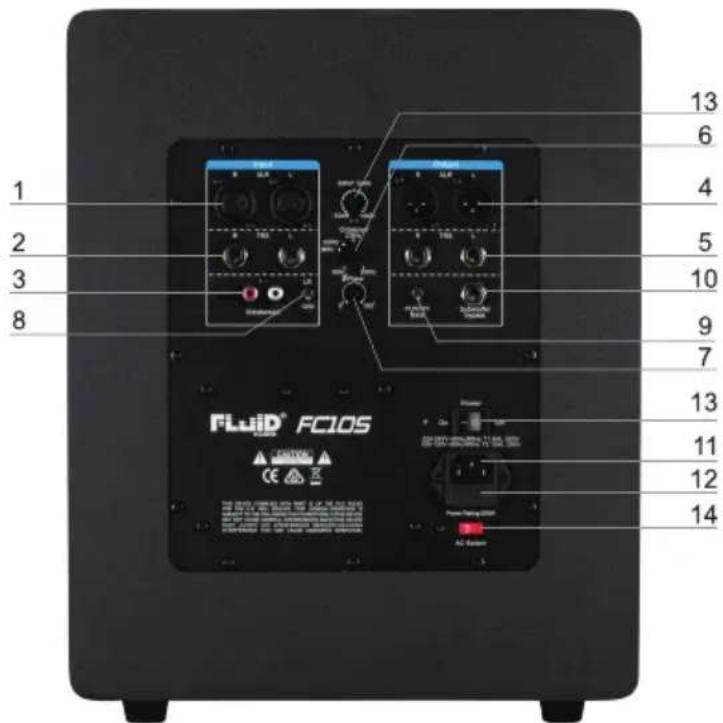
1.XLR INPUT: This jack accepts XLR input connections with either balanced or unbalanced wiring. The input wiring of an XLR connector should be as follows:
• XLR PIN 1 ..... signal ground (shield)
• XLR PIN 2 . . . . . signal positive(+)
• XLR PIN 3 · · · · · signal negative(-)
2.TRS INPUT: This jack accepts 1/4" connections with either balanced or unbalanced wiring. For balanced wiring, a three-conductor TRS plug is necessary. The input wiring of a TRS connector should be as follows:
• TRS TIP .....signal positive (+)
- TRS RING ..... signal negative (−)
• TRS SLEEVE ..... signal ground (shield)
Unbalanced 1/4" wiring can be done with either a two- or three-conductor (TS or TRS) plug. A two-conductor (TS) plug automatically grounds the signal negative input, whereas a three-conductor (TRS) plug, wired unbalanced, provides the option of leaving the negative input open or grounded. We recommend that you ground the unused negative input (this can be done by wiring the ring and sleeve of the TRS plug together).
The TRS input is summed through a balanced input amplifier with the XLR input, allowing both inputs to be used simultaneously. Input specifications apply to both.
3.RCA INPUT: This jack accepts RCA input connections with unbalanced wiring.
4.XLR OUTPUT: This jack accepts XLR input connections with either balanced or unbalanced wiring.
5. TRS OUTPUT: This jack accepts 1/4" connections with either balanced or unbalanced wiring.
6.VARIABLE CROSSOVER ADJUST: Select the low-pass frequency of the FC10S to properly integrate with full range satellite speakers.
7.VARIABLE PHASE ADJUST:Depending on subwoofer placement, adjust the phase knob to create the best sounding integration between the FC10S and the satellite speakers.
8.GROUND LIFT SWITCH: This can help eliminate ground humm noise that may be present in some studios.
9.FLAT/PUNCHY BASS SELECT SWITCH: Select a flat sound or more punchy (for Dance music) bass.
10.FOOTSWITCH INPUT: Allows you to connect the included footswitch or easy on/off control. (Full frequency devices attached to the subwoofer are automatically high-passed at 80Hz when the footswitch/subwoofer is engaged.
11. POWER RECEPTACLE: Accepts a detachable 3-circuit line cord in order to power the subwoofer.
12.FUSE HOLDER: Holds the external main fuse.
13. POWER SWITCH: This switch turns the monitor on and off.
14.VOLTAGE SELECT SWITCH: Provides two selections, 100-120V AC and 220-230V AC, and should be set to match the "house supply" (receptacle) voltage of the country or location in which the speaker is used. The 100-120V setting is correct for the USA, while the 220-230V setting is correct for most of the UK, Europe and Asia.
Front Panel Features
The front panel houses the "power on" LED indicator. When the subwoofer is turned on and there is signal playing, it will turn blue. If there is no signal after 45 minutes, it will turn red, which indicates that it is in standby mode.
Installation
For optimal performance of your FC10S subwoofer, please read the following thoroughly and carefully prior to installation.
Precautions
Caution: Please read, heed and keep all of these instructions and warnings in this user guide.
Water: Please keep powered speakers and related devices away from water or splashing.
Handling: Please do not touch the speaker cones. The FC10S speakers are tightly packed, so your attention is required when taking them out of the box. To avoid possible damage to the speaker units, hold both sides of the monitor while pulling it out of the box. The speaker cone should not be touched in order to avoid damage even after they are out of the box.
Correct Power Operation: Since the FC10S subwoofer contains its own amplifier, it must be connected to a power outlet using the detachable AC cable provided. Before connecting power, please make sure that the Voltage-Select Switch located on the speaker's rear panel is set to the appropriate position, as described in the rear-panel features list appearing earlier in this manual.
WARNING! - Use of improper Voltage-Select Switch combinations may result in hazardous conditions and/or damage to speaker components not covered by speaker warranty.
Connections: You can connect either an XLR balanced cable, TRS balanced/unbalanced cable or RCA unbalance cable from the inputs of FC10S to your corresponding preamp, interface or mixer outputs. We recommend that you use high-quality balanced or unbalanced cables for input connections. Also, always turn off the power of the FC10S and turn the volume to a minimum before making the necessary connections.
Usage: All Fluid studio monitors are designed to be used on flat surfaces. They were not designed or intended to be suspended, "flown" or mounted by screws, straps or the like. Fluid Audio is not responsible for anything resulting from such use.
Caution: Never remove the rear panel of the FC10S subwoofer. To do so could result in electric shock. A qualified technician should perform any repair or service to the electronics.
Hearing protection: This product is capable of producing sounds at a level that could be damaging to hearing and result in permanent hearing loss over an extended period of time.
XLR Balanced Connection
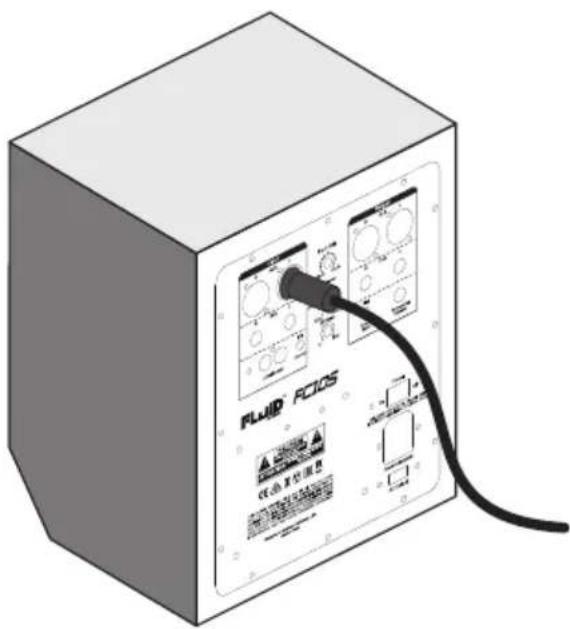
Assure that the power switch of the FC10S is turned off and that the volume control of the FC10S is turned down to a minimum. Connect the male Left/Right ends of an XLR balanced cables to the balanced inputs of the FC10S (refer to the following diagram for balanced connection).
TRS Balanced/Unbalanced Connection
Assure that the power switch of the FC10S is turned to off and that the volume control of the FC10S is turned down to a minimum. Connect the male Left/Right ends of a TRS balanced or TS unbalanced cable to the TRS input of the FC10S subwoofer.(Refer to the following diagram for TRS connection).
Connecting to Preamp or Computer Outputs
Before connecting, make sure the output device's power has been turned off. Plug the XLR balanced, TRS balanced or TS unbalanced or RCA cable to the corresponding output connectors of a pre amplifier, computer or game console.
XLR Balanced Connection
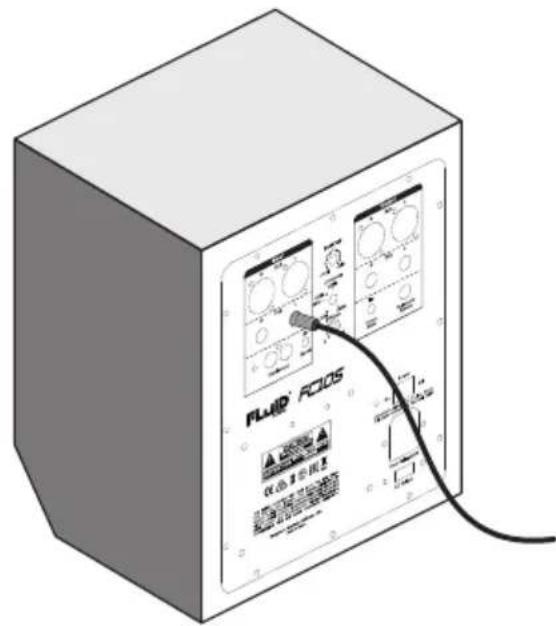
1/4" TRS Balanced or Unbalanced Connection
FC10S Orientation and Listening position
Placement of any speaker is one of the most important procedures in order to monitor sound accurately. To monitor using a subwoofer in conjunction with full range speakers, appropriate listening environment and correct placement are essential. Please refer to the following for correct FC10S placement. Your speaker's placement, and more specifically their proximity or walls and other "boundaries", can have a huge impact on how it will sound. In fact, any well-designed, amply powered subwoofer can sound very weak in your monitoring setup if you have located it and set it up incorrectly. (This applies for any loudspeaker, but it is especially true for low-frequency reproducers like subwoofers, where the frequency wave length is much longer.)
First, there are many opinions on the best method to determine the optimal location for your subwoofer. However, for the FC10S, where the bass-reflex port is located on the front of the cabinet, we recommend facing the FC10S subwoofer in the direction of the listener. That doesn't mean it has to be on a desktop (we do not recommend using it that way), but rather on the floor, relatively close to the mixing position, with the port facing forward. The closer you can get it to you, the user, the more it will work as a "near field" monitor, and the less walls and other boundaries will be a problem. They still will be, but less so. We cannot emphasize enough how important this issue is, so please take a little time to think about subwoofer placement; keeping in mind that the shape of your room, its dimensions (including ceiling height), the wall construction, and any acoustic treatment you have can affect the subwoofer's perceived performance.
As mentioned, the subwoofer should never be used on a desk or stand, and it's best to start out placing the FC10S on the floor half-way between your left and right direct-field monitors, in the same plane as the direct-field speakers. From there, you can adjust the subwoofer's position until it sounds the most "correct." Another theory dictates that you should start with the subwoofer in a corner of the room's floor, where the adjacent walls can help the subwoofer maximize the amount of sound it radiates; and then you can adjust the position to suit your specific monitoring setup.
At this point, you may want to integrate your full range speakers, and set your crossover and phase appropriately (you can start with the phase set to 0 degrees). After you have done this, play your favorite music tracks and carefully listen for any integration problems or "holes" in the full range response. If you want to be more precise, you can use a real-time analyzer (RTA) instead of your ears and perform the same exercise. (If you do this, make sure you use full bandwidth pink noise as the test signal and observe if there are any holes or notches.)
If the response is not as smooth and flat as you would like, check that sub and full range speakers are crossing over at the same frequency, and then play with the phase knob until they are better aligned. This will produce a much more full sound as the subwoofer energy is better "summing" with the full range speakers. You can usually find an optimal compromise between position, crossover and phase to get the subwoofer sounding great.
Remarks: DO NOT place any obstacles that may block the flow of air in front or between the monitors. Also remove reflective materials such as glass, mirrors or metal from the monitoring environment. PLACE THOSE MATERIALS AWAY FROM THE PATH OF THE SOUND OF THE FC10S SUBWOOFER.
Warranty
Warranty Terms
Fluid Audio warrants products to be free from defects in materials and workmanship, under normal use and provided that the product is owned by the original, registered user.
Contact your local retailer or place of purchase for terms and limitations applying to your specific product. Terms may differ depending on country of purchase.
Appendix A -Technical Specifications
| Type: | 10" active subwoofer |
| LF Driver: | 10-inch composite paper cone with high temperature voice coil and damped rubber surround. |
| Frequency Response: | 20Hz -200Hz |
| Amplifier Power200W | 200W |
| SIN Ratio: | >100dB typical, A-weighted |
| Inputs: | Stereo XLR balanced / unbalanced inputStereo TRS balanced/unbalanced inputStereo RCA unbalance input |
| Outputs: | Stereo XLR balanced / unbalanced outputStereo TRS balanced/unbalanced output |
| Controls | Fader Volume/Gain controlVariable Phase controlVariable Crossover controlFlat/Punchy bass switchSubwoofer bypass footswitch jack |
| Polarity: | Positive signal at + input produces outward LF cone displacement |
| Input Impedance: | 20k ohms balanced, 10k ohms unbalanced |
| Input Sensitivity: | 85mV pink noise input produces 97dBA output SPL at one meter with volume control at maximum |
| Protection: | RF interference, output current limiting, over temperature, turn-on/off transient, subsonic filter, external mains fuse. |
| Indicator: | Power on / off LED on front panel |
| Power Requirements: | Factory programmed for either 100-120V-60Hz, 220-230V-50Hz |
| Cabinet: | Vinyl-laminated, high acoustic efficient MDF |
| Dimention: | 385.5 mm (H) x 320 mm (W) x 385.5 mm (D) |
| Weight | 12.4 kgs/unit (without packing) |
Above specifications subject to change without notice
WARNING: This product contains chemicals, including lead, known to the State of California to cause cancer, and birth defects or other reproductive harm. Wash hands after handling.

©2020 Fluid Audio. All rights reserved. Product features, specifications, system requirements and availability are subject to change without notice. Fluid Audio is trademark or registered trademark of Fluid Audio in the U.S. and other countries. All other trademarks contained herein are the property of their respective owners.