
ATXPOW350PRO - Computer Adapter StarTech.com - Free user manual and instructions
Find the device manual for free ATXPOW350PRO StarTech.com in PDF.


| Product Type | Computer Power Adapter / Power Supply |
| Model | ATXPOW350PRO |
| Brand | StarTech.com |
| Input Voltage | 100-240V AC, 50/60Hz |
| Output Power | 350W |
| Output Voltages | +3.3V, +5V, +12V, -12V, +5VSB |
| Max Output Current (+3.3V) | 20A |
| Max Output Current (+5V) | 20A |
| Max Output Current (+12V) | 15A |
| Connectors | 1x 20+4 pin ATX, 1x 4+4 pin CPU, 2x SATA, 2x Molex |
| Efficiency | Standard, up to 80% |
| Protection Features | Over-voltage, over-current, short-circuit protection |
| Cooling | 120mm fan |
| Dimensions (W x D x H) | 150 mm x 140 mm x 86 mm |
| Weight | 1.4 kg (3.1 lbs) |
| Safety Certifications | CE, FCC, RoHS |
| Operating Temperature | 0°C to 40°C |
| Maintenance | Clean with dry cloth; do not use liquids. |
| Safety Warning | Do not open the unit. Contains no user-serviceable parts. |
| Spare Parts / Repairability | Not user-serviceable. Contact StarTech.com support for service. |
Frequently Asked Questions - ATXPOW350PRO StarTech.com
User questions about ATXPOW350PRO StarTech.com
0 question about this device. Answer the ones you know or ask your own.
Ask a new question about this device
Download the instructions for your Computer Adapter in PDF format for free! Find your manual ATXPOW350PRO - StarTech.com and take your electronic device back in hand. On this page are published all the documents necessary for the use of your device. ATXPOW350PRO by StarTech.com.
USER MANUAL ATXPOW350PRO StarTech.com
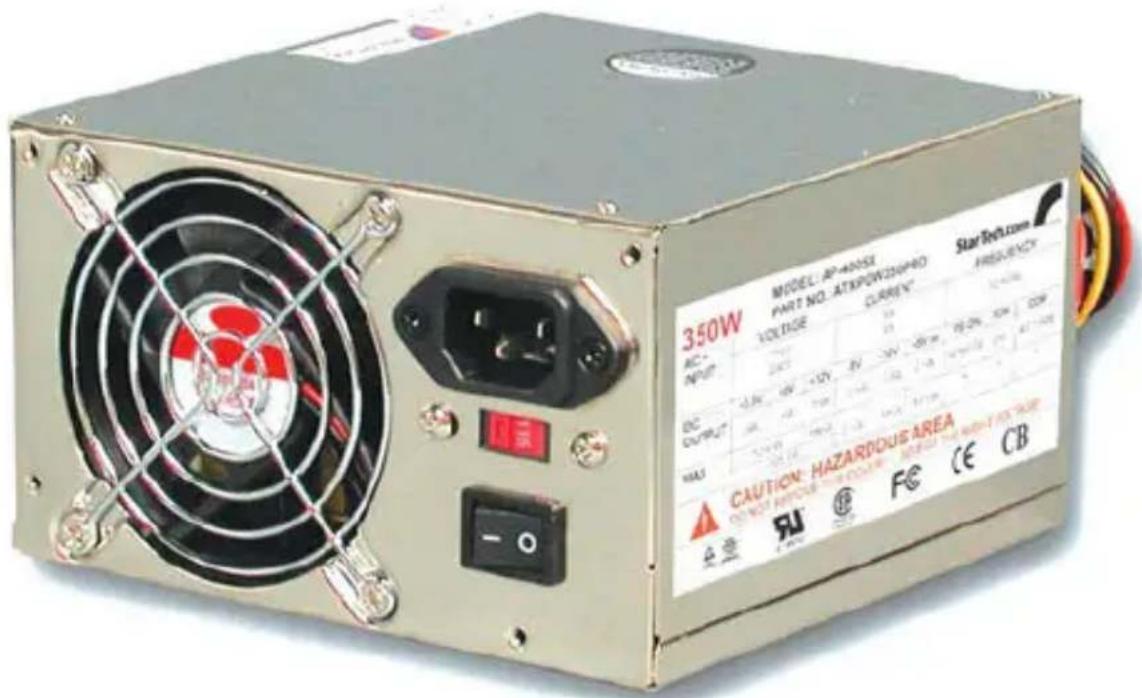
Reliable High-Performance 350 Watt ATX 12V Power Supply
ATXPOW350PRO
Instruction Manual
FCC Compliance Statement
This equipment has been tested and found to comply with the limits for a Class B digital device, pursuant to part 15 of the FCC Rules. These limits are designed to provide reasonable protection against harmful interference in a residential installation. This equipment generates, uses and can radiate radio frequency energy and, if not installed and used in accordance with the instructions, may cause harmful interference to radio communications. However, there is no guarantee that interference will not occur in a particular installation. If this equipment does cause harmful interference to radio or television reception, which can be determined by turning the equipment off and on, the user is encouraged to try to correct the interference by one or more of the following measures:
Reorient or relocate the receiving antenna.
Increase the separation between the equipment and receiver.
Connect the equipment into an outlet on a circuit different from that to which the receiver is connected.
Consult the dealer or an experienced radio/TV technician for help.
Use of Trademarks, Registered Trademarks, and other Protected Names and Symbols
This manual may make reference to trademarks, registered trademarks, and other protected names and/or symbols of third-party companies not related in any way to StarTech.com. Where they occur these references are for illustrative purposes only and do not represent an endorsement of a product or service by StarTech.com, or an endorsement of the product(s) to which this manual applies by the third-party company in question. Regardless of any direct acknowledgement elsewhere in the body of this document, StarTech.com hereby acknowledges that all trademarks, registered trademarks, service marks, and other protected names and/or symbols contained in this manual and related documents are the property of their respective holders.
Instruction Manual
Table of Contents
Introduction ...... 1
Features ....1
Installation 2
Specifications 3
Technical Support 4
Warranty Information 4
Introduction
Thank you for buying a StarTech.com 350-Watt heavy-duty power supply. Guaranteed compatible with Pentium 4 (and below) processors, the high-quality ATXPOW350PRO is a reliable way to ensure that optimum power is delivered your computer's demanding components. A dual ball-bearing temperature-controlled fan adjusts its speed to maintain an optimum operating environment for heat-sensitive components.
Features
- Ideal for Pentium 3, Pentium 4, and AMD Athlon processors
- Constructed from the highest quality components to assure a long life
- Provides extra power capacity for PC servers with several hard drives
- Provides the extra current required by 1 GHz and faster CPUs
- Automatically detects temperature and adjusts fan speed to maintain optimal performance
- Uses superior EMI/RFI power filtration system ensure system components receive clean, stable power
Contents
This package should contain:
• 1 x ATXPOW350PRO power supply
- 1 x power cord
WARNING! Computer parts can be severely damaged by static electricity. Be sure that you are properly grounded before opening your computer case. StarTech.com recommends that you wear an anti-static strap when installing any computer component. If an anti-static strap is unavailable, discharge yourself of any static electricity build-up by touching a large grounded metal surface (such as the computer case) for several seconds. Also make sure that your computer is turned off and unplugged before attempting to open your computer case.
Installation
NOTE: Check the power supply voltage before installation. It should be the same as your local power voltage (115V for North America and 230V for most of the European countries). Change the voltage setting if necessary.
- Make sure that your computer is turned off and unplugged. Remove the power cord from your old power supply.
- Remove the cover of your system (see your computer's user manual for details, if necessary).
- Disconnect all the power connectors from the mother board and the peripheral devices such as hard drives, floppy disks, etc. Make sure there are no devices connected to the existing power supply.
- Remove the existing power supply from your computer case and replace it with the new StarTech.com power supply.
- Connect the power connectors to your motherboard and peripheral devices.
- Close your computer case.
- Connect the power cord to the StarTech.com power supply.
ATXPOW350DF Connectors

Instruction Manual
Specifications
| Dimensions | 5.9 x 3.35 x 5.87 inches (150 x 85 x 149mm) |
| Output Power | 350W |
| Fan Type | Ball bearing |
| Connectors | FCC, UL, CSA, CE, TUV, CB |
| Connectors | 6 x 4-pin-LP4-female2 x small-internal-power1 x 20-pin-ATX-motherboard-adapter1 x 4-pin extended ATX power 12V plug |
| MTBF | 100,000 hrs. @ 25°C |
| Safety Approvals | FCC, UL, CSA, CE, TUV, CB |
| AC Input | Voltage 115V ~ Current 8AVoltage 230V ~ Current 4AFrequency 5-~60Hz |
| DC Output | + 3.3V (30A)+ 5V (40A)+ 12V (18A)-5V (1A)-12V (1A)+ 5V Standby (2.5A) |
Technical Support
StarTech.com's lifetime technical support is an integral part of our commitment to provide industry-leading solutions. If you ever need help with your product, visit www.startech.com/support and access our comprehensive selection of online tools, documentation, and downloads.
Warranty Information
This product is backed by a three year warranty.
In addition, StarTech.com warrants its products against defects in materials and workmanship for the periods noted, following the initial date of purchase. During this period, the products may be returned for repair, or replacement with equivalent products at our discretion. The warranty covers parts and labor costs only. StarTech.com does not warrant its products from defects or damages arising from misuse, abuse, alteration, or normal wear and tear.
Limitation of Liability
In no event shall the liability of StarTech.com Ltd. and StarTech.com USA LLP (or their officers, directors, employees or agents) for an (whether direct or indirect, special, punitive, incidental, consequential, or otherwise), loss of profits, loss of business, or any pecuniary loss, arising out of or related to the use of the product exceed the actual price paid for the product. Some states do not allow the exclusion or limitation of incidental or consequential damages. If such laws apply, the limitations or exclusions contained in this statement may not apply to you.

StarTech.com has been making “hard-to-find easy” since providing high quality solutions to a diverse IT and A/V customer base that spans many channels, including government, education and industrial facilities to name just a few. We offer an unmatched selection of computer parts, cables, A/V products, KVM and Server Management solutions, serving a worldwide market through our locations in the United States, Canada, the United Kingdom and Taiwan.
Visit www.startech.com today for complete information about all our products and to access exclusive interactive tools such as the Cable Finder, Parts Finder and the KVM Reference Guide.


- Reliable High-Performance 350 Watt ATX 12V Power Supply
- ATXPOW350PRO
- Instruction Manual
- FCC Compliance Statement
- Use of Trademarks, Registered Trademarks, and other Protected Names and Symbols
- Table of Contents
- Introduction ...... 1
- Installation 2
- Specifications 3
- Technical Support 4
- Warranty Information 4
- Introduction
- Features
- Contents
- Installation
- Technical Support
- Warranty Information
- Limitation of Liability
Brand : StarTech.com
Model : ATXPOW350PRO
Category : Computer Adapter