SC-SM10S55 - Food processor Scarlett - Free user manual and instructions
Find the device manual for free SC-SM10S55 Scarlett in PDF.


| Product Type | Food Processor |
| Brand | Scarlett |
| Model | SC-SM10S55 |
| Power Supply | 220-240V ~ 50/60Hz |
| Power Consumption | 400 W |
| Bowl Capacity | 1.5 L |
| Dimensions (L x W x H) | 25 x 20 x 30 cm |
| Weight | 2.5 kg |
| Main Functions | Chopping, Blending, Grating, Slicing, Kneading |
| Number of Speeds | 2 + Pulse |
| Blade Material | Stainless Steel |
| Bowl Material | Plastic (BPA-free) |
| Lid Locking System | Safety Lock |
| Overheat Protection | Yes |
| Non-Slip Feet | Yes |
| Cord Length | 1.0 m |
| Dishwasher Safe Parts | Bowl, Lid, Blades, Pusher |
| Cleaning Instruction | Wipe motor unit with damp cloth; other parts dishwasher safe |
| Spare Parts Availability | Bowl, Lid, Blade Set, Pusher available online |
| Repairability Index | 7.5/10 |
| Included Accessories | Chopping blade, grating disc, slicing disc, kneading hook, spatula |
| Certification | CE, RoHS |
Frequently Asked Questions - SC-SM10S55 Scarlett
User questions about SC-SM10S55 Scarlett
0 question about this device. Answer the ones you know or ask your own.
Ask a new question about this device
Download the instructions for your Food processor in PDF format for free! Find your manual SC-SM10S55 - Scarlett and take your electronic device back in hand. On this page are published all the documents necessary for the use of your device. SC-SM10S55 by Scarlett.
USER MANUAL SC-SM10S55 Scarlett
natural_image
Green SCARLETT kitchen mixer with digital display showing 3.05-00% angle (no text or symbols on main body)scarlett.ru

- Please read these operating instructions carefully before connecting your device to the power supply, in order to avoid damage due to incorrect use.
- Before the first switching on check that the voltage indicated on the rating label corresponds to the mains voltage in your house.
- Incorrect operation and improper handling can lead to malfunction of the appliance and injuries to the user.
- The appliance is intended for use only in domestic aims. The unit is not intended for industrial and commercial use, and also for use in:
– kitchen area for the stuff of shops, offices and the other industrial places - farm houses
– hotels, motels, rest homes and other similar places by residents. - Do not use outdoors or in damp area.
- Do not disassemble the appliance when it is plugged to the power supply. Always unplug the appliance from the power supply before cleaning and when not in use.
- To prevent risk of electric shock and fire, do not immerse the appliance in water or any other liquids. If it has happened, unplug it immediately and check in service center.
- In case of power cord is damaged, its replacement should be done by the manufacture or service department or the other high-skill person to avoid any danger.
-
Keep the cord away from sharp edges and hot surfaces.
-
When disconnecting the appliance from the mains, grab the plug, and do not pull the cord/
-
The device must stand steadily on a dry, flat surface. Do not place the appliance on hot surfaces, as well as near heat sources (for example, electric stoves), curtains and under hanging shelves.
-
Do not leave the appliance switched on when not in use.
-
Nothing other than processed products and liquids should come into contact with the nozzles of the device if the device is connected to the power supply network. Do not allow hair or clothing edges to get into the bowl.
-
It is forbidden to use the bowl for processing frozen food.
-
Do not touch the motor unit housing, plug and power cord with wet hands.
-
During operation, do not close the ventilation holes on the motor unit housing
-
Keep the power cord away from heat, oil and sharp objects.
-
Do not use other attachments than those supplied.
-
Before interacting with moving parts of the device or removable attachments, turn off the device and disconnect it from the mains.
-
It is forbidden to wash the appliance and its components in the dishwasher, with the exception of a steel bowl, a lid with a hole for adding ingredients and a whisk for whipping.
-
Avoid contacting with moving parts.
-
The appliance is not intended for use for physically, sensory or mental disabled person (including children) or for person with lack of life experience or knowledge, if only they are under supervision or have been instructed about the use of the unit by responsible person.
-
This appliance can be used by children aged 8 years and older, as well as persons with reduced physical, sensory or mental abilities, if they have been monitored or instructed on the safe use of the appliance and if they understand the dangers associated with it. Cleaning and maintenance should not be carried out by children, unless they are older than 8 years and are under the supervision of adults. Keep the appliance and its cord out of the reach of children under 8 years of age together.
-
Children must be under control in order not to be allowed to play with the appliance.
-
Do not attempt to repair, adjust or replace parts in the appliance. Check and repair the malfunctioning appliance in the nearest service center only.
-
If the product has been exposed to temperatures below 0 ^ for some time it should be kept at room temperature for at least 2 hours before turning it on.
-
The manufacturer reserves the right to introduce minor changes into the product design without prior notice, unless such changes influence significantly the product safety, performance, and functions.
-
Manufacturing date is indicated on the unit and/or on packing as well as in accompanying documents in the following format XX.XXXX where first two figures XX is the month of production, and following four figures XXXX is the year of production.
GETTING STARTED
- Read the manual carefully.
- Remove the appliance from the packaging by removing all packaging material (if available).
- Check the equipment and make sure there is no mechanical damage.
- Check the integrity of the product and the power cord.
- Wipe the motor unit and the base with a dry towel.
- Thoroughly wash the bowl, the lid, after removing it from the body, the whisk nozzle, the mixing nozzle and the dough kneading nozzle in warm water using detergent and wipe dry.
• The appliance is ready for use.
WORK
- Before installing the nozzles, make sure that the appliance is disconnected from the mains.
- Press the lock button of the motor unit and flip the motor unit up.
- Fix the bowl lid to the mixer body by aligning the groove on the lid with the protrusion on the motor unit.
- The lid protects against splashing of products during their processing.
- Select the appropriate nozzle.
• Put the nozzle on the shaft so that the pin falls into the slots on the nozzle until it locks.
• Make sure that the nozzle is securely fixed. - Put all the necessary ingredients in the bowl and set the bowl.
- Align the protrusions on the bowl with the grooves on the base and turn the bowl clockwise until it locks.
- Press the lock button of the motor unit and lower it.
- Connect the appliance to the mains by plugging it into an outlet.
OPERATION
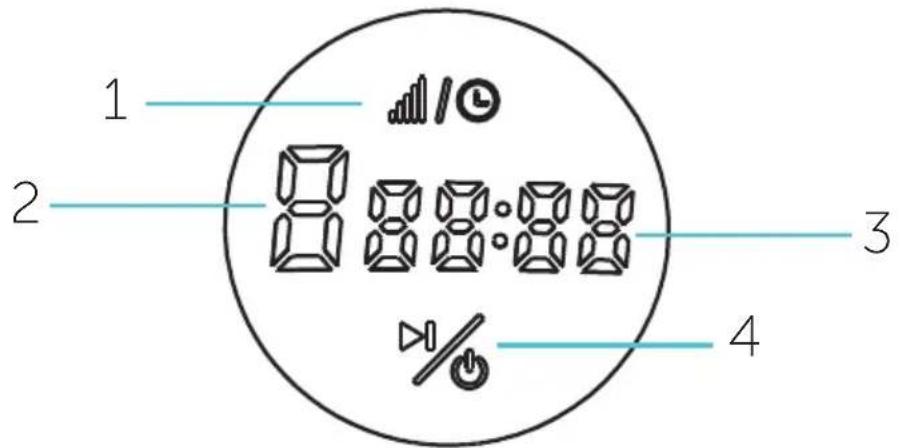
- Speed/Time selection
- Operation time
- Timer
- Turning the device on and off
1. Turning on
(1). Plug in the device. The button will light up – the device is in the standby mode.
(2). Press the button to activate the control panel.
(3). Press and hold the button to turn off the control panel and enter the standby mode.
(4). Speed (2) and time (3) setting will not save after entering standby mode.
2. Speed/time setting
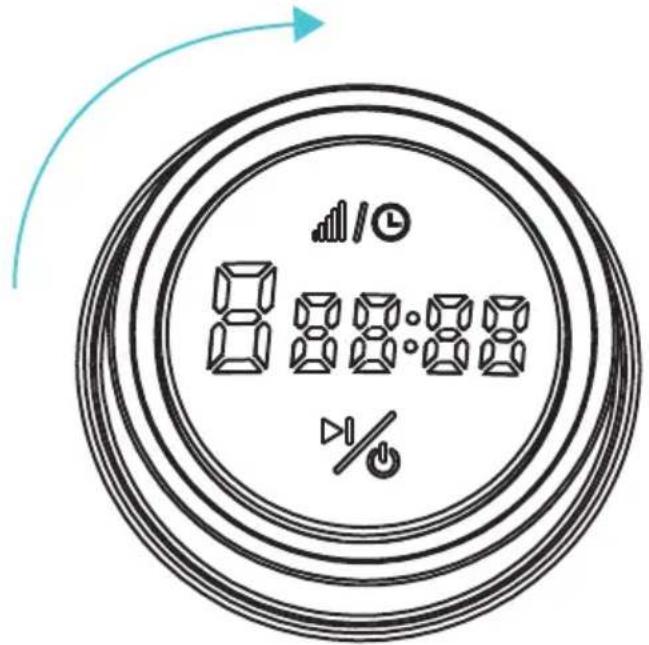
(1). When the device is turned on (all indicator are on) turn the switch clockwise one time – the speed (2) will increase by 1. Speed range 1-8. To decrease the speed, turn the switch counterclockwise.

(2). Press the button – the time (3) will start flashing
Turn the switch clockwise one time – the operation time (3) will increase by 30 seconds. Time range is 0-5 minutes. After setting the time the countdown will be shown on the display. If you do not set the time, the device will work for 5 minutes – the time will be shown on the display.
To enter the speed (2) selection press the flash.

3. Starting the operation
(1). After setting the speed (2) and time (3) press the button to start the operation. Press


the button again to stop the operation – the device will stop the remaining time will be show on the display.
- ATTENTION! In order to avoid overheating of the device, it is forbidden to exceed the continuous operation time. Take a break of 20 minutes between work cycles to avoid overheating of the device.
- Shut down the operation by pressing the button on the control panel - the device will switch to standby mode and unplug the power cord from the electrical outlet.
- By pressing and holding the motor unit lock button, lift the motor unit to lock.
- Remove the installed nozzle by turning it.
- Remove the bowl lid and remove the bowl. Remove the ingredients from the bowl.
- Rinse the nozzle, lid, bowl and wipe dry.
THE PURPOSE OF THE NOZZLES\*
| Nozzle Recommended speed | Purpose | |
Dough hook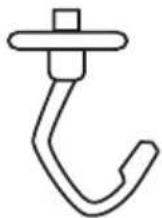 | 1,2 | Kneading thick dough |
Mixing attachment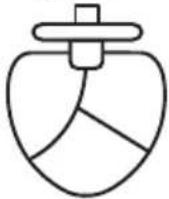 | 3-5 | Mixing of sparse ingredients, preparation of mashed potatoes, tomato paste, dough for cakes and cupcakes |
Whisk attachment for whipping | 6-8 | Whipping egg whites, cream, kneading batter. |
*Operating modes for the use of each nozzle recommended by the manufacturer. The maximum continuous operation time of the device is 5 minutes
CLEANING AND MAINTENANCE
• Make sure that the appliance is disconnected from the mains before cleaning and rinsing it.
• To clean the appliance, do not use cleaning agents that may damage the surface of the appliance.
• The bowl, lid and nozzles can be washed, and all other parts can be wiped with a dry towel.
- It is forbidden to wash the appliance and its components in the dishwasher, with the exception of a steel bowl, a lid with a hole for adding ingredients and a whisk for whipping.
TROUBLESHOOTING
| Malfunction Cause Solution | ||
| «E:01» error code | Motor part is up during operation | Press the fixation button, lift down the motor part – the display will show the remaining operation time, it is needed to set the operation speed manually. |
STORAGE
- Switch off and unplug the appliance; let it entirely cool.
- Complete all requirements of Chapter CLEANING AND MAINTENANCE.
- Keep the appliance in a dry cool place.

The symbol on the unit, packing materials and/or documentations means used electrical and electronic units should not be toss in the garbage with ordinary household garbage. These units should be pass to special receiving point.
For additional information about actual system of the garbage collection address to the local authority. Valid utilization will help to save valuable resources and avoid negative work on the public health and environment which happens with incorrect using garbage.

Brand : Scarlett
Model : SC-SM10S55
Category : Food processor