
AWM 401 - Microphone Audibax - Free user manual and instructions
Find the device manual for free AWM 401 Audibax in PDF.


| Product Type | Wireless Handheld Microphone System |
| Model | AWM 401 |
| Brand | Audibax |
| Frequency Range | UHF 500-900 MHz |
| Operating Range | Up to 50 meters (164 ft) in open space |
| Transmitter Battery | 2 x AA batteries (not included) |
| Transmitter Battery Life | Approximately 8-10 hours |
| Receiver Power Supply | DC 12V 500mA adapter (included) |
| Audio Frequency Response | 50 Hz - 15 kHz |
| Signal-to-Noise Ratio | ≥ 90 dB |
| THD | < 1% |
| Channels | 2 (dual receiver) |
| Receiver Dimensions | 180 x 120 x 40 mm |
| Transmitter Dimensions | 250 x 50 mm (handle diameter) |
| Weight (Receiver) | 300 g |
| Weight (Transmitter) | 200 g (without batteries) |
| Connector Type | 6.35 mm (1/4") Jack |
| Display | LCD with channel and battery status |
| Controls | Power, volume, channel scan |
| Included Accessories | Receiver, handheld transmitter, power adapter, audio cable, user manual |
| Usage | Indoor presentations, karaoke, live performance |
| Maintenance | Keep dry; clean grille with soft brush; replace batteries as needed |
| Safety | Do not expose to moisture or extreme temperatures |
| Repairability | Contact authorized service center for repairs |
Frequently Asked Questions - AWM 401 Audibax
User questions about AWM 401 Audibax
0 question about this device. Answer the ones you know or ask your own.
Ask a new question about this device
Download the instructions for your Microphone in PDF format for free! Find your manual AWM 401 - Audibax and take your electronic device back in hand. On this page are published all the documents necessary for the use of your device. AWM 401 by Audibax.
USER MANUAL AWM 401 Audibax


AWM 401 / AWM 402 / AWM 403
Four Channel UHF Modulation Wireless Microphone Micrófono Inalámbrico UHF de Cuatro Canales
INDEX / ÍNDICE
ENGLISH
WELCOME TO AUDIBAX....1
SAFETY INSTRUCTIONS....1
IMPORTANT INFORMATION......2
PACKAGE CONTENT....3
RECEIVER FRONT PANEL....3
RECEIVER REAR PANEL....3
RECEIVER......4
TRANSMITTER....5
BODYPACK LAUNCHER......5
SYNC......6
TECHNICAL PARAMETER......6
DISPOSAL....7
ESPAÑOL
BIENVENIDOS A AUDIBAX....8
Thank you very much for choosing Audibax. We hope you enjoy your new product.
It has been developed and designed paying attention to the smallest details, with quality control with European standards supervised by our great team of professional technicians, who work every day to offer our customers the best quality.
We make sure that every Audibax product is built to last long. All our references are made with long lasting materials and our specialists are dedicated to constantly doing quality controls to guarantee the best result.
Please read carefully this manual in order to use your Audibax product in the best way. Do not hesitate to visit our website for further information: www.audibax.com
SAFETY INSTRUCTIONS
GENERAL INFORMATION
- It is important to read and follow the instructions carefully.
- Keep all information and instructions in a secure location.
- Always follow the instructions provided.
- Take note of all safety warnings and never remove them from the equipment.
- Use the equipment only as intended and for its intended purpose.
- Ensure that the stands and/or mounts used are sufficiently stable and compatible for fixed installations. Wall mounts should be properly installed and secured, and the equipment should be installed securely to prevent falls.
- When installing the equipment, be sure to observe the relevant safety regulations in your country.
- Do not install or operate the equipment near sources of heat, such as radiators, heat registers, or ovens, and ensure that it is always cooled sufficiently and cannot overheat.
- Do not place sources of ignition, such as burning candles, on the equipment.
- Keep ventilation slits unobstructed.
- For equipment designed for indoor use only should not be used near water, flammable materials, fluids, or gases. Special outdoor equipment should be used in accordance with the manufacturer's instructions.
- Ensure that no dripping or splashed water can enter the equipment and do not place containers filled with liquids on the equipment.
- Prevent objects from falling into the equipment.
- Use the equipment only with recommended accessories intended by the manufacturer.
- Do not attempt to open or modify the equipment.
- Check all cables after connecting the equipment to prevent accidents or damage due to tripping hazards.
- During transport, take steps to prevent the equipment from falling and causing damage or injury.
- If the equipment is not functioning properly, fluids or objects have gotten inside, or is otherwise damaged, switch it off immediately and unplug it from the power outlet (if applicable). Only authorized, qualified personnel should repair the equipment.
- Clean the equipment with a dry cloth.
- Comply with all applicable disposal laws and separate plastic and paper/cardboard during packaging disposal.
- Keep plastic bags out of the reach of children.
FOR DEVICES DESIGNED TO BE CONNECTED TO THE MAIN POWER SUPPLY:
- ATTENTION: If your equipment has a power cord with a grounding plug, it must be connected to a wall outlet with a ground connection. Never remove the grounding plug from the power cord.
- If your equipment has been exposed to extreme temperature changes, allow it to reach room temperature before turning it on. Otherwise, moisture and condensation may damage the equipment.
- Before plugging in the equipment, make sure that the voltage and frequency of the power outlet match the specifications of the equipment. If the equipment has a voltage selector, only connect it to the power outlet if the values match. If the power cord or adapter does not fit your outlet, contact an electrician.
- Do not step on the power cord. Make sure it is not pinched at the outlet, adapter, or equipment connection.
- Keep the power cord or adapter within reach and disconnect the equipment from the power supply when not in use or when cleaning it. Always unplug the cord or adapter by pulling the plug or adapter, not the cord. Never touch the cord or adapter with wet hands.
- Avoid frequently turning the equipment on and off, as this can reduce its useful life.
- IMPORTANT: Only replace fuses with those of the same type and rating. If a fuse repeatedly blows, contact an authorized service center.
- To completely disconnect the equipment from the power mains, unplug the power cord or adapter from the outlet.
- If your device has a Volex power connector, the mating Volex connector must be unlocked before it can be removed. Be careful when laying cables, as the equipment can slide or fall if the power cord is pulled.
- Unplug the power cord or adapter before an extended period of disuse or in case of lightning strike risk.
- Only install the equipment when it is disconnected from the power source.
- To prevent damage and overheating, qualified personnel should regularly clean and service the equipment depending on ambient conditions like dust, nicotine, and fog.
If the product contains the following symbols, please, read carefully:

CAUTION: To reduce the risk of electric shock, do not remove cover (or back). There are no user serviceable parts inside. Maintenance and repairs should be exclusively carried out by qualified service personnel.

The warning triangle with lightning symbol indicates dangerous uninsulated voltage inside the unit, which may cause an electrical shock.
The warning triangle with exclamation mark indicates important operating and maintenance instructions.
IMPORTANT INFORMATION
CAUTION! HIGH VOLUMES IN AUDIO PRODUCTS!
This equipment is designed for professional purposes and its commercial use must comply with the applicable national rules and regulations for accident prevention.
As the manufacturer of this product, Audibax has the responsibility to inform you about the potential health risks associated with its use. One such risk is hearing damage caused by prolonged exposure to high volume.
When this product is in use, it can generate high sound-pressure levels that may cause irreversible hearing damage to performers, employees, and audience members.
To prevent this, it is important to avoid exposing yourself or others to volumes exceeding 90 dB for an extended period of time.
PACKAGE CONTENT
-1×AWM 401/AWM 402/AWM 403
- 1 x User manual
RECEIVER FRONT PANEL
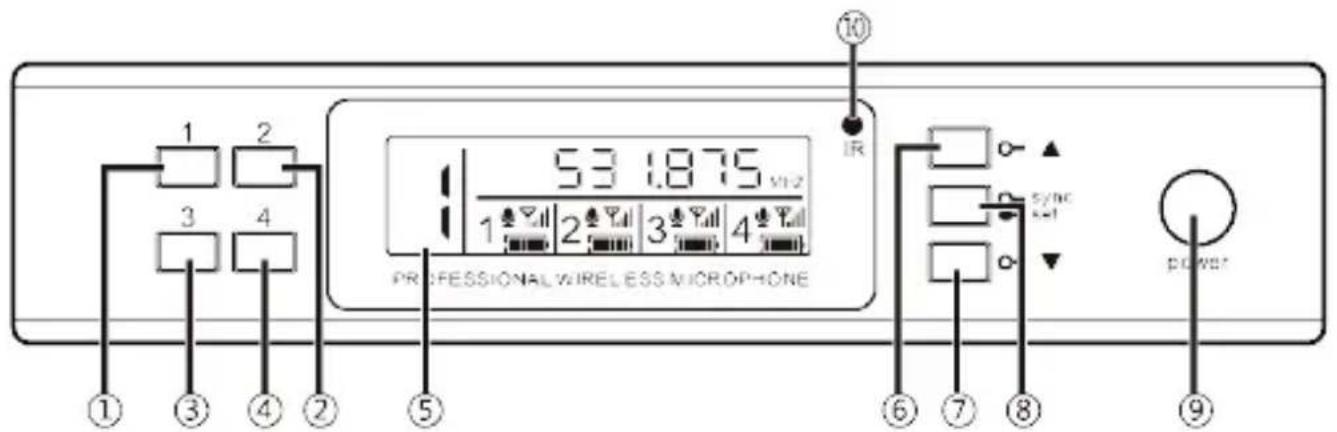
① Channel 1;
② Channel 2;
③ Channel 3;
④ Channel 4;
⑤ Display screen;
⑥ ▲ Up function button: select frequency and volume upward;
⑦ ▼ Down function button: select frequency and volume downward;
⑧ Synchronization/setting function button: short press (less than 1 second) the infrared frequency, long press (more than 1 second) to enter the setting menu;
⑨ Power switch;
⑩ Infrared frequency matching window
RECEIVER REAR PANEL

① DC power supply: external power adapter socket
② ANT-B: antenna interface
③ MIX: 6.3 mm jack audio output, asymmetric output
④ Audio output CH4: Balanced XLR Output
⑤ Audio output CH3: Balanced XLR Output
⑥ Audio output CH2: Balanced XLR Output
⑦ Audio output CH1: Balanced XLR Output
⑧ ANT-A: antenna interface
RECEIVER
The receiver display overview
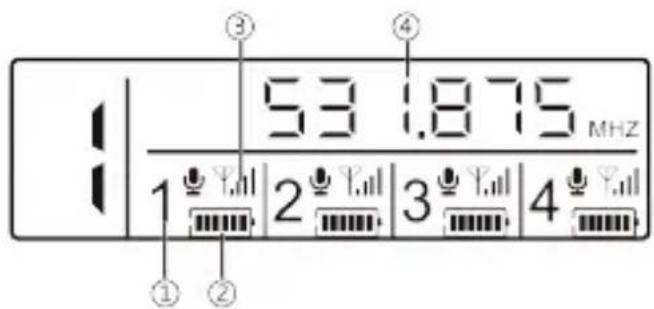
① Unit display
② Wireless unit battery level
③ Unit signal strength
④ Selected unit frequency (example unit 1)
Output volume adjustment
To adjust the volume, select a unit (1 to 4), briefly press SYNC/SET, increase or decrease the volume with the up or down keys, the VOL- values will increase or decrease on the display, press SET/SYNC again when the volume of the unit is at the desired level.

Frequency Adjustment
Timing/Set Function Button: Short press (less than 1 second) the infrared frequency.

Manually adjust the frequency
To set use ▲ \ ▼ and then press "Sync /set" to confirm.

SCAN: Automatic frequency scanning
Press the Button (from 1 to 4) and select the unit to be adjusted, (Example 1) Keep the Sync/SET button pressed for at least 2 seconds, the Display will indicate the selected frequency, orient the emitter with its infrared LED pointed at the Sync sale, and your transmitter will receive the scanned frequency and channel, repeat the step for each unit if you want to select a free frequency.

TRANSMITTER
① Nethead
② Display screen
③ Power switch
④ Battery compartment
⑤ Tailpipe

BODYPACK LAUNCHER
① Mini-XLR connector for microphone
② Display
③ Power switch
④ Infrared pairing LED
⑤ Battery compartment

SYNC
Infrared Frequency Setting

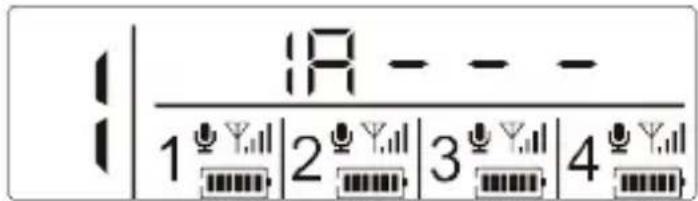
Align the infrared frequency window of the transmitter with the infrared frequency window of the receiver (10\~20 cm), short press the "sync" button (less than 1 second) of the receiver, and the receiver display will show "IR----". After the frequency is successful, the transmitter display will flash and the frequency will become the same as the receiver, then successful frequency.
TECHNICAL PARAMETER
Selectable Frequency Range
640-690Mhz
Band: UHF
Frequency response: 50Hz-15KHz
Signal to noise ratio (S/N): >105dB(A)
Distortion (1 KHz): <0.3%
Operating temperature: -10°C-55°C
Working distance: 100 meters (in real environment without obstacles)
Receiver
Reception Mode: PLL
Sensitivity :5dBuV
Audio output: 4 balanced XLR 250 mV/600Q
MIX output: JACK TRS 1/4" 400mV/3kOhms
Direct current voltage: DC 12-16V
Intensity: 1 A
Handheld transmitter:
Frequency Range: 640-690Mhz
RF Power output : Max 30mW
Oscillation mode :PLL
Transmit frequency stability :<30ppm
Dynamic Range :≥100dB (A)
Frequency response :50Hz-15KHz
Maximum input sound pressure :130dB SPL
Microphone pickup : moving coil type
Power: 2 x (1.5V) AA alkaline battery
Bodypack transmitter
Frequency Range: 640-690Mhz
RF: the maximum power output of 30mW
(Oscillation mode: PLL (digital frequency synthesizer))
Emission frequency stability: <30ppm
Dynamic range:≥100dB (A)
Frequency response: 50Hz-15KHz
Maximum input pressure: 130dB SPL
Microphone: Condenser microphone
Power supply: 2 (1.5V) AA type alkaline battery
DISPOSAL
Packaging:

-
The packaging can be recycled using standard disposal methods and reintroduced into the reusable material cycle.
-
Please follow the laws and regulations regarding disposal and recycling of packaging in your country.
Device:

-
This device is subject to the Waste Electrical and Electronic Equipment (WEEE) Directive of the European Union. Used appliances should not be disposed of with household waste. Used device must be disposed of through an approved disposal company or a municipal disposal facility. Please comply with the applicable regulations in your country.
-
Please follow all the disposal laws and regulations in your country.
-
As a customer, you can obtain information on environmentally-friendly disposal options from the product seller or the appropriate regional authorities.
BIENVENIDO A AUDIBAX
TRANSMISOR BODYPACK
SINCRONIZACIÓN
- AWM 401 / AWM 402 / AWM 403
- INDEX / ÍNDICE
- ENGLISH
- ESPAÑOL
- SAFETY INSTRUCTIONS
- GENERAL INFORMATION
- FOR DEVICES DESIGNED TO BE CONNECTED TO THE MAIN POWER SUPPLY
- IMPORTANT INFORMATION
- CAUTION! HIGH VOLUMES IN AUDIO PRODUCTS
- PACKAGE CONTENT
- RECEIVER
- TRANSMITTER
- BODYPACK LAUNCHER
- SYNC
- TECHNICAL PARAMETER
- DISPOSAL
- PACKAGING
- DEVICE
- BIENVENIDO A AUDIBAX
- TRANSMISOR BODYPACK
- SINCRONIZACIÓN
Brand : Audibax
Model : AWM 401
Category : Microphone