
E0102 - Monitor SIMRAD - Free user manual and instructions
Find the device manual for free E0102 SIMRAD in PDF.


| Product Type | Marine Monitor |
| Brand | Simrad |
| Model | E0102 |
| Display Technology | LCD |
| Screen Size (Diagonal) | 10.4 inches |
| Resolution | 800 x 600 pixels |
| Brightness | 800 cd/m² |
| Aspect Ratio | 4:3 |
| Power Input | 12 V DC (10-18 V) |
| Power Consumption | 18 W max |
| Weight | 2.5 kg |
| Dimensions (W x H x D) | 280 x 210 x 60 mm |
| Mounting Type | Flush or bracket mount |
| Connectivity | NMEA 0183, NMEA 2000, Video Input (1x composite), USB |
| Operating Temperature | -15°C to +55°C |
| Waterproof Rating | IPx6 (front panel) |
| Backlight | LED, adjustable |
| Controls | Hard keys and touchscreen (resistive) |
| Cleaning | Wipe with a soft, damp cloth; do not use harsh chemicals |
| Safety Warning | Install securely; use only recommended power source |
Frequently Asked Questions - E0102 SIMRAD
User questions about E0102 SIMRAD
0 question about this device. Answer the ones you know or ask your own.
Ask a new question about this device
Download the instructions for your Monitor in PDF format for free! Find your manual E0102 - SIMRAD and take your electronic device back in hand. On this page are published all the documents necessary for the use of your device. E0102 by SIMRAD.
USER MANUAL E0102 SIMRAD
The E0102 Alarm Panel is designed for use with the E5024 ECDIS system, and the MARIS ECDIS900 MK5 PC and Simrad M5024 monitor. The unit gives an audible and a visual alarm for any ECDIS system, including power supply failure.
This type of alarm is mandatory on systems requiring Wheelmark certification.
Pushing the button will mute the audible alarm. The visual alarm will remain lit as long as the alarm situation remains. The indication will cease if the alarm is cancelled on the ECDIS system.
INSTALLATION
The E0102 is panel mounted and fixed from front by the four enclosed screws.
Select a mounting location where a visual alarm on the panel not will disturb the operator's night vision!
Cable(s) should be fixed with the enclosed cable strap to spacers for the circuit board.
WIRING THE E5000 PROCESSOR
Connect the E0102 Alarm Panel according to the illustration below.
Note that the power supply for E0102 must be independent of the power supply to the E5000 Processor.

WIRING THE MARIS ECDIS900 MK5 COMPUTER
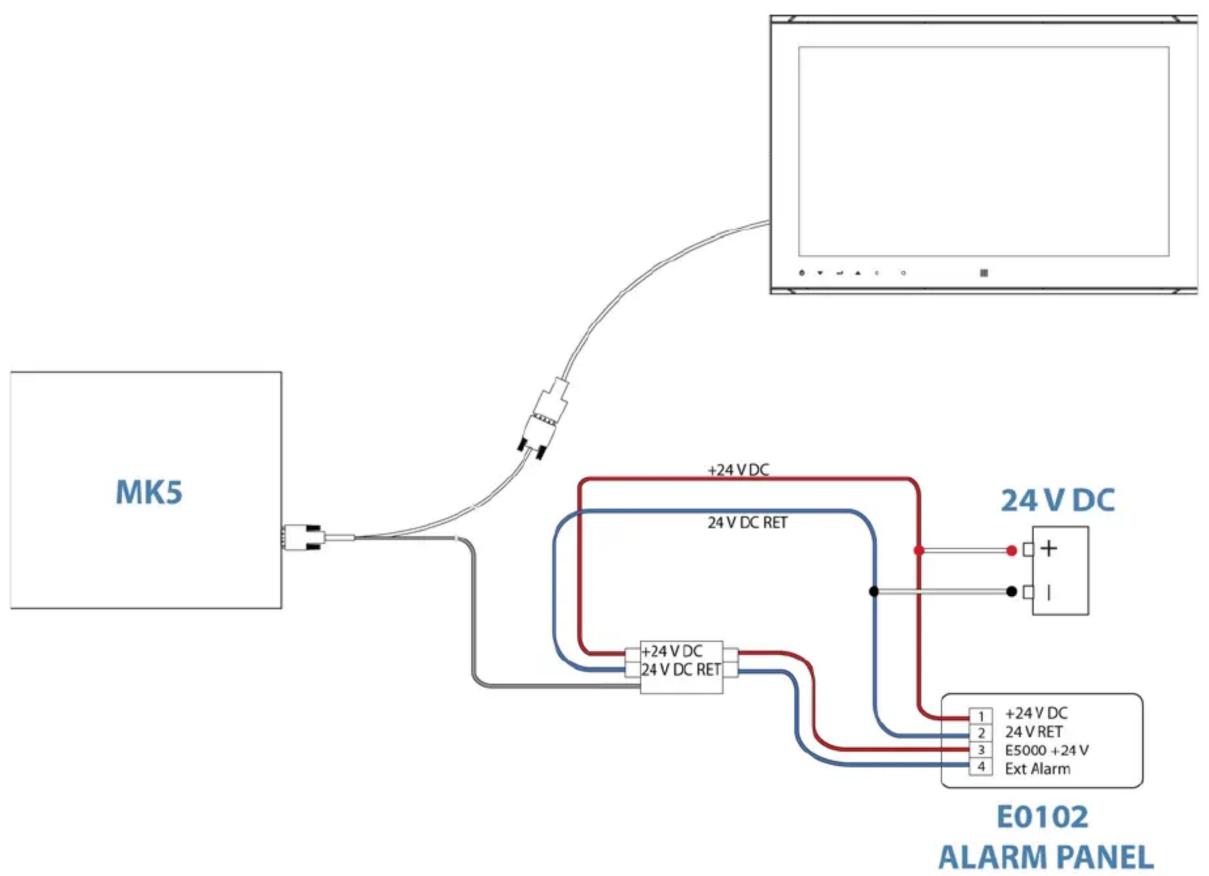
flowchart
graph TD
    A["MK5"] --> B["24V DC"]
    B --> C["+24V DC RET"]
    B --> D["+24V DC RET"]
    C --> E["+24V DC"]
    D --> F["+24V DC RET"]
    E --> G["E0102 ALARM PANEL"]
    F --> G
    H["Computer monitor"] --> I["+"]
    H --> J["-"]
    style A fill:#f9f,stroke:#333
    style B fill:#bbf,stroke:#333
    style C fill:#bfb,stroke:#333
    style D fill:#bfb,stroke:#333
    style E fill:#ffb,stroke:#333
    style F fill:#bbf,stroke:#333
    style G fill:#fbb,stroke:#333
    style H fill:#fbb,stroke:#333
    style I fill:#fff,stroke:#333
    style J fill:#fff,stroke:#333
E0102 ALARM PANEL TECHNICAL SPECIFICATIONS
Weight: 0.25 kg (0.55 lbs.)
Material: ....Epoxy coated aluminum
Alarm supply: 24VDC -10%/+30%
Environmental Protection: IP44 from front when panel mounted
Color: Black
Temperature range:
Operation: -15 to +55^ (+5 to +130°F)
Storage: -30 to +70^ (-22 to +158^ )
Mounting:....Panel from front
Alarm sound: Continuous between 75 and 85 dB(A) at 1 m
Interface connection: ....Screw plug terminal list
DIMENSIONS


Panel Cutout : 48 x 120 mm (1.9" x 4.7")
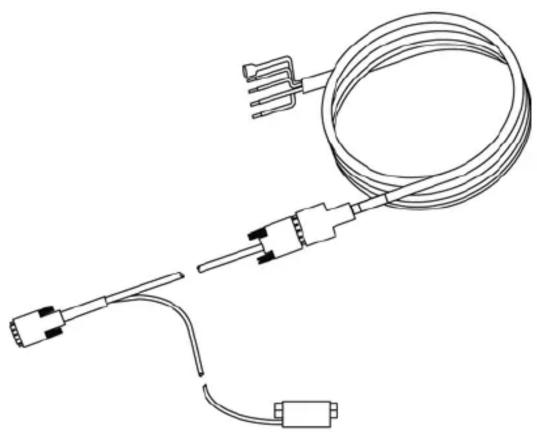
CT&A CABLE TECHNICAL SPECIFICATIONS
Power supply 24 V DC
Compass safe distance 0.4m (1.2 ft)
natural_image
Line drawing of a coiled electrical sensor with terminal connectors and probe (no text or symbols)Brand : SIMRAD
Model : E0102
Category : Monitor