ACR-4 - Remote control AudioControl - Free user manual and instructions
Find the device manual for free ACR-4 AudioControl in PDF.


| Product Type | Remote Control |
| Brand | AudioControl |
| Model | ACR-4 |
| Compatible Devices | AudioControl processors and amplifiers |
| Control Type | Infrared (IR) |
| Dimensions (L x W x H) | 6.5 x 2.0 x 0.8 inches (165 x 51 x 20 mm) |
| Weight | 4.2 oz (120 g) with batteries |
| Power Source | 2 x AAA batteries (not included) |
| Battery Life | Approximately 12 months with normal use |
| Keypad | 24-button rubber keypad with backlight |
| Functions | Volume, mute, source selection, zone control, menu navigation, bass/treble adjustment |
| Range | Up to 30 feet (9 meters) line-of-sight |
| Programming | Pre-programmed for AudioControl devices; custom macros via learning mode |
| Mounting | Handheld, tabletop, or wall-mountable with optional bracket |
| Material | High-impact ABS plastic with rubberized finish |
| Cable | Not required (wireless) |
| Indicator Lights | Red LED on key press |
| Cleaning Instructions | Wipe with a soft, dry cloth; do not use liquids or abrasive cleaners |
| Safety Precautions | Do not expose to moisture or extreme temperatures; remove batteries if not used for extended periods |
| Spare Parts Availability | Replaceable batteries (AAA); backlight bulb replacement by authorized service |
| Repairability | Not user-serviceable beyond battery replacement; contact AudioControl support for repairs |
| User Manual | Available for free download in PDF on AudioControl website |
Frequently Asked Questions - ACR-4 AudioControl
User questions about ACR-4 AudioControl
0 question about this device. Answer the ones you know or ask your own.
Ask a new question about this device
Download the instructions for your Remote control in PDF format for free! Find your manual ACR-4 - AudioControl and take your electronic device back in hand. On this page are published all the documents necessary for the use of your device. ACR-4 by AudioControl.
USER MANUAL ACR-4 AudioControl
Scan for Compatible Products

Add volume control to any system
The ACR-4 is a dual-knob remote level control designed to work with specific AudioControl processors. The ACR-4 can be surface or custom-mounted to add discrete level and function control to your audio system. Installation is simple and no power is required.
Placement And Mounting of the ACR-4
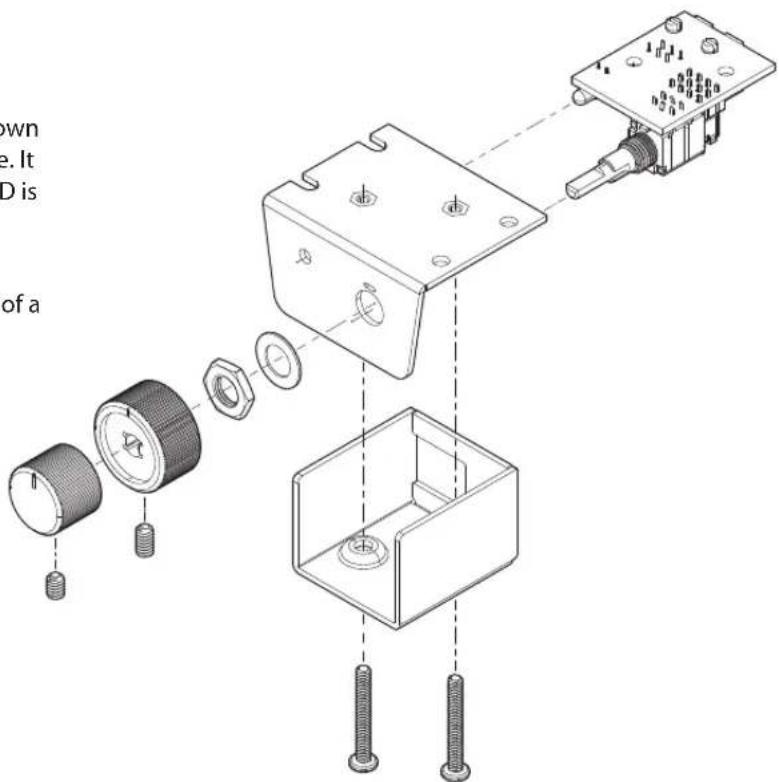
The ACR-4 may be mounted under a dash or console using its own bracket or through custom mounting holes in the dash/console. It should be within reach of the driver and in a spot where the LED is plainly visible.
Bracket Installation
ACR-4 mounts with four screws, which attach to the underside of a dashboard/console. Slide under the dash or console and place the ACR-4 in its mounting position, mark the mounting holes, drill pilot holes, and secure with screws.
Custom Installation
For that custom, finished look, the ACR-4 can be flush mounted directly on the dash/console panel (or anywhere else). Referencing the drawing right, disassemble the ACR-4. Drill a 9/32" (7 mm) hole in the panel for the control along with a 3/32" (2.3 mm) hole for the lock tab and a 1/8" (3 mm) hole for the LED. Reassemble the ACR-4 components on the dashboard or console.
What's Included?
ACR-4 Remote Level Control, 20' Phone Cable (RJ-11)
Brand : AudioControl
Model : ACR-4
Category : Remote control