ACR-1 - Remote control AudioControl - Free user manual and instructions
Find the device manual for free ACR-1 AudioControl in PDF.


| Product Type | Remote Control |
| Brand | AudioControl |
| Model | ACR-1 |
| Category | Remote Control |
| Dimensions (Approx.) | 6.5 x 2.5 x 1.5 inches |
| Weight | 0.2 lbs |
| Power Source | 2 x AAA batteries (not included) |
| Connectivity | Infrared (IR) |
| Compatibility | AudioControl audio processors and amplifiers |
| Primary Functions | Volume control, input selection, mute, power on/off |
| Range | Up to 30 feet (line of sight) |
| Programming | No programming required; plug-and-play with compatible devices |
| Materials | Plastic casing |
| Color | Black |
| Maintenance | Wipe with a soft, dry cloth; avoid liquids |
| Safety Precautions | Keep away from moisture and extreme temperatures |
| Spare Parts | Replaceable AAA batteries |
| Repairability | Not user-serviceable; contact AudioControl support |
| Manuals Included | Quick start guide, full user manual available online |
| Warranty | Limited warranty (check manufacturer for details) |
Frequently Asked Questions - ACR-1 AudioControl
User questions about ACR-1 AudioControl
0 question about this device. Answer the ones you know or ask your own.
Ask a new question about this device
Download the instructions for your Remote control in PDF format for free! Find your manual ACR-1 - AudioControl and take your electronic device back in hand. On this page are published all the documents necessary for the use of your device. ACR-1 by AudioControl.
USER MANUAL ACR-1 AudioControl
Placement And Mounting of Optional Dash Remote:
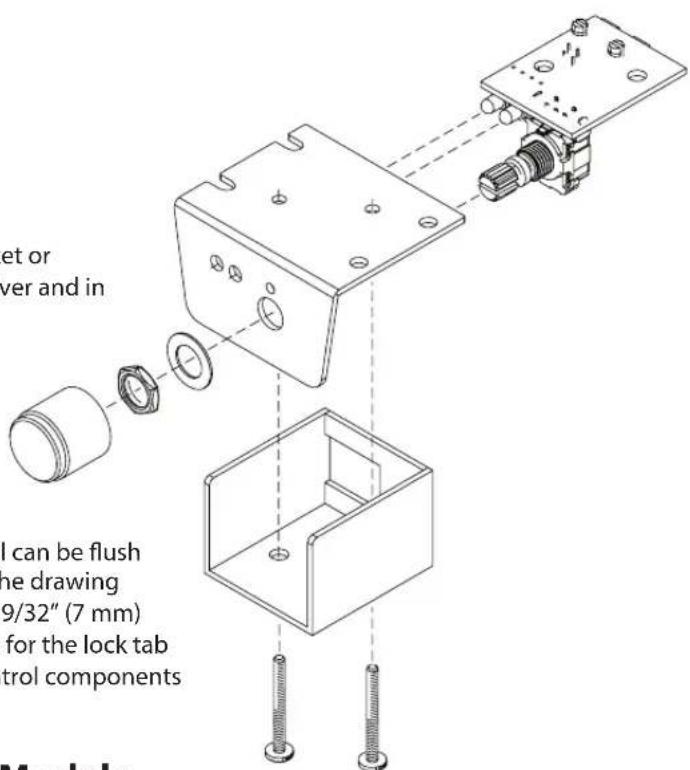
The dash control may be mounted under the dash using its own bracket or through a custom hole in the dash. It should be within reach of the driver and in a spot where the LED is plainly visible.
Bracket Installation: The dash control mounts with two screws, which attach to the underside of the dashboard. Slide under the dash and place the dash control in its mounting position, mark the two mounting holes, drill pilot holes, and secure with two screws.
Custom Installation: For that custom, finished look, the dash control can be flush mounted directly on the dash-board (or anywhere else). Referencing the drawing right, disassemble the dash control from the mounting bracket. Drill a 9/32" (7 mm) hole in the dashboard for the control along with a 3/32" (2.3 mm) hole for the lock tab and a 1/8" (3 mm) hole(s) for the LED holder. Reassemble the dash control components on the dashboard.
Available Models

ACR-1
COMPATIBLE WITH COMPATIBLE WITH COMPATIBLE WITH
LC2i™, LC6i™, LC7i™,
Overdrive™ Plus, Matrix™ Plus, 6XS, The Epicenter®, LC-4.800™

ACR-2
LCQ-1™,
The Epicenter® Plus

ACR-3
22410 70th Ave West | Mountlake Terrace, WA 98043 USA
Phone 425-775-8461 | Fax 425-778-3166
www.audiocontrol.com
©2016 AudioControl. All rights reserved.
P/N 9120350 Rev B
Brand : AudioControl
Model : ACR-1
Category : Remote control