
Vocal - Microphone Ipevo - Free user manual and instructions
Find the device manual for free Vocal Ipevo in PDF.


| Product Type | USB Microphone |
| Brand | IPEVO |
| Model | Vocal |
| Dimensions (approx.) | 150 x 50 x 50 mm (5.9 x 2.0 x 2.0 in) |
| Weight (approx.) | 500 g (1.1 lbs) |
| Power Source | USB (Bus-powered) |
| Connectivity | USB-C (USB-A adapter included) |
| Cable Length | 1.5 m (4.9 ft) |
| Polar Pattern | Cardioid |
| Frequency Response | 50 Hz – 16 kHz |
| Sample Rate / Bit Depth | 48 kHz / 16-bit |
| Sensitivity | -45 dBV/Pa |
| Max SPL | 110 dB SPL |
| Signal-to-Noise Ratio | 70 dB |
| Controls | Mute button, volume knob |
| Indicator Light | LED (mute status) |
| Compatible Systems | Windows, macOS, Chrome OS |
| Maintenance | Wipe with dry cloth; avoid moisture |
| Safety | Do not disassemble; keep away from liquids |
| Spare Parts Availability | Replacement USB cable available |
| Repairability | Not user-serviceable; contact support |
| General Information | Designed for voice recording and conferencing |
Frequently Asked Questions - Vocal Ipevo
User questions about Vocal Ipevo
0 question about this device. Answer the ones you know or ask your own.
Ask a new question about this device
Download the instructions for your Microphone in PDF format for free! Find your manual Vocal - Ipevo and take your electronic device back in hand. On this page are published all the documents necessary for the use of your device. Vocal by Ipevo.
USER MANUAL Vocal Ipevo
AI Beamforming Bluetooth Speakerphone
IPEVO
www.ipevo.com
Customer Service
Email: cs@ipevo.com
Tel: +1-408-490-3085 [USA]
Copyright© 2023 IPEVO Corp. All rights reserved.

natural_image
Line drawing of a cylindrical device with perforated base and circular top, labeled 'VOCAL' at bottom (no text or symbols on the device itself)The Basics
IPEVO VOCAL is a Bluetooth speakerphone with two beamforming microphones and a 360° speaker, that offers two user modes and a two-way AI noise reduction. This guide will teach you to pair it with your computer or device and help you make the most out of its features.
First Time Use of IPEVO VOCAL
When using IPEVO VOCAL for the first time, activate it by charging it via USB-C.
Turning On IPEVO VOCAL and Connecting It to Your Computer or Device
*Hold the power button for 3 seconds to turn VOCAL on.
**There are two connection options that can be used:
- Bluetooth 5.1 connection
- USB-C connection
To connect IPEVO VOCAL via Bluetooth, hold the Bluetooth pairing button for 3 seconds to initiate pairing.

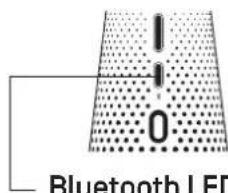
The Bluetooth LED indicator can be used to verify the success of pairing. When IPEVO VOCAL is paired, the LED indicator continuously shines blue. During pairing, the LED indicator is blinking blue.
IPEVO VOCAL automatically pairs with memorized Bluetooth devices and existing Bluetooth connection has priority over a connection via USB. To use IPEVO VOCAL in USB mode, the current Bluetooth connection needs to be disconnected.
Holding the pairing button for 3 seconds when paired disconnects VOCAL from the currently paired device and initiates pairing again.
Selecting IPEVO VOCAL in a Conferencing App
In the conferencing app you are going to use, select IPEVO VOCAL as the microphone and as the speaker.


IPEVO VOCAL is plug-and-play and directly compatible with Zoom, Google Meet, Skype, Microsoft Teams, Webex, GoToMeeting, and other conferencing apps, as well as Barco ClickShare - on Windows, Mac, and Chromebooks, mobile devices, and Bluetooth-enabled devices.
* All trademarks, logos, and brands are the property of their respective owners and are used for identification purposes only.
Selecting the Microphone Mode
IPEVO VOCAL has two microphone modes, that change how the device is used. The modes can be changed by switching the Microphone Mode button.

OMNI
DIRECTIONAL


The Omni [omnidirectional] mode is ideal for when we intend to keep IPEVO VOCAL standing at the center of the meeting room table and capture voices from all directions, in a 360° sound pickup range.


When in the directional mode, only the front microphone is capturing sound in a 120^ range. The sound from other directions is cut off thanks to the use of beamforming technology and the AI Voice function. This mode can be used for meetings or one-on-one calls. When used during meetings, the device should be passed from speaker to speaker, who can then speak without disturbance from sources outside of the directional modes sound pickup range.
* In this mode, the AI noise reduction for the microphone is always on.
Changing the Volume of the Speaker and Muting the Microphone
IPEVO VOCAL's microphone can be muted/unmuted by pressing the Microphone Mute (red) button.
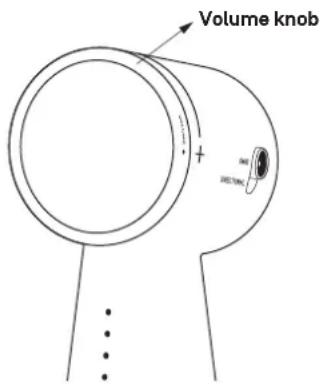
To change the volume of the speaker, use the volume knob on the device, the volume control on your computer/device, or the volume control of the conferencing app that you are using.
Activating the AI Noise Reduction
There are two AI noise reduction options you can activate separately or at the same time.
Al Mic: The one that relates to the microphone filters out the noise picked up in the room where IPEVO VOCAL is being used.
AI Speaker: The option related to the speaker filters out the noise picked up by the microphone of the user on the other end of the line.

Charging IPEVO VOCAL
When fully charged, VOCAL can be used for 40 hours in wireless mode. View the current battery life by pressing the power button once. It will be displayed on the front LED bar.
Once the battery drops below 15 percent, the bottom LED starts flashing fast in yellow color.
Connect the IPEVO VOCAL to a power source via a USB-C cable. Either a computer or an adapter can be used to charge the device. The charging status is indicated by the front LED indicators.
A shining yellow light (bottom LED) indicates that VOCAL is fully charged.
Buttons, Controls, and LED Indicators
![Front microphone Mic mute/unmute Press once to mute / unmute the microphone. Rear microphone Power switch Hold for 3 seconds to turn VOCAL on/off. Press once to display the battery life. Bluetooth pairing button Hold for 3 seconds to initiate pairing. Once VOCAL is in pairing mode, you can: [1] Select VOCAL from your host device's Bluetooth settings,or [2] Connect to your PC/laptop via a USB cable. USB-C port Use it to charge VOCAL's battery or for connecting to a computer. An Existing Bluetooth connection has priority over a connection via USB.](/content/2026/05/1063455/images/fec23748a22f9ab87f80f52d7d9f75ab9e872f09f6b79d580fa66b53b6a618b1.jpg)


① AI Voice for Mic
Turns noise reduction on/off for the microphone.
② AI Voice for Speaker
Turns noise reduction on/off for incoming calls.
③ Microphone mode switch
Switches between the directional and omnidirectional microphone modes.
When in the directional mode, only the front microphone is capturing sound in a 120° range.
④ Volume knob
Turn clockwise to increase the volume of the speaker.
LED Signals
Battery status
Press power button once to display the battery life.

other
| Range | Percentage (%) | |---|---| | 85-100% | □ | | 70-85% | ■ | | 55-70% | ■ | | 40-55% | ■ | | 25-40% | ■ | | 15-25% | ■ | | < 15% | ■ | | □ | □ | | □ | □ | | □ | □ | | □ | □ | | □ | □ | | □ | □ | | □ | □ | | □ | □ | | □ | □ | | □ | □ | | □ | □ | | □ | □ | | □ | □ | | □ | □ | | □ | □ | BlinkingCharging status
(The 1st LED shines yellow)
- Blinking = Charging
- Blinking fast = Battery below 15%
- LED on = Fully charged

Other LED signals


AI MIC LED Indicator
Shining = Al noise reduction on
AI SPEAKER LED Indicator
Shining = Al noise reduction on
Bluetooth LED Indicator
Blinking blue = VOCAL is pairing.
Shining blue = VOCAL is paired.
LED off = VOCAL isn't paired with any device.
Federal Communication Commission Interference Statement
FC This device complies with Part 15 of the FCC Rules. Operation is subject to the following two conditions:
[1] This device may not cause harmful interference, and [2] this device must accept any interference received, including interference that may cause undesired operation.
This equipment has been tested and found to comply with the limits for a Class B digital device, pursuant to Part 15 of the FCC Rules. These limits are designed to provide reasonable protection against harmful interference in a residential installation. This equipment generates, uses and can radiate radio frequency energy and, if not installed and used in accordance with the instructions, may cause harmful interference to radio communications. However, there is no guarantee that interference will not occur in a particular installation. If this equipment does cause harmful interference to radio or television reception, which can be determined by turning the equipment off and on, the user is encouraged to try to correct the interference by one of the following measures:
- Reorient or relocate the receiving antenna.
- Increase the separation between the equipment and receiver.
- Connect the equipment into an outlet on a circuit different from that to which the receiver is connected.
- Consult the dealer or an experienced radio/TV technician for help.
FCC Caution: Any changes or modifications not expressly approved by the party responsible for compliance could void the user's authority to operate this equipment.
This transmitter must not be co-located or operating in conjunction with any other antenna or transmitter.
Radiation Exposure Statement: The product comply with the FCC portable RF exposure limit set forth for an uncontrolled environment and are safe for intended operation as described in this manual. The further RF exposure reduction can be achieved if the product can be kept as far as possible from the user body or set the device to lower output power if such function is available.
CAN ICES-003(B) / NMB-003(B)
Industry Canada statement
This device complies with ISED's licence-exempt RSSs. Operation is subject to the following two conditions: [1] This device may not cause harmful interference, and (2) this device must accept any interference received, including interference that may cause undesired operation.
Radiation Exposure Statement:
The product comply with the Canada portable RF exposure limit set forth for an uncontrolled environment and are safe for intended operation as described in this manual. The further RF exposure reduction can be achieved if the product can be kept as far as possible from the user body or set the device to lower output power if such function is available.
Hereby, IPEVO declares that the radio equipment type IPEVO VOCAL is in compliance with Directive 2014/53/EU and UK Radio Equipment Regulations 2017 SI 2017/1206. The full text of the EU declaration of conformity is available at the following internet address: Fill the website address
FOR PORTABLE DEVICE
The product comply with the RF exposure limit set forth for an uncontrolled environment and are safe for intended operation a described in this manual. The further RF exposure reduction can be achieved if the product can be kept as far as possible from the user body or set the device to lower output power if such function is available.
Frequency Range: 2402 \~ 2483.5 MHz; Maximum Radio Power < 20dBm; Operation temperature: 0°C to 40°C; Rating: 5V\~3A
CE Mark Warning
Hereby, IPEVO declares that the radio equipment type IPEVO VOCAL is in compliance with the Directive 2014/53/EU and UK Radio Equipment Regulations 2017 SI 2017/1206, and the Low Voltage Directive 2014/35/EU test EN 62368-1.
Battery Safety: Your device contains rechargeable lithium-ion polymer batteries and should be replaced only by a qualified service provider. Do not disassemble, open, crush, bend, deform, puncture, shred or attempt to access battery.
- Do not expose products containing batteries to excessive heat [e.g. from storage in direct sunlight, fire or the like].
- Do not expose products containing batteries to water, rain, liquids or snow.
限用物質含有情況標示聲明書
Declaration of the Presence Condition of the Restricted Substances Marking
| Note 2: “o” indicates that the percentage content of the restricted substance does not exceed the percentage of reference value of presence. |
| 備考3. “—”係指該項限用物質為排除項目。 |
| Note 3: The “~” indicates that the restricted substance corresponds to the exemption. |

FCC ID: WKP-CSCB-01IP / IC: 23924-CSCB01IP CAN ICES-003(B) / NMB-003(B)

Precaution
Do not use/store the product in the following places
- Near heat sources
- Locations with high humidity
* Sandy or dusty places
- The Basics
- First Time Use of IPEVO VOCAL
- Turning On IPEVO VOCAL and Connecting It to Your Computer or Device
- Selecting IPEVO VOCAL in a Conferencing App
- Selecting the Microphone Mode
- Changing the Volume of the Speaker and Muting the Microphone
- Activating the AI Noise Reduction
- There are two AI noise reduction options you can activate separately or at the same time.
- Charging IPEVO VOCAL
- Buttons, Controls, and LED Indicators
- LED Signals
- Battery status
- Charging status
- (The 1st LED shines yellow)
- Other LED signals
- AI MIC LED Indicator
- AI SPEAKER LED Indicator
- Bluetooth LED Indicator
- Federal Communication Commission Interference Statement
- 限用物質含有情況標示聲明書
Brand : Ipevo
Model : Vocal
Category : Microphone