
TONE Free TONE-FP7C - Headphones LG - Free user manual and instructions
Find the device manual for free TONE Free TONE-FP7C LG in PDF.


| Product Type | True Wireless Stereo (TWS) Earbuds |
| Model | LG TONE Free TONE-FP7C |
| Brand | LG |
| Dimensions (Earbuds) | Approx. 21.5 x 16.5 x 21.0 mm each |
| Dimensions (Charging Case) | Approx. 55.0 x 50.0 x 27.0 mm |
| Weight (Earbud) | Approx. 5.6 g each |
| Weight (Charging Case) | Approx. 38.8 g |
| Driver | 8.25 mm dynamic driver |
| Bluetooth Version | 5.2 |
| Bluetooth Profiles | A2DP, AVRCP, HFP, HSP |
| Audio Codec | SBC, AAC |
| Battery Life (Earbuds) | Up to 8 hours on a single charge |
| Battery Life (with Case) | Up to 24 hours total |
| Charging | USB-C and Wireless charging supported |
| Water Resistance | IPX4 (splash proof) |
| UVnano | UVnano charging case eliminates 99.9% of bacteria on earbud mesh |
| Additional Features | Meridian Audio tuning, Ambient Sound Mode, Find My Earbuds, Auto Pair (Google Fast Pair) |
| Care | Wipe earbuds and case with soft, dry cloth; avoid liquids |
| Spare Parts | Eargels in different sizes, USB charging cable included; replacement earbuds available via LG service center |
| Repairability | Not user-serviceable; contact LG service center for repairs |
| Warranty | 1 year limited warranty |
| Safety | Low SAR value, certified safe |
Frequently Asked Questions - TONE Free TONE-FP7C LG
User questions about TONE Free TONE-FP7C LG
0 question about this device. Answer the ones you know or ask your own.
Ask a new question about this device
Download the instructions for your Headphones in PDF format for free! Find your manual TONE Free TONE-FP7C - LG and take your electronic device back in hand. On this page are published all the documents necessary for the use of your device. TONE Free TONE-FP7C by LG.
USER MANUAL TONE Free TONE-FP7C LG
Please read the Important Safety Information for the proper use of this product. After reading, store this Owner's Manual in an easily accessible place for all users.
Rev 2.0 US
√ NOTE: Please read all information carefully prior to using the headset in order to enjoy the best performance and prevent damage to the product.
TONE-FP7 / TONE-FP7C
www.lg.com
Copyright © 2022-2023 LG Electronics Inc. All rights reserved.
Contents
-
Overview....2
-
How to pair....4
-
Wearing Earbuds....6
-
Playing Music....7
-
Placing a Call....8
-
Listen to the Ambient Sound (LAS), Active Noise Cancellation (ANC)....9
-
UVnano 11
-
Charging 13
-
Plug and Wireless Mode (External Device Connection Mode)....14
-
Checking the Battery Status....16
Safety Precautions....17
LG TONE Free App....20
Troubleshooting....21
Specifications and Features....22
Declaration of Confirmation....23
Additional Information 25
Important Safety Information 27
Open Source Software Notice Information....28
Symbols....28
LIMITED WARRANTY- U.S.A. ONLY 29

NOTE: Actual product design may differ from images shown in manual. *A mid-sized ear gel is attached to the earbud by default.
CAUTION
Make sure authentic LG Electronics components are used. Using a non-authentic component may damage the product. The LG limited warranty does not cover damage caused by the use of non-authentic components. Use the USB Type-C™ cable/USB-C™ to AUX cable provided with the product.
NOTE
The complete manual is available for download from the LG Electronics website.

www.lg.com > Support > Manuals & Documents > Browse by Product > Mobile Devices > LG Bluetooth Devices
1. Overview
[Charging Case]

*Make sure that the charging terminal is not soiled with foreign substance.
[Earbuds]

ENGLISH
*Make sure that the charging terminal is not soiled with foreign substance.
*The appearance and specifications of the actual product may differ depending on the model.
2. How to pair
1 Turn on the Bluetooth function on the mobile phone or the device to be connected.
② Open the cover of the charging case with the earbuds mounted on the case. Press and hold the touchpad of the left or right earbud for 3 to 5 seconds until the battery status indicator blinks blue.
![graph LR A["Smartphone"] --> B["Bluetooth"] B --> C["Bluetooth Signal"] C --> D["Payment Box with Payment Icon"] D --> E["Hand-Oriented Touch"] style A fill:#f9f,stroke:#333 style B fill:#ccf,stroke:#333 style C fill:#cfc,stroke:#333 style D fill:#fcc,stroke:#333 style E fill:#cff,stroke:#333](/content/2026/05/1063205/images/a64ad56380dc84ddbe08051e6ed5e8f30de5297b2c921a2285600fabd469424a.jpg)
3 When the Fast Pair connection pop-up appears on the top area of the mobile phone screen, tap it to connect.
- It only supports Android™ 6.0 or higher, and requires configuring Bluetooth and location information settings of the mobile device.

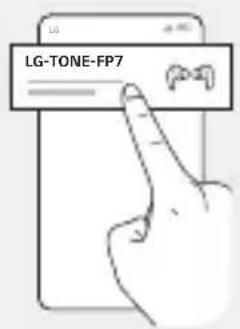
4 If the pop-up does not appear, select [LG-TONE-FP7] from the Bluetooth menu on the mobile phone and connect it (for users of iOS or Android 5.0 or lower versions).
CAUTION: In the list of Bluetooth connected devices, LG-TONE-FP7_LE is not the correct model name for connection. Check the model name in use and connect with the model name without "LE".
If the earbud model name is abnormally displayed on the Android device, change the model name in the Bluetooth menu of Connected Device Settings.
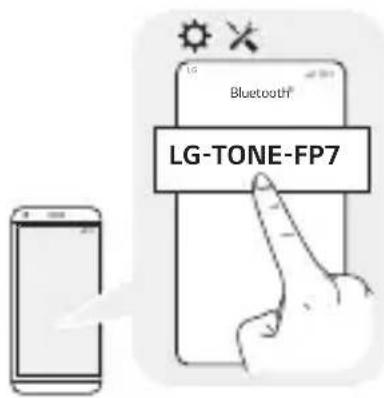
NOTE: To connect with another device, perform the above procedure again.
3. Wearing Earbuds
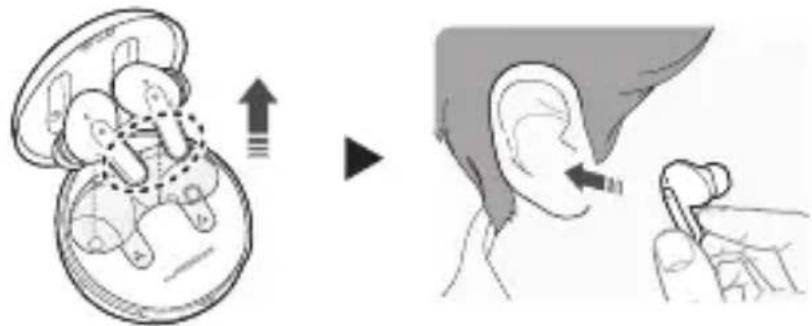
1 Separate the earbuds from the charging case and adjust them so that they fit comfortably in your ears.
NOTE: Choose the ear gels that best fit your ears to improve Active Noise Canceling (ANC) performance.
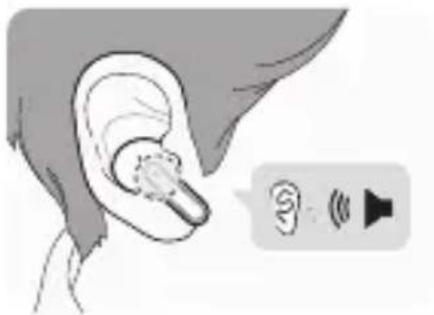
② You will hear an audio confirmation when wearing the earbuds.
4. Playing Music

| Function Description | |
| Play / Pause |  : Touch the left or right earbud once. : Touch the left or right earbud once. |
| Adjusting the Volume |  : Touch the left (Decrease volume) or right (Increase volume) earbud twice. : Touch the left (Decrease volume) or right (Increase volume) earbud twice. |
| Play Next |  : Touch the left or right earbud three times. : Touch the left or right earbud three times. |

NOTE: You can change the operation method of the function in the touchpad settings of the LG TONE Free app.
Once you turn on the Plug and Wireless mode, the earbuds reacts to your touch as follows:
- Touch it once to mute or unmute the sound.
- Touch it twice to adjust the volume.
- Touching it three times triggers no response.
5. Placing a Call
ENGLISH

| Function Description | |
| Answering Calls | : Touch the left or right earbud once. |
| Ending Calls | : Touch the left or right earbud twice. |
| Rejecting Calls | : Touch and hold the left or right earbud. |
6. Listen to the Ambient Sound (LAS), Active Noise Cancellation (ANC)
[Listen to the Ambient Sound (LAS)]
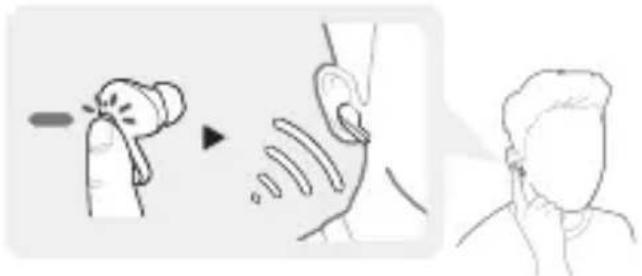
The Listen to the Ambient Sound (LAS) function allows you to listen to the ambient sound so that you can recognize the surrounding situation and any potential risks.
[Active Noise Cancellation (ANC)]

The Active Noise Cancellation (ANC) function blocks out ambient sound. Use the function to listen to music or watch a video.
Touch and hold the left or right earbud to switch between the ANC mode and the LAS mode.
You can set the LAS and ANC functions in the LG TONE Free app.
You can configure the Listen to the Ambient Sound mode and Conversation mode using the LG TONE Free app.
If you use the LAS or ANC function, the battery consumes faster, reducing the time you can use the product.
You can use the LAS and ANC functions while being idle, listening to music, or being on the phone.
*ANC is an acronym for Active Noise Cancellation.

CAUTION: When the LAS mode is enabled, you may hear the ambient sound become loud suddenly. When using the ANC function outdoors, pay attention to the surrounding environment for safety.
7. UVnano

The charging case has a built-in UVnano LED, which allows you to sanitize your earbuds' speaker mesh.
The UVnano LED operates for 5 minutes when mounted in the charging case while it is being charged via a wired connection.
*UVnano is a compound word derived from the words UV and its unit, nanometer.

NOTE: The UVnano LED indicator turns blue when on.
Independent tests show case kills 99.9% of bacteria on speaker mesh of earbuds in 5 min while charging. Function works only when case connected to power.
In the case of a white product, discoloring may occur in the contact area of the UVnano LED, but it does not affect the product function.

CAUTION: Be aware that the temperature of the earbuds may rise while the UVnano LED is on.
| RISK GROUP 2 | |
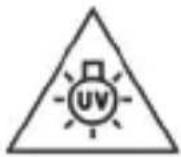 | CAUTION: UV EMITTED FROM THIS PRODUCT.EYE OR SKIN IRRITATION MAY RESULT FROM EXPOSURE USE APPROPRIATE SHIELDING. |
| WARNING: THE UVNANO FUNCTION IS NOT ACTIVATED WHEN THE CHARGING CASE IS OPENED OR IF EARBUDS AREN'T CHARGING. | |
8. Charging
[Wired Charging]

When the charging cable is connected, the charging status is displayed in the charging case.

NOTE: The earbuds and the charging case are charged at the same time. The charging port on the charging case cannot be used to supply power to mobile phones, etc.
9. Plug and Wireless Mode (External Device Connection Mode)
You can connect the charging case to a device such as an airplane stereo system, treadmill, cassette player, radio, and TV to listen with the earbuds.
How to Connect
1 Connect the USB-C™ side of the USB-C™ to AUX cable to the charging case.
2 Connect the AUX side to a device you want to use.

3 Wear the earbuds.
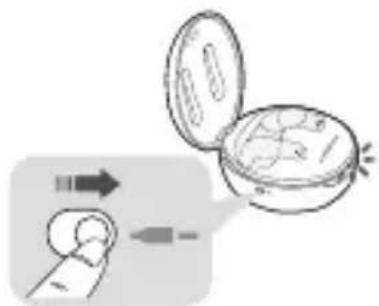
4 Push the Plug and Wireless Mode switch to the right to turn on the mode.
5 The indicator on the charging case flashes in green.
6 Once the charging case is connected to the earbuds, the indicator turns off.
How to Disconnect
1 Push the Plug and Wireless Mode switch to the left.
2 The indicator on the charging case flashes in blue.
3 Once disconnected from the charging case, the earbuds reconnect to the device that was previously connected.
-If the device is not found, the earbuds enter the Connection Ready mode.


NOTE: You cannot use the LG TONE Free app, but the EQ and touchpad settings are maintained as is. (Touch operation: Refer to the Playing Music section.)
The earbuds do not support the call function.
The USB-C ™ to AUX cable does not support the charging function.
The earbuds may not be compatible with some devices, and a separate adapter (sold separately) may be necessary to use a port on some airplane seats.
If you use the earbuds for a long duration, the battery of the earbuds (including the charging case) may drain faster than when physically connected to a smartphone.
10. Checking the Battery Status
If earbuds are mounted in the charging case, the earbuds' battery status is displayed. Otherwise, the charging case's battery status is displayed. If the earbuds are mounted in the charging case while plugged in, the UVnano process will commence for 5 minutes. Once this process is complete, the charging case's battery status will be displayed.

| Battery Status Indicator | Remaining Battery (charger not connected) | Charging State (charger connected) |
| Red 20% or lower Charging | ||
| Yellow 20% - 80% - | ||
| Green 80% or higher Fully charged | ||
NOTE: When the charging case lid is closed, charging case battery status is displayed. If the charging case has no remaining charge, there will be no display and it cannot function. We recommend you keep the charging case charged at all times as the earbuds are not able to be turned on and turned off independently.
Safety Precautions
The following safety precautions are provided to prevent any unexpected accident or damage. Please familiarize yourself with the safety precautions. The safety precautions are classified into "WARNING" and "CAUTION".

WARNING: Failing to comply with the instructions may result in serious injury or death.

CAUTION: Failing to comply with the instructions may result in minor injury or product damage.

WARNING
Do not drop the product from a high place.
Make sure there is no water, alcohol, or benzene in contact with the product.
Do not store the product in a wet or dusty place.
Do not place heavy objects on the product.
Earbuds tested under controlled laboratory conditions with an IPX4 rating.
Resistant to splashed water. Dry before using. Do not charge while wet.
Case has not been tested for IPX4.

CAUTION
Do not disassemble, adjust, or repair the product.
Do not place the product near excessive heat or flammable material.
The product may be damaged if an incompatible charger is used.
Keep small components of the product away from infants or children.
Make sure that foreign objects do not enter the charger's connectors (charging port and power plug). Foreign objects in the charger's connectors may result in fire or electric shock.
If you have a medical device implanted, contact your doctor before using this device.
For your safety, do not remove the battery incorporated in the product.
This product has a built-in battery, and the battery cannot be removed or replaced.
If you arbitrarily replace the battery or don't replace it correctly, it may explode.
The lithium-ion battery is a hazardous component that can cause injury.
Battery replacement by an unqualified professional can cause damage to your device.
Do not discard the battery arbitrarily. Follow the local procedure for discarding batteries.
In order to prevent unnecessary energy consumption, disconnect the device when fully charged. Always use an easily accessible power outlet for charging your device.
Risk of fire or explosion if the battery is replaced by an incorrect type.
Do not store or transport at pressures lower than 0.116 bar (11.6 kPa) and at above 9.32 miles (15,000 m) altitude.
Replacement of a battery with an incorrect type that can defeat a safeguard (for example, in the case of some lithium battery types).
Disposal of a battery into fire or a hot oven, or mechanically crushing or cutting of a battery, may result in an explosion.
Leaving a battery in an extremely high temperature surrounding environment that can result in an explosion or the leakage of flammable liquid or gas.
A battery subjected to extremely low air pressure may result in an explosion or the leakage of flammable liquid or gas.
Do not carelessly throw away old batteries. It can cause an explosion or fire. The disposal method may vary by country and region. Dispose of it in an appropriate manner.

NOTE
If the product is exposed to excessive sweat, Clean the product with dry cloth.
Keep the earbuds clean.
LG TONE Free App
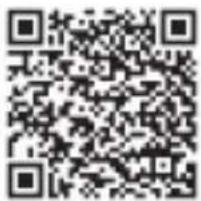
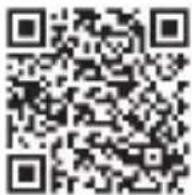
If you install the "LG TONE Free" app, you can use Check Earbud Battery, Voice Alert, Change Equalizer Mode, Check Last Connected Location Information, and Find My Earbuds functions. Check out the app for more details.
To install the "LG TONE Free" app, search LG TONE Free in the Google Play Store or App Store or scan the QR code below.
It supports Android 7.0 or higher and iOS 11 or higher.
Google Play App Store
Troubleshooting
If you see any of the following symptoms while using the product, make sure to recheck it. It may not be a malfunction.
| Symptom Cause and Solution | |
| The power does not turn on | Check the battery level and charge it. |
| If unable to make a call with earbuds | If the mobile phone does not support headset and hands-free functions, you cannot use the calling features.Check the battery level and charge it. |
| If unable to register earbuds to mobile phone | Check whether earbuds are turned on.Check if the earbuds have entered the search mode.- While the earbuds are inserted in the charging case, press and hold the touch pad on the left or right earbud for 3 to 5 seconds to switch to the search mode. |
| If you replaced the earbuds or there is a problem with the operation (Factory reset) | While the earbuds are inserted in the charging case, press and hold the touch pad on the left or right earbud for 10 seconds or more.- The battery status indicator of the charging case flashes red and the initialization to the factory status is carried out. After initialization to the factory status, reconnect the earbuds. |
*Factory reset and Search mode cannot be used in Plug and Wireless mode.
Specifications and Features
| Item Comments | |
| Bluetooth Specifications | V 5.2 (Headset/Hands-Free/A2DP/AVRCP) |
| Battery | Earbud: 3.7V / 55 mAh, Lithium-ionCharging case: 3.7V / 390 mAh, Lithium-ion |
| Music Play Time Earbuds & With Charging case | ANC Off: Up to 8 & Up to 22 hours*ANC On: Up to 5 & Up to 13 hours* |
| Charging Time | Earbud: Within an hour / Charging case: Within 2 hoursFast Charging: 5 min charge for up to 60 min playtime*※ When charging wired at room temperature |
| Rated Input Voltage | Earbud: 5V ---, 110 mACharging case: 5V ---, 500 mA |
| Operating Temperature 0°C (+32°F) ~ +40°C (+104°F) | |
| Operating Humidity 5% - 60 % | |
| Dimensions (inch) | Earbud: 0.84" (W) X 1.12" (L) X 0.92" (H)Charging case: 2.15" (W) X 2.15" (L) X 1.18" (H) |
| Weight (oz) | Earbud: 0.18 oz (One earbud)Charging case: 1.29 oz |
| Frequency range 2402 MHz to 2480 MHz | |
*Duration of use may vary depending on the connected mobile device, features being used, settings, signal strength, operating temperature, frequency band, and other methods of use.
Declaration of Confirmation
FCC NOTICE TO USERS:
This device complies with part 15 of the FCC Rules.
Operation is subject to the following two conditions:
(1) This device may not cause harmful interference, and
(2) This device must accept any interference received, including interference that may cause undesired operation.
Changes or modifications not expressly approved by the manufacturer (or party responsible) for compliance could void the user's authority to operate the equipment.
FCC Part 15.105 statement
This equipment has been tested and found to comply with the limits for a Class B digital device, pursuant to Part 15 of the FCC Rules.
These limits are designed to provide reasonable protection against harmful interference in a residential installation. This equipment generates, uses and can radiate radio frequency energy and, if not installed and used in accordance with the instructions, may cause harmful interference to radio communications.
However, there is no guarantee that interference will not occur in a particular installation. If this equipment does cause harmful interference to radio or television reception, which can be determined by turning the equipment off and on, the user is encouraged to try to correct the interference by one or more of the following measures:
-Reorient or relocate the receiving antenna.
-Increase the separation between the equipment and receiver.
-Connect the equipment into an outlet on a circuit different from that to which the receiver is connected.
-Consult the dealer or an experienced radio/TV technician for help.
This device was tested in compliance with FCC RF Exposure limit.
IMPORTANT NOTE:
To comply with the FCC RF exposure compliance requirements, no change to the antenna or the device is permitted. Any change to the antenna or the device could result in the device exceeding the RF exposure requirements and void the user's authority to operate the device.
Bluetooth ® is a registered trademark of Bluetooth SIG, Inc. worldwide.
Android, Google Play, the Google Play logo, and other related marks and logos are trademarks of Google LLC.
Supplier's Declaration of Conformity
Trade Name LG
Responsible Party LG Electronics USA, Inc.
Address 111 Syrian Avenue, North Building
Englewood Cliffs, New Jersey 07632
Email lg.environmental@ige.com

Bluetooth®
FCC ID: ZNFTONEFP7 (Earbud) / ZNFTONEFP7P (Charging case)
Additional Information
1. Radio frequency exposure
This Bluetooth LG Stereo Headset is a radio transmitter and receiver. When in operation, it communicates with a Bluetooth-equipped mobile device by receiving and transmitting radio frequency (RF) electromagnetic fields (microwaves) in the frequency range 2402 to 2480 MHz.
Your Bluetooth headset is designed to operate in compliance with the RF exposure guidelines and limits set by national authorities and international health agencies when used with any compatible mobile phone.
2. Bluetooth connection precautions
The following environments affect the range and reception of Bluetooth signals:
-When walls, metal, human bodies, or other obstacles exist between the Bluetooth device and the connected device.
-When equipment that uses 2.4 GHz frequency signals (wireless LANs, wireless phones, microwave ovens, etc.) is placed near the devices being used.
-When using a Bluetooth device (TV, laptop, etc.) other than the mobile phone, the sound quality may be affected by the specifications and performance of the device.
3. Potentially explosive atmosphere
Turn off your electronic device when in any area with a potentially explosive atmosphere. Although this is uncommon, your electronic device could generate sparks. Sparks in such areas could cause an explosion or fire resulting in bodily injury or even death. Areas with a potentially explosive atmosphere are often but not always clearly marked.
4. Emergency calls
IMPORTANT!
This Bluetooth headset and the electronic device connected to the headset operate using radio signals and mobile and landline networks as well as user-programmed functions, which cannot guarantee connection under all conditions. Therefore, you should never rely solely upon any electronic device for essential communications (e.g., medical emergencies). Remember, in order to make or receive calls, the headset and the electronic device connected to the headset must be switched on and in a service area with adequate mobile signal strength. Emergency calls may not be possible on all mobile phone networks or when certain network services and/or phone features are in use. Check with your local service provider.
5. Battery information
A rechargeable battery has a long service life if treated properly. A new battery or one that has not been used for a long period of time could have reduced capacity the first few times it is used. Do not expose the battery to extreme temperatures, never above +122°F (+50°C) or below +14°F (-10°C). For maximum battery capacity, use the battery at room temperature. If the battery is used in low temperatures, the battery capacity will be reduced. The battery can only be charged in temperatures between +32°F (0°C) and +113°F (+45°C).
6. Recycling the battery in your Bluetooth headset
The battery in your Bluetooth headset must be disposed of properly and should never be placed in municipal waste.
In case rechargeable battery is included in this product, the entire device should be recycled in compliance with rechargeable battery recycling
standards because of the internal battery. To dispose of properly, call (800) 822-8837 or visit www.call2recycle.org.
Important Safety Information
Avoiding hearing damage
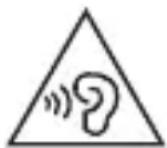
Permanent hearing loss may occur if you use your headset at a high volume.
Set the volume to a safe level. Over time you can become accustomed to a higher volume that may sound normal but can be damaging to your hearing.
If you experience ringing in your ears or muffled speech, stop listening and have your hearing checked. The louder the volume, the less time that is required before your hearing could be affected.
Hearing experts suggest that to protect your hearing:
- Limit the amount of time you use the headset at a high volume.
- Avoid turning up the volume to block out noisy surroundings.
- Turn the volume down if you can't hear people speaking near you.
Using headsets safely
Use of headsets to listen to music while operating a vehicle is not recommended and is illegal in some areas. Be careful and attentive while driving. Stop using this device if you find it disruptive or distracting while operating any type of vehicle or performing any other activity that requires your full attention.
Open Source Software Notice Information
To obtain the source code under GPL, LGPL, MPL, and other open source licenses that have the obligations to disclose source code, that is contained in this product, and to access all referred license terms, copyright notices and other relevant documents please visit https://opensource.lge.com.
LG Electronics will also provide open source code to you on CD-ROM for a charge covering the cost of performing such distribution (such as the cost of media, shipping, and handling) upon email request to opensource@lge.com.
This offer is valid to anyone in receipt of this information for a period of three years after our last shipment of this product.
Symbols
| ~ | Refers to alternating current (AC). |
| --- | Refers to direct current (DC). |
| Refers to class II equipment. | |
| Refers to stand-by. | |
| I | Refers to “ON” (power). |
| Refers to dangerous voltage. |
The output level shall automatically return to an output level not exceeding RS1 when the power is switched off.
LIMITED WARRANTY- U.S.A. ONLY
TONE-FP7/ TONE-FP7C
ARBITRATION NOTICE: THIS LIMITED WARRANTY CONTAINS AN ARBITRATION PROVISION THAT REQUIRES YOU AND LG TO RESOLVE DISPUTES BY BINDING ARBITRATION INSTEAD OF IN COURT, UNLESS YOU CHOOSE TO OPT OUT. IN ARBITRATION, CLASS ACTIONS AND JURY TRIALS ARE NOT PERMITTED. PLEASE SEE THE SECTION TITLED "PROCEDURE FOR RESOLVING DISPUTES" BELOW.
Should your LG TONE Free ("Product") fail due to a defect in materials or workmanship under normal and proper use, during the warranty period set forth below, LG Electronics ("LG") will, at its option, repair or replace the Product. This limited warranty is valid only to the original purchaser of the Product and applies only when purchased lawfully and used within the United States including U.S. Territories.
| WARRANTY PERIOD HOW SERVICE IS HANDLED | |
| PARTS/LABOR:1 Year from the date of original retail purchase | The original sales invoice specifying the Product and date of purchase is required to obtain warranty service.For customer assistance, please contact LG Electronics:Call 1-800-243-0000 and select the appropriate option from the menu.Or visit our website at http://www.lg.com/usOr by mail: LG Electronics Customer Service P.O. Box 240007, Huntsville, AL 35813ATTN: Customer Service |
-Replacement Products and parts are warranted for the remaining portion of the original warranty period or ninety (90) days, whichever is greater.
-Replacement Products and parts may be new, reconditioned, refurbished, or otherwise factory remanufactured.
-Any replaced Product and/or parts will be the property of LG.
Disclaimer:
EXCEPT TO THE EXTENT PROHIBITED BY APPLICABLE LAW, ANY IMPLIED WARRANTY OF MERCHANTABILITY OR FITNESS FOR A PARTICULAR PURPOSE ON THE PRODUCT IS LIMITED IN DURATION TO THE DURATION OF THE ABOVE LIMITED WARRANTY PERIOD. UNDER NO CIRCUMSTANCES SHALL LG OR ITS U.S. DISTRIBUTORS/DEALERS BE LIABLE FOR ANY INDIRECT, INCIDENTAL, CONSEQUENTIAL, SPECIAL OR PUNITIVE DAMAGES INCLUDING, WITHOUT LIMITATION, LOST GOODWILL, LOST REVENUES OR PROFITS, WORK STOPPAGE, IMPAIRMENT OF OTHER GOODS, COST OF REMOVAL AND REINSTALLATION OF THE PRODUCT, LOSS OF USE, OR ANY OTHER DAMAGES WHETHER BASED IN CONTRACT, TORT, OR OTHERWISE. LG'S TOTAL LIABILITY, IF ANY, SHALL NOT EXCEED THE PURCHASE PRICE PAID BY THE CUSTOMER FOR THE PRODUCT.
SOME STATES DO NOT ALLOW THE EXCLUSION OR LIMITATION OF INCIDENTAL OR CONSEQUENTIAL DAMAGES OR LIMITATIONS ON HOW LONG AN IMPLIED WARRANTY LASTS, SO THE ABOVE EXCLUSIONS OR LIMITATIONS MAY NOT APPLY TO YOU. THIS LIMITED WARRANTY GIVES YOU SPECIFIC LEGAL RIGHTS AND YOU MAY ALSO HAVE OTHER RIGHTS THAT VARY FROM STATE TO STATE.
THIS LIMITED WARRANTY DOES NOT COVER:
-Damage or loss to programs, data, or removable storage media.
-Damage or failure of the Product caused by improper set-up or adjustment on consumer controls.
-Damage or failure of the Product caused by transportation and/or handling, including scratches, dents, chips, and/or other damage to the finish of your Product, unless such damage results from a defect in materials or workmanship and is reported within one (1) week of delivery (Call: 1-800-243-0000).
-Damage or failure of the Product from other than normal intended use.
-Damage or failure of Product caused by incorrect electrical current or voltage (including power surge), power failures, interruptions or inadequate electrical service, including incorrect or insufficient AC supply.
-Damage or failure of the Product resulting from misuse, abuse, improper installation or operation of the Product contrary to the Product owner's manual and/or installation manual.
-Damage or failure of the Product caused by accidents, liquid, pests and vermin, lightning, wind, fire, flood, or other acts of nature.
-Damage or failure of the Product caused by abnormal conditions or an environment where the temperature and humidity is not adequately controlled.
-Damage or failure of the Product caused by the use of accessories, parts, consumable cleaning products, or service not provided or approved by LG.
-Damage or failure of the Product or missing items to any Product sold "As Is", "With all Faults" or similar disclaimer.
-Products with original serial numbers that have been removed, altered, or cannot be readily determined.
-Replacement of any consumable parts including batteries.
-Minor imperfections that do not materially alter or affect functionality.
The cost of repair or replacement under the above excluded circumstances shall be borne by you.
PROCEDURE FOR RESOLVING DISPUTES:
ALL DISPUTES BETWEEN YOU AND LG ARISING OUT OF OR RELATING IN ANY WAY TO THIS LIMITED WARRANTY OR THE PRODUCT SHALL BE RESOLVED EXCLUSIVELY THROUGH BINDING ARBITRATION, AND NOT IN A COURT OF GENERAL JURISDICTION. BINDING ARBITRATION MEANS THAT YOU AND LG ARE EACH WAIVING THE RIGHT TO A JURY TRIAL AND TO BRING OR PARTICIPATE IN A CLASS ACTION.
Definitions. For the purposes of this section, references to "LG" mean LG Electronics U.S.A., Inc., its parents, subsidiaries and affiliates, and each of their officers, directors, employees, agents, beneficiaries, predecessors in interest, successors, assigns and suppliers; references to "dispute" or "claim" shall include any dispute, claim or controversy of any kind whatsoever (whether based in contract, tort, statute, regulation, ordinance, fraud, misrepresentation or any other legal or equitable theory) arising out of or relating in any way to the sale, condition or performance of the product or this Limited Warranty.
Notice of Dispute. In the event you intend to commence an arbitration proceeding, you must first notify LG in writing at least 30 days in advance of initiating the arbitration by sending a letter to LG at LG Electronics, USA, Inc. Attn: Legal Department- Arbitration 111 Sylvan Avenue, Englewood Cliffs, NJ 07632, USA. You and LG agree to engage in good faith discussions in an attempt to amicably resolve your claim. The notice must provide your name, address, and telephone number; identify the product that is the subject of the claim; and describe the nature of the claim and the relief being sought. If you and LG are unable to resolve the dispute within 30 days, either party may proceed to file a claim for arbitration.
Agreement to Binding Arbitration and Class Action Waiver. Upon failure to resolve the dispute during the 30 day period after sending written notice to LG, you and LG agree to resolve any claims between us only by binding arbitration on an individual basis, unless you opt out as provided below. Any dispute between you and LG shall not be combined or consolidated with a dispute involving any other person's or entity's product or claim. More specifically, without limitation of the foregoing, any dispute between you and LG shall not under any circumstances proceed as part of a class or representative action. Instead of arbitration, either party may bring an individual action in small claims court, but that small claims court action may not be brought on a class or representative basis.
Arbitration Rules and Procedures. To begin arbitration of a claim, either you or LG must make a written demand for arbitration. The arbitration will be administered by the American Arbitration Association ("AAA") and will be conducted before a single arbitrator under the AAA's Consumer
Arbitration Rules that are in effect at the time the arbitration is initiated (referred to as the “AAA Rules”) and under the procedures set forth in this section. The AAA Rules are available online at www.adr.org/consumer. Send a copy of your written demand for arbitration, as well as a copy of this provision, to the AAA in the manner described in the AAA Rules. You must also send a copy of your written demand to LG at LG Electronics, USA, Inc. Attn: Legal Department- Arbitration 111 Sylvan Avenue, Englewood Cliffs, NJ 07632, USA. If there is a conflict between the AAA Rules and the rules set forth in this section, the rules set forth in this section will govern. This arbitration provision is governed by the Federal Arbitration Act. Judgment may be entered on the arbitrator’s award in any court of competent jurisdiction. All issues are for the arbitrator to decide, except that issues relating to the scope and enforceability of the arbitration provision and to the arbitrability of the dispute are for the court to decide. The arbitrator is bound by the terms of this provision.
Governing Law. The law of the state of your residence shall govern this Limited Warranty and any disputes between us except to the extent that such law is preempted by or inconsistent with applicable federal law.
Fees/Costs. You do not need to pay any fee to begin an arbitration. Upon receipt of your written demand for arbitration, LG will promptly pay all arbitration filing fees to the AAA unless you seek more than \$25,000 in damages, in which case the payment of these fees will be governed by the AAA Rules. Except as otherwise provided for herein, LG will pay all AAA filing, administration and arbitrator fees for any arbitration initiated in accordance with the AAA Rules and this arbitration provision. If you prevail in the
arbitration, LG will pay your attorneys' fees and expenses as long as they are reasonable, by considering factors including, but not limited to, the purchase amount and claim amount. Notwithstanding the foregoing, if applicable law allows for an award of reasonable attorneys' fees and expenses, an arbitrator can award them to the same extent that a court would. If the arbitrator finds either the substance of your claim or the relief sought in the demand is frivolous or brought for an improper purpose (as measured by the standards set forth in Federal Rule of Civil Procedure 11(b)), then the payment of all arbitration fees will be governed by the AAA Rules. In such a situation, you agree to reimburse LG for all monies previously disbursed by it that are otherwise your obligation to pay under the AAA Rules. Except as otherwise provided for, LG waives any rights it may have to seek attorneys' fees and expenses from you if LG prevails in the arbitration.
Hearings and Location. If your claim is for \25,000 or less, you may choose to have the arbitration conducted solely on the basis of (1) documents submitted to the arbitrator, (2) through a telephonic hearing, or (3) by an in-person hearing as established by the AAA Rules. If your claim exceeds \25,000, the right to a hearing will be determined by the AAA Rules. Any in-person arbitration hearings will be held at a location within the federal judicial district in which you reside unless we both agree to another location or we agree to a telephonic arbitration.
Opt Out. You may opt out of this dispute resolution procedure. If you opt out, neither you nor LG can require the other to participate in an arbitration proceeding. To opt out, you must send notice to LG no later than 30 calendar days from the date of the first consumer purchaser's purchase of
the product by either: (i) sending an e-mail to optout@lge.com, with the subject line: "Arbitration Opt Out" or (ii) calling 800-980-2973. You must include in the opt out e-mail or provide by telephone: (a) your name and address; (b) the date on which the product was purchased; (c) the product model name or model number; and (d) the serial number (the serial number can be found (i) on the product; or (ii) online by accessing https://www.lg.com/us/support/repair-service/schedule-repair-continued and clicking on "Find My Model & Serial Number").
You may only opt out of the dispute resolution procedure in the manner described above (that is, by e-mail or telephone); no other form of notice will be effective to opt out of this dispute resolution procedure. Opting out of this dispute resolution procedure will not affect the coverage of the Limited Warranty in any way, and you will continue to enjoy the full benefits of the Limited Warranty. If you keep this product and do not opt out, then you accept all terms and conditions of the arbitration provision described above.
LG
Life's Good
MANUAL DEL PROPIETARIO
LG TONE Free
ESPAÑOL

Google Play App Store


Any modifications or changes to this manual due to typographical errors or inaccuracies of stated information shall only be made by LG Electronics Inc. Las modificaciones o cambios de este manual por errores tipográficos o de información serán realizados exclusivamente por LG Electronics, Inc.

www.lg.com



- TONE-FP7 / TONE-FP7C
- CONTENTS
- CAUTION
- NOTE
- OVERVIEW
- [EARBUDS]
- HOW TO PAIR
- WEARING EARBUDS
- PLAYING MUSIC
- PLACING A CALL
- LISTEN TO THE AMBIENT SOUND (LAS), ACTIVE NOISE CANCELLATION (ANC)
- UVNANO
- CHARGING
- PLUG AND WIRELESS MODE (EXTERNAL DEVICE CONNECTION MODE)
- HOW TO CONNECT
- HOW TO DISCONNECT
- CHECKING THE BATTERY STATUS
- SAFETY PRECAUTIONS
- WARNING
- LG TONE FREE APP
- TROUBLESHOOTING
- DECLARATION OF CONFIRMATION
- FCC NOTICE TO USERS
- FCC PART 15.105 STATEMENT
- IMPORTANT NOTE
- FCC ID: ZNFTONEFP7 (EARBUD) / ZNFTONEFP7P (CHARGING CASE)
- ADDITIONAL INFORMATION
- RADIO FREQUENCY EXPOSURE
- BLUETOOTH CONNECTION PRECAUTIONS
- POTENTIALLY EXPLOSIVE ATMOSPHERE
- EMERGENCY CALLS
- BATTERY INFORMATION
- RECYCLING THE BATTERY IN YOUR BLUETOOTH HEADSET
- IMPORTANT SAFETY INFORMATION
- AVOIDING HEARING DAMAGE
- USING HEADSETS SAFELY
- OPEN SOURCE SOFTWARE NOTICE INFORMATION
- LIMITED WARRANTY- U.S.A. ONLY
- TONE-FP7/ TONE-FP7C
- DISCLAIMER
- THIS LIMITED WARRANTY DOES NOT COVER
- LG TONE FREE
Brand : LG
Model : TONE Free TONE-FP7C
Category : Headphones