VoicEX - Audio software CEDAR - Free user manual and instructions
Find the device manual for free VoicEX CEDAR in PDF.


| Product Type | Audio Software Plugin |
| Category | Audio Restoration & Voice Processing |
| Brand | CEDAR |
| Model | VoicEX |
| Platform Compatibility | Windows (Vista/7/8/10/11), macOS (10.12+) |
| Plugin Format | VST, AU, AAX (64-bit) |
| Key Functions | Voice extraction, noise reduction, dialogue cleaning, audio restoration |
| Real-time Processing | Yes, with low latency |
| User Interface | Resizable GUI with preset management |
| Supported Sample Rates | 44.1 kHz, 48 kHz, 96 kHz, 192 kHz |
| Bit Depth | 16, 24, 32-bit float |
| License Type | Perpetual license, single-user |
| Protection | iLok or machine-based activation |
| Software Updates | Free updates within major version |
| Technical Support | Email and online knowledge base |
| System Requirements | 4 GB RAM, multi-core processor, 500 MB free disk space |
| Installation | Installer provided via download |
Frequently Asked Questions - VoicEX CEDAR
User questions about VoicEX CEDAR
0 question about this device. Answer the ones you know or ask your own.
Ask a new question about this device
Download the instructions for your Audio software in PDF format for free! Find your manual VoicEX - CEDAR and take your electronic device back in hand. On this page are published all the documents necessary for the use of your device. VoicEX by CEDAR.
USER MANUAL VoicEX CEDAR
CEDAR VoicEX manual v1.02 - 13 September 2023
This page left blank
Table Of Contents
Getting Started 4
Installing CEDAR VoicEX – Mac 5
Installing CEDAR VoicEX – PC......6
Using VoicEX 7
Contact Information and Support......9
Licence and Limited Warranty 10
Getting Started
Unpacking and licensing
CEDAR VoicEX is supplied electronically for Mac and PC hosts using an iLok, so no physical objects are necessary or supplied.
Licensing of CEDAR VoicEX is achieved using the iLok licence manager. Please refer to your iLok documentation.
Assumed Knowledge
CEDAR VoicEX conforms to the 64-bit AAX Native and 64-bit VST 2.4, VST 3 and AU plug-in formats. It is not compatible with 32-bit operating systems or hosts.
This manual assumes that you are fully conversant with your host computer, and that you know how to operate the host software onto which you're loading CEDAR VoicEX. It will refer to operations that are common to these products, but will not attempt to explain them.
Troubleshooting Non-CEDAR Components
If you encounter problems with your Macintosh®, MacOS®, OS X®, your PC, Microsoft Windows®, or any 3 ^rd party host system, please refer to the relevant manuals or contact the dealer that supplied these to you. Unless appointed independently as authorised dealers for the following products, CEDAR Audio's dealers will not attempt to provide technical support for:
• Macintosh computers
- MacOS and OS X
• PCs of any description
- Microsoft Windows
- 3^rd party host hardware
- 3^rd party host software
Installing CEDAR VoicEX – Mac
■ Before proceeding, ensure that any older versions of the plug-in (if any) are archived and removed from the plug-in folder.
■ Double-click on the installer package:
CEDARAudioLtd-VoicEX.pkg
■ Follow the instructions offered by the installer.
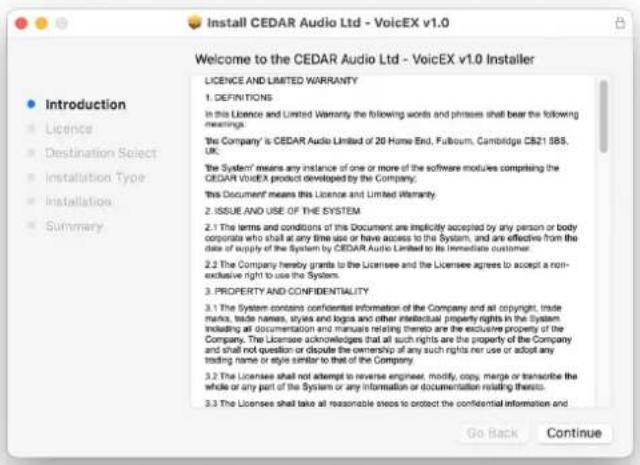
■ Ensure that you have sufficient space on your drive and then press Install to install the complete package or press the Customise button to select which formats are loaded.
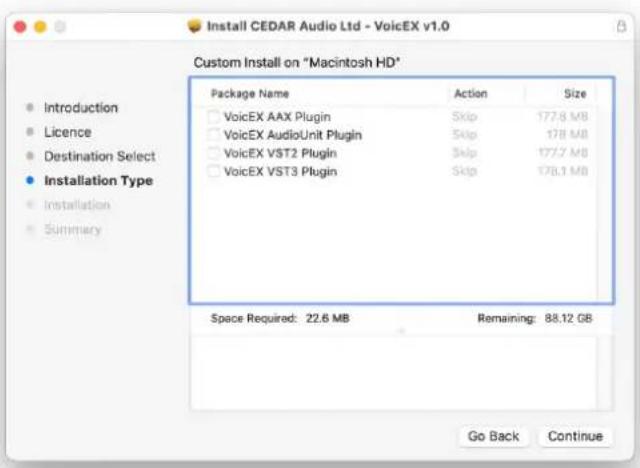
■ A message will appear to tell you that installation was completed successfully.
Installing CEDAR VoicEX - PC
■ If necessary, uninstall any previous version of CEDAR VoicEX.
■ Double-click on the installer package: VoicEX_Full_Setup.exe
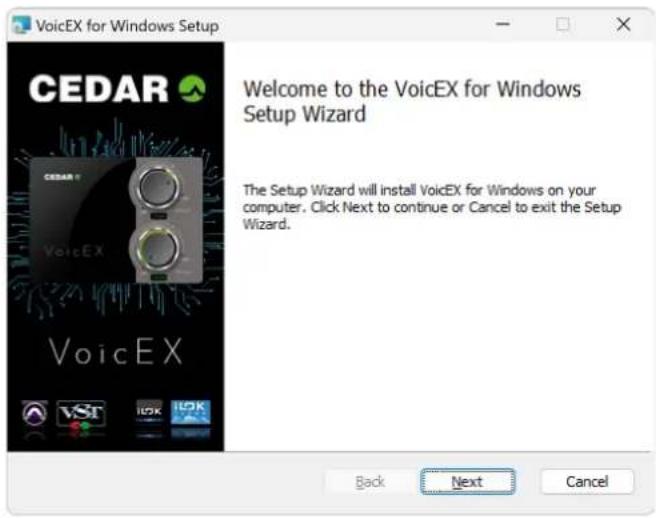
■ Follow the instructions offered by the installer.
■ Ensure that you have sufficient space on your drive and then select the plug-in formats that you wish to install.
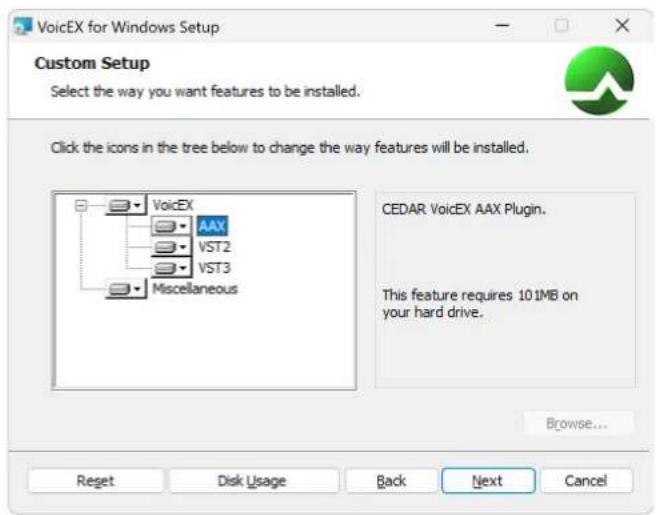
■ A message will appear to tell you that the installation was completed successfully. Click on OK and Finish.
Using VoicEX
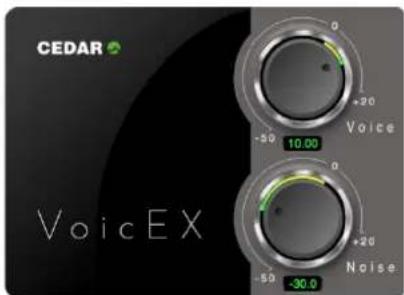
Artificial Intelligence (AI) based upon deep neural networks (DNNs) has the potential to offer many advancements in the field of audio processing. VoicEX is an example of this. It incorporates some unique algorithmic features that take it beyond standard DNN-based noise reduction techniques and, for a wide range of material, is able to separate voices (primarily but not limited to speech) from other sounds, and to perform superior noise reduction when compared with traditional signal processing techniques.
Tutorial
Internally, VoicEX creates two signal streams - one containing any voices identified within the input signal, and the other containing everything else. To eliminate the noise and excessive reverberation, leave the voice control at zero and reduce the background knob to the desired degree. Do not over process; although VoicEX is extremely tolerant, you may introduce a slight change in the retained signal. To eliminate the voices, leave the background knob at zero and reduce the voice control to its minimum.
You may accentuate either the voices or the background by increasing either control above zero.
Controls
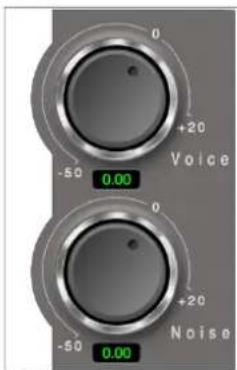
Voice
Attenuate or accentuated signal that is identified as voices. The range is notionally -50dB to +20dB.
Noise
Attenuate or accentuated signal that is not identified as voices. The range is notionally -50dB to +20dB.
Additional Information
Contact Information and Support
Headquarters
| Address: | CEDAR Audio Ltd, 20 Home End, Fulbourn, Cambridge, CB21 5BS, UK |
| Telephone and Fax: | T: +44 1223 881771 F: +44 1223 881778 |
| Email: | support@cedaraudio.com |
USA Office
| Address: | CEDAR Audio USA, 82 Gilman Street, Portland, ME 04102, USA |
| Telephone and Fax: | T: +1 207 828 0024 F: +1 207 773 2422 |
| Email: | cedarusa@cedaraudio.com |
German Office
| Address: | CEDAR Deutschland, Görlitzer Str 3, D-49525 Lengerich, Deutschland |
| Telephone and Fax: | T: +49 5481 945087 F: +49 5481 945088 |
| Email: | info@cedaraudio.de |
Web
| English language: | www.cedaraudio.com |
| German language: | www.cedaraudio.de |
Worldwide Dealer List
For an up-to-date dealer list, please visit www.cedaraudio.com.
Technical Support
Should you experience difficulties with CEDAR VoicEX, please contact your local dealer or CEDAR office. Alternatively, you may send an email to support@cedaraudio.com. In either case, please provide the following details:
■ Your software version number.
■ Details of the host system and version numbers.
■ A precise description of the problem.
Licence and Limited Warranty
1. DEFINITIONS
In this Licence and Limited Warranty the following words and phrases shall bear the following meanings:
'the Company' is CEDAR Audio Limited of 20 Home End, Fulbourn, Cambridge, CB21 5BS, UK;
'the System' means any instance of any product developed by the Company, including but not limited to VoicEX;
'this Document' means this Licence and Limited Warranty.
2. ISSUE AND USE OF THE SYSTEM
2.1 The terms and conditions of this Document are implicitly accepted by any person or body corporate who shall at any time use or have access to the System, and are effective from the date of supply of the System by CEDAR Audio Limited to its immediate customer.
2.2 The Company hereby grants to the Licensee and the Licensee agrees to accept a non-exclusive right to use the System.
3. PROPERTY AND CONFIDENTIALITY
3.1 The System contains confidential information of the Company and all copyright, trade marks, trade names, styles and logos and other intellectual property rights in the System including all documentation and manuals relating thereto are the exclusive property of the Company. The Licensee acknowledges that all such rights are the property of the Company and shall not question or dispute the ownership of any such rights nor use or adopt any trading name or style similar to that of the Company.
3.2 The Licensee shall not attempt to reverse engineer, modify, copy, merge or transcribe the whole or any part of the System or any information or documentation relating thereto.
3.3 The Licensee shall take all reasonable steps to protect the confidential information and intellectual property rights of the Company.
4. LIMITED WARRANTY AND POST-WARRANTY OBLIGATIONS
4.1 The Company warrants that the System will perform substantially in accordance with the appropriate section of its accompanying product manual for a period of one year from the date of supply to the Company's immediate customers.
4.2 The Company will make good at its own expenses by repair or replacement any defect or failure that develops in the System within one year of supply to the Company's immediate customer.
4.3 The Company shall have no liability to remedy any defect, failure, error or malfunction that arises as a result of any improper use, operation or neglect of the System, or any attempt to repair or modify the System by any person other than the Company or a person appointed with the Company's prior written consent.
4.4 In the case of any defect or failure in the System occurring more than twelve months after its supply to the Company's immediate customer the Company will at its option and for a reasonable fee make good such defect or failure by repair or replacement (at the option of the Company) subject to the faulty equipment having first been returned to the Company. The Company will use reasonable efforts to return repaired or replacement items promptly, all shipping, handling and insurance costs being for the account of the Licensee.
4.5 The above undertakings 4.1 to 4.4 are accepted by the Licensee in lieu of any other legal remedy in respect of any defect or failure occurring during the said period and of any other obligations or warranties expressed or implied including but not limited to the implied warranties of saleability and fitness for a specific purpose.
4.6 The Licensee hereby acknowledges and accepts that nothing in this Document shall impose upon the Company any obligation to repair or replace any item after a time when it is no longer produced or offered for supply by the Company or which the Company certifies has been superseded by a later version or has become obsolete.
5. FORCE MAJEURE
The Company shall not be liable for any breach of its obligations hereunder resulting from causes beyond its reasonable control including, but not limited to, fires, strikes (of its own or other employees), insurrection or riots, embargoes, container shortages, wrecks or delays in transportation, inability to obtain supplies and raw materials, or requirements or regulations of any civil or military authority.
6. WAIVER
The waiver by either party of a breach of the provisions hereof by the other shall not be construed as a waiver of any succeeding breach of the same or other provisions, nor shall any delay or omission on the part of either party to exercise any right that it may have under this Licence operate as a waiver of any breach or default by the other party.
7. NOTICES
Any notices or instruction to be given hereunder shall be delivered or sent by first-class post or telecopier to the other party, and shall be deemed to have been served (if delivered) at the time of delivery or (if sent by post) upon the expiration of seven days after posting or (if sent by telecopier) upon the expiration of twelve hours after transmission.
8. ASSIGNMENT AND SUB-LICENSING
The Licensee may at his discretion assign the System and in doing so shall assign this Licence its rights and obligations to the purchaser who shall without reservation agree to be bound by this Licence. The original Licensee and any subsequent Licensees shall be bound by the obligations of this Licence in perpetuity.
9. LIMITATION OF LIABILITY
The Company's maximum liability under any claim including any claim in respect of infringement of the intellectual property rights of any third party shall be, at the option of the Company either:
(a) return of a sum calculated as the price received for the System by the Company from its immediate customer depreciated on a straight line basis over a one year write-off period; or
(b) repair or replacement of those components of the System that do not meet the warranties contained within this Document.
The foregoing states the entire liability of the Company to the Licensee.
10. CONSEQUENTIAL LOSS
Even if the Company has been advised of the possibility of such damages, and notwithstanding anything else contained herein the Company shall under no event be liable to the Licensee or to any other persons for loss of profits or contracts or damage (whether direct or consequential) arising in connection with the System or any modification, variation or enhancement thereof and including any documentation or data provided by the Company or for any other indirect or consequential loss.
11. ENTIRE AGREEMENT
The Company shall not be liable to the Licensee for any loss arising in connection with any representations, agreements, statements or undertakings made prior to the date of supply of the System to the Licensee.
12. TERMINATION
This Licence may be terminated forthwith by the Company if the Licensee commits any material breach of any terms of this Licence. Forthwith upon such termination the Company shall have immediate right of access to the System for the purpose of removing it.
13. SEVERABILITY
Notwithstanding that the whole or any part of any provision of this Document may prove to be illegal or unenforceable the other provisions of this Document and the remainder of the provision in question shall remain in full force and effect.
14. HEADINGS
The headings to the Clauses are for ease of reference only and shall not affect the interpretation or construction of this Document.
15. LAW
This Document shall be governed by and construed in accordance with English law and all disputes between the parties shall be determined in England in accordance with the Arbitration Act 1950 and 1979.
CEDAR VoicEX
CEDAR Audio Limited
20 Home End
Fulbourn
Cambridge
CB21 5BS
United Kingdom
t: +44 1223 881771
e: info@cedaraudio.com
w: www.cedaraudio.com
Copyright CEDAR Audio Ltd, ©2023
CEDAR is a registered trademark of CEDAR Audio Ltd
CEDAR VoicEX and all related trademarks are trademarks of CEDAR Audio Ltd
E&OE. Subject to revision at the Company's sole discretion
- Table Of Contents
- Getting Started
- Unpacking and licensing
- Assumed Knowledge
- Troubleshooting Non-CEDAR Components
- Installing CEDAR VoicEX – Mac
- Installing CEDAR VoicEX - PC
- Using VoicEX
- Tutorial
- Controls
- Voice
- Noise
- Additional Information
- Contact Information and Support
- Worldwide Dealer List
- Technical Support
- Licence and Limited Warranty
- DEFINITIONS
- ISSUE AND USE OF THE SYSTEM
- PROPERTY AND CONFIDENTIALITY
- LIMITED WARRANTY AND POST-WARRANTY OBLIGATIONS
- FORCE MAJEURE
- WAIVER
- NOTICES
- ASSIGNMENT AND SUB-LICENSING
- LIMITATION OF LIABILITY
- CONSEQUENTIAL LOSS
- ENTIRE AGREEMENT
- TERMINATION
- SEVERABILITY
- HEADINGS
- LAW
- CEDAR VoicEX
Brand : CEDAR
Model : VoicEX
Category : Audio software