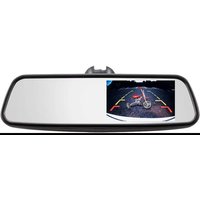
TE-RM45 - Dash cam iBEAM - Free user manual and instructions
Find the device manual for free TE-RM45 iBEAM in PDF.


| Product Type | Dash cam |
| Dimensions | 5.5 x 5.0 x 3.5 cm |
| Weight | 60 g |
| Power Supply | 5V DC via USB |
| Recording Resolution | Full HD 1080p |
| Viewing Angle | 120° |
| Memory Card Support | microSD up to 32GB (Class 10 required) |
| Loop Recording | Yes, adjustable duration |
| G-Sensor | Built-in, saves clips on impact |
| Night Vision | Yes, with IR LEDs |
| Parking Mode | Yes, motion detection |
| Display | 2.0 inch LCD |
| Mounting | Suction cup windshield mount |
| Operating Temperature | -10°C to 60°C |
| Battery | Built-in rechargeable battery (approx. 30 min standby) |
| Connectivity | USB 2.0 |
| Maintenance & Cleaning | Clean lens with soft, dry microfiber cloth |
| Safety | Use high-speed memory card (Class 10 or higher) |
| Spare Parts & Reparability | Mounting bracket and USB cable available; lens not user-replaceable |
| Included Accessories | Dash cam, suction mount, USB power cable, user manual |
Frequently Asked Questions - TE-RM45 iBEAM
User questions about TE-RM45 iBEAM
0 question about this device. Answer the ones you know or ask your own.
Ask a new question about this device
Download the instructions for your Dash cam in PDF format for free! Find your manual TE-RM45 - iBEAM and take your electronic device back in hand. On this page are published all the documents necessary for the use of your device. TE-RM45 by iBEAM.
USER MANUAL TE-RM45 iBEAM
natural_image
Icon of a red 'i' with Wi-Fi signal waves above, next to a black 'ID' symbol (no text or numbers present)BEAM
VEHICLE SAFETY SYSTEMS
TE-RM45 User Manual
1. Mirror

natural_image
Back view of a car showing a child on a scooter with red and yellow directional arrows (no text or symbols)2. OE Brackets

TE-M01
Genuine bracket for Toyota series, Bonds, Hyundai, GM, Ford

TE-M02
Genuine bracket for Honda

TE-M03
Genuine bracket for Most VW, Audi, Subaru, Peugoot, Nissan

TE-M06
Over bracket for Universal

TE-M07
Genuine bracket for Hyundai, Kia

TE-M08
Genuine bracket for Ford Ranger, Dodge

TE-M09
denuine bracket for Fiat

TE-M11
Genuine bracket for Renault, Mercedes
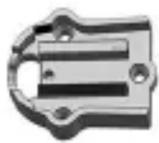
TE-M12
Genuine bracket for Toyota Corolla
3. Specification
| Screen size | 4.5 inch |
| Display screen | Frameless TFT LCD panel |
| Brightness | Ultra high brightness 1700cdm |
| Display resolution | 480(H)xRGBx272(V) |
| Display mode | 16:9 / 4:3 |
| Power consumption | 4W |
| Working voltage | DC10-15V |
| Video input | AV1, AV2 (reverse camera) |
| Signal system | PAL / AUTO / NTSC |
4. Operation
(1) The screen only works when it has video signal going into it. When AV1 input receives signal, the screen turns on to AV1. When the signal is removed, the screen turns off.
(2) When AV2 receives video signal, the screen powers on and switches to AV 2, regardless of whether there is signal going into AV1. When signal is removed from AV2, either the screen will switch to AV1 if there is signal present there or switch off there is no signal.
(3) The screen can adjust its brightness according to the ambient light condition. When ambient light is strong, the screen will be brighter. Similarly, the screen will decrease its brightness to protect your eyesight and so it isn't too bright while driving when the ambient light is low.
5. General Instruction
This rear view mirror monitor is designed for car rear view purpose, which can work with a reversing camera (NTSC or PAL) to show the real-time image behind your car. When the reverse gear is engaged, the rear view system automatically starts to work, and when the monitor is powered off, the mirror functions just like a normal rear view mirror as the monitor is hidden and almost invisible.
IMPORTANT If you are having difficulties with the installation of this product, please call our Tech Support line at 1-800-253-TECH. Before doing so, look over the instructions a second time, and make sure the installation was performed exactly as the instructions are stated. Please have the vehicle apart and ready to perform troubleshooting steps before calling.

KNOWLEDGE IS POWER
Enhance your installation and fabrication skills by enrolling in the most recognized and respected mobile electronics school in our industry. Log onto www.installerinstitute.com or call 800-354-6782 for more information and take steps toward a better tomorrow.

Metra recommends MECP certified technicians
Attention
When connecting with power cable, please make sure not to mistake the positive and negative pole, otherwise the fuse will blow immediately for security protection. If it happens, please replace the blown fuse with a new one with same specification, after connecting properly to the right pole. Don't randomly increase the current rating of the fuse, and NEVER use metal wire as a substitute.


- BEAM
- Mirror
- OE Brackets
- Specification
- Operation
- General Instruction
- IMPORTANT If you are having difficulties with the installation of this product, please call our Tech Support line at 1-800-253-TECH. Before doing so, look over the instructions a second time, and make sure the installation was performed exactly as the instructions are stated. Please have the vehicle apart and ready to perform troubleshooting steps before calling.
- KNOWLEDGE IS POWER
- Metra recommends MECP certified technicians
- Attention
Brand : iBEAM
Model : TE-RM45
Category : Dash cam