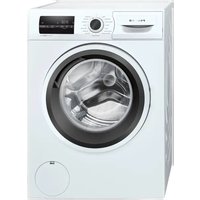
CMN12190TR - Washing machine Profilo - Free user manual and instructions
Find the device manual for free CMN12190TR Profilo in PDF.


Pick your language and provide your email: we'll send you a specifically translated version.
| Brand | Profilo |
| Model | CMN12190TR |
| Product Type | Freestanding Washing Machine |
| Energy Class | A+++ |
| Maximum Load Capacity | 9 kg |
| Spin Speed | 1200 rpm |
| Number of Programs | 15 |
| Power Supply | 220-240 V ~ 50 Hz |
| Water Connection | Cold water only |
| Dimensions (H x W x D) | 85 x 60 x 58 cm |
| Noise Level (Wash/Spin) | 52 dB / 74 dB |
| Key Features | Quick wash, Eco mode, Delay start |
| Safety Features | Child lock, Overflow protection |
| Maintenance | Drum clean, Filter cleaning reminder |
| Spare Parts Availability | Direct from Profilo or authorized dealers |
Frequently Asked Questions - CMN12190TR Profilo
How do I install the washing machine?
Ensure the machine is on a level surface. Remove all transport bolts. Connect the water inlet hose to a cold water tap with a 3/4 inch thread. Insert the drain hose into a standpipe or sink. Plug into a grounded outlet.
What do the error codes mean?
Error codes like E01 indicate door lock issue, E02 means water drainage problem, E03 shows heating failure. Check the manual for a full list. If persistent, contact support.
How often should I clean the filter?
Clean the pump filter every 3 months or if the machine does not drain properly. Turn off and unplug, open the filter cover, drain residual water, and remove debris.
Can I use liquid detergent?
Yes, use liquid detergent for low temperatures (30-40°C) and powders for higher. Pour into the correct compartment to avoid residue.
Why is the machine vibrating excessively?
Check that transport bolts are removed. Ensure the machine is level by adjusting the feet. Do not overload. Uneven loads cause vibrations.
How do I activate child lock?
Press and hold the 'Child Lock' button (symbol of a padlock) for 3 seconds until the indicator lights up. Deactivate the same way.
What is the maximum spin speed?
The maximum spin speed of the CMN12190TR is 1200 rpm. You can adjust it depending on the fabric type.
How do I run the drum clean program?
Select the 'Drum Clean' program from the dial. Empty the drum, add descaling tablet if needed, and press start. Run every 2 months.
What should I do if the machine does not start?
Check if the door is closed properly. Ensure the machine is plugged in and there is power. Verify that the water supply is turned on. Try resetting by unplugging for 1 minute.
How to order spare parts?
Visit the Profilo website or contact authorized service centers. Provide model CMN12190TR and the part number from the user manual.
User questions about CMN12190TR Profilo
0 question about this device. Answer the ones you know or ask your own.
Ask a new question about this device
No questions yet. Be the first to ask one.
Download the instructions for your Washing machine in PDF format for free! Find your manual CMN12190TR - Profilo and take your electronic device back in hand. On this page are published all the documents necessary for the use of your device. CMN12190TR by Profilo.
USER MANUAL CMN12190TR Profilo
natural_image
Simple line drawing of a box filled with plastic waste (no text or symbols)9.0 kg

3:48

50 L
A B CDEFG

ABCD

Manual assistant
Powered by Anthropic
Waiting for your message
Product information
Brand : Profilo
Model : CMN12190TR
Category : Washing machine