X652B - Mobile Phone Infinix - Free user manual and instructions
Find the device manual for free X652B Infinix in PDF.


| Product Type | Smartphone |
| Brand | Infinix |
| Model | X652B |
| Dimensions (H x W x D) | 168 x 76 x 9 mm |
| Weight | 200 g |
| Display Size | 6.6 inches |
| Display Resolution | 1600 x 720 pixels |
| Operating System | Android 12 |
| Processor | MediaTek Helio G35 |
| RAM | 4 GB |
| Internal Storage | 64 GB |
| Battery Capacity | 5000 mAh |
| Charging | 10W charging |
| Rear Camera | 13 MP + 0.3 MP |
| Front Camera | 8 MP |
| Network | 4G LTE |
| SIM Card | Dual nano-SIM |
| Connectivity | Wi-Fi 802.11 b/g/n, Bluetooth 5.0 |
| Sensors | Fingerprint (side-mounted), accelerometer, proximity |
| Power Source | Lithium-ion polymer battery, 3.8V |
| Main Functions | Calling, messaging, internet browsing, media playback, GPS navigation |
| Maintenance & Cleaning | Wipe with dry soft cloth. Do not use harsh chemicals. |
| Safety | Do not expose to water or extreme temperatures. Use only approved chargers. |
| Spare Parts & Repairability | Replacement battery and screen available through authorized service centers. |
| General Information | User manual available for download. Supports OTG. |
Frequently Asked Questions - X652B Infinix
User questions about X652B Infinix
0 question about this device. Answer the ones you know or ask your own.
Ask a new question about this device
Download the instructions for your Mobile Phone in PDF format for free! Find your manual X652B - Infinix and take your electronic device back in hand. On this page are published all the documents necessary for the use of your device. X652B by Infinix.
USER MANUAL X652B Infinix
Explosion diagram specification
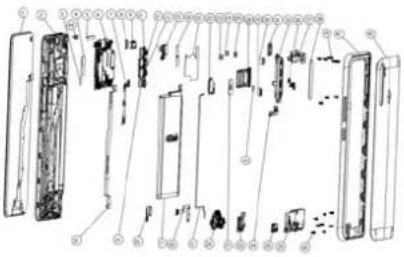
| 1 | FL(CTP+LCM) 6.55HD+ black TM | 2 | F hsg asm black |
| 3 | R Cam con foam Con fb 8.5*8.5*0.75 | 4 | R MAIN Cam Con foams 17.3*8.8*0.2 |
| 5 | MAIN seal mylor 28*3.64*0.05 | 6 | PCBA MB A1 64GB+4GB |
| 7 | FPC Switch key | 8 | F Cam Rubber 32M black |
| 9 | REC 1206W H20 broadband H:SPL 50mW AC | 10 | FPC MAIN |
| 11 | Cam FF 2M SP250A LHYX | 12 | Cam AF 16M SSK3P9SX STGX |
| 13 | Cam AF 5M GC503S SS TS | 14 | Cam FF BW GC6153 CSP W6003 XCG |
| 15 | Cam FF 32M SSKGD1 OF | 16 | motor FPC 0827 L4.B H AWA with Con ads |
| 17 | Bat Infinix BL 39LX 3900mAh TM IN RIS | 18 | F Cam Cop foil 18.31*7.66*0.06 |
| 19 | PCBA MB radiating film 52.0*27.9*0.08 | 20F | C.SPX |
| 21 | coaxial cable | 22 | FM(ICNF7332AL) 05 midnight black Sunwin |
| 23 | MAIN FPC con rubber 9.4*3.5*0.75 black | 24 | LCM FPC con rubber 10.7*3.5*0.75 black |
| 25 | Bat rubber 5.9*3.9*0.65 black | 26 | PCBA SUB 1 A |
| 27 | FP support foam 13.2*11.6*0.55 | 28 | card holder asm midnight black |
| 29 | R vice Cam Rubber black 8W | 30 | R vice Cam Rubber black 2M |
| 31 | R flash lens | 32 | R Cam deco asm midnight black |
| 33 | Headset Rubber black | 34 | MAIN FPC con imp steel asm |
| 35 | USB Rubber black | 36 | Bat LCM FP con imp steel |
| 37 | F Cam frame asm | 38 | R Cam lens KN3 0.5 midnight black |
| 39 | machine screw M1.4*L3.5*D2.5*H0.5 black | 40 | mc screw M1.4*L3.5*D2.5*H0.5 silve black |
| 41 | Bat cover asm midnig black | 42 | PF BatcovMihousing+composite miblack |
| 43 | FP Con foams 3.6*3.6*1.0 | 44 | Range sensor Rubber black |
Know your phone
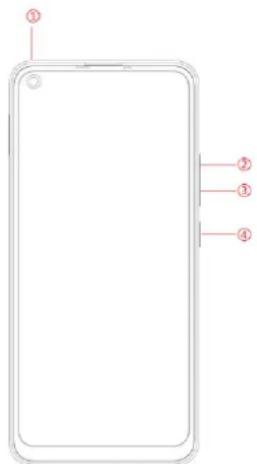
- Front camera
- Volume+ key
- Volume-key
- Power key
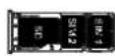
SIM/SD card installation
- Power off mobile.
- Refer to the following picture for SIM / SD card installation.
natural_image
Blank rectangular outline with rounded corners and a small dot at the top-left corner (no text or symbols)Charging the phone
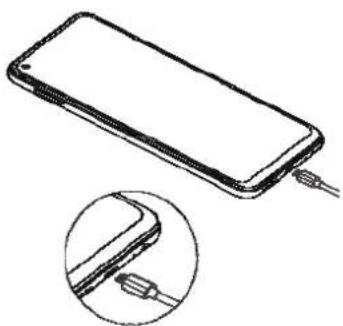
You can charge your device using a charger or by connecting it to the computer using a USB cable (comes with the phone).
-
Please remind the front and back of the plug.
-
Use only INFINIX charger and cables. Other chargers or cables may damage the device. This will invalidate your phone warranty.
natural_image
Line drawing of a smartphone with cable connectors, shown in two views: top is open showing internal cable (no text or symbols)Emergency call
If any emergency arises, dial 112/911 (or other emergency call number) for emergency help.
Due to the nature of cellular networking, the success of emergency call is not guaranteed.
FCC Warning:
This device complies with part 15 of the FCC Rules. Operation is subject to the following two conditions: (1) This device may not cause harmful interference, and (2) this device must accept any interference received, including interference that may cause undesired operation.
Any Changes or modifications not expressly approved by the party responsible for compliance could void the user's authority to operate the equipment.
This equipment has been tested and found to comply with the limits for a Class B digital device, pursuant to part 15 of the FCC Rules. These limits are designed to provide reasonable protection against harmful interference in a residential installation. This equipment generates uses and can radiate radio frequency energy and, if not installed and used in accordance with the instructions, may cause harmful interference to radio communications. However, there is no guarantee that interference will not occur in a particular installation. If this equipment does cause harmful interference to radio or television reception, which can be determined by turning the equipment off and on, the user is encouraged to try to correct the interference by one or more of the following measures:
-Reorient or relocate the receiving antenna.
-Increase the separation between the equipment and receiver.
-Connect the equipment into an outlet on a circuit different from that to which the receiver is connected.
-Consult the dealer or an experienced radio/TV technician for help.
The SAR limit of USA (FCC) is 1.6 W/kg averaged over one gram of tissue.
Device types X652B (FCC ID: 2AIZN-X652B) has also been tested against this SAR limit. The highest reported SAR values for head, body-worn accessory, and product specific (Hotspot) are 0.76 W/kg, 0.44 W/kg, and 0.79W/kg respectively. The Max simultaneous SAR is 1.23 W/kg. This device was tested for typical body-worn operations with the back of the handset kept 10mm from the body. To maintain compliance with FCC RF exposure requirements, use accessories that maintain a 10mm separation distance between the user's body and the back of the handset. The use of belt clips, holsters and similar accessories should not contain metallic components in its assembly. The use of accessories that do not satisfy these requirements may not comply with FCC RF exposure requirements, and should be avoided.
5G
For 5150-5250 and 5725-5850 frequency band,
Operations in the 5150-5250 and 5725-5850 band are restricted to indoor usage only.
5G:
Any emission is maintained within the band of operation under all conditions of normal operation. The max. frequency stability is less than 20ppm.
Brand : Infinix
Model : X652B
Category : Mobile Phone