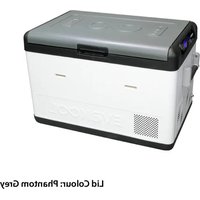
DU265-DZ - Cooler Evakool - Free user manual and instructions
Find the device manual for free DU265-DZ Evakool in PDF.


| Product Type | Portable Electric Cooler / Fridge |
| Brand | Evakool |
| Model | DU265-DZ |
| Capacity | 65 Liters |
| Compressor Type | Danfoss/Secop Variable Speed Compressor |
| Temperature Range | -18°C to +10°C |
| Power Input (DC) | 12V / 24V (cigarette plug) |
| Power Input (AC) | 100-240V AC (mains adapter) |
| Power Consumption | ~45W average, max 70W |
| Dimensions (H x W x D) | 47 x 72 x 48 cm (approx.) |
| Weight | 23 kg |
| Dual Zone Function | Yes (separate fridge and freezer compartments) |
| Insulation Material | High-density polyurethane foam |
| Lid Type | Reversible hinge (can open from either side) |
| Control Type | Digital thermostat with LED display |
| Battery Protection | 3-stage low voltage cut-off (Low/Med/High) |
| Cleaning & Maintenance | Wipe interior and exterior with damp cloth; avoid abrasive cleaners |
| Safety Features | Overheat protection, short-circuit protection, ventilation slots |
| Spare Parts Availability | Replaceable compressor, fan, control board, and door gasket |
| Repair Index | High (commercial-grade components, serviceable by qualified technician) |
Frequently Asked Questions - DU265-DZ Evakool
User questions about DU265-DZ Evakool
0 question about this device. Answer the ones you know or ask your own.
Ask a new question about this device
Download the instructions for your Cooler in PDF format for free! Find your manual DU265-DZ - Evakool and take your electronic device back in hand. On this page are published all the documents necessary for the use of your device. DU265-DZ by Evakool.
USER MANUAL DU265-DZ Evakool
natural_image
Three white and purple electronic devices with black lids, displayed against a blue background (no visible text or symbols)CHILLED FOR GOOD TIMES
Please read operating manual carefully before using your unit.
Please keep manual in a safe place.
If lost you can find a digital copy at Evakool.com.au or contact Evakool on 1300 385 665 (1300 EVKOOL).
Contents
1 Safety Instructions 4
2 Notes on Using the Product 4
3 Operation 5
4 LED Control Panel 6
5 Refrigerator Settings Recommendations 9
6 Lid Configuration 11
7 Error Codes 12
8 Troubleshooting 13
9 Preventative Maintenance & Care 15
10 App Instructions.... 16
11 Product Data 20
12 Down Under II Accessories 21
13 Product Drawings 22
14 Warranty Statement 24
What's in the Box:
- 1 x Fridge
• 1 x 1.8m Anderson to Anderson style 12V plug - 1 × 12 ~V to 240 ~V adaptor
- 3 x Baskets
Key Product Features
• Made in Australia
• World renowned Secop compressor
- Superior roll bond evaporator design
• True dual zone technology - set 2 temperatures
• Turn zones on/off independently


1 Safety Instructions
- Warning: Do not touch exposed cables.
- Warning: Do not use fridge if you suspect any connections could be wet.
- When using the fridge in a vehicle, please ensure the circuit being used is fused at the battery or power source at the recommended size.
- Any installation of DC power systems should be handled by a qualified professional.
- Make sure the source voltage is correct. The technical data label (page 20) has the voltage data.
- Do not place any electrical devices inside the refrigerator as moisture could harm these devices.
2. Notes On Using The Product
- Your refrigerator requires good ventilation, especially around the vents of the refrigerator; allow a gap of at least 200mm around the vents.
- Avoid humidity: humidity inside the appliance can form frost and impair cooling. Do not allow frost to build up.
- Never clean the appliance using a hose and never submerge the unit in any liquid.
- Avoid placing your refrigerator near a heat source. This helps the refrigerator to work more efficiently and keep the contents cool.
- Place the refrigerator on a flat surface and away from any edges. When using the fridge in a vehicle, please use a fastening device to secure it.
- This product is not designed for marine purposes and warranty may become void if corrosion or rust is caused by sea salt.
3. Operation
- Power: The refrigerator can be powered by a multi-voltage system utilising either 12/24 Volts or with the included 240V adaptor. The electronic module controls the compressor and has the added function of a three stage battery protection. When the input voltage drops below the minimum, the compressor will cut out; when the voltage comes back up to the cut-in value, the compressor will restart automatically.
- Battery Protection: The SECOP compressor requires approximately 11.0 Volts (12 Volt System) or 23.0 Volts (24V System) to operate. If the voltage drops below this the fridge will stop running.
- Cable Specification: The DC cables must have a suitable cross-section for their length (measured from the battery to the unit), according to this table:
| Cable Thickness (Area) 12V Max Cable Length 24V Max Cable Length | |||||
| (mm ^2 ) AWG (m) (ft) (m) (ft) | |||||
| 2.5 13 2.5 8 5 16 | |||||
| 4 11 4 13 8 26 | |||||
| 6 9 6 20 12 39 | |||||
| 10 7 10 33 20 66 | |||||
4. LED Control Panel
LED Control Panel

Display

4.1 Display Panel Definitions
Large & Small Bins: Wondering which display indicates the temperature for each bin? The outline of the display indicates this, the large bin is represented by a full square, and the small bin is represented by an L shape/stepped bin shape.
Snowflakes: These indicate which bin is currently cycled on (cooling). This fridge has one compressor, meaning it will only cool one bin at a time. This is an automated process within the fridge and cannot be altered within the settings.
AMB/Ambient Temperature: This indicates the ambient temperature inside the motor compartment of the fridge.
Bluetooth: The bluetooth symbol will turn on and make an audible beep when you have successfully connected to the app. This symbol will not be illuminated unless you have successfully connected. There is no setting within the fridge that turns the bluetooth on or off.
Voltage Indicator: When running your fridge on 12V this indicates the voltage at the fridge (not at your battery). The voltage indicator on the fridge will typically be different to the reading at the battery. This is because there can be voltage drop present between your fridge and battery. This can be to do with the length and quality of your power cord, and also be influenced by the health/life of your battery. When the fridge cycles on, the voltage will typically drop and then increase again when the fridge cycles off. This feature is useful for identifying any fridge errors (such as an E1).
When running your fridge on the supplied EvaPower 240V adaptor the voltage indicator will read approximately 14.5V, as this is the rated output of the 240V adaptor.
Battery Charge: When running the fridge on 12V, this icon will indicate how much battery charge you have left. Just like the voltage indicator reading, the battery charge reading will typically drop when the fridge cycles on, and will increase again when the fridge cycles off. If you notice the battery symbol on your fridge getting low, we recommend checking your battery voltage and putting it on charge if possible to prevent any power issues to your fridge.
When running your fridge on 240V the battery charge will indicate it's full.
4.2 Display Panel Settings
To turn on/off the refrigerator:
- Hold the button for three seconds.
• The fridge will make an audible beep and turn on.
Setting the temperature:
- To set the large bin press the button once.
- To set the small/stepped bin press the button twice.
- Once the selected room is flashing use the + or buttons to select the desired temperature. Temperature recommendations can be found on page 9.
- Once the desired temperature is selected, it will flash several times, and after a few seconds the temperature will automatically set.
Did you know?
Just like your fridge at home, all EvaKool fridge freezers will cycle on and off. This means you will hear the fridge turn on (cycle on) and commence cooling, then once it gets down to the set temperature, it will cycle off again. Subsequently, the temperature displayed on the fridge will fluctuate by a couple of degrees from the set temperature. The temperature shown is only an indication of the temperature inside the fridge. It is also typical to hear gurgling sounds during this process too.
There is no cause for concern, your fridge at home runs the exact same and means your fridge is running in a healthy state!
Setting the Max & Eco Mode:
- Press the button three times.
- Use the +r buttons to select the desired mode. You can find recommendations on page 9.
- Once the desired setting is selected, it will flash several times, and after a few seconds it will automatically set.
Setting the Battery Protection Mode:
- Press the button four times.
- Use the +or buttons to select the desired battery protection mode. You can find recommendations on page 10.
- Once the desired setting is selected, it will flash several times, and after a few seconds it will automatically set.
Turning one compartment on/off:
If you only require cooling for a small amount of product, you can switch off either side and run just one bin/compartment.
• To turn off the large bin press the + button for 3 seconds.
• To turn on the large bin press the + button again for 3 seconds.
• To turn off the small bin press the button for 3 seconds.
- To turn on the small bin press the button again for 3 seconds.
5. Refrigerator Setting Recommendations
To ensure maximum performance from your Down Under Series II Fridge/Freezer please follow these recommendations.
Temperature Settings
This fridge can be run as a fridge/fridge, fridge/freezer or freezer/freezer, meaning either compartment can be run as a fridge or freezer. See recommendations below:
Fridge: 2^ C
Freezer: -16^ C
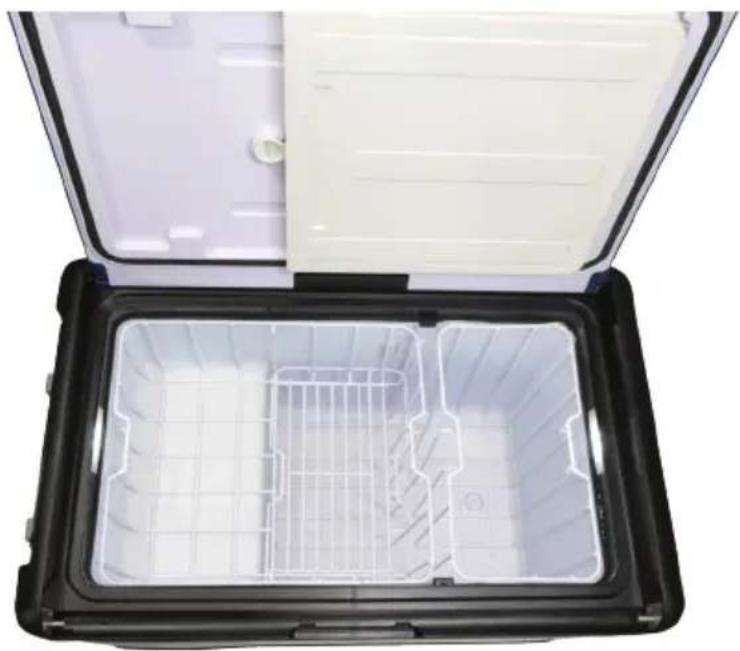
Down Under II 65L - Single or Dual Zone Settings
The Down Under II 65L Fridge Freezer has the capability to be run as a single or dual zone fridge or freezer. See recommendations below:
Single Zone operation:
- Remove the internal divider, this can be stored in the lid.
- Set the temperature:
- To run a fridge: have both bins running at 2°C. To save battery power you can turn off the small bin and just run one side.
- To run a freezer: have both bins running at -16°C.
Dual Zone operation:
Leave the divider in place and set a separate fridge and freezer temperature.
natural_image
Open black plastic container with white internal compartments and a lid open (no text or symbols visible)Max or Eco Mode Settings
This setting controls the compressor speed. Max mode is typically used to quickly pull the fridge down to temperature or to assist in high ambient temperatures, whereas Eco mode will assist with conserving battery power and can be used in low ambient temperatures.
See recommendations below:
Eco: Recommended for ambient temperatures of 30°C or less.
Max: Recommended for ambient temperatures of 30°C or less.
Battery Protection Mode Settings
The fridge is equipped with a multi-level battery monitor that protects your vehicle battery against excessive discharging when the fridge is connected to the on-board 12V/24V supply. If the refrigerator is operated when the vehicle's ignition is switched off, the fridge switches off automatically as soon as the supply voltage falls below a set level. The fridge will switch back on once the battery has been recharged to the restart voltage level. See recommendations below:
| Battery Protection Mode L M H | |||
| Switch-off voltage at 12V 10.1V 10.5V 11.1V | |||
| Restart voltage at 12V 10.9V 11.4V 12.4V | |||
| Switch-off voltage at 24V 21.5V 22.3V 24.3V | |||
| Restart voltage at 24V 22.7V 23.7V 25.7V | |||
When the power to the refrigerator is supplied by the starter battery of a car, select battery mode “H”. In every other instance, EvaKool recommends using the “L” / low setting. This is safe for your auxiliary battery and will maximise how long your fridge can run off your battery on a single charge. Keep in mind, best 12V practice is to keep your battery as charged as possible to maximise its lifespan. If you wish to operate the fridge from an AC power supply, set the battery mode to “L”.
Helpful Hints
- Pre-chill your fridge before use, this can be done the night before you leave for your trip on 240V to save on battery power. This will allow your fridge to achieve the desired temperature quicker.
- Clean your fridge regularly by following the cleaning and maintenance guide on page 15. This will avoid ice forming of the cooling plates and ensure the condenser is free from dust and lint for optimum performance.
- Do not store any electrical equipment inside the fridge after use.
- Leave the fridge lid left ajar after use to prevent mold.
- Use the included baskets to ensure air circulates freely around the cabinet.
- Ensure the vents are not obstructed to allow maximum airflow.
- Refrain from unnecessary opening of the unit.
6. Lid Configuration
This series features a bi-directional and completely removable lid for ease of access. Please follow these steps to change the lid configuration.
-
To open left or right, press the latch inwards to release the lid.
-
To completely remove the lid, press both latches on either side of the fridge inwards simultaneously to release the lid.
-
The lid can be placed back onto the fridge from either side.

natural_image
White and blue electronic device with open lid, hands installing top panel (no visible text or symbols)7. Error Codes
| Code Reason / Solution | |
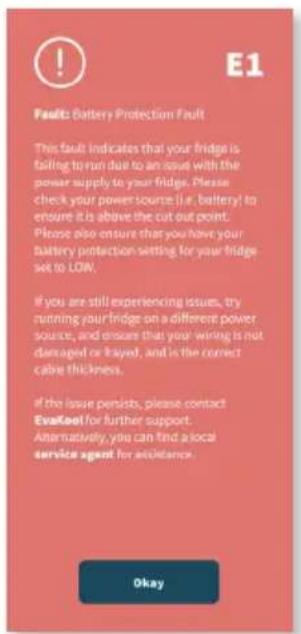
| E1 | Low VoltagePlease check the source voltage to ensure it is above the cut out. Try lowering the voltage cut out setting to LOW (refer to page 8).The vehicle cabling may be inadequate/unsuitable, please refer to cable specifications table for correct cable thickness (page 5).Try on a different power source. |
| E2 | Fan IssueFan is drawing too many Amps (Over 1 Amp).- Contact EvaKool |
| E3 | Compressor Start IssuesUnplug for 10 minutes.Try on a different power source.Possible compressor module fault.- Contact EvaKool |
| E4 | The Compressor Speed is Too LowUnplug for 10 minutes.Move unit to a lower ambient temperature.Clean vents / ensure clear air flow over compressor.Reduce product load inside unit. |
| E5 | Ambient Temperature Too HighMove unit to a lower ambient temperature.Clean vents / ensure clear air flow.Fan fault.- Contact EvaKool |
| E6 | Thermistor is Unplugged- Contact EvaKoolThermistor is Short Circuited- Contact EvaKool |
8. Troubleshooting
The appliance is not turning on
- Check the power supply.
- Check whether the plug and the socket have a good connection.
- If you have purchased an additional 12V adaptor with a cigarette end, check whether the fuse requires replacing. This is located inside the cigarette end of the 12V adaptor. Follow the ‘Replacing the fuse plug’ section at the bottom of page 13 if you require a new fuse.
- Check whether the appliance has been turned on (refer to page 7).
- Check the circuit breaker, this is located to the left of the motor cover. If the circuit breaker button has popped out, press it back in.
The food inside is frozen
- The set temperature is too low.
Bad performance in refrigeration
- The temperature setting is inappropriate.
• The lid is unlocked/or open.
• The lid seal is broken. - Problems arising from poor ventilation.
• There is too much food inside the refrigerator. - There is too much warm product inside the refrigerator.
- There is a heat source near the unit.
Hear the sound of water from inside the unit
- This is normal, due to the flow of the refrigerant.
Unusual noise when refrigerator is working
- The refrigerator is not placed on a level surface.
- Some part has come loose inside the refrigeration compartment (see a service agent).
Replacing the fuse plug (12/24V)
NOTE: An Anderson to cigarette adaptor is not included with this product and can be purchased separately via our website.
- You can purchase a fuse from any automotive or electrical retailer near you. The required replacement part is a 15 Amp glass fuse.
- Pull off the adaptor sleeve on the plug.
- Unscrew the screw from the upper half of the housing.
- Carefully raise the upper half of the housing from the lower half.
• Take out the contact pin. - Replace the defective fuse with a new one that has the same rating (15A, 250V).
- Re-assemble the plug in the reverse order.
Replacing the light
- If you require a new LED light please contact Evakool on 1300 385 665.
- The LED light is located internally on the outer left and right hand sides.
- Disconnect the power supply.
- Carefully pry out the plastic light cover with a pointed and flat tool.
- Unscrew the LED mounting screws.
- Pull out the LED.
- Replace them with a new LED.
- Fit the screws in with a screwdriver.
- Press the transparent part of the lamp back into the housing.
- Connect the power supply to the fridge.
If none of the above solves your issue please contact Evakool on 1300 385 665 or warranty@evakool.com.au for details of your closest Evakool service centre.
9. Preventative Maintenance & Care: Metal & Injection Moulded Products
To ensure a long life and reliable operation of your metal and injection moulded fridge/freezer we recommend following our preventative maintenance and care guide.
Cabinet Care
- The cabinet should be cleaned after every use by wiping both the interior and exterior with a damp cloth, using a mild non-abrasive detergent, and dry thoroughly. The painted metal surfaces can be polished with a car polish and a soft cloth.
*To protect the cabinet from the harsh conditions a protective cover can be purchased from EvaKool's online store (http://www.evakool.com.au/) or selected retail outlets. - Do not use scourers, harsh cleaning products, solvents, or oil as this will degrade the plastic and can cause damage to painted surfaces.
- Do not leave the cabinet in direct sunlight as this may cause discolouration in the plastic and painted surfaces. Please note: plastic components in all EvaKool fridge/freezers are UV stabilised.
Defrosting
• After use, defrost ice off evaporator; switch off unit and disconnect from power source. Leave the lids open to naturally melt the ice. Once the ice has melted, ensure the unit is completely dry by draining any residue and wiping down with a towel.
• Always make sure the cabinet is completely dry and the lid left ajar when put in storage. This will ensure no corrosion, mold or odor will form inside the cabinet.
- Do not store electrical devices such as the 12 volt adaptor inside the refrigerator.
- Do not use a sharp object to remove ice. If damage is caused by a sharp object than the warranty of the unit will become void.
Refrigerator Maintenance
- As your EvaKool fridge is a portable appliance it is subjected to a variety of different operating conditions. Every 12 months of use, a general inspection and maintenance should be carried out. We recommend the inspection to be carried out by an approved EvaKool agent. Our service agents can be found via our website https://www.evakool.com.au/stores?type=2.
Marine Use
- We do not recommend the use of our fridges in a marine environment, as salt can cause corrosion in electronics and metal components. If unit failure is found to be caused by corrosion, warranty will be void.
10. App Instructions
The following instructions will assist you with downloading and using the EvaKool Down Under Series II App. This app is suitable for Down Under Series II 95L, 80L & 65L only. Please note that the app is a bonus feature and is not needed for the fridge to function.
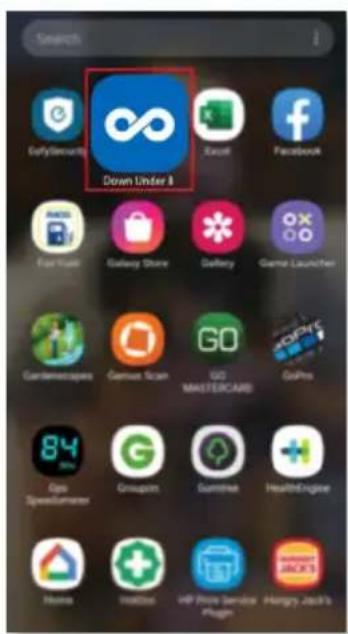
Step 1: Download the app from the Apple App Store or the Google Play Store. Once downloaded, enter the app by clicking its icon on the home screen.

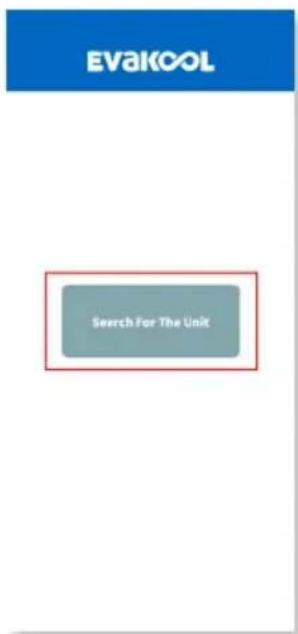
Step 2: To connect to the fridge press the 'Search for the unit' button. While the app is searching, you will stay on the 'Searching' page.

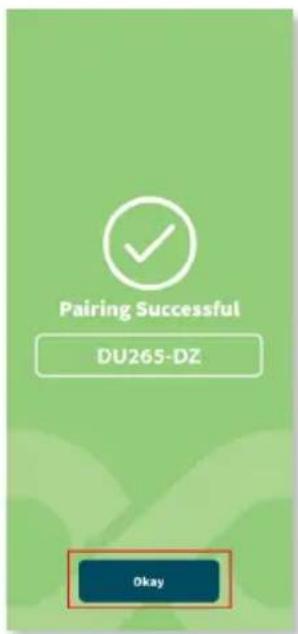
Step 3: Once the app has found the fridge, click 'Connect' to connect to the fridge. Once you have successfully connected, you will hear an audible beep from the fridge, the bluetooth light on the fridge will turn on, and the app will say 'Pairing Successful'. When you are ready to proceed click 'Okay'.

Step 4: Under 'My Units', press the button to enter the fridge settings of the selected fridge. You will now see the setting page which will display all the current fridge settings.


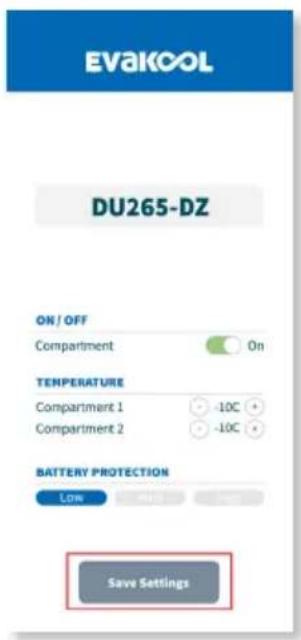
Step 5: To edit the fridge settings press 'Edit Settings'. There are three fridge settings that you can changed; On/Off, Temperature & Battery Protection Mode. Once you have chosen the desired settings press 'Save Settings'.

Step 6: If you experience a fault code, simply press the red button next to 'Fault Codes'. You'll be taken to a page that will indicate what the fault is and how to proceed.

Step 7: If you are using more than one Down Under Series II fridge and you are currently in the settings for Fridge 1 but want to change the settings of Fridge 2, simply exit and restart the app. This will take you back to the home screen, where you can select which fridge you want to connect to.
Two users cannot connect at the same time. Please disconnect app if wanting to use app on a different device.

- Product Data
| SPECIFICATIONS | |||
| Model No. | DU265-DZ DU280-DZ DU295-DZ | ||
| Basic Data | |||
| Ambient Temperature Rating 43°C | |||
| Temperature Range +10°C to -18°C | |||
| Gross Capacity 65 80 95 | |||
| Power Supply DC 12/24V | |||
| Insulation Thickness 50mm | |||
| Refrigerating System | |||
| Compressor | SECOP PCB 2.5 | ||
| Refrigerant Type | R134a | ||
| Refrigerant Charge 55g 60g 70g | |||
| Packing Information | |||
| Net Weight 32kg 35kg 35kg | |||
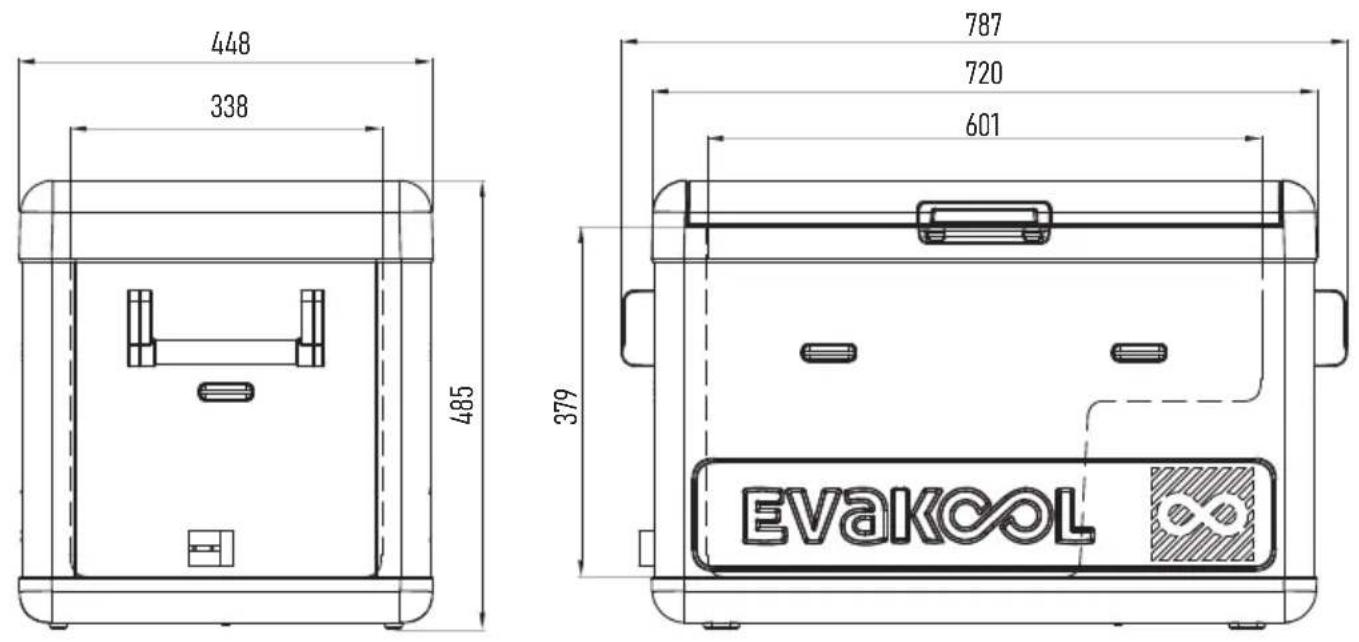
| Product Dimension (LxWxH) | 787x448x485mm | 967x530x415mm | 967x530x470mm |
12. Down Under Series II Accessories
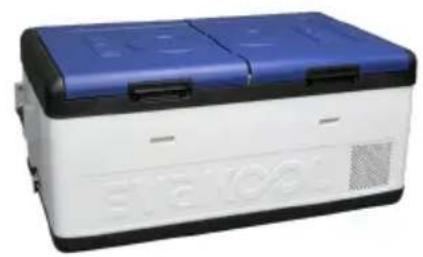
Choose your lid colour:
natural_image
Exterior view of a white and blue electronic device casing (no visible text or symbols)
natural_image
Exterior view of a white and black portable electronic device with ventilation slots (no visible text or symbols)
natural_image
Exterior view of a white and gray electronic device with a lid (no visible text or symbols)EvaKool Blue Midnight Black Phantom Grey
Accessories:

natural_image
Blue and white product box with 'TOYOTA' branding, no visible text or symbols on the main bodyDown Under Series II Insulated Protective Cover

natural_image
Exterior view of a black rectangular electronic device labeled 'EVAKOOL' (no other text or symbols visible)Large Heavy Duty Fridge Slide to suit 80L & 95L
Small Heavy Duty Fridge Slide to suit 65L

natural_image
Three blue electric water heaters with black lids, no visible text or symbols on the devices themselves.Infinity Drinkware Range Water Bottle, Tumbler, Can Cooler
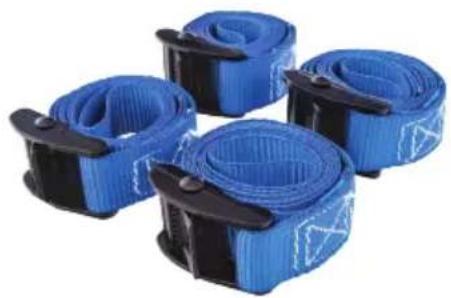
natural_image
Four blue and black striped cable or strap components arranged in a row (no text or symbols visible)EvaPower Heavy Duty Tie Down Straps

natural_image
Close-up of a black battery with red wires connected to two white connectors (no visible text or symbols)EvaPower Watt Meter

Shop via our website by scanning the QR code or by visiting www.evakool.com.au
13. Product Drawings
DU265
DU280

DU295

14. Warranty Statement/Terms & Conditions
Nexberg Pty Ltd trading as EvaKool undertakes to the original purchaser that this product is sold free of defect in materials and/or workmanship under normal use for a period of 3 years. Subject to the following:
- The warranty period commences from the date of purchase by the original purchaser from an authorised EvaKool dealer.
- The Secop compressor in this unit carries a 5 year warranty under normal use.
- EvaKool will honour this warranty on presentation of proof of purchase of the unit to EvaKool or its approved service agent. The service agent will be requested to provide EvaKool with a photocopy of the proof prior to warranty being honoured.
- EvaKool will not be held responsible for any costs incurred in making a warranty claim.
- Please telephone 1300 385 665 for the name of an authorised service agent or refer to list provided on website (https://www.evakool.com.au/stores?type=2). It is the purchaser's responsibility to freight the unit to and from the service agent.
- EvaKool will not be held responsible for any damage or loss suffered or cost incurred whilst fridge is in transit.
- Warranty repairs may only be carried out by an authorised service agent. EvaKool will not reimburse repair claims carried out by unauthorised service agents. Any unauthorised tampering with any part of the unit will automatically void the warranty.
- Service agents may charge a fee for viewing or testing the unit. This is not covered by EvaKool or this warranty and is payable at the service point unless authorised by EvaKool.
- Any EvaKool authorised service agent in Australia will be able to carry out the service of your unit. If a repair needs to be undertaken and is covered in terms of this warranty a warranty authorisation number must be obtained prior to commencement of any work.
- This warranty does not extend to any products acquired for the purposes of re-supply, to be used up or transformed in a production or manufacture process or in repairing other goods.
- This fridge is intended for recreational use only. If used for commercial use, a 12 month warranty applies.
-
To the extent permitted by law, this warranty does not extend to any claim for damages that you or any other person may have for any loss (including without limitation consequential damages or loss of profit) or damage howsoever caused.
• EvaKool will not accept a warranty claim if: -
Modifications have been carried out to the unit without EvaKool's written authority.
- Damage to or failure of the unit has been caused in EvaKool's opinion by incorrect, extreme or unreasonable use.
-
Damage to or failure of the unit has been caused in EvaKool's opinion by misuse, neglect, accident, impact or similar cause. Refer to the preventative maintenance guidelines.
-
EvaKool has total discretion of the variation of the warranty terms.
- Our goods come with guarantees that cannot be excluded under the Australian Consumer Law. You are entitled to a replacement or refund for major failure and for compensation for any other reasonably foreseeable loss or damage. You are also entitled to have the goods repaired or replaced if the goods fail to be of acceptable quality and the failure does not amount to a major failure.
- The above warranty conditions are in addition to any other rights and/or remedies as per the applicable law.
- Failure to follow the guidelines/recommendations in this manual may void the warranty.
• This warranty cannot be varied by others.
Please retain your receipt or proof of purchase for warranty purposes. You can register your warranty online at www.evakool.com.au under contact us and register product warranty.
Evakcol®
CHILLED FOR GOOD TIMES
For your nearest stockist contact Evakool
T: 1300 385 665 (1300 EVKOOL)
E: sales@evakool.com
evakool.com.au
For Service and Warranty support contact Evakool
T: 1300 385 665 (EVKOOL)
E: warranty@evakool.com


- Please read operating manual carefully before using your unit.
- Please keep manual in a safe place.
- If lost you can find a digital copy at Evakool.com.au or contact Evakool on 1300 385 665 (1300 EVKOOL).
- Contents
- What's in the Box:
- Key Product Features
- Safety Instructions
- Notes On Using The Product
- Operation
- LED Control Panel
- Display Panel Definitions
- Display Panel Settings
- To turn on/off the refrigerator:
- Setting the temperature:
- Did you know?
- Setting the Max & Eco Mode:
- Setting the Battery Protection Mode:
- Turning one compartment on/off:
- Refrigerator Setting Recommendations
- Temperature Settings
- Down Under II 65L - Single or Dual Zone Settings
- Single Zone operation:
- Dual Zone operation:
- Max or Eco Mode Settings
- Battery Protection Mode Settings
- Helpful Hints
- Lid Configuration
- Error Codes
- Troubleshooting
- The appliance is not turning on
- The food inside is frozen
- Bad performance in refrigeration
- Hear the sound of water from inside the unit
- Unusual noise when refrigerator is working
- Replacing the fuse plug (12/24V)
- Replacing the light
- Preventative Maintenance & Care: Metal & Injection Moulded Products
- Cabinet Care
- Defrosting
- Refrigerator Maintenance
- Marine Use
- App Instructions
- Down Under Series II Accessories
- Product Drawings
- Warranty Statement/Terms & Conditions
- Evakcol®
- CHILLED FOR GOOD TIMES
Brand : Evakool
Model : DU265-DZ
Category : Cooler