Emko

Trans-AUTO - Generator Emko - Free user manual and instructions

Find the device manual for free Trans-AUTO Emko in PDF.

📄 77 pages English EN Download 💬 AI Question 10 questions ⚙️ Specs
Notice Emko Trans-AUTO - page 1
Pick your language and provide your email: we'll send you a specifically translated version.
Product Type Generator
Brand Emko
Model Trans-AUTO
Power Output (Rated) 3.5 kW
Peak Power 4.0 kW
Fuel Type Petrol (Gasoline)
Engine Type 4-Stroke, Single Cylinder
Engine Displacement 208 cc
Starting System Recoil Start
Fuel Tank Capacity 15 Liters
Run Time (50% Load) 8 Hours
Output Voltage 230 V AC
Output Frequency 50 Hz
Socket Dimensions 1x 16A, 2x 10A
Noise Level (@7m) 72 dB(A)
Dimensions (L x W x H) 600 x 450 x 450 mm
Net Weight 42 kg
Wheel Kit Included
Maintenance Check oil every 20 hours; change oil every 100 hours
Safety Features Overload protection, low oil shutdown

Frequently Asked Questions - Trans-AUTO Emko

What type of oil should I use for my Emko Trans-AUTO generator?
Use SAE 10W-30 for general use. In high temperatures, SAE 30 is recommended. Always check the oil level before starting.
How often should I change the engine oil?
Change the oil after the first 20 hours of operation, then every 100 hours or annually. Use fresh, high-quality oil.
Can I run the generator in the rain?
No, never operate the generator in rain or wet conditions to avoid electrocution. Keep it in a dry, well-ventilated area.
What is the break-in period for a new generator?
For the first 20 hours, do not exceed 50% of the rated load. This ensures proper engine break-in and longevity.
How do I start the Trans-AUTO generator?
Turn the fuel valve to ON, close the choke, pull the recoil starter gently until resistance, then pull firmly. Once started, open the choke gradually.
What is the recommended fuel type?
Use unleaded petrol with an octane rating of 87 or higher. Do not use ethanol blends above 10%.
How do I clean the air filter?
Remove the air filter cover, take out the foam filter, wash with soapy water, rinse, dry, and lightly oil before reinstalling. Replace if damaged.
Why does the generator shut down suddenly?
Possible causes: low oil level (triggers low oil shutdown), overload, or faulty spark plug. Check oil, reduce load, or inspect spark plug.
Can I connect the generator directly to my house wiring?
No, use a transfer switch installed by a qualified electrician. Direct connection can cause backfeeding and endanger linemen.
How do I store the generator for long periods?
Drain the fuel tank and carburetor, change the oil, clean the unit, and store in a dry, protected place. Follow storage procedure in manual.

User questions about Trans-AUTO Emko

0 question about this device. Answer the ones you know or ask your own.

Ask a new question about this device

The email remains private: it is only used to notify you if someone responds to your question.

No questions yet. Be the first to ask one.

Download the instructions for your Generator in PDF format for free! Find your manual Trans-AUTO - Emko and take your electronic device back in hand. On this page are published all the documents necessary for the use of your device. Trans-AUTO by Emko.

USER MANUAL Trans-AUTO Emko

text_image Trans AUTO EMKO ! LOG ▲ ✓ ▼ EKC PROG ON LOAD ← → G ENGINE RUNNING RESET AUTO TEST MAN I O

CE EAC

TRANS-AUTO

AUTOMATIC START UNIT

FOR GAS/DIESEL/GASOLINE GENERATORS

WITH J1939 ECUs

User Manual

CONTENTS

1. Introduction Page 4

1.1 General Specifications.... Page 4
1.2 Warranty.... Page 4
1.3 Maintenance Page 4
1.4 Order Information...... Page 4

2.Installation.... Page 5

2.1 Unit Configuration Page 5
2.2 Panel Mounting.... Page 5

Figure 2.1 Front View...... Page 5

Figure 2.2 Panel Cut-Out.... Page 5

2.3 Electrical Connection.... Page 6

3. Definition Of Front Panel And Accessing To The Parameters...... Page 7

3.1 Front Panel Description.... Page 7
3.2 Accessing To The Operator Parameters...... Page 16
3.3 Accessing To The Technician Parameters...... Page 17
3.4 Changing And Saving Parameter Values Page 23

4.Parameters Page 24

4.1 Operator Parameters...... Page 24

4.1.1 Generator Page 24

4.2 Technician Parameters.... Page 25

4.2.1 System Page 25
4.2.2 Generator Page 30
4.2.3 Engine Page 33
4.2.4 Inputs Page 45
4.2.5 Outputs.... Page 61
4.2.6 Timers.... Page 70
4.2.7 Expansion Modules.... Page 71
4.2.8 User Adjustment.... Page 72

5.Specifications Page 76

6. Other Informations...... Page 77

Manufacturer's Name : EMKO ELEKTRONIK A.S.

Manufacturer's Address : Bursa Organize Sanayi Bölgesi ,

This declaration is issued under the sole responsibility of the manufacturer.

Product Name : Unit

Automatic Start

Type Number : TRANS-AUTO

Product Category : Electrical equipment for measurement, control and laboratory use

The product(s) that are stated above are fully in conformity with the essential requirements of Council Directives:

2014 / 35 / EU The Low Voltage Directive

2014 / 30 / EU The Electromagnetic Compatibility Directive

2011 / 65 / EU The Restriction of Hazardous Substances (RoHS 2) Directive

2015 / 863 / EU Amendment to Annex II of Directive 2011/65/EU

2017 / 2102 / EU Amendment to Annex II of Directive 2011/65/EU

This declaration is based on the full compliance of the products with the following European standards:

EN 61010-1:2010 Safety Requirements for Electrical Equipment for Measurement, Control and Laboratory Use

EN 61326-1:2013 Electrical Equipment for Measurement, Control and Laboratory Use - EMC Requirements

EN 60947-6-1:2005/A1:2014 Low - Voltage Switchgear and Controlgear - Part 6-1: Multiple Function Equipment - Transfer Switching Equipment

EN 50581:2012 Technical Documentation for The Assessment of Electrical and Electronic Products With Respect to The Restriction of Hazardous Substances

When and Where Issued Authorized Signature

22 ^No October 2021 Name : Arzu ATAN

BURSA-TÜRKİYE

Position

: Quality Manager

1. Introduction

1.1 General Specifications

The unit provides automatic start and stop the engine and protect the generator system. Both automatic and manual control is possible. A test mode is also available which allows the generator to be run for checking the generator system.

The unit has Dual Working feature. In the event of a remote start, group with high priority starts and takes the load. If both groups has no priority, the group with less working hour will start and take the load. To use Dual Working feature Dual Set expansion module must be used.

The unit calculates engine RPM from Magnetic Pickup sensor input (MPU) and/or generator voltage signal.

The unit monitors J1939 ECU messages and provides remote start/stop control via J1939 protocol (supported ECUs: Volvo EMS2, Volvo EDC4, Perkins, Scania S6, MAN MFR and standard messages).

The unit is extensively programmable through the front panel, with password protection on two levels. Operational parameters can also be monitored and controlled from a PC via a built-in USB communication port.

In the event that the engine fails to start on the first attempt, the attempt will be repeated a programmed number of times or until successful.

The unit monitors generator operation and gives warning of any faults that are detected. If a fault is detected, the unit shuts down the engine and shows the failure message on the LCD display and activates the internal sounder.

The unit has Remote Start input for remote control of the engine.

The configurable input-3 can be used as the water level sensing input.

The configurable input-7 can be used as the cabin temperature analog input.

1.2 Warranty

EMKO Elektronik warrants that the equipment delivered is free from defects in material and workmanship. This warranty is provided for a period of two years. The warranty period starts from the delivery date. This warranty is in force if duty and responsibilities which are determined in warranty document and instruction manual performs by the customer completely.

1.3 Maintenance

Repairs should only be performed by trained and specialized personnel. Cut power to the device before accessing internal parts.

Do not clean the case with hydrocarbon-based solvents (Petrol, Trichlorethylene etc.). Use of these solvents can reduce the mechanical reliability of the device. Use a cloth dampened in ethyl alcohol or water to clean the external plastic case.

1.4 Order Information

Trans-AUTO: Automatic start unit with USB communication

Trans-AUTO.RS485: Automatic start unit with USB and RS-485 communication

2. Installation

Emko Trans-AUTO - Installation - 1

Before beginning installation of this product, please read the instruction manual and warnings below carefully.

A visual inspection of this product for possible damage occurred during shipment is recommended before installation. It is your responsibility to ensure that qualified mechanical and electrical technicians install this product.

If there is danger of serious accident resulting from a failure or defect in this unit, power off the system and separate the electrical connection of the device from the system.

Keep the power off until all of the wiring is completed so that electric shock and trouble with the unit can be prevented.

2.1 Unit Configuration

The unit can be programmed using the buttons and LCD display on the front panel or PC Software.

2.2 Panel Mounting

The unit is designed for panel mounting. Fixing is by two screw fixings.

1- Insert the unit in the panel cut-out from the front.
2- Insert the fixings in the slotted at the corners of the unit and tighten the fixing screws to secure the unit against the panel.

Emko Trans-AUTO - Panel Mounting - 1

During the equipment is putted in hole on the metal panel while mechanical installation some metal burrs can cause injury on hands, you must be careful.
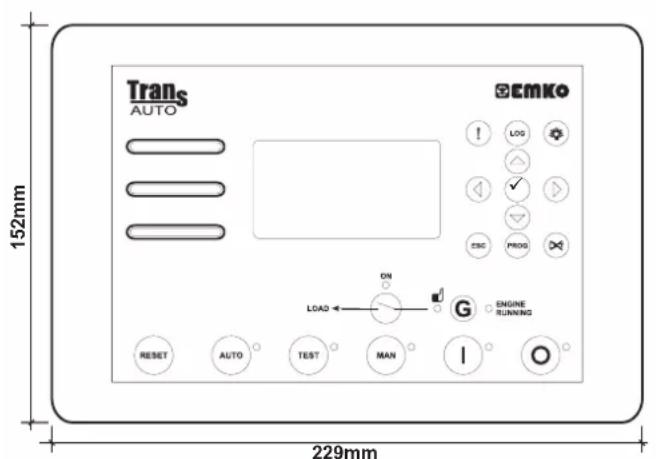
Emko Trans-AUTO - Panel Mounting - 2

text_image Trans AUTO 152mm 229mm ECMKO ! LOG ▲ ✓ ▽ ESC PROG ON LOAD ← → G ENGINE RUNNING RESET AUTO TEST MAN I O
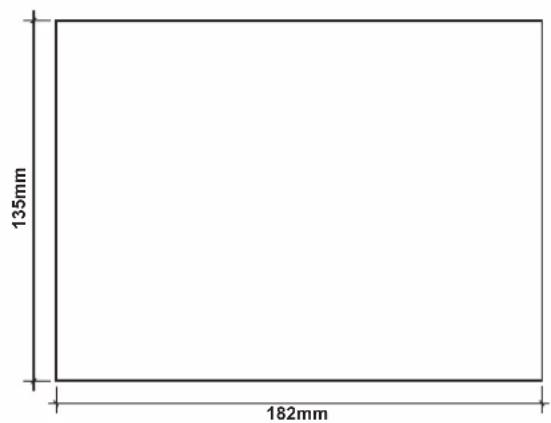
Emko Trans-AUTO - Panel Mounting - 3

text_image 135mm 182mm

Figure 2.1 Front View Figure 2.2 Panel Cut-Out

2.3 Electrical Connection

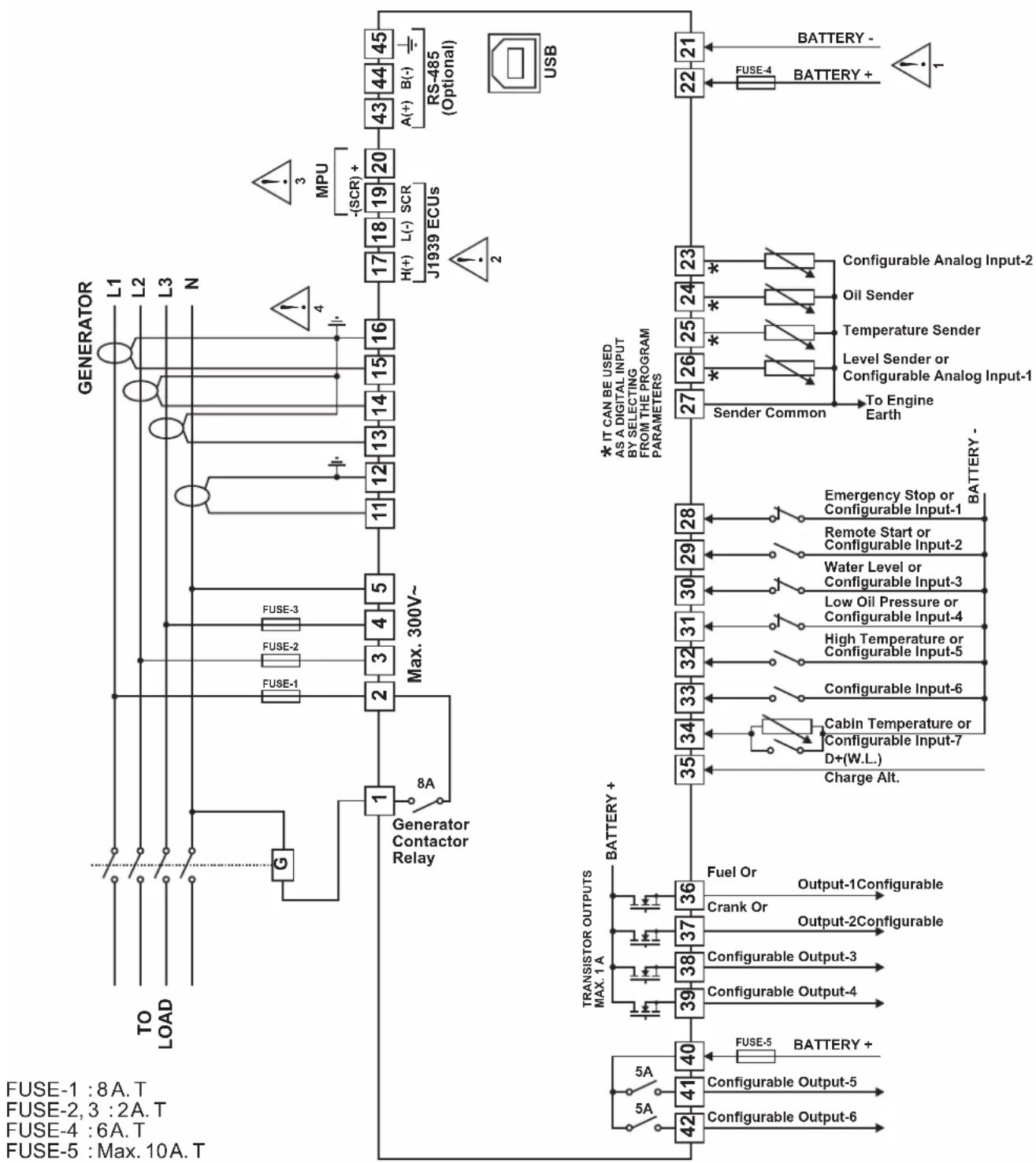
TRANS-AUTO three phase connections schematic
Emko Trans-AUTO - Electrical Connection - 1

flowchart
graph TD
    A["GENERATOR"] -->|L1 L2 L3 N| B["Generator"]
    B --> C["Max. 300V~"]
    C --> D["Generator Contactor Relay"]
    D --> E["Transistor Outputs MAX. 1A"]
    E --> F["BATTERY +"]
    F --> G["FUSE-1:8A.T"]
    F --> H["FUSE-2:3:2A.T"]
    F --> I["FUSE-4:6A.T"]
    F --> J["FUSE-5:Max. 10A.T"]

    subgraph USB
        K["RS-485 (Optional)"]
        L["MPU -SCR"] --> M["17 H(+) L(-) SCR"]
        M --> N["J1939 ECUs"]
        O["22"] --> P["BATTERY -"]
        Q["21"] --> R["BATTERY +"]
    end

    subgraph MAX. 300V~
        S["1"] --> T["8A Generator Contactor Relay"]
        U["FUSE-3"] --> V["FUSE-2"]
        W["FUSE-1"] --> X["FUSE-1"]
        Y["3"] --> Z["4"]
        AA["5"] --> AB["3"]
        AC["1"] --> AD["2"]
    end

    subgraph BATTERY +
        AE["28"] --> AF["BATTERY -"]
        AG["29"] --> AH["BATTERY -"]
        AI["30"] --> AJ["BATTERY -"]
        AK["31"] --> AL["BATTERY -"]
        AM["32"] --> AN["BATTERY -"]
        AO["33"] --> AP["BATTERY -"]
        AQ["34"] --> AR["BATTERY -"]
        AS["35"] --> AT["BATTERY -"]
        AU["Fuel Or Output-1Configurable"] --> AV["Crank Or Output-2Configurable"]
        AW["36"] --> AX["37"] --> AY["38"] --> AZ["39"] --> BA["40"] --> BB["FUSE-5 BATTERY +"]
        BC["41"] --> BD["BATTERY +"]
        BE["42"] --> BF["BATTERY +"]

Emko Trans-AUTO - Electrical Connection - 2

1- Connect the unit as shown in the appropriate diagram. Be sure to connect the battery supply the right way round. External fuse is recommended. Stranded cable cross section: 1,5mm^2 , Solid cable cross section: 2,5mm^2 , The stripping length is 7 to 9 mm. Supply cables must comply with the requirements of IEC 60277 or IEC 60245.
2- The CAN interface requires that a 120 Ohms terminator is fitted to each end of the communications link. This termination resistor is fitted internally into the unit. So it is not required externally. Screened cable must be used for connecting the CAN, ensuring that the screen is grounded at one end ONLY.
3- Screened cable must be used for connecting the Magnetic Pickup, ensuring that the screen is grounded at one end ONLY.
4- Current transformers secondary should be grounded. The CT of 5VA is recommended. The unit has a burden of 0.5VA on the CT.

3. Front Panel Description And Accessing To The Parameters

3.1 Front Panel Description
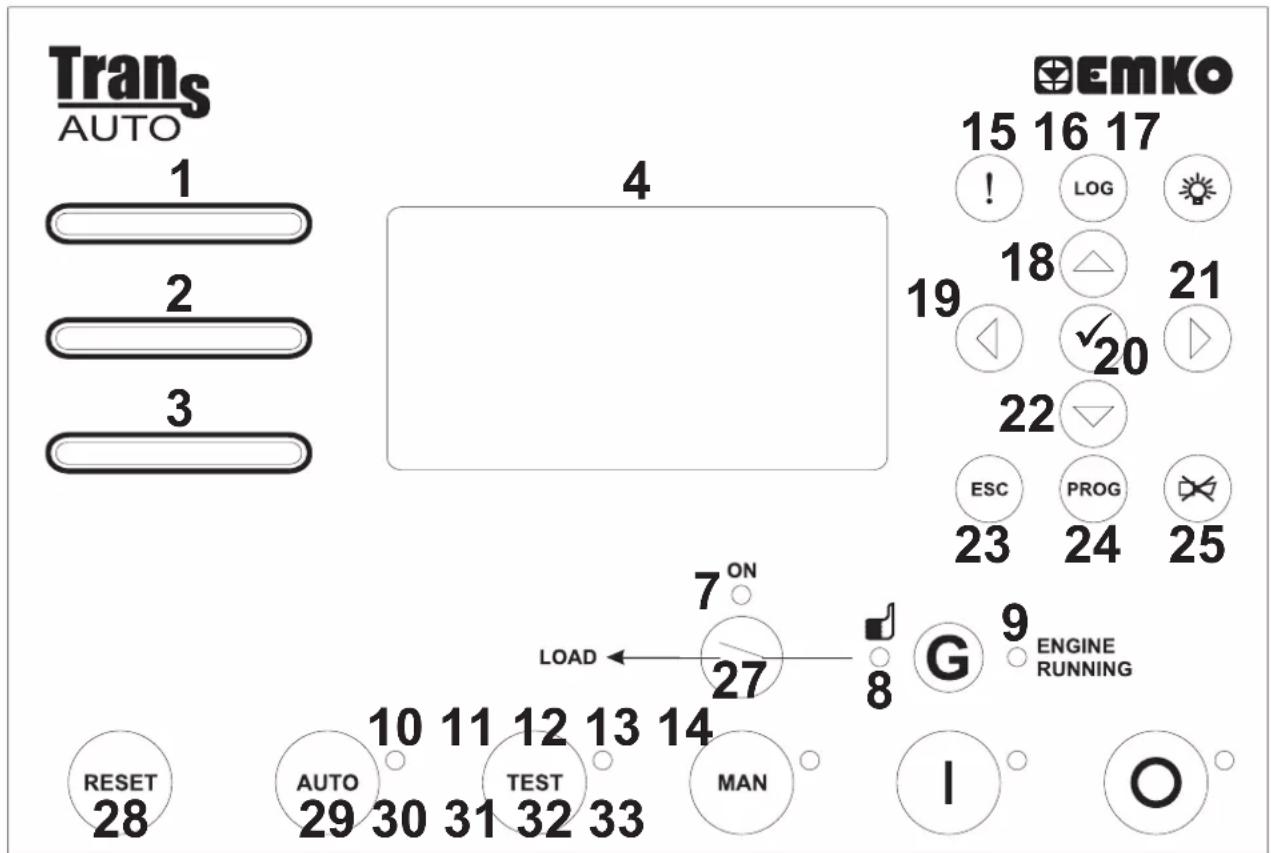
Emko Trans-AUTO - Front Panel Description - 1

text_image Trans AUTO 1 2 3 4 Emko 15 16 17 ! LOG 19 18 △ 21 ↓ ✓ 20 22 ESC PROG 23 24 25 7 ON LOAD ← 27 8 G 9 ENGINE RUNNING RESET 28 AUTO 29 30 31 32 33 MAN I O
NumberComment
1This LED indicates that a "Shutdown" alarm was detected.
2This LED indicates that a "Warning" alarm was detected
3This LED indicates that a "Maintenance" alarm was detected
4This LCD display is used for displaying the electrical measurements during normal operation, and editing/inspecting programming parameters in program mode.
7Th LED shows that the load is supplied from the generator.is
8This LED indicates that Generator's stage and time required is ready to take over the load.
9This LED indicates that the engine has started and is running.
10This LED shows that the unit is in the AUTO mode.
11This LED shows that the unit is in the TEST mode.
12This LED shows that the unit is in the MANUAL mode.
13In the MAN, AUTO and TEST modes, this LED indicates that the engine is starting up or is running.
14This LED shows that the unit is in the STOP mode.
15Warning and Alarm messages shortcut button.
16Event Logs shortcut button.
17The LAMPTEST button illuminates all LED indicators.
18This button is used for showing previous parameters on the currently selected page in normal operation. In Programming mode, it operates as an Up button (changing cursor position) or Increment button (increase parameter value).
19This button is used for showing previous page in normal operation. In Programming mode, it operates as an Left button (changing cursor position).
20This button is used for entering parameter edit section and saving parameter value in programming mode.
21This button is used for showing next page in normal operation. In Programming mode, it operates as an Right button (changing cursor position).
22This button is used for showing next parameters on the currently selected page in normal operation. In Programming mode, it operates as an Down button (changing cursor position) or Decrement button (decrease parameter value).
23The Escape button is used for exit previous section in programming mode.
24When this button is pressed, the unit goes into its PROGRAMMING Mode.
25This button will silence the alarm horn after a failure has been detected.
27This button opens or closes the gen. contactor, only operative when manual mode is selected
28This button will reset the controller after a failure has been detected.
29TheAUTO button is used for changing operating mode of the unit to theAUTO Mode.
30The TEST button is used for changing operating mode of the unit to the TEST Mode.
31The MAN button is used for changing operating mode of the unit to the MANUALMode.
32The STARTbutton is used for starting the engine when the unit is in the Manual Mode.
33The STOPbutton is used for changing operating mode of the unit to the STOPMode. The generator is stopped.

LCD display Description

Emko Trans-AUTO - LCD display Description - 1

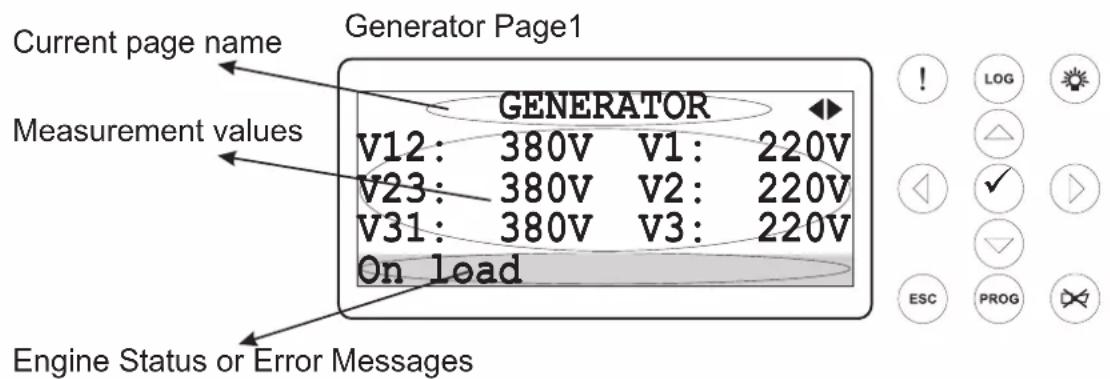
text_image Current page name Generator Page1 Measurement values GENERATOR V12: 380V V1: 220V V23: 380V V2: 220V V31: 380V V3: 220V On load Engine Status or Error Messages

128x64 Dot-matrix LCD display.

Use the buttons to select which Data display page (screen) is to be displayed. Next and Previous When the Alarm (!) shortcut button is pressed, the Warning & Alarm display page is displayed. When the Event log (LOG) shortcut button is pressed, the Event Log display page is displayed.

Data display pages on the LCD display;

Generator Page1:
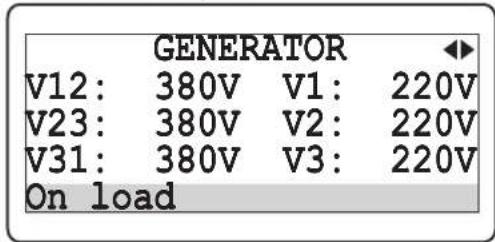
Emko Trans-AUTO - Generator Page1: - 1

text_image GENERATOR V12: 380V V1: 220V V23: 380V V2: 220V V31: 380V V3: 220V On load

V12: Generator voltage L1-L2

V23: Generator voltage L2-L3

V31: Generator voltage L3-L1

V1: Generator voltage L1-N

V2: Generator voltage L2-N

V3: Generator voltage L3-N

Generator Page2:
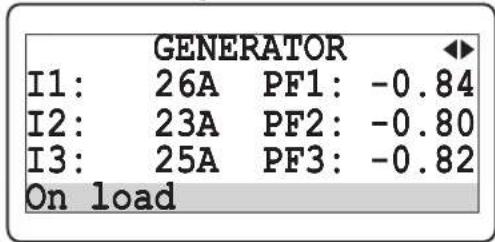
Emko Trans-AUTO - Generator Page2: - 1

text_image GENERATOR I1: 26A PF1: -0.84 I2: 23A PF2: -0.80 I3: 25A PF3: -0.82 On load

I1: Load Current L1

I2: Load Current L2

I3: Load Current L3

PF1: Generator power factor L1

PF2: Generator power factor L2

PF3: Generator power factor L3

Generator Page3:
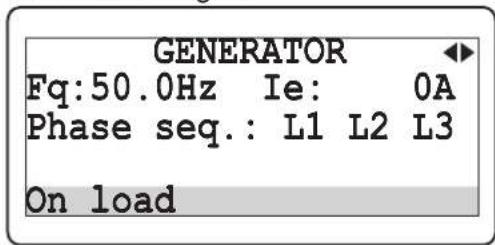
Emko Trans-AUTO - Generator Page3: - 1

text_image GENERATOR Fq:50.0Hz Ie: 0A Phase seq.: L1 L2 L3 On load

Fq: Generator frequency

le: Earth Current

Phase Seq.: Generator phase sequence

Generator Page4:
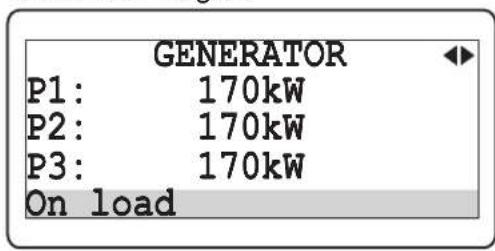
Emko Trans-AUTO - Generator Page4: - 1

text_image GENERATOR P1: 170kW P2: 170kW P3: 170kW On load

P1: Generator active power L1

P2: Generator active power L2

P3: Generator active power L3

Generator Page5:
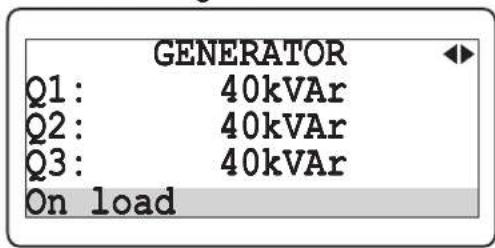
Emko Trans-AUTO - Generator Page5: - 1

text_image GENERATOR Q1: 40kVAr Q2: 40kVAr Q3: 40kVAr On load

Q1: Generator reactive power L1

Q2: Generator reactive power L2

Q3: Generator reactive power L3

Generator Page6:
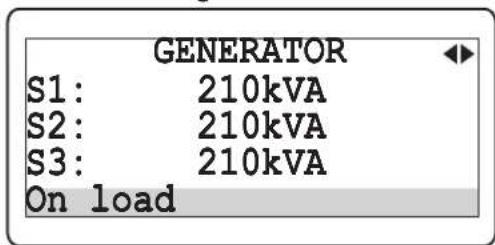
Emko Trans-AUTO - Generator Page6: - 1

text_image GENERATOR S1: 210kVA S2: 210kVA S3: 210kVA On load

S1: Generator apparent power L1

S2: Generator apparent power L2

S3: Generator apparent power L3

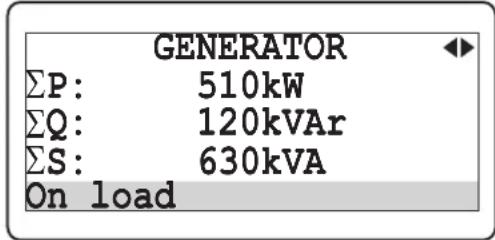
Generator Page7:
Emko Trans-AUTO - Generator Page7: - 1

text_image GENERATOR ΣP: 510kW ΣQ: 120kVAr ΣS: 630kVA On load

ΣP: Generator total active power
ΣQ: Generator total reactive power
ΣS: Generator total apparent power

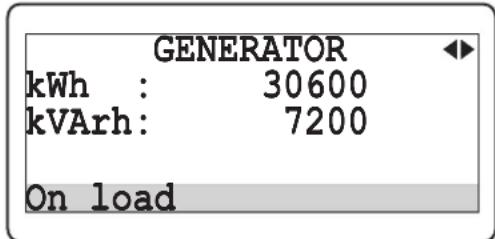
Generator Page8:
Emko Trans-AUTO - Generator Page8: - 1

text_image GENERATOR kWh : 30600 kVArh: 7200 On load

kWh: Generator active energy

KVArh: Generator reactive energy

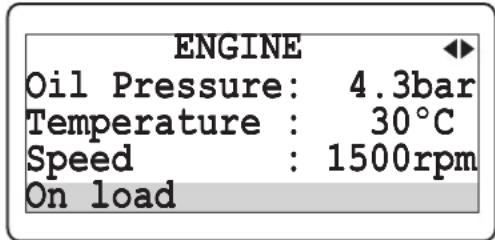
Engine Page1:
Emko Trans-AUTO - Engine Page1: - 1

text_image ENGINE Oil Pressure: 4.3bar Temperature : 30°C Speed : 1500rpm On load

Oil pressure: Oil pressure sender input value

Temperature: Coolant temperature sender input value

Speed: Engine speed

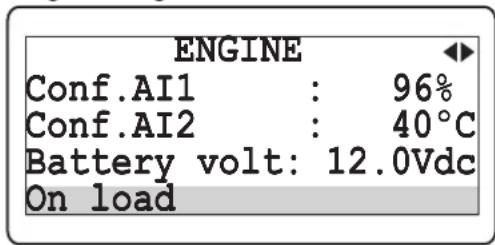
Engine Page2:
Emko Trans-AUTO - Engine Page2: - 1

text_image ENGINE Conf.AI1 : 96% Conf.AI2 : 40°C Battery volt: 12.0Vdc On load

Conf. AI1: Configurable Analog Input-1 value

Conf. AI2: Configurable Analog Input-2 value

Battery volt: Battery supply voltage

Engine Page3:
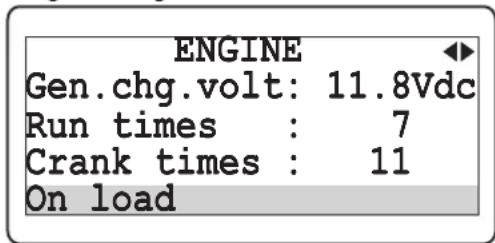
Emko Trans-AUTO - Engine Page3: - 1

text_image ENGINE Gen.chg.volt: 11.8Vdc Run times : 7 Crank times : 11 On load

Gen.chg.volt: Charge generator voltage

Run times: Number of generator runs

Crank times: Number of generator starts

Engine Page4:
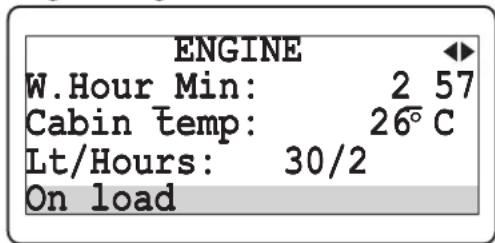
Emko Trans-AUTO - Engine Page4: - 1

text_image ENGINE W.Hour Min: 2 57 Cabin temp: 26°C Lt/Hours: 30/2 On load

W.Hour_Min: Engine running time (Hour and Minute)

Cabin temp: Cabin temperature

Lt/Hours: Fuel consumption

Engine Maintenance Page:

ENGINE MAINTENANCE ◀
Next hours : 5000
Next months: 6
Last date: 15/02/2011
On load 

Next hours: The remaining hour for maintenance Next months: The remaining month for maintenance Last date: The last maintenance date

J1939 Values Page1:

J1939 VALUES
Engine speed: 1500rpm
Oil pressure: 4.0bar
Coolant temp: 27°C
On load 

Engine speed: Engine speed via J1939 Oil pressure: Oil pressure via J1939 Coolant temp: Coolant temperature via J1939

J1939 Values Page2:

J1939 VALUES
Fuel rate: 12.50L/h
Fuel tot.: 176L
Oil level: 97.2%
On load 

Fuel rate: Fuel rate via J1939 Fuel tot.: Fuel total used via J1939 Oil level: Oil level via J1939

J1939 Values Page3:

J1939 VALUES
Coolant level: 87.6%
Load at cur.spd: 25%
Fuel temper.: 13°C
On load 

Coolant level: Coolant level via J1939 Load at cur.spd: Load at current speed via J1939 Fuel temper.: Fuel temperature via J1939

J1939 Values Page4:

J1939 VALUES
Oil temper.: 82.00°C
Act.engine torq: 75%
Boost press.: 2.8bar
On load 

Oil temper.: Oil temperature via J1939 Act.engine torq: Actual engine torque via J1939 Boost press.: Boost pressure via J1939

J1939 Values Page5:

J1939 VALUES
Int.man.temp.: 45°C
Pedal position: 50.0%
W.hour Min: 2_57
On load 

Int.man.temp.: Intake manifold temperature via J1939 Pedal position: Accelerator pedal position via J1939 W.hour_Min: Working hour and minute via J1939

J1939 DM1 (Active) Faults Page:
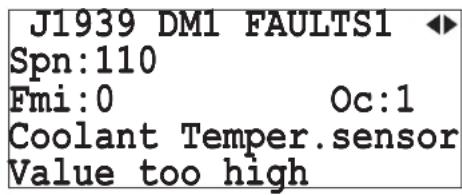
Emko Trans-AUTO - J1939 DM1 (Active) Faults Page: - 1

text_image J1939 DM1 FAULTS1 ◀ Spn:110 Fmi:0 Oc:1 Coolant Temper.sensor Value too high

Spn: Suspect parameter number (e.g. SPN = 110 corresponds to coolant temperature sensor) Fmi: Failure mode identifier (e.g. FMI = 0 means value too high) Oc: Occurrence count (if OC = 0, no alarm is present) The first 10 active alarm messages (Active Diagnostic Trouble Codes - DM1) with SPN, FMI, and OC are displayed). If more than one active fault condition is present, all of them is displayed sequentially by pressing Next and Previous buttons.

Input & Output Status Page:
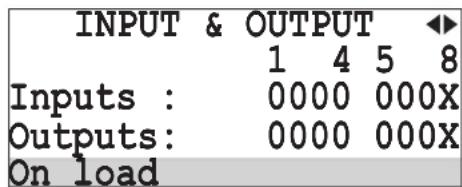
Emko Trans-AUTO - Input & Output Status Page: - 1

text_image INPUT & OUTPUT ◀ 1 4 5 8 Inputs : 0000 000X Outputs: 0000 000X On load

Inputs: Input status information. If an input is active, related digit is displayed as "1" else it is displayed as "0".

1: 203f.4n-1, Conf. in-2, Conf. in-3, Conf. in-4,

5: 607f.8n-5, Conf. in-6, Conf. in-7, Not available.

Outputs: Output status information. If an output is active, related digit is displayed as "1" else it is displayed as "0".

1: 2p8f.4ut-1, Conf. out-2, Conf. out-3, Conf. out-4,

5: 607f. out-5, Conf. out-6, Generator contactor,

8: Not available.

Exp. Input & Output Status Page:
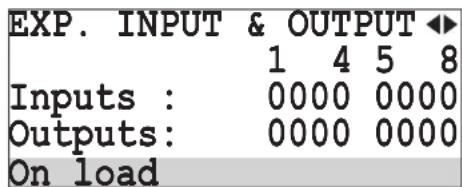
Emko Trans-AUTO - Exp. Input & Output Status Page: - 1

text_image EXP. INPUT & OUTPUT ◀ 1 4 5 8 Inputs : 0000 0000 Outputs: 0000 0000 On load

Inputs: Exp. input status information. If an input is active, related digit is displayed as "1" else it is displayed as "0".

1: Exp: conf. in-1, Exp. conf. in-2, Exp. conf. in-3,

4: 5x6: conf. in-4, Exp. conf. in-5, Exp. conf. in-6,

7: Exp. conf. in-7, Exp. conf. in-8.

Outputs: Exp. output status information. If an output is active, related digit is displayed as "1" else it is displayed as "0".

1: Exp: conf. out-1, Exp. conf. out-2, Exp. conf. out-3,

4: 5x6: conf. out-4, Exp. conf. out-5, Exp. conf. out-6,

7: Exp. conf. out-7, Exp. conf. out-8.

GPRS Page:
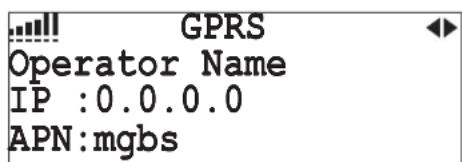
Emko Trans-AUTO - GPRS Page: - 1

text_image GPRS Operator Name IP :0.0.0.0 APN:mgbs

Signal Quality: Signal Quality level indicator

Operator Name: Operator name

IP: Device IP value

APN: Access point name of the operator

GPS Page:
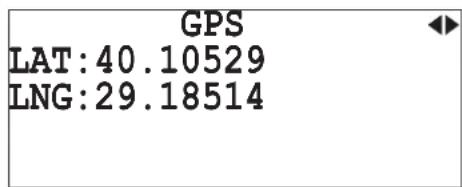
Emko Trans-AUTO - GPS Page: - 1

text_image GPS LAT:40.10529 LNG:29.18514

LAT: Latitude value of device's position

LNG: Longitude value of device's position

Date & Time Page:
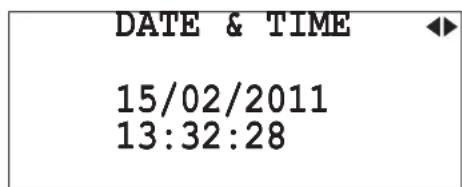
Emko Trans-AUTO - Date & Time Page: - 1

text_image DATE & TIME 15/02/2011 13:32:28

Date: Day, Month, Year.

Time: Hour, minute, second.

GenSet Page: (This page is only available at TRANS-AUTO.TR device)
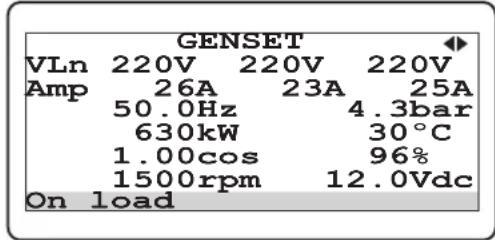
Emko Trans-AUTO - GenSet Page: (This page is only available at TRANS-AUTO.TR device) - 1

text_image GENSET VLn 220V 220V 220V Amp 26A 23A 25A 50.0Hz 4.3bar 630kW 30°C 1.00cos 96% 1500rpm 12.0Vdc On load

VLn: Generator voltage L1-N, L2-N and L3-N

Amp: Generator current L1, L2 and L3

Hz: Generator frequency

bar: Oil pressure sender input value

kW: Generator total active power

°C: Coolant temperature sender input value

cos: Generator power factor average

%: Configurable Analog Input-1 value

rpm: Engine speed

Vdc: Battery supply voltage

Warning & Alarm display pages on the LCD display;

Warning & Alarm Page:
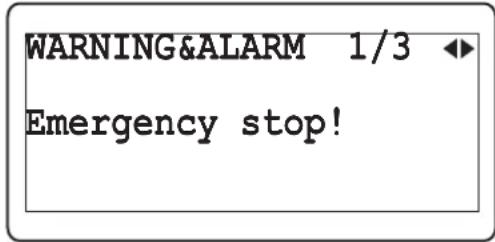
Emko Trans-AUTO - Warning & Alarm Page: - 1

text_image WARNING&ALARM 1/3 Emergency stop!

1/3: The first message of current alarms.

Emergency stop!: This message indicates that an emergency stop alarm has occurred.

Event Log display pages on the LCD display;

Event Log Page1:
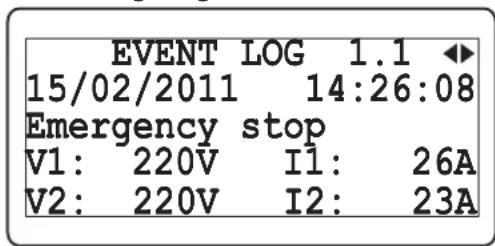
Emko Trans-AUTO - Event Log Page1: - 1

text_image EVENT LOG 1.1 15/02/2011 14:26:08 Emergency stop V1: 220V I1: 26A V2: 220V I2: 23A

1.1: The first page of related event log

Emergency stop: This message indicates that an emergency stop alarm has occurred. (Event history: 15/02/2011 date, 14:26:08 time).

V1: Generator voltage L1-N

I1: Load Current L1

V2: Generator voltage L2-N

I2: Load Current L2

Event Log Page2:
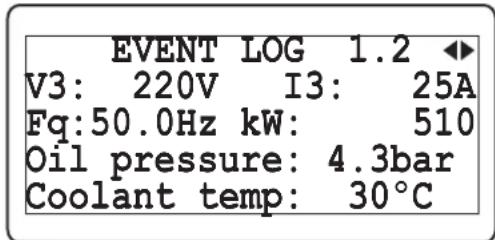
Emko Trans-AUTO - Event Log Page2: - 1

text_image EVENT LOG 1.2 V3: 220V I3: 25A Fq:50.0Hz kW: 510 Oil pressure: 4.3bar Coolant temp: 30°C

1.2: The second page of related event log

V3: Generator voltage L3-N

I3: Load Current L3

Fq: Generator frequency

kW: Generator total active power

Oil oressure: Oil pressure sender input value

Coolant temp: Coolant temperature sender input value

Event Log Page3:
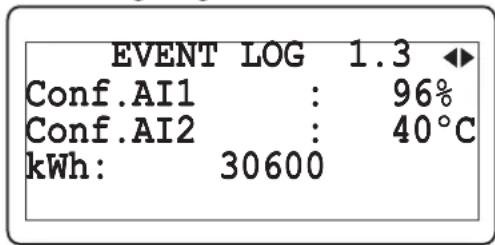
Emko Trans-AUTO - Event Log Page3: - 1

text_image EVENT LOG 1.3 Conf.AI1 : 96% Conf.AI2 : 40°C kWh: 30600

1.3: The last page of related event log

Conf. AI1: Configurable Analog Input-1 value

Conf. AI2: Configurable Analog Input-2 value

kWh: Generator active energy

Events (from 1 to 50) can be displayed sequentially with the Next and Previous buttons.

Example-1: Displaying all pages.Data display
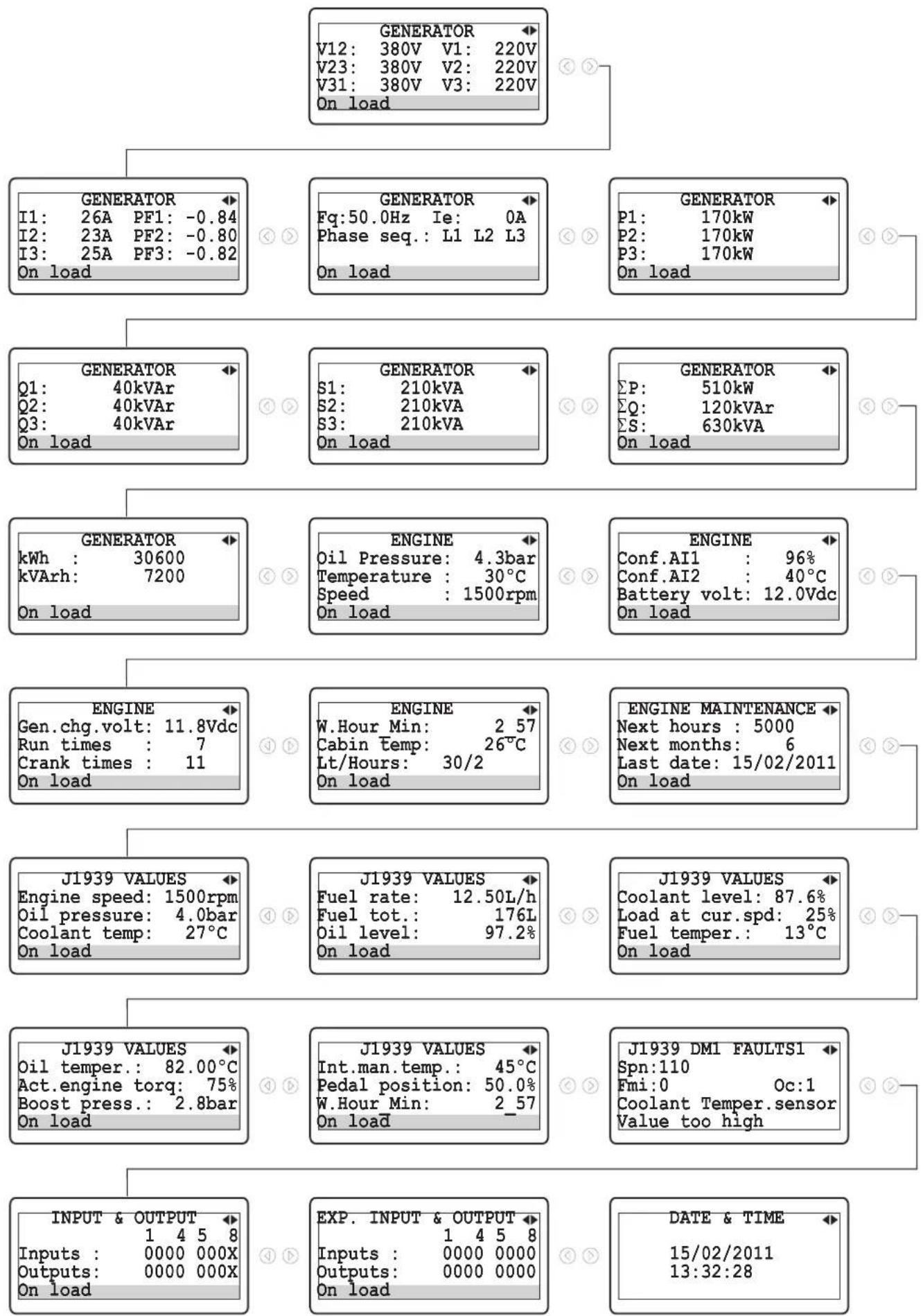
Emko Trans-AUTO - Event Log Page3: - 2

flowchart
graph TD
    A["GENERATOR"] --> B["I1: 26A PF1: -0.84\nI2: 23A PF2: -0.80\nI3: 25A PF3: -0.82\nOn load"]
    A --> C["Fq: 50.0Hz Ie: 0A\nPhase seq.: L1 L2 L3\nOn load"]
    A --> D["P1: 170kW\nP2: 170kW\nP3: 170kW\nOn load"]
    A --> E["GENERATOR"]
    E --> F["Q1: 40kVAr\nQ2: 40kVAr\nQ3: 40kVAr\nOn load"]
    A --> G["GENERATOR"]
    G --> H["kWh : 30600\nkVArh: 7200\nOn load"]
    A --> I["ENGINE"]
    I --> J["Gen.chg.volt: 11.8Vdc\nRun times : 7\nCrank times : 11\nOn load"]
    A --> K["ENGINE"]
    K --> L["W.Hour Min: 2.57\nCabin Temp: 26℃\nLt/Hours: 30/2\nOn load"]
    A --> M["ENGINE MAINTENANCE"]
    M --> N["Next hours : 5000\nNext months: 6\nLast date: 15/02/2011\nOn load"]
    A --> O["J1939 VALUES"]
    O --> P["Engine speed: 1500rpm\nOil pressure: 4.0bar\nCoolant temp: 27℃\nOn load"]
    A --> Q["J1939 VALUES"]
    Q --> R["Fuel rate: 12.50L/h\nFuel tot.: 176L\nOil level: 97.2%\nOn load"]
    A --> S["J1939 VALUES"]
    S --> T["Coolant level: 87.6%\nLoad at cur.spd: 25%\nFuel temper.: 13℃\nOn load"]
    A --> U["J1939 VALUES"]
    U --> V["Oil temper.: 82.00℃\nAct.engine torq: 75%\nBoost press.: 2.8bar\nOn load"]
    A --> W["J1939 VALUES"]
    W --> X["Int.man.temp.: 45℃\nPedal position: 50.0%\nW.Hour Min: 2.57\nOn load"]
    A --> Y["J1939 DM1 FAULTS1"]
    Y --> Z["Spn:110\nFmi:0 Oc:1\nCoolant Temper.sensor\Value too high"]
    A --> AA["INPUT & OUTPUT"]
    AA --> AB["Inputs : 0000 000X\nOutputs: 0000 000X\nOn load"]
    A --> AC["EXP. INPUT & OUTPUT"]
    AC --> AD["Inputs : 0000 0000\nOutputs: 0000 0000\nOn load"]
    A --> AE["DATE & TIME"]

Example-2: Displaying all Warning&Alarm pagesdisplay
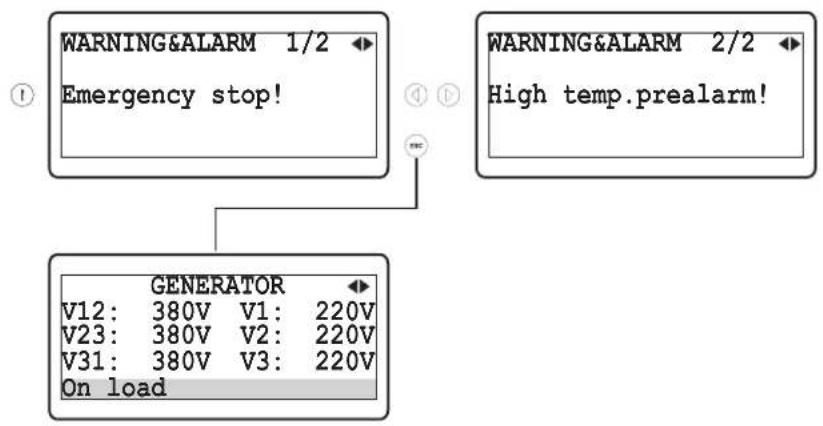
Emko Trans-AUTO - Event Log Page3: - 3

flowchart
graph TD
    A["WARNING&ALARM 1/2 Emergency stop!"] --> C["GENERATOR"]
    B["WARNING&ALARM 2/2 High temp.prealarm!"] --> C
    C --> D["V12: 380V V1: 220V"]
    C --> E["V23: 380V V2: 220V"]
    C --> F["V31: 380V V3: 220V"]
    C --> G["On load"]

Example-3: Displaying all Event Log pagesdisplay
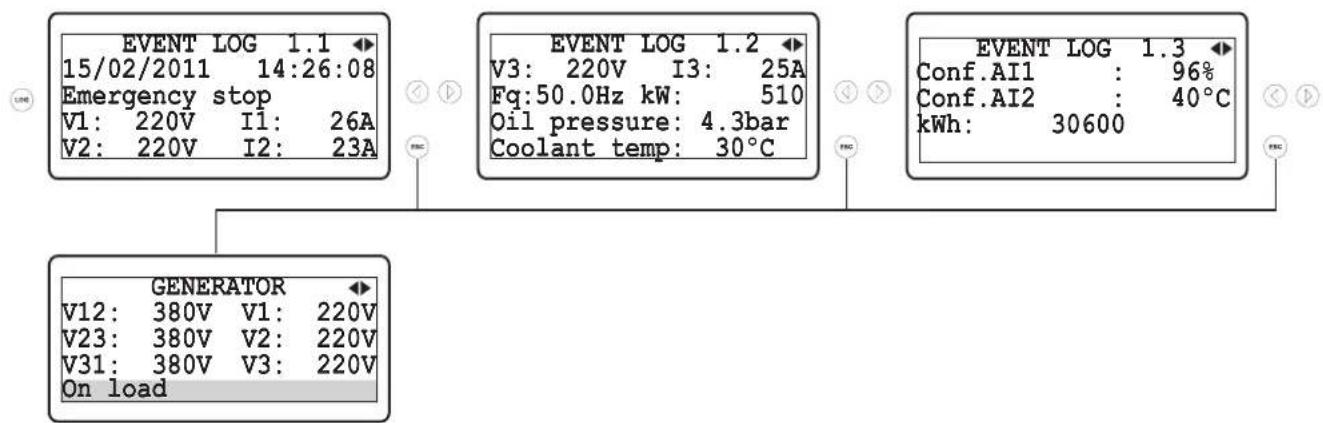
Emko Trans-AUTO - Event Log Page3: - 4

text_image EVENT LOG 1.1 15/02/2011 14:26:08 Emergency stop V1: 220V I1: 26A V2: 220V I2: 23A EVENT LOG 1.2 V3: 220V I3: 25A Fq:50.0Hz kW: 510 Oil pressure: 4.3bar Coolant temp: 30°C EVENT LOG 1.3 Conf.AI1 : 96% Conf.AI2 : 40°C kWh: 30600 GENERATOR V12: 380V V1: 220V V23: 380V V2: 220V V31: 380V V3: 220V On load

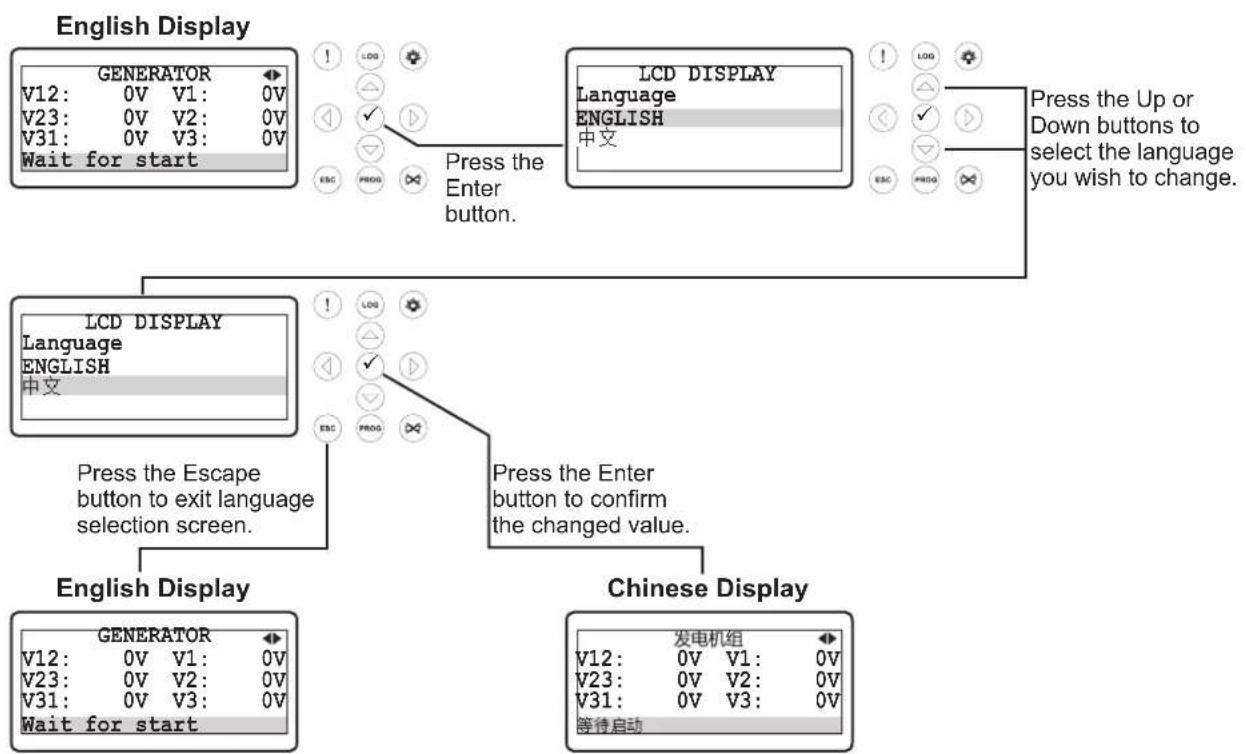
LCD display language selection
Emko Trans-AUTO - Event Log Page3: - 5

flowchart
graph TD
    A["English Display"] --> B["GENERATOR V12: 0V V1: 0V"]
    A --> C["V23: 0V V2: 0V"]
    A --> D["V31: 0V V3: 0V"]
    A --> E["Wait for start"]
    F["LCD DISPLAY Language ENGLISH 中文"] --> G["Press the Enter button."]
    H["LCD DISPLAY Language ENGLISH 中文"] --> I["Press the Enter button to confirm the changed value."]
    J["English Display"] --> K["GENERATOR V12: 0V V1: 0V"]
    J --> L["V23: 0V V2: 0V"]
    J --> M["V31: 0V V3: 0V"]
    J --> N["Wait for start"]
    O["Chinese Display"] --> P["发电机组 V12: 0V V1: 0V"]
    O --> Q["V23: 0V V2: 0V"]
    O --> R["V31: 0V V3: 0V"]
    O --> S["等待启动"]
    T["Press the Up or Down buttons to select the language you wish to change."] --> U["Press the Enter button to confirm the changed value."]

3.2 Accessing To The Operator Parameters
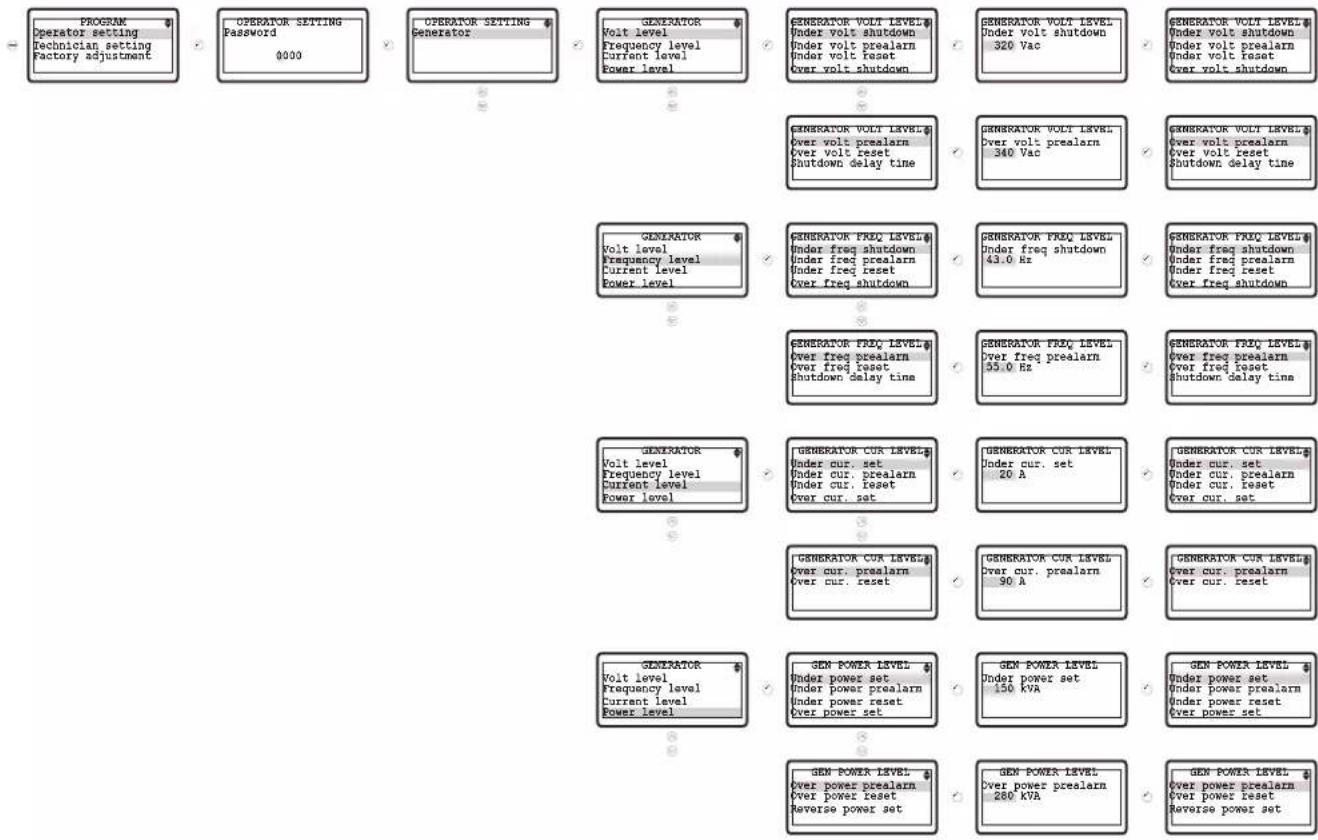
Emko Trans-AUTO - Accessing To The Operator Parameters - 1

flowchart
graph TD
    A["PROGRAM Operator setting\nTechnician setting\nFactory adjustment"] --> B["OPERATOR SETTING Password 0000"]
    B --> C["OPERATOR SETTING Generator"]
    C --> D["GENERATOR Volt level\nFrequency level\nCurrent level\nPower level"]
    D --> E["GENERATOR VOLT LEVEL\nUnder volt shutdown\nUnder volt prealarm\nUnder volt reset\nOver volt shutdown"]
    E --> F["GENERATOR VOLT LEVEL\nUnder volt shutdown 320 Vac"]
    F --> G["GENERATOR VOLT LEVEL\nUnder volt shutdown\nUnder volt prealarm\nUnder volt reset\nOver volt shutdown"]
    G --> H["GENERATOR VOLT LEVEL\nOver volt prealarm\nOver volt reset\nShutdown delay time"]
    H --> I["GENERATOR VOLT LEVEL\nOver volt prealarm\n340 Vac"]
    I --> J["GENERATOR VOLT LEVEL\nOver volt prealarm\nOver volt reset\nShutdown delay time"]
    J --> K["GENERATOR VOLT LEVEL\nUnder freq shutdown\nUnder freq prealarm\nUnder freq reset\nOver freq shutdown"]
    K --> L["GENERATOR FREQ LEVEL\nUnder freq shutdown\nUnder freq prealarm\nUnder freq reset\nOver freq shutdown"]
    L --> M["GENERATOR FREQ LEVEL\nOver freq prealarm\nOver freq reset\nShutdown delay time"]
    M --> N["GENERATOR FREQ LEVEL\nOver freq prealarm\nOver freq reset\nShutdown delay time"]
    N --> O["GENERATOR FREQ LEVEL\nOver freq prealarm\nOver freq reset\nShutdown delay time"]
    O --> P["GENERATOR CUR LEVEL\nUnder cur. set\nUnder cur. prealarm\nUnder cur. reset\nOver cur. set"]
    P --> Q["GENERATOR CUR LEVEL\nUnder cur. set 20 A"]
    Q --> R["GENERATOR CUR LEVEL\nUnder cur. set\nUnder cur. prealarm\nUnder cur. reset\nOver cur. set"]
    R --> S["GENERATOR CUR LEVEL\nOver cur. prealarm\nOver cur. reset 90 A"]
    S --> T["GENERATOR CUR LEVEL\nOver cur. prealarm\nOver cur. reset"]
    T --> U["GENERATOR CUR LEVEL\nUnder cur. set\nUnder cur. prealarm\nUnder cur. reset\nOver cur. set"]
    U --> V["GENERATOR CUR LEVEL\nUnder cur. set\nUnder cur. prealarm\nUnder cur. reset\nOver cur. set"]
    V --> W["GENERATOR CUR LEVEL\nUnder cur. set\nUnder cur. prealarm\nUnder cur. reset\nOver cur. set"]
    W --> X["GENERATOR CUR LEVEL\nUnder cur. set\nUnder cur. prealarm\nUnder cur. reset\nOver cur. set"]
    X --> Y["GENERATOR CUR LEVEL\nUnder cur. set\nUnder cur. prealarm\nUnder cur. reset\nOver cur. set"]
    Y --> Z["GENERATOR CUR LEVEL\nUnder cur. set\nUnder cur. prealarm\nUnder cur. reset\nOver cur. set"]
    Z --> AA["GENERATOR CUR LEVEL\nUnder cur. set\nUnder cur. prealarm\nUnder cur. reset\nOver cur. set"]
    AA --> AB["GENERATOR CUR LEVEL\nUnder cur. set\nUnder cur. prealarm\nUnder cur. reset\nOver cur. set"]
    AB --> AC["GENERATOR CUR LEVEL\nUnder cur. set\nUnder cur. prealarm\nUnder cur. reset\nOver cur. set"]

3.3 Accessing To The Technician Parameters
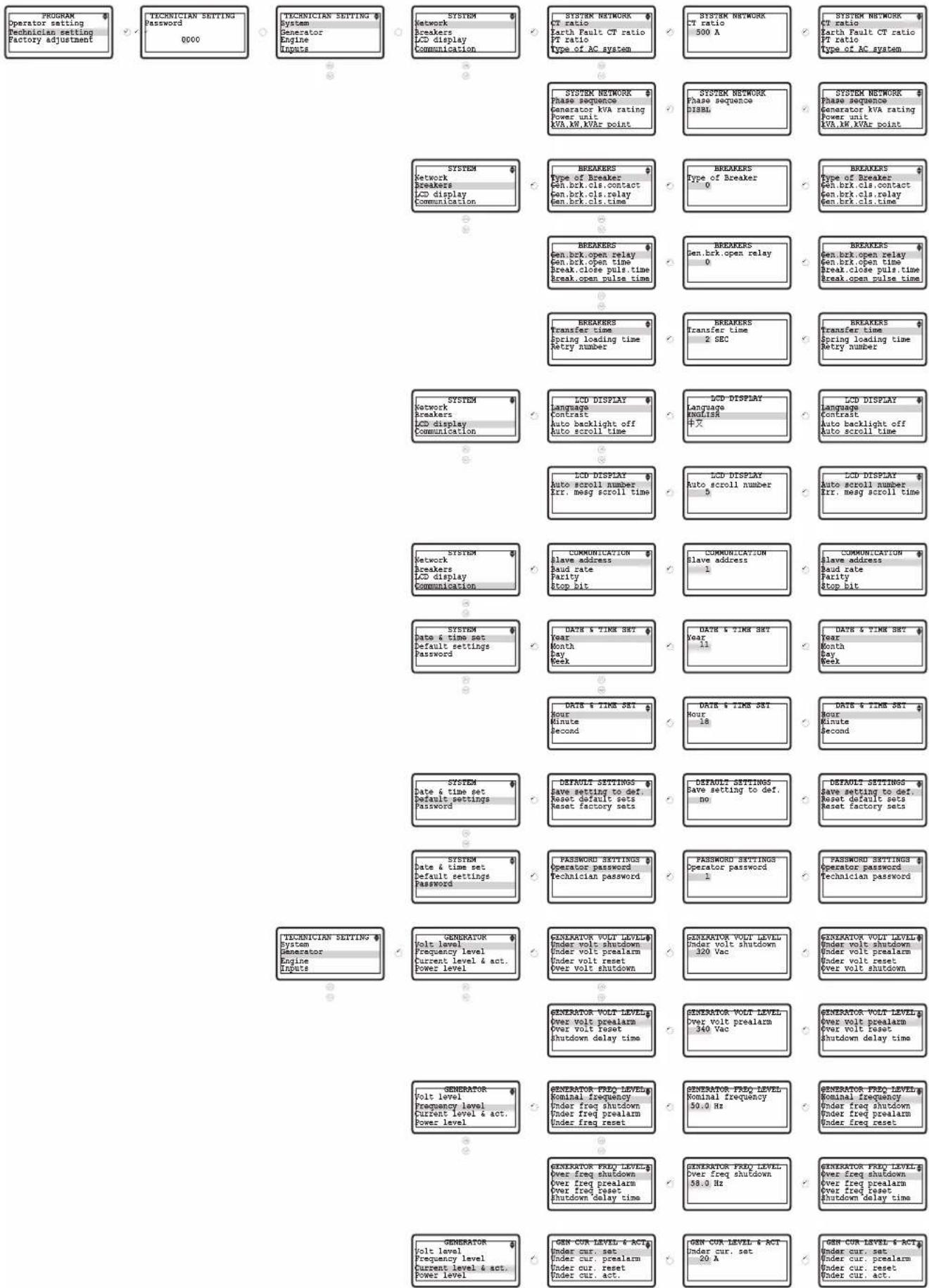
Emko Trans-AUTO - Accessing To The Technician Parameters - 1

text_image PROGRAM Operator setting Technician setting Factory adjustment 0000 TECHNICIAN SETTING System Generator Engine Inputs SYSTEM Network Breakers LCD display Communication SYSTEM NETWORK Phase sequence Generator KVA rating Power unit KVA.KW.KVAR point SYSTEM NETWORK Phase sequence Generator KVA rating Power unit KVA.KW.KVAR point SYSTEM NETWORK Phase sequence Generator KVA rating Power unit KVA.KW.KVAR point SYSTEM NETWORK Phase sequence Generator KVA rating Power unit KVA.KW.KVAR point SYSTEM NETWORK Phase sequence Generator KVA rating Power unit KVA.KW.KVAR point SYSTEM NETWORK Phase sequence Generator KVA rating Power unit KWA.KW.KVAR point SYSTEM NETWORK Phase sequence Generator KVA rating Power unit KWA.KW.KVAR point SYSTEM NETWORK Phase sequence Generator KVA rating Power unit KWA.KW.KVAR point SYSTEM NETWORK Phase sequence Generator KVA rating Power unit KWA.KW.KVAR point SYSTEM NETWORK Phase sequence Generator KVA rating Power unit KWA.KW.KVAR point SYSTEM NETWORK Phase sequence Generator KVA ratingSYSTEM NETWORK Phase sequence Generator KVA rating Power unit KWA.KW.KVAR pointSYSTEM NETWORK Phase sequence Generator KVA rating Power unit KWA.KW.KVAR pointSYSTEM NETWORK Phase sequence Generator KVA rating Power unit KWA.KW.KVAR pointSYSTEM NETWORK Phase sequence Generator KVA rating Power unit KWA.KW.KVAR pointSYSTEM NETWORK Phase sequence Generator KVA rating Power unit KWA.KW.KVAR pointSYSTEM NETWORK Phase sequence Generator KVA rating Power unit KWA.KW.KVAR pointSYSTEM NETWORK Phase sequence Generator KVA rating Power unit KWA.KW.KVAR pointSYSTEM NETWORK Phase sequence Generator KVA rating Power unit KWA.KW.KVAR pointSYSTEM NETWORK Phase sequence Generator KVA rating Power unit KWA.KW.KVAR pointSYSTEM NETWORK Phase sequence Generator KVA rating Power unit KWE.A.W. KWA.KVAR pointSYSTEM NETWORK Phase sequence Generator KVA rating Power unit KWA.KW.KVAR pointSYSTEM NETWORK Phase sequence Generator KVA rating Power unit KWA.KW.KVAR pointSYSTEM NETWORK Phase sequence Generator KVA rating Power unit KWA.KW.KVAR pointSYSTEM NETWORK Phase sequence Generator KVA rating Power unit KWA.KW.KVAR pointSYSTEM NETWORK Phase sequence Generator KVA rating Power units: KWA.KW.KVAR pointSYSTEM NETWORK Phase sequence Generator KVA rating Power units: KWA.KW.KVAR pointSYSTEM NETWORK Phase sequence Generator KVA rating Power units: KWA.KW.KVAR pointSYSTEM NETWORK Phase sequence Generator KVA rating Power units: KWA.KW.KVAR pointSYSTEM NETWORK Phase sequence Generator KVA rating Power units: KWA.KW.KVAR pointSYSTEM NETWORK Phase sequence Generator KVA rating Power units: KWA. KW. KWA. KVAR pointSYSTEM NETWORK Phase sequence Generator KVA rating Power units: KWA. KW. KWA. KVAR pointSYSTEM NETWORK Phase sequence Generator KVA rating Power units: KWA. KW. KWA. KVAR pointSYSTEM NETWORK Phase sequence Generator KVA rating Power units: KWA. KW. KWA. KVAR pointSYSTEM NETWORK Phase sequence Generator KVA rating Power units: KWA. KW. KWA. KVAR pointSYSTEM NETWORK Phase sequence Generator KVA rating Power units: KWA. KW. KWA. KVAR pointSYSTEM NETWORK Phase sequence Generator KVA ratingBREAKERS Type of BreakerBREAKERS Type of Breaker0BREAKERS Type of BreakerType of BreakerEwh.brk.cls.contactgen.brk.cls Polyestergen.brk.cls Polyester0gen.brk.cls Polyestergen.brk.cls Polyestergen.brk.cls timeBREAKERS Open brk.open relaygen.brk.open relayGENBREREN Open brk.open relayGENBREREN Open brk.open relayGENBREREN Open brk.open relaygen.brk.cls Timegen.brk.cls TimeGENBREREN Open brk TimeGENBREREN Open brk TimeGENBREREN Open brk TimeBreak.open pulse timeBREAKERS Transfer time Spring loading time Retry numberBREAKERS Transfer time Spring loading time Retry numberBREAKERS Transfer time Spring loading time Retry numberBREAKERS Transfer time Spring loading time Retry numberBREAKERS Transfer time Spring loading time Retry numberBREAKERS Transfer time Spring loading time Retry numberBREAKERS Transfer time Spring loading time Retry numberBREAKERS Transfer time Spring loading time Retry numberBREAKERS Transfer time Spring loading time Retry numberBREAKERS Transfer time Spring loading time Retry numberBREAKERS Transfer time Spring loading time Retry numberBREAKERS Transfer time Spring loading time Retry numberBREAKERS Transfer time Spring loading time Retry numberBREAKERS Transfer time Spring loading time Retry numberBREAKERS Transfer time Spring loading time Retry numberBREAKERS Transfer time Spring loading time Retry numberBREAKERS Transfer time Spring loading time Retry numberBREAKERS Transfer time Spring loading time Retry numberBREAKERS Transfer time Spring loading time Retry numberACKER 12ACKER 12ACKER 12ACKER 12ACKER 12ACKER 12ACKER 12ACKER 12ACKER 12ACKER12ACKER12ACKER12ACKER12ACKER12ACKER12ACKER12ACKER12ACKER12ACKER 12/13/13/13/13/13/13/13/13/13/13/13/13/13/13/13/13/13/13/13/13/13/13/13/13/13/13/13/13/13/13/13/13/13/13/ 0000000000000000000000000000000000000000000000000000000000000000000000000000000000000000000000000000

Emko Trans-AUTO - Accessing To The Technician Parameters - 2

text_image GEN CUR LEVEL & ACT Under act. delay time Over cur. set Over cur. prealarm Over cur. reset GEN CUR LEVEL & ACT Over cur. act. Over act. delay time Short circuit cur. Earth fault cur. GEN CUR LEVEL & ACT Earth faults cur. act. P. F. act. delay time Unbalance load set. Unbalance load act. GEN CUR LEVEL & ACT Unbalance act. delay GEN POWER LEVEL Under power set Under power prealarm Under power reset Under power act. GEN POWER LEVEL Under act. delay time Over power set Over power prealarm Over power reset GEN POWER LEVEL Over power act. Over act. delay time Reverse power set Reverse power act. GEN POWER LEVEL Rv.pow.act.delay time GEN POWER LEVEL Under act. delay time 2 SEC GEN POWER LEVEL Under act. delay time 150 kVA GEN POWER LEVEL Under power set Under power prealarm Under power reset Under power act. GEN POWER LEVEL Over power act. Over act. delay time Reverse power set Reverse power act. GEN POWER LEVEL Rv.pow.act.delay time GEN POWER GENERAL Bens option gen frequent Bens opt.pickup&Flywh All warning are latch GEN POWER GENERAL Bens option gen frequent DISBL GEN POWER GENERAL Bens option gen frequent Bens opt.pickup&Flywh All warning are latch TECHNICIAN SETTING System Generator Engine Inputs ENGINE Starting options Crank disconnect Speed settings Plant battery ENGINE START OPTIONS Horn prior start No. of volt reset atcomp Cranking time Crank rest time ENGINE START OPTIONS Pickup fall delay ENGINE START OPTIONS Pickup fall delay 1.0 sec ENGINE START OPTIONS Pickup fall delay ENGINE START OPTIONS Pickup fall delay ENGINE START OPTIONS Pickup fall delay ENGINE START OPTIONS Pickup fall delay ENGINE START OPTIONS Pickup fall delay ENGINE START OPTIONS Pickup fall delay ENGINE START OPTIONS Pickup fall delay ENGINE START OPTIONS Pickup fall delay ENGINE START OPTIONS Pickup fall delay ENGINE START OPTIONS Pickup fall delay ENGINE START OPTIONS Pickup fall delay ENGINE START OPTIONS Pickup fall delay) ENGINE START OPTIONS Pickup fall delay ENGINE START OPTIONS Pickup fall delay ENGINE START OPTIONS Pickup fall delay ENGINE START OPTIONS Pickup fall delay ENGINE START OPTIONS Pickup fall delay ENGINE START OPTIONS Pickup fall delay ENGINE START OPTIONS Pickup fall delay ENGINE START OPTIONS Pickup fall delay ENGINE START OPTIONS Pickup fall delay ENGINE START OPTIONS Pickup fall delay ENGINE START OPTIONS Pickup fall delay Engine Starting Options Crank disconnect Speed settings Plant battery ENGINE CRANK DISCONNECT Generator frequency Engine speed Generator volt Alt. Charge volt ENGINE CRANK DISCONNECT Oil pressure ENGINE CRANK DISCONNECT Dill pressure DISBL ENGINE CRANK DISCONNECT Oil pressure ENGINE CRANK DISCONNECT Dill pressure DISBL ENGINE CRANK DISCONNECT Oil pressure ENGINE CRANK DISCONNECT Dill pressure DISBL ENGINE CRANK DISCONNECT Dill pressure DISBL ENGINE CRANK DISCONNECT Dill pressure DISBL ENGINE CRANK DISCONNECT Dill pressure DISBL ENGINE CRANK DISCONNECT Dill pressure DISBL ENGINE CRANK DISCONNECT Dill pressure DISBL ENGINE CRANK DISCONNECT Dill pressure DISBL ENGINE CRANK DISCONNECT Dill pressure DISBL ENGINE CRANK DISCONNECT Doll pressure, 1990 RPM ENGINE CRANK DISCONNECT Doll pressure, 1990 RPM ENGINE CRANK DISCONNECT, 1990 RPM ENGINE CRANK DISCONNECT, 1990 RPM ENGINE CRANK DISCONNECT, 1990 RPM ENGINE CRANK DISCONNECT, 1990 RPM ENGINE CRANK DISCONNECT, 1990 RPM ENGINE CRANK DISCONNECT, 1990 RPM ENGINE CRANK DISCONNECT, 1990 RPM ENGINE CRANK DISCONNECT, 1990 RPM Engine Starting Options: Crank disconnect Speed settings Plant battery Engine SPEED SETS Nominal speed, Under speed shutdown, Under speed prealarm, Under speed reset Engine SPEED SETS: Nominal speed, Under speed shutdown, Under speed prealarm, Under speed reset Engine SPEED SETS: Over speed shutdown, Over speed prealarm, Over speed reset, Shutdown delay time Engine PLANT BATTERY: Under volt, Under volt reset, Under volt delay Engine PLANT BATTERY: Under volt, reset, Over volt, reset, Over volt delay Engine PLANT BATTERY: Over volt reset, Over volt delay, Alt. chg. warning Engine PLANT BATTERY: Over volt reset, Over volt reset, Alt. chg. warning Engine PLANT BATTERY: Over volt reset, Over volt reset, Over volt delay, Alt. chg. warning Engine PLANT BATTERY: Over volt reset, Over volt reset, Over volt delay, Alt. chg. warning Engine PLANT BATTERY: Over volt reset, Over volt reset, All chg. warning Engine PLANT BATTERY: Over volt reset, Over volt reset, All chg. warning Engine PLANT BATTERY: Over volt reset, Over volt reset, All chg. warning

Emko Trans-AUTO - Accessing To The Technician Parameters - 3

text_image CANBUS ECU ICU remote control Speed control enable Oil Pres cont. enable Temp. control enable CANBUS ECU Speed set point Speed correction CANBUS ECU Speed set point 1500 RPM CANBUS ECU Speed set point Speed correction ENGINE CanBus ECU CanBus error set Maintenance Load test CANEUS ERROR SET CAN fault actions CAN fault activation CAN fault delay Amber warn.actions CANEUS ERROR SET Amber warn.activation Amber warn.delay Red stop actions Red stop activation CANEUS ERROR SET Red stop delay CANEUS ERROR SET Red stop delay CANEUS ERROR SET Red stop delay ENGINE MAINTENANCE Running hour interval Maint. data interval Ing. stop when maint Eng. running hour(1sb) ENGINE MAINTENANCE Eng. running hour Eng. running hour(2sb) Maintenance okay ENGINE MAINTENANCE Eng. running hour 0 ENGINE MAINTENANCE Eng. running hour Eng. running hour(2sb) Maintenance okay ENGINE CanBus ECU CanBus error set Maintenance Load test LOAD TEST Disable/enable select LOAD TEST Disable/enable select DISBL LOAD TEST Disable/enable select ENGINE Exercise General ENGINE GENERAL Fuel selection Stop solencoid time Ignition delay Gas valve delay ENGINE GENERAL Min.of ignition speed Choke time ENGINE GENERAL Min.of ignition speed 200 RPM ENGINE GENERAL Min.of ignition speed Choke time TECHNICIAN SETTING System Generator Engine Inputs INPUTS Sender inputs Sender linearisations Conf. input-1 Conf. input-2 SENDER INPUTS Oil pressure unit Oil stress script type Oil pressure prealarm oil pressure reset SENDER INPUTS Oil pressure shutdown Temperature unit Temp. input type High temp. prealarm SENDER INPUTS High temp. reset High temp. shutdown Low temp. Warning Heater control ON SENDER INPUTS Heater control OFF Conf. All unit Conf. All type Conf. All low prealarm SENDER INPUTS Conf. All low reset Conf. All low shutdown Conf. All high prealarm Conf. All high reset SENDER INPUTS Conf. All high shutt. Conf. All control ON Conf. All control OFF Conf. All2 unit SENDER INPUTS Conf. All high shutt. Conf. All control ON Conf. All control OFF Conf. All2 unit SENDER INPUTS Conf. All high prealarm Conf. All2 low prealarm Conf. All2 low reset Conf. All2 low shutdown SENDER INPUTS Conf. All2 high prealarm Conf. All2 high shutdown. Conf. All2 control ON SENDER INPUTS Conf. All2 high prealarm Conf. All2 high reset Conf. All2 high shutdown. Conf. All2 control ON
SENDER INPUTSConf. AI2 control OFFSENDER INPUTSConf. AI2 control OFF75 °CSENDER INPUTSConf. AI2 control OFF
INPUTSSender inputsSender linearisationsConf. input-1Conf. input-2SENDER LINEARISATIONOil pressure sender 1Oil pressure 1Oil pressure sender 2Oil pressure 2SENDER LINEARISATIONOil pressure sender 110 RSENDER LINEARISATIONOil pressure sender 1Oil pressure 1Oil pressure sender 2Oil pressure 2
SENDER LINEARISATIONOil pressure sender 3Oil pressure 3Oil pressure sender 4Oil pressure 4SENDER LINEARISATIONOil pressure sender 362 RSENDER LINEARISATIONOil pressure sender 3Oil pressure 3Oil pressure sender 4Oil pressure 4
SENDER LINEARISATIONOil pressure sender 5Oil pressure 5Oil pressure sender 6Oil pressure 6SENDER LINEARISATIONOil pressure sender 5111 RSENDER LINEARISATIONOil pressure sender 5Oil pressure 5Oil pressure sender 6Oil pressure 6
SENDER LINEARISATIONOil pressure sender 7Oil pressure 7Oil pressure sender 8Oil pressure 8SENDER LINEARISATIONOil pressure sender 7156 RSENDER LINEARISATIONOil pressure sender 7Oil pressure 7Oil pressure sender 8Oil pressure 8
SENDER LINEARISATIONOil pressure sender 9Oil pressure 9Oil press. sender 10Oil pressure 10SENDER LINEARISATIONOil pressure sender 9205 RSENDER LINEARISATIONOil pressure sender 9Oil pressure 9Oil press. sender 10Oil pressure 10
SENDER LINEARISATIONTemperature sender 1Temperature 1Temperature sender 2Temperature 2SENDER LINEARISATIONTemperature sender 1360 RSENDER LINEARISATIONTemperature sender 1Temperature 1Temperature sender 2Temperature 2
SENDER LINEARISATIONTemperature sender 3Temperature 3Temperature sender 4Temperature 4SENDER LINEARISATIONTemperature sender 3145 RSENDER LINEARISATIONTemperature sender 3Temperature 3Temperature sender 4Temperature 4
SENDER LINEARISATIONTemperature sender 5Temperature 5Temperature sender 6Temperature 6SENDER LINEARISATIONTemperature sender 550 RSENDER LINEARISATIONTemperature sender 5Temperature 5Temperature sender 6Temperature 6
SENDER LINEARISATIONTemperature sender 7Temperature 7Temperature sender 8Temperature 8SENDER LINEARISATIONTemperature sender 743 RSENDER LINEARISATIONTemperature sender 7Temperature 7Temperature sender 8Temperature 8
SENDER LINEARISATIONTemperature sender 9Temperature 9Temperature sender 10Temperature 10SENDER LINEARISATIONTemperature sender 910 RSENDER LINEARISATIONTemperature sender 9Temperature 9Temperature sender 10Temperature 10
SENDER LINEARISATIONConf. All sender 1Conf. All value 1Conf. All sender 2Conf. All value 2SENDER LINEARISATIONConf. All sender 110 RSENDER LINEARISATIONConf. All sender 1Conf. All value 1Conf. All sender 2Conf. All value 2
SENDER LINEARISATIONConf. All sender 3Conf. All value 3Conf. All sender 4Conf. All value 4SENDER LINEARISATIONConf. All sender 350 RSENDER LINEARISATIONConf. All sender 3Conf. All value 3Conf. All sender 4Conf. All value 4
SENDER LINEARISATIONConf. All sender 5Conf. All value 5Conf. All sender 6Conf. All value 6SENDER LINEARISATIONConf. All sender 590 RSENDER LINEARISATIONConf. All sender 5Conf. All value 5Conf. All sender 6Conf. All value 6
SENDER LINEARISATIONConf. All sender 7Conf. All value 7Conf. All sender 8Conf. All value 8SENDER LINEARISATIONConf. All sender 7130 RSENDER LINEARISATIONConf. All sender 7Conf. All value 7Conf. All sender 8Conf. All value 8
SENDER LINEARISATIONConf. All sender 9Conf. All value 9Conf. All sender 10Conf. All value 10SENDER LINEARISATIONConf. All sender 9170 RSENDER LINEARISATIONConf. All sender 9Conf. All value 9Conf. All sender 10Conf. All value 10
SENDER LINEARISATIONConf. AI2 sender 1Conf. AI2 value 1Conf. AI2 sender 2Conf. AI2 value 2SENDER LINEARISATIONConf. AI2 sender 1579 RSENDER LINEARISATIONConf. AI2 sender 1Conf. AI2 value 1Conf. AI2 sender 2Conf. AI2 value 2
SENDER LINEARISATIONConf. AI2 sender 3Conf. AI2 value 3Conf. AI2 sender 4Conf. AI2 value 4SENDER LINEARISATIONConf. AI2 sender 3342 RSENDER LINEARISATIONConf. AI2 sender 3Conf. AI2 value 3Conf. AI2 sender 4Conf. AI2 value 4

Emko Trans-AUTO - Accessing To The Technician Parameters - 4

flowchart
graph TD
    A["SENDER LINEARISATION"] --> B["CONF. AI2 sender 5"]
    A --> C["Conf. AI2 value 5"]
    A --> D["Conf. AI2 sender 6"]
    A --> E["Conf. AI2 value 6"]
    F["SENDER LINEARISATION"] --> G["CONF. AI2 sender 7"]
    F --> H["Conf. AI2 value 7"]
    F --> I["Conf. AI2 sender 8"]
    F --> J["Conf. AI2 value 8"]
    K["SENDER LINEARISATION"] --> L["CONF. AI2 sender 9"]
    K --> M["Conf. AI2 value 9"]
    K --> N["Conf. AI2 sender 10"]
    K --> O["Conf. AI2 value 10"]
    P["SENDER LINEARISATION"] --> Q["CONF. AI2 sender 9"]
    P --> R["Conf. AI2 value 9"]
    P --> S["Conf. AI2 sender 10"]
    T["SENDER LINEARISATION"] --> U["Conf. AI2 sender 9"]
    T --> V["Conf. AI2 value 9"]
    T --> W["Conf. AI2 sender 10"]
    X["SEMICON"] --> Y["SEMICON INPUT-1"]
    X --> Z["SEMICON INPUT-2"]
    X --> AA["SEMICON INPUT-3"]
    AB["SEMICON INPUT-4"] --> AC["SEMICON INPUT-5"]
    AB --> AD["SEMICON INPUT-6"]
    AE["SEMICON INPUT-7"] --> AF["SEMICON INPUT-8"]
    AE --> AG["SEMICON INPUT-9"]
    AH["SEMICON INPUT-10"] --> AI["SEMICON INPUT-11"]
    AH --> AJ["SEMICON INPUT-12"]
    AK["SEMICON INPUT-13"] --> AL["SEMICON INPUT-14"]
    AK --> AM["SEMICON INPUT-15"]
    AN["SEMICON INPUT-16"] --> AO["SEMICON INPUT-17"]
    AN --> AP["SEMICON INPUT-18"]
    AQ["SEMICON INPUT-19"] --> AR["SEMICON INPUT-20"]
    AQ --> AS["SEMICON INPUT-21"]
    AT["SEMICON INPUT-22"] --> AU["SEMICON INPUT-23"]
    AT --> AV["SEMICON INPUT-24"]
    AW["SEMICON INPUT-25"] --> AX["SEMICON INPUT-26"]
    AW --> AY["SEMICON INPUT-27"]
    AZ["SINCHINEAN SETTING"] --> BA["TECHNICIAN SETTING"]
    BB["OUTPUTS"] --> BC["TECHNICIAN SETTING"]
    BD["TEMERS"] --> BE["TECHNICIAN SETTING"]
    BF["Expansion modules"] --> BG["TECHNICIAN SETTING"]
    BH["User adjustment"] --> BI["TECHNICIAN SETTING"]

Emko Trans-AUTO - Accessing To The Technician Parameters - 5

text_image OUTPUTS Conf. Exp. output-3 Conf. Exp. output-4 Conf. Exp. output-5 Conf. Exp. output-6 CONF. EXP. OUTPUT-3# Polarity Function CONF. EXP. OUTPUT-3# Polarity NO CONF. EXP. OUTPUT-3# Polarity Function OUTPUTS Conf. Exp. output-5 Conf. Exp. output-6 Conf. Exp. output-7 Conf. Exp. output-8 CONF. EXP. OUTPUT-5# Polarity Function CONF. EXP. OUTPUT-5# Polarity NO CONF. EXP. OUTPUT-5# Polarity Function TECHNICIAN SETTING Outputs Timers Expansion modules User adjustment TIMERS Start timers topping timers START TIMERS Remote start delay Pre-heat Pre-heat bypass Safety on delay START TIMERS Warming up time Born duration Chg.excitation time Cooling fan time START TIMERS Idle mode time Idle mode time off START TIMERS Idle mode time DISBL START TIMERS Idle mode time Idle mode time off STOPPING TIMERS Remote stop delay Cooling time Fail to stop delay STOPPING TIMERS Remote stop delay 5 SEC STOPPING TIMERS Remote stop delay Cooling time Fail to stop delay TECHNICIAN SETTING Outputs Timers Expansion modules User adjustment EXPANSION MODULES IO (1-8) Dial-up & Ethernet GSM GPRS IO (1-8) MODULE Disable/enable select IOL (1-8) MODULE Disable/enable select DISBL IO (1-8) MODULE Disable/enable select DISBL EXPANSION MODULES IO (1-8) Dial-up & Ethernet GSM GPRS DIAL-UP & Ethernet Disable/enable select Call back selection DIAL-UP & Ethernet Disable/enable select DISBL EXPANSION MODULES IO (1-8) Dial-up & Ethernet GSM GPRS USM MODULE Disable/enable select Call back selection RMS USM MODULE Disable/enable select DISBL USM MODULE Disable/enable select DISBL EXPANSION MODULES IO (1-8) Dial-up & Ethernet GSM GPRS GPRS MODULES Disable/enable select Call back selection GPRS MODULES Disable/enable select DISBL EXPANSION MODULES Web Server GPRS Web WEB SERVER MODULES Disable/enable select WBS SERVER MODULES Disable/enable select DISBL EXPANSION MODULES Web Server GPRS Web GPRS WEB MODULES- Disable/enable select. GPRS WEB MODULES- Disable/enable select DISBL TECHNICIAN SETTING Outputs Timers Expansion modules User adjustment USSR ADJUSTMENT # Gen. voltage offset Current offset Battery/chrg gen.vol Sender inputs offset GEN. VOLTAGE OFFSET# Gen. V1 offset Gen. V2 offset Gen. V3 offset USSR ADJUSTMENT # Gen. voltage offset Current offset Battery/chrg gen.vol Sender inputs offset CURRENT OFFSET# Current I1 offset Current I2 offset Current I3 offset I/P. Current offsetUSSR ADJUSTMENT # Gen. voltage offset Current offset Battery/chrg gen.vol Sender inputs offsetCURRENT OFFSET# Current I1 offset Current I2 offset Current I3 offset I/P. Current offsetCURRENT OFFSET# Current I1 offset Current I2 offset Current I3 offset I/P. Current offsetCURRENT OFFSET# Current I1 offset Current I2 offset Current I3 offset I/P. Current offsetCURRENT OFFSET# Current I1 offset Current I2 offset Current I3 offset I/P. Current offsetCURRENT OFFSET# Current I1 offset Current I2 offset Current I3 offset I/P. Current offsetCURRENT RESPONSE# Gen. voltage offset Current offset Battery/chrg gen.vol Sender inputs offsetCURRENT RESPONSE# Gen. voltage offset Current offset Battery/chrg gen.vol Sender inputs offsetCURRENT RESPONSE# Gen. voltage offset Current offset Battery/chrg gen.vol Sender inputs offsetCURRENT RESPONSE# Gen. voltage offset Current offset Battery/chrg gen.vol Sender inputs offsetCURRENT RESPONSE# Gen. voltage offset Current offset Battery/chrg gen.vol Sender inputs offsetCURRENT RESPONSE# Gen. voltage offset Current offset Battery/cherg gen.vol Sender inputs offsetCURRENT RESPONSE# Gen. voltage offset Current offset Battery/chrg gen.vol Sender inputs offsetCURRENT RESPONSE# Gen. voltage offset Current offset Battery/chrg gen.vol Sender inputs offsetCURRENT RESPONSE# Gen. voltage offset Current offset Battery/chrg gen.vol Sender inputs offsetCURRENT RESPONSE# Gen. voltage offset Current offset Battery/chrg gen.vol Sender inputs offsetCURRENT RESPONSE# Gen. voltage offset current offset Battery/chrg volv onset gen.chg volv onsetBATTERY/CHRG GEN-Volc# Batt.volt offset 0.0 VdcBATTERY/CHRG GEN-Volc# Batt.volt offset gen.chg volv onsetBATTERY/CHRG GEN-Volc# Batt.volt offset gen.chg volv onsetBATTERY/CHRG GEN-Volc# Batt.volt offset gen.chg volv onsetBATTERY/CHRG GEN-Volc# Batt.volt offset gen.chg volv onsetBATTERY/CHRG GEN-Volc# Batt.volt offset gen.chg volv onsetBATTERY/CHRG GEN - Volc# Batt.volt offset gen.chg volv onsetBATTERY/CHRG GEN-Volc# Batt.volt offset gen.chg volv onsetBATTERY/CHRG GEN-Volc# Batt.volt offset gen.chg volv onsetBATTERY/CHRG GEN-Volc# Batt.volt offset gen.chg volv onsetBATTERY/CHRG GEN-Volc# Batt.volt offset | gen.chg volv onsetBATTERY/CHRG GEN-Volc# Batt.volt offset gen.chg volv onsetBATTERY/CHRG GEN-Volc# Batt.volt offset gen.chg volv onsetBATTERY/CHRG GEN-Volc# Batt.volt offset gen.chg volv onsetBATTERY/CHRG GEN-Volc# Batt.volt offset gen.chg volv onsetNOMADJINTING OF UNTIN INverters 10000000000000000000000000000000000000000000000000000000000000000000000000000000000000000000000000000

3.4 Changing And Saving Parameters Values

Emko Trans-AUTO - Changing And Saving Parameters Values - 1

flowchart
graph TD
    A["Operation Screen"] --> B["GENERATOR"]
    B --> C{When the Prog button is pressed, the parameters section is asked for accessing to parameters.}
    C --> D["PROGRAM"]
    D --> E["Operator setting\nTechnician setting\nFactory adjustment"]
    E --> F["Press the Enter button."]
    F --> G["TECHNICIAN SETTING Password 0000"]
    G --> H["Enter password with cursor (Right, Left, Up and Down) buttons."]
    H --> I["TECHNICIAN SETTING Password 0162"]
    I --> J["Press the Enter button to confirm password. If the password is incorrect, the unit will drop out of program mode."]
    J --> K["TECHNICIAN SETTING System Generator Engine Inputs"]
    K --> L["Press Enter button to access to all parameters page in currently main parameter group."]
    L --> M["GENERATOR VOLT LEVEL Under volt shutdown\nUnder volt prealarm\nUnder volt reset\nOver volt shutdown"]
    M --> N["Press the Enter button to view parameter value."]
    N --> O["GENERATOR VOLT LEVEL Under volt shutdown\nUnder volt prealarm\nUnder volt reset\nOver volt shutdown"]
    O --> P["Press Enter button to confirm the changed value."]
    P --> Q["GENERATOR VOLT LEVEL Under volt shutdown\nUnder volt prealarm\nUnder volt reset\nOver volt shutdown"]
    Q --> R["To exit from programming mode any time, press Prog button."]
    R --> S["Operation Screen"]

4. Parameters

4.1 Operator Parameters

4.1.1 Generator

GENERATOR VOLT LEVEL ( )Generator-> levelVoltMinMaxDefaultUnit
Under volt shutdownGenerator Under Voltage Shutdown60(dis)600320V~
Under volt prealarmGenerator Under Voltage Pre-Alarm60(dis)600340V~
Under volt resetGenerator Under Voltage Pre-Alarm Reset60600350V~
Over volt shutdownGenerator Over Voltage Shutdown60600440V~
Over volt prealarmGenerator Over Voltage Pre-Alarm60(dis)600420V~
Over volt resetGenerator Over Voltage Pre-Alarm Reset60600400V~
Shutdown delay timeGenerator Voltage Shutdown Delay Time0.010.0 1.0Sec
GENERATOR FREQ LEVEL (Generator->Frequency level)MinMaxDefaultUnit
Nominal frequencyNominal Alternator Frequency30.075.050.0Hz
Under freq shutdownGenerator Under Frequency Shutdown30.0(dis)75.043.0Hz
Under freq prealarmGenerator Under Frequency Pre-Alarm30.0(dis)75.045.0Hz
Under freq resetGenerator Under Frequency Pre-Alarm Reset30.075.046.0Hz
Over freq shutdownGenerator Over Frequency Shutdown30.0(dis)75.058.0Hz
Over freq prealarmGenerator Over Frequency Pre-Alarm30.0(dis)75.055.0Hz
Over freq resetGenerator Over Frequency Pre-Alarm Reset30.075.054.0Hz
Shutdown delay timeGenerator Frequency Shutdown Delay Time0.010.01.0Sec
GENERATOR CUR LEVEL (Generator->Current level)MinMaxDefaultUnit
Under cur. setGenerator Under Current Set099991A~
Under cur. prealarmGenerator Under Current Pre-Alarm0(dis)9999disA~
Under cur. resetGenerator Under Current Pre-Alarm Reset099995A~
Over cur. IDMT alarmGenerator Over Current IDMT AlarmENABL/DISBLDISBL
Over cur. setGenerator Over Current Set099999999A~
Over cur. prealarmGenerator Over Current Pre-Alarm0(dis)99999990A~
Over cur. resetGenerator Over Current Pre-Alarm Reset099999980A~
GEN POWER LEVEL (Generator->Power level)MinMaxDefaultUnit
Under power setGenerator Under Power Set099990kVA
Under power prealarmGenerator Under Power Pre-Alarm0(dis)9999diskVA
Under power resetGenerator Under Power Pre-Alarm Reset099995kVA
Over power IDMT alarmGenerator Over Power IDMT AlarmENABL/DISBLDISBL
Over power setGenerator Over Power Set099990kVA
Over power prealarmGenerator Over Power Pre-Alarm0(dis)9999diskVA
Over power resetGenerator Over Power Pre-Alarm Reset099990kVA
Over load step 1Generator Over Load Step 1099999999KVA
Over load step 1 restGenerator Over Load Step 1 Reset099999999KVA
Over load step 2Generator Over Load Step 2099999999KVA
Over load step 2 restGenerator Over Load Step 2 Reset099999999KVA
Reverse power setReverse Power Set-999900kW

Note: dis = disable

4.2 Technician Parameters

4.2.1 System

SYSTEM NETWORK (System->Network)MinMaxDefaultUnit
CT ratioCurrent Transformer Ratio19999100
Earth fault CT ratioEarth Fault Current Transformer Ratio19999100
PT ratioVoltage Transformer Ratio11001
Type of AC systemSelect AC system; 0-1 Phase 2 Wire1-3 Phase 4 Wire2-2 Phase 3 Wire L1-L23-2 Phase 3 Wire L1-L3031
Phase sequenceGenerator Phase Sequence (dis, L123 or L321)DISBL, L123, L321DISBL
Generator kVA ratingGenerator kVA rating set09999300kVA
Power unitPower unitkVA/kWkVA
kVA,kW,kVAr pointkVA kW kVAr point position;, , 0->01->0.02->0.003->0.000030
Power on modePower On Mode Selection0-LAST MODE1-AUTO MODE2-TEST MODE3-MANUAL MODE4-STOP MODE0-LAST MODE

CT ratio

Load current transformers transfer ratio(Primary current/Secondary current) value must be entered to this parameter.

Example:

If Current Transformer Primary=500A and Current Transformer Secondary=5A, Current Transformer Ratio should be entered CT Primary/CT Secondary=100.

PT ratio

Defines the scaling factor applied to voltage readout and associated fault conditions.

This PT ratio is for additional voltage transformers mounted the unit.

BREAKERS ( )System->BreakersMinMaxDefaultUnit
Type of BreakerHardware Breaker Selection0(dis)31
Gen.brk.cls.contactGen Close Breaker Contact TypeNO / NC0
Gen.brk.cls.relayGen Close Breaker Relay TypeNOR / PULS0
Gen.brk.cls.timeGen Close Timer12505Sec
Gen.brk.open relayGen Open Breaker Relay TypeNOR / PULS0
Gen.brk.open timeGen Open Timer12505Sec
Break.close puls.timeBreaker Close Pulse Time0.010.00.5Sec
Break.open pulse timeBreaker Open Pulse Time0.010.00.5Sec
Transfer timeTransfer Time02502Sec
Spring loading timeSpring Loading Time12503Sec
Retry numberRetry Number12505

Hardware Breaker Selection

1- Breakers: Have only close drives and if close drive off will open.

Parameters; GEN CLOSE BREAKER CONTACT TYPE, GEN CLOSE TIMER(if gen closed input selected), GEN OPEN TIMER(if gen closed input selected), TRANSFER TIME.

Note-1 : NO / NC : Normally Open / Normally Close

text_image For closing Gen. Shalter For opening Gen. Shalter Gen. Closed Out. (NO) t[s] Gen. Closed Out. (NC) ClosedGen. Shalter Opened t[s]

2- User Configured: Breaker break have only close drives, when want to close, close breaker output on and after 1 sec. open breaker output on and after breaker close pulse time open breaker output will off. When want to open a close breaker output and open breaker output will off. Parameters; GEN CLOSE BREAKER CONTACT TYPE, GEN CLOSE TIMER(if gen closed input selected), GEN OPEN TIMER(if gen closed input selected), TRANSFER TIME.

Example: If Hardware Breaker Selection parameter is selected as 2;

Emko Trans-AUTO - Hardware Breaker Selection - 1

text_image For closing Gen. Shalter Breaker close pulse time For opening Gen. Shalter Gen. Closed Out. (NO) 1 s 1 s 1 s 1 s ClosedGen. Shalter Opened

3- Motorised Breakers: User can select all the breaker types.

Parameters; GEN CLOSE BREAKER CONTACT TYPE, GEN CLOSE BREAKER RELAY TYPE, GEN CLOSE TIMER(if gen closed input selected), GEN OPEN BREAKER RELAY TYPE, GEN OPEN TIMER(if gen closed input selected), BREAKER CLOSE PULSE TIME(if Gen Close Breaker Relay Type parameter is selected as 1), BREAKER OPEN PULSE TIME(if Gen Open Breaker Relay Type parameter is selected as 1), TRANSFER TIME, SPRING LOADING TIME, RETRY NUMBER.

Example-1: GCB Close Diagram.

If Hardware Breaker Selection parameter is selected as 3, Gen. Close Breaker Relay Type parameter is selected as 1 (PULSE) and Gen. Open Breaker Relay Type parameter is selected as 1 (PULSE);

GbCt: Gen close timer

brCP: Breaker close pulse time

brOP: Breaker open pulse time

sPLD: Spring loading time

rtNB: Retry number

Emko Trans-AUTO - Example-1: GCB Close Diagram. - 1

flowchart
graph TD
    A["GCB close command"] --> B["sPLD"]
    B --> C["brCP"]
    C --> D["BrCP"]
    D --> E["BrCP"]
    E --> F["GoCI"]
    F --> G["GbCI"]
    G --> H["1s"]
    H --> I["brOP"]
    I --> J["GoCI"]
    J --> K["1s"]
    K --> L["brOP"]
    L --> M["GoCI"]
    M --> N["1s"]
    N --> O["brOP"]
    O --> P["GoCI"]
    P --> Q["1s"]
    Q --> R["brOP"]
    R --> S["GoCI"]
    S --> T["1s"]
    T --> U["brOP"]
    U --> V["GoCI"]
    V --> W["1s"]
    W --> X["brOP"]
    X --> Y["GoCI"]
    Y --> Z["1s"]
    Z --> AA["brOP"]
    AA --> AB["GoCI"]
    AB --> AC["1s"]
    AC --> AD["brOP"]
    AD --> AE["GoCI"]
    AE --> AF["1s"]
    AF --> AG["brOP"]
    AG --> AH["GoCI"]
    AH --> AI["1s"]
    AI --> AJ["brOP"]
    AJ --> AK["GoCI"]
    AK --> AL["1s"]
    AL --> AM["brOP"]
    AM --> AN["GoCI"]
    AN --> AO["1s"]
    AO --> AP["brOP"]
    AP --> AQ["GoCI"]
    AQ --> AR["1s"]
    AR --> AS["brOP"]
    AS --> AT["GoCI"]
    AT --> AU["1s"]
    AU --> AV["brOP"]
    AV --> AW["GoCI"]
    AW --> AX["1s"]
    AX --> AY["brOP"]
    AY --> AZ["GoCI"]
    AZ --> BA["1s"]
    BA --> BB["brOP"]
    BB --> BC["GoCI"]
    BC --> BD["1s"]
    BD --> BE["brOP"]
    BE --> BF["GoCI"]
    BF --> BG["1s"]
    BG --> BH["brOP"]
    BH --> BI["GoCI"]
    BI --> BJ["1s"]
    BJ --> BK["brOP"]
    BK --> BL["GoCI"]
    BL --> BM["1s"]
    BM --> BN["brOP"]
    BN --> BO["GoCI"]
    BO --> BP["1s"]
    BP --> BQ["brOP"]
    BQ --> BR["GoCI"]
    BR --> BS["1s"]
    BS --> BT["brOP"]
    BT --> BU["GoCI"]
    BU --> BV["1s"]
    BV --> BW["brOP"]
    BW --> BX["GoCI"]
    BX --> BY["1s"]
    BY --> BZ["brOP"]

Example-2: GCB Open Diagram.

If Hardware Breaker Selection parameter is selected as 3, Gen. Close Breaker Relay Type parameter is selected as 1 (PULSE) and Gen. Open Breaker Relay Type parameter is selected as 1 (PULSE);

GbOt: Gen open timer

brOP: Breaker open pulse time

Emko Trans-AUTO - Example-2: GCB Open Diagram. - 1

text_image GCB close command GCB open command Feedback input GCB fail to open alarm GbOt brOP GbOt t[s] t[s] t[s] t[s]

Gen Close Timer

This is used to monitor the closure of the generator contactor or breaker. It will only operate if an auxiliary input is configured as 'Generator Closed Auxiliary' and connected to the auxiliary on the generator contactor or breaker. Once a generator closed signal is issued the 'gen close timer' is initiated. Should the 'Generator Closed Auxiliary' input become active the timer the 'gen close timer' is cancelled. If the timer expires and the 'Generator Closed Auxiliary' has not become active the module will issue a 'generator failed to close' alarm.

Gen Open Timer

This is used to monitor the opening of the generator contactor or breaker. It will only operate if an auxiliary input is configured as 'Generator Closed Auxiliary' and connected to the auxiliary on the generator contactor or breaker. Once a generator open signal is issued the 'gen open timer' is initiated. Should the 'Generator Closed Auxiliary' input become in-active the timer 'gen open timer' is cancelled. If the timer expires and the 'Generator Closed Auxiliary' has not become in-active the module will issue a 'generator failed to open' alarm.

Breaker Close Pulse Time

This is used to determine the duration of the Generator close signal. This timer is only used if Pulsed outputs are configured to be used.

Breaker Open Pulse Time

This is used to determine the duration of the Generator close signal. This timer is only used if Pulsed outputs are configured to be used.

Transfer Time

This is used to allow for fixed duration transfer breaks when switching from mains to generator and back. It can be used to ensure that the supply is removed from the load for fixed period of time to allow pumps/motors to come to rest etc.

Spring Loading Time

When the unit give open command to the breaker and after that the unit want to give close command the same breaker, this time for between open and close commands, because if there is no delay between open and close commands can be problem the motorized switches.

Retry Number

The unit try to close breaker number of this parameter. If each try there is no close feedback, after last try the alarm will be activated.

LCD DISPLAY ( )System->LCD displayMinMaxDefaultUnit
LanguageLanguage SelectionENGLISH/CHINESEENGLISH
ContrastContrast Setting495
Auto backlight offAuto Backlight OffENA DISBLBL/ DISBL
Auto scroll timeAuto Scroll Time0 (dis)2500Sec
Auto scroll numberAuto Scroll Number1243
Err. mesg scroll timeScroll Time For Error Messages12502Sec

Language Selection

Language selection: English or Chinese.

Digital Contrast

It is used to change contrast of LCD Display.

Auto Backlight Off

ENABL: If any button is not pressed during 120 secs, LCD backlight is automatically changed power safety mode.

DISBL: LCD backlight is on continuously.

Auto Scroll Time

The scroll time between all data display pages.

Auto Scroll Number

The number of data display pages that will be scrolled.

Scroll Time For Error Messages

Error messages are displayed the last line of LCD Display. If more than one error condition is present, each of them is displayed during time defined by Auto Scroll Timer parameter.

Note: dis = disable

COMMUNICATION (System->Communication)MinMaxDefaultUnit
Slave addressSlave Address12471
Baud rateBaud Rate: 0 - 1200 baud1 - 2400 baud2 - 4800 baud3 - 9600 baud4 - 19200 baud5 - 38400 baud053
ParityParity: 0-> None, 1-> Odd, 2-> Even020
Stop bitStop Bit (0-> 1 stop bit,1-> 2 stop bit)010
Datalog periodDatalog Period0.0(dis)999.91.0Min
TimeoutTimeout0(dis)9993Min
ASCII/RTU selectionModBus ASCII/RTU SelectionASCII / RTUASCII

Timeout

This parameter is used for the modem hardware reset. If the data communication is interrupted and this situation continues as this parameter, the modem hardware reset is performed.

ModBus ASCII/RTU Selection

This parameter is only functional for the USB, RS-232, RS-485 or RS-422 communication.

DATE & TIME SET (System->Date & time set)MinMaxDefaultUnit
YearYear099
MonthMonth112
DayDate131
WeekDay of week17
HourHour023
MinuteMinute059
SecondSecond059

Day of week
1=Monday,2=Tuesday,3=Wednesday,4=Thursday,5=Friday,6=Saturday,7=Sunday

DEFAULT SETTINGS (System->Default settings)MinMaxDefaultUnit
Save setting to def.Save setting to defaultYES / NONO
Reset default setsReset default setsYES / NONO
Reset factory setsReset factory setsYES / NONO

Save setting to default

If this parameter is selected as "Yes", the unit's currently parameters save as default sets.

After this parameter is reset automatically to "No".

Reset default sets

If this parameter is selected as "Yes", the unit's parameters back to default sets.

After this parameter is reset automatically to "No".

Reset factory sets

If this parameter is selected as "Yes", the unit's parameters back to factory sets.

After this parameter is reset automatically to "No".

PASSWORD SETTINGS ( )System->Password settingsMinMaxDefaultUnit
Operator passwordOperator Password099990
Technician passwordTechnician Password099990

Operator Password

Use this option to change the Operator password. This password allows access to operator parameters section.

Technician Password

Use this option to change the Technician password. It allows access to both operator and technician parameters section.

Note: dis = disable

4.2.2 Generator

GENERATOR VOLT LEVEL ( )Generator-> levelVoltMinMaxDefaultUnit
Under volt shutdownGenerator Under Voltage Shutdown60(dis)600320V~
Under volt prealarmGenerator Under Voltage Pre-Alarm60(dis)600340V~
Under volt resetGenerator Under Voltage Pre-Alarm Reset60600350V~
Over volt shutdownGenerator Over Voltage Shutdown60600440V~
Over volt prealarmGenerator Over Voltage Pre-Alarm60(dis)600420V~
Over volt resetGenerator Over Voltage Pre-Alarm Reset60600400V~
Shutdown delay timeGenerator Voltage Shutdown Delay Time0.010.0 1.0Sec
GENERATOR FREQ LEVEL (Generator->Frequency level)MinMaxDefaultUnit
Nominal frequencyNominal Alternator Frequency30.075.050.0Hz
Under freq shutdownGenerator Under Frequency Shutdown30.0(dis)75.043.0Hz
Under freq prealarmGenerator Under Frequency Pre-Alarm30.0(dis)75.045.0Hz
Under freq resetGenerator Under Frequency Pre-Alarm Reset30.075.046.0Hz
Over freq shutdownGenerator Over Frequency Shutdown30.0(dis)75.058.0Hz
Over freq prealarmGenerator Over Frequency Pre-Alarm30.0(dis)75.055.0Hz
Over freq resetGenerator Over Frequency Pre-Alarm Reset30.075.054.0Hz
Shutdown delay timeGenerator Frequency Shutdown Delay Time0.010.01.0Sec

Note: dis = disable

GEN CUR LEVEL & ACT (Generator->Current level & act.)MinMaxDefaultUnit
Under cur. setGenerator Under Current Set099991A~
Under cur. prealarmGenerator Under Current Pre-Alarm0(dis)9999disA~
Under cur. resetGenerator Under Current Pre-Alarm Reset099995A~
Under cur. act.Generator Under Current Actions0 - Disable1 - Warning (Alarm Only, No Shutdown)2 - Electrical Trip (Alarm/Off Load Generator Followed By Shutdown After Cooling)3 - Shutdown (Alarm And Shutdown)0(dis)3dis
Under act. delay timeGenerator Under Current Actions Delay Time0992Sec
Over cur. IDMT alarmGenerator CurrentOver IDMT AlarmENABL/DISBLDISBL
Over cur. setGenerator Over Current Set099999999A~
Over cur. prealarmGenerator Over Current Pre-Alarm0(dis)99999990A~
Over cur. resetGenerator Over Current Pre-Alarm Reset099999980A~
Over cur. act.Generator Over Current Actions0 - Disable1 - Warning (Alarm Only, No Shutdown)2 - Electrical Trip (Alarm/Off Load Generator Followed By Shutdown After Cooling)3 - Shutdown (Alarm And Shutdown)0(dis)3dis
Over act. delay timeGenerator Over Current Actions Delay Time0992Sec
Short circuit cur.Generator Short Circuit Current Set099999999A~
Earth fault cur.Generator Earth Fault Current Set09999100A~
Earth fault cur. act.Generator Earth Fault Current Actions0 - Disable1 - Warning (Alarm Only, No Shutdown)2 - Electrical Trip (Alarm/Off Load Generator Followed By Shutdown After Cooling)3 - Shutdown (Alarm And Shutdown)0(dis)3dis
E.F. act. delay timeGenerator Earth Fault Current Actions Delay Time0992Sec
Unbalance load setUnbalance Load Set099990A~
Unbalance load act.Unbalance Load Actions0 - Disable1 - Warning (Alarm Only, No Shutdown)2 - Electrical Trip (Alarm/Off Load Generator Followed By Shutdown After Cooling)3 - Shutdown (Alarm And Shutdown)0(dis)3dis
Unbalance act. delayUnbalance Load Actions Delay Time0992Sec

Over cur. IDMT alarm

DISABLE: If the measurement value of current more than "Over cur. set" parameter and this condition is go on more than "Over act. delay time" parameter, the unit will give a "Over current" alarm.

ENABLE: If the measurement value of current more than “Over cur. set” parameter and this condition is go on more than “”, the unit will give a “Over current” alarm. Tripping time

$$ \text { Tripping time } = \frac {\left(" \text { Over act. delay time" parameter }\right) \times \left(" \text { Over cur. set" parameter }\right)}{\left(\text { Measured current }\right) - \left(" \text { Over cur. set" parameter }\right)} $$

Note: dis = disable

GEN POWER LEVEL (Generator->Power level)MinMaxDefaultUnit
Under setpowerGenerator Under SetPower099990kVA
ponder prealarmGenerator Under Pre-AlarmPower0(dis)9999diskVA
ponder resetGenerator Under Pre-Alarm ResetPower099995kVA
Under power act.Generator Under Rotors0 - Disable1 - Warning (Alarm Only, No Shutdown)2 - Electrical Trip (Alarm/Off Load Generator Followed By Shutdown After Cooling)3 - Shutdown (Alarm And Shutdown)0(dis)30(dis)
Under act. delay timeGenerator Under Delay TimePower Action0992Sec
pover IDMT alarmGenerator Over IDMT AlarmPowerENABL/DISBLDISBL
Over setpowerGenerator Over SetPower099990kVA
pover prealarmGenerator Over Pre-AlarmPower0(dis)9999diskVA
pover resetGenerator Over Pre-Alarm ResetPower099990kVA
Over power act.Generator Over Rotors0 - Disable1 - Warning (Alarm Only, No Shutdown)2 - Electrical Trip (Alarm/Off Load Generator Followed By Shutdown After Cooling)3 - Shutdown (Alarm And Shutdown)0(dis)30(dis)
Over act. delay timeGenerator Over Delay TimePower Action0992Sec
Over load step 1Generator Over Load Step 1099999999KVA
Over load step 1 restGenerator Over Load Step 1 Reset099999999KVA
Over load step 1 act.Generator Over Load Step 1Actions0 - Disable1 - Status2 - Warning Non-Latching3 - Warning Latching0(dis)30(dis)
Over load step 1 dly.Generator Over 1 Delay TimeLoad Step Action0999.930.0Sec
Over load step 2Generator Over Load Step 2099999999KVA
Over load step 2 restGenerator Over Load Step 2 Reset099999999KVA
Over load step 2 act.Generator Over Load Step 2Actions0 - Disable1 - Status2 - Warning Non-Latching3 - Warning Latching0(dis)30(dis)
Over load step 2 dly.Generator Over Delay TimeLoad Step 20999930.0Sec
Reverse power setReverse Power Set-999900kW
Reverse power act.Reverse Power Actions0 - Disable1 - Warning (Alarm Only, No Shutdown)2 - Electrical Trip (Alarm/Off Load Generator Followed By Shutdown After Cooling)3 - Shutdown (Alarm And Shutdown)0(dis)30(dis)
Rv.pow.act.delay timeReverse Power Action Delay Time0992Sec

Over power IDMT alarm

DISABLE: If the measurement value of power more than "Over power set" parameter and this condition is go on more than "Over act. delay time" parameter, the unit will give a "Over palaem."

ENABLE: If the measurement value of power more than "Over power set" parameter and this condition is go on more than "Tripping time", the unit will give a "Over power" alarm.

$$ \text { Tripping time } = \frac {\left(" \text { Over act. delay time }" \text { parameter }\right) \times \left(" \text { Over power set }" \text { parameter }\right)}{\left(\text { Measured power }\right) - \left(" \text { Over power set }" \text { parameter }\right)} $$

Note: dis = disable

GENERATOR GENERAL ( )Generator->GeneralMinMaxDefaultUnit
Sens.option gen.freqSensing Options Generator Frq En/DisENABL/DISBLENABL
Sens.opt.pickup&flywhSensing Opt Pickup En/Dis & Flywheel0( )dis1000DISBL
All warning are latchAll Warnings Are Latched En/DisENABL/DISBLDISBL
Stop mode on shutdownChanged To Stop Mode On Shutdown FailENABL/DISBLDISBL

Sensing Options Generator Frq En/Dis

ENABLE: Speed sensing will be derived from the generator output frequency.

DISABLE: Speed sensing not will be derived from the generator output frequency.

Sensing Options Pickup En/Dis & Flywheel

DISABLE: Speed sensing will not be derived from the magnetic pickup.

1-1000: Speed sensing will be derived from the magnetic pickup and the number is flywheel teeth on the engine.

All Warnings Are Latched En/Dis

ENABLE: Warnings and pre-alarms will latched when triggered. To reset the alarm either an external reset must be applied to one of the inputs or the 'Reset' pushbutton operated, once the triggering condition has cleared.

DISABLE: Normal operation, the warnings and pre-alarms (except spare inputs, because they have their latching or non-latching selections) will automatically reset once the triggering condition has cleared.

Changed To Stop Mode On Shutdown Fail

ENABLE: When the shutdown alarm received in automatic or test mode, the unit will change the operation mode to "STOP" mode.

DISABLE: When the shutdown alarm received in automatic or test mode, the unit will remain at the current operating mode.

4.2.3 Engine

ENGINE START OPTIONS ( )Engine->Starting optionsMinMaxDefaultUnit
Horn prior startAudible Alarm Prior To Starting En/DisENABL/DISBLDISBL
No. of crank attempNumber Of Start Attempts1103
Cranking timeCranking Time1995Sec
Crank rest timeCrank Rest Time59910Sec
Pickup fail delyPickup Sensor Fail Delay0.110.03.0Sec

Audible Alarm Prior To Starting En/Dis

ENABLE: The audible alarm will sound before the engine starts. The sounder will become active once the start delay is initialised, it will remain active until either the engine reaches crank disconnect speed or pre-heat timers are cancelled.

Number Of Start Attempts

This value is the number of times the module will attempt to start the generator. Should the generator start the module will not attempt further starts. If the generator does not start after the final attempt, the module will give a 'Fail to start' alarm.

Cranking Time

This is the maximum amount of time that the module will energise the starter motor for during starting attempts once the starter has engaged.

Crank Rest Time

This is the amount of time the module will wait for between start attempts. This is to allow the starter motor to cool and the starter batteries to recover.

Note: dis = disable

ENG. CRANK DISCONNECT ( )Engine->Crank disconnectMinDefaultUnitMax
Generator frequencyCrank Disconnect On Gen. Frequency10.075.030.0Hz
Engine speedCrank Disconnect On Engine RPM1006000500RPM
Generator voltCrank Disconnect On Gen. Voltage60 (dis)600300V~
Charge alt. voltCrank Disconnect On Charge Alt. Voltage6.0 (dis)30.0disV---
Oil pres. enab./dis.Crank Disconnect On Oil Pressure En/DisENABL/DISBLDISBL
Oil pressure valueOil Pressure Value1.030.01.0BAR
Check oil before.startCheck Oil Pressure Before StartENABL/DISBLENABL

The parameters in this page are used for engine started signals. If any of the selected signals appears, the unit assumes that the engine has started.

Crank Disconnect On Gen. Frequency

If the generator frequency over than 30.0 Hz, the unit assumes that the engine has started and the unit stop cranking.

Crank Disconnect On Engine RPM

If the generator speed over than 500 Rpm, the unit assumes that the engine has started and the unit stop cranking.

Crank Disconnect On Gen. Voltage

If the generator voltage over than 300 Vac, the unit assumes that the engine has started and the unit stop cranking.

Crank Disconnect On Charge Alt. Voltage

If the charge alternator voltage over than 6.1 Vdc, the unit assumes that the engine has started and the unit stop cranking. Note:charge generator input (terminal #35) is disconnect, this parameter selected as disabled (6.0 Vdc).

Crank Disconnect On Oil Pressure En/Dis

This parameter is used for to activate of the crank disconnect on oil pressure feature.

Oil Pressure Value

If the oil pressure sender over than this value, the unit assumes that the engine has started and the unit stop cranking.

Check Oil Pressure Before Start

If this parameter is enabled, the unit will not be allowed to crank if the oil pressure isn't seen as being low.

ENGINE SPEED SETS ( )Engine->Speed settingsMinMaxDefaultUnit
Nominal speedNominal Speed50050001500RPM
Under speed shutdownEngine Under Speed Shutdown500(dis)5000disRPM
Under speed prealarmEngine Under Speed Prealarm500(dis)5000disRPM
Under speed resetEngine Under Speed Prealarm Reset5005000500RPM
Over speed shutdownEngine Over Speed Shutdown500(dis)5000disRPM
Over speed prealarmEngine Over Speed Prealarm500(dis)5000disRPM
Over speed resetEngine Over Speed Prealarm Reset5005000500RPM
Shutdown delay timeEngine Speed Shutdown Delay Time0.010.01.0Sec

The parameters in this page are used for the generator speed low and high alarms.

Note: dis = disable

ENGINE PLANT BATTERY ( )Engine->Plant batteryMinMaxDefaultUnit
Under volt shutdownBattery Undervolts Shutdown6.0(dis)30.0disV---
Under volt warningBattery Undervolts Warning6.0(dis)30.011.0V---
Under volt resetBattery Undervolts Warning Reset6.030.011.5V---
Under volt delayBattery Undervolts Volts Delay0.0120.01.0Sec
Over volt shutdownBattery Overvolts Shutdown6.0(dis)30.0disV---
Over volt warningBattery Overvolts Warning6.0(dis)30.029.0V---
Over volt resetBattery Overvolts Warning Reset6.030.028.5V---
Over volt delayBattery Overvolts Delay0.0120.01.0Sec
Alt. chg. warningCharge Alternator Warning6.0(dis)30.0disV---

The parameters in this page are used for the battery voltage low and high alarms and the charge alternator voltage warning.

CANBUS ECU ( )Engine->CanBus ECUMinDefaultUnitMax
Baud rateBaud Rate:0: 20, 1: 50, 2: 100, 3: 125,4: 250, 5: 500, 6: 800, 7: 1.000074kBaud
J1939 ECU typeJ1939 ECU Type Selection:0 - Disable1 - Standard2 - Volvo EMS13 - Volvo EMS24 - Volvo EMS2b5 - Volvo EDC36 - Volvo EDC47 - Deutz EMR28 - Deutz EMR39 - Perkins 130010 - Perkins ADEM311 - Perkins ADEM412 - Scania S613 - MAN MFR14 - Cummins ISB15 - Cummins CM57016 - Cummins CM85017 - Cummins CM2150E18 - Cummins CM225019 - Detroit DDEC20 - John Deere21 - MTU ADEC22 - MTU ECU823 - MTU ECU8 SAM24 - Yuchai25 - Kubota26 - Baudouin WISE10B27 - Baudouin WISE1528 - Perkins 160029 - Perkins A4E230 - Perkins A5E231 - Perkins A5E2v232 - Hatz EDC170(dis)320
Device addressDevice Address0255 17
SPN versionSPN version13 1
ECU remote controlECU Remote Control via J1939ENABL/DISBLENABL
Speed control enableSpeed Control via J1939ENABL/DISBLENABL
Oil pres cont. enabOil Pressure Control via J1939ENABL/DISBLDISBL
Temp. control enableCoolant Temperature Control via J1939ENABL/DISBLDISBL
Speed set pointSpeed Set Point Selection1500 / 18001500RPM
Speed correctionSpeed Correction Value010050%

Baud Rate

It defines the used Baud rate.

Note: All participants on the CAN bus must use the same Baud rate.

J1939 ECU Type Selection

The J1939 interface of this unit can be operated with different ECUs. This parameter determines the operating mode of the used ECUs. If this parameter is selected as “disable”, No messages will be sent or received.

Note: Volvo EMS2 engine types: TAD734, TAD940, TAD941, TAD1640, TAD1641, TAD1642.

Volvo EDC3 engine types: TAD1240, TAD1241, TAD1242.

Volvo EDC4 engine types: TD520, TAD520, TD720, TAD720, TAD721, TAD722.

Perkins ADEM3 / ADEM4 engine types: 2306, 2506, 1106, 2806.

Scania S6 engine types: DC 9, DC 12, DC 16.

MAN MFR ECU type: EDC7.

Cummins ISB engine type: QSM11.

Cummins CM570 engine type: QSX15.

Cummins CM850, Cummins CM2150E, Cummins CM2250 engine types: QSB5, QSB7, QSL9,

QSK50, QSK60, QSK19, QSK38.

MTU ADEC engine types: Series 2000, 4000.

MTU UCU8 engine types: Series 1600.

Baudouin WISE10B engine types: Series 12M33, 16M33, 12M55.

Baudouin WISE15 engine types: Series 4M06, 6M16, 6M21, 6M33.

Hatz EDC17 engine type: 3/4H50 TICD.

ECU Device Address

The unit sends J1939 request and control messages with this ID. It must be changed for different ECU types according to the following table. The ECU listens only to control messages, if they are sent to the correct address.

Baudouin WISE10B, Baudouin WISE15Volvo EMS1, Volvo EMS2, Volvo EMS2b, Volvo EDC3Volvo EDC4, Deutz EMR2, Deutz EMR3Perkins 1300, Perkins ADEM3, Perkins ADEM4, Perkins 1600, Perkins A4E2, Perkins A5E2, Perkins A5E2v2Scania S6MAN MFRStandard
17 333 17 39 2533
Cummins ISB, Cummins CM570, Cummins CM850, Cummins CM2150E, Cummins CM2250Detroit DDECJohn DeereMTU ADEC, MTU ECU8 SAMMTU ECU8YuchaiKubotaHatz EDC17
22031 23423132283

SPN Version

There are 4 different Suspect Parameter Number versions with J1939 protocol. The device has ability to detecting version 4 automatically. Therefore, this parameter is important to show alarm messages correctly except version 4.

Note: Changing above mentioned parameter becomes only effective after restarting the unit.

ECU Remote Control Via J1939

If this parameter is selected as "Enable", The unit sends remote control messages to the ECU if the selected ECU type is supporting the J1939 Remote control Messages. Available messages are engine start-stop, 50/60 Hz selection or Idle mode. For some ECUs;

ParameterBaudouin WISE10B Baudouin WISE15Volvo EMS1, Volvo EMS2, Volvo EMS2b, Volvo EDC3Volvo EDC4, Deutz EMR2, Deutz EMR3Perkins 1300, Perkins ADEM3, Perkins ADEM4, Perkins 1600, Perkins A4E2, Perkins A5E2, Perkins A5E2v2Scania S6MAN MFRStandard
Remote StartNoYesNoNoYesYesNo
Remote StopNoYesNoNoYesYesNo
50/60 Hz SelectionNoYesNoNoYesNoNo
Idle ModeNoYesNoNoYesYesNo
ParameterCummins ISB, Cummins CM570, Cummins CM850, Cummins CM2250Cummins CM2150EDetroit DDECJohn DeereMTU ADEC, MTU ECU8, MTU ECU8 SAMYuchaiKubotaHatz EDC17
Remote StartYesNoNoNoYesNoNoNo
Remote StopYesNoNoNoYesNoYesNo
50/60 Hz SelectionYesYesNoNoYesNoNoNo
Idle ModeYesYesNoNoNoNoNoNo

If this parameter is selected as "Disable", The ECU remote control via the J1939 protocol will be disabled.

Speed Control via J1939

If this parameter is selected as “Enable”, The speed sensing from J1939 ECU will be used for the speed (Rpm) failures.

Oil Pressure Control via J1939

If this parameter is selected as “Enable”, The oil pressure sensing from J1939 ECU will be used for the oil pressure failures and the engine started signal.

Coolant Temperature Control via J1939

If this parameter is selected as “Enable”, The coolant temperature sensing from J1939 ECU will be used for the coolant temperature failures.

Speed Set Point Selection (50/60 Hz)

This parameter used for to select the requested engine speed as 1500Rpm (50Hz) or 1800Rpm (60Hz). Note scenario; first change the parameter, next wait at least 5 seconds, and then start the engine.

Speed Correction Value

This parameter can be changed between 0 and 100%. The engine should change the speed as follows:

$$ 0 \% = \text { rated speed } - \text { speed deviation ECU e.g. } 1 5 0 0 - 1 2 0 = 1 3 8 0 \mathrm{rpm} $$

$$ 50 \% = \text { rated speed e.g. } = 1500 \text { rpm } $$

$$ 100 \% = \text{rated speed} + \text{speed deviation ECU e.g.} 1500 + 120 = 1620 \text{rpm} $$

CANBUS ERROR SET ( )Engine->CanBus error setMinMaxDefaultUnit
CAN fault actionsCan Fault Actions:0- Disable1- Warning Non-Latching2- Warning (Alarm Only, No Shutdown)3- Electrical Trip (Alarm/Off Load Generator Followed By Shutdown After Cooling)4- Shutdown (Alarm And Shutdown)0(dis) 40
CAN fault activationCan Fault Activation:0- Active From Starting1- Active From Safety On2- Always Active020
CAN fault delay225010SecCan Fault I
Amber warn.actionsJ1939 Amber Warning Lamp Actions:0- Disable1- Warning Non-Latching2- Warning (Alarm Only, No Shutdown)3- Electrical Trip (Alarm/Off Load Generator Followed By Shutdown After Cooling)4- Shutdown (Alarm And Shutdown)0(dis) 40
Amber warn.activationJ1939 Amber Warning Lamp Activation:0- Active From Starting1- Active From Safety On2- Always Active022
Amber warn.delay02502SecJ1939 Amt
Red stop actionsJ1939 Red Stop Lamp Actions:0- Disable1- Warning Non-Latching2- Warning (Alarm Only, No Shutdown)3- Electrical Trip (Alarm/Off Load Generator Followed By Shutdown After Cooling)4- Shutdown (Alarm And Shutdown)0(dis) 40
Red stop activationJ1939 Red Stop Lamp Activation:0- Active From Starting1- Active From Safety On2- Always Active022
Red stop delay02502SecJ1939 Red

Note: dis = disable

ENGINE MAINTENANCE ( )Engine->MaintenanceMinMaxDefaultUnit
Running hour intervalRunning Hours Interval0(dis)99995000Hour
Maint. date intervalMaintenance Date Interval0(dis)126Month
Eng. stop when maintForce Engine Shutdown When Maintenance Is DueENABL/DISBLDISBL
Engine running hourEngine Running Hour0300000
Maintenance okayMaintenance OkayYES/NONO

Engine Running Hour: The user can change the engine running hours value by using this parameter.

LOAD TEST ( )Engine->Load testMinMaxDefaultUnit
Disable/enable selectDisable, No Load or On Load Selection0-DISABLE1-NO LOAD2-ON LOAD0-DISABLE

Disable, No Load or On Load Selection

DISABLE:T distablade.

NO LOAD: The generator will be running without taking the load in test mode.

ON LOAD:T he generator will be running with load in test mode.

Note: dis = disable

EXERCISE (Engine->Exercise)MinMaxDefaultUnit
Disable/enable selectExercise Disable or EnableDISBL/ENABLDISBL
Start time on monday1Exercise Start Time on Monday10.0023.590.00H.Min
Stop time on monday1Exercise Stop Time on Monday10.0023.590.00H.Min
St time on mondayartExercise St Time on Mondayart 20.0023.590.00H.Min
Stop time on monday2Exercise Stop Time on Monday20.0023.590.00H.Min
St time on mondayartExercise St Time on Mondayart 30.0023.590.00H.Min
Stop time on monday3Exercise Stop Time on Monday30.0023.590.00H.Min
St time on mondayartExercise St Time on Mondayart 40.0023.590.00H.Min
Stop time on monday4Exercise Stop Time on Monday40.0023.590.00H.Min
Start time on tues.Exercise Start Time on Tuesday10.0023.590.00H.Min
Stop time on tuesday1Exercise Stop Time 1 on Tuesday0.0023.590.00H.Min
Start time on tues.Exercise Start Time on Tuesday20.0023.590.00H.Min
Stop time on tuesday2Exercise Stop Time 2 on Tuesday0.0023.590.00H.Min
Start time on tues.Exercise Start Time on Tuesday30.0023.590.00H.Min
Stop time on tuesday3Exercise Stop Time 3 on Tuesday0.0023.590.00H.Min
Start time on tues.Exercise Start Time on Tuesday40.0023.590.00H.Min
Stop time on tuesday4Exercise Stop Time 4 on Tuesday0.0023.590.00H.Min
Start time on wednes1Exercise Start Time on Wednesday10.0023.590.00H.Min
Stop time on wednes.Exercise Stop Time on Wednesday10.0023.590.00H.Min
Start time on wednes2Exercise Start Time on Wednesday20.0023.590.00H.Min
Stop time on wednes.Exercise Stop Time on Wednesday20.0023.590.00H.Min
Start time on wednes3Exercise Start Time on Wednesday30.0023.590.00H.Min
Stop time on wednes.Exercise Stop Time on Wednesday30.0023.590.00H.Min
Start time on wednes4Exercise Start Time on Wednesday40.0023.590.00H.Min
Stop time on wednes.Exercise Stop Time on Wednesday40.0023.590.00H.Min
Start time on thurs.Exercise Start Time on Thursday10.0023.590.00H.Min
Stop time on thurs.Exercise Stop Time 1 on Thursday0.0023.590.00H.Min
Start time on thurs.Exercise Start Time on Thursday20.0023.590.00H.Min
Stop time on thurs.Exercise Stop Time 2 on Thursday0.0023.590.00H.Min
Start time on thurs.Exercise Start Time on Thursday30.0023.590.00H.Min
Stop time on thurs.Exercise Stop Time 3 on Thursday0.0023.590.00H.Min
Start time on thurs.Exercise Start Time on Thursday40.0023.590.00H.Min
Stop time on thurs.Exercise Stop Time 4 on Thursday0.0023.590.00H.Min
Start time on fridayExercise Start Time on Friday10.0023.590.00H.Min
Stop time on fridayExercise Stop Time on Friday10.0023.590.00H.Min
Start time on fridayExercise Start Time on Friday20.0023.590.00H.Min
Stop time on fridayExercise Stop Time on Friday20.0023.590.00H.Min
Start time on fridayExercise Start Time on Friday30.0023.590.00H.Min
Stop time on fridayExercise Stop Time on Friday30.0023.590.00H.Min
Start time on fridayExercise Start Time on Friday40.0023.590.00H.Min
Stop time on fridayExercise Stop Time on Friday40.0023.590.00H.Min
Start time on satur.Exercise Start Time on Saturday10.0023.590.00H.Min
Stop time on satur1Exercise Stop Time on Saturday10.0023.590.00H.Min
Start time on satur.Exercise Start Time on Saturday20.0023.590.00H.Min
Stop time on satur2Exercise Stop Time on Saturday20.0023.590.00H.Min
Start time on satur.Exercise Start Time on Saturday30.0023.590.00H.Min
Stop time on satur3Exercise Stop Time on Saturday30.0023.590.00H.Min
Start time on satur.Exercise Start Time on Saturday40.0023.590.00H.Min
Stop time on satur4Exercise Stop Time on Saturday40.0023.590.00H.Min

Note: dis = disable

Start time1 on sundayExercise Start Time 1 on Sunday0.0023.590.00H.Min
Stop time1 on sundayExercise Stop Time 1 on Sunday0.0023.590.00H.Min
Start time2 on sundayExercise Start Time 2 on Sunday0.0023.590.00H.Min
Stop time2 on sundayExercise Stop Time 2 on Sunday0.0023.590.00H.Min
Start time3 on sundayExercise Start Time 3 on Sunday0.0023.590.00H.Min
Stop time3 on sundayExercise Stop Time 3 on Sunday0.0023.590.00H.Min
Start time4 on sundayExercise Start Time 4 on Sunday0.0023.590.00H.Min
Stop time4 on sundayExercise Stop Time 4 on Sunday0.0023.590.00H.Min
ENGINE GENERAL ( )Engine->GeneralMinMaxDefaultUnit
Fuel selectionEngine Fuel Selection0-GAS1-DIESEL2-GASOLINE1-DIESEL
Stop solenoid timeStop Solenoid Time12099Sec
Ignition delayIgnition Delay1599 Sec
Gas valve delayGas Valve Delay1599 Sec
Min. of ignition speedMinimum Ignition Speed102001500RPM
Choke timeChoke Time0.00.830.0Sec

Engine Fuel (Gas/ Diesel/Gasoline) Selection

Gas, Diesel or Gasoline engines can be selected.

Stop Solenoid Time

This timer is used if the unit is configured to operate an Energise to stop engine. It dictates the duration that the Stop Solenoid output will remain active after the module has detected the engine has come to rest. If the Stop Solenoid output is not configured, this timer will still operate, preventing an immediate restart.

Ignition Delay

With gas engines often a purging operation is desired before starting. With the engaging of the starter the ignition delay is started. If the 'min ignition speed' is reached after expiry of this time, the configurable relay output 'ignition' is set.

Gas Valve Delay

By setting the ignition relay the gas valve delay is started. After the expiry of the set time as long as the number of revolutions is higher than the minimum ignition speed, the gas valve is set. When the necessary engine shutdown process, gas valve is de-energised.

Minimum Ignition Speed

After expiry of the ignition delay the number of revolutions set must be reached, so that the configurable relay output 'ignition' will be set.

Choke Time

This timer dictates that how long choke output will be active in gasoline engines.

tR Interval between 2 start attempts tID Ignition delay tGV Gas valve delay tD Engine delayed monitoring
Emko Trans-AUTO - Choke Time - 1

line | Time (s) | RPM [RPM] | Event Description | |----------|-----------|----------------------------------------------------------------------------------| | Start | 0 | Initiate ignition request before start request, then undergo ignition with stop. The ignition start is 5 seconds. The ignition start is 5 seconds. The ignition start is 5 seconds. The ignition start is 5 seconds. The ignition start is 5 seconds. The ignition start is 5 seconds. The ignition start is 5 seconds. The ignition start is 5 seconds. The ignition start is 5 seconds. The ignition start is 5 seconds. The ignition start is 5 seconds. The ignition start is 5 seconds. The ignition start is 5 seconds. The ignition begins to stop after the stop point. The ignition begins to stop after the stop point. The ignition begins to stop after the stop point. The ignition begins to stop after the stop point. The ignition begins to stop after the stop point. The ignition begins to stop after the stop point. The ignition begins to stop after the stop point. The ignition begins to stop after the stop point. The ignition begins to stop after the stop point. The ignition begins to stop after the stop point. The ignition begins to stop after the stop points. The ignition begins to stop after the stop point. The ignition begins to stop after the stop point. The ignition begins to stop after the stop point. The ignition begins to stop after the stop point. The ignition begins to stop after the stop point. The ignition begins to stop after the stop point. The ignition begins to stop after the stop point. The ignition begins to stop after the stop point. The ignition begins to stop after the stop point. The ignition begins to stop after the stop time.

Start/Stop Diagram for GAS ENGINE

Emko Trans-AUTO - Choke Time - 2

line | Time (s) | RPM [RPM] | Event Description | |----------|-----------|----------------------------------------| | 0 | 0 | Start request | | ~0.5 | ~0.8 | Pre-heat | | ~1.0 | ~0.2 | Starter | | ~1.5 | ~0.6 | Fuel relay | | ~2.0 | ~1.0 | Engine monitoring ON | | >2.0 | 0 | Starting |

Start/Stop Diagram for DIESEL ENGINE

Emko Trans-AUTO - Choke Time - 3

line | Time Segment | Event Description | Time Interval | |----------------------|----------------------------------------|-------------------| | Start request | Initiated pulse from start request to start request | t_s | | Pre-heat | Initiated pulse from pre-heat to start request | t_s | | Starter | Initiated pulse from start request to start request | t_s | | Choke | Initiated pulse from start request to start request | t_s | | Fuel relay | Initiated pulse from start request to start request | t_s | | Engine monitoring ON | Initiated pulse from start request to start request | t_s | | Starting | Unsuccessful, Successful, Stopping, Repeated | - | | Rated speed | Rated speed, Crank disconnect magnetic pick-up speed | - | | [1/min] RPM | Rated speed, Crank disconnect magnetic pick-up speed | - | | [1/min] RPM | Rated speed, Crank disconnect magnetic pick-up speed | - | | [1/min] RPM | Repeated pulse from start request to start request | - | | [1/min] RPM | Repeated pulse from start request to start request | - | | [1/min] RPM | Repeated pulse from start request to start request | - | | [1/min] RPM | Repeated pulse from start request to start request | - | | [1/min] RPM | Repeated pulse from start request to start request | - | | [1/min] RPM | Repeated pulse, Repeated pulse, Repeated pulse, Repeated pulse, Repeated pulse, Repeated pulse, Repeated pulse, Repeated pulse, Repeated pulse, Repeated pulse, Repeated pulse, Repeated pulse, Repeated pulse, Repeated pulse, Repeated pulse, Repeated pulse, Repeated pulse, Repeated pulse, Repeated pulse, Repeated pulse, Repeated pulse, Repeated pulse, Repeated pulse, Repeated pulse, Repeated pulse, Repeated pulse | - | | [1/min] RPM | Repeated pulse, Repeated pulse, Repeated pulse, Repeated pulse, Repeated pulse, Repeated pulse, Repeated pulse, Repeated pulse, Repeated pulse, Repeated pulse, Repeated pulse, Repeated pulse, Repeated pulse, Repeated pulse, Repeated pulse, Repeated pulse, Repeated pulse, Repeated pulse, Repeated pulse, Repeated pulse, Repeated pulse, Repeated pulse | - | | [1/min] RPM | Uncontinued, Unsuccessful, Successful, Stopping | - | | [1/min] RPM | Uncontinued, Unsuccessful, Successful, Stopping | - | | [1/min] RPM | Uncontinued, Unsuccessful, Successful, Stopping | - | | [1/min] RPM | Uncontinued, Unsuccessful, Successful, Stopping | - | | [1/min] RPM | Uncontinued, Unsuccessful, Successful, Stopping | - | | [1/min] RPM (Start request) | Initiated pulse from start request to start request | - | | Initiated pulse | Initiated pulse from start request to start request | - | | Initiated pulse | Initiated pulse from start request to start request | - | | Initiated pulse | Initiated pulse from start request to start request | - | | Initiated pulse | Initiated pulse from start request to start request | - | | Initiated pulse | Initiated pulse from start request to start request | - | | Initiated pulse | Initiated pulse (tPH) | - | | Initiated pulse | Initiated pulse (tCR) | - | | Initiated pulse | Initiated pulse (tCR) | - | | Initiated pulse | Initiated pulse (tCH) | - | | Initiated pulse | Initiated pulse (tCH) | - | | Initiated pulse | Initiated pulse (tD) | - | | Initiated pulse | Initiated pulse (tCH) | - | | Initiated pulse | Initiated pulse (tCH) | - | | Initiated pulse | Initiated pulse (tCH) | - | | Initiated pulse | Initiated pulse (tCH) | - | | Initiated pulse | Initiated pulse (tCH) | - | | Initiated pulse | Initiated pulse (tCH) | - | | Initiated pulse (Start request) | Initiated pulse from start request to start request | - | | Initiated pulse (Start request) | Initiated pulse from start request to start request | - | | Initiated pulse (Start request) | Initiated pulse from start request to start request | - | | Initiated pulse (Start request) | Initiated pulse from start request to start request | - | | Initiated pulse (Start request) | Initiated pulse from start request to start request | - | | Initiated pulses (Start request) | Initiated pulses from start request to start request (start request) | - | | Initiated pulses (Start request) | Initiated pulses from start request to start request (start request) | - | | Initiated pulses (Start request) | Initiated pulses from start request to start request (start request) | - | | Initiated pulses (Start request) | Initiated pulses from start request to start request (start request) | - | | Initiated pulses (Start request) | Initiation pulses from start request to start request (start request) | - | | Initiated pulses (Start request) | Initiation pulses from start request to start request (start request) | - | | Initiated pulses (Start request) | Initiation pulses from start request to start request (start request) | - | | Initiated pulses (Start request) | Initiation pulses from start request to start request (start request) | - |

4.2.4 Inputs

SENDER INPUTS ( )Inputs->Sender inputsMinMaxDefaultUnit
Oil pressure unitOil Pressure UnitBARBAR/PSI
Oil press. input typeOil Pressure Input Type0 - Not Used (Disable)1 - Digital NC2 - Digital NO3 - VDO 5 BAR4 - VDO 7 BAR5 - VDO 10 BAR6 - DATCON 5 BAR7 - DATCON 7 BAR8 - MURPHY 7 BAR9 - User Configured0 (dis)
Oil pressure prealarmOil Pressure Pre-Alarm0.0 (dis)30.01.2BAR
Oil pressure resetOil Pressure Pre-Alarm Reset0.030.01.4BAR
Oil pressure shutdownOil Pressure Shutdown0.030.01.0BAR
Temperature unitCoolant Temperature Unit°CC/°F
Temp. input typeCoolant Temperature Input Type0 - Not Used (Disable)1 - Digital NC2 - Digital NO3 - VDO 120 °C4 - 5VDO 10 °C5 - DATCON6 - MURPHY7 - PT1008 - User Configured0 (dis)
Temp. sensor breakTemperature Sensor Break0 - Disable1 - Enable From Safety On (3min. delayed)2 - Always Enable0 (dis)
High temp. prealarmHigh Temperature Pre-Alarm0 (dis)30090°C
High temp. resetHigh Temp. Pre-Alarm Reset030088°C
High temp. shutdownHigh Temperature Shutdown030095°C
Low temp. warningLow Temperature Warning0 (dis)700 (dis)°C
Heater control ONCoolant Heater Control On0 (dis)3000 (dis)°C
Heater control OFFCoolant Heater Control Off030045°C
Water pump on timeWater Pump On Time099995Sec
Water pump off timeWater Pump Off Time099995Sec
Conf. AI1 unitConfigurable Analog Input-1 UnitBAR/PSI/KPA/°C/°F/%/Lt%
Conf. AI1 typeConfigurable Analog Input-1 Type0 - Not Used (Disable)1 - Digital NC2 - Digital NO3 - VDO OHM (10-180)4 - VDO TUBE (90-0)5 - US OHM (240-33)6 - ELS11 OHM (0-190)7 - FORD (73-10)8 - ELS13 OHM (0-190)9 - ELS30 OHM (0-190)10 - User Configured0 (dis)
Conf. AI1 indicationIf Conf. AI1 type is "Digital"0- Status1- Warning Non-Latching2- Warning Latching3- Electrical Trip4- Shutdown040
Conf. AI1 activationIf Conf. AI1 type is Digital "0- Active From Starting1- Active From Safety On2- Always Active022
Conf. AI1 active delyConfigurable Analog Input-1 Active Delay If Conf. AI1 type is Digital "02500Sec
Conf. AI1 low prealrmConfig. Analog Input-1 Low Pre-Alarm0 (dis)30000 (dis)%
Conf. AI1 low resetConfig. Analog Input-1 Low Reset0300060%
Conf. AI1 low shutdownConfig. Analog Input-1 Low Shutdown0 (dis)30000 (dis)%
Conf. AI1 high prealrConfig. Analog Input-1 High Pre-Alarm0 (dis)30000 (dis)%
Conf. AI1 high resetConfig. Analog Input-1 High Reset0300090%
Conf. AI1 high shutd.Config. Analog Input-1 High Shutdown0 (dis)30000 (dis)%
Conf. AI1 control ONConfig. Analog Input-1 control ON30000 (dis)0 (dis)%
Conf. AI1 control OFFConfig. Analog Input-1 control OFF0300075%
Fuel filling max.timeFuel Filling Maximum Time0 (dis)300000 (dis)Sec
Fuel fill.alarm resetFuel Filling Alarm ResetYES/NONO
Fuel consumpt. resetFuel Consumption ResetYES/NONO
Conf. AI2 unitConfigurable Analog Input-2 UnitBAR/PSI/KPA/°C/°F/%/Lt°C
Conf. AI2 typeConfigurable Analog Input-2 Type0 - Not Used (Disable)1 - Digital NC2 - Digital NO3 - VDO 120 °C4 - 5/DO 10 °C5 - DATCON6 - MURPHY7 - PT1008 - User Configured0 (dis)
Conf. AI2 indicationIf Conf. AI2 type is Digital "0- Status1- Warning Non-Latching2- Warning Latching3- Electrical Trip4- Shutdown040
Conf. AI2 activationIf Conf. AI2 type is Digital "0- Active From Starting1- Active From Safety On2- Always Active022
Conf. AI2 active delyConfigurable Analog Input-2 Active Delay If Conf2A type is Digital "02500Sec
Conf. AI2 low prealrmConfig. Analog Input-2 Low Pre-Alarm0 (dis)3000 (dis)°C
Conf. AI2 low resetConfig. Analog Input-2 Low Reset030060°C
Conf. AI2 low shutdownConfig. Analog Input-2 Low Shutdown0 (dis)3000 (dis)°C
Conf. AI2 high prealrConfig. Analog Input-2 High Pre-Alarm0 (dis)3000 (dis)°C
Conf. AI2 high resetConfig. Analog Input-2 High Reset030090°C
Conf. AI2 high shutd.Config. Analog Input-2 High Shutdown0 (dis)3000 (dis)°C
Conf. AI2 control ONConfig. ontrol ONAnalog Input-2 C0 (dis)3000 (dis)°C
Conf. AI2 control OFFConfig. Control OFFAnalog Input-2030075°C

Note: dis = disable

Oil Pressure Input Type

This section is used to configure the Oil Pressure sender input.

0-NOT USED: The Oil Pressure input will not be monitored.

1-DIGITAL NC: The Oil pressure input is fed from an engine mounted digital pressure switch. This switch returns a closed signal during low oil pressure conditions (and engine at rest), once oil pressure is established the switch will open.
2-DIGITAL NO: The Oil pressure input is fed from an engine mounted digital pressure switch. This switch returns an open signal during low oil pressure conditions (and engine at rest), once oil pressure is established the switch will close.
3, 4, 5, 6, 7, 8 and 9: Oil pressure input is connected to a resistive type engine mounted oil pressure transducer. If this parameter selected as "9-USER eCONFIGURED" data manually according to the sensor curve.

Temperature Input Type

This section is used to configure the Coolant Temperature sender input.

0-NOT USED: The Coolant Temperature input will not be monitored.

1-DIGITAL NC: The Coolant Temperature input is fed from an engine mounted digital temperature switch. This switch returns a closed signal during low temperature, should the temperature rise above the switch manufacturers trip point the switch contact will open.
2-DIGITAL NO: The Coolant Temperature input is fed from an engine mounted digital temperature switch. This switch returns an open signal during low temperature, should the temperature rise above the switch manufacturers trip point the switch contact will close.
3, 4, 5, 6, 7 and 8: The Coolant Temperature input is connected to a resistive type engine mounted temperature transducer. If this parameter selected as "8-USERCONFIGURED" data manually according to the sensor curve.

Temperature Sensor Break

Disable: The Coolant Temperature sensor break will not be monitored.

Enable From Safety On (3min. delayed): The Coolant Temperature sensor break will be monitored if the engine runs at least 3 minutes.

Always Enable: The Coolant Temperature sensor break always will be monitored.

Configurable Analog Input-1 Type

This section is used to configure the Configurable Analog Input-1

0-NOT USED: The ⓥdnfigubaebleoAirtahegl.Input-1

1-DIGITAL NC: open for low Configurable Analog Input-1

2-DIGITAL NO: close for low .Configurable Analog Input-1

3, 4, 5, 6, 7, 8, 9 and 10: The Configurable Astdo Inpesitive type engine mounted level/temperature/pressure transducer. If this parameter selected as "10-USER

CONFIGURED", the user can input the data manually according to the sensor curve.

Configurable Analog Input-2 Type

This section is used to configure the Configurable Analog Input-2

0-NOT USED: The ⓊbfigubabheoAirtalegl.Input-2

1-DIGITAL NC: open for low Configurable Analog Input-2

2-DIGITAL NO: close for low .Configurable Analog Input-2

3, 4, 5, 6, 7, 8, 9 and 10: The Configurable Astdop Impesitive type engine mounted level/temperature/pressure transducer. If this parameter selected as "10-USER

CONFIGURED", the user can input the data manually according to the sensor curve.

SENDER LINEARISATION ( )Inputs->Sender linearisationMinMaxDefaultUnit
Oil pressure sender 1Oil Pressure Sender Point-10130015R
Oil pressure 1Oil Pressure Point-10.030.00.0BAR
Oil pressure sender 2Oil Pressure Sender Point-20130031R
Oil pressure 2Oil Pressure Point-20.030.01.0BAR
Oil pressure sender 3Oil Pressure Sender Point-30130049R
Oil pressure 3Oil Pressure Point-30.030.02.0BAR
Oil pressure sender 4Oil Pressure Sender Point-40130066R
Oil pressure 4Oil Pressure Point-40.030.03.0BAR
Oil pressure sender 5Oil Pressure Sender Point-50130085R
Oil pressure 5Oil Pressure Point-50.030.04.0BAR
Oil pressure sender 6Oil Pressure Sender Point-601300101R
Oil pressure 6Oil Pressure Point-60.030.05.0BAR
Oil pressure sender 7Oil Pressure Sender Point-701300117R
Oil pressure 7Oil Pressure Point-70.030.06.0BAR
Oil pressure sender 8Oil Pressure Sender Point-801300132R
Oil pressure 8Oil Pressure Point-80.030.07.0BAR
Oil pressure sender 9Oil Pressure Sender Point-901300149R
Oil pressure 9Oil Pressure Point-90.030.08.0BAR
Oil pressure sender 10Oil Pressure Sender Point-1001300178R
Oil pressure 10Oil Pressure Point-100.030.010.0BAR
Temperature sender 1Temperature Sender Point-101300579R
Temperature 1Temperature Point-1030028°C
Temperature 2senderTemperature Sender Point-201300404R
Temperature 2Temperature Point-2030035°C
Temperature 3senderTemperature Sender Point-301300342R
Temperature 3Temperature Point-3030040°C
Temperature 4senderTemperature Sender Point-401300250R
Temperature 4Temperature Point-4030050°C
Temperature 5senderTemperature Sender Point-501300179R
Temperature 5Temperature Point-5030060°C
Temperature 6senderTemperature Sender Point-601300136R
Temperature 6Temperature Point-6030070°C
Temperature 7senderTemperature Sender Point-701300103R
Temperature 7Temperature Point-7030080°C
Temperature 8senderTemperature Sender Point-80130077R
Temperature 8Temperature Point-8030090°C
Temperature 9senderTemperature Sender Point-90130067R
Temperature 9Temperature Point-9030095°C
Temperature 0sender 1Temperature Sender Point-100130063R
Temperature 01Temperature Point-10030098°C
Conf. AI1 sender 1Configurable Analog Input-1 Sender Point-10130010R
Conf. AI1 value 1Configurable Analog Input-1 Point-1030000%
Conf. AI1 sender 2Configurable Analog Input-1 Sender Point-20130030R
Conf. AI1 value 2Configurable Analog Input-1 Point-20300011%
Conf. AI1 sender 3Configurable Analog Input-1 Sender Point-30130050R
Conf. AI1 value 3Configurable Analog Input-1 Point-30300022%
Conf. AI1 sender 4Configurable Analog Input-1 Sender Point-40130070R
Conf. AI1 value 4Configurable Analog Input-1 Point-40300033%
Conf. AI1 sender 5Configurable Analog Input-1 Sender Point-50130090R
Conf. AI1 value 5Configurable Analog Input-1 Point-50300044%
Conf. AI1 sender 6Configurable Analog Input-1 Sender Point-601300110R
Conf. AI1 value 6Configurable Analog Input-1 Point-60300055%
Conf. AI1 sender 7Configurable Analog Input-1 Sender Point-701300130R
Conf. AI1 value 7Configurable Analog Input-1 Point-70300066%
Conf. AI1 sender 8Configurable Analog Input-1 Sender Point-801300150R
Conf. AI1 value 8Configurable Analog Input-1 Point-80300077%
Conf. AI1 sender 9Configurable Analog Input-1 Sender Point-901300170R
Conf. AI1 value 9Configurable Analog Input-1 Point-90300088%
Conf. AI1 sender 10Configurable Analog Input-1 Sender Point-1001300190R
Conf. AI1 value 10Configurable Analog Input-1 Point-1003000100%
Conf. AI2 sender 1Configurable Analog Input-2 Sender Point-101300579R
Conf. AI2 value 1Configurable Analog Input-2 Point-1030028°C
Conf. AI2 sender 2Configurable Analog Input-2 Sender Point-201300404R
Conf. AI2 value 2Configurable Analog Input-2 Point-2030035°C
Conf. AI2 sender 3Configurable Analog Input-2 Sender Point-301300342R
Conf. AI2 value 3Configurable Analog Input-2 Point-3030040°C
Conf. AI2 sender 4Configurable Analog Input-2 Sender Point-401300250R
Conf. AI2 value 4Configurable Analog Input-2 Point-4030050°C
Conf. AI2 sender 5Configurable Analog Input-2 Sender Point-501300179R
Conf. AI2 value 5Configurable Analog Input-2 Point-5030060°C
Conf. AI2 sender 6Configurable Analog Input-2 Sender Point-601300136R
Conf. AI2 value 6Configurable Analog Input-2 Point-6030070°C
Conf. AI2 sender 7Configurable Analog Input-2 Sender Point-701300103R
Conf. AI2 value 7Configurable Analog Input-2 Point-7030080°C
Conf. AI2 sender 8Configurable Analog Input-2 Sender Point-80130077R
Conf. AI2 value 8Configurable Analog Input-2 Point-8030090°C
Conf. AI2 sender 9Configurable Analog Input-2 Sender Point-90130067R
Conf. AI2 value 9Configurable Analog Input-2 Point-9030095°C
Conf. AI2 sender 10Configurable Analog Input-2 Sender Point-100130063R
Conf. AI2 value 01Configurable Analog Input-2 Point-10030098°C
CONF. INPUT-1 ( )Inputs->Conf. input-1MinMaxDefaultUnit
Dis,user conf.or list0- Disable1- User Configured2- Select From List20(dis)2
Polarity0- Normally Open (Close To Activate)1- Normally Close (Open To Activate)011
IndicationIf User Configured0- Status1- Warning Non-Latching2- Warning Latching3- Electrical Trip4- Shutdown040
ActivationIf User Configured0- Active From Starting1- Active From Safety On2- Always Active022
Select from listIf Select From List0-Remote Start On Load1-Remote Start Off Load2-Reserved3-Simulate Lamp Test Button4-Simulate Horn Reset Button5-Simulate Alarm Reset Button6-Simulate Auto Button7-Simulate Test Button8-Simulate Manual Button9-Simulate Start Button10-Simulate Stop Button11-Generator Closed Auxiliary12-Generator Load Inhibit13-Reserved14-Reserved15-Auto Restore Inhibit16-Auto Start Inhibit17-Panel Lock18-Scheduled Runs(Exercise) Inhibited19-Priority Select20-Transfer To Generator/Open Mains21-Reserved22-Remote Inhibit23-Being Found Alive24-Reserved25-Emergency Stop26-Emergency Stop No-Latching02625
Active delayInput active delay02500Sec

Note: dis = disable

CONF. INPUT-2 ( )Inputs->Conf. Input-2MinMaxDefaultUnit
Dis,user conf.or list0- Disable1- User Configured2- Select From List20(dis)2
Polarity0- Normally Open (Close To Activate)1- Normally Close (Open To Activate)010
IndicationIf User Configured0- Status1- Warning Non-Latching2- Warning Latching3- Electrical Trip4- Shutdown040
ActivationIf User Configured0- Active From Starting1- Active From Safety On2- Always Active022
Select from listIf Select From List0-Remote Start On Load1-Remote Start Off Load2-Reserved3-Simulate Lamp Test Button4-Simulate Horn Reset Button5-Simulate Alarm Reset Button6-Simulate Auto Button7-Simulate Test Button8-Simulate Manual Button9-Simulate Start Button10-Simulate Stop Button11-Generator Closed Auxiliary12-Generator Load Inhibit13-Reserved14-Reserved15-Auto Restore Inhibit16-Auto Start Inhibit17-Panel Lock18-Scheduled Runs(Exercise) Inhibited19-Priority Select20-Transfer To Generator/Open Mains21-Reserved22-Remote Inhibit23-Being Found Alive24-Reserved25-Sprinkler Mode On Load26-Sprinkler Mode Off Load0263
Active delayInput active delay02500Sec

Note: dis = disable

CONF. INPUT-3 ( )Inputs->Conf. Input-3MinMaxDefaultUnit
Dis,user conf.or list0- Disable1- User Configured2- Select From List20(dis)1
Polarity0- Normally Open (Close To Activate)1- Normally Close (Open To Activate)011
IndicationIf User Configured0- Status1- Warning Non-Latching2- Warning Latching3- Electrical Trip4- Shutdown044
ActivationIf User Configured0- Active From Starting1- Active From Safety On2- Always Active022
Select from listIf Select From List0-Remote Start On Load1-Remote Start Off Load2-Reserved3-Simulate Lamp Test Button4-Simulate Horn Reset Button5-Simulate Alarm Reset Button6-Simulate Auto Button7-Simulate Test Button8-Simulate Manual Button9-Simulate Start Button10-Simulate Stop Button11-Generator Closed Auxiliary12-Generator Load Inhibit13-Reserved14-Reserved15-Auto Restore Inhibit16-Auto Start Inhibit17-Panel Lock18-Scheduled Runs(Exercise) Inhibited19-Priority Select20-Transfer To Generator/Open Mains21-Reserved22-Remote Inhibit23-Being Found Alive24-Reserved25-Sprinkler Mode On Load26-Sprinkler Mode Off Load0264
Active delayInput active delay02505Sec

Note: dis = disable

CONF. INPUT-4 ( )Inputs->Conf. input-4MinMaxDefaultUnit
Dis,user conf.or list0- Disable1- User Configured2- Select From List20(dis) 2
Polarity0- Normally Open (Close To Activate)1- Normally Close (Open To Activate)010
IndicationIf User Configured0- Status1- Warning Non-Latching2- Warning Latching3- Electrical Trip4- Shutdown040
ActivationIf User Configured0- Active From Starting1- Active From Safety On2- Always Active022
Select from listIf Select From List0-Remote Start On Load1-Remote Start Off Load2-Reserved3-Simulate Lamp Test Button4-Simulate Horn Reset Button5-Simulate Alarm Reset Button6-Simulate Auto Button7-Simulate Test Button8-Simulate Manual Button9-Simulate Start Button10-Simulate Stop Button11-Generator Closed Auxiliary12-Generator Load Inhibit13-Reserved14-Reserved15-Auto Restore Inhibit16-Auto Start Inhibit17-Panel Lock18-Scheduled Runs(Exercise) Inhibited19-Priority Select20-Transfer To Generator/Open Mains21-Reserved22-Remote Inhibit23-Being Found Alive24-Reserved25-Low Oil Pressure26-Low Oil Level02625
Active delayInput active delay02500Sec

Note: dis = disable

CONF. INPUT-5 ( )Inputs->Conf. input-5MinMaxDefaultUnit
Dis,user conf.or list0- Disable1- User Configured2- Select From List20(dis) 2
Polarity0- Normally Open (Close To Activate)1- Normally Close (Open To Activate)010
IndicationIf User Configured0- Status1- Warning Non-Latching2- Warning Latching3- Electrical Trip4- Shutdown040
ActivationIf User Configured0- Active From Starting1- Active From Safety On2- Always Active022
Select from listIf Select From List0-Remote Start On Load1-Remote Start Off Load2-Reserved3-Simulate Lamp Test Button4-Simulate Horn Reset Button5-Simulate Alarm Reset Button6-Simulate Auto Button7-Simulate Test Button8-Simulate Manual Button9-Simulate Start Button10-Simulate Stop Button11-Generator Closed Auxiliary12-Generator Load Inhibit13-Reserved14-Reserved15-Auto Restore Inhibit16-Auto Start Inhibit17-Panel Lock18-Scheduled Runs(Exercise) Inhibited19-Priority Select20-Transfer To Generator/Open Mains21-Reserved22-Remote Inhibit23-Being Found Alive24-Reserved25-High Temperature02525
Active delayInput active delay02500Sec

Note: dis = disable

CONF. INPUT-6 ( )Inputs->Conf. Input-6MinMaxDefaultUnit
Dis,user conf.or list0- Disable1- User Configured2- Select From List20(dis)1
Polarity0- Normally Open (Close To Activate)1- Normally Close (Open To Activate)010
IndicationIf User Configured0- Status1- Warning Non-Latching2- Warning Latching3- Electrical Trip4- Shutdown040
ActivationIf User Configured0- Active From Starting1- Active From Safety On2- Always Active022
Select from listIf Select From List0-Remote Start On Load1-Remote Start Off Load2-Reserved3-Simulate Lamp Test Button4-Simulate Horn Reset Button5-Simulate Alarm Reset Button6-Simulate Auto Button7-Simulate Test Button8-Simulate Manual Button9-Simulate Start Button10-Simulate Stop Button11-Generator Closed Auxiliary12-Generator Load Inhibit13-Reserved14-Reserved15-Auto Restore Inhibit16-Auto Start Inhibit17-Panel Lock18-Scheduled Runs(Exercise) Inhibited19-Priority Select20-Transfer To Generator/Open Mains21-Reserved22-Remote Inhibit23-Being Found Alive24-Reserved25-Sprinkler Mode On Load26-Sprinkler Mode Off Load0267
Active delayInput active delay02505Sec

Note: dis = disable

CONF. INPUT-7 ()Inputs->Conf. input-7MinMaxDefaultUnit
Input type0- Disable1- User Configured (Digital)2- Select From List (Digital)3- Cabin Temperature (Anolog)30(dis) 3
PolarityIf Input Type is Digital0- Normally Open (Close To Activate)1- Normally Close (Open To Activate)010
IndicationIf Input Type is User Configured0- Status1- Warning Non-Latching2- Warning Latching3- Electrical Trip4- Shutdown040
ActivationIf Input Type is User Configured0- Active From Starting1- Active From Safety On2- Always Active022
Select from listIf Input Type is Select From List0-Remote Start On Load1-Remote Start Off Load2-Reserved3-Simulate Lamp Test Button4-Simulate Horn Reset Button5-Simulate Alarm Reset Button6-Simulate Auto Button7-Simulate Test Button8-Simulate Manual Button9-Simulate Start Button10-Simulate Stop Button11-Generator Closed Auxiliary12-Generator Load Inhibit13-Reserved14-Reserved15-Auto Restore Inhibit16-Auto Start Inhibit17-Panel Lock18-Scheduled Runs(Exercise) Inhibited19-Priority Select20-Transfer To Generator/Open Mains21-Reserved22-Remote Inhibit23-Being Found Alive24-Reserved25-Sprinkler Mode On Load26-Sprinkler Mode Off Load0268
Active delayInput active delay (If Input Type is Digital)02505Sec
Cabin temp.low prealrCabin temperature low prealarm-50(dis)100dis°C
Cabin temp.low resetCabin temperature low prealarm reset-501000°C
Cabin temp.low shutd.Cabin temperature low shutdown-50(dis)100dis°C
Cabin temp.high prealCabin temperature high prealarm reset-50(dis)100dis°C
Cabin temp.high resetCabin temperature high prealarm-501000°C
Cabin temp.high shutdCabin temperature high shutdown-50(dis)100dis°C

Note: dis = disable

CONF. EXP. INPUT-1 ( )Inputs->Conf. exp. input-1MinMaxDefaultUnit
Dis,user conf.or list0- Disable1- User Configured2- Select From List20(dis)1
Hardware type0-(-Ve Switched Battery - 1-> +Ve (Switched To Battery +)010
Polarity0- Normally Open (Close To Activate)1- Normally Close (Open To Activate)010
IndicationIf User Configured0- Status1- Warning Non-Latching2- Warning Latching3- Electrical Trip4- Shutdown040
ActivationIf User Configured0- Active From Starting1- Active From Safety On2- Always Active022
Select from listIf Select From List2-Reserved3-Simulate Lamp Test Button4-Simulate Horn Reset Button5-Simulate Alarm Reset Button6-Simulate Auto Button7-Simulate Test Button8-Simulate Manual Button9-Simulate Start Button10-Simulate Stop Button11-Generator Closed Auxiliary12-Generator Load Inhibit13-Reserved14-Reserved15-Auto Restore Inhibit16-Auto Start Inhibit17-Panel Lock18-Scheduled Runs(Exercise) Inhibited19-Priority Select20-Transfer To Generator/Open Mains21-Reserved2212
Active delayInput active delay02505Sec
CONF. EXP. INPUT-2 ( )Inputs->Conf. exp. input-2MinMaxDefaultUnit
Dis,user conf.or listThe same as Expansion Config. Input-1 options0(dis)21
Hardware typeThe same as Expansion Config. Input-1 options010
PolarityThe same as Expansion Config. Input-1 options010
IndicationThe same as Expansion Config. Input-1 options040
ActivationThe same as Expansion Config. Input-1 options022
Select from listThe same as Expansion Config. Input-1 options2212
Active delayInput active delay02505Sec
CONF. EXP. INPUT-3 ( )Inputs->Conf. exp. input-3MinMaxDefaultUnit
Dis,user conf.or listThe same as Expansion Config. Input-1 options0(dis)21
Hardware typeThe same as Expansion Config. Input-1 options010
PolarityThe same as Expansion Config. Input-1 options010
IndicationThe same as Expansion Config. Input-1 options040
ActivationThe same as Expansion Config. Input-1 options022
Select from listThe same as Expansion Config. Input-1 options2212
Active delayInput active delay02505Sec
CONF. EXP. INPUT-4 ( )Inputs->Conf. exp. input-4MinMaxDefaultUnit
Dis,user conf.or listThe same as Expansion Config. Input-1 options0(dis)21
Hardware typeThe same as Expansion Config. Input-1 options010
PolarityThe same as Expansion Config. Input-1 options010
IndicationThe same as Expansion Config. Input-1 options040
ActivationThe same as Expansion Config. Input-1 options022
Select from listThe same as Expansion Config. Input-1 options2212
Active delayInput active delay02505Sec
CONF. EXP. INPUT-5 ( )Inputs->Conf. exp. input-5MinMaxDefaultUnit
Dis,user conf.or listThe same as Expansion Config. Input-1 options0(dis)21
Hardware typeThe same as Expansion Config. Input-1 options010
PolarityThe same as Expansion Config. Input-1 options010
IndicationThe same as Expansion Config. Input-1 options040
ActivationThe same as Expansion Config. Input-1 options022
Select from listThe same as Expansion Config. Input-1 options2212
Active delayInput active delay02505Sec
CONF. EXP. INPUT-6 ( )Inputs->Conf. exp. input-6MinMaxDefaultUnit
Dis,user conf.or listThe same as Expansion Config. Input-1 options0(dis)21
Hardware typeThe same as Expansion Config. Input-1 options010
PolarityThe same as Expansion Config. Input-1 options010
IndicationThe same as Expansion Config. Input-1 options040
ActivationThe same as Expansion Config. Input-1 options022
Select from listThe same as Expansion Config. Input-1 options2212
Active delayInput active delay02505Sec
CONF. EXP. INPUT-7 ( )Inputs->Conf. exp. input-7MinMaxDefaultUnit
Dis,user conf.or listThe same as Expansion Config. Input-1 options0(dis)21
Hardware typeThe same as Expansion Config. Input-1 options010
PolarityThe same as Expansion Config. Input-1 options010
IndicationThe same as Expansion Config. Input-1 options040
ActivationThe same as Expansion Config. Input-1 options022
Select from listThe same as Expansion Config. Input-1 options2212
Active delayInput active delay02505Sec
CONF. EXP. INPUT-8 ( )Inputs->Conf. exp. input-8MinMaxDefaultUnit
Dis,user conf.or listThe same as Expansion Config. Input-1 options0(dis)21
Hardware typeThe same as Expansion Config. Input-1 options010
PolarityThe same as Expansion Config. Input-1 options010
IndicationThe same as Expansion Config. Input-1 options040
ActivationThe same as Expansion Config. Input-1 options022
Select from listThe same as Expansion Config. Input-1 options2212
Active delayInput active delay02505Sec

Note: dis = disable

CONFIGURABLE INPUTS SELECTIONS

0 REMOTE START ON LOAD

In AUTO mode, if one of the configurable inputs are selected as 0 (Remote Start On Load) and this input is active, then the unit will perform the start sequence and transfer load to the generator. If the input is passive, the unit will perform the stop sequence.

1 REMOTE START OFF LOAD

If this input is active, operation will be similar to the 'Remote Start On Load' function except that the generator will not be instructed to take the load. This function can be used where an engine only run is required e.g. for exercise.

2 RESERVED

3 SIMULATE LAMP TEST BUTTON

This input mimic's the operation of the 'Lamp Test' button and is used to provide a remotely located Lamp Test push button.

4 SIMULATE HORN RESET BUTTON

This input mimic's the operation of the 'Horn Reset' button and is used to provide a remotely located Horn Reset push button.

5 SIMULATE ALARM RESET BUTTON

This input mimic's the operation of the 'Alarm Reset' button and is used to provide a remotely located Alarm Reset push button.

6 SIMULATE AUTO BUTTON

This input mimic's the operation of the 'Auto' button and is used to provide a remotely located Auto mode push button.

7 SIMULATE TEST BUTTON

This input mimic's the operation of the 'Test' button and is used to provide a remotely located Test mode push button.

8 SIMULATE MANUAL BUTTON

This input mimic's the operation of the 'Manual' button and is used to provide a remotely located Manual mode push button.

9 SIMULATE START BUTTON

This input mimic's the operation of the 'Start' button and is used to provide a remotely located start push button.

10 SIMULATE STOP BUTTON

This input mimic's the operation of the 'Stop' button and is used to provide a remotely located Stop push button.

11 GENERATOR CLOSED AUXILIARY

This input is used to provide feedback to allow the unit to give true indication of the contactor or circuit breaker switching status. It should be connected to the generator load switching device auxiliary contact.

12 GENERATOR LOAD INHIBIT

This input is used to prevent the unit from loading the generator. If the generator is already on load, activating this input will cause the unit to unload the generator. Removing the input will allow the generator to be loaded again. Note input only operates to control the generator-switching device if the unit load switching logic is attempting load the generator.

13 RESERVED

14 RESERVED

15 AUTO RESTORE INHIBIT

When module in the AUTO mode. In the event of a remote start, the generator will be instructed to start and take load. On removal of the remote start signal, the module will continue to run the generator on load until this AUTO RESTORE INHIBIT input is removed. Once the input is removed the unit will take off the load and supply and follow a normal generator stop sequence.

16 AUTO START INHIBIT

This input is used to provide an over-ride function to prevent the unit from starting the generator in the event of a remote start occurring. If this input is active and a remote start signal occurs the unit will not give a start command to the generator. If this input signal is then removed, the unit will operate as if a remote start has occurred, starting and loading the generator. If the 'Auto Start Inhibit' signal become active once more it will be ignored until the unit shutdown the generator.

17 PANEL LOCK

This input is used to provide security to the installation. If the panel lock input is active, the unit will not respond to operation of the mode select or start buttons. This allows the unit to be placed into a spesific mode (such as Auto) and then secured. The operation of the unit is not affected and the operator will still be able to view the various instrumentation pages etc. Noternal control sources (i.e. Simulate Start Button) are not affected by the panel lock input and will continue to operate normally.

18 SCHEDULED RUNS(EXERCISE) INHIBITED

This input is used to prevent the generator for starting in the event of a programmed scheduled (exercise) run occurring. While the input is active no scheduled runs will occur. If the input is active when a schedule run is called for, and is removed during the running period the gen-set will start and complete any remaining scheduled running time.

19 PRIORITY SELECT

This input is used to determine the generator that is working at dual set application.

20 TRANSFER TO GENERATOR/OPEN MAINS

This input is used to transfer the load to the generator when running in Manual mode.

21 RESERVED

22 REMOTE INHIBIT

In AUTO mode, if one of the configurable inputs are selected as 22 (Remote Inhibit) and this input is active, the module will inhibit the generator for starting. In the other hand, if this input is active while the generator was starting, the module will stop the generator.

23 BEING FOUND ALIVE

When this input is active, controlling the engine remotely is not possible.

24 RESERVED

25 EMERGENCY STOP (FOR CONFIGURABLE INPUT-1)

This input is used as the emergency stop input.

25 SPRINKLER MODE ON LOAD (FOR CONFIGURABLE INPUT-2,3,6,7)

This input is used as the sprinkler mode input. We am this with possible earnings, except overspeed and emergency stop.

25 LOW OIL PRESSURE (FOR CONFIGURABLE INPUT-4)

This input is used as the oil pressure failure input. It will be checked while starting or stopping attempts.

25 HIGH TEMPERATURE (FOR CONFIGURABLE INPUT-5)

This input is used as the temperature failure input.

26-LOW OIL LEVEL (FOR CONFIGURABLE INPUT-4)

This input is used as the oil pressure failure input. It won't be checked while starting or stopping attempts.

26 EMERGENCY STOP NO-LATCHING (FOR CONFIGURABLE INPUT-1)

This input is used as the non-latching emergency stop input.

26 SPRINKLER MODE OFF LOAD (FOR CONFIGURABLE INPUT-2,3,6,7)

This input is used as the sprinkler mode input. W/eam this vih p#eispective warnings, except overspeed and emergency stop. Also where this input is reaker, will not be active

4.2.5 Outputs

CONF. OUTPUT-1 ()Outputs->Conf. output-1MinMaxDefaultUnit
Polarity0-Normally Open (Close To Activate)1-Normally Close (Open To Activate)010
Function0-NOT USED1-AIR FLAP CONTROL2-ALARM RESET3-AUDIBLE ALARM4-AUTO START INHIBIT5-RESERVED6-BATTERY HIGH VOLTAGE7-BATTERY LOW VOLTAGE8-CALLING FOR SCHEDULED RUN(EXERCISE)9-CAN ECU POWER10-CAN ECU STOP11-CHARGE ALTERNATOR FAILURE12-COMMON ALARM13-COMMON ELECTRICAL TRIP ALARM14-COMMON SHUTDOWN ALARM15-COMMON WARNING ALARM16-COOILING FAN AFTER START17-COOILING FAN AFTER STOP18-COOLANT TEMPERATURE HIGH PRE ALARM19-COOLANT TEMPERATURE HIGH SHUTDOWN20-COOILING DOWN TIMER IN PROGRESS21-CRAK RELAY ENERGISED22-DELAYED ALARMS ACTIVE23-DIGITAL INPUT1 ALARM24-DIGITAL INPUT2 ALARM25-DIGITAL INPUT3 ALARM26-DIGITAL INPUT4 ALARM27-DIGITAL INPUT5 ALARM28-DIGITAL INPUT6 ALARM29-DIGITAL INPUT7 ALARM30-EXPANSION INPUT1 ALARM31-EXPANSION INPUT2 ALARM32-EXPANSION INPUT3 ALARM33-EXPANSION INPUT4 ALARM34-EXPANSION INPUT5 ALARM35-EXPANSION INPUT6 ALARM36-EXPANSION INPUT7 ALARM37-EXPANSION INPUT8 ALARM38-EARTH-FAULT39-EMERGENCY STOP40-FAIL TO START ALARM41-FAIL TO STOP ALARM42-CONF. A/H CONTROL43-FUEL RELAY ENERGISED44-OAS ENORNE KONITION OUTPUT45-GENERATOR AT REST46-GENERATOR AVAILABLE47-GENERATOR CLOSED AUXILIARY48-GENERATOR FAILED TO CLOSE49-GENERATOR FAILED TO OPEN50-GENERATOR HIGH FREQUENCY PRE-ALARM51-GENERATOR HIGH FREQUENCY SHUTDOWN52-GENERATOR HIGH VOLTAGE PRE-ALARM53-GENERATOR HIGH VOLTAGE SHUTDOWN54-GENERATOR LOAD INHIBIT55-GENERATOR LOW FREQUENCY PRE-ALARM56-GENERATOR LOW FREQUENCY SHUTDOWN57-GENERATOR LOW VOLTAGE PRE-ALARM58-GENERATOR LOW VOLTAGE SHUTDOWN59-GENERATOR STOPPING60-GENERATOR OPEN BREAKER61-HORN OUTPUT LATCHED62-HORN OUTPUT PULSED63-LAMP TEST64-CONF. A/I2 CONTROL65-LOSS OF MAGNETIC PICK-UP SPEED SIGNAL66-LOW TEMPERATURE67-MANTENANCE DUE ALARM68-RESERVED69-RESERVED70-RESERVED71-RESERVED72-RESERVED73-RESERVED74-RESERVED75-RESERVED76-RESERVED77-RESERVED78-NO LOADING COMMAND79-OIL PRESSURE LOW PRE-ALARM80-OIL PRESSURE LOW SHUTDOWN81-CONF.AI1 HIGH PREA82-CONF.AI1 HIGH SHUT83-OVER CURRENT PRE-ALARM84-OVER CURRENT85-OVER POWER PRE-ALARM86-OVER POWER SHUTDOWN87-OVERSPESD PRE-ALARM88-OVERSPESD SHUTDOWN89-PANEL LOCK90-PRE HEAT(during preheat timer)91-PRE HEAT(unill end of cranking)92-PRE HEAT(unill end of warning)93-PRE HEAT(unill end of safety on)94-REMOTE START PRESENT95-REMOTE STOP DELAY IN PROGRESS96-SHORT CIRCUIT97-SMOSKE LIMITING98-STARTING ALARM99-STARTING ALARMS ARMED100-STOP RELAY ENERGISED101 SYSTEM IN AUTO MODE102 SYSTEM IN MANUAL MODE103 SYSTEM IN STOP MODE104 SYSTEM IN TEST MODE105 UNDER CURRENT PRE-ALARM106 UNDER CURRENT107 UNDER POWER PRE-ALARM108 UNDER POWER SHUTDOWN109 UNDERSPEED PRE-ALARM110 UNDERSPEED SHUTDOWN111-WAITING FOR GENERATOR112-DUAL COMMUNICATION ERROR113-LOAD SUPPLY FROM GENERATOR114-RESERVED115-CONFIGURABLE ANALOG INPUT 1 LOW PRE-ALARM116-CONFIGURABLE ANALOG INPUT 1 LOW SHUTDOWN117-CONFIGURABLE ANALOG INPUT 2 LOW PRE-ALARM118-CONFIGURABLE ANALOG INPUT 2 LOW SHUTDOWN119-CONFIGURABLE ANALOG INPUT 2 HIGH PRE-ALARM120-CONFIGURABLE ANALOG INPUT 2 HIGH SHUTDOWN121-CHOKE ACTIVE122-REMOTE CONTROL ACTIVE123-REVERSE POWER124-CABIN TEMPERATURE LOW PRE-ALARM125-CABIN TEMPERATURE LOW SHUTDOWN126-CABIN TEMPERATURE HIGH PRE-ALARM127-CABIN TEMPERATURE HIGH SHUTDOWN128-HEATER CONTROL129-REMOTE OUTPUT130-UNBALANCE LOAD131-WATER PUMP132-RESERVED133-RESERVED134-RESERVED135-RESERVED136-RESERVED137-OVER LOAD STEP 1138-OVER LOAD STEP 2138043
CONF. OUTPUT-2 ( )Outputs->Conf. output-2MinMaxDefaultUnit
Polarity0- Normally Open (Close To Activate)1- Normally Close (Open To Activate)010
FunctionThe same as Configurable Output-1 options013821
CONF. OUTPUT-3 ( )Outputs->Conf. output-3MinMaxDefaultUnit
Polarity0- Normally Open (Close To Activate)1- Normally Close (Open To Activate)010
FunctionThe same as Configurable Output-1 options013862
CONF. OUTPUT-4 ( )Outputs->Conf. output-4MinMaxDefaultUnit
Polarity0- Normally Open (Close To Activate)1- Normally Close (Open To Activate)010
FunctionThe same as Configurable Output-1 options01389
CONF. OUTPUT-5 ( )Outputs->Conf. output-5MinMaxDefaultUnit
Polarity0- Normally Open (Close To Activate)1- Normally Close (Open To Activate)010
FunctionThe same as Configurable Output-1 options013810
CONF. OUTPUT-6 ( )Outputs->Conf. output-6MinMaxDefaultUnit
Polarity0- Normally Open (Close To Activate)1- Normally Close (Open To Activate)010
FunctionThe same as Configurable Output-1 options013846
CONF. EXP. OUTPUT-1 ( )Outputs->Conf. exp. output-1MinMaxDefaultUnit
Polarity0- Normally Open (Close To Activate)1- Normally Close (Open To Activate)010
FunctionThe same as Configurable Output-1 options013812
CONF. EXP. OUTPUT-2 ( )Outputs->Conf. exp. output-2MinMaxDefaultUnit
Polarity0- Normally Open (Close To Activate)1- Normally Close (Open To Activate)010
FunctionThe same as Configurable Output-1 options013812
CONF. EXP. OUTPUT-3 ( )Outputs->Conf. exp. output-3MinMaxDefaultUnit
Polarity0- Normally Open (Close To Activate)1- Normally Close (Open To Activate)010
FunctionThe same as Configurable Output-1 options013812
CONF. EXP. OUTPUT-4 ( )Outputs->Conf. exp. output-4MinMaxDefaultUnit
Polarity0- Normally Open (Close To Activate)1- Normally Close (Open To Activate)010
FunctionThe same as Configurable Output-1 options013812
CONF. EXP. OUTPUT-5 ( )Outputs->Conf. exp. output-5MinMaxDefaultUnit
Polarity0- Normally Open (Close To Activate)1- Normally Close (Open To Activate)010
FunctionThe same as Configurable Output-1 options013812
CONF. EXP. OUTPUT-6 ( )Outputs->Conf. exp. output-6MinMaxDefaultUnit
Polarity0- Normally Open (Close To Activate)1- Normally Close (Open To Activate)010
FunctionThe same as Configurable Output-1 options013812
CONF. EXP. OUTPUT-7 ( )Outputs->Conf. exp. output-7MinMaxDefaultUnit
Polarity0- Normally Open (Close To Activate)1- Normally Close (Open To Activate)010
FunctionThe same as Configurable Output-1 options013812
CONF. EXP. OUTPUT-8 ( )Outputs->Conf. exp. output-8MinMaxDefaultUnit
Polarity0- Normally Open (Close To Activate)1- Normally Close (Open To Activate)010
FunctionThe same as Configurable Output-1 options013812

CONFIGURABLE OUTPUTS SELECTIONS

0 NOT USED

Output is not used

1 AIR FLAP CONTROL

Normally used to control an air flap, this output becomes active upon an Engine shutdown failure situation. Inactive when the set has come to rest.

2 ALARM RESET

The output indicates that an alarm reset being performed. Once the alarm reset has been completed, the output become inactive again. The output could be used to give an external reset signal to external systems.

3 AUDIBLE ALARM

The output indicates that the internal sounder is operating. It may be use for external sounder.

4 AUTO START INHIBIT

This output indicates that a digital input that has been configured as 'auto start inhibit' is active.

5 RESERVED

6 BATTERY HIGH VOLTAGE

This output indicates that a battery high voltage alarm has occurred.

7 BATTERY LOW VOLTAGE

This output indicates that a battery low voltage alarm has occurred.

8 CALLING FOR SCHEDULED RUN(EXERCISE)

This output indicates that a scheduled run(exercise) has been called for. If the unit is in the 'auto' and mains okay, the unit will change mode to 'test' and the generator will run if no shutdown alarms are present.

9 EAN POWER

This output normally used to turn on the ECU (sometimes via an external slave relay). Some engine ECUs are permanently powered in which case the ECU Power output is used to give input to a Run (or similarly named) input on the ECU.

10 CAN ECU STOP

This output used to give input to a Stop (or similarly named) input on the ECU. This is used as a backup stop system should the ECU Data link fail. In this instance, it is not possible to stop the engine using a data command as the link is not operative. As a backup, the STOP signal is given to the engine via a separate hardwired connection.

11 CHARGE ALTERNATOR FAILURE

This output indicates that a charging alternator failure has occurred.

12 COMMON ALARM

This output indicates that a warning, electrical trip or shutdown alarm has been activated.

13 COMMON ELECTRICAL TRIP ALARM

This output indicates that an electrical trip alarm has been activated. This output can only be reset by removal of the fault and by then pressing the RESET button.

14 COMMON SHUTDOWN ALARM

This output indicates that a shutdown alarm has been activated. This output can only be reset by removal of the fault and by then pressing the RESET button or by using an external 'alarm reset' input.

15 COMMON WARNING ALARM

This output indicates that a warning alarm has been activated. This output is normally self-resetting on removal of the fault.

16 COOLING FAN AFTER START

This output should energise as soon as engine has started so the fan should be running when the engine is running. This output should continue to operate for Cooling Fan Time parameter after engine has stopped.

17 COOLING FAN AFTER STOP

This output indicates that can be made to energise for Cooling Fan Time parameter after the engine shuts down (to run an electric cooling fan on the radiator).

18 COOLANT TEMPERATURE HIGH PRE-ALARM

This output indicates that a high engine coolant temperature warning (pre-alarm) has occurred.

19 COOLANT TEMPERATURE HIGH SHUTDOWN

This output indicates that a high engine coolant temperature shutdown has occurred.

20 COOLING DOWN TIMER IN PROGRESS

This output source will be active when the cooling off-load timer is running.

21 CRANK RELAY ENERGISED

The output mimics the operation of the crank relay. Can be used to control external logic circuitry.

22 DELAYED ALARMS ACTIVE

The output indicates that the delayed alarms now enabled. Can be used to control external logic circuitry.

23 DIGITAL INPUT1 ALARM

This output indicates that digital input 1 alarm has occurred.

24 DIGITAL INPUT2 ALARM

This output indicates that digital input 2 alarm has occurred.

25 DIGITAL INPUT3 ALARM

This output indicates that digital input 3 alarm has occurred.

26 DIGITAL INPUT4 ALARM

This output indicates that digital input 4 alarm has occurred.

27 DIGITAL INPUT5 ALARM

This output indicates that digital input 5 alarm has occurred.

28 DIGITAL INPUT6 ALARM

This output indicates that digital input 6 alarm has occurred.

29 DIGITAL INPUT7 ALARM

This output indicates that digital input 7 alarm has occurred.

30 EXPANSION CONFIGURABLE INPUT1 ALARM

This output indicates that expansion configurable input 1 alarm has occurred.

31 EXPANSION CONFIGURABLE INPUT2 ALARM

This output indicates that expansion configurable input 2 alarm has occurred.

32 EXPANSION CONFIGURABLE INPUT3 ALARM

This output indicates that expansion configurable input 3 alarm has occurred.

33 EXPANSION CONFIGURABLE INPUT4 ALARM

This output indicates that expansion configurable input 4 alarm has occurred.

34 EXPANSION CONFIGURABLE INPUT5 ALARM

This output indicates that expansion configurable input 5 alarm has occurred.

35 EXPANSION CONFIGURABLE INPUT6 ALARM

This output indicates that expansion configurable input 6 alarm has occurred.

36 EXPANSION CONFIGURABLE INPUT7 ALARM

This output indicates that expansion configurable input 7 alarm has occurred.

37 EXPANSION CONFIGURABLE INPUT8 ALARM

This output indicates that expansion configurable input 8 alarm has occurred.

38 EARTH FAULT

This output indicates that the unit has detected that an earth fault exists on the generator output.

39 EMERGENCY STOP

This output indicates that an emergency stop alarm has occurred.

40 FAIL TO START ALARM

This output indicates that the engine has not started after the specified number of attempts.

41 FAIL TO STOP ALARM

This output indicates that the generator has failed to stop within the selected time

42 CONFIGURABLE ANALOG INPUT-1 CONTROL

Becomes active when the Analog Input-1 falls below the "ANALOG INPUT-1 ON" setting. If the output is already active it will become inactive when the Analog Input-1 is above the "ANALOG INPUT-1 OFF" setting.

43 FUEL RELAY ENERGISED

The output mimics the operation of the fuel relay. It can be used to control external logic circuitry.

44 GAS ENGINE IGNITION OUTPUT

With the engaging of the starter the ignition delay is started. If the ‘minimum ignition speed’ is reached after expiry of this time, the configurable relay output ‘ignition’ is set. When the necessary engine shutdown process, firstly gas valve is de-energised. Then ignition output is de-energised that after 5 seconds when the engine speed become lower than ‘minimum ignition speed’

45 GENERATOR AT REST

The output indicates that the generator is not running.

46 GENERATOR AVAILABLE

This output indicates when the generator is ready to accept load, i.e. after safety on and warm up timers have timed out.

47 GENERATOR CLOSED AUXILIARY

This output indicates that a digital input that has been configured as 'generator closed auxiliary' is active.

48 GENERATOR FAILED TO CLOSE

This output source has intended to be used to indicate a failure of the generator contactor or breaker. It can only be used if the unit is configured to use 'generator closed auxiliary' feedback.

49 GENERATOR FAILED TO OPEN

This output source has intended to be used to indicate a failure of the generator contactor or breaker. It can only be used if the unit is configured to use 'generator closed auxiliary' feedback.

50 GENERATOR HIGH FREQUENCY PRE-ALARM

This output indicates that a generator high frequency warning (pre-alarm) has occurred.

51 GENERATOR HIGH FREQUENCY SHUTDOWN

This output indicates that a generator high frequency shutdown has occurred.

52 GENERATOR HIGH VOLTAGE PRE-ALARM

This output indicates that a generator high voltage warning (pre-alarm) has occurred.

53 GENERATOR HIGH VOLTAGE SHUTDOWN

This output indicates that a generator high voltage shutdown has occurred.

54 GENERATOR LOAD INHIBIT

This output indicates that a digital input has been configured as 'generator load inhibit' is active.

55 GENERATOR LOW FREQUENCY PRE-ALARM

This output indicates that a generator low frequency warning (pre-alarm) has occurred.

56 GENERATOR LOW FREQUENCY SHUTDOWN

This output indicates that a generator low frequency shutdown has occurred.

57 GENERATOR LOW VOLTAGE PRE-ALARM

This output indicates that a generator low voltage warning (pre-alarm) has occurred.

58 GENERATOR LOW VOLTAGE SHUTDOWN

This output indicates that a generator low voltage shutdown has occurred.

59 GENERATOR STOPPING

This output indicates that the engine has been instructed to stop but has not come to rest.

60 GENERATOR OPEN BREAKER

This output used to control the load switching device. For Details see: "BREAKERS Page" section.

61 HORN OUTPUT LATCHED

This output indicates that the latched horn alarm has occurred.

62 HORN OUTPUT PULSED

This output indicates that the pulsed horn alarm has occurred.

63 LAMP TEST

This output indicates that the module is performing a lamp test. Once the lamp test completed, the output will become inactive again. The output can be used to feed a lamp test on external modules or panel lamps.

64 CONFIGURABLE ANALOG INPUT-2 CONTROL

Becomes active when the Analog Input-2 falls below the "ANALOG INPUT-2 ON" setting. If the output is already active it will become inactive when the Analog Input-2 is above the "ANALOG INPUT-2 OFF" setting.

65 LOSS OF MAGNETIC PICK-UP SPEED SIGNAL

This output indicates that the magnetic pick up signal is not sufficient to be used by the unit for speed monitoring. The alarm can only operate if the speed signal fails to appearduring cranking. It is disabled if 'multiple attempts to engage' is selected. If the MPU fails during engine running this would result in an under speed alarm.

66 LOW TEMPERATURE

This output indicates that a low temperature warning has occurred.

67 MAINTENANCE DUE ALARM

This output indicates that the generator is now due for maintenance either because it has used all the available running hours or the periodic maintenance time has expired. To clear the output a maintenance reset must be performed.

68 RESERVED

69 RESERVED

70 RESERVED

71 RESERVED

72 RESERVED

73 RESERVED

74 RESERVED

75 RESERVED

76 RESERVED

77 RESERVED

78 NO LOADING COMMAND

This output indicates that the unit is not calling of the generator contactor or breaker to be closed. Should the unit close the generator contactor this output will become inactive.

79 OIL PRESSURE LOW PRE-ALARM

This output indicates that a low oil pressure warning (pre-alarm) has occurred.

80 OIL PRESSURE LOW SHUTDOWN

This output indicates that a low oil pressure shutdown has occurred.

81 CONFIGURABLE ANALOG INPUT-1 HIGH PRE-ALARM

This output indicates that a high analog input-1 warning (pre-alarm) has occurred.

82 CONFIGURABLE ANALOG INPUT-1 HIGH SHUTDOWN

This output indicates that a high analog input-1 shutdown has occurred.

83 OVER CURRENT PRE-ALARM

This output indicates that the over current pre-alarm has been reached.

84 OVER CURRENT ALARM

This output indicates that the over current trip level has been reached.

85 OVER POWER PRE-ALARM

This output indicates that the over power pre-alarm has been reached.

86 OVER POWER SHUTDOWN

This output indicates that the over power shutdown has been reached.

87 OVER SPEED PRE-ALARM

This output indicates that the over speed warning (pre-alarm) has occurred.

88 OVER SPEED SHUTDOWN

This output indicates that the over speed shutdown has occurred.

89 PANEL LOCK

This output indicates that the unit 'panel lock' is active. If the panel lock input is active, the unit will not respond to operation of the Mode select or start buttons. This allows the unit to be placed into a specific mode (such as auto) and then secured.

90 PRE-HEAT(during preheat timer)

The output controls the pre-heater. Pre-heat output is available for the duration of pre-heat timer, which terminates prior to cranking.

91 PRE-HEAT(until end of cranking)

The output controls the pre-heater. As 'Pre-heat (during pre-heat timer)' mode but pre-heat is also available during cranking.

92 PRE-HEAT(until end of warming)

The output controls the pre-heater. As 'Pre-heat (until safety on)' but pre-heat continues to be available until the warm-up timer has elapsed.

93 PRE-HEAT(until end safety on)

The output controls the pre-heater. As 'Pre-heat (until end of cranking)' but pre-heat is also available while waiting for the delayed alarms to become active.

94 REMOTE START PRESENT

This output indicates that a digital input that has been configured as 'remote start' is active. This output could be used to pass the remote start signal on to else where in the control system.

95 REMOTE STOP DELAY IN PROGRESS

This output source will be active to indicate that the return timer is running.

96 SHORT CIRCUIT

This output indicates that the module has detected a short circuit on the generator output.

97 SMOKE LIMITING

This output is used to supply a smoke-limiting signal to an Electronic Governor to limit smoke emissions on start-up. It is used in conjunction with the Smoke limit timer (Idle mode timer) settings. Once the timer has expired, the Smoke limit output will cease to operate allowing the engine to accelerate to normal running speed.

98 STARTING ALARM

This output is used to supply an external sounder with a signal that the engine is about to start. The output will be active during the start delay and pre-heat timer (if used).

99 STARTING ALARMS ARMED

The output indicates that the starting alarms are now enabled. It can be used to control external logic circuitry. Starting alarms are armed as soon as the unit commences starting of the engine and remain armed until the engine at rest.

100 STOP RELAY ENERGISED

The output mimics the operation of the stop relay. Can be used to control external logic circuitry.

101 SYSTEM IN AUTO MODE

The output indicates that the unit is in the Auto mode.

102 SYSTEM IN MANUAL MODE

The output indicates that the unit is in the Manual mode.

103 SYSTEM IN STOP MODE

The output indicates that the unit is in the Stop mode.

104 SYSTEM IN TEST MODE

The output indicates that the unit is in the Test mode.

105 UNDER CURRENT PRE-ALARM

This output indicates that the under current pre-alarm has been reached.

106 UNDER CURRENT ALARM

This output indicates that the under current trip level has been reached.

107 UNDER POWER PRE-ALARM

This output indicates that the under power pre-alarm has been reached.

108 UNDER POWER SHUTDOWN

This output indicates that the under power shutdown has been reached.

109 UNDER SPEED PRE-ALARM

This output indicates that an under speed warning (pre-alarm) has occurred.

110 UNDER SPEED SHUTDOWN

This output indicates that an under speed shutdown has occurred.

111 WAITING FOR GENERATOR

This output indicates that the engine has been instructed to start but has not yet become available. Once the generator becomes available this output will be in-active.

112 DUAL COMMUNICATION ERROR

This output indicates that an dual communication alarm has occurred.

113 LOAD SUPPLY FROM GENERATOR

This output indicates that the load is supplying from generator.

114 RESERVED

115 CONFIGURABLE ANALOG INPUT-1 LOW PRE-ALARM

This output indicates that a low configurable analog input-1 warning (pre-alarm) has occurred.

116 CONFIGURABLE ANALOG INPUT-1 LOW SHUTDOWN

This output indicates that a low analog input-1 shutdown has occurred.

117 CONFIGURABLE ANALOG INPUT-2 LOW PRE-ALARM

This output indicates that a low configurable analog input-1 warning (pre-alarm) has occurred.

118 CONFIGURABLE ANALOG INPUT-2 LOW SHUTDOWN

This output indicates that a low analog input-2 shutdown has occurred.

119 CONFIGURABLE ANALOG INPUT-2 HIGH PRE-ALARM

This output indicates that a high analog input-2 warning (pre-alarm) has occurred.

120 CONFIGURABLE ANALOG INPUT-2 HIGH SHUTDOWN

This output indicates that a high analog input-2 shutdown has occurred.

121 CHOKE ACTIVE

This output becomes active every time generator cranks and stays active until the choke time expires.

122 REMOTE CONTROL ACTIVE

This output indicates that the engine is being controlled remotely.

123 REVERSE POWER

This output becomes active when generator's active power drops below the Reverse Power Set value.

124 CABIN TEMPERATURE LOW PRE-ALARM

This output indicates that a low cabin temperature warning (pre-alarm) has occurred.

125 CABIN TEMPERATURE LOW SHUTDOWN

This output indicates that a low cabin temperature shutdown has occurred.

126 CABIN TEMPERATURE HIGH PRE-ALARM

This output indicates that a high cabin temperature warning (pre-alarm) has occurred.

127 CABIN TEMPERATURE HIGH SHUTDOWN

This output indicates that a high cabin temperature shutdown has occurred.

128 HEATER CONTROL

Becomes active when the Coolant Temperature falls below the "Heater control ON" setting. If the output is already active it will become inactive when the Coolant Temperature is above the "Heater control OFF" setting.

129 REMOTE OUTPUT

This output indicates that the output can be energised or de-energised remotely.

130 UNBALANCE LOAD

This output indicates “out of balance” current loading of the generator. Sometimes also called Negative Sequence Current or Symmetry Fault.

131 WATER PUMP

This output becomes active for the "Water pump on time" parameter and passive for the "Water pump off time" parameter while the "Heater control output" was active.

132 RESERVED

133 RESERVED

134 RESERVED

135 RESERVED

136 RESERVED

137 OVER LOAD STEP 1

This output indicates that the over load step 1 level has been reached.

138 OVER LOAD STEP 2

This output indicates that the over load step 2 level has been reached.

4.2.6 Timers

START TIMERS ( ) Timers->Start timersMinMaxDefaultUnit
Remote start delayRemote Start Delay036004Sec
Pre-heatPre-Heat02503Sec
Pre-heat bypassPre-Heat Bypass02500Min
Safety on delaySafety On Delay0995Sec
Warming up timeWarmup Time02503Sec
Horn durationHorn Duration0 (dis)99960Sec
Chg. excitation timeCharge Excitation Time099(cont)15Sec
Cooling fan timeCooling Fan Time0250180Sec
Idle mode timeIdle Mode Time (Smoke Limiting)0 (dis)3600disSec
Idle mode time offIdle Mode Time Off (Smoke Limiting Off)0250 5Sec

Remote Start Delay

This timer dictates how long the unit will wait after it has received a remote start signal before it will attempt to start. This prevent un-necessary starting on a fluctuating mains supply etc.

Pre-Heat

This timer dictates the duration that the pre-heat output will be active before an attempt is made to start the engine. Once this timer is expired cranking will commence.

Pre-Heat Bypass

This feature allows the unit to start a hot engine without performing an un-necessary pre-heat delay. The bypass timer is triggered by the generator starting and actually being loaded. If the generator started but does not achieve loading then the timer will not be triggered. The bypass timer is initiated once the engine has come to rest. If any attempts to start are requested within the duration of the bypass timer the start sequence will bypass the pre-heat timer.

Safety On Delay

This timer dictates how long the unit will ignore the Low Oil Pressure, High Engine Temperature, Underspeed, Undervolts and any other inputs configured as active from safety on. It allows the values such as oil pressure to rise to their operating values on starting without triggering an alarm. Once the timer has expired all alarm conditions are monitored again. If configured to use 'fast loading', should all the monitored conditions, such as oil pressure, come to expected state prior to the end of the safety on timer, the timer will be terminated prematurely ensuring maximum protection as soon as possible.

Warmup Time

This timer is initiated once the engine is up and running. It delays loading the generator until it has stabilised. Once this timer is expired the 'Close generator' signal will be given and the generator is available to be loaded.

Horn Duration

This timer dictates how long the horn will work after the last error detected. Once after this timer ended unit will do horn reset.

Charge Excitation Time

Charge excitation was selectable as momentary / continuous operation. This timer dictates how long the Charge excitation will active.

Cooling Fan Time

This timer dictates how long the Cooling Fan will continue to operate.

Idle Mode Time (Smoke Limiting)

This is the amount of time that the smoke limiting output will remain active for once the engine has started. While the smoke limiting output is active the engine will be held at a reduced speed to minimise smoke emissions on start-up. (Only if fitted with an appropriate Electronic Control Module). Once the timer has expired the engine will be allowed to accelerate up to its normal operating speed.

Note: dis = disable

cont = continuous

Idle Mode Time Off (Smoke Limiting Off)

This timer is started after the Idle mode timer (smoke limit timer) was expired. This is to allow the engine to accelerate to its normal running speed without triggering an underspeed alarm, etc.

STOPPING TIMERS ( ) Timers->Stopping timersMinMaxDefaultUnit
Remote stop delayRemote Stop Delay02504Sec
Cooling timeCooling Time0 (dis)360060Sec
Fail to stop delayFail To Stop Time1599930Sec
Idle stop timeIdle Stop Time0 (dis)3600disSec

Remote Stop Delay

This timer dictates how long the unit will wait after it has received a remote stop signal before it will attempt to stop. This prevent un-necessary stopping on a fluctuating mains supply etc.

Cooling Timer

This is the time the generator is to run off-load once the load transfer signal has ceased. This gives the engine time to cool down before shutdown.

Fail To Stop Time

Once the unit has given a shutdown signal to the engine it expects the engine to come to rest. It monitors the Oil pressure and speed sensing sources and if they still indicate engine movement when this timer expires a 'Fail To Stop' alarm signal is generated.

Idle Stop Time

This parameter specifies the duration of the motor to run at idle before it stops.

4.2.7 Expansion Modules

IO (1-8) MODULE ( )Expansion modules->IO (1-8)MinMaxDefaultUnit
Disable/enable selectExpansion I/O Module SelectionENABL/DISBLDISBL
DIAL-UP & ETHERNET (Expansion modules->Dial-up & Ethernet)MinMaxDefaultUnit
Disable/enable selectExpansion Module SelectionDal-up&EthernetENABL/DISBLENABL
Call back selectionCall Back SelectionENABL/DISBLDISBL
GPRS MODULE (Expansion modules->GPRS)MinMaxDefaultUnit
Disable/enable selectExpansion GPRS Module Selection0-DISABLE1-GPRS SERVER2-GPRS CLIENT3-SMS1-GPRS SERVER
Call back selectionCall Back SelectionENABL/DISBLDISBL
Cell inf refresh rateCell info refresh rate0(dis)9992Min
Location dataLocation dataENABL/DISBLDISBL
Location warningLocation warning1(dis)9991(dis)Km
DUAL SET MODULE (Expansion modules->Dual set)MinMaxDefaultUnit
Disable/enable select*1Expansion Dual Set Module SelectionENABL/DISBLENABL
Node ID*2Node Address121
Working periodDual Working Period0:0098:591:00H.Min
Early start timeEarly Start Time025015Sec
Remote priority selctRemote Priority Selection:0- Disable, 1- Priority, 2- None Priority0(dis)2dis
GPRS WEB MODULE (Expansion modules->GPRS Web)MinMaxDefaultUnit
Disable/enable selectGPRS-Web Module SelectionENABL/DISBLENABL

Note: ^1 = Changing this parameter becomes only effective after restarting the unit. ^2 = Changing this parameter becomes only effective after restarting the unit. dis = disable.

4.2.8 User Adjustment

GEN. VOLTAGE OFFSET ( )User adjustment->Gen. voltage offsetMinMaxDefaultUnit
Gen. V1 offsetGenerator V1 Offset-20200V~
Gen. V offset2Generator V Offset2-20200V~
Gen. V offset3Generator V Offset3-20200V~
CURRENT OFFSET ( )User adjustment-> offsetCurrentMinMaxDefaultUnit
Current I1 offsetCurrent I1 Offset-20200A~
Current I offset2Current I Offset2-20200A~
Current I offset3Current I Offset3-20200A~
E/F. Current offsetEarth current I Offset3-20200A~
BATTERY&CHRG GEN.VOL (User adjustment->Battery&chrg gen.vol)MinMaxDefaultUnit
Batt.volt offsetBattery Voltage Offset-5.05.00V---
Gen.chg.volt offsetCharge Generator Voltage Offset-5.05.00V---
SENDER INPUTS OFFSET (User adjustment->Sender inputs offset)MinMaxDefaultUnit
Oil Pressure offsetOil Pressure Offset-2.02.00.0BAR
Temperature offsetCoolant Temperature Offset-20200°C
Conf. Al1 offsetConfigurable Analog Input-1 Offset-2002000%
Conf. Al2 offsetConfigurable Analog Input-2 Offset-20200°C

Error Messages And Explanations:

Battery high error! : Battery high error

Battery low error! : Battery low error

Battery high warning! : Battery high error

Battery low warning! : Battery low error

Cab temp.high error! : Cabin temperature high error

Cab temp.high prealr! : Cabin temperature high pre-alarm

Cab temp.low error! : Cabin temperature low error

Cab temp.low prealr! : Cabin temperature low pre-alarm

Can bus warning! : Can bus error

Charge alterntr fail! : Charge alternator fail

Conf. AI1 high error! : Configurable analogue input-1 high error

Conf. AI1 high preal! : Configurable analogue input-1 high pre-alarm

Conf. AI1 low error! : Configurable analogue input-1 low error

Conf. AI1 low prealr! : Configurable analogue input-1 low pre-alarm

Conf. AI1 sensor err! : Configurable analogue input-1 sensor break

Conf. AI2 high error! : Configurable analogue input-2 high error

Conf. AI2 high preal! : Configurable analogue input-2 high pre-alarm

Conf. AI2 low error! : Configurable analogue input-2 low error

Conf. AI2 low prealr! : Configurable analogue input-2 low pre-alarm

Conf. AI2 sensor err! : Configurable analogue input-2 sensor break

Dual communicat. err! : Dual communication error

E/F. instant trip! : Earth fault error

E/F. warning! : Earth fault warning

E/F.trip with cool.! : Earth fault electrical trip

Emergency stop! : Emergency stop error

Exp.spare-1 alarm! : Expansion module spare 1 error

Exp.spare-2 alarm! : Expansion module spare 2 error

Exp.spare-3 alarm! : Expansion module spare 3 error

Exp.spare-4 alarm! : Expansion module spare 4 error

Exp.spare-5 alarm! : Expansion module spare 5 error

Exp.spare-6 alarm! : Expansion module spare 6 error

Exp.spare-7 alarm! : Expansion module spare 7 error

Exp.spare-8 alarm! : Expansion module spare 8 error

Fail to start alarm! : Fail to start alarm

Fuel filling alarm! : Fuel filling alarm

Gen break.close fail! : Generator breaker not closed alarm

Gen break.open fail! : Generator breaker not opened alarm

Gen over frq.prealr! : Generator over frequency pre-alarm

Gen over frq.shutdwn! : Generator over frequency shutdown

Gen over vol.shutdwn! : Generator over voltage shutdown

Gen over volt.prealr! : Generator over voltage prealarm

Gen phase seq.wrong! : Generator phase sequence wrong

Gen stop fail! : Generator stop error

Gen under frq.prealr! : Generator under frequency pre-alarm

Gen under frq.shtdwn! : Generator under frequency shutdown

Gen under vol.shtdwn! : Generator under voltage shutdown

Gen under volt.preal! : Generator under voltage pre-alarm

High temp.prealarm! : Temp pre-alarm

High temp.shutdown! : High temp. shutdown

J1939 ECU warning! : Amber warning lamp error

Low temperature! : Low temperature

Maintenance alarm! : Maintenance error

Oil press.shutdown! : Pressure shutdown

Over curr.trip cool.! : Over current electrical trip

Over current prealr! : Over current pre-alarm

Over current trip! : Over current error

Over current warning! : Over current warning

Over load step 1 alr! : Over load step 1 alarm

Over load step 2 alr! : Over load step 2 alarm

Over power alarm! : Under power error

Over power prealarm! : Under power pre-alarm

Over power trip cool! : Over power electrical trip

Over power warning! : Over power warning

Over speed alarm! : Over speed error

Over speed prealarm! : Over speed pre-alarm

Error Messages And Explanations:

Pressure prealarm! : Pressure prealarm

Pressure sensor err! : Oil pressure sensor break

Red stop lamp! : Red stop lamp error

Reverse power warning! : Reverse power Warning

Rev.power trip cool.! : Reverse power Electrical Trip

Reverse power trip! : Reverse power Error

Short circuit trip! : Short circuit error

Spare-1 alarm! : Spare 1 error

Spare-2 alarm! : Spare 2 error

Spare-3 alarm! : Spare 3 error

Spare-4 alarm! : Spare 4 error

Spare-5 alarm! : Spare 5 error

Spare-6 alarm! : Spare 6 error

Spare-7 alarm! : Spare 7 error

Speed loss alarm! : Speed loss error

Temperat. sensor err! : Temperature sensor break

Unbalance load trip! : Unbalance load error

Unbal.load trip cool! : elebalaabtripoad

Unbalance load warn.! : Wabalance load

Under curr.trip cool! : Under current electrical trip

Under current prealr! : Under current pre-alarm

Under current trip! : Under Current error

Under current warning! : Under Current Warning

Under power prealarm! : Under power prealarm

Under power trip! : Under power error

Under pow.trip cool! : powder electrical trip

Under power warning! : blonder warning

Under speed prealarm! : Under speed prealarm

Under speed trip! : Under speed error

Event Messages And Explanations:

Battery high a Battery high error

Battery low a Battery low error

Cab temp.high error : Cabin temperature high error

Cab temp.high prealr : Cabin temperature high pre-alarm

Cab temp.low error : Cabin temperature low error

Cab temp.low prealr : Cabin temperature low pre-alarm

Can bus warning : Can bus error

Changed mode to auto : Changed mode to auto

Changed mode to man: Changed mode to manual

Changed mode to stop: Changed mode to off

Changed mode to test : Changed mode to test

Charge alterntr fail : Charge alternator fail

Conf. AI1 high error: Configurable analogue input-1 high error

Conf. AI1 high preal: Configurable analogue input-1 high pre-alarm

Conf. AI1 low error: Configurable analogue input-1 low error

Conf. AI1 low prealr: Configurable analogue input-1 low pre-alarm

Conf. AI1 sensor err : Configurable analogue input-1 sensor break

Conf. AI2 high error: Configurable analogue input-2 high error

Conf. AI2 high preal: Configurable analogue input-2 high pre-alarm

Conf. AI2 low error : Configurable analogue input-2 low error

Conf. AI2 low prealr: Configurable analogue input-2 low pre-alarm

Conf. AI2 sensor err : Configurable analogue input-2 sensor break

Dual communicat. err : Dual communication error

E/F. alarm : Earth fault alarm

Emergency stop : Emergency stop error

Engine started

Engine stopped

Exp.spare-1 alarm : Expansion module spare 1 error

Exp.spare-2 alarm : Expansion module spare 2 error

Exp.spare-3 alarm : Expansion module spare 3 error

Exp.spare-4 alarm : Expansion module spare 4 error

Exp.spare-5 alarm : Expansion module spare 5 error

Event Messages And Explanations:

Exp.spare-6 alarm : Expansion module spare 6 error

Exp.spare-7 alarm : Expansion module spare 7 error

Exp.spare-8 alarm : Expansion module spare 8 error

Fail to start alarm : Fail to start alarm

Fuel filling alarm : Fuel filling alarm

Gen break.close fail: Generator breaker not closed alarm

Gen break.open fail : Generator breaker not opened alarm

Gen over frq.prealr : Generator over frequency pre-alarm

Gen over frq.shutdown : Generator over frequency shutdown

Gen over vol.prealr : Generator over voltage pre-alarm

Gen over vol.shutdwn : Generator over voltage shutdown

Gen phase seq.wrong : Generator phase sequence wrong

Gen stop fail : Generator stop error

Gen under frq.preal : Generator under frequency pre-alarm

Gen under frq.shtdwn : Generator under frequency shutdown

Gen under vol.preal : Generator under voltage pre-alarm

Gen under vol.shtdwn : Generator under voltage shutdown

GPRS IP not found : Gprs no IP alarm

GPRS reset fail : Gprs reset fail

High temp.prealarm : High temp. pre-alarm

High temp.shutdown : High temp. shutdown

J1939 ECU warning : Amber warning lamp error

Low temperature : Low temperature

Maintenance alarm : Maintenance error

Maintenance warning : Maintenance warning

Modem response: error : Gprs error response alarm

No responses.from modem : Gprs no response alarm

Oil press.shutdown: Pressure shutdown

Over current alarm : Over current alarm

Over current prealr : Over current pre-alarm

Over load step 1 alr : Over load step 1 alarm

Over load step 2 alr : Over load step 2 alarm

Over power alarm : Under power error

Over power prealarm : Under power pre-alarm

Over speed prealarm : Over speed pre-alarm

Over speed shutdown : Over speed shutdown

Pressure prealarm: Pressure prealarm

Pressure sensor err : Oil pressure sensor break

Red stop lamp : Red stop lamp error

Reverse power alarm: Reverse power alarm

Short circuit alarm : Short circuit alarm

SMS was not sent: Sms wasn't sent

SMS was sent : Sms was successfully sent

Spare-1 alarm : Spare 1 error

Spare-2 alarm : Spare 2 error

Spare-3 alarm : Spare 3 error

Spare-4 alarm : Spare 4 error

Spare-5 alarm : Spare 5 error

Spare-6 alarm : Spare 6 error

Spare-7 alarm : Spare 7 error

Speed loss alarm : Magnetic pickup loss of speed error

Temperat. sensor err : Temperature sensor break

Unbalance load alarm : balance load

Under current alarm : Under current error

Under current prealr : Under current pre-alarm

Under power alarm : Under power error

Under power prealarm : Under power pre-alarm

Under speed prealarm : Under speed pre-alarm

Under speed shutdown : Under speed shutdown

  1. Specifications
Equipment use: Electrical control equipment for generating sets.
Housing & Mounting: 229 mm x 152 mm x 41 mm. (including connectors). Plastic housing for panel mounting.
Panel Cut-Out: 182mm x 135mm.
Protection Against Mech. Impacts: 1Joule (IK06).
Protection: IP65 at front panel.
Weight: Approximately 0,53 Kg.
Environmental rating: Standard, indoor at an altitude of less then 2000 meters with non-condensing humidity.
Operating/Storage Temperature:-20°C to +70°C / -30°C to +80°C
Operating/Storage Humidity: 95 % max. (non-condensing)
Vibration: EN 60068-2-6Ten sweeps in each of three major axes5Hz to 8Hz @ +/-7.5mm, 8Hz to 500Hz @ 2gn.
Shock: EN 60068-2-27Three shocks in each of three major axes15gn in 11mS.
Installation Over Volt. Category: II Appliances, portable equipment
Pollution Degree: II, Normal office or workplace, non conductive pollution
Mode of Operation: Continuous.
Supply Voltage and Power: 8 to 32 V (Peak: 36 V) -3-2W
Cranking Dropouts: Battery voltage can be “0” VDC for max. 50 ms during cranking (battery voltage should be at least nominal voltage before cranking).
Battery Voltage Measurement: 8 to 32 V -accuracy: 1 % FS, resolution: 0,1 V
Generator Voltage Measurement: 10 to 300 VAC Ph-N, 5 to 99.9 Hz. Accuracy: 1 % FS,Resolution: 1 V, Harmonics: Up to 11th.
Generator Frequency: 5 to 99.9Hz (min. 20 VAC Ph-N) Accuracy: 0,25 % FS,Resolution: 0,1 Hz.
Magnetic Pickup Input: 35 to 10000 Hz (1 to 35 volts peak continuously).Accuracy: 0,25 % FS.
CT secondary: 5A.
Charge Generator Excitation: 210mA @12V, 105mA @24V. Nominal 2.5W.
Charge Gen. Vol. Measurement: 8 to 32 V -accuracy: 1 % FS, resolution: 0,1 V.
Sender Measurement: 0 to 1300 ohm, accuracy: 1 % FS, resolution: 1 ohm.
Canbin Temp. Measurement: -50 to +100 °C, accuracy: 1 % FS, resolution: 1 °C.
Communication interface: USB programming and communication port, RS-485 (optional), CanBus communication with 1939 ECU.
Optional Expansion I/O Module: Expansion I/O module including 8 inputs and 8 outputs.
Optional Comm. Modules: Ethernet/Dial-up, GSM/GPRS, RS-232/485/422, Dual Set, Web Server and GPRS-Web modules.
Relay Outputs: Generator contactor relay output 8A@250V~Configurable output-5 5A@250V~Configurable output-6 5A@250V~
Transistor Outputs: Fuel or Configurable output-1 1A at DC supply voltageCrank or Configurable output-2 1A at DC supply voltageConfigurable output-3 1A at DC supply voltageConfigurable output-4 1A at DC supply voltageAll transistor outputs supplied from DC supply terminal 22
Approvals: EAC, CE

6. Other Informations

Manufacturer Information:

Emko Elektronik Sanayi ve Ticaret A.Ş.

Repair and maintenance service information:

Emko Elektronik Sanayi ve Ticaret A.Ş.

Table of contents Click a title to access it
Manual assistant
Powered by Anthropic
Waiting for your message
Product information

Brand : Emko

Model : Trans-AUTO

Category : Generator