IB-MS404-T - NAS Icy Box - Free user manual and instructions
Find the device manual for free IB-MS404-T Icy Box in PDF.


| Product Type | 4-bay NAS enclosure |
| Brand | Icy Box |
| Model | IB-MS404-T |
| Drive Bays | 4 x 2.5/3.5 inch SATA HDD/SSD |
| Supported RAID Levels | JBOD, RAID 0, RAID 1, RAID 5, RAID 10 |
| Processor | 1.5 GHz dual-core |
| Memory | 1 GB DDR3 |
| Network Interface | 1 x Gigabit Ethernet |
| USB Ports | 2 x USB 3.0 (back), 1 x USB 2.0 (front) |
| Power Supply | External 60W adapter, 100-240V AC |
| Dimensions (L x W x H) | 260 x 175 x 200 mm |
| Weight | 2.5 kg (empty) |
| Cooling Fan | 1 x 120mm, quiet |
| Supported File Systems | ext4, Btrfs, NTFS, FAT32 |
| Management | Web-based UI (Icy Box Dashboard) |
| Backup Features | Time Machine, rsync, cloud sync |
| Protocols | SMB/CIFS, AFP, NFS, FTP |
| Operating Temperature | 0°C to 40°C |
| Storage Humidity | 5% to 95% non-condensing |
| Warranty | 2 years |
| Compliance | CE, FCC, RoHS |
Frequently Asked Questions - IB-MS404-T Icy Box
User questions about IB-MS404-T Icy Box
0 question about this device. Answer the ones you know or ask your own.
Ask a new question about this device
Download the instructions for your NAS in PDF format for free! Find your manual IB-MS404-T - Icy Box and take your electronic device back in hand. On this page are published all the documents necessary for the use of your device. IB-MS404-T by Icy Box.
USER MANUAL IB-MS404-T Icy Box
EN Read the entire instruction manual before you start installation and assembly. If you have any questions regarding any of the instructions or warnings, please contact your local distributor for assistance.
CAUTION: Use with products heavier than the rated weights indicated may result in instability causing possible injury.
• Mounts must be attached as specified in assembly instructions. Improper installation may result in damage or serious personal injury. Safety gear and proper tools must be used. This product should only be installed by professionals.
- Barley gear and proper tools must be used. The product should only be installed by professionals. - Make sure that the supporting surface will safely support the combined weight of the equipment and all attached hardware and components.
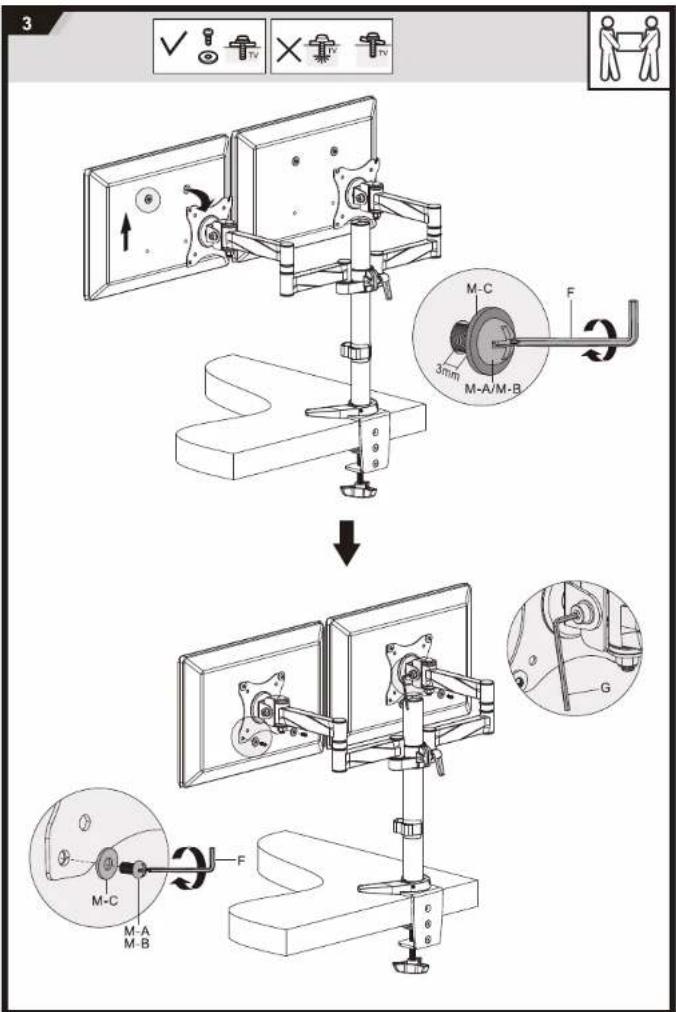
- Use the mounting screws provided and DO NOT OVER TIGHTEN mounting screws.
- This product contains small items that could be a choking hazard if swallowed. Keep these items away from children.
- This product is intended for indoor use only. Using this product outdoors could lead to product failure and personal injury.
IMPORTANT: Ensure that you have received all parts according to the component checklist prior to installation. If any parts are missing or faulty, telephone your local
distributor for a replacement.
MAINTENANCE: Check that the bracket is secure and safe to use at regular intervals (at least every three months).
The purpose of writing the proper written script will be considered as a language, with English letters being written and written in parentheses.
The provision of the government plans, as well as the provisions of the government's funding, is provided by the government for the purpose of the government's funding.

© Copyright 2017 by RaidSonic Technology GmbH. All Rights Reserved
The information contained in this manual is believed to be accurate and sensible. RaidSonic Technology GmbH assumes no responsibility for any access contained in this manual. RaidSonic Technology GmbH reserves the right to make attempts in the specification audit or design of the above mentioned product without prior notice. The diagrams contained in this manual may also reflect a better performance that you are taking and read there for illustration purposes only. RaidSonic Technology GmbH assumes no responsibility for any differences between the product mentioned in this manual and the product you may have.

ICY BOX®
Manual: IB-MS404T
natural_image
Technical line drawing of a mechanical device with multiple arms and clamps (no text or symbols)