
F-YCT10V - Dehumidifier PANASONIC - Free user manual and instructions
Find the device manual for free F-YCT10V PANASONIC in PDF.


| Product Type | Dehumidifier |
| Model Number | F-YCT10V |
| Dimensions (W x H x D) | 293 x 530 x 230 mm |
| Weight | 13 kg |
| Power Supply | 230-240 V ~ 50 Hz |
| Power Consumption (Hi) | 210 W |
| Water Removal Capacity (30°C, 80% RH) | 10.0 L/day |
| Water Tank Capacity | 2.5 L |
| Operating Temperature Range | 5 °C to 35 °C |
| Operating Modes | Continuous Dehumidify, Auto Dehumidify (target ~57% RH), Laundry |
| Full Tank Indicator | Yes (flashing LED when tank is full) |
| Auto Shut-off (Tilt Detection) | Yes (all LEDs flash) |
| Auto Shut-off (Full Tank) | Yes |
| Continuous Drainage | Yes (requires hose, internal diameter 15 mm) |
| Air Filter | Washable, clean every 2 weeks |
| Safety Features | Overload protection, GFCI, tilted shut-off, no sharp objects near vents |
| Additional Functions | Louver adjustable, caster wheels (lateral movement only), standby power ~1.6 W |
Frequently Asked Questions - F-YCT10V PANASONIC
User questions about F-YCT10V PANASONIC
0 question about this device. Answer the ones you know or ask your own.
Ask a new question about this device
Download the instructions for your Dehumidifier in PDF format for free! Find your manual F-YCT10V - PANASONIC and take your electronic device back in hand. On this page are published all the documents necessary for the use of your device. F-YCT10V by PANASONIC.
USER MANUAL F-YCT10V PANASONIC
natural_image
Line drawing of a portable electronic device with control panel and buttons (no text or symbols)Panasonic®
Operating Instructions
Dehumidifier
Model No. F-YCL10N
This product is for indoor use only
Contents
< Page >
Safety Precautions 2\~4
Part Names 5
Preparing for use
Operating method 6
Control panel and Functions 7
Correct Usage 8
Removing a Full Tank 8
Continuous Drainage 9
Maintenance 10\~11
Operation
Troubleshooting 12
Contact Manufacturer Immediately 13
(Emergency Treatment)
Memo 14\~15
Specifications 16
Troubleshooting
Correct use will help you save electricity
Warranty card included Separately
Thank you for purchasing this Panasonic product.
- Please read these operating instructions carefully, in order to use the product correctly and in a safe manner.
- Also, be sure to read the "Safety precautions" section (pages2\~4), before use.
- Keep the warranty documentation in a safe place along with the operating instructions for future reference.
Safety precautions
Always pay attention to these precautions
To prevent users and others bodily harm or property losses, we are explaining the precautions that must be observed.
■ Ignoring the symbols denoting incorrect operation, can result in harm or level of damage, described in the following two categories.

WARNING: This symbol indicates the "Possibility of death or serious injury".

CAUTION: This symbol indicates the "Possibility of injury or damage to property".
■ Meanings of symbols that always observed are as shown below.

This symbol indicates an action that "requires caution".


This symbol indicates a "never do this" action.


This symbol indicates an "always do this" action.

WARNING
■ Do not do anything that may damage the power cord or power plug.

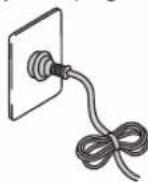
Please do not cut, modify, bend strongly, pull, place heavy objects on top of or tie the power plug with nylon straps or wires; continual use of damaged power plugs may result in electric shock, short circuit or fire.
- If the included power cord is damaged, it must be replaced by the manufacturer, the manufacturers authorized service agent or registered electrician in order to avoid a safety hazard
■ Do not disconnect the power plug with wet hands.

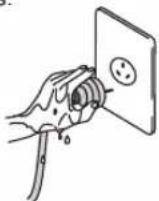
Electric shocks may occur.
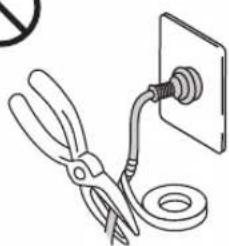
■ Avoid the power cord if it is damaged or modified

natural_image
Illustration of a pair of scissors and a wall-mounted cable with a ring, no text or symbols present.Damage from heavy objects placed on the power cord, heating the power cord or pulling on the power cord may cause fire or electric shock.
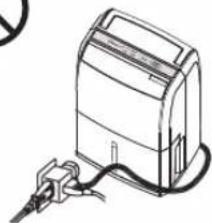
■ Do not use overloaded the rated current of the power outlet and wiring equipment.

natural_image
Line drawing of a portable electronic device with cable and plug (no text or symbols)Use too many branch lines will exceed the rated current, it may cause a fire by overheating.
■ Do not use a damaged power cord

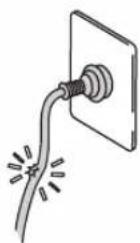
Using a damaged power cord may result in short circuit or fire. Please consult with the manufacturer or an authorized service agent.
■ Do not start or stop the unit by inserting or pulling out the power plug.

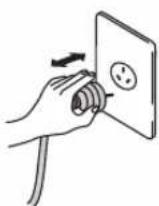
It may cause fire or electric shock by overheating.
■ Insert the power plug completely

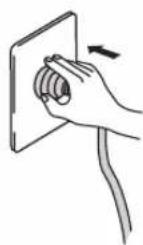
If the power plug is not inserted securely, fire due to overheating may occur.
- Do not use damaged power plugs or loose wall sockets.
■ Do not use the voltage other than as specified for unit.

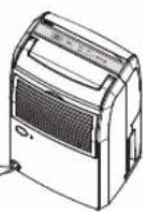
It may cause fire or electric shock by overheating.

WARNING
■ Do not insert fingers or other objects into the air inlet or outlet.
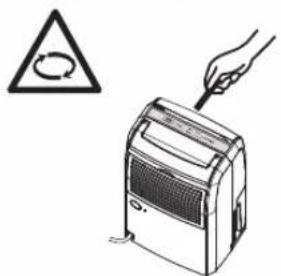
The rotating fan inside the unit could cause injury.
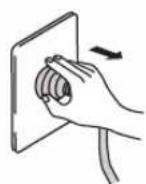
■ Do not unplug roughly.
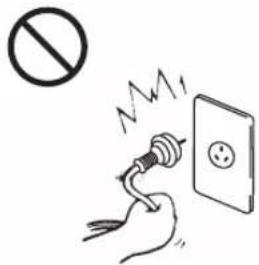
Unplugging roughly may damage the power cord and may cause electric shock, short circuit or fire.
■ Do not place the unit near a heater.
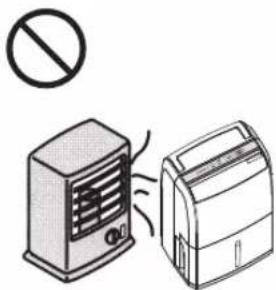
natural_image
Illustration of a portable air conditioner and its side heater with no text or symbolsPlastic parts may melt and cause fire.
■ Periodically clean the dust and dirt on the power plug.
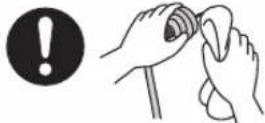
Dust may accumulate on the power plug in humid conditions and may cause the insulation to fail and cause a fire.
- Disconnect the power plug and wipe it with dry cloth. If not using the unit, disconnect the power plug.
■ Never try to repair the unit by yourself.
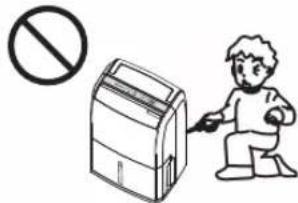
Fire or electric shock may occur.
● Consult the manufacturer or the manufacturers authorized service agent.
■ Do not stretch the power cord.
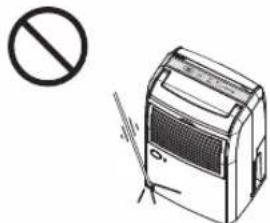
natural_image
Illustration of a portable air conditioner with a prohibition symbol (no text or labels present)Trapping the power cord as in the above illustration, may cause a short circuit or broken wires (which may cause a fire or an electric shock.)
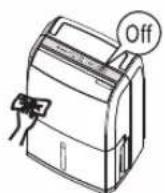
■ Switch off the unit and pull out the power plug if smoke or an abnormal smell is detected.
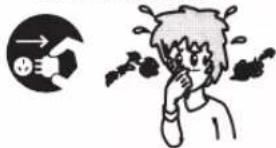
It may cause fire or electric shock by overheating.
- Consult the manufacturer or the manufacturers authorized service agent.
■ Do not pull on the power cord when carrying or storing the unit.
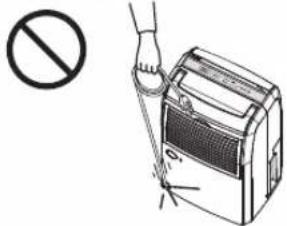
Pulling on the power cord as in the above illustration may damage the wires inside the cord and fire or electric shock may result.

CAUTION
■ Please monitor indoor temperature during prolonged operation.

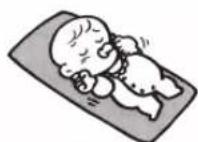
During operation, heat from the unit can cause indoor temperature to rise, upsetting homeostasis, potentially making people feel unwell.
■ Do not use in places where water may splash onto the unit.

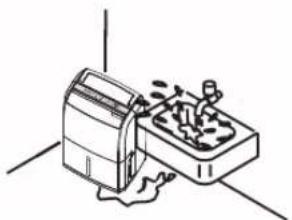
natural_image
Simple line drawing of a device with a lid and base, no text or symbols presentFire or electric shock may occur.
Place the unit on a level and sturdy floor.

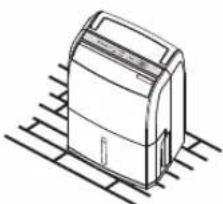
natural_image
Line drawing of a cylindrical device with a curved top and base, resting on a grid-patterned surface (no text or symbols)If the unit tilts water will overflow, and wet the furniture potentially causing fire or electric shock.
■ Do not use the unit near flammable gas.

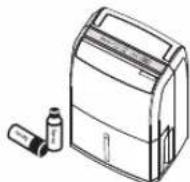
If flammable gases permeate the surrounding space, it may cause fire.
■ Do not use in confined spaces such as closets.

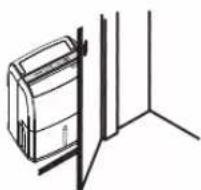
If there is insufficient ventilation, overheating and fire may occur.
■ Do not use in places exposed to direct sunlight, wind or rain.

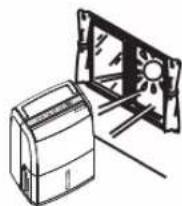
Resulting heat may cause fire or electric shock.
Safety Precautions
This unit is not intended for use by persons (including children) with reduced physical, sensory or mental capabilities, or lack of experiences and knowledge, unless they have been given supervision or instruction concerning use of the unit by a person responsible for the safety. Children should be supervised to ensure that they do not play with the unit.

CAUTION
■ Do not use in place where there are artworks or academic documents.
- Do not place flower vases or other water container on top of the unit.
■ Do not wash the unit directly with water.

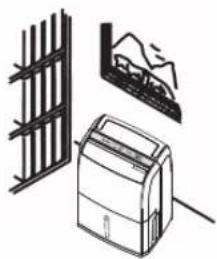
natural_image
Illustration of a portable air conditioner unit, a fence, and a mountain mural (no text or symbols)Deterioration of stored articles may occur.

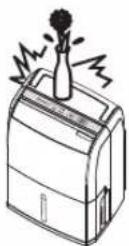
Water may spill into the unit and fire or electric shock may occur.

natural_image
Line drawing of a mechanical device with a handle and lever (no text or symbols)Water leakage may cause electric shock.
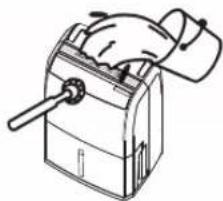
■ Do not place any heat or flame producing instrument in air outlet of the unit.
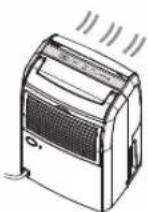
■ Do not cover the air inlet or air outlet with cloths or towels.
■ Do not sit or climb on the unit.
■ Do not hold the unit by the louver when moving or lifting it.

Incomplete combustion may cause carbon monoxide poisoning.

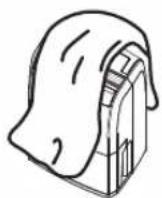
Air circulation will decrease and overheating or fire may occur.

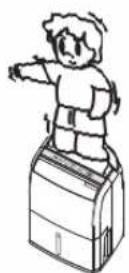
You may fall over, and injury may occur.

The unit may fall down and injury may occur.
■ Before moving the unit, turn off the power and empty the tank.
■ Before cleaning the unit, the unit must be powered off and unplugged from the electrical outlet.
If the unit will remain unused for a long period, disconnect the power plug, for safety.
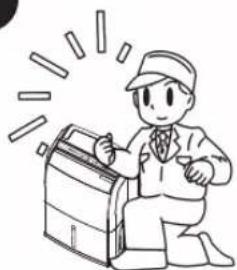
■ After prolonged use, perform periodic inspection.


natural_image
Cartoon illustration of a person in a suit kneeling beside a briefcase with radiating lines (no text or symbols)Failure to empty the tank may result in water leakage resulting in fire, electric shock or water damage to furniture.
The high-speed rotation of the fan inside may cause injury.
Accumulation of dust and foreign objects may occur and may lead to overheating and fire may occur.
Particularly the air filter and drains should be checked routinely to avoid overheating and leakage, resulting in house fires and items wetted.
Part Names
Front
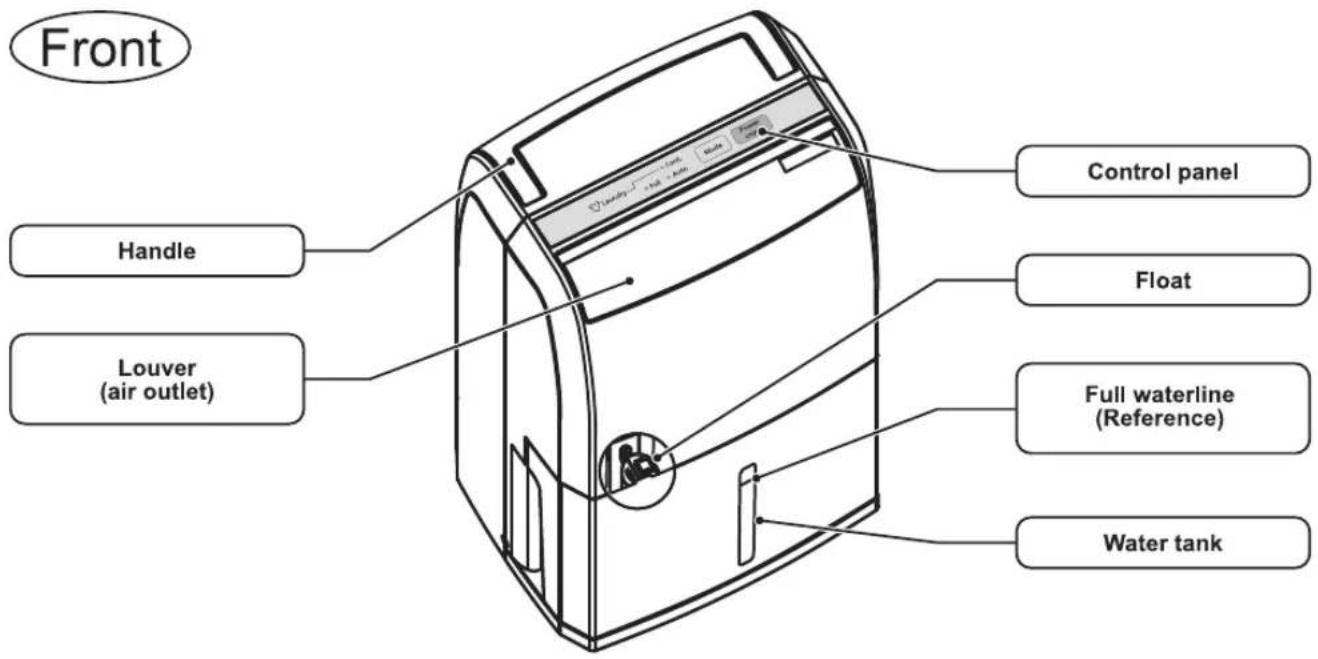
Back
Note
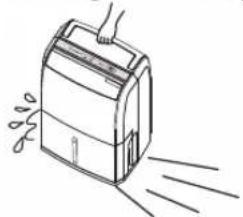
Caster (On the bottom of the unit / 4 pieces)
- Casters only move laterally.

CAUTION
- Use care when moving the unit over carpet, or when the tank is filled with water. (The unit may fall over causing spills, which may result in electrical shock, fire or damage to furniture.)

natural_image
Line drawing of a device emitting exhaust lines (no text or symbols)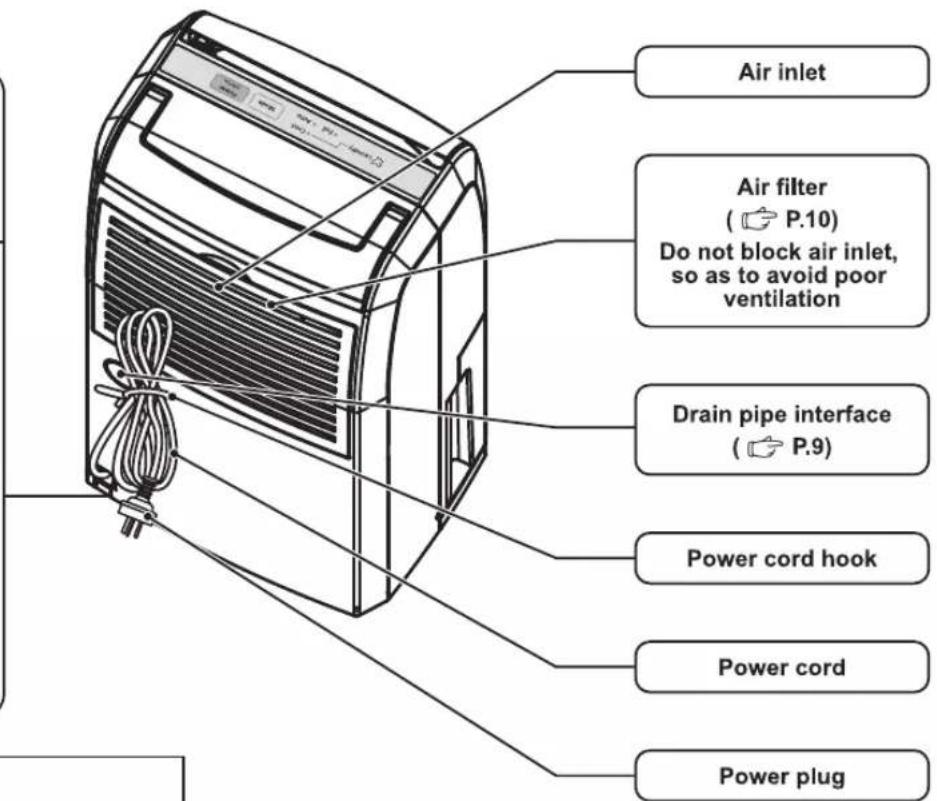
※Remove cover from plug before use.
Where to use
- At least 20 cm distance from the wall. (Walls and furniture near the unit, may be stained by electrostatic.)
- At least 1 Meter distance from any TV, radio (To prevent screen interference, noise)
Operating method

WARNING
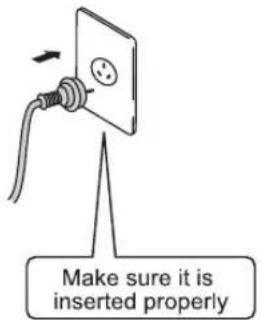
■ Make sure the power plug is inserted properly.
Loose power plugs will result in short circuit and overheating which can cause fire and electric shock.
1 Insert the power plug
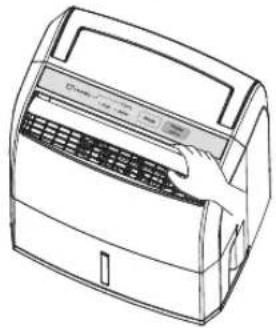
2 Open the louver manually
natural_image
Line drawing of a portable air conditioner unit (no text or symbols)3 Press the "Power Off/On" button
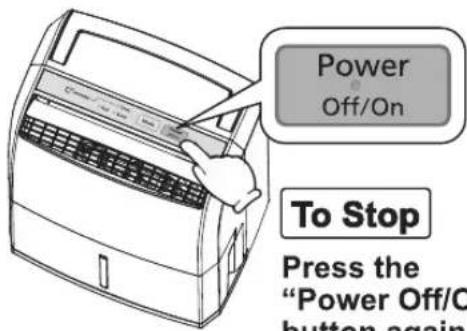
To Stop
Press the "Power Off/On" button again
Note
- This model is a type-B dehumidifier with an operating indoor temperature range between 5 - 35 °C (Although it can continue operating in temperatures exceeding this range, but doing so has negative effects to the unit itself and the unit may not be able to operate normally).
- An environment with comfortable humidity cannot be maintained when the humidity is below approximately 50%. (This unit can be used in daily life for uncomfortable environments with a high humidity; it can also help dry laundry etc.)
● This unit will stop operating when there's a power outage and will resume into standby mode when power is restored. - Do not operate this unit again within 5 minutes of turning the unit off in order to ensure the usage life of the compressor.
- Please open the louver when operating.
Louver installation
When the louver comes off
■ Louver installation
1 Insert the bulging part on the left into the hole on the left side of the unit.
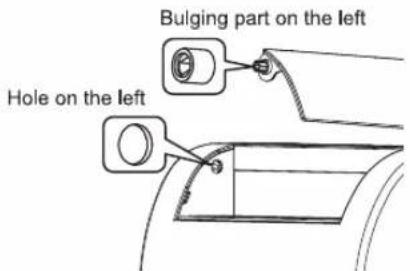
Turn the louver up and down for easier insertion.
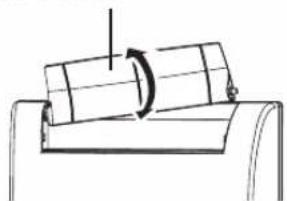
natural_image
Simple line drawing of a mechanical component with a rotating arrow (no text or symbols)2 Hold the louver horizontally and slightly bend the center part.
3 Insert the right side into the unit.
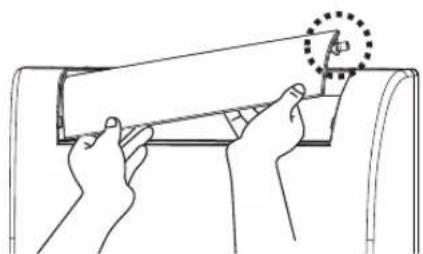
natural_image
Line drawing of hands installing or adjusting a mechanical component with a circular detail (no text or symbols)Control panel and Functions

flowchart
graph TD
    A["Laundry"] --> B["Full tank indicator"]
    B --> C["Cont."]
    B --> D["Auto"]
    C --> E["Mode"]
    D --> F["Power Off/On"]
    style A fill:#f9f,stroke:#333
    style E fill:#ccf,stroke:#333
    style F fill:#ccf,stroke:#333
① The power will be turned on once the “Power Off/On” button is pressed; press it again to turn the power off.
② “Mode” button (This button can switch between the “Continuous (dehumidify)” or “Auto (dehumidify)” functions).
Continuous dehumidify

Laundry
● Continuous dehumidify can be used to help dry wet laundry.
Auto dehumidify
- Humidity sensor detects the ambient humidity level and keeps indoor humidity at the most suitable level for the human body; the dehumidifier operates during high ambient humidity and stops at a low ambient humidity. (But the fan motor will continue to operate). (around 57%) The “Continuous (dehumidify)” function can be selected to adjust the humidity if you feel uncomfortable.
Note
- Do not let water from clothing drip onto the unit if your laundry is still damp.
- When the water level of the tank reaches full waterline (approximately 2.5 litres), the unit will stop operating automatically (Full tank indicator flashes) (Page 8).
● The unit will automatically stop operating when tilted status is detected (All LED flashes) (Page 12). - In continuous mode the dehumidifier will switch off if no buttons have been pushed for 24 hours.
Correct Usage
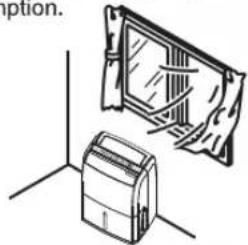
Dehumidifying function will not operate efficiently
If doors / windows are left open, or keep being open or closed repeatedly. It will also result in higher power consumption.
natural_image
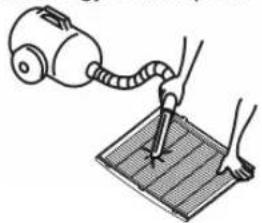
Simple line drawing of two 3D objects with no text or symbolsClean the air filter frequently.
Dehumidifying capabilities will be reduced if the air filter is blocked by foreign objects or dust, and will result in higher energy consumption.
natural_image
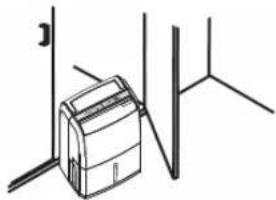
Illustration of a hand using a vacuum cleaner to test a grid on a surface (no text or symbols present)Do not place the unit inside the closet.
Position the unit in the closet doorway and ensure that clothing does not block the air inlet.
natural_image
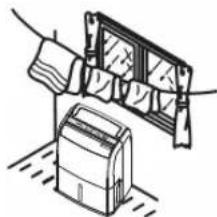
Simple line drawing of a printer placed inside a wall, no text or symbols presentUse when washed items have difficulty drying.
Face and operate the dehumidifier towards the washed objects to help drying.
natural_image
Simple line drawing of a hand holding a wall-mounted device next to a box, with no text or symbols present.Use in a kitchen that can easily become humid due to steam.
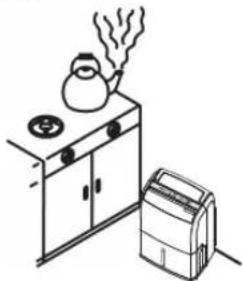
natural_image
Simple line drawing of a kitchen scene with a steaming pot on a stove and a portable air conditioner nearby (no text or symbols)Used to prevent frosting and the forming of mildew.
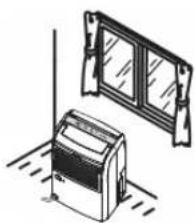
natural_image
Illustration of a washing machine and a window with glass panels (no text or symbols)Removing a Full Tank
※When the water level of the tank reaches full waterline (approximately 2.5 litres), the unit will stop operating automatically (Full tank indicator flashes).
※Please follow steps ①-③ to empty the tank:
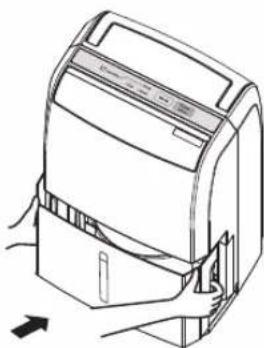
① Slowly remove the water tank with both hands.
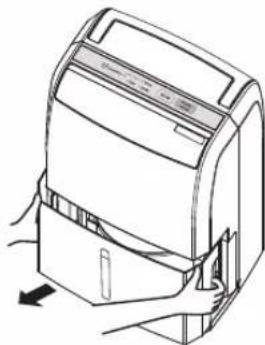
natural_image
Line drawing of a device with a hand pressing down on the side panel (no text or symbols)2 Hold the Tank handle and empty the water.
(Please empty the water according to the gesture in the figure below)
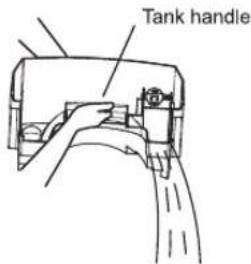
3 Reinsert the water tank gently with both hands.
natural_image
Line drawing of a device with a handle and arrow indicator (no text or symbols)● To prevent water from spilling, pull the water tank out in a parallel position.
Note
● Water can be emptied once the water tank is removed.
- Do not touch internal components after removing the water tank, or it may cause the unit to malfunction.
- Please reinsert the water tank completely. If the water tank is not correctly reinserted, the unit will not operate when the "Power Off/On" button is pressed. Remove the water tank and carefully reinsert again.
Continuous Drainage
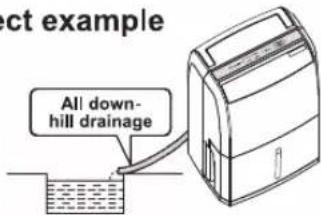
If there is adequate drainage nearby, the unit can be connected directly to the drain pipe and use the continuous drainage function.

CAUTION
■ Drainage hose must be securely installed

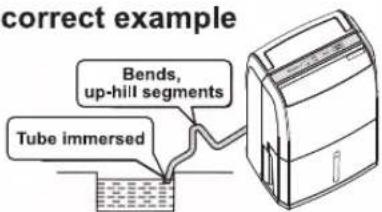
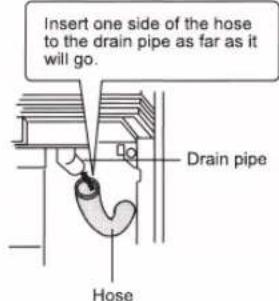
Please avoid bending or kinking the drain hose, make the drainage go as far as it will go. Poor drainage may result in leakage, this in turn may cause damage to furniture.
■ The ambient temperature of drain pipe must not fall below 0°C

Water in drain pipe may freeze and block drainage, resulting in leakage and damage to furniture.
Install the hose
Correct example
Incorrect example
Items to be purchased
● Hose
Length: 30cm longer than the distance between dehumidifier and the drain.
Internal diameter: 15mm
Note
When the temperature of water in the drain pipe is much cooler than the ambient temperature, the surface of drainage pipe may develop condensation. Please take insulation measures if necessary.
1 Disconnect the power plug and remove the water tank.
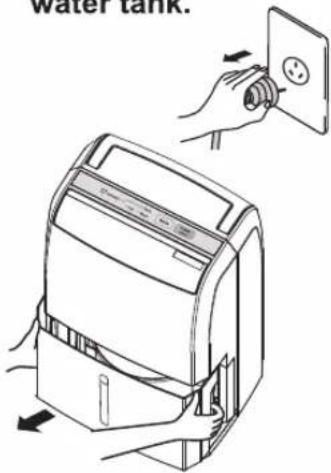
2 Open the drain pipe interface
(Use tools to remove the protective cover)
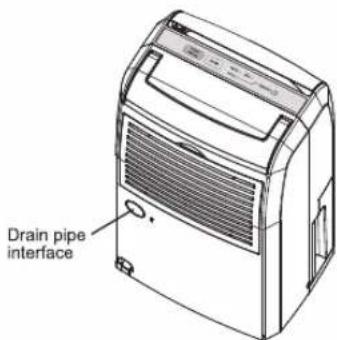
● Clean the drain pipe interface.
③ Remove the sealing device
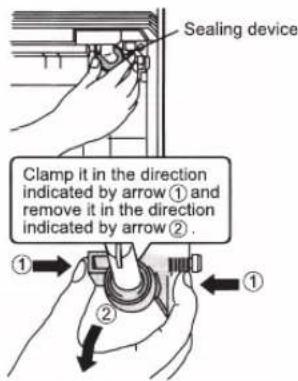
4 Connect the hose to the drain pipe
5 Insert the water tank
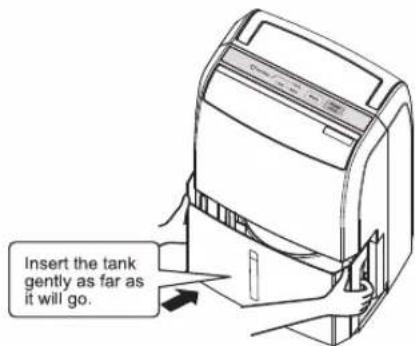
- Improper installation may cause the unit to operate incorrectly.
Note: When restoring to the water tank drainage, improper installation may result in water leakage; please refer to the above instructions.
Maintenance

CAUTION
● Always be sure that the unit is off and the power plug is disconnected when cleaning. (The electric fan inside rotates with high speed and may cause injury)
- Do not wash the praluct with water. (This may result in electric shock)
- Do not clean the product with solvents such as benzine or thinner, and do not apply insect sprays. (This product may become cracked and injury may occur. This may cause damage to the product resulting in injury, furniture damage, short circuit, electrical fire or electrical shock.)
Maintaining the unit
- Please wipe it with a soft, dry cloth.
- Please do not use hot water with temperature above 40 °C, volatile substances (thinners, benzene) and scouring powder etc. during maintenance.
(If using a chemically treated cloth, please read the manufacturers instructions that came with the cloth.)
Cleaning the air filter (Suggest once every two weeks)
1 Remove the air filter.
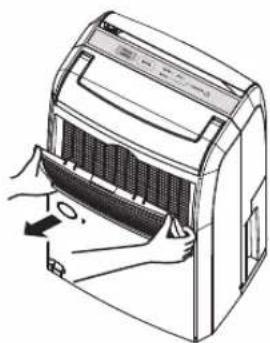
natural_image
Line drawing of a hand inserting a fan into a device (no text or symbols)2 Remove dust and dirt using a vacuum cleaner etc. Do not operate the unit with a wet air filter inserted.
For stubborn stains, clean with water mixed with diluted kitchen detergents (neutral detergents), and then place it in the shade for it to dry completely.
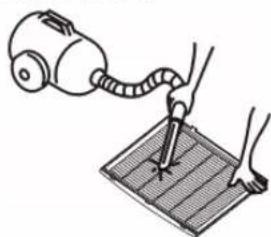
natural_image
Illustration of a hand using a vacuum cleaner to press or install a grid on a surface (no text or symbols present)3 Install the air filter Perform reversed operations from removing the air filter.
Cleaning the water tank
1 Clean the interior and exterior of the water tank after removing the water tank.
(Please do not remove the float)
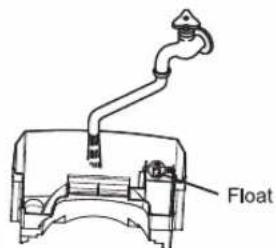
● Take care not to damage the float.
- Do not remove the float.
2 Clean the interior of the water tank with a sponge brush.
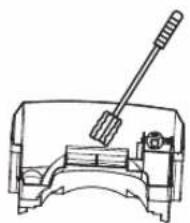
natural_image
Technical line drawing of a mechanical component with a lever and housing (no text or symbols)3 Reinsert the water tank after wiping it clean
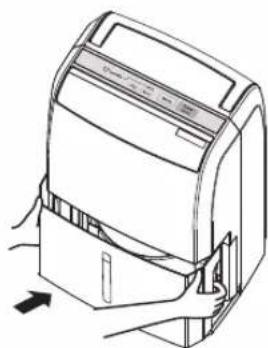
natural_image
Line drawing of a device with a handle and arrow indicating rotation (no text or symbols)Maintenance
Note
- Please push the water tank as far as it will go in when reinstalling it.
The unit will not operate even if the "Power Off/On" button is pressed if the water tank is not properly installed.
● Never remove the float.
If the float is removed, the unit will not operate even if the "Power Off/On" button is pressed.

CAUTION
● Water may leak if the water tank was not properly installed. (May cause water leak resulting in damage to furniture, fire or electric shock.)
If not using the unit for long periods of time
1 Disconnect the power plug, tie the power cord up with the strap and place it in the cord hook.
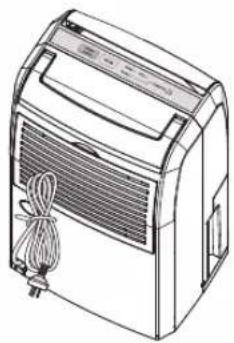
natural_image
Line drawing of a portable air conditioner unit with ventilation grille and cord (no text or symbols)2 Empty the water in the water tank, wipe the water tank dry and reinstall the water tank.
(Do not remove the float)
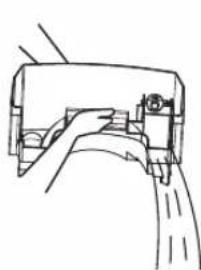
natural_image
Technical line drawing of a mechanical component or bracket assembly (no text or symbols)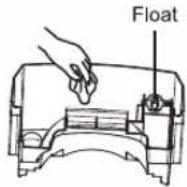
Note
● Store the unit in a place with no exposure to direct sunlight.
(Direct sunlight exposure may cause the unit to deform and decolorize)
- Do not store it by laying it down.
(May cause malfunction or abnormal sounds)
Troubleshooting
Please check the followings first
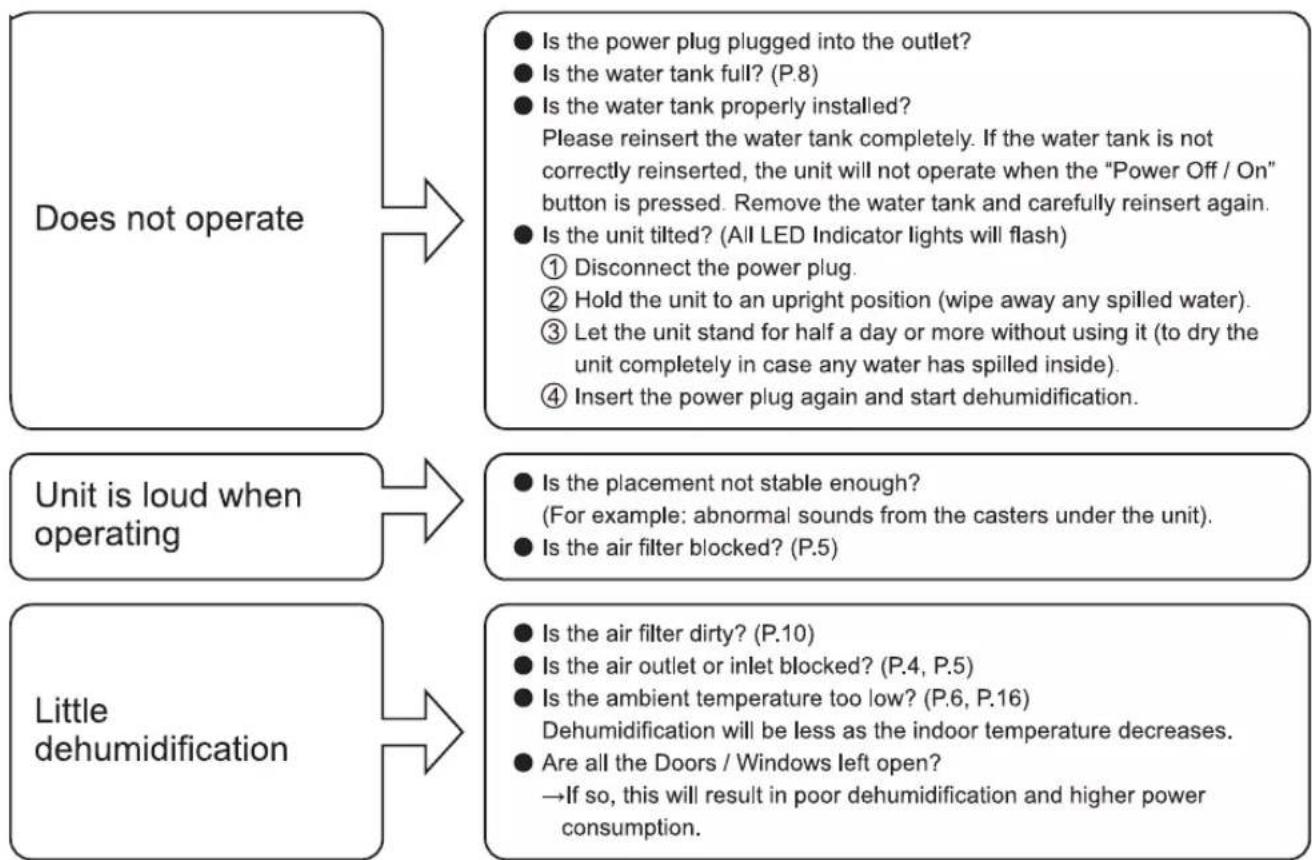
flowchart
graph TD
    A["Does not operate"] --> B["Is the power plug plugged into the outlet?"]
    B --> C["Is the water tank full? (P.8)"]
    C --> D["Is the water tank properly installed?"]
    D --> E["Please reinsert the water tank completely. If the water tank is not correctly reinserted, the unit will not operate when the "Power Off / On" button is pressed. Remove the water tank and carefully reinsert again."]
    E --> F["Is the unit tilted? (All LED Indicator lights will flash)"]
    F --> G["① Disconnect the power plug."]
    F --> H["② Hold the unit to an upright position (wipe away any spilled water)."]
    F --> I["③ Let the unit stand for half a day or more without using it (to dry the unit completely in case any water has spilled inside)."]
    F --> J["④ Insert the power plug again and start dehumidification."]

    K["Unit is loud when operating"] --> L["Is the placement not stable enough?"]
    L --> M["(For example: abnormal sounds from the casters under the unit)."]
    L --> N["Is the air filter blocked? (P.5)"]

    O["Little dehumidification"] --> P["Is the air filter dirty? (P.10)"]
    P --> Q["Is the air outlet or inlet blocked? (P.4, P.5)"]
    Q --> R["Is the ambient temperature too low? (P.6, P.16)"]
    R --> S["Dehumidification will be less as the indoor temperature decreases."]
    S --> T["Are all the Doors / Windows left open?"]
    T --> U["→If so, this will result in poor dehumidification and higher power consumption."]
If the abnormality still remains after following the treatments described above, please disconnect the power plug and contact the manufacturer or authorized service agent immediately.
No problems
The following conditions of the dehumidifier happen for their respective reasons; please do not worry and continue to use the unit.
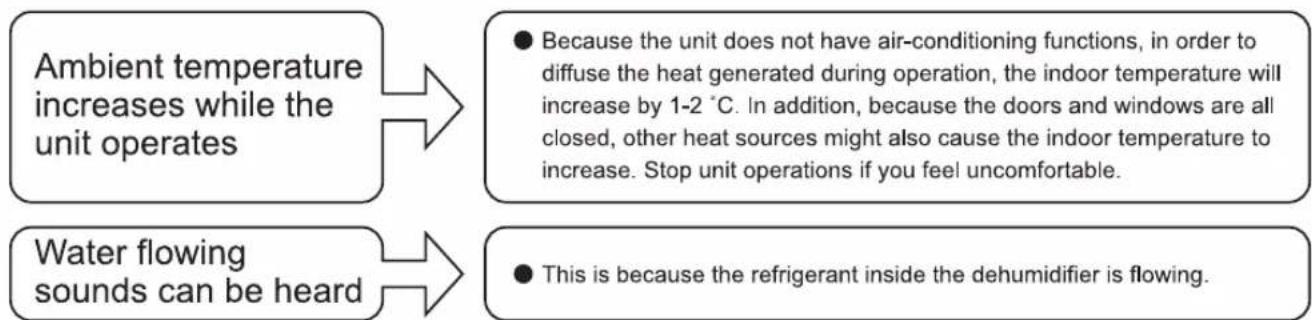
flowchart
graph TD
    A["Ambient temperature increases while the unit operates"] --> B["● Because the unit does not have air-conditioning functions, in order to diffuse the heat generated during operation, the indoor temperature will increase by 1-2 °C. In addition, because the doors and windows are all closed, other heat sources might also cause the indoor temperature to increase. Stop unit operations if you feel uncomfortable."]
    C["Water flowing sounds can be heard"] --> D["● This is because the refrigerant inside the dehumidifier is flowing."]
Contact Manufacturer Immediately (Emergency Treatment)
Stop operating immediately, disconnect the power plug and contact the manufacturer or authorized service agent immediately if the following symptoms occurred.
● The "Power Off/On" function is not operating properly.
● The GFCI (ground-fault circuit interrupter) or the fuse burns frequently.
● The power cord and power plug overheats abnormally.
● Smells like something is burning or there are abnormal sounds when operating.
● Water leaks from the unit.
● Other abnormal malfunctions.

WARNING
If the supplide power cord is damaged, it must be replaced by the manufacturer, authorized service agent or registered electrician.
Kind Reminder

Did these symptoms occur?
● Unable to operate or stops suddenly during operation when power is connected.
● Power is only sometimes connected when the power cord is moved.
● Abnormal sounds or vibrations occur when the fan is rotating.
● The unit itself overheats abnormally, and smells like something is burning.
● Other abnormalities or malfunctions.
When these symptoms occur, in order to prevent accidents from happening, please turn off the power, disconnect the power plug and contact your purchasing manufacturer or authorized service agent by our company for repairs.
Memo
Memo
Specifications
| Model No. | F-YCL10N | ||
| Power supply | 230-240 V ~ 50 Hz | ||
| Power plug shape | ◎ | ||
| Operating condition | Temperature | 30 °C | |
| Relative humidity | 80 % | ||
| Water removal (L/Day) | Hi | 10.0 | |
| Power consumption (W) | Hi | 210 | |
| Water tank capacity (L) | 2.5 | ||
| Weight (kg) | 13 | ||
| Dimensions (WxHxD) (mm) | 293X530X230 | ||
*The unit consumes approximately 1.6 W of power when operation is off. (While power plug is inserted)
Customer's record
For the model number and serial number of this product, please refer to the back side of the machine.
Please record them in the space provided and keep for future reference.
| MODEL NO. F-YCL10N | SERIAL NO. |
| DATE OF PURCHASE | MANUFACTURER NAME |
| MANUFACTURER ADDRESS | |
| MANUFACTURER TELEPHONE NUMBER | |
Panasonic Corporation
Web Site : http://www.panasonic.com
©Panasonic Ecology Systems Co., Ltd. 2015 All Rights Reserved.
- Panasonic®
- Operating Instructions
- Dehumidifier
- Model No. F-YCL10N
- Contents
- Safety precautions
- WARNING
- CAUTION
- Part Names
- Front
- Back
- Note
- Where to use
- Operating method
- ■ Make sure the power plug is inserted properly.
- Insert the power plug
- Open the louver manually
- Press the "Power Off/On" button
- To Stop
- Louver installation
- When the louver comes off
- ■ Louver installation
- Insert the bulging part on the left into the hole on the left side of the unit.
- Hold the louver horizontally and slightly bend the center part.
- Insert the right side into the unit.
- Control panel and Functions
- Auto dehumidify
- Correct Usage
- Dehumidifying function will not operate efficiently
- Clean the air filter frequently.
- Do not place the unit inside the closet.
- Use when washed items have difficulty drying.
- Use in a kitchen that can easily become humid due to steam.
- Used to prevent frosting and the forming of mildew.
- Removing a Full Tank
- ① Slowly remove the water tank with both hands.
- Hold the Tank handle and empty the water.
- Reinsert the water tank gently with both hands.
- Continuous Drainage
- ■ Drainage hose must be securely installed
- ■ The ambient temperature of drain pipe must not fall below 0°C
- Items to be purchased
- ● Hose
- Disconnect the power plug and remove the water tank.
- Open the drain pipe interface
- ③ Remove the sealing device
- Connect the hose to the drain pipe
- Insert the water tank
- Maintenance
- Maintaining the unit
- Cleaning the air filter (Suggest once every two weeks)
- Remove the air filter.
- Remove dust and dirt using a vacuum cleaner etc. Do not operate the unit with a wet air filter inserted.
- Install the air filter Perform reversed operations from removing the air filter.
- Cleaning the water tank
- Clean the interior and exterior of the water tank after removing the water tank.
- Clean the interior of the water tank with a sponge brush.
- Reinsert the water tank after wiping it clean
- If not using the unit for long periods of time
- Troubleshooting
- Please check the followings first
- No problems
- Contact Manufacturer Immediately (Emergency Treatment)
- Kind Reminder
- Did these symptoms occur?
- Memo
- Specifications
- Customer's record
- Panasonic Corporation
Brand : PANASONIC
Model : F-YCT10V
Category : Dehumidifier