
NI-E500 - Iron PANASONIC - Free user manual and instructions
Find the device manual for free NI-E500 PANASONIC in PDF.


| Product Type | Electric Steam Iron |
| Brand | Panasonic |
| Model | NI-E500 |
| Power Consumption | 1500 W (typical) |
| Voltage | 120 V, 60 Hz |
| Water Tank Capacity | 200 ml (up to MAX line) |
| Soleplate Material | Stainless Steel |
| Cord Length | 2.0 m |
| Weight | Approx. 1.2 kg |
| Dimensions (approx.) | 280 x 120 x 150 mm |
| Spray Feature | Yes (pump mist button) |
| Jet of Steam Feature | Yes (pump button, 2-5 sec interval) |
| Vertical Steam Feature | Yes (NI-E500T model only) |
| Self-Cleaning Feature | Yes (flush mineral residue) |
| Stay Clean Vents | Yes (anti-calcium system) |
| Steam/Dry Selector | 3 positions: Dry, Low steam, High steam |
| Temperature Control | Dial with dot settings (•, ••, •••) |
| Indicator Light | Thermostat operating indicator |
| Storage | Heel rest; empty water; dry position |
| Safety | Do not leave unattended; use on stable surface; unplug when filling |
Frequently Asked Questions - NI-E500 PANASONIC
User questions about NI-E500 PANASONIC
0 question about this device. Answer the ones you know or ask your own.
Ask a new question about this device
Download the instructions for your Iron in PDF format for free! Find your manual NI-E500 - PANASONIC and take your electronic device back in hand. On this page are published all the documents necessary for the use of your device. NI-E500 by PANASONIC.
USER MANUAL NI-E500 PANASONIC
Your safety and the safety of others are very important
We have provided important safety messages in this manual and on your appliance. Always read and obey all safety messages.

This is the safety alert symbol. It is used to alert you to potential hazards that can kill or cause injury. The safety messages will follow the safety alert symbol and either the word "WARNING" or "CAUTION". These words mean:

This describes issues which could cause death or serious injury.

This describes issues which could cause injury or damage your belongings.
The safety messages will tell you what the potential hazard is, how to avoid and reduce the chance of getting injured, and what can happen if the instructions are not followed.
Thank you for buying a Panasonic Iron
Your iron is an appliance to be used only for ironing fabrics on an ironing board.
IMPORTANT SAFETY INSTRUCTIONS
When using your iron, basic safety precautions should always be followed, including the following:

To reduce the risk of burns, electric shock, fire, or injury to persons:
- To avoid a circuit overload, do not operate another high wattage appliance on the same circuit.
- The input voltage should match the rated voltage marked on the iron.
- Use the iron only for its intended purpose, for ironing fabrics on an ironing board. To protect against burns or injury to persons, do not iron or steam fabrics while being worn on the body.
- Do not leave the iron unattended while it is connected to the mains.
- This iron must be filled or emptied only when the power plug is disconnected.
- Most ordinary tap water can be used with this iron. In extremely hard water areas, distilled and/or demineralized water should be used.
- When leaving the room even for a short time, disconnect the power plug. Keep it away from children. -2-

NI-E300T
Panasonic®
Electric Steam Iron
Operating Instructions
Model No. NI-E500T/E300T/E200T/E100T
natural_image
Line drawing of a Panasonic air iron (no text or symbols)- To protect against the risk of electric shock, do not immerse the iron or cord in water or other liquids.
- If the supply cord or plug is damaged, it must be replaced by the service agent of the manufacture or similarly qualified person in order to avoid a hazard.
- Do not allow cord to touch hot surfaces. Allow the iron to cool completely before storing.
- Burns can occur from touching hot metal parts, hot water, or steam. Use caution when turning the steam iron upside down. Hot water may leak from the iron.
- The iron must be used and rested on a stable surface. When placing the iron on its stand, ensure that the surface on which the stand is placed is stable.
- The iron is not to be used if it has been dropped, if there are visible signs of damage or if it is leaking.
- Do not use the appliance with the Cord entangled. The supply Cord might be damaged as a result.
- If one notice smoke or fire, stop using equipment immediately and detach the plug from the mains. This is to avoid fire or electrical shock, Thereafter contact the service agent or dealer immediately.
- This appliance is not intended for use by persons (including children) with reduced physical, sensory or mental capabilities, or lack of experience and knowledge, unless they have been given supervision or instruction concerning use of the appliance by a person responsible for their safety.
- Children should be supervised to ensure that they do not play with the appliance.

CAUTION
To reduce the risk of personal injury and damage to your iron:
- Never use steam iron cleaning products in the iron, as they may damage working parts of the iron.
- Do not use water additives or substitute water such as linen or scented water in the steam iron. They can stain fabrics.
- If the Steam/Dry Selector is not in the Dry position after using, remaining water will flow into the Soleplate and can result in burns at the next use of the iron.
- Don't use the Steam or Jet of Steam, while AC cord is unplugged, water will remain inside the Soleplate which will cause staining.
Please do not use Steam or Jet of Steam while thermodial is set to "0".
SAVE THESE INSTRUCTIONS
For proper use of your iron, read remaining safety cautions and operation instructions.
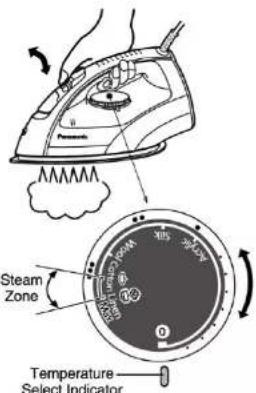
- Preheat the iron until the indicator light goes out, usually about 1-2 minutes.
This light will go on and off during ironing to indicate the temperature chosen by the Temperature Selector Dial is being maintained. - Hold the iron horizontally and move the Steam/Dry Selector into the steam position. Steam/Dry Selector is regulated as follows.
NOTE: 3 Position Steam/Dry Selector.

Dry | Low steam | High steam
| Temperature Zone | Steam/Dry Selector Position |
| Low steam | |
| Low steam | |
| High steam |
- Whenever the iron is positioned vertically, the steaming action will stop.

CAUTION
Do not use the Steam/Dry Selector unless the iron is sufficiently hot to produce steam, otherwise water will leak out through the vents instead.
HOW TO USE AS A DRY IRON
- Move the Steam/Dry Selector to the Dry position.
- Position the iron vertically, set the Temperature Selector Dial to "0".
- Plug in the iron.
- Set the Temperature Selector Dial to the desired position.
- Preheat the iron until the Thermostat Operating Indicator Light goes out, usually about 1-2 minutes.
HOW TO USE THE "SPRAY" FEATURE (NI-E500T/E300T/E200T Only)
Note:
Before using the spray feature, check the fabric label for ironing instructions because some fabrics may be spotted or stained with moisture.
HELPFUL IRONING TIPS
The Temperature Selector Dial of the Panasonic iron has words, dots and steam symbols.
-
The dots are symbols for 3 temperature ranges:
-
Low Temperature
•• Medium Temperature
••• High Temperature

(NI-E500T/E300T)

(NI-E200T/E100T)
Some fabrics are labeled with these dots as a guide
for selecting the proper ironing temperature setting.
- For General information of the dots setting, refer to the Heel Rest.
HOW TO FILL WITH WATER

WARNING
Be sure the iron is unplugged from the electrical outlet before filling with water.
- Move the Steam/Dry Selector to the Dry position to avoid water leakage.
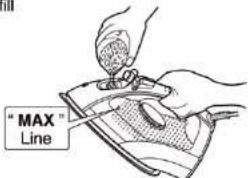
Open the Water Fill Cover. Hold the iron as shown and fill
the iron with water up to "MAX" line (about 200ml).
Use a cup for filling (see note).
- Do not overfill. Check for the correct water fill level with the iron in the vertical position.
- Close the Water Fill Cover, or water will splash from Water Tank when ironing.
Note:
Most tap water can be used in this iron. If water is very hard, distilled or demineralized water should be used. Do not use water processed through home water softening systems because this water contains minerals that may be harmful to the iron. Do not use water additives or substitute water as linen or scented water in the steam iron. They can stain fabrics or damage the iron.

CAUTION
When adding water to the iron, please make sure the whole iron is grasped stably to avoid dropping, or it may result in injury.
HOW TO USE AS A STEAM IRON
- Fill the iron as described in "HOW TO FILL WITH WATER".
- Position the iron vertically and be sure the Temperature Selector Dial is set to "0".
- Plug the AC Cord into the electrical outlet.
- Set the Temperature Selector Dial to the " 🔊" or " 🔊" (steam) zone.
HOW TO USE THE "VERTICAL STEAM" FEATURE (NI-E500T Only)

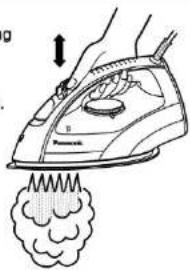
To get better results when using vertical steam, hang the garment on a clothes hanger. Curtains and drapes may also be steamed once they're hung. Hold the iron away from your body, close to but not touching the fabric. Pull the fabric tight with your free hand and pump the Vertical Steam Button (Jet of Steam Button) at 2-5 seconds intervals as you pass the iron over the wrinkled fabric.
WARNING
Never iron clothes on the body or point your iron at anyone when steaming.
Keep hands and body away from steam areas while using vertical steam feature.
SELF-CLEANING (NI-E500T/E300T Only)
With the self-cleaning feature you can flush out mineral residue from the steam generating chamber and the steam vents, refreshing your iron each time for a longer steaming life. It is very important to operate the self-cleaning feature after each steam ironing to prevent mineral accumulations from hardening.
- Check water level. Water level should be at 1/2 full mark. When water level is less than half full, fill with water according to the instructions in "HOW TO FILL WITH WATER".
- Preheat at "Max" setting (for about 1-2 minutes). Make sure that the Steam/Dry Selector is in the Dry position.
- Set the dial to "0" and remove the AC plug.
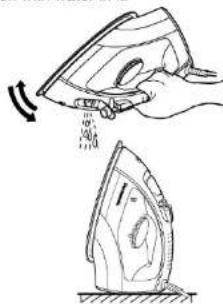
- Hold the iron horizontally over the sink.
- Pump the "Jet of Steam Button" quickly (at least 3 times per second) about 20-30 times.
- While self-cleaning, tilt the iron up and down slowly to help clean the entire inside and let the water drip out of the soleplate vents.
- Check that all water and steam have completely stopped coming out of the soleplate vents. After self-cleaning is finished, empty any remaining water from the Water Tank by turning the iron upside down.
-
Iron on a towel to remove any drops of water remaining on the bottom of iron.
-
Allow the iron to cool and store on its Heel Rest. Never store an iron on its Soleplate or with water in it.
-
If water still remains inside the Soleplate after self-cleaning operation, dry out the iron by setting the iron on the "Max" setting, to vaporize the remaining water. After the iron is dry, follow the instructions under "AFTER EACH USE".
natural_image
Illustration of a hand using an iron on a steamer with smoke plume (no text or symbols)The spray feature is particularly helpful for removing stubborn wrinkles and where extra dampening is needed.
The spray may be used with steam or dry ironing.
- Simply pump the Spray Mist Button "蒸" whenever spray is desired. If the spray doesn't come out immediately, keep pumping until it does.
- To get a finer spray, pump the button vigorously. To get a more powerful spray, pump the button more slowly. For best results, use a quick, full stroke.

HOW TO USE THE "JET OF STEAM" FEATURE (NI-E500T/E300T Only)
The "Jet of Steam" feature provides extra steam which goes deep into the garment and is helpful for removing stubborn wrinkles. The "Jet of Steam" feature operates properly only in the "💡" indication area of the Temperature Selector Dial when steam or dry ironing (If used at lower setting, water spotting will occur because the iron is not hot enough to change water to steam). If you have not used the "Jet of Steam" feature for a long time, it is necessary to clean the inside of the iron before using this feature on any clothes to be ironed. Simply test the "Jet of Steam" feature several times away from the ironing board and clothes to be ironed. This will prevent brown spotting or water spotting on the clothes.
- Fill the iron as described in "HOW TO FILL WITH WATER".
- Position the iron vertically and be sure the Temperature Selector Dial is set to "0". Plug the AC Power Cord into the electrical outlet.
- Set the Temperature Selector Dial to the " 🔊 " indication area.
- Preheat the iron until the indicator light goes out, usually about 1-2 minutes.
- Simply pump the "Jet of Steam Button" when steam is desired. Pump the "Jet of Steam Button" several times at the beginning of each ironing session.
- Allow at least 2-5 seconds between uses of the "Jet of Steam Button" to prevent water spotting. Use a press cloth if necessary.

natural_image
Line drawing of a hand using an iron on a steam machine, emitting smoke (no text or symbols)CAUTION
Do not use the "Jet of Steam Button" until the Thermostat Operating Indicator Light turns off after setting the Temperature Setting Dial to "💡". Hot water may leak from the Soleplate and burns may result, and it may cause corrosion.

STAY CLEAN VENTS (NI-E500T Only)
The built-in Anti Calcium System in the Tank continuously reduces scale bulldup in the vaporizing chamber of the iron.
This system makes it possible to use the steam function for a long period of time and prevents steam vents from clogging.
HOW TO CARE FOR YOUR IRON
AFTER EACH USE
- Set the Temperature Selector Dial to "0".
- Turn the iron off and unplug.
- Empty the iron immediately after using. Do not store the iron with water in it.
- Move the Steam/Dry Selector into the Dry position. If the Steam/Dry Selector is not in the Dry position after using, remaining water will move into the Soleplate and damage the Soleplate and may result in burns during the next initial use of the iron
- Wait until the iron has cooled before storing it, and always set it on the Heel Rest to protect the Soleplate from scratches, corrosion or stains.
OUTSIDE SURFACE OF IRON
After unplugging and cooling the iron, simply wipe off with a damp cloth and if necessary, use a mild detergent.
NEVER USE ANY HARSH CLEANERS.
SOLEPLATE
- Starch and other residue can be easily removed from the Soleplate with a damp cloth.
- To avoid scratching the finish, never use a metallic pad to clean the Soleplate, and never place the iron on a rough surface.
- If synthetics are being ironed on a higher temperature level than instructed, not only will the fabric be ruined, but the Soleplate will often be covered with the melted remains of the synthetic fabric.
- The best way to remove synthetic residue from the Soleplate is to iron over an old cotton rag after heating the iron.

CAUTION
natural_image
Illustration of a hand using a steam iron to lift or spread air, showing the process (no text or symbols present)Never use steam iron cleaners in the iron, since they may damage the working parts of the iron.
© Panasonic Corporation 2011. All rights reserved.
http://panasonic.net/
-9-
Printed in China
natural_image
Illustration of a hand using a steam iron to lift a cloth, with motion arrows indicating speed (no text or symbols)natural_image
Line drawing of a hand using an iron on a steam machine, with smoke plume below (no text or symbols)0—نشانگر میزان دما
natural_image
Line drawing of a hand using a steam iron to lift a piece of material (no text or symbols)
- Thank you for buying a Panasonic Iron
- IMPORTANT SAFETY INSTRUCTIONS
- Panasonic®
- CAUTION
- SAVE THESE INSTRUCTIONS
- HOW TO USE AS A DRY IRON
- HOW TO USE THE "SPRAY" FEATURE (NI-E500T/E300T/E200T Only)
- Note:
- HELPFUL IRONING TIPS
- HOW TO FILL WITH WATER
- WARNING
- HOW TO USE AS A STEAM IRON
- HOW TO USE THE "VERTICAL STEAM" FEATURE (NI-E500T Only)
- SELF-CLEANING (NI-E500T/E300T Only)
- HOW TO USE THE "JET OF STEAM" FEATURE (NI-E500T/E300T Only)
- STAY CLEAN VENTS (NI-E500T Only)
- HOW TO CARE FOR YOUR IRON
- AFTER EACH USE
- OUTSIDE SURFACE OF IRON
- SOLEPLATE
Brand : PANASONIC
Model : NI-E500
Category : Iron