
AS517 - Sander Mac Tools - Free user manual and instructions
Find the device manual for free AS517 Mac Tools in PDF.


Pick your language and provide your email: we'll send you a specifically translated version.
| Product Type | Orbital Sander |
| Model Number | AS517 |
| Brand | Mac Tools |
| Power Source | Corded Electric |
| Voltage | 120 V AC |
| Amperage | 2.5 A |
| Orbits per Minute | 10,000 - 12,000 OPM |
| Orbit Diameter | 1/8 inch (3.2 mm) |
| Pad Size | 5 inch (125 mm) Hook-and-Loop |
| Dust Collection | Built-in dust bag or vacuum port |
| Weight | 3.2 lbs (1.45 kg) |
| Dimensions (L x W x H) | 8.5 x 5.0 x 5.5 inches |
| Power Cord Length | 6 feet (1.8 m) |
| Variable Speed | Yes, dial control |
| Soft Start | Yes |
| Body Material | Reinforced Composite |
| Warranty | 1 Year Limited |
| Included Accessories | 5 sandpaper discs, dust bag, wrench |
| Safety Features | Lock-on button, dust protection |
| Maintenance | Clean dust bag, replace pad if worn |
Frequently Asked Questions - AS517 Mac Tools
How do I change the sandpaper disc?
Press the pad brake to stop the pad, then peel off the old disc and align the new hook-and-loop disc onto the pad.
Can I connect a vacuum to this sander?
Yes, the AS517 has a vacuum port that fits standard shop vac hoses for efficient dust extraction.
What speed should I use for wood?
For wood, set the variable speed dial to medium-high (around 10,000 OPM) for fast removal or lower for finishing.
How do I maintain the sander?
Empty the dust bag regularly, clean the pad with a brush, and inspect the power cord for damage.
Is this sander suitable for metal?
Yes, use abrasive discs rated for metal and reduce speed to avoid overheating.
What accessories are included?
The package includes five sandpaper discs (80, 120, 180 grit), a dust bag, and a wrench for pad changes.
How to prevent swirl marks?
Use a light pressure, keep the sander moving, and use progressively finer grits. Avoid orbiting in one spot.
Can I use this sander for wet sanding?
No, this sander is not designed for wet sanding. Use only dry applications to avoid electrical hazards.
Is the speed adjustable?
Yes, the AS517 features a variable speed dial from 6,000 to 12,000 OPM for different materials.
What is the warranty period?
Mac Tools offers a 1-year limited warranty covering defects in materials and workmanship. Register your product online.
User questions about AS517 Mac Tools
0 question about this device. Answer the ones you know or ask your own.
Ask a new question about this device
No questions yet. Be the first to ask one.
Download the instructions for your Sander in PDF format for free! Find your manual AS517 - Mac Tools and take your electronic device back in hand. On this page are published all the documents necessary for the use of your device. AS517 by Mac Tools.
USER MANUAL AS517 Mac Tools
3" MINI DA SANDER Model #AS 517
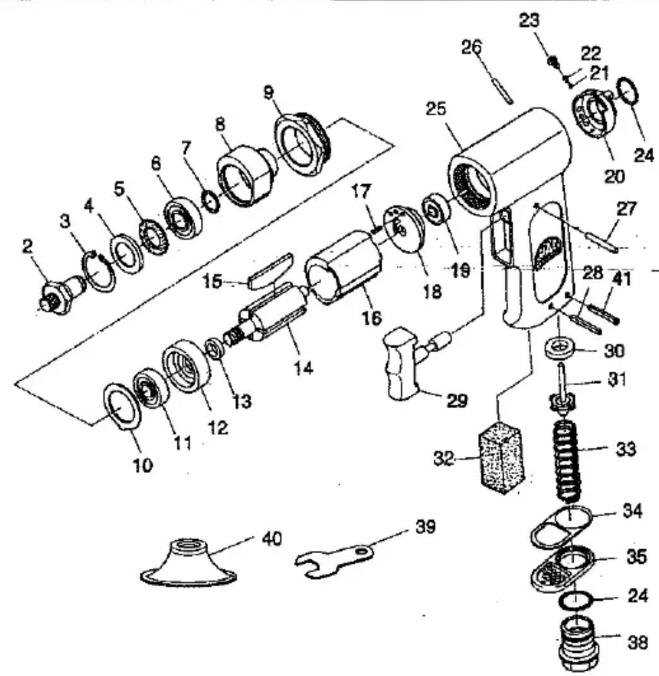
PARTS LIST:
| Fig. | Parts No. | Description | |||
| 2 | AS517-02 | Random Shaft | 30 | AS517-30 | Valve Seal |
| 3 | AS517-03 | Snap Ring | 31 | AS517-31 | Valve |
| 4 | AS517-04 | Shim | 32 | AS517-32 | Mufflar Foam(3) |
| 5 | AS517-05 | Dust Seal | 33 | AS517-33 | Valve Spring |
| 6 | AS517-06 | Bearing | 34 | AW375-19 | Deflector Gasket |
| 7 | AS517-07 | Snap Ring | 35 | AW375-21 | Deflector |
| 8 | AS517-08 | Eccentric Hub | 38 | AS517-38 | Inlet Bushing |
| 9 | AS517-09 | Clamp Nut | 39 | AS517-39 | Spanner |
| 10 | AS517-10 | Spacer | 40 | AS517-40 | Pad Holder |
| 11 | ADG200-20 | Bearing | 41 | AW145-016 | Spring Pin |
| 12 | AS517-12 | Front Plate | |||
| 13 | AS517-13 | Spacer | |||
| 14 | AS517-14 | Rotor | |||
| 15 | AR133-14 | Rotor Blade(4) | |||
| 16 | AR133-16 | Cylinder | |||
| 17 | AR133-15 | Spring Pin | |||
| 18 | AS517-18 | Rear Plate | |||
| 19 | ADG210-11 | Bearing | |||
| 20 | AS517-20 | Air Regulator | |||
| 21 | AW136-18 | Steel Ball | |||
| 22 | AS517-22 | Rubber Spring | |||
| 23 | AW135-07 | Set Screw | |||
| 24 | AW375-17 | "O" Ring(2) | |||
| 25 | AS517-25 | Motor Housing | |||
| 26 | AS517-26 | Needle Pin | |||
| 27 | AS517-27 | Needle Pin | |||
| 28 | AW170-35 | Spring Pin | |||
| 29 | AS517-29 | Trigger |


Table of contents
Click a title to access it
Manual assistant
Powered by Anthropic
Waiting for your message
Product information
Brand : Mac Tools
Model : AS517
Category : Sander