
FIESTA 2 - Tablet MPMAN - Free user manual and instructions
Find the device manual for free FIESTA 2 MPMAN in PDF.


User questions about FIESTA 2 MPMAN
0 question about this device. Answer the ones you know or ask your own.
Ask a new question about this device
Download the instructions for your Tablet in PDF format for free! Find your manual FIESTA 2 - MPMAN and take your electronic device back in hand. On this page are published all the documents necessary for the use of your device. FIESTA 2 by MPMAN.
USER MANUAL FIESTA 2 MPMAN
1 "ON/OFF": Power switch.
2 Power on / Play / Pause / Stop, hereinafter referred to as the "PLAY" button.
3 "MODE" Enter the main menu or previous menu.
4 "Next": Next option, Fast-forward. Volume increases, the fast increase.
5 "Last": Previous option, Rewind, Volume reduction, and faster reduction.
6 "VOL": Enter the volume interface.
7 "Headphone jack": Headphone standard jack.
8 "USB": USB plug.
9 MICROSD CARD
Audio mode
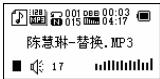
- In music mode, there are two different menus available: one is pressing M while playing. It will appear the following menu:
-Equalizer
-
Repeat: normal, repeat one, repeat all
-
Replay
-Exit
- A variety of sound effects (EQ), the specific menu as follows:
Natural, Rock, Pop, Classical, Soft, Jazz, DBB
- Toggle the Next button to select, short press Mode key to confirm.
The other menu will appear vile pressing M key in the Stop or Pause mode, you will find the following menu: local folder, delete file, delete all and exit.
Synchronous lyrics display
The player supports "RLC" lyrics files, lyrics and songs synchronous playback.
! Native songs match the appropriate lyrics are automatically read during playback. Do not need to press any key allows you to use with ease
Sound recording
Native support for 99 recording files are stored for each directory.
In the recording mode to record
-
Enter the main menu: "Recording"
-
Toggle the Next button to select the
recording mode.
- Short press Mode key to enter the recording mode, the graphics are as follows:
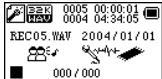
- Short press the Play button to start recording.
! During recording, short press the Play button to pause recording, long press the Play button to save the audio file. Long press Mode button to exit the recording mode and save the recording file.
! The recording process only responds to the "Play" button and the Mode button.
To select the recording type
Fine recording
Long-term recording
Super recording
O Play recording file
1 Enter the main menu
2 Toggle Next button, select "Voice"
3 Press play
4 Select the recording file.
Last button: Select the previous recording file.
Next button: Select the next recording file.
System Settings
Here you can set system parameters, the options change with the firmware upgrade.
- Enter the main menu
- Toggle Next key to select "System Settings"
- Short press Mode key to enter the
"System Settings"
| LCD Set | set the system to play / stop mode, the screen saver |
| Language | to set a different languages |
| Power off | to set a countdown time (minutes), the time will automatically shut down |
| Memory info | Shows device information |
| Firmware version | Display the firmware version of the player |
| (Exit) | exit this interface |
! Tips: after the option is set press the Mode button to exit or you can press the Play button to quickly exit the menu. Press the Play button to quickly exit the menu function on all menus.
E-book
Under the main menu, select E-Book by pressing the M button.
File select
Test3.TXT
Directory options: Select the root directory of the removable disk.
Short press Mode key to enter the "Select Directory" interface. Toggle the Next button or Last button to select the directory where the files you want to read. Short press the Play button to open/access the selected file.
! This unit only supports "txt" files.
Using a USB disk
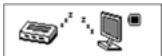
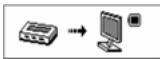
Connected to the PC: The player has three display modes
- Waiting state
- Downloading information
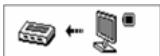
- Uploading information
Play Mode (Play submenu) REPEAT
normal mode, Normal, Repeat, Repeat One, Full circle, Repeat All
A-B repeat
- Music playback or playback player.
2 Press the Mode button to enter Play submenu.
3 toggle the Next button to select the "repeat mode" menu item.
4 Press the Mode button to enter the 'repeat mode'.
5 struck the Next button to determine the starting point A.
Repeat the key icon in the "A" blinking, waiting to determine the starting point B
- Toggle the Next button, to determine the starting point B.
The repeat icon is fixed. AB points played
repeatedly to exit repeat mode, press the Next button
Power / Charge
When the power is 3.8V, (Full battery charge) the power displays full. With the increase of use, the battery indicator will be reduced.
When the power is almost completely run out, the power icon will show blank.
! You must turn ON the power switch for charging. Otherwise, the player will not be able to respond to the charge task
CHARGING THE UNIT
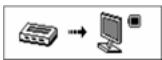
This unit recharges the battery when connected to a USB port, the battery will be fully charged in around 4 hour.
! It is recommended a longer period of time for the first charging, around 6 hours
Technical Specifications
| Dimensions | 84mm(L) * 35mm(W) * 12mm(H) | |
| Weight | 46.8g | |
| Display | dot-matrix (128 * 64),False OLED LCD display | |
| Connected computer | high-speed USB 2.0 (Read 1000K Byte, write 800K Byte) | |
| Power | Power up to 6-8 hours playback time (Headphone) | |
| Power up to 1-2 hours playback time (Speakers) | ||
| Recording | sampling rate | 8KHz |
| Recording Format | WAV (32K bps) | |
| Recording time | 35Hrs,ACT, 128M Flash) | |
| MP3、WMA | headphon e output | (L) 10mW+ (R) 10mW (32Ohm) |
| MP3 bit rate | 8K bps - 320K bps | |
| WMA bit rate | 5K bps - 384K bps | |
| Frequency Response | 20Hz to 20KHz | |
| Signal to noise ratio | 80dB | |
| Music formats | MP3 / WMA | |
| Use temperature | -5 to 40 degrees Celsius | |
| Languages | English, French, Germany, Italian, Dutch, Portuguese, Spanish | |
| The operating system | Windows98/SE/ME/2K/XP/Vist a/Win7 | |
Note: Product design and specifications are subject to change without notice.
This is to certify this MP3 Player is in accordance with:
EN55022:2006+A1:2007
EN55024:1998+A1:2001+A2:2003
EN61000-3-2:2006+A1:2009+A2:2
009
EN61000-3-3:2008
For more information please check our website
www.mpmaneurope.com

C

For more information please check our website
www.mpmaneurope.com

C E

Alimentation / Charge
For more information please check our website
www.mpmaneurope.com

C E

For more information please check our website
www.mpmaneurope.com

C

- Informatie over uploaden
HET APPARAAT OPLADEN
For more information please check our website
www.mpmaneurope.com

C

Note: Product design and specifications are subject to change without notice.
For more information please check our website
www.mpmaneurope.com

C E
