
VL-VN1700 - Intercom PANASONIC - Free user manual and instructions
Find the device manual for free VL-VN1700 PANASONIC in PDF.


| Product Type | Video Intercom System |
| Model | VL-VN1700 |
| Brand | Panasonic |
| Monitor Type | 7-inch color LCD |
| Camera Type | CMOS color camera with infrared LED |
| Door Station Material | Stainless steel and resin |
| Power Supply | AC 100-240V, 50/60Hz (adapter included) |
| Power Consumption | Approx. 12W (monitor), 3W (door station) |
| Mounting Type | Flush mount or surface mount (optional bracket) |
| Audio Features | Hands-free and handset communication |
| Video Features | Wide-angle lens (120° horizontal), night vision |
| Memory | Supports SD card for image recording (not included) |
| Additional Functions | Door lock release, intercom call, visitor snapshot |
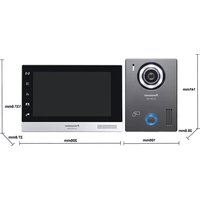
| Dimensions (Monitor) | Approx. 200mm x 140mm x 25mm (WxHxD) |
| Weight (Monitor) | Approx. 600g |
| Dimensions (Door Station) | Approx. 130mm x 95mm x 35mm (WxHxD) |
| Weight (Door Station) | Approx. 250g |
| Operating Temperature | -10°C to +50°C |
| Water Resistance | IP44 (door station) |
| Maintenance | Clean with a soft dry cloth; avoid solvents |
| Safety | Low voltage design; door station tamper-proof |
| Spare Parts | Available through authorized Panasonic service centers |
| Repairability | Modular design; professional repair recommended |
Frequently Asked Questions - VL-VN1700 PANASONIC
User questions about VL-VN1700 PANASONIC
0 question about this device. Answer the ones you know or ask your own.
Ask a new question about this device
Download the instructions for your Intercom in PDF format for free! Find your manual VL-VN1700 - PANASONIC and take your electronic device back in hand. On this page are published all the documents necessary for the use of your device. VL-VN1700 by PANASONIC.
USER MANUAL VL-VN1700 PANASONIC
| Model number and name | VL-VN1500 (Door Station) | VL-MN1000 (Room Monitor) |
 |  | |
| Power source | PoE (IEEE 802.3af compliant, Class 2 device) or Power supply unit VL-PS240 / 2.4 V DC, 0.6 A | PoE (IEEE 802.3af compliant, Class 2 device) or Power supply unit VL-PS240 / 2.4 V DC, 0.6 A |
| Power consumption | PoE: Standby: 2.5 W / Operating: 5.1 WLV-PS240: Standby: 2.6 W / Operating: 6.3 W | PoE: Standby: 1.9 W / Operating: 6.3 WLV-PS240: Standby: 2.1 W / Operating: 6.2 W |
| Dimensions (H x V x D)(Excluding protruding sections) | 141 x 100 x 28.5 mm 137.5 x 205 x 27.8 mm | |
| Weight | 250 g | 550 g |
| Operating environment | Ambient temperature: Approx. -10 °C to +55 °CRelative humidity (non-condensing): up to 90 % | Ambient temperature: Approx. 0 °C to +40 °CRelative humidity (non-condensing): up to 90 % |
| Display | - | 7-inch wide colour display with touch screen (800x480 pixels) |
| Display language | - | English, Arabic, French, Italian, German, Spanish, Dutch, Vietnamese and Indonesian |
| Talking method | Hands-free | Hands-free |
| Network interface | 10BASE-T/100BASE-TX (Auto MDI/MDI-X) | 10BASE-T/100BASE-TX (Auto MDI/MDI-X) |
| Network protocol | TCP/IP: UDP | TCP/IP: UDP |
| Writing | UTP (cat.5e or higher) | UTP (cat.5e or higher) |
| Card reader (RFID) | 13.56 MHz (ISO/EC 14443 Type A (MFARE)) | - |
| Expanded interface | E-lock x 1 : Relay box VL-RLY1 is required (sold separately) | Sensor input x 5 (including emergency / urgency button) |
| Viewing angle | Horizontally: Approx. 113° , Verically: Approx. 69° | - |
| Image sensor | 1.3 M pixels CMGS sensor | - |
| Minimum illuminance required | 1 lx (within approx. 50 cm from the camera lens) | - |
| Lighting method | White coloured LED lights | - |
| Video / Audio format | Video: H.264, Audio: G.711 | Video: H.264, Audio: G.711 |
| Recording | - | Internal memory (video with audio can be saved) |
| IP rating / IK rating | IP54 - / - | - |
| Installation method | Surface mount (mounting base supplied) | Surface mount (mounting bracket supplied) or Flush mount (mount box VL-VN1790 sold separately) |
| External material | PC+ABS resin | PC+ABS resin |
| Supported functions | • Unlock individual doors via the RFID card (MFARE)• Theft detection buzzer | • Monitoring through the IP camera• Emergency / Urgency call, Sensor, Door bell• Intercom calls between monitors (family or neighbours)• Calls to SIP Phones (guard station, reception, etc.)• Register up to 32 IP camera per monitor• Register up to 18 SIP Phones per monitor |
*1 VL-PS240 is sold separately. *2 Water resistance is only assured if the door station is installed correctly according to the instructions in the Operating Instructions, and appropriate water protection measures are taken.
| Model number and name VL-YN1800 (Control Box) Options | |||
| Dimensions(Unit: mm) |  | VL-PS | —— |
 | |||
| Power source | 100-240 V AC, 0.95-0.6 A, 50/60 Hz | Input: 220-240 V AC, 0.2 A (50/60 Hz)Output: 24 V DC, 0.6 A | Supplied by the door station |
| Power consumption | Under 50 W -- | ||
| Dimensions (H x W x D)(Excluding protruding sections) | 88 x 430 x 340 mm 116 x 100 x 54 mm 92 x 78 x 38 mm | ||
| Weight | 4.5 kg 230 g 130 g | ||
| Operating environment | Ambient temperature: Approx. 0 °C to +40 °CRelative humidity (non-condensing); up to 90 % | Ambient temperature: Approx. 0 °C to +50 °CRelative humidity (non-condensing); up to 90 % (door use only) | Ambient temperature: Approx. 0 °C to +40 °CRelative humidity (non-condensing); up to 90 % |
| Network interface | 10BASE-T/100BASE-TX/1000BASE-T (Auto MDI/MDI-X) -- | ||
| Network protocol | TCP/IP, UDP -- | ||
| Wiring | UTP (cat.5e or higher) -- | ||
| Installation method | Mountable to 19-inch racks Wall mount or attach to DIN rail | Wall mount or attach to DIN rail | |
| External material | Front Cabinet: ABS, Lower / Upper Cabinet: Steel | Flame retardant PC+ABS resin | Flame retardant ABS resin |
| Supported functions | Mobile Remote Voice mailE-mail notificationSupports up to 2000 SIP devices (embedded SIP server) | - | - |
Trademark
- MIFARE is a registered trademark of NXP B.V. and is used under license.
- iPhone and iPad Air are trademarks of Apple Inc., registered in the U.S. and other countries
- Android is a trademark of Google LLC.
- The software of this product is based in part on the work of the Independent JPEG Group.
- All other trademarks identified herein are the property of their respective owners.
Important
- Safety Precaution: carefully read the operating instructions and installation manual before using this product.
- Panasonic cannot be responsible for the performance of the network and/or other manufacturers' products used on the network.
- This system is not designed to provide complete protection from property loss. To the maximum extent permitted by applicable law
Panasonic will not be held responsible for any damage incurred as a result of property loss.
- When installing or using the product, please take into consideration the rights of others with regard to privacy and rights of portrait
- The actual product may vary slightly from photograph.
- Weights and dimensions are approximate
- Design and specifications are subject to change without notice.
• These products may be subject to export control regulations.
DISTRIBUTED BY
Panasonic®
MG-DHPED20EN 1903TD/ZZZ-2.1
Panasonic
IP Video Intercom System for Apartment Complexes

Key Features
Full IP system
The Door Station and Room Monitor support PoE (IEEE 802.3af compliant).
Supports large apartment systems.
Up to 200 SIP devices on a system without a Control Box.
Up to 2,000 SIP devices on a system with a Control Box.
Up to 10,000 SIP devices on a system (up to 5 Control Boxes on a system).
Easy installation, convenient maintenance.
Easy Setup (Includes setup tool for mass configuration of large numbers of devices)
Mobile Remote 1
Remote visitor answering while checking visitor's live image
Push message with visitor's image
History log in chat
Sensor notification
Allow visitors to enter the lobby and lift 2
Others
E-mail Notification (Control Box required)
Voice Mail (Control Box required)
Visitor Recording
Lift Integration 2 (Third party device required)
| Model number and name | VL-VN1900 (Lobby Station) | ||
| Dimensions(Unit: mm) |  |  | [AL32G] |
| Power source | Power supply unit (VL-PS240)Input: 220-240 V AC, 0.2 A (50/60 Hz)Output: 24 V DC, 0.6 A | Image sensor | 2.0 M pixels CMOS sensor |
| Minimum illuminance required | 1 x (within approx. 50 cm from the camera lens) | ||
| Power consumption | Standby: 3.5 W, Operating: 8.5 W | Lighting method | White coloured LED lights |
| Dimensions (H x W x D)(Excluding protruding sections) | 373 x 179 x 6 mm (excluding sections embedded into the wall) | IP rating / IK rating | IP55 a / Compliant with IK07 |
| Weight | VL-VN1900 : 1.5kgVL-PS240 : 220 g | Installation method | VL-VN1900: Flush mount (flush mount box supplied)VL-PS240: Wall mount or attach to DIN rail |
| Operating environment | VL-VN1900: Ambient temperature: Approx. -10 °C to +55 °CELative humidity (non-condensing): up to 90 %VL-PS240: Ambient temperature: Approx. 0 °C to +50 °CELative humidity (non-condensing): up to 90 %(indoor use only) | External material | VL-VN1900: AluminiumVL-PS240: Flame retardant PC+ABS resin |
| Network interface | 10BASE-T/10BASE-TX (Auto MDI/MDI-X) | ||
| Network protocol | TCP/IP, UDP | ||
| Display | 3.5-inch colour display (320x240 pixels) | Writing | UTP (cat.5e or higher) |
| Display language | English, Arabic, French, Italian, German, Spanish, Dutch,Vietnamese and IndonesianOnly user guidance supports multiple languageResident's names are only in English | SIP server | Embedded SIP server (up to 200 devices) |
| Video / Audio format | Video: H.264, Audio: G.711 | ||
| Talking method | Hands-free | Expanded interface | Support for electric lock releasing (entrance unlocking) x 1 |
| Viewing angle | Horizontally: Approx. 120°, Vertically: Approx. 72°(15° angle adjusting, vertical only) | Supported functions | • Display a BMP file set by the user (320x220 pixels)• Room numbers using numbers 0 to 9 and Access A to F• Phonebook (Room-No., Resident's name)• Theft detection buzzer• Unlock lobby door via a PIN code or RFID card (MIFARE)• Reception mode (visitor calls are directed to a receptionist)• Recording images of visitors to MRI• LRT integration a |
| Card reader (RFID) | 13.56 MHz (650 IEC 1444) Type A (MIFARE b ) (Note) | ||
| 50,000 RfD card key can be registered to each Lobby Station.(Each card key must be individually registered plused "bour card", "Lost Found", and "Delete") to each Lobby Station with which will be used.There are no batch operators to register/update card keys to multiple Lobby Station. | |||
*1 Control Box (VL-VN1800) required. Compatible mobile devices: iPhone 5s and later, iPad Air and later (iOS 10 and later) / Android™ devices (Android 4.4 and later), as of June 2019. Some mobile devices may not be compatible. Supported language: English, Vietnamese and Indonesian *2. A third-party lift controller is required for lift integration. Lift controllers are not available *3 Water resistance is only assured if the lobby station is installed correctly according to the instructions in the installation Guide, and appropriate water protection measures are taken.
System Diagram of the IP Apartment System![graph TD A["IP Camera"] --> B["PoE Switch"] B --> C["UTP CAT5e"] C --> D["Reception/Guard"] D --> E["SIP Phone"] D --> F["Gate"] G["IP Camera"] --> H["PoE Switch"] H --> I["UTP CAT5e"] I --> J["Reception/Guard"] J --> K["SIP Phone"] J --> L["Gate"] M["IP Camera"] --> N["PoE Switch"] N --> O["UTP CAT…](/content/2026/05/1061492/images/dd92cbc5a720c9b083c9566c08236872b077de3e1142ec19ee1009550d5c97fe.jpg)
![graph TD A["Cellular Network"] --> B["Global IP Address"] B --> C["Router"] C --> D["Control box VL-VN1800"] D --> E["SIP Phone"] E --> F["Gate"] F --> G["IP Camera"] G --> H["Reception/Guard"] H --> I["SIP Phone"] I --> J["PC"] subgraph System K["IP Camera"] --> L["E-Lock"] M["IP Camera"] --> N["E-…](/content/2026/05/1061492/images/761ee72743e4548124037718efeb1e2c566c0f158ca4f2e62834d351cfe27a38.jpg)
Support up to 10,000 devices on a system with 5 Control Boxes![graph TD A["Control box VL-VN1800"] --> B["PoE Switch PoE Switch"] C["SIP Phone SIP Phone"] --> B D["Control box VL-VN1800"] --> E["PoE Switch"] F["Global IP Address"] --> G["Router"] H["Cellular Network"] --> I["Mobile Device"] J["Mobile Device"] --> K["Mobile Device"] L["Mobile Device"] --> M["Mob…](/content/2026/05/1061492/images/6e203fe9b66e8c81549b3c35dce331a545c116512d9df2d1c0ab4b7e7b5d1496.jpg)
FUNCTION - 10,000 SIP devices are supported - Mobile Remote - Multiple sessions are supported - E-mail notification - Easy setup by PC tool - Send voice mail from control room to all monitors (When multiple Control Boxes are installed, a message must be left on each Control Box.)


![graph TD A["Global IP Address"] --> B["Router"] B --> C["PoE Switch"] D["Cellular Network"] --> E["Mobile Device"] E --> F["Common Area"] G["Lobby Station VL-VN1900"] --> H["Gate"] H --> I["Lobby Station VL-VN1900"] J["Reception/Guard"] --> K["SIP Phone"] K --> L["NVR"] L --> M["PC"] N["Internet"] -…](/content/2026/05/1061492/images/f7c5b8ed3d20907524d3491b85bb38cf79d562ee0807376a42950ea49f88056f.jpg)

![graph TD A["SIP Phone"] --> B["Up to 100 for Common"] A --> C["Register up to 18 SIP Phones per monitor"] A --> D["Register up to 90 SIP Phones per lobby station"] E["PoE Switch"] --> F["Up to 100 for Common"] E --> G["Register up to 45 Lobby Stations and door stations per monitor"] H["VL-VN1800 Con…](/content/2026/05/1061492/images/d9873e17217d4a140793be39c139e40b2f960ea6b1f257f3c54409805b6102ac.jpg)
Brand : PANASONIC
Model : VL-VN1700
Category : Intercom