Pro CX-700SR90 - Security Camera VideoComm - Free user manual and instructions
Find the device manual for free Pro CX-700SR90 VideoComm in PDF.


| Product Type | Security Camera (Outdoor/Indoor) |
| Model | Pro CX-700SR90 |
| Brand | VideoComm |
| Dimensions (W x H x D) | Approx. 10 x 8 x 12 inches (254 x 203 x 305 mm) |
| Weight | Approx. 4.5 lbs (2.04 kg) |
| Power Supply | 12V DC, 1A (power adapter included) |
| Resolution | 1080p Full HD (1920x1080 pixels) |
| Viewing Angle | 90° (wide angle) |
| Night Vision | Infrared LEDs up to 100 ft (30 m) |
| Weather Rating | IP66 (dust-tight and protected against powerful water jets) |
| Connectivity | BNC video output, power jack, optional audio |
| Mounting | Wall or ceiling mount bracket included |
| Main Features | Motion detection, day/night mode, vandal-resistant housing |
| Cleaning Instructions | Wipe gently with a soft, dry cloth. Avoid solvents or abrasive cleaners. |
| Safety Precautions | Disconnect power before cleaning; do not expose to extreme temperatures beyond -20°C to 50°C. |
| Spare Parts Availability | Contact VideoComm support for replacement brackets, lenses, or power adapters. |
| Repairability | Designed for professional service; user-replaceable parts only as indicated in manual. |
| General Information | Compatible with standard CCTV DVRs; manual available in PDF on VideoComm website. |
Frequently Asked Questions - Pro CX-700SR90 VideoComm
User questions about Pro CX-700SR90 VideoComm
0 question about this device. Answer the ones you know or ask your own.
Ask a new question about this device
Download the instructions for your Security Camera in PDF format for free! Find your manual Pro CX-700SR90 - VideoComm and take your electronic device back in hand. On this page are published all the documents necessary for the use of your device. Pro CX-700SR90 by VideoComm.
USER MANUAL Pro CX-700SR90 VideoComm
It's About Real Time
ON-SCREEN DISPLAY MENU
OPERATING INSTRUCTIONS
(888) 379-2666 US Toll Free
(905) 336-9665 Phone
(905) 336-9662 Fax
www.VideoTransmitters.com
REVISION HISTORY
VERSION :Ver 0.01
DATE ; 2011-01-6
Descriptipon
• ORIGINAL
This document contains information on a new product. Specifications and information herein are subject to change without notice.
Use of this specification for product design requires an executed license agreement from RJ Electronics.
RJ Electronics shall not be liable for technical or editorial errors or omissions contained herein; nor for incidental or consequential damages resulting from the furnishing, performance, or use of this material. Copyright law protects all parts of the RJ Electronics Specification and all rights are reserved. This documentation may not, in whole or in part, be copied, photocopied, reproduced, translated, or reduced to any electronic medium or machine readable form without prior consent, in writing, from RJ Electronics.
TABLE OF CONTENTS
CONTENTS
REVISION HISTORY 2
TABLE OF CONTENTS 4
- EXPOSURE....6
EXPOSURE - LENS....6
EXPOSURE - LENS - ELC - E.SHTTER 6
EXPOSURE - LENS - ELC - BRIGHT 6
EXPOSURE - LENS - DC 7
EXPOSURE - LENS - DC - E.SHUTTER 7
EXPOSURE - LENS - DC - BRIGHT 7
EXPOSURE - LENS - DC REF 7
EXPOSURE-HBLC/D-WDR 7
EXPOSURE - HBLC/D-WDR - BLC 8
EXPOSURE - HBLC/D-WDR - BLC - BLC MODE 8
EXPOSURE - HBLC/D-WDR - BLC - BLC MODE - MANUAL 8
EXPOSURE - HBLC/D-WDR - BLC - BLC WEIGHT 8
EXPOSURE - HBLC/D-WDR - HLI 9
EXPOSURE - HBLC/D-WDR - HLI - HBLC 9
EXPOSURE - HBLC/D-WDR - HLI - HBLC (window set) 9
EXPOSURE - HBLC/D-WDR - HLI - MODE 9
EXPOSURE - HBLC/D-WDR - HLI - GRAY MODE....10
EXPOSURE - HBLC/D-WDR - HLI - MASK SEL 10
EXPOSURE - HBLC/D-WDR - HLI - MASK SEL - MASK i....10
EXPOSURE - AGC 11
EXPOSURE - 3D DNR....11
EXPOSURE - SENSE-UP 11
- COLOR 12
COLOR-WB MODE....12
COLOR-WB MODE-MANUAL 12
COLOR-WB MODE-AWC>PUSH 12
COLOR-WB MODE-AWC 12
COLOR-R-Y GAIN 13
COLOR-B-Y GAIN 13
- DAY&NIGHT 14
SETUP - DPC - MANUAL ....19
SETUP - OLPF 20
SETUP-MONITOR 20
SETUP - GAMMA 20
- SYSTEM 21
SYSTEM-CAMERA ID 21
SYSTEM – COMMUNI. (communication setting)....21
SYSTEM-LANGUAGE....21
SYSTEM – COMMUNICATION sub menu. 21
- EXIT 21
EXIT - FACTORY SET....21
EXIT - SAVE&EXIT....21
EXIT - EXIT....21
1. EXPOSURE
The EXPOSURE menus SHUTTER/IRIS controls, BLC, HLI, D-WDR, AGC and 3D DNR, will set SENSE-UP etc. and it will be able to change a condition.

text_image
EXPOSURE EXP WB DAN FUNC MOT PVM SET SYS EXIT LENS ELC HBLC/D-WDR OFF AGC HIGH 3D DNR MID SENSE-UP AUTO EXIT RET↓1/60
EXPOSURE -LENS
- Selection of LENS modes.
- The ELC means fixed LENS mode.
- The ELC modes with electronic shutter AE controls.
- When use DC-IRIS lens, DC-IRIS full open
conditions.
- DC modes use DC-IRIS lenses and they control AE. This time, Electronic shutter default shutter speed
text_image
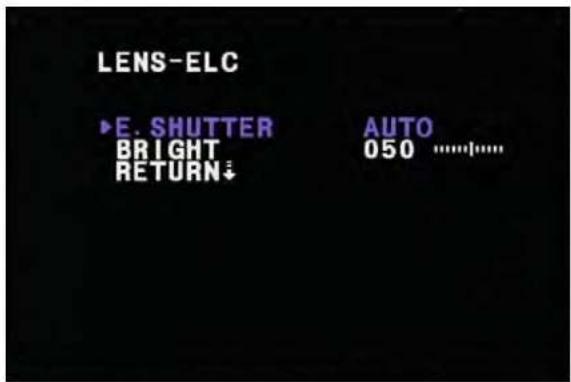
LENS-ELC ►E. SHUTTER AUTO BRIGHT 050 ......EXPOSURE - LENS - ELC-E.SHTTER
- E.SHUTTER –setting value of electronic shutter
- Select mode :Auto,1/60(1/50), 1/100, 1/120FLK, 1/250, 1/500,1/1000, 1/2000, 1/4000, 1/10000, 1/100000 sec. (default: AUTO)
- When selecting in Auto mode (default) :The shutter mode from 1/60 to 1/100000 is controlled with automatic.
text_image
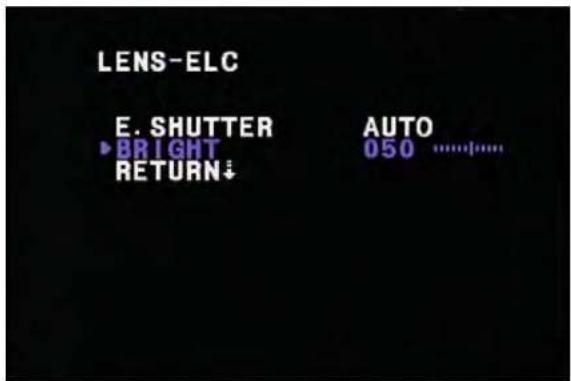
LENS-ELC E. SHUTTER BRIGHT RETURN↓ AUTO 050 ......EXPOSURE - LENS - ELC - BRIGHT
- BRIGHT : For target brightness control
- AE controls this in compliance with a set bright control. Bright control from 1 to 100, the default is 50.

text_image
LENS-DC ►E. SHUTTER 1/60 BRIGHT 050 ....|.... DC REF 000 |.... RETURN↓EXPOSURE - LENS - DC
- DC modes use DC-IRIS lenses and they control AE. Then, electronic shutter speed default 1/60.
EXPOSURE - LENS - DC -E.SHUTTER
- LENS - DC mode setting.
- E.SHUTTER :Electronic shutter value setting mode in DC IRIS
- 1/60(1/50), 1/100, 1/120FLK, 1/250, 1/500, 1/1000,
1/2000, 1/4000, 1/10000, 1/100000 sec. (default: 1/50 (1/60))
text_image
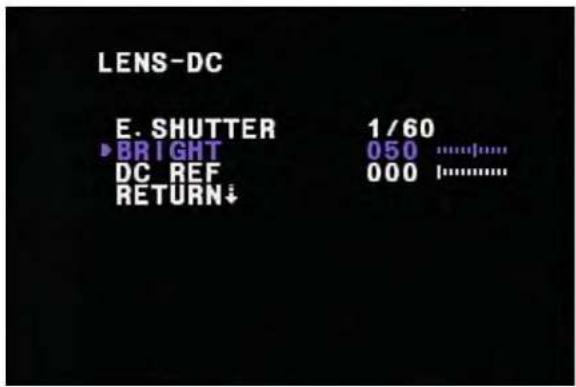
LENS-DC E. SHUTTER 1/60 BRIGHT 050 ........### DC REF 000 ........### RETURN↓EXPOSURE - LENS - DC - BRIGTNESS
- BRIGHT : Setting for target brightness.
- Controls DC IRIS at the bright value which is set. Bright control from 1 to 100, the default is 50.
text_image
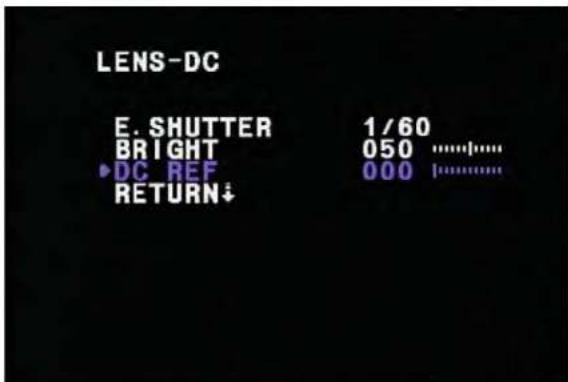
LENS-DC E. SHUTTER 1/60 BRIGHT 050 ...... ▶DC REF 000 |...... RETURN↓EXPOSURE - LENS - DC REF
- Completing setting from DC, after lens modes, more will open the lens or there is a possibility of closing
- Control value from 0 to 20, the default is 10.
text_image
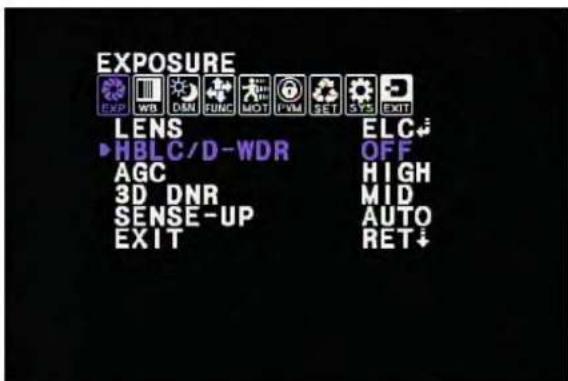
EXPOSURE EXP WB DIM FUNC MOT FVM SET SYS EXIT LENS ELC HBLC/D-WDR OFF AGC HIGH 3D DNR MID SENSE-UP AUTO EXIT RET↓EXPOSURE -HBLC/D-WDR
- Select menu for BLC / HLI / D-WDR
- BLC mode : Back Light Compensation
- HLImode :High Light Inverse
- D-WDRmode : Digiter Wide Dynamic Range
text_image
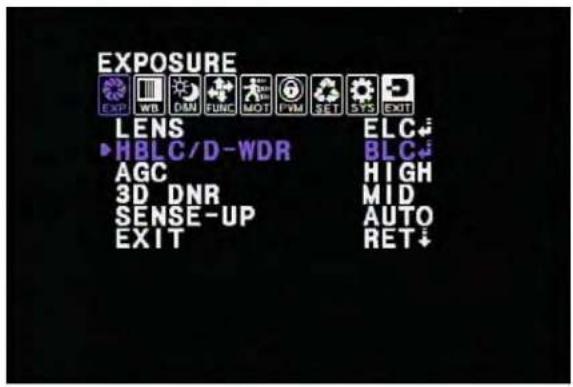
EXPOSURE EXP WB DIN FUNC MOT PWM SET SYS EXIT LENS ELC H BLC / D - WDR BLC AGC HIGH 3D DNR MID SENSE - UP AUTO EXIT RET ↓EXPOSURE - HBLC/D-WDR -BLC
- Selected BLE mode
text_image
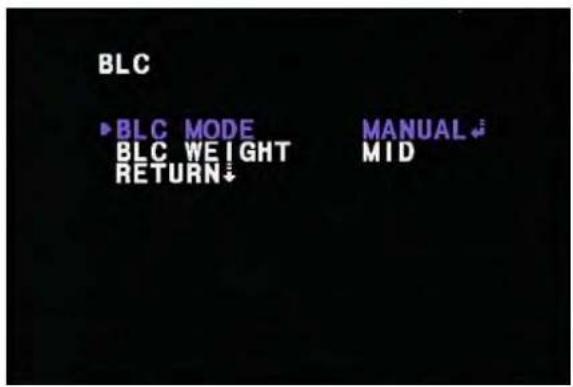
BLC ►BLC MODE BLC WEIGHT RETURN↓ MANUAL ↓ MIDEXPOSURE - HBLC/D-WDR - BLC -BLC MODE
- Select AUTO or MANUAL
- Sets the total AE level at AE value of select window area.
- AUTO, the case which modes will select seeks the darkest area with automatic and photometry weight, AE controls does.
text_image
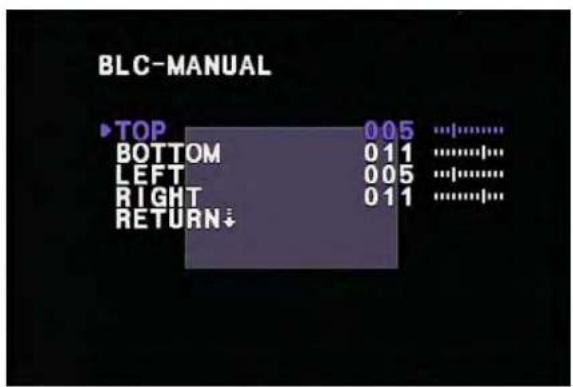
BLC-MANUAL TOP 005 ...... BOTTOM 011 ...... LEFT 005 ...... RIGHT 011 ...... RETURN↓EXPOSURE - HBLC/D-WDR - BLC - BLC MODE - MANUAL
- BLC window setting at manual mode
- TOP / BOTTOM / LEFT / RIGHT zone setting.
- TOP: 0 \~ (BOTTOM - 1), 1 step.
- BOTTOM : (TOP + 1) \~ 16, 1 step.
- LEFT: 0 \~ (RIGHT - 1), 1 step.
- RIGHT : (LEFT + 1) \~ 16, 1 step.

text_image
BLC BLC MODE ► BLC WEIGHT RETURN MANUAL ↓ MIDEXPOSURE - HBLC/D-WDR - BLC -BLC WEIGHT
- BLC weight select mode
- Select OFF / LOW / MID / HIGH
text_image
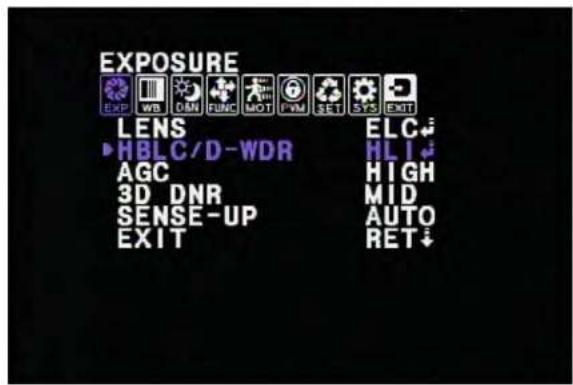
EXPOSURE EXP WB OBN FUNC MOT PVM SET SYS EXIT LENS ELC HBLC/D-WDR HL AGC HIGH 3D DNR MID SENSE-UP AUTO EXIT RET↓EXPOSURE - HBLC/D-WDR -HLI
- HLImode :High Light Inverse
- It is a function which reverses the area about strong light.
- The HLI BLC mode control by BLC window area. (HBLC)
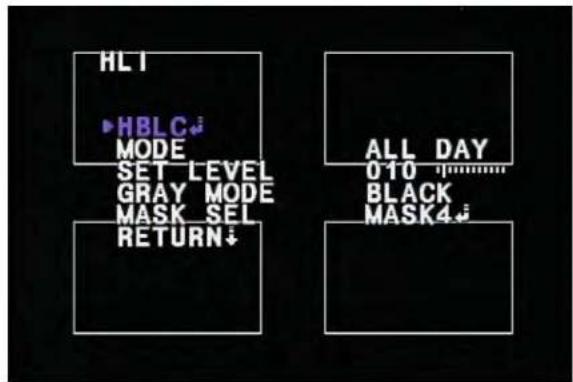
text_image
HLT HBLC MODE SET LEVEL GRAY MODE MASK SEL RETURN↓ ALL DAY 010 BLACK MASK4↓EXPOSURE - HBLC/D-WDR -HLI - HBLC
- Sets HBLC area of separate way from HLI mode
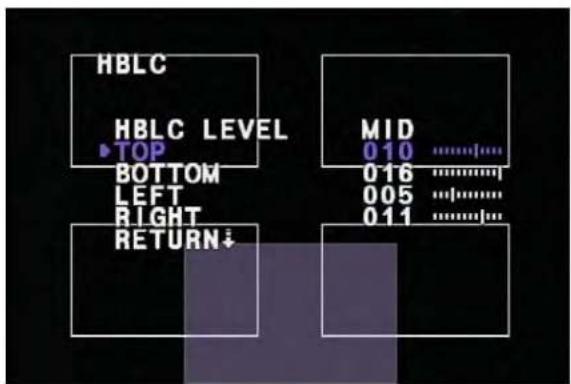
text_image
HBLC HBLC LEVEL ▶TOP BOTTOM LEFT RIGHT RETURN↓ MID 010 ...... 016 ...... 005 ...... 011 ......EXPOSURE - HBLC/D-WDR -HLI - HBLC
- HBLC LEVEL : OFF/LOW/MID/HIGH
- HBLC zone sets regulate HBLC zone with square window of the screen.
- TOP / BOTTOM / LEFT / RIGHT control mode
TOP : 0 \~ (BOTTOM - 1), 1 step.
BOTTOM : (TOP + 1) \~ 16, 1 step.
LEFT: 0 \~(RIGHT - 1), 1 step.
RIGHT : (LEFT + 1) \~ 16, 1 step.
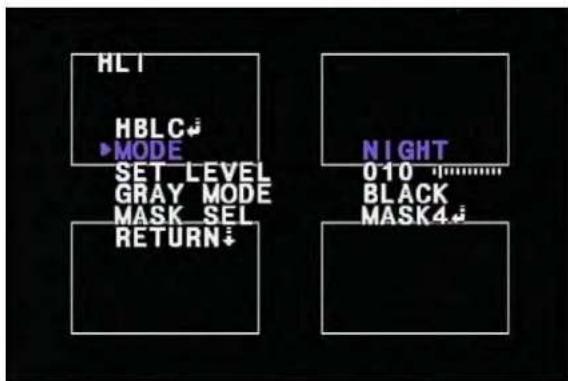
text_image
HL HBLC MODE SET LEVEL GRAY MODE MASK SEL RETURN NIGHT 010 BLACK MASK4EXPOSURE - HBLC/D-WDR -HLI - MODE
- Use mode set of HLI (ALL DAY / NIGHT).
- ALL DAY :Always operating HLI
- NIGHT : Only NIGHT environment operating.
But if DAY condition, not operating HLI
text_image
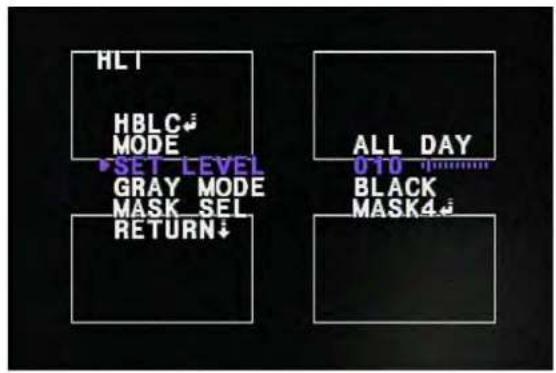
HLT HBLC MODE SET LEVEL GRAY MODE MASK SEL RETURN↓ ALL DAY OTO BLACK MASK4↓EXPOSURE - HBLC/D-WDR - HLI - SET LEVEL
- Setting of HLI level (1 \~ 100, 1 step, default : 10) Inverse zone will increase in low level
text_image
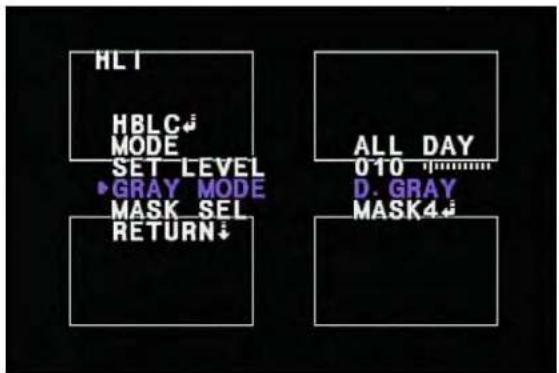
HLT HBLC MODE SET LEVEL ▶GRAY MODE MASK SEL RETURN ALL DAY 010 D. GRAY MASK4EXPOSURE - HBLC/D-WDR - HLI -GRAY MODE.
- When HLI is operatethe zone color sets. Selection of GRAY / D.GRAY / BLACK
text_image
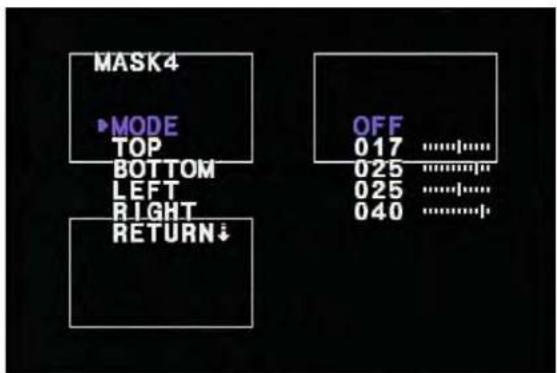
MASK4 ►MODE TOP BOTTOM LEFT RIGHT RETURN↓ OFF 017 ............. 025 ............. 025 ............. 040 .............EXPOSURE - HBLC/D-WDR - HLI - MASK SEL
- Window has 4 zones :MASK1 \~ 4 User sets each mask window.
EXPOSURE - HBLC/D-WDR - HLI -MASK SEL - MASK i
- MODE :Window operates by ON/OFF.
-
TOP / BOTTOM / LEFT / RIGHT
-
The white rectangle exists in only the window set mode.
- TOP: 0 \~ (BOTTOM - 1), 1 step.
- BOTTOM : (TOP + 1) \~ 34, 1 step.
- LEFT: 0 \~ (RIGHT - 1), 1 step.
- RIGHT : (LEFT + 1) \~ 45, 1 step.
text_image
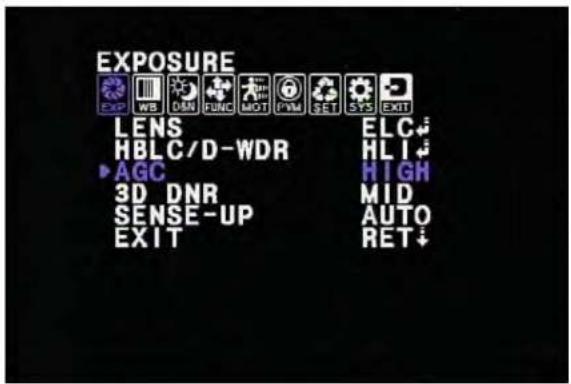
EXPOSURE EXP WB DNN FUNC MOT PWM SET SYS EXIT LENS ELC HBLC/D-WDR HL1 AGC HIGH 3D DNR MID SENSE-UP AUTO EXIT RET↓EXPOSURE -AGC
- AGC :Auto Gain Control level set OFF / LOW / MIDDLE / HIGH.
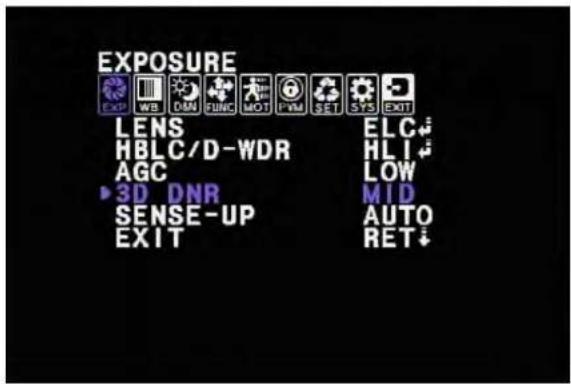
text_image
EXPOSURE EXP WB CNN FUNC MOT PVM SET SYS EXIT LENS ELC HBLC/D-WDR HL AGC LOW 3D DNR MID SENSE-UP AUTO EXIT RET↓EXPOSURE -3D DNR
- 3 Dimension Digital Noise Reduction
- Level sets for 3D DNR.
- OFF / LOW / MID / HIGH
The noise level reduces in high level but ghost image increasemore.
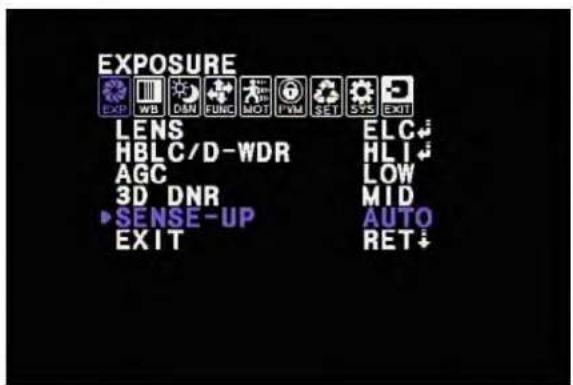
text_image
EXPOSURE EXP WB DAN FUNC MOT PVM SET SYS EXIT LENS ELC HBLC/D-WDR HL AGC LOW 3D DNR MID SENSE-UP AUTO EXIT RET↓EXPOSURE -SENSE-UP
- When it is low dark condition, SENSE-UP uses
- AUTO / OFF / X2 / X4 / X8 / X16 / X32 / X64 / X128
/ X256 / X512
- AUTO mode basically sets X8 by manufacture.
- In case of SENSE-UP operating, the 3D-DNR is rated LOW level.
2. COLOR
The white balance mode and color gainsetting menu.

text_image
COLOR EXP WB OAN FUNC MOT PVM SET SYS EXIT ▶WB MODE ATW R-Y GAIN 128 ............. B-Y GAIN 128 ............. EXIT RET ↓COLOR-WB MODE
- White Balance control mode selects
ATW / MANUAL / AWC>PUSH / AWC - Selection of COLOR - WB MODE - ATW
- ATW :Auto Tracking White Balance mode

text_image
COLOR EXP WB DIM FUNC MOT PWM SET GPS EXIT WB MODE MANUAL R-Y GAIN 128 ............. B-Y GAIN 128 ............. EXIT RET ↓COLOR-WB MODE-MANUAL
- User can change color
- M. WB R : If it is higher than default (64), the white point moves toward RED. And it is lower than it moves toward GREEN.
- Control range : 0 \~ 128, 1 step, default : 64
- M. WB B : If it is higher than default (64), the white point moves toward BLUE. And it is lower than it moves
toward YELLOW.
- Control range : 0 \~ 128, 1 step, default : 64
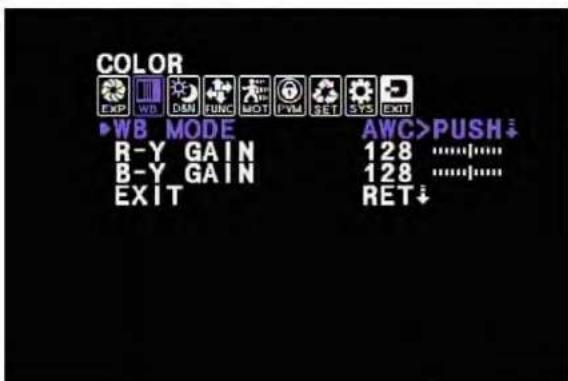
text_image
COLOR EXP WD DIM FUNC MOT I VM SET SYS EXIT WB MODE AWC>PUSH R-Y GAIN 128 ............. B-Y GAIN 128 ............. EXIT RET↓COLOR-WB MODE-AWC>PUSH
- When pushing ENTER, the white balance operate automatically in fixed color temperature area.
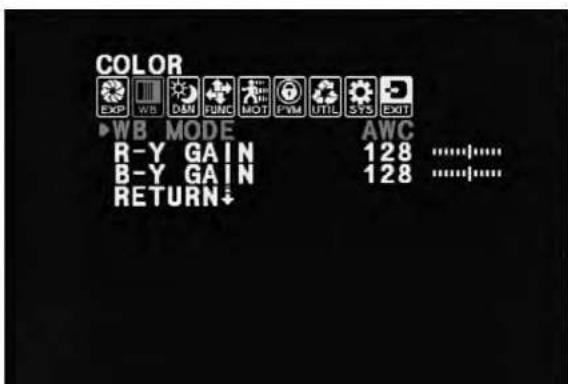
text_image
COLOR EXP WB DMM FUNC MOT PWM UTIL SYS EXIT ▶WB MODE AWC R-Y GAIN 128 ............. B-Y GAIN 128 ............. RETURN↓COLOR-WB MODE-AWC
- AWC :Auto White Balance Control mode
Auto White Balance controls in all color temperature ranges.
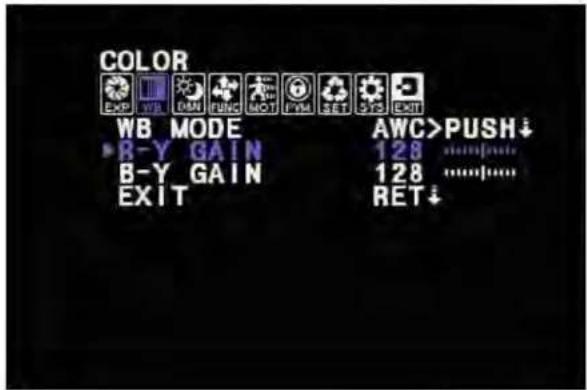
text_image
COLOR EXP WB DM FUNC MOT PM SET 375 EXIT WB MODE B-Y GAIN B-Y GAIN EXIT AWC>PUSH↓ 128 ...... 128 ...... RET↓COLOR -R-Y GAIN
- The color gain controls R-Y
- If it increases more than default (128) value, R-Y gain extends to vertical shaft in color vector. And if it decrease, it shortens (0 \~ 256, 1 step, default : 128)
COLOR-B-Y GAIN
- The color gain controls B-Y
- If it increases more than default (128) value, B-Y
gain extends to horizontal shaft in color vector. And if it decrease, it shortens (0 \~ 256, 1 step, default : 128)
3. DAY&NIGHT
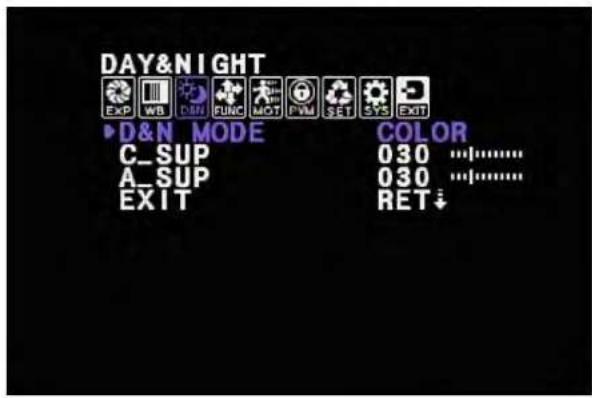
- Color & B/W change, D&N filter change, Color/Aperture level control.
text_image
DAY&NIGHT EXP WB DIM FUNC MOT PVM SET SYS EXIT D&N MODE COLOR C_SUP 030 .......... A_SUP 030 .......... EXIT RET ↓DAY&NIGHT -D&N MODE
- D&N change mode sets
- Select of AUTO / COLOR / B&W / EXT.
- AUTO mode: D&N is decided by AGC gain level.
- COLOR mode: Only Color mode operates.
- B&W mode: Only B&W mode operates.
- EXT mode: D&N decision by external CDS signal.
text_image
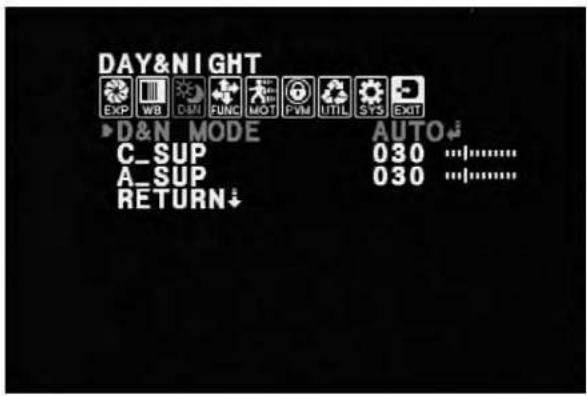
DAY&NIGHT EXP WB COM FUNC MOT PVM UTIL SYS EXIT D&N MODE AUTO C_SUP 030 A_SUP 030 RETURN- D&N is decided by AGC gain level.
- BURST: When it is Night mode, color burst ON/OFF controls.
- DAY>NIGHT: It controls gain level for changing Night mode((DAY>NIGHT + 1) \~ 30, 1 step) unitdB.
- NIGHT>DAY :It controls gain level for changing DAY mode. (6 \~ (NIGHT>DAY - 1), 1 step) unitdB.
- DWELL TIME: D&N change on continual time condition set DAY>NIGHT or NIGHT>DAY. For protecting hunting. (0 \~ 15, 1 step) unit : sec

text_image
DAY&NIGHT EXP WB DAM FUNC MOT PWM UTIL SYS EXIT ▶D&N MODE EXTERAL C_SUP 030 A_SUP 030 RETURN↓- EXT mode: D&N decision by external CDS signal.
- BURST :When it is Night mode,color burst signal selects ON/OFF.
- DAY>NIGHT: ADC level for changing Night mode. (0 \~ 255, 1 step)
- NIGHT>DAY : ADC level for changing Day mode. (0 \~ 255, 1 step)
- SMART IR : SMART IR changing ON/OFF mode
text_image
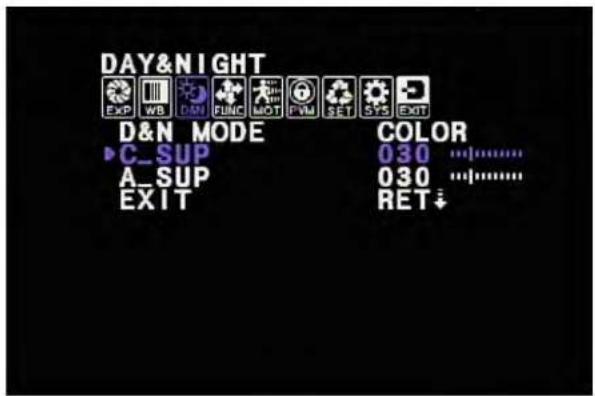
DAY&NIGHT EXP WB DM FUNC MOT PVM SET SYS EXIT D&N MODE COLOR ▶ C_SUP 030 A_SUP 030 EXIT RET ↓DAY&NIGHT -C\_SUP
- The color noise suppress in Night mode.
- 0 \~100, 1 step. Unit %.

text_image
DAY&NIGHT EXP WB D-51 FUNC MOT FVM SET SYS EXIT D&N MODE COLOR C_SUP 030 A_SUP 030 EXIT RET ↓DAY&NIGHT -A\_SUP
- The Aperture level suppres in Night mode.
- 0\~100, 1 step. Unit %.
4. FUNCTIPON
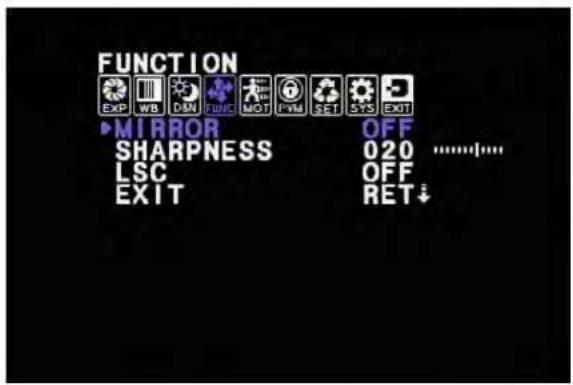
- Sets for MIRROR, Sharpness, LSC mode
text_image
FUNCTION EXP WB DAN FUNC MOT PVM SET SYS EXIT MIRROR OFF SHARPNESS 020 ............. LSC OFF EXIT RET ↓FUNCTION
- MIRROR : Image change mirror ON/OFF mode
- SHAPRNESS: Sharpness level control( 0 \~ 30, 1 step)
- LSC: Lens Shading Compensation ON/OFF mode

text_image
LSC ▶ SET LEVEL 010 ...... RETURN↓FUNCTION -LSC
- LSC(Lens Shading Compensation)
- In order to complement the quality of the lens is a function which increases gain of screen angle.
- LSC operates ON/OFF
- 0 \~ 30, 1 step.
- In increasing level, side image is bright.
5. MOTION

text_image
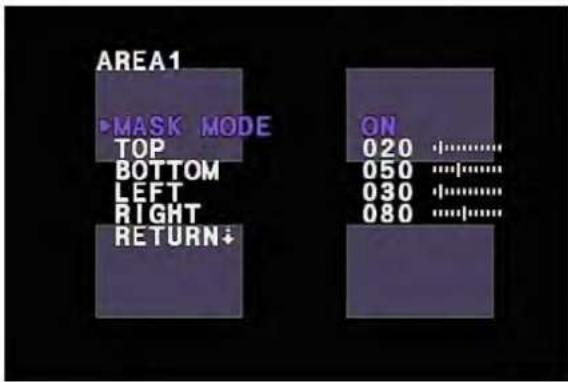
MOTION EXP WB DIM FUNC MOT PVM SET SYS EXIT ▶MOTION OFF AREA SEL AREA1 SENSITI. 025 ............| DISPLAY TRACE HOLD TIME 003 ............| ALARM ON EXIT RET ↓- The functioninforms alarm on camera when being moving by the screen. The setting zones are 4 area.
- MOTION : Select operates ON/OFF
- AREA SEL : Select each area
- SENSITI.: Control MOTION sensitivity. (0 \~ 30, 1
step)
- DISPLAY: Control alarm mode when MOTION indicates. (Select of OFF / ICON / TRACE)
i) ICON mode: MOTION ICON display when MOTION
indicates.
ii) TRACE mode: Display selected window in AREA
- HOLD TIME: The time of alarm control when MOTIONindicat. (0 \~ 15, 1 step) Unit : sec
text_image
AREA1 ▶MASK MODE TOP BOTTOM LEFT RIGHT RETURN↓ ON 020 ·…… 050 ·…… 030 ·…… 080 ·……MOTION - AREA SEL - AREA i
- MASK MODE: Selected area operates MASK area.
- TOP / BOTTOM / LEFT / RIGHT
- TOP : 0 \~ (BOTTOM - 1), 1 step.
- BOTTOM : (TOP + 1) \~ 145, 1 step.
- LEFT: 0 \~ (RIGHT - 1), 1 step.
-
RIGHT : (LEFT + 1) \~ 192, 1 step.
6. PRIVACY
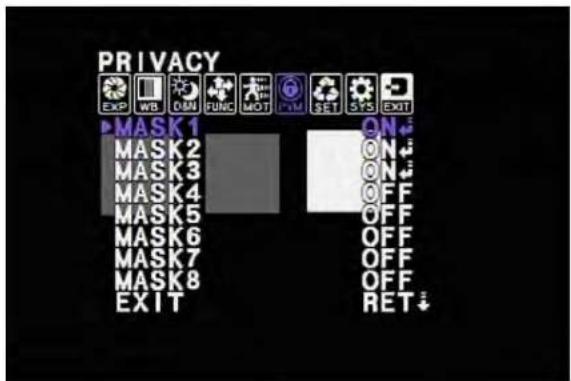
- The mask controls about the zone where the privacy is necessary.
The total mask is 8 zones.
The each mask color can control GRAY, BLACK, WHITE, RED, GREEN, BLUE, MAGENTA, CYAN.
text_image
PRIVACY EXP WB ON FUNC MOT SET SYS EXIT MASK 1 ON MASK 2 ON MASK 3 ON MASK 4 OFF MASK 5 OFF MASK 6 OFF MASK 7 OFF MASK 8 OFF EXIT RET ↓PRIVACY-MASK1\~MASK 8
- The each mask selects ON/OFF
text_image
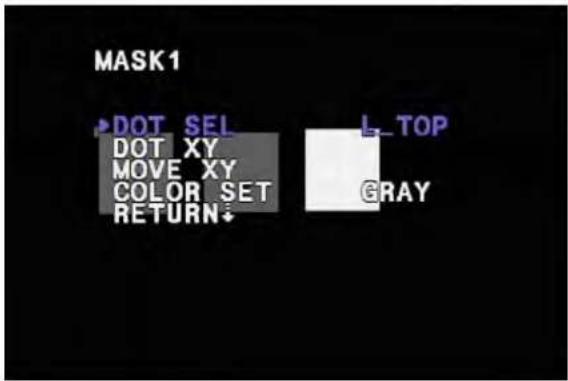
MASK1 ▶DOT SEL DOT XY MOVE XY COLOR SET RETURN L_TOP GRAYPRIVACY-MASKi
- After selecting each mask, it can select color, location, area of mask.
- DOT SEL : The each mask can change area.
(L_TOP / L_BOT / R_BOT / R_TOP) - DOT XY : The selected point in mask controls size.
- MOVE XY: The selected mask can move.
- COLOR SET : The selected mask can change color.
(GRAY/BLACK/WHITE/RED/GREEN/BLUE/MAGENTA/CYAN)
7. SETUP
- The SETUP mode set USER TITLE,DPC(Dead Pixel Compensation), OLPF, MONITOR MODE.
SETUP -TITLE
- User writes TITLE
- User sets TITLE ON/OFF.
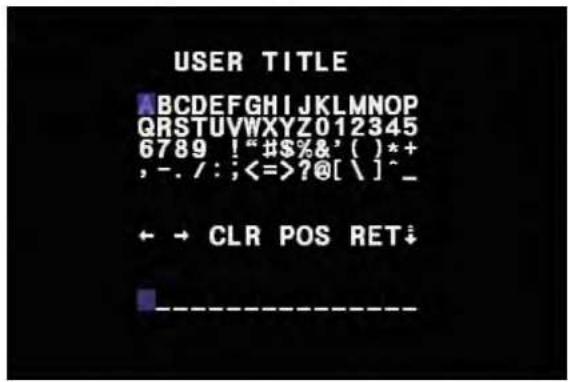
- After selecting TITLE ON, it can write TEXT to display on screen.
text_image
USER TITLE ABCDEFGHIJKLMNOPQRSTUVWXYZ012345 6789 ! "#$%&' ( )*+ , -. / : ;<==>?@[ \ ]^_ ← → CLR POS RET↓ ------------------USER TITLE – Text setting mode.
- User can write text 64 characters.
- ←, →: When it modify, user can move revision text..
- CLR: User can remove all text.
- POS: The text move to the position.
- RET : After finishing USER TITLE to the upper menu.
text_image
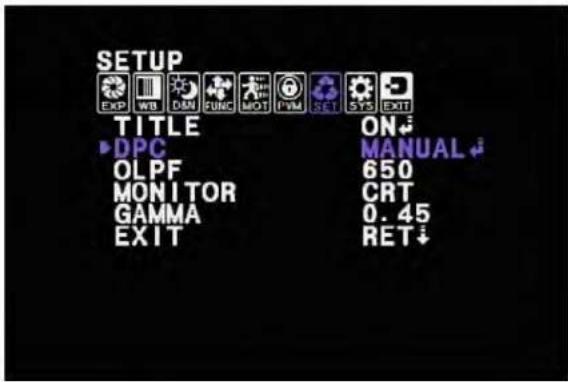
SETUP EXP WB DAN FUNC MOT PVM SET SYS EXIT TITLE ON ►DPC MANUAL OLPF 650 MONITOR CRT GAMMA 0.45 EXIT RET↓SETUP -DPC (Dead Pixel Compensation)
- It is the function to compensate for CCD defect.
- User can select OFF / MANUAL.

text_image
DPC-MANUAL WHITE THR 150 ...... BLACK THR 030 .\.......... ►DPC LEVEL 030 .\.......... RETURN↓SETUP - DPC -MANUAL
- After selecting MANUAL mode, menu move to the DPC control mode
- WHITE THR : White defect threshold. (0 \~ 255, 1 step)
- BLACK THR : Black defect threshold. (0 \~ 255, 1 step)
- DPC LEVEL: Control the DPC compensation level (0 \~ 255, 1 step)
text_image
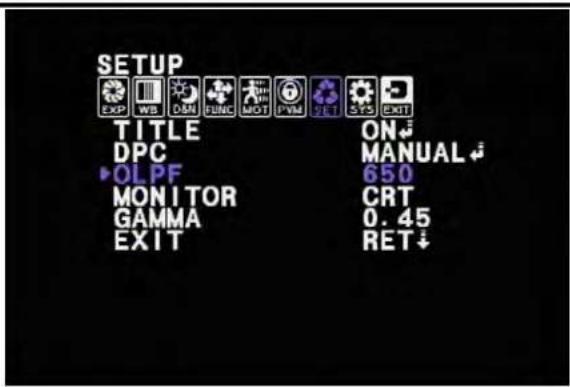
SETUP EXP WB OMM GUNK MOT PVM ZEL GPS EXIT TITLE ON DPC MANUAL OLPF 650 MONITOR CRT GAMMA 0.45 EXIT RET ↓SETUP -OLPF
- User can control ATW value according to kind of OLPF
- It supports two kinds of OLPF. (650 filter (IR-CUT), 850 filter(IR-PASS))
text_image
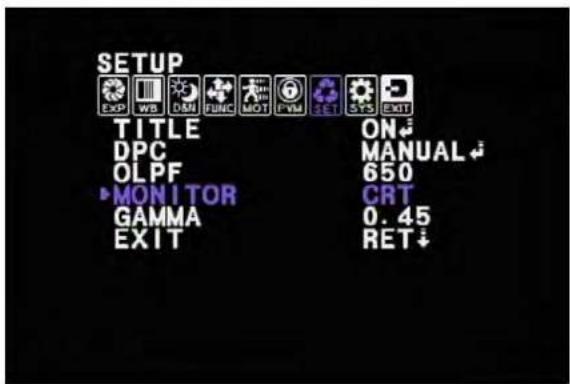
SETUP EXP WB D&N FUNC MOT PVM SET SYS EXIT TITLE ON DPC MANUAL OLPF 650 MONITOR CRT GAMMA 0.45 EXIT RET↓SETUP -MONITOR
- The DISPLAY MONITOR mode can support two kinds of display( CRT/LCD)

text_image
SETUP EXP WB DAN FUNC MOT PWM SET SYS EXIT TITLE ON DPC MANUAL OLPF 650 MONITOR CRT GAMMA 0.60 EXIT RET↓SETUP -GAMMA
- User can adjust GAMMA level.
- Selecting of 0.45 / 0.60 / 1.0 / USER.
- After selecting USER mode, the gamma value adjust 0.20 \~ 1.00. (0.05 step)
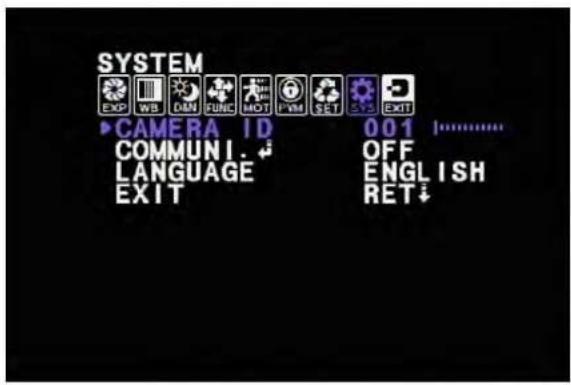
- The setting Camera ID, 485 comm., language.
text_image
SYSTEM EXP WB CNN FUNC MOT PWM SET EXIT ▶ CAMERA ID 001 ⋯ COMMUNI. OFF LANGUAGE ENGLISH EXIT RET ↓SYSTEM-CAMERAID
- When user set a couple of camera, it can set camera ID of each camera. 0 \~ 255
SYSTEM -COMMUNI. (communication setting)
- User can set RS485 comm. ON /OFF.
SYSTEM-LANGUAGE
- User can set language of OSD menu.

text_image
COMMUNICATION ▶ PROTOCOL PEL CO-D BAUDRATE 9600 RETURN↓SYSTEM -COMMUNICATIONsub menu.
- Setting RS485 communication.
- PROTOCOL: Supporting for PELCO-D.
- BAUDRATE: 2400 / 4800 / 9600 / 19200. Unit : bps
9. EXIT
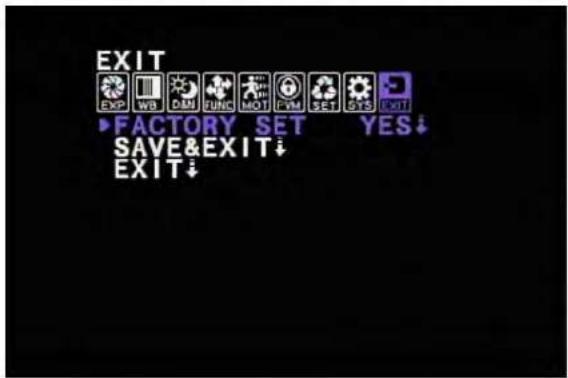
- You can choice each option for the EXIT after config the camera setting.
text_image
EXIT EXP WB OAM FUNC MOT FVM SET GYS EXIT ▶FACTORY SET YES ↓ SAVE&EXIT ↓ EXIT ↓EXIT-FACTORY SET.
- Factory initial data mode set.
- Camera setting data factory original data.
- After factory set mode, user has to enter /E&EXIT.
EXIT -SAVE&EXIT.
- After adjusted data, exit OSD menu.
EXIT -EXIT
- Exit not saving changed data.