
Fun Touch 3 - Video camera NIKON - Free user manual and instructions
Find the device manual for free Fun Touch 3 NIKON in PDF.


| Product Type | 35mm compact film camera with built-in flash and autofocus |
| Model | Nikon Fun Touch 3 |
| Film Format | 35mm (135 film magazine), 24 x 36 mm |
| Lens | 32 mm F4.5 (3 elements in 3 groups) |
| Focus | Autofocus with focus lock; range 1.2 m (3.9 ft) to infinity |
| Shutter | Programmed electronic shutter |
| Exposure Modes | Auto, Fill-in flash, Red-eye reduction |
| Film Speed Setting | DX automatic: ISO 100, 400; manual setting for non-DX (ISO 50-1600) |
| Film Loading & Advance | Automatic loading, advance, and rewind |
| Flash | Built-in with pre-charge; flash range: ISO 100: 1.2–3.8 m, ISO 400: 1.2–7.6 m |
| Flash Recycling Time | Approx. 5 seconds with new batteries |
| Viewfinder | Albada-type bright-frame finder with focusing frame |
| Power Source | Two 1.5V AA alkaline batteries (manganese, Ni-Cd, lithium not recommended) |
| Battery Life | Approx. 30 rolls of 24 exposures (or 20 rolls of 36 exposures) with flash ~50% |
| Dimensions (W x D x H) | 125 x 45 x 70 mm (4.9 x 1.8 x 2.8 in) |
| Weight | Approx. 180 g (6.4 oz) without battery and film |
| Red-eye Reduction | Switchable mode; lamp glows before flash |
| Country of Origin | Japan (Nikon Corporation) |
| Warranty | 1 year limited (varies by region) |
Frequently Asked Questions - Fun Touch 3 NIKON
User questions about Fun Touch 3 NIKON
0 question about this device. Answer the ones you know or ask your own.
Ask a new question about this device
Download the instructions for your Video camera in PDF format for free! Find your manual Fun Touch 3 - NIKON and take your electronic device back in hand. On this page are published all the documents necessary for the use of your device. Fun Touch 3 by NIKON.
USER MANUAL Fun Touch 3 NIKON
For Fig. C, D, E, F, G, H, K & L, refer to the end of booklet.

English (p. 1 — p. 14)
Español (p. 15 — p. 28)
Precautions
●In the event of camera failure, do not attempt to disassemble or repair the camera by yourself since high-voltage circuits are built in. In such a case, try replacing the battery first. If it does not work, take the camera to your nearest Nikon service center.
- Please ensure that you are fully conversant with the operations and features of your new camera by reading these instructions before using it for special occasions (holidays, weddings, etc.).
● To prevent the camera from being deformed, discoloured or damaged, do not leave it in a high-temperature and high-humidity environment. The battery power will be decreased in very cold surroundings.
- When the camera is not in use, close the lens cover and keep it in a safe place.
Precauciones
"This digital apparatus does not exceed the (Class B) limits for radio noise emissions from digital apparatus set out in the Radio Interference Regulations of the Canadian Department of Communications."
Pour le Canada
Thank you for selecting Nikon Compact Camera. We welcome you to the growing family of owners of our products around the world. We trust that you will be satisfied with this new aid to your photographic creativity. Please carefully read these operating instructions and keep it handy for your reference.
■ Parts Identification
(Fig. A)
- Shutter release button
- Film frame counter
- Infrared auto focus window
- Viewfinder
- Exposure sensor
- Electronic flash
- Flash-on button
- Red-eye reduction lamp
- Lens cover and red-eye reduction switch
- 32 mm lens
- Strap
- Back cover latch
(Fig. B)
- Viewfinder eyepiece
- Green LED (ready lamp)
- Film chamber
- Film rewind spindle
- DX decoding contact
- Film rewind switch
- Film guide
- Take-up spool
21.Battery compartment cover - Back cover
- Film check window
1 Installing the Batteries
(1) Open the battery compartment cover by pushing in the direction of the arrow.
(2) Insert two new AA-size alkaline batteries with the correct positive (+) and negative (−) polarity as indicated by the diagram inside the battery compartment.
(3) Push the battery compartment cover down to close securely.
■ Replace the batteries when:
A) The film winding speed is slower than usual.
B) The green LED does not come on within 20 sec. after opening the lens cover.
C) The green LED blinks when pressing the shutter halfway.
A), B) or C) means that the batteries are weak and there may be insufficient power to operate all the camera's functions.
NOTE:
— Manganese batteries are not powerful enough for correct performance. Ni-Cd re-chargeable and lithium batteries cannot be used either.
— Remove the batteries from the camera when you do not intend to use it for a number of months.
2 Opening the Lens Cover
Slide the lens cover switch to open and close the lens cover. (Fig. C)

NOTE: When the lens cover is closed, the shutter will not operate. When the camera is not in use, close the cover to prevent accidental exposure and to protect the lens.
3 Film Speed Selection
Use ISO 100 film in sunny weather and 400 film in cloudy/dull conditions and indoors.
| ISO Number of Film | ISO 50, 100, 200, and Non-DX coded film | ISO 400, 1000, 1600 |
| DX setting by camera | 100 | 400 |
NOTE: When using faster films than ISO 400, you may get an overexposed picture if the ambient light is very high, such as in direct sunlight.
4 Loading the Film
(1) Push the back cover latch in the direction of the arrow and pull open the cover.
(2) Insert the female end of the cartridge into the bottom of the film chamber, then lower the male end in and snap into position.
(3) Pull the film leader across and place it as indicated (FILM TIP) in the figures. Be careful not to let the leader extend too far, as it may cause excessive film slackness. Make sure the film rests flat between the guides and over the sprocket teeth. (Figs. D and E)
(4) Close the back cover until you hear a click indicating that it is securely locked. If the cover does not close properly with the film in place, check that it is lying flat between the guides and that the cartridge is snug in the chamber.
(5) Depress the shutter release button halfway after the cover has been closed, and the film will advance automatically to frame counter number '1'.
NOTE: The counter will only work with the film properly installed in the camera. If the film counter does not advance, repeat steps (1) to (5).
5 Holding the Camera (Fig. F)
The camera must be held correctly with both hands, to ensure consistently good, sharp photographs.
It should be held steadily and comfortably while you are taking photographs.
The illustrations in Fig. F show the correct ways to hold the camera in both the vertical and horizontal positions.
Be careful not to block any window on the front with your fingers.
6 Viewfinder
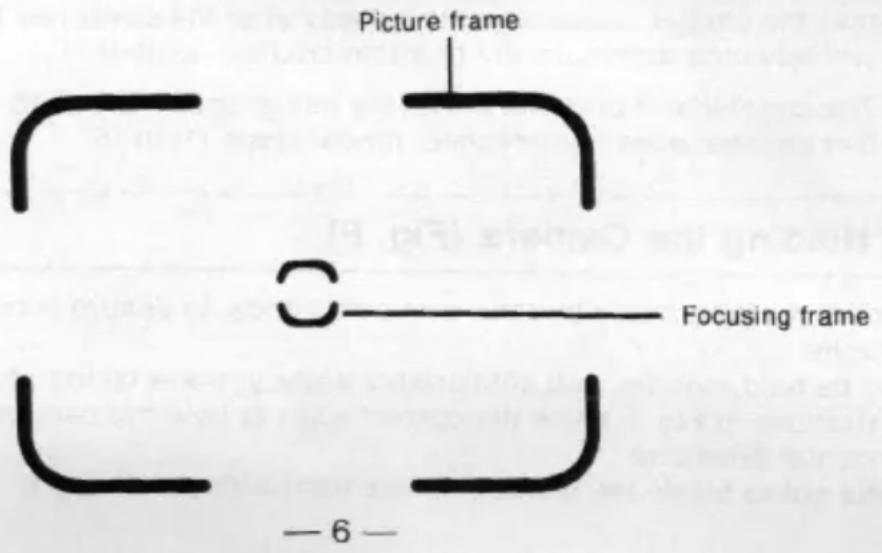
Look through the viewfinder and compose your picture in the white frame. When your main subject is located in the centre focusing frame of the viewfinder and is more than 1.2 m (3.9 ft) away, the camera will automatically focus on it.
7 Taking Pictures
1. Automatic Photography
Your camera is totally automatic. Exposure, focus and film advance are all handled automatically by the camera. But we recommend you shoot the pictures after confirming that the green LED is glowing, i.e. the flash is ready. You can thus regard this green LED as a ready sign. Strictly speaking, however, proper flash exposure depends on the film speed and the camera-to-subject distance. (See table)
Flash range
| Film speed | Flash range |
| ISO 100 | 1.2—3.8 m (3.9—12.5 ft) |
| ISO 400 | 1.2—7.6 m (3.9—24.9 ft) |
If you don't press the shutter button more than 1 minute after opening the lens cover, the green LED goes off automatically in order to save power. In this case press the shutter halfway, then it will come back on.
2. Fill-in Flash
When photographing a subject in the shade, against the sun or in front of a bright window, the flash can be used to brighten the subject. After holding the flash-on button and making sure the green LED glows, release the shutter.
3. Focus-lock (Fig. G)
When composing the picture where the principal subject is not in the centre of the viewfinder, it is necessary to prefocus the camera lens. To do so:
(1) Look through the viewfinder and compose the picture so that your subject is located directly within the focusing frame.
(2) Gently press the shutter release button halfway to lock in the correct focus.
(3) While maintaining pressure on the shutter button, recompose the picture as you desire and press the shutter button all the way down to take the picture. The focus-lock can be cancelled simply by removing pressure on the shutter button.
4. Special Auto Focus situations
The auto focus system will focus accurately on the majority of the subjects you wish to photograph. However, there are a few situations where the auto focus mechanism may not function properly. These are:
A) When the subject has strong reflections, such as polished metals, exterior of cars, bodies of water, or mirrors.
B) Subjects with little or no reflection, such as black objects, hair, a flame or smoke.
C) Subjects that are very small.
D) Subjects with an object in front of them, such as a wire net or a cage.
In situations A) — D), prefocus on another subject approximately the same distance away and then recompose the scene and take the picture. (See Section 3 on Focus-lock).
E) Taking pictures through glass windows:
Shoot with camera lens nearer the glass and at an angle of approximately 20^ .
5. Red-eye reduction effect (Fig. H)
Try this mode to reduce the possibility of showing red eyes in your flash photo. Just shift the lens cover and red-eye reduction switch all the way to the red-eye reduction position to set this mode. When the shutter release button is pressed in this mode, the red-eye reduction lamp will glow for a few seconds and then the shutter is automatically released together with a burst of flash. (The red-eye reduction mode is not recommended for a snap-shot).
* Even when the red-eye reduction mode is used, red-eye may still present itself due to the differences between individuals and photographing conditions. Basically, red-eye is more pronounced with light coloured eyes and dark conditions.
8 Removing the Film
At the end of the film, the frame counter will cease to advance or you cannot press the shutter release button. Rewind the film by sliding the film rewind switch in the direction of the arrow (Fig. K). When rewinding is complete and the motor has stopped, open the back cover and remove the film cartridge from the chamber. The film rewind switch will return to its original position automatically.
— To rewind the film before it is completely used, take the same steps as above.
— Do not open the back cover while rewinding the film.
— Do not attempt to pull the film out yourself. (Fig. L)
Troubleshooting Guide
| Problem | Solution |
| Subject is out of focus | Subjects must be 1.2 m (3.9 ft) or more away from the camera. |
| Flash fails to function | Clean the battery terminals with a pencil eraser if dirty or corroded. Replace batteries immediately if exhausted. |
| Flash pictures have dark area(s) | Make certain fingers are clear of the flash when shooting. (Have your subject watch for this.) |
| Flash pictures are too dark overall | Subject(s) must be within the specified flash range.See section 7-1. |
| Flash pictures are too light | Place subjects at least 1.2 m (3.9 ft) from the camera. |
| Short battery life | Only use AA alkaline batteries. |
Specifications
Type: 35 mm lens shutter camera with built-in flash and auto-focus
Film format: 24 mm x 36 mm (135 film magazine)
Lens: 32 mm F4.5 (3 elements in 3 groups)
Focus: Auto-focus (with focus lock)
Focus range: 1.2 m (3.9 ft) — infinity
Shutter: Programmed electronic shutter
Photographic modes and exposure (ISO 100):
AUTO/Red-eye reduction: Programmed exposure.
F4.5, 1/50 sec. (EV10) F8, 1/125 sec. (EV13)
Less than approx. EV10: Automatic switchover flash
FILL-IN FLASH/Red-eye reduction
Viewfinder: Albada-type bright-frame finder
Viewfinder indications: Picture frame, Focusing frame
Green LED: On: Ready for shooting
Blinking: Replace the batteries
Film-speed setting (ISO):
| DX automatic settings (ISO 100, 400) | |
| Film loading: | Automatic |
| Film advance: | Automatic |
| Film rewind: | Automatic via film rewind switch |
| Built-in flash: | With pre-charge systemAUTO: Automatic switchover for low lighting levelsFILL-IN FLASH: Flash |
Flash operating range (ISO 100):
| 1.2—3.8 m (3.9—12.5 ft) | |
| Flash recycling time: | Approx. 5 sec. (with new batteries) |
| Battery life: | Approx. 30 rolls of 24 exposures film (20 rolls of 36 exposures film)(with new batteries, using flash for approx. 50% of shots) |
| Power source: | Two 1.5 V AA-size alkaline batteries |
| Dimensions: | 125 (W) x 45 (D) x 70 (H) mm [4.9 (W) x 1.8 (D) x 2.8 (H) in.] |
| Weight: | Approx. 180 g (6.4 oz) (without battery and film) |
Specifications are based on an operating ambient temperature of 20^ C, and subject to change without notice.
ESPAÑOL
Estimado usuario:
natural_image
Line drawing of a person taking a photo with a camera (no text or symbols)
natural_image
Line drawing of a person holding a camera, no text or symbols presentFig. G

natural_image
Illustration of two people holding hands, framed by decorative borders (no text or symbols)
natural_image
Illustration of two people shaking hands, enclosed in a frame (no text or symbols)Fig. H

Fig. K

natural_image
Technical line drawing of a cylindrical device with a control panel and directional arrow (no text or symbols)Fig. L

Nikon Fun·Touch 3
Nikon
IMPORTANT NOTICE:
YOU MUST PRESENT THE ATTACHED WARRANTY FORM (PART 1) TOGETHER WITH PROOF-OF-PURCHASE AND PROOF-OF-PURCHASE DATE TO OBTAIN WARRANTY SERVICE.
THIS FORM MUST BE PRESENTED FOR WARRANTY SERVICE
| Nikon Fun·Touch 3 |
This is your Nikon Inc. One Year Limited Warranty (valid in the Continental United States, Alaska, Hawaii, Puerto Rico, U.S. and U.S. Virgin Islands).
YOU MUST PRESENT THIS FORM (PART 1) TOGETHER WITH PROOF-OF-PURCHASE AND PROOF-OF-PURCHASE DATE TO OBTAIN WARRANTY SERVICE.
This Nikon Product is warranted by Nikon Inc. to be free from defects in material and workmanship for a period of one (1) year from the date of purchase. During this period, if this Product is found to be defective in material or workmanship, Nikon Inc. or its authorized service station will at its option either repair or replace this Product without charge subject to the following limitations and exclusions:
This warranty extends to the original consumer purchaser only and is not assignable or transferable.
This warranty shall not apply to the following:
- Any product which has been subject to misuse, abuse, negligence or accident.
- Any defects or damage directly or indirectly caused by the use of unauthorized replacement parts and/or service performed by unauthorized personnel.
- Any batteries.
ALL WARRANTIES IMPLIED BY LAW INCLUDING ANY WARRANTY OF MERCHANTABILITY OR FITNESS FOR A PARTICULAR PURPOSE SHALL BE OF A DURATION OF ONE (1) YEAR FROM DATE OF PURCHASE. THE WARRANTIES HEREIN ARE EXPRESSLY IN LIEU OF ALL OTHER EXPRESS WARRANTIES INCLUDING THE PAYMENT OF CONSEQUENTIAL OR INCIDENTAL DAMAGES FOR THE BREACH OF ANY WARRANTY.
Some states do not allow (a) limitations on how long an implied warranty lasts or (b) the exclusion or limitation of incidental or consequential damages so the above limitations or exclusions may not apply to you. This warranty gives you specific legal rights and you may also have other rights which vary from state to state.
In order to obtain performance of the warranty obligations, the original consumer purchaser must return this warranty and this Nikon product together with proof of purchase and proof of purchase date (bill of sale) either in person or addressed to the warranty department of Nikon Inc., at 1300 Walt Whitman Rd. Melville, N.Y. 11747-3064 or any one of the authorized service stations at their respective addresses listed on the reverse side. The original consumer purchaser in returning this Nikon product must prepay all postage, shipping, transportation, insurance and delivery costs to the repair facility.

THIS WARRANTY FORM MAY NOT BE REPRODUCED OR COPIED AND SHALL BE VALID ONLY WITH PRODUCTS
SOLD BY Nikon Inc.
Nikon
PART 1
Nikon AUTHORIZED SERVICE STATIONS
ARIZONA
Phoenix Camera Repair Inc.
3232 North 18th Street
Primes, A2 500/M Principal Street II
(603) 377-1811
Trombin Lianey
742 West Limbay Lost
Tucson, AZ 85765
Principal-Berry Cookson
表决情况:100
CALIFORNIA
Bilksat Irle;
19801 Hamilton Avenue
Authorized Games Service
(2018) Riverside Drive
Sherman O&M, CA 37142
Principal-Peter Mccawt
Figure 1.2.3
Kurt's Carner Repair Inc.
San Diego, CA 20120
San Diego, CA 501-60 Principal Karl Kuyama
Paul Struckier
(714)266-1018
Matrix Camera Service Inc.
36 Mason Street
San Francisco, CA 54102
Principal-Mathian Law
中位效应
California Regional Services Inc.
17th Street
Sacramento, CA State of Cincinnati, Tel Aviv
邮电通1-1380
Pro. Caumela Service Inc
2001 E. Hollinger Dr. # 302
Treasured Oaks, CA \$150
Principal Klaus Reiberburg
(805) ABT 7340
COLORADO
Metro Carriers Service Inc.
475 S. Federal Blvd.
Grenw, CG 90218
Principal James York Atlas
(2022) E39-2471
Rocky Mountaini Carmerz Repair
240 B160098
CHINW, LTD (600)
(3018) 744-3499
DISTRICT OF COLUMBIA
Siemens Power Tech Services Inc.
1240 M3, Offreet Road 16
Washington, DC 300W
Principal Store
(1) 2023.12.26
FLORIDA
No. Photo Text Services Inc.
2267 Beach Boulevard
jacksonville, FL 3209
Principal Hall Wt 2 2015.9.19-1986
(1) 2016
So, Phosci Tech Sarwere of Orlando Inc.
Last March Miles Aversion
(Decrease, FL, 3200)
(四) 2016-034
(四) 陈志刚
to: Molo Sert Servizi V.
(1) 2017 annual results for the year ended June 30, 2017
Pincing Di Passeri
0113 896-5141
2017年1月
GEORGIA
Wilson Inc.
Principal D. J. Park
08746 4321-20927
E. LINDUS
CLAWOS Milton Inc.
12/24. English Ave
Suite 128
MURSO (dove, a edolfi)
(300) N=45.8817
International Camera Corp
(47) Nest Jackson Souvenet
Chicago, IL 60607
Princisal €, 45m
01257364320
INDIANA
Pascal Point Cannees Service
320# East State Blvd
71 Wayne, 5V 46800
Principal Cleve J. Limgbore
(2) 可得-
KANSAS
Pro-tech Service Center
112 North Main Blvd
P.O. Box 608
Hankton, 418 67962
Petrochro-Bartina Ranga 1988 320-2196
(1) 2017年1月
LOUISIANA
So. Photo Tech Service Inc
(10) N. Causteney
Metalsk, L.A. 70121
Principal Charles Song
(594) 838-3379
MASSACHUSETTS
Precision Camera Retail Inc.
61 Sheridan St., P.O. Box 180
Chopper Falls, MA 21920
Principal Theatre 1. Rand
(4.13) 500-8000
Samford Camera Repair
1050 Massachusetts
Arlington, MA 52174
Principal-Paul (C. Mackoet
电话:045-25038
S. H. S/STnes Carneils Repair
scoring, 364-3210 Residential Bank End
法定代表人:
2.1.2.2
MICHIGAN
offwood: Carlier, Inc.
19 Oak Street
Ryandola, M:48162
Principal Mayenthal J. Marithokar
(1) 2007-03-06
MINNESOTA
Marquette Camara Repair Inc.
32.1 Wajdata NPD
Mónagaos, 194 S5416
Principal Issue
9.12.581.1212
Custom Carnera Service Inc;
with W. Lasso in
sensitagris, 1946.
表决情况:
MISSOUR
CSI Castars Repair Center Inc.
7925 Cayton Road
St. Lerón, M20-85117
Principal Law There
(214) 725-9648
NEVERDA
Lamila Camera Inc.
025 A. 54713
Las Vegas, NY 8912
Principal Design Mark
(No text)
NEW YORK
Siban Inc.
(300 West Microsoft Road
Marcella, NY 11
(003) 645-8975
Nustout Valley Carner Repair Inc.
225 Vem Suite 18
VACUJE, NCT 10954
办公地址:深圳市
(1) 深圳市
Inco-Atch Nesterberne Inc.
1104, 1205.87 New York, 257
Principal Altery Psi
(2)25 873-6400
Professional Carner Service Inc.
(7) Name: CTR-5006
New York, NY 10005
Principal Risk Ranking
(1) 362 (050)
NORTH CAROLINA
to: Mbox Tech Services Inc.
0513 South Blvd
Charter, NC 2020
Principal Larry Hendria
(54) 523-807
OHIO
Germany Service & Retail Co
(1) may be done
(Streinest) OH 8420
Principal XBRef: Lindlow
补充说明
Carbonye Cartam & Video Repair
theat south High Street
Columbus, OH 43214
Arlotgas William R. Schean
(14)20279
OKLA/HOMA
Flare Products Repair Inc.
2109 Classen Bud.
Principal Cheritas Souch
(No. 62-402)
OREGON
Associated Camera Repair Inc.
SADY A.R. Sandy Box
Portland, OR 9732
Principal Real Cashflow
(917) 323-4828
PENNSYLVANIA
General Camera Repair Shop
480 N. 9th Street
Физмерная, No 19120
Principal-Ostella, Weaver
(1) 760-8421
TEXAS
Archinal Carrier Repair
3100 Commerce sa
Dai4a, TX 75226
Principal Robert Factors
(2) 可持核心股
Camera Services Inc.
3827 South Steephard
Hoskorn, 18 17569-2300
7125.528.6692
(1) 2016
Valley Canada Services Inc. 1022 Europe Bank
San Antonio, TX
Principal Curite Jauvel
3101736-7412
VIRGINIA
Strain Photo-Net Service
154 West 250t Street
MOTUM, 18-2381
Principal William Wright
(3) 2015-04
WASHINGTON
Photo Stories Inc
223 Westlake Avenue Improb
Swatch, 198. 9812a
Principal Jerry Wardsworth
(370) 8882-6948
广力云
[Non-Text]
WISCONSIN
BOC Enterprises Inc.
31) West Johnson Street
Marlson, M: 53750
Principal James Neiner
.806 257-4315
WYOMING
Photo-Electronicus
Retain this Worldwide Warranty with proof of purchase for your records
Nikon ONE YEAR WORLDWIDE LIMITED WARRANTY
(Excluding the Continental United States, Alaska, Hawaii, Puerto Rico, U.S. and U.S. Virgin Islands)
Welcome to the worldwide family of Nikon owners.
Your NIKON equipment has been manufactured to the highest quality standards by NIKON CORPORATION, Tokyo, Japan.
This warranty entitles the original consumer to worldwide warranty protection in accordance with the terms and conditions. It affords the consumer warranty protection outside the continental United States, Alaska, Hawaii, Puerto Rico and the U.S. Virgin Island. Such warranty coverage is supplemental to and not in lieu of the United States Nikon One Year Limited Warranty which is received by the customer with the Nikon product.
This Nikon product except for batteries is warranted by NIKON CORPORATION, Tokyo, Japan to be free from defects in materials or workmanship for a period of one year from the date of purchase. During this period any one of the worldwide repair facilities listed on the reverse side will repair without charge any parts or assembly of parts found to be defective in material or workmanship subject to the following limitations:
-
This warranty extends to the original consumer purchaser only and is not assignable or transferable.
-
This warranty shall not extend to any product which has been subject to misuse, abuse, negligence, accident or unauthorized repair. All warranties implied by law including any warranty of merchantability or fitness for a particular purpose shall be of a duration of one (1) year from date of purchase. The warranties herein are expressly in lieu of all other express warranties including the payment of consequential or incidental damages for the breach of any warranty.
No warranties, whether express or implied, including the warranties of merchantability or fitness for a particular purpose are made by any distributor or dealer of the product herein warranted; nor shall such dealer or distributor be liable for the payment of any direct incidental or consequential damages.
In order to obtain worldwide service, the consumer should return the Nikon product, either in person or addressed to the Warranty Department of any authorized service repair station listed on the reverse side together with proof of purchase and this warranty. The original consumer in returning this product, must prepay all postage, shipping, transportation, insurance and delivery costs to the repair facility.
For prompt response of worldwide warranty inquiries, please direct all correspondence to:
NIKON CORPORATION

Nikon
PART 2
Nikon SERVICE FACILITIES
Argentina: Eduardo Udenio y Ga. S.A.C.I.F.I
Australia: Maxwell Optical Industries Pty Ltd
Austria: Prihoda & Beck
Belgium: H. De Beukelaer & Co.
Brazil: T. Tanaka & Cia. Lida
Canada: Nikori Canada Inc. Toronto
Montreal!
Vancouver
Canary Islands: Mayo S.A.
Chile: Reitschneider Foto S.A.C.I
Cyprus: K.H. Papesian Ltd.
Denmark: Dansk Fotogeselur A/S
France: Nikon France S.A.
Greece: D. & J. Damralidis S.A.
Fed. Rep. of Germany: Nikon GmbH
Hong Kong: Shiro (H.K.) Ltd.
Hungary: Nikon KTI
India (west): Mazda Camera Centre
Israel: Hadar Photo Supply Agencies Ltd
Italy: Natal S.p.A.
Yurwalt: Ashraf & Co., Ltd.
Malaysia: Shino (Malaysia) SON BHO
Mexico: Mayoristas Fotográficos, S.A. Netherlands: Inca B.V.
New Caledonia: Phocidis New Zealand: T.A. Matallister Limited
Norway: Interbolo A.S.
(P.O. Box 410) Ayacucho, 1235, Buenos Aires, Argentina Phone: 1425538
Unit 27, Level A, 100 Harris Street Pymont 2009, N.S.W. Phone: 811 2-650-7088
Phone: (014) 532-369 No. 5-12515 Quarterly
Phone: (604) 276-0531
Candelara 31, P.O. Box 757, 36003
Santa Cruz de Terente Prone: 22 24 50 96
Jose Manuel Infante 15d9, Santiago Phone: 16-2-30@8000
240 Ledra Street, Nicossus P.O. Box 1601
Phone: 2-453795
Produktionevej 238, DK 2600 Glostrup
Phone: 42 84 76 22
Haisuanie 4, P.O. Box 79, SF-0040! Helsinki
2nd Floor, Hutchison House, 10 Harcourt Road
(Postal Address) G.P.O. Box 181, Hong Kong
Phone: 324-5031 (051) Budapest
Phone: (06-1) 138 2975
- Dr. D.N. Road, Fort. Bombay 400 001
Phone: (91) 22-2612611/2612612
P.O. Box 1686, Tel-Avr 61016. Israel
Phone: 352340718
Via Tabacchi S3-10132, Torino, Casella Postale 1200 Phone: (0111)3102151
P.O. Box 3556, Salat, P. Code 13036-Salat, Kuwait
Phone: 5312960/5312961/5312962
Lots 22 & 24, Jalen 225, Section 51A, 46100 Petzing
Jaya, Selangor (P.O. Box 10571, 50718 Kuala Lumpur) Phone: (60) 3-7249942
Dr. Jimenez 159, Mexico 7, D.E. Phone: 5-588701
Rutherfordstraal 7-2014 Ka Hagriemi Pfone: 023.24 91.81
B.P. 2358, Noumese Phone 121-70
Private Bag Auckland, 65-73 Parnell Rise Parnell, Auckland Phone: 9-808-4334
O.H. Bangs, Wei S1
Phone: 02 53 49 90
Poland: Foto & Video Service
Portugal: Sifio-Soc Import.
de Fotografia, LDA.
Reunion: Dimacphiol 5 A
Saudi Arabia: Ahmed Abdulwahed
Abdullah Tadin Establishment
Singapore: Shriak (Singapore) Pte. Ltd
South Africa: Frank & Hirsch(Pty) Ltd
Spain: Finicon S.A.
Sweden: Nordic Camera AB
Switzerland: Nikon AG
Taiwan: Yang Tai Trading Corp. Ltd
Thailand: Niks (Thailand) Co. Ltd
U.A.E.: Grand Stores
United Kingdom: Nihon U.K. Ltd
Uruguay: M40 S.C.
U.S.A.: Nissan Inc.
Japan: NIKON CORPORATION
Ohmori Service Dept
Sapporo Service Center
Shinjuku Service Center
Ginza Service Center
Telepharma Service Station
Nagoya Service Center
Osaka Camera Service Dept
Osala Umeda Service Station
Fukuoka Service Center
P.O. Box 30:1 Sedan (Postal Address) Hall Commercial Centre, 2nd Floor, Hall Road Inside Cangwa Centre, Inditat
3rd Floor, Hall Road, Inside Caribbean Centre, Jersey Phone: 2-6425333/8425777
39 Macdonari Road, Singapore 1336
Phone: (65) 2840058
350 Bree Street, Johannesburg 2001
Phone: (11) 28-3020. International (2711) 28-3020
Calle Laborja, 95. Prai., 3. 08021-Barcelona
Phone: (3) 200 15, 21, 200 11 32
6F, 90 Hua-Ning Street, Tape: 10037
Phone: (886)2-311-7975, 331-3400, 371-2125
168 Silom road 12, Bangkok 10500
Phone: (86) 2-235-2929
P.O. Box 425, Abu Dhabi, U.A.E. Phone: 2-723131
380 Richmond Road, Kingston upon Thames, Surrey KT2 SPR
Phone: 44 (081) 541 4440
Arida: 18 de Aio: 7252, Muravacero
Phone: 2-91-50-16, 99-20-39
1300 Wall Whitman Rd. Melville, N.Y. 11747-3054
Phone: (516) 547-4200
6-19-22, Ohmorkita, Ohta-ku, Tokyo 143
Phone: [03] 3764-2605
Ohdox) Bldg., 1-13, Ondorinish, Chuo-ku, Sapporo 060
Phone: (011)231-7898
Shinjuku Center Bldg, 1-25-1, Nishi-Shinjuku, Shinjuku-ku,
Tokyo 163-06 Phone: (03)3349-0701
Ginza INZ-2, 2-2, Ginzanishi, Chuo-ku, Tokyo 104
Phone: (03) 3561-0888
Nisso Daisen Bldg., 2-5-15, Kitasalwal, Nish-Ku, Yokohame 229
Phone: 10453312-1101
Da-Nagoya Bldg., 3-28-12, Meieki, Nakamura-Ru, Nagoya 450
Phone: (052) 583-2881
Koukoku Bldg., 2-11-20, Minamiserba, Chuo-ku, Osaka 542
Phone: (06) 251-1024
Hankyu-Sangyo-Umeda Bldg., 6-8, Taiyuji-cho, Kita-ku, Osaka 530
Phone (06) 313-1531
lenjin bldg., 2-12-1, lenjin, Chao-ks, Fukukola and These: 1990-731-21561
PHONE:(052)721-3561
MEMO
No reproduction in any form of this manual, in whole or in part (except for brief quotation in critical articles or reviews), may be made without written authorization from NIKON CORPORATION.
- Precautions
- Precauciones
- Pour le Canada
- ■ Parts Identification
- (Fig. A)
- (Fig. B)
- Installing the Batteries
- ■ Replace the batteries when:
- NOTE:
- Opening the Lens Cover
- Film Speed Selection
- Loading the Film
- Holding the Camera (Fig. F)
- Viewfinder
- Taking Pictures
- Automatic Photography
- Fill-in Flash
- Focus-lock (Fig. G)
- Special Auto Focus situations
- Red-eye reduction effect (Fig. H)
- Removing the Film
- Specifications
- ESPAÑOL
- Estimado usuario:
- Nikon
- Nikon AUTHORIZED SERVICE STATIONS
- ARIZONA
- DISTRICT OF COLUMBIA
- INDIANA
- MISSOUR
- OKLA/HOMA
- WISCONSIN
- Nikon ONE YEAR WORLDWIDE LIMITED WARRANTY
- Welcome to the worldwide family of Nikon owners.
- NIKON CORPORATION
- Nikon SERVICE FACILITIES
- MEMO
Brand : NIKON
Model : Fun Touch 3
Category : Video camera