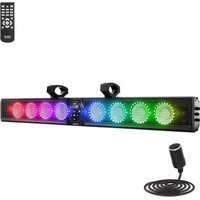
PATVSB4600 - Soundbar Pyle - Free user manual and instructions
Find the device manual for free PATVSB4600 Pyle in PDF.


| Type of Product | Marine/UTV/ATV Waterproof Soundbar Speaker System |
| Model | PATVSB4600 |
| Dimensions (L x W x H) | 43.23 x 4.84 x 4.05 inches |
| Construction Material | Aluminum alloy with silicone buttons |
| Power Output (RMS/Peak) | 240 Watts RMS / 360 Watts Peak |
| Power Input | DC 12V (cigarette lighter cable included) |
| Waterproof Rating | IPX5 (weatherproof/waterproof) |
| Drivers | 8 x 4-inch woofers, 2 x 1-inch tweeters |
| Bluetooth Version | 5.3 |
| Bluetooth Range | Up to 82 ft. |
| Bluetooth Network Name | PATVSB4600 |
| Lighting | Colorful RGB lights with on/off and mode selection |
| Inputs | 3.5mm AUX, USB playback, Bluetooth |
| Remote Control Battery | 2 x AAA (not included) |
| Frequency Response | 20Hz - 20kHz |
| Mounting System | Aluminum clamp system fits 1.5" - 2" bars |
| Included Accessories | Remote control, car cigarette lighter cable, bracket & screws, USB cable, 3.5mm audio cable |
| Fuse | 15A (replaceable) |
| Cleaning | Mild soap/detergent and lukewarm water; avoid abrasives and harsh chemicals |
| Safety Certifications | FCC Part 15 Class B; California Prop 65 Warning |
Frequently Asked Questions - PATVSB4600 Pyle
User questions about PATVSB4600 Pyle
0 question about this device. Answer the ones you know or ask your own.
Ask a new question about this device
Download the instructions for your Soundbar in PDF format for free! Find your manual PATVSB4600 - Pyle and take your electronic device back in hand. On this page are published all the documents necessary for the use of your device. PATVSB4600 by Pyle.
USER MANUAL PATVSB4600 Pyle
Questions or Comments?
We are here to help!
Phone: 1.718.535.1800
PyleUSA.com/ContactUs

PYLE®
PyleUSA.com
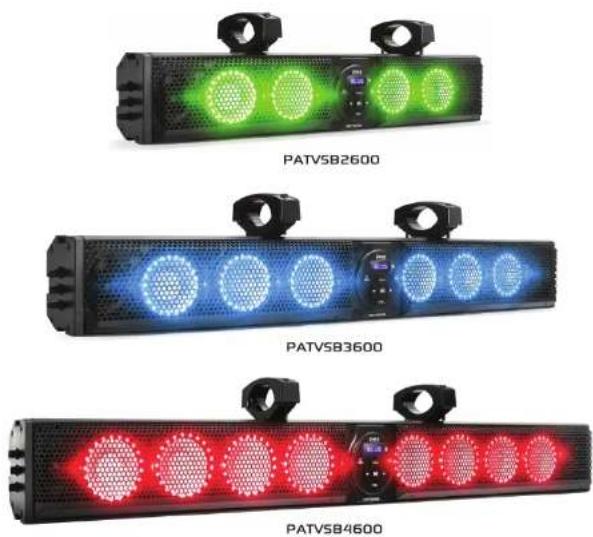
PATVSB2600 - PATVSB3600 - PATVSB4600
Aluminum Alloy Sound Bar Speaker System
USER GUIDE
READ ALL INSTRUCTIONS CAREFULLY BEFORE USING THIS PRODUCT. RETAIN THIS OWNER'S MANUAL FOR FUTURE REFERENCE.
Features:
• Marine/UTV/ATV Waterproof Soundbar Speaker
• Available in 26", 36", or 46" Sound Bar sizes with a stylish design
• Built-in USB Playback
• Built-in 4/6/8 x 4-inch woofers and 2 x 1-inch tweeters
- DC 12V input
- Colorful RGB lights with the option to easily turn the lights on/off or change color modes
- Front panel control center
- 3.5mm auxiliary input
- Marine-rated, rugged weatherproof exterior
• IPX5 waterproof/weatherproof rating
- Weather-resistant grill and hardware
Bluetooth Wireless Streaming:
- Wireless music streaming capability
- Quick and hassle-free device pairing
- Compatible with all BT-enabled devices (smartphones, tablets, laptops, computers, etc.)
• Wireless BT Version 5.3 - Wireless BT network name: 'PATVSB2600' / 'PATVSB3600' / 'PATVSB4600'
WHAT'S IN THE BOX:
- Sound bar speaker
- Remote control
• Car cigarette lighter cable - Bracket and screws
- USB cable
- 3.5mm audio cable
California Prop 65 Warning
!WARNING:
This product may expose you to chemicals, which is known to the state of California to cause cancer, birth defects and other reproductive harm. Do not ingest.
For more info go to: www.P65warnings.ca.gov
Technical Specs:
- Power Supply:
• PATVSB2600: 120 watts RMS / 180 watts peak
• PATVSB3600: 180 watts RMS / 270 watts peak
• PATVSB4600: 240 watts RMS / 360 watts peak
- Construction Materials: Aluminum alloy sound bar with silicone buttons
• BT Range: Up to 82 ft.
• Aluminum Clamp System: Fits 1.5" - 2" bars
• Frequency Response: 20Hz - 20kHz
- Remote Control Battery: Requires 2x 'AAA' batteries (not included)
- Tweeters: 1 inch
• Product Dimensions (L x W x H):
• PATVSB2600: 24.46" x 4.84" x 4.05" -inches
• PATVSB3600: 34.72" x 4.84" x 4.05" -inches
• PATVSB4600: 43.23" x 4.84" x 4.05" -inches
FCC INFORMATION
WARNING: Changes or modifications not expressly approved by the party responsible for compliance could void the user's authority to operate the equipment.
NOTE: This equipment has been tested and found to comply with the limits for a Class B digital device, pursuant to Part 15 of the FCC Rules. These limits are designed to provide reasonable protection against harmful interference in a residential installation. This unit generates, uses, and can radiate radio frequency energy, and if not installed and used in accordance with the instructions, may cause harmful interference to radio communications. However, there is no guarantee that interference will not occur in a particular installation. If this equipment does cause harmful interference to radio or television reception, which can be determined by turning the equipment off and on, the user is encouraged to try and correct the interference by one or more of the following measures:
• Reorient or relocate the receiving antenna.
- Increase the separation between the equipment and receiver.
- Connect the equipment to an outlet on a circuit different from that to which the receiver is connected.
- Consult the dealer or an experienced radio/TV technician for help.
This device complies with Part 15 of the FCC Rules. Operation is subject to the following two conditions:
- This device may not cause harmful interference.
- This device must accept any interference received, including interference that may cause undesired operation.
PLEASE READ THIS MANUAL CAREFULLY BEFORE OPERATION
IMPORTANT SAFETY INSTRUCTIONS:
- Do not operate mobile equipment while driving a motorized vehicle.
Safe driving and consideration for the safety of others should always be your highest priority. - If you notice smoke, strange noises, odor from this product, or any other abnormal signs, immediately turn off the power and consult your dealer or the nearest authorized PyleUSA Service Center. Using this product in such a condition may result in permanent system damage.
- Set your volume control at a low setting, then slowly increase the sound until you can hear it comfortably without distortion or discomfort to your ears.
BE SURE TO OBSERVE THE FOLLOWING GUIDELINES
- Do not turn up the volume so high that you cannot hear what's around you.
- Use caution or temporarily discontinue use in potentially hazardous situations.
INSTALLATION PRECAUTIONS
WARNING - Always consult a professional installer:
- Do not attempt to install or service this product by yourself. Installation or servicing by persons without professional training and experience in electronic equipment and motorized vehicle accessories may be dangerous and could expose you to electric shock, injury, or other hazards.
- This product can be powered from a vehicle's cigarette lighter/auxiliary power port or hardwired directly to the battery through an optional relay/accessory switch.
- While this product has a weather-resistant design, it should not be submerged in or under water.
- Use only the installation parts provided with the product.
- Clean with mild soap or detergent and lukewarm water using a clean sponge or soft cloth. Rinse well with clean water.
"DON'T" - VERY IMPORTANT
- DON'T clean in hot sun or on very hot days.
- DON'T use abrasive or highly alkaline cleaners on the main body.
- DON'T scrape the main body with razor blades or other sharp instruments.
- DON'T use gasoline, acetone, or carbon tetrachloride.
WIRELESS BT OPERATION INSTRUCTIONS
External devices with built-in BT functions can be connected to this sound bar. When your device is connected to the sound bar, you will hear audible tones to assist with the connection process.
- First, ensure the sound bar is powered on and the volume is set to low.
- Press the "MODE" button on the front panel and select BT mode.
- Turn on BT on your external device.
- Search for available BT devices. Make sure you are within range of the sound bar and select "PATVSB2600," "PATVSB3600," or "PATVSB4600" on your device.
- You can now play music from your external device through the sound bar.
FRONT CONTROL PANEL:
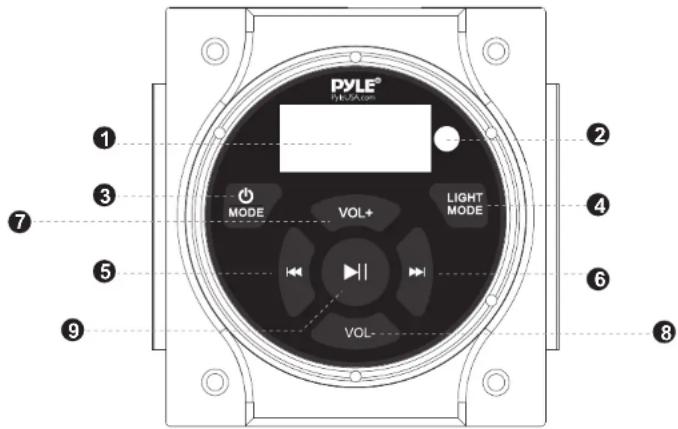
- Display screen
- Remote Control Receiver
- MODE: Press this button to select the input source.
- Light Mode: Press this button to turn the light on/off or change the light color.
- Previous Track: Press this button to select the previous track.
- Next Track▶: Press this button to select the next track.
- Vol+: Press this button to increase the volume.
- Vol-: Press this button to decrease the volume.
- Play/Pause ▶: Press this button to play or pause the audio track.
SIDE PANEL FUNCTIONS
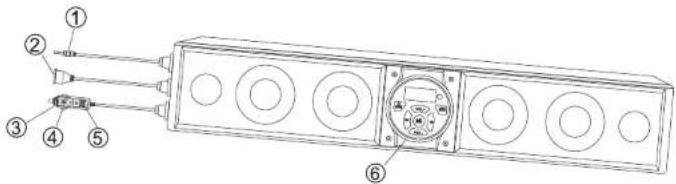
1.3.5mm AUX Input
2. USB Jack
3. Cigarette Power Cable Adapter
4. Fuse (15A)
5. LED Power Indicator
6. Control Panel
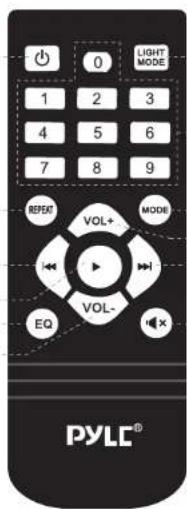
REMOTE CONTROL
- Power Switch
- Light Mode: Press this button to turn the light on/off or change the light color.
- Number Pad
- Repeat: Press to repeat the current song.
- Mode: Press to select the input source.
- Vol+: Press this button to increase the volume.
- Previous Track ◀: Press this button to select the previous track.
- Next Track ▶: Press this button to select the next track.
- EQ: Press to toggle between preset EQ curves.
- Mute
- Vol:- Press this button to decrease the volume.
- Play/Pause ▶I: Press this button to play or pause the audio track.
1
②
3
5
8
10
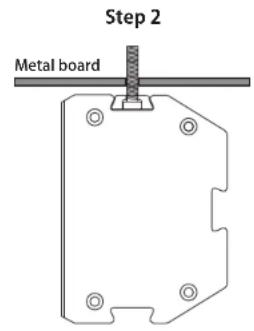
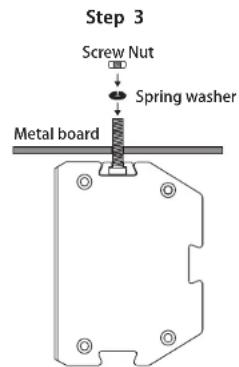
INSTALLATION METHOD
- Take the bracket and screws out of the package.
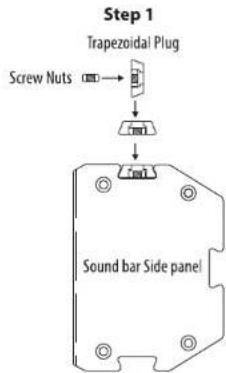
flowchart
graph TD
    A["Screw Nuts"] --> B["Trapezoidal Plug"]
    B --> C["Sound bar Side panel"]
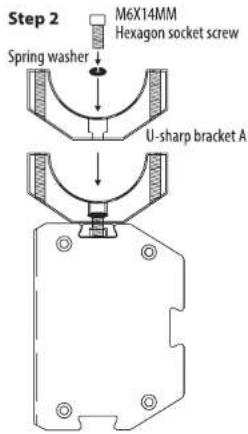
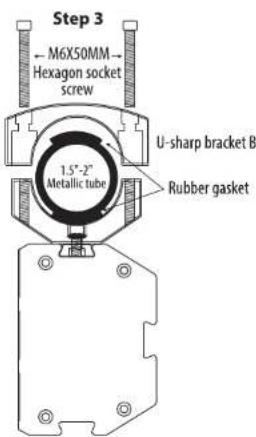
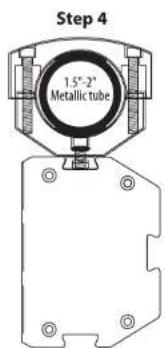
- Follow the installation instructions provided.
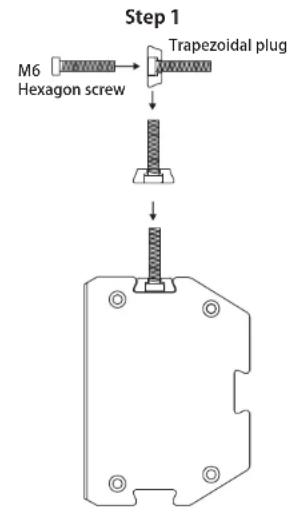
flowchart
graph TD
    A["M6 Hexagon screw"] --> B["Trapezoidal plug"]
    B --> C["Step 1"]
    C --> D["Final assembled part with bolt holes and mounting holes"]
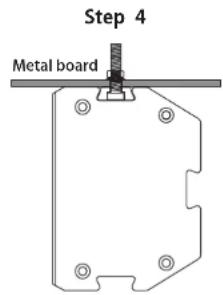
CLEANING, MAINTENANCE, AND STORAGE GUIDE
Cleaning
- Use a soft, dry cloth to gently wipe the exterior of the sound bar. For stubborn dirt, use a mild soap or detergent with lukewarm water, and a soft cloth or sponge. Rinse with clean water and dry thoroughly.
- Avoid using abrasive materials, harsh chemicals, or solvents such as gasoline, acetone, or carbon tetrachloride, as they may damage the exterior finish.
- Do not clean the unit in direct sunlight or on very hot days, as this may affect the finish.
Maintenance
- Periodically check all connections to ensure they are secure and free of dust or debris.
- Inspect the LED power indicator and ensure it is functioning properly.
- Replace the fuse (15A) if needed, and use only the specified fuse type to avoid electrical hazards.
- If not in regular use, power off the unit and disconnect it from the power source to preserve battery life.
Storage
- Store the sound bar in a cool, dry place away from direct sunlight and extreme temperatures.
- If the sound bar is not in use for an extended period, disconnect it from the vehicle's power source or remove the cigarette power cable adapter.
- For added protection, place the sound bar in a padded storage case or cover to prevent dust buildup and potential scratches.
Register Product
Thank you for choosing PyleUSA. By registering your product, you ensure that you receive the full benefits of our exclusive warranty and personalized customer support. Complete the form to access expert support and to keep your PyleUSA purchase in perfect condition.
Start Here

Model Number
PATVSB2600
PyleUSA.com/pages/register
- PYLE®
- PyleUSA.com
- READ ALL INSTRUCTIONS CAREFULLY BEFORE USING THIS PRODUCT. RETAIN THIS OWNER'S MANUAL FOR FUTURE REFERENCE.
- Features:
- Bluetooth Wireless Streaming:
- WHAT'S IN THE BOX:
- California Prop 65 Warning
- !WARNING:
- Technical Specs:
- - Power Supply:
- FCC INFORMATION
- PLEASE READ THIS MANUAL CAREFULLY BEFORE OPERATION
- IMPORTANT SAFETY INSTRUCTIONS:
- BE SURE TO OBSERVE THE FOLLOWING GUIDELINES
- INSTALLATION PRECAUTIONS
- WARNING - Always consult a professional installer:
- "DON'T" - VERY IMPORTANT
- WIRELESS BT OPERATION INSTRUCTIONS
- REMOTE CONTROL
- INSTALLATION METHOD
- CLEANING, MAINTENANCE, AND STORAGE GUIDE
- Cleaning
- Maintenance
- Storage
- Register Product
Brand : Pyle
Model : PATVSB4600
Category : Soundbar