
PFS3409-4GT - Network switch Dahua Technology - Free user manual and instructions
Find the device manual for free PFS3409-4GT Dahua Technology in PDF.


| Product Type | Managed PoE+ Switch |
| Brand | Dahua Technology |
| Model | PFS3409-4GT |
| Category | Network Switch |
| Ports | 4 x 10/100/1000 Mbps PoE+ ports + 5 x 10/100 Mbps PoE+ ports |
| PoE Standard | IEEE 802.3af/at |
| PoE Power Budget | 96W |
| Switching Capacity | 10 Gbps |
| MAC Address Table | 8K entries |
| VLAN Support | IEEE 802.1Q, up to 64 VLANs |
| Management | Web GUI, CLI, SNMP v1/v2c/v3 |
| Dimensions (W x D x H) | 200 x 120 x 30 mm (7.9 x 4.7 x 1.2 in) |
| Weight | 0.8 kg (1.76 lbs) |
| Power Supply | External adapter: 48V DC, 2A |
| Power Consumption | Max 120W (with PoE) |
| Operating Temperature | 0°C to 45°C (32°F to 113°F) |
| Operating Humidity | 10% to 90% non-condensing |
| Certification | CE, FCC, RoHS |
| Installation | Desktop or wall-mountable (brackets included) |
| Maintenance and Cleaning | Use a soft, dry cloth. Do not use liquid cleaners. |
| Safety | Use only the supplied power adapter. Keep away from water and heat sources. |
| Spare Parts and Repairability | No user-serviceable parts. Contact authorized service center for repairs. |
Frequently Asked Questions - PFS3409-4GT Dahua Technology
User questions about PFS3409-4GT Dahua Technology
0 question about this device. Answer the ones you know or ask your own.
Ask a new question about this device
Download the instructions for your Network switch in PDF format for free! Find your manual PFS3409-4GT - Dahua Technology and take your electronic device back in hand. On this page are published all the documents necessary for the use of your device. PFS3409-4GT by Dahua Technology.
USER MANUAL PFS3409-4GT Dahua Technology
Dahua 9-Port Gigabit Switch User's Manual
V1.0.1
ZHEJIANG DAHUA VISION TECHNOLOGY CO., LTD.
Important Safeguards and Warnings
Please read the following safeguards and warnings carefully before using the product in order to avoid damages and losses.
Note
- Do not expose the device to lampblack, steam or dust. Otherwise it may cause fire or electric shock.
- Do not install the device at position exposed to sunlight or in high temperature. Temperature rise in device may cause fire.
- Do not expose the device to humid environment. Otherwise it may cause fire.
- The device must be installed on solid and flat surface in order to guarantee safety under load and earthquake. Otherwise, it may cause device to fall off or turnover.
- Do not place the device on carpet or quilt.
- Do not block air vent of the device or ventilation around the device. Otherwise, temperature in device will rise and may cause fire.
- Do not place any object on the device.
- Do not disassemble the device without professional instruction.
Warning
- Please use battery properly to avoid fire, explosion and other dangers.
- Please replace used battery with battery of the same type.
- Do not use power line other than the one specified. Please use it properly. Otherwise, it may cause fire or electric shock.
Special Announcement
- This manual is for reference only.
- All the designs and software here are subject to change without prior written notice.
- All trademarks and registered trademarks are the properties of their respective owners.
- If there is any uncertainty or controversy, please refer to the final explanation of us.
- Please visit our website for more information.
Table of Contents
1 Product Overview.... - 1 -
1.1 Introduction ...... - 1 -
1.2 Features....- 1 -
1.3 Typical Application....- 1 -
2 Device Structure....- 2 -
2.1 Front Panel....- 2 -
2.2 Side Panel - 3 -
3 Installation Guide....- 4 -
1 Product Overview
1.1 Introduction
9-port Gigabit switch is a layer-two industrial switch. It provides 4 10/100/1000Mbps Ethernet RJ45 ports, 4 1000Mbps optical ports and 1 10/100/1000Mbps uplink port.
1.2 Features
- Layer-two industrial switch.
- Conforms to IEEE802.3, IEEE802.3u and IEEE802.3X standards.
• Large buffer, smooth video. - MAC auto study and aging, MAC address list capacity is 4K.
• Self-adaptation MDI/MDIX mode. - Adopts metal structure.
• Supports -30^ +65^ operating temperature.
• High protection grade, supports common mode 4KV, differential mode 2KV.
• Supports DC 9V-DC 57V power supply and dual power backup.
1.3 Typical Application
The typical networking scene of the device is shown in Figure 1-1.
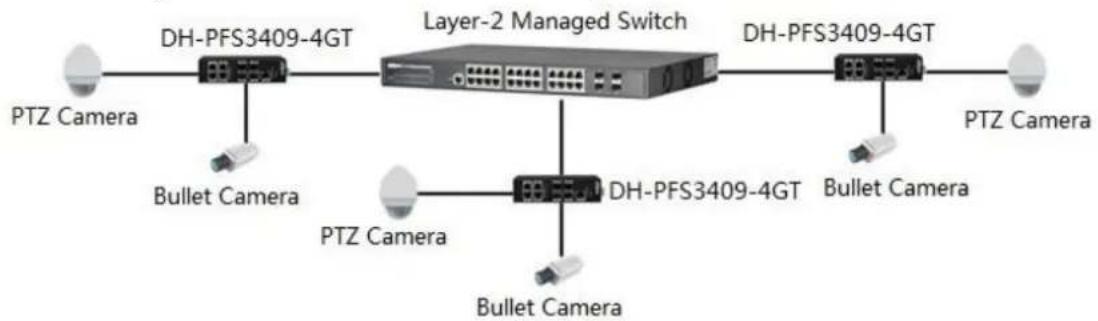
flowchart
graph LR
    A["PTZ Camera"] --> B["DH-PFS3409-4GT"]
    B --> C["Layer-2 Managed Switch"]
    C --> D["DH-PFS3409-4GT"]
    D --> E["PTZ Camera"]
    F["Bullet Camera"] --> B
    G["PTZ Camera"] --> H["DH-PFS3409-4GT"]
    H --> I["Bullet Camera"]
    J["Bullet Camera"] --> H
Figure 1-1
2 Device Structure
2.1 Front Panel
The front panel is shown in Figure 2-1. Refer to Table 2-1 for the description of front panel.
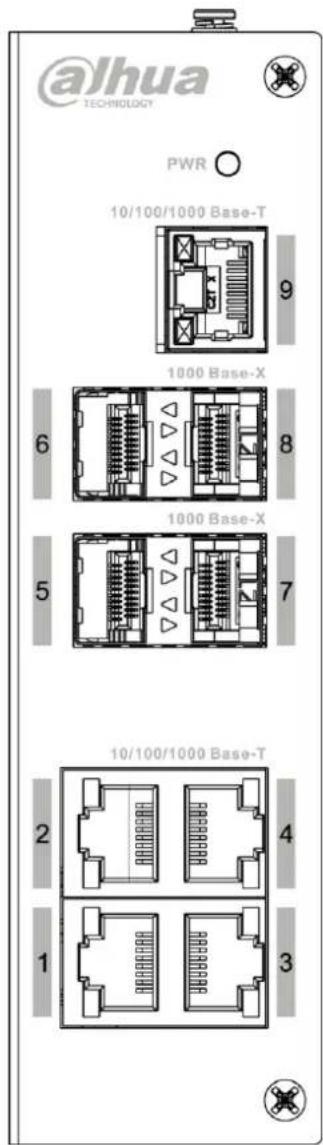
Figure 2-1
Please refer to Table 2-1 for more information.
| Number | Name | Description |
| 1~4 | 10/100/1000 Base-T | 4 10/100/1000Mbps self-adaptation RJ45 ports. |
| 5~8 | 1000 Base-X | 4 1000Mbps optical ports. |
| 9 | 10/100/1000Base-T | 1 10/100/1000Mbps self-adaptation uplink port. |
| - | PWR | Power indicator light. |
Table 2-1
2.2 Side Panel
The side panel of device is shown in Figure 2-2; refer to Table 2-2 for more description of side panel.
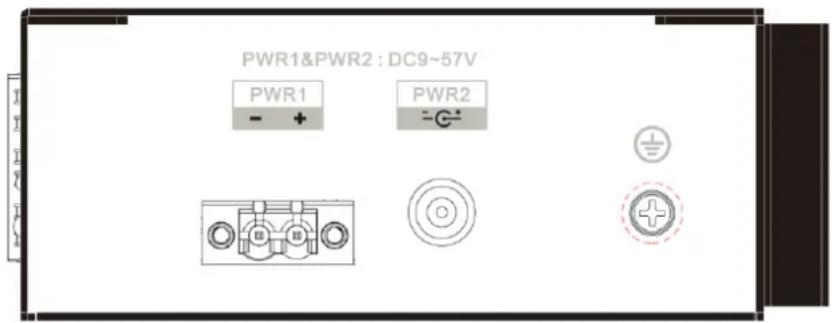
Figure 2-2
| Name | Description |
| PWR1&PWR2 | Supports DC 9V-DC 57V power supply. |
| Grounding screw. |
Table 2-2
3 Installation Guide
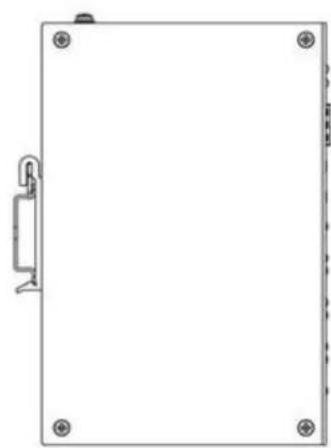
The device supports DIN rail mount.
Lay the switch hook on the rail, press the switch to make the buckle get into the slide, which is shown in Figure 3-1.
Note
The device supports the slide width of 38mm.
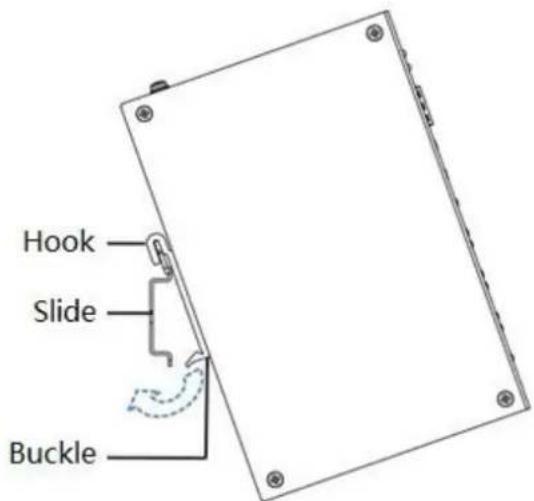
natural_image
Blank rectangular frame with corner markers and a small mechanical component on the left side (no text or symbols)Figure 3-1
Note
- This user's manual is for reference only.
- Slight difference may be found in user interface.
- All the designs and software here are subject to change without prior written notice.
● All trademarks and registered trademarks are the properties of their respective owners. - If there is any uncertainty or controversy, please refer to the final explanation of us.
- Please visit our website for more information.
ZHEJIANG DAHUA VISION TECHNOLOGY CO., LTD.
Address: No.1199, Bin'an Road, Binjiang District, Hangzhou, P.R. China
Postcode: 310053
Tel: +86-571-87688883
Fax: +86-571-87688815
Email: overseas@dahuatech.com
Website: www.dahuasecurity.com
- Dahua 9-Port Gigabit Switch User's Manual
- Important Safeguards and Warnings
- Note
- Warning
- Special Announcement
- Table of Contents
- Product Overview.... - 1 -
- Device Structure....- 2 -
- Installation Guide....- 4 -
- Product Overview
- Introduction
- Features
- Typical Application
- Device Structure
- Front Panel
- Side Panel
- Installation Guide
- ZHEJIANG DAHUA VISION TECHNOLOGY CO., LTD.
Brand : Dahua Technology
Model : PFS3409-4GT
Category : Network switch