SkyThermo RST-191S - Climate control Redmond - Free user manual and instructions
Find the device manual for free SkyThermo RST-191S Redmond in PDF.


| Product Type | Climate control device (thermostat) |
| Brand | Redmond |
| Model | SkyThermo RST-191S |
| Dimensions (approx.) | 120 x 80 x 30 mm |
| Weight (approx.) | 150 g |
| Power Supply | 2 x AAA batteries (1.5 V each) or DC 5V via USB |
| Display Type | LCD with backlight |
| Temperature Range | 5°C to 35°C (adjustable) |
| Temperature Accuracy | ±0.5°C |
| Modes | Heating, Cooling, Auto, Fan Only |
| Timer Function | 24-hour programmable timer |
| Wireless Connectivity | Wi-Fi 802.11 b/g/n (2.4 GHz) |
| Compatible Apps | Redmond Ready for Sky (iOS/Android) |
| Voice Control | Compatible with Amazon Alexa, Google Assistant |
| Installation | Wall-mountable with included screws and anchors |
| Maintenance | Clean with soft dry cloth; avoid liquids |
| Safety Features | Child lock, overheat protection |
| Spare Parts | Not available; device is not user-serviceable |
| Environmental Conditions | Operating: 0°C to 40°C, humidity <80% |
| Certifications | CE, RoHS |
Frequently Asked Questions - SkyThermo RST-191S Redmond
User questions about SkyThermo RST-191S Redmond
0 question about this device. Answer the ones you know or ask your own.
Ask a new question about this device
Download the instructions for your Climate control in PDF format for free! Find your manual SkyThermo RST-191S - Redmond and take your electronic device back in hand. On this page are published all the documents necessary for the use of your device. SkyThermo RST-191S by Redmond.
USER MANUAL SkyThermo RST-191S Redmond
(Continued, 1983, 2004) is previously
UKD
UKR
cañti www.redmond.company/services.
KAZ
KAZ
Carefully read all instructions before operating the appliance and save them for future reference. Do carefully follow this instructions you are considerably using the
REFERENCE: By carefully following these circumstances you can considerably proving the service life of your appliance.
The safety measures and instructions contained in this manual do not cover all possible
situations that may arise during the operation of the appliance. When operating the device the user should be guided by common sense, be cautious and attentive.
IMPORTANT SAFEGUARDS
IMPORTANT SAFLE Guam
- The manufacturer is not responsible for injuries caused by failure to comply with the safety requirements and operation rules of the appliance.
- This appliance is intended to be used for nonindustrial use in household and sim phrases of application. Industrial application or any other mixture will be regarded
as violation of proper service conditions. Should this happen, manufacturer is not
responsible for possible consequences.
- Do not operate the appliance outdoors. In water of any foreign object gets into the device housing it may result in serious damage of the appliance.
DO NOT immerse the housing in water or wash it under running water
• This appliance can be used by children aged from 8 years and above and persons with
reduced physical, sensory or mental capabilities or lack of experience and knowledge that they have been given supervision or instruction concerning the use of the appliance in
a safe way and understand the hazards involved. Children shall not play with the appliance
Keep the appliance and its cord out of reach of children aged less than 8 and user maintenance shall not be made by children without supervision
- No modifications or adjustments to the product are allowed. All the repair works
should be carried out by an authorized service centre. Failure to do so may result in device and property damage or injury.
CAUTION! Do not use the appliance in case
Technical Specifications
Technical Specifications Model
Electric power 4.5 V
Powered by 5 × LR6 (AA) Type of control electronic remote (Ready for Six)
Data transmission standard ____ Bluetooth v4.0
Supported operating systems....JOS, Android Body material....plastic
Display...
Temperature control range....5-50°C Temperature indication on the disclay....5-50°C
Temperature Induction on the display 3-30°C Control panel lock yes
Overall di
Net weight ____ Options Included
Package includes Smart temperature controller designed for the radiator
Battery LR6 (AA) 3 pcs.
Warranty service coupon 1 pcs. User manual 1 pcs
The manufacturer reserves the right to make any modifications to design, packaging, or tech
nical specifications of the product without prior notice. The specification allows an error of
Parts of the Appliance A1
-
Housi
-
5(题)
-
6000
-
1500
-
Stage
Display A.1 1. Work: five indicators 7. Indents of a flutated temperature
- Week 2. Cut
E. Content online number in days display icon icon
-
Calen
-
Modest temperature display icon 10. Engineering mode display icon 5. Valve status display icon 11. Battery level display icon
-
Power saving mode display icon 12. Control panel lock indica
L DBI
I. PRIOR TO FIRST USE
Carefully remove the device and its accessories from the packaging. Dispose of all packaging materials
Keep all warning labels, including the serial number identification label located on the hour
After transportation or storage at low temperatures allow the appliance to stay at room
temperature for at least 2 hours before using. Before operation, make sure that the device has no dents, cracks or any other visible damp
Preparation for Use
1 Insert the batteries
- When the batteries are serving the plenary! The display backlight and last the display will come on for 2 seconds, and then U1 legend will appear, the backlight will go
Installing the battery ensure that your hands and the unit are dry.
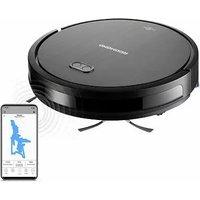

Brand : Redmond
Model : SkyThermo RST-191S
Category : Climate control