ANC-CH01 - Car audio accessory PAC - Free user manual and instructions
Find the device manual for free ANC-CH01 PAC in PDF.


| Product Type | Active Noise Cancelling Headphones |
| Model | ANC-CH01 |
| Brand | PAC |
| Driver Size | 40 mm |
| Frequency Response | 20 Hz - 20 kHz |
| Impedance | 32 Ω |
| Bluetooth Version | 5.0 |
| Wireless Range | 10 m |
| Battery Type | Lithium-ion rechargeable |
| Battery Life (ANC On) | 20 hours |
| Battery Life (ANC Off) | 30 hours |
| Charging Time | 2 hours |
| Charging Port | USB-C |
| Active Noise Cancellation | Yes, up to 25 dB reduction |
| Microphone | Built-in, with noise suppression |
| Controls | Touch controls on earcup |
| Weight | 250 g |
| Dimensions (L x W x H) | 180 x 180 x 80 mm |
| Foldable | Yes |
| Carrying Case | Included |
| Cleaning Instructions | Wipe with a soft, dry cloth |
| Safety Certifications | CE, FCC, RoHS |
| Spare Parts Available | Earpads and charging cable |
| Repairability Index | 7.5 / 10 |
Frequently Asked Questions - ANC-CH01 PAC
User questions about ANC-CH01 PAC
0 question about this device. Answer the ones you know or ask your own.
Ask a new question about this device
Download the instructions for your Car audio accessory in PDF format for free! Find your manual ANC-CH01 - PAC and take your electronic device back in hand. On this page are published all the documents necessary for the use of your device. ANC-CH01 by PAC.
USER MANUAL ANC-CH01 PAC
Introduction and Features
The ANC-CH01 harness bypasses the Active Noise Cancellation (ANC) module in select Chrysler, Dodge, Jeep and RAM non-amplified audio systems while maintaining communication between the vehicle's CAN bus network and the module. Aftermarket amplifiers can easily be added with no need to cut or modify a vehicle's original wiring.
Installation Notes
- WARNING: Passing the speaker signal from aftermarket amplifier through the ANC module will cause DAMAGE!
- The ANC-CH01 is only compatible with non-amplified vehicles that have the ANC system. To determine compatibility, some key factors to look for would be the inclusion of an active center channel and / or subwoofer. If the audio system includes either or both, the ANC-CH01 is not compatible because the system is factory amplified.
- The ANC-CH01 can be used to provide speaker wire connections for all 4 speakers, eliminating the need to cut into the factory harness (see "Installation Steps" for info.).
- When using the ANC-CH01 harness to connect speaker wire outputs from an aftermarket amplifier, it is always best to use a tone generator (PAC part number TL-PTG2) to verify that the tables in this manual match the wiring in your specific vehicle.
Installation Steps
- Locate the vehicle's ANC module and disconnect the 16-pin and 22-pin connectors.
a. RAM Truck: The ANC module is under the driver's seat
b. Jeep Cherokee: The ANC module is above the glove box
c. Chrysler Pacifica: The ANC module is to the right of the glove box
- Connect the ANC-CH01 harness to the connectors that were disconnected in the previous step.
- Connect the male 22-pin connector from the ANC-CH01 to the ANC module.
- When connecting the ANC-CH01 to the outputs of an aftermarket amplifier, use the wiring information (provided in the chart below) to determine which will be used.
a. Cut the wires in the ANC-CH01 that will be used for connection to the aftermarket amplifier speaker outputs. The wiring overview (provided in the chart below) shows the approximate location of where the wires should be cut.
b. Leave any speaker wires that are going to be powered from the radio (rather than from an aftermarket amplifier), intact.
c. Connect the outputs of the aftermarket amplifier to the appropriate wires in the ANC-CH01 harness that go to 16-pin side of the cut harness.
d. Insulate the cut wires that lead to the 22-pin side of the harness as they will not be used.
Wiring Overview

flowchart
graph TD
    A["22-Pin to Harness from ANC Module"] --> B["Speaker Wires from Radio"]
    C["16-Pin to Harness from ANC Module"] --> D["Speaker Wires To Speakers"]
    B --> E["22-Pin to ANC Module"]
    D --> F["Speaker Wires To Speakers"]
    E --> G["10.8M-108C-NC"]
    F --> H["Wires can be cut here to allow for connection to an aftermarket amplifier. See "Installation Steps" (4a - 4d) for additional info."]
*Illustration is for reference only. Your harness will have more wires*

natural_image
Front view of a dual-chamber electronic device with indicator lights (no text or symbols visible)| Pin Number | Wire Color | Description Label | |
| 1 | N/A | ||
| 9 | |||
| 2 | |||
| 10 | |||
| 3 White/Black Left Front - | LF Speaker | ||
| 11 White Left Front + | |||
| 4 Gray/Black Right Front - | RF Speaker | ||
| 12 Gray Right Front + | |||
| 5 Green/Black | Left Rear - | LR Speaker | |
| 13 Green | Left Rear + | ||
| 6 Purple/Black | Right Rear - | RR Speaker | |
| 14 Purple | Right Rear + | ||
| 7 | N/A | ||
| 15 | |||
| 8 | |||
| 16 | |||
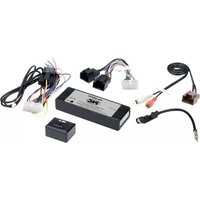
Brand : PAC
Model : ANC-CH01
Category : Car audio accessory