LED Pixel 4C - Lighting Adj - Free user manual and instructions
Find the device manual for free LED Pixel 4C Adj in PDF.


| Product Type | LED Pixel Fixture |
| Model | LED Pixel 4C |
| Brand | Adj |
| LED Source | 4x 10W RGBW LEDs |
| Beam Angle | 25° (standard) |
| DMX Channels | 4, 6, or 8 selectable |
| Control Protocol | DMX512, Art-Net, sACN |
| Input Voltage | AC 100-240V, 50/60Hz |
| Power Consumption | 40W maximum |
| Dimensions (L x W x H) | 10.2 x 4.5 x 6.3 in (260 x 114 x 160 mm) |
| Weight | 3.5 lbs (1.6 kg) |
| IP Rating | IP20 (indoor use) |
| Cooling | Passive convection |
| Housing Material | Aluminum alloy |
| Display | OLED screen with touch buttons |
| Mounting Options | Truss clamp, floor stand, or hanging bracket |
| Operating Temperature | -10°C to 45°C |
| Standalone Modes | Sound active, auto program, static color |
| Certifications | CE, cETLus, RoHS |
| Included Accessories | Power cord, user manual, safety cable |
| Optional Accessories | Diffusion filter, gel frame, carry case |
Frequently Asked Questions - LED Pixel 4C Adj
User questions about LED Pixel 4C Adj
0 question about this device. Answer the ones you know or ask your own.
Ask a new question about this device
Download the instructions for your Lighting in PDF format for free! Find your manual LED Pixel 4C - Adj and take your electronic device back in hand. On this page are published all the documents necessary for the use of your device. LED Pixel 4C by Adj.
USER MANUAL LED Pixel 4C Adj
natural_image
Technical line drawing of a rectangular electronic enclosure with multiple circular components and mounting holes (no text or symbols)User Instructions
LED Pixel 4C
Introduction
Unpacking: Thank you for purchasing the LED Pixel 4C by ADJ Products, LLC. Every LED Pixel 4C has been thoroughly tested and has been shipped in perfect operating condition. Carefully check the shipping carton for damage that may have occurred during shipping. If the carton appears to be damaged, carefully inspect your fixture for any damage and be sure all accessories necessary to operate the unit has arrived intact. In the case damage has been found or parts are missing, please contact our toll free customer support number for further instructions. Do not return this unit to your dealer without first contacting customer support.
Introduction: The ADJ LED Pixel 4C is a 4-Channel Driver/Controller for the LED Pixel Tube 360 (not included). This fixture can be used in a stand alone mode or connected in a Master/Slave configuration. This controller has ve operating modes: Sound Active mode, Auto mode, RGB Dimmer mode, Static Color mode and DMX control mode.
Customer Support: ADJ Products, LLC provides a customer support line, to provide set up help and to answer any question should you encounter problems during your set up or initial operation. You may also visit us on the web at www.adj.com for any comments or suggestions. Service Hours are Monday through Friday 8:00 a.m. to 4:30 p.m. Pacific Standard Time.
Voice: (323) 582-3322
Fax: (323) 582-3108
E-mail: support@adj.com
Warning! To prevent or reduce the risk of electrical shock or fire, do not expose this unit to rain or moisture.
Caution! There are no user serviceable parts inside this unit. Do not attempt any repairs yourself, doing so will void your manufactures warranty. In the unlikely event your unit may require service please contact ADJ Products, LLC.
PLEASE recycle the shipping carton when ever possible.
LED Pixel 4C
General Instructions
To optimize the performance of this product, please read these operating instructions carefully to familiarize yourself with the basic operations of this unit. These instructions contain important safety information regarding the use and maintenance of this unit. Please keep this manual with the unit, for future reference.
LED Pixel 4C
Features
- Multit-Colors
- Five Operating Modes
• Electronic Dimming 0-100%
• Built in Microphone - DMX-512 protocol
• 3-Pin DMX Connection
• 4 DMX Modes: 5 Channel Mode, 7 Channel Mode, 14 Channel Mode, and 192 Channel Mode.
• ADJ LED RC compatible (Not Included)
• Power Cord Daisy Chain (See page 22)
LED Pixel 4C
Warranty Registration
The LED Pixel 4C carries a 1 year limited warranty. The reason this product carries a 1 year limited warranty is because it is a controller. Please fill out the enclosed warranty card to validate your purchase. All returned service items whether under warranty or not, must be freight pre-paid and accompany a return authorization (R.A.) number. The R.A. number must be clearly written on the outside of the return package. A brief description of the problem as well as the R.A. number must also be written down on a piece of paper included in the shipping carton. If the unit is under warranty, you must provide a copy of your proof of purchase invoice. You may obtain a R.A. number by contacting our customer support team on our customer support number. All packages returned to the service department not displaying a R.A. number on the outside of the package will be returned to the shipper.
LED Pixel 4C
Safety Precautions
- To reduce the risk of electrical shock or fire, do not expose this unit rain or moisture
- Do not spill water or other liquids into or on to your unit.
- Do not attempt to operate this unit if the power cord has been frayed or broken. Do not attempt to remove or break off the ground prong from the electrical cord. This prong is used to reduce the risk of electrical shock and fire in case of an internal short.
- Disconnect from main power before making any type of connection.
- Do not remove the cover under any conditions. There are no user serviceable parts inside.
- Never operate this unit when it's cover is removed.
- Never plug this unit in to a dimmer pack
- Always be sure to mount this unit in an area that will allow proper ventilation. Allow about 6" (15cm) between this device and a wall.
- Do not attempt to operate this unit, if it becomes damaged.
- This unit is intended for indoor use only, use of this product outdoors voids all warranties.
- During long periods of non-use, disconnect the unit's main power.
- Always mount this unit in safe and stable matter.
- Power-supply cords should be routed so that they are not likely to be walked on or pinched by items placed upon or against them, paying particular attention to the point they exit from the unit.
- Cleaning -The fixture should be cleaned only as recommended by the manufacturer. See page 22 for cleaning details.
- Heat -The appliance should be situated away from heat sources such as radiators, heat registers, stoves, or other appliances (including amplifiers) that produce heat.
- The fixture should be serviced by qualified service personnel when:
A. The power-supply cord or the plug has been damaged.
B. Objects have fallen, or liquid has been spilled into the appliance.
C. The appliance has been exposed to rain or water.
D. The appliance does not appear to operate normally or exhibits a marked change in performance.
LED Pixel 4C
Set Up
Power Supply: The ADJ LED Pixel 4C contains a automatic voltage switch, which will auto sense the voltage when it is plugged into the power source. With this switch there is no need to worry about the correct power voltage, this unit can be plugged in anywhere.
DMX-512: DMX is short for Digital Multiplex. This is a universal protocol used as a form of communication between intelligent fixtures and controllers. A DMX controller sends DMX data instructions from the controller to the xture. DMX data is sent as serial data that travels from fixture to fixture via the DATA "IN" and DATA "OUT" XLR terminals located on all DMX xtures (most controllers only have a DATA "OUT" terminal).
DMX Linking: DMX is a language allowing all makes and models of different manufactures to be linked together and operate from a single controller, as long as all fixtures and the controller are DMX compliant. To ensure proper DMX data transmission, when using several DMX fixtures try to use the shortest cable path possible. The order in which xtures are connected in a DMX line does not in uence the DMX addressing. For example; a xture assigned a DMX address of 1 may be placed anywhere in a DMX line, at the beginning, at the end, or anywhere in the middle. When a xture is assigned a DMX address of 1, the DMX controller knows to send DATA assigned to address 1 to that unit, no matter where it is located in the DMX chain.
Data Cable (DMX Cable) Requirements (For DMX Operation): The LED Pixel 4C can be controlled via DMX-512 protocol. The LED Pixel 4C has 4 DMX channel modes, please see page 7 for the different DMX modes. The DMX address is set on the back panel of the LED Pixel 4C.
Your unit and your DMX controller require a standard 3-pin XLR connector for data input and data output (Figure 1). We recommend Accu-Cable DMX cables. If you are making your own cables, be sure to use standard 110-120 Ohm shielded cable (This cable may be purchased at almost all pro lighting stores). Your cables should be made with a male and female XLR connector on either end of the cable. Also remember that DMX cable must be daisy chained and cannot be split.

natural_image
Close-up of two black electronic connectors with metallic leads (no text or symbols visible)Figure 1
ADJ Products, LLC - www.adj.com - LED Pixel 4C User Manual Page 5
LED Pixel 4C
Set Up
Notice: Be sure to follow figures two and three when making your own cables. Do not use the ground lug on the XLR connector. Do not connect the cable's shield conductor to the ground lug or allow the shield conductor to come in contact with the XLR's outer casing. Grounding the shield could cause a short circuit and erratic behavior.


text_image
XLR Male Socket 1 Ground 2 Cold 3 Hot XLR Female Socket 2 Cold 1 Ground 3 HotFigure 2
| XLR Pin Configuration |
| Pin 1 = Ground |
| Pin 2 = Data Compliment (negative) |
| Pin 3 = Data True (positive) |
Figure 3
Special Note: Line Termination. When longer runs of cable are used, you may need to use a terminator on the last unit to avoid erratic behavior. A terminator is a 110-120 ohm 1/4 watt resistor which is connected between pins 2 and 3 of a male XLR connector (DATA + and DATA -). This unit is inserted in the female XLR connector of the last unit in your daisy chain to terminate the line. Using a cable terminator (ADJ part number Z-DMX/T) will decrease the possibilities of erratic behavior.

Termination reduces signal errors and avoids signal transmission problems and interference. It is always advisable to connect a DMX terminal. (Resistance 120 Ohm 1/4 W) between PIN 2 (DMX-) and PIN 3 (DMX+) of the last fixture
Figure 4
5-Pin XLR DMX Connectors. Some manufactures use 5-pin DMX-512 data cables for DATA transmission in place of 3-pin. 5-pin DMX fixtures may be implemented in a 3-pin DMX line. When inserting standard 5-pin data cables in to a 3-pin line a cable adaptor must be used, these adaptors are readily available at most electric stores. The chart below details a proper cable conversion.
| 3-Pin XLR to 5-Pin XLR Conversion | ||
| Conductor 5-Pin XLR Male (In)3-Pin XLR Female (Out) | ||
| Ground/Shield | Pin 1 | Pin 1 |
| Data Compliment (- signal) | Pin 2 | Pin 2 |
| Data True (+ signal) | Pin 3 | Pin 3 |
| Not Used | Do Not Use | |
| Not Used | Do Not Use | |
ADJ Products, LLC - www.adj.com - LED Pixel 4C User Manual Page 6
LED Pixel 4C
Operating Instructions
Operating Modes:
The LED Pixel 4C has ve operating modes:
- DMX control mode - This function will allow you to control each individual xtures traits with a standard DMX 512 controller.
- RGB DimmerMode - Choose one of the three colors to remain static or adjust the intensity of each color to make your own color.
- Sound-Active mode - The unit will react to sound. There are 24 sound active programs.
• Auto Mode - There are 2 different Auto Modes to choose from.
• Static Color Mode - Choose 1 of 7 colors to remain static.
DMX Mode:
Operating through a DMX controller gives the user the freedom to create their own programs tailored to their own individual needs. This function also allows you to use your xtures as spot lights. The LED Pixel 4C has
4 DMX modes: 5 Channel mode, 7 Channel mode, 14 Channel mode, and a 192 Channel mode. See pages 14-20 for each modes' DMX traits.
- This function will allow you to control each individual fixture's traits with a standard DMX 512 controller.
- To run your fixture in DMX mode press the MODE button until "A.XXX" is displayed. "XXX" represents the current displayed address. Use the UP or DOWN buttons to select your desired DMX address, then press the SETUP button to select your DMX Channel mode.
- Use the UP or DOWN buttons to scroll through the DMX Channel modes. The Channel modes are listed below: To run the 5 Channel Mode, press the MODE button until "Ch.05" is displayed. This is the 5 Channel DMX Mode.
To run the 7 Channel Mode, press the MODE button until "Ch.07" is displayed. This is the 7 Channel DMX Mode.
To run the 14 Channel Mode, press the MODE button until "Ch.14" is displayed. This is the 14 Channel DMX Mode.
To run the 192 Channel Mode, press the MODE button until "Ch.16" is displayed. This is the 192 Channel DMX Mode.
- Please see pages 14-20 for DMX values and traits.
- After you have chosen your desired DMX Channel mode plug in the xture via the XLR connections to any standard DMX controller.
RGB Dimmer Mode:
- Plug the fixture in and press the MODE button until "d-XX" is dis- ADJ Products, LLC - www.adj.com - LED Pixel 4C User Manual Page 7
LED Pixel 4C
Operating Instructions
played. "XX" represents the current LED Pixel Tube being controlled. If "d-FU" is displayed then all of the tubes are being controlled. If "d-01" is displayed, you are controlling the tube connected to port 1. If "d-02" is displayed, you are controlling the tube connected to port 2. If "d-03" is displayed, your controlling the tube connected to port 3. If "d-04" is displayed, you are controlling the tube connected to port 4. After deciding what tube to control press the SET UP button.
- When "r.XXX" is displayed you are in Red dimming mode. Press the UP and DOWN buttons to adjust intensity. After you have finished adjusting the intensity, or if you would like to skip to the next color, press the SET UP button.
- When "G.XXX" is displayed you are in Green dimming mode. Press the UP and DOWN buttons to adjust intensity.
- When "b.XXX" is displayed you are in Blue dimming mode. Press the UP and DOWN buttons to adjust intensity.
- After you have adjusted the RGB colors to make your desired color you can then activate strobing by pressing the SET UP button to enter the Flash (strobe) mode.
- "FS.XX" will be displayed, this is Flash mode. The Flash can be adjusted between "FS.00" (ash off) to "FS.15" (fastest ash).
Sound Active Mode:
In this mode the LED Pixel 4C will react to sound. There are 24 sound active programs to choose from. The sound sensitivity can also be adjusted.
- Plug the fixture in and press the MODE button until "SoXX" is displayed. "XX" represents the sound active mode (1-24) currently displayed. Use the UP or DOWN buttons to scroll through the 24 sound active programs.
- When you have found your desired sound active program press the SET UP button to adjust the sound sensitivity. When you press SET UP, "SJ-X" will be displayed. Use the UP or DOWN buttons to adjust the sensitivity. "SJ-1" is the least sensitive, "SJ-8" is the most sensitive.
Auto Run Mode: There are 2 different Auto Modes to choose from; Color Fade, Color Change, and both modes running together. The running speed is adjustable in all 2 modes.
- Plug the fixture in and press the MODE button until either "AFXX", or "AJXX" is displayed. Press the SET UP button to switch between
ADJ Products, LLC - www.adj.com - LED Pixel 4C User Manual Page 8
LED Pixel 4C
Operating Instructions
the different modes.
- AJXX = Color Change mode, there are 24 Color Change modes to choose from. Use the UP or DOWN buttons to scroll through the different Auto Change modes.
- AFXX = Color Fade mode, there are 24 Color Fade modes to choose from. Use the UP or DOWN buttons to scroll through the different Auto Fade modes.
- After you have chosen your desired Auto Mode press the SET UP button until "SP.XX" is displayed. When this is displayed you can adjust the running speed of your Auto Mode. Use the UP or DOWN button to adjust the speed between "SP.01" (slowest) and "SP.16" (fastest). Once you have set your desired running speed, press the SET UP button to return to your desired Auto Mode.
Static Color Mode:
- Plug the fixture in and press the MODE button until "S-XX" is displayed. "XX" represents the current LED Pixel Tube being controlled. If "S-FU" is displayed then all of the tubes are being controlled. If
"S-01" is displayed, you are controlling the tube connected to port 1. If "S-02" is displayed, you are controlling the tube connected to port - If "S-03" is displayed, your controlling the tube connected to port
- If "S-04" is displayed, you are controlling the tube connected to port 4. After deciding what tube to control press the SET UP button.
- After pressing the SET UP button "CLXX" will be displayed.
- There are 7 colors to choose from. Use the UP and DOWN buttons to scroll through the 7 colors. After you have found your desired color you can activate strobing by pressing the SET UP button to enter the Flash (strobe) mode.
- "FS.XX" will be displayed, this is Flash mode. The Flash can be adjusted between "FS.00" (ash off) to "FS.15" (fastest ash).
LED Display On/Off:
To set the LED display to turn off after 10 seconds, press the MODE button until "dXXX" is displayed. "XXX" represents either "on" or "oFF". Press the UP or DONW buttons so that "doff" is displayed. Now the display will disappear after 10s. Press any button to turn the display on again. Be advised though that the display will turn off automatically after 10 seconds.
“don” = LED display on at all times.
“doFF” = LED display shuts off after 10 seconds.
ADJ Products, LLC - www.adj.com - LED Pixel 4C User Manual Page 9
LED Pixel 4C
Operating Instructions
LED Display Inversion:
Follow these instructions to ip the display 180^ so that the display can be read upside down.
- Plug the fixture in and press the MODE button until "dXXX" is displayed.
- Press the SET UP button until "Stnd" is displayed.
- Press the UP or DOWN buttons to "flip" the display 180°.
Default Running Mode:
This is a default running mode. When this mode is activated all modes will return to their default settings.
- Plug the fixture in and press the MODE button until "dXXX" is displayed.
- Press the SET UP button until "dEFA" is displayed.
- Press the UP and DOWN buttons simultaneously. Press the MODE button to exit.
Infrared Receiver:
This function is used to activate and deactivate the infrared receiver. When this function is activated you can control the x-ture using the ADJ LED RC (Remote Control). Please see the next page for ADJ LED RC controls and functions.
- Plug the fixture in and press the MODE button until "dXXX" is displayed.
- Press the SET UP button until "IrXX" is displayed. "XX" represents either "on" or "oF".
- Press the UP or DOWN buttons to either activate the remote function (On) or deactivate it (Off).
ADJ Products, LLC - www.adj.com - LED Pixel 4C User Manual Page 10
LED Pixel 4C
Operating Instructions
Master-Slave Operation:
This function will allows you to link units together to run in a Master-Slave configuration. In a Master-Slave configuration one unit will act as the controlling unit and the others will react and copy the controlling units operation. Any unit can act as a Master or as a Slave however, only one unit can be programmed to act as the "Master."
Master-Slave Connections and Settings:
- Daisy chain your units via the XLR connector on the rear of the unit. Use standard XLR data cables to link your units together. Remember that the Male XLR connector is the input and the Female XLR connector is the output. The rst unit in the chain (master) will use the female XLR connector only. The last unit in the chain will use the male XLR connector only.
- Connect the first "Slave" unit to the "Master." Set the "Slave" to any DMX Channel mode.
- Set the "Master" unit to your desired mode of operation. The "Slave" unit will now follow the "Master".
LED Pixel 4C
ADJ LED RC Operation
The ADJ LED RC infrared remote (sold separately) has many different functions and gives you complete control of your LED Pixel 4C. To control the your desired xture you must aim the controller at the front of the xture and be no more the 30 feet away. To use the ADJ LED RC you must rst activate the xtures infrared receiver, to activate the receiver please see the instructions on page 10.
BLACKOUT - Pressing this button will blackout the xture.
AUTO RUN - Press this button to switch between the Color Change mode and Color Fade mode. Use the "+" and "-" buttons to scroll through the 24 programs of each mode. You can control the speed of the modes by pressing the SPEED button rst and then pressing the "+" and "-" buttons.
PROGRAM SELECTION - This button activates static color mode and lets you select which tube to control. See Static Color mode for information on selecting the LED Pixel tube. Use the "+" and "-" buttons to scroll through the 7 static colors and to scroll through the LED Pixel tubes. Press the Flash button to activate strobing and use the "+" and "-" buttons to adjust the strobe speed.
SOUND ACTIVE - This button activates sound active mode. Use the "+" and "-" buttons to scroll through the 24 sound active modes. Press this button again to switch to sound sensitivity adjustment and use the "+" and "-" buttons to adjust the sound sensitivity.
FLASH - This button will activate the strobe effect. You can control the ash rate by pressing the “+” and “-” buttons. Press this button again to exit strobe mode.
SPEED - Press this button to activate and use the "+" & "-" buttons to adjust the speed of color fade and color change mode, color fade mode, color change mode, and the sound sensitivity level.
DMX MODE - This button will let you select which DMX mode you want to use. Use the "+" and "-" buttons to scroll through the DMX channel modes. Some xtures will come with different DMX channel modes. This button will switch between the different modes. Please see pages 14-20 for DMX modes, values, and traits.
LED Pixel 4C ADJ LED RC Operation
SET ADDRESS - Press this button to set the DMX address. Press this button rst, then press the numbers to set the address.
Example: Set DMX Address 1 Press "S-0-0-1" Set DMX Address 245 Press "S-2-4-5"
R G B - Press either one of these buttons and the press the "+" or "-" to adjust the brightness or use the number buttons to input a 3 number intensity degree. Press the Flash button to activate strobing and use the "+" and "-" buttons to adjust the strobe speed.
“+” and “-” - Use these buttons to adjust the flash rate speed, program speed, fade speed, output intensity, and sound sensitivity. These buttons are also used to scroll through the DMX channel modes, static colors, sound active modes, and auto run programs.
DMX Control:
Operating through an DMX controller gives the user the freedom to create their own programs tailored to their own individual needs. Follow the directions below to set your DMX Mode and address.
-
Before connecting to an DMX controller, your xture has different DMX channel modes, please select your desired mode by pressing the DMX Mode button, then using the "+" or "-" buttons to scroll through the DMX Channel Modes. Set the mode before you address the xture. See the bottom of this page for the DMX modes.
-
After you have selected your mode, set the DMX address for the xture by pressing the "S" button. When the "S" button is pressed the LED's will flash 2-3 times and all the red LED's will light. Use the number buttons to press in your desired address. See "SET ADDRESS" located above for examples.
Note: When setting the DMX address, each time a number is pressed a LED color will glow, when you have set the DMX address correctly all LED's will flash 2-3 times.
- Now you may connect the fixture via the XLR connections to any standard DMX controller. Please see pages 14-20 to for a detailed descriptions of the DMX modes, values, and traits.
| LED Pixel 4C | 5 Channel - DMX Values & Functions | |
| Channel | Value | Function |
| 1 | 0 - 255 | RED0% - 100% |
| 2 | 0 - 255 | GREEN0% - 100% |
| 3 | 0 - 255 | BLUE0% - 100% |
| 4 | 0 - 255 | MASTER DIMMER0% - 100% |
| 5 | 01 - 56 - 1011 - 255 | SOUND ACTIVITY/STROBINGNO FUNCTIONSOUND ACTIVENO FUNCTIONSTROBING SLOW - FAST |
| LED Pixel 4C | 7 Channel - DMX Values & Functions | |
| Channel | Value | Function |
| 1 | MASTER DIMMER0% - 100% | |
| 2 | STROBING/PROGRAM SPEED/SOUND SENSITIVITYSTROBING OFF | |
| 0 - 27 | ||
| 28 - 255 | STROBING SLOW - FAST | |
| 0 - 255 | PROGRAM SPEED SLOW - FAST | |
| 0 - 31 | SOUND SENSITIVITY OFF | |
| 32 - 255 | SOUND SENSITIVE LEAST - MOST | |
| 3 | DIMMING/STATIC COLOR SELECT/COLOR CHANGE SELECT/COLOR FADE SELECT | |
| 0 - 51 | DIMMER MODE | |
| 52 - 102 | COLOR MACRO MODE | |
| 103 - 153 | COLOR CHANGE MODE | |
| 154 - 204 | COLOR FADE MODE | |
| 205 - 255 | SOUND ACTIVE MODE | |
| 4 | COLOR MACROS & MODESCOLOR MACROS | |
| 0 - 31 | BLACKOUT | |
| 32 - 63 | RED | |
| 64 - 95 | GREEN | |
| 96 - 127 | BLUE | |
| 128 - 159 | YELLOW | |
| 160 - 191 | PURPLE | |
| 192 - 223 | CYAN | |
| 224 - 255 | WHITE | |
| COLOR CHANGE MODE | ||
| 0 - 10 | COLOR CHANGE 1 | |
| 11 - 20 | COLOR CHANGE 2 | |
| 21 - 31 | COLOR CHANGE 3 | |
| 32 - 42 | COLOR CHANGE 4 | |
| 43 - 52 | COLOR CHANGE 5 | |
ADJ Products, LLC - www.adj.com - LED Pixel 4C User Manual Page 15
| LED Pixel 4C | 7 Channel - DMX Values & Functions | |
| Channel | Value | Function |
| 4 | COLOR CHANGE MODE CONT. | |
| 53 - 63 | COLOR CHANGE 6 | |
| 64 - 74 | COLOR CHANGE 7 | |
| 75 - 84 | COLOR CHANGE 8 | |
| 85 - 95 | COLOR CHANGE 9 | |
| 96 - 106 | COLOR CHANGE 10 | |
| 107 - 117 | COLOR CHANGE 11 | |
| 118 - 127 | COLOR CHANGE 12 | |
| 128 - 138 | COLOR CHANGE 13 | |
| 139 - 148 | COLOR CHANGE 14 | |
| 149 - 159 | COLOR CHANGE 15 | |
| 160 - 170 | COLOR CHANGE 16 | |
| 171 - 180 | COLOR CHANGE 17 | |
| 181 - 191 | COLOR CHANGE 18 | |
| 192 - 202 | COLOR CHANGE 19 | |
| 203 - 212 | COLOR CHANGE 20 | |
| 213 - 223 | COLOR CHANGE 21 | |
| 224 - 234 | COLOR CHANGE 22 | |
| 235 - 244 | COLOR CHANGE 23 | |
| 245 - 255 | COLOR CHANGE 24 | |
| COLOR FADE MODE | ||
| 0 - 10 | COLOR FADE 1 | |
| 11 - 20 | COLOR FADE 2 | |
| 21 - 31 | COLOR FADE 3 | |
| 32 - 42 | COLOR FADE 4 | |
| 43 - 52 | COLOR FADE 5 | |
| 53 - 63 | COLOR FADE 6 | |
| 64 - 74 | COLOR FADE 7 | |
| 75 - 84 | COLOR FADE 8 | |
| 85 - 95 | COLOR FADE 9 | |
| 96 - 106 | COLOR FADE 10 | |
| 107 - 117 | COLOR FADE 11 | |
| 118 - 127 | COLOR FADE 12 | |
ADJ Products, LLC - www.adj.com - LED Pixel 4C User Manual Page 16
| LED Pixel 4C | 7 Channel - DMX Values & Functions | |
| Channel | Value | Function |
| 4 | COLOR FADE MODE CONT. | |
| 128 - 138 | COLOR FADE 13 | |
| 139 - 148 | COLOR FADE 14 | |
| 149 - 159 | COLOR FADE 15 | |
| 160 - 170 | COLOR FADE 16 | |
| 171 - 180 | COLOR FADE 17 | |
| 181 - 191 | COLOR FADE 18 | |
| 192 - 202 | COLOR FADE 19 | |
| 203 - 212 | COLOR FADE 20 | |
| 213 - 223 | COLOR FADE 21 | |
| 224 - 234 | COLOR FADE 22 | |
| 235 - 244 | COLOR FADE 23 | |
| 245 - 255 | COLOR FADE 24 | |
| SOUND ACTIVE MODE | ||
| 0 - 10 | SOUND ACTIVE 1 | |
| 11 - 20 | SOUND ACTIVE 2 | |
| 21 - 31 | SOUND ACTIVE 3 | |
| 32 - 42 | SOUND ACTIVE 4 | |
| 43 - 52 | SOUND ACTIVE 5 | |
| 53 - 63 | SOUND ACTIVE 6 | |
| 64 - 74 | SOUND ACTIVE 7 | |
| 75 - 84 | SOUND ACTIVE 8 | |
| 85 - 95 | SOUND ACTIVE 9 | |
| 96 - 106 | SOUND ACTIVE 10 | |
| 107 - 117 | SOUND ACTIVE 11 | |
| 118 - 127 | SOUND ACTIVE 12 | |
| 128 - 138 | SOUND ACTIVE 13 | |
| 139 - 148 | SOUND ACTIVE 14 | |
| 149 - 159 | SOUND ACTIVE 15 | |
| 160 - 170 | SOUND ACTIVE 16 | |
| 171 - 180 | SOUND ACTIVE 17 | |
| 181 - 191 | SOUND ACTIVE 18 | |
| 192 - 202 | SOUND ACTIVE 19 | |
ADJ Products, LLC - www.adj.com - LED Pixel 4C User Manual Page 17
| LED Pixel 4C | 7 Channel - DMX Values & Functions | |
| Channel | Value | Function |
| 4 | SOUND ACTIVE MODE CONT. | |
| 203 - 212 | SOUND ACTIVE 20 | |
| 213 - 223 | SOUND ACTIVE 21 | |
| 224 - 234 | SOUND ACTIVE 22 | |
| 235 - 244 | SOUND ACTIVE 23 | |
| 245 - 255 | SOUND ACTIVE 24 | |
| 5 | RED | |
| 0 - 255 | 0% - 100% | |
| 6 | GREEN | |
| 0 - 255 | 0% - 100% | |
| 7 | BLUE | |
| 0 - 255 | 0% - 100% | |
When Channel 3 is between the values of 0-51, Channels 5-7 are used, and Channel 2 will control strobing.
When Channel 3 is between the values of 52-102, Channel 4 is in Color Macros Mode, and Channel 2 will control strobing.
When Channel 3 is between the values of 103-153, Channel 4 is in Color Change Mode, and Channel 2 will control the color change speed.
When Channel 3 is between the values of 154-204, Channel 4 is in Color Fade Mode, and Channel 2 will control the color fade speed.
When Channel 3 is between the values of 205-255, Channel 4 is in Sound Active Mode, and Channel 2 will control the sound sensitivity.
| LED Pixel 4C | 14 Channel - DMX Values & Functions | |
| Channel | Value | Function |
| 1 | 0 - 255 | MASTER DIMMER0% - 100% |
| 2 | 0 - 2728 - 255 | STROBINGSTROBING OFFSTROBING SLOW - FAST |
| 3 | 0 - 255 | RED (TUBE 1)0% - 100% |
| 4 | 0 - 255 | GREEN (TUBE 1)0% - 100% |
| 5 | 0 - 255 | BLUE (TUBE 1)0% - 100% |
| 6 | 0 - 255 | RED (TUBE 2)0% - 100% |
| 7 | 0 - 255 | GREEN (TUBE 2)0% - 100% |
| 8 | 0 - 255 | BLUE (TUBE 2)0% - 100% |
| 9 | 0 - 255 | RED (TUBE 3)0% - 100% |
| 10 | 0 - 255 | GREEN (TUBE 3)0% - 100% |
| 11 | 0 - 255 | BLUE (TUBE 3)0% - 100% |
| 12 | 0 - 255 | RED (TUBE 4)0% - 100% |
| 13 | 0 - 255 | GREEN (TUBE 4)0% - 100% |
| 14 | 0 - 255 | BLUE (TUBE 4)0% - 100% |
| LED Pixel 4C 192 Channel - DMX Values & Functions | ||
| Channel | Value | Function |
| 1 | 0 - 255 | RED (TUBE 1 PIXEL 1)0% - 100% |
| 2 | 0 - 255 | GREEN (TUBE 1 PIXEL 1)0% - 100% |
| 3 | 0 - 255 | BLUE (TUBE 1 PIXEL 1)0% - 100% |
| 4 | 0 - 255 | RED (TUBE 1 PIXEL 2)0% - 100% |
| 5 | 0 - 255 | GREEN (TUBE 1 PIXEL 2)0% - 100% |
| 6 | 0 - 255 | BLUE (TUBE 1 PIXEL 2)0% - 100% |
| 7 | 0 - 255 | RED (TUBE 1 PIXEL 3)0% - 100% |
| 8 | 0 - 255 | GREEN (TUBE 1 PIXEL 3)0% - 100% |
| *Channels | 9-184 Continues the same RGB Tube Pixel pattern* | |
| 185 | 0 - 255 | GREEN (TUBE 4 PIXEL 14)0% - 100% |
| 186 | 0 - 255 | BLUE (TUBE 4 PIXEL 14)0% - 100% |
| 187 | 0 - 255 | RED (TUBE 4 PIXEL 15)0% - 100% |
| 188 | 0 - 255 | GREEN (TUBE 4 PIXEL 15)0% - 100% |
| 189 | 0 - 255 | BLUE (TUBE 4 PIXEL 15)0% - 100% |
| 190 | 0 - 255 | RED (TUBE 4 PIXEL 16)0% - 100% |
| 191 | 0 - 255 | GREEN (TUBE 4 PIXEL 16)0% - 100% |
| 192 | 0 - 255 | BLUE (TUBE 4 PIXEL 16)0% - 100% |
LED Pixel 4C
Installation
The LED Pixel 4C is fully operational in three different mounting positions, hanging upside-down from a ceiling, hanging sideways on trussing, or set on a flat level surface. The unit should be mounted using a mounting clamp (not provided), affixing it to the mounting bracket that is provided with the unit. Always ensure that the unit is firmly fixed to avoid vibration and slipping while operating. Always ensure that the structure to which you are attaching the unit is secure and is able to support a weight of 10 times the unit's weight. Also, always use a safety cable that can hold 12 times the weight of the unit when installing the fixture.
The equipment must be installed by a professional, and it must be installed in a place where it is out of the reach of people's grasp.
LED Pixel 4C
Connection & Linking
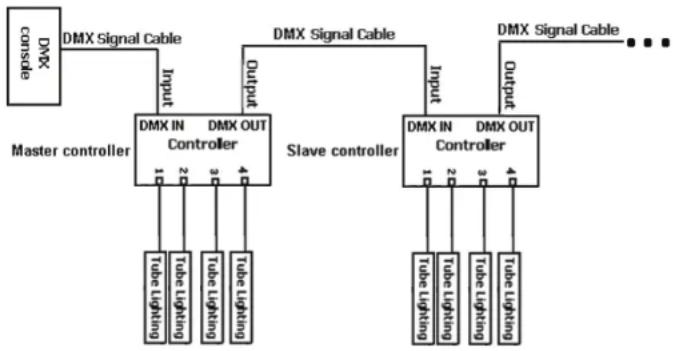
flowchart
graph TD
    A["Master controller"] -->|Input| B["DMX IN Controller"]
    A -->|Output| C["Slave controller"]
    B --> D["Tube Lighting"]
    B --> E["Tube Lighting"]
    B --> F["Tube Lighting"]
    C --> G["Tube Lighting"]
    C --> H["Tube Lighting"]
    C --> I["Tube Lighting"]
    J["DMX Signal Cable"] --> K["DMX IN Controller"]
    J --> L["DMX OUT Controller"]
    M["DMX Signal Cable"] --> N["DMX IN Controller"]
    M --> O["DMX OUT Controller"]
    P["DMX Signal Cable"] --> Q["DMX IN Controller"]
    P --> R["DMX OUT Controller"]
ADJ Products, LLC - www.adj.com - LED Pixel 4C User Manual Page 21
LED Pixel 4C
Power Cord Daisy Chain
With this feature you can connect the controllers to one another using the IEC input and output sockets. The quantity that can be connected is 8 controllers maximum. After 8 controllers you will need to use a new power outlet. They must be the same controllers, DO NOT mix controllers.
LED Pixel 4C
Fuse Replacement
Disconnect the unit from its power source. Remove the power cord from the unit. Once the cord has been removed, you will find that the fuse holder is located inside the power socket. Insert a at-head screw driver into the power socket and gently pry out the fuse holder. Remove the bad fuse and replace with a new one. The fuse holder also has a holder for a spare fuse.
LED Pixel 4C
Cleaning
Due to fog residue, smoke, and dust cleaning the internal and external optical lenses must be carried out periodically to optimize light output.
- Use normal glass cleaner and a soft cloth to wipe down the outside casing.
- Clean the external optics with glass cleaner and a soft cloth every 20 days.
- Always be sure to dry all parts completely before plugging the unit back in.
Cleaning frequency depends on the environment in which the x-ture operates (i.e. smoke, fog residue, dust, dew).
LED Pixel 4C
Trouble Shooting
Listed below are a few common problems the user may encounter, with solutions.
Unit not responding to DMX:
- Check that the DMX cables are connected properly and are wired correctly (pin 3 is "hot"; on some other DMX devices pin 2 may be 'hot'). Also, check that all cables are connected to the right connectors; it does matter which way the inputs and outputs are connected.
Unit does not respond to sound:
- Quiet or high pitched sounds will not activate the unit.
- Make sure that Sound Active mode is activated.
ADJ Products, LLC - www.adj.com - LED Pixel 4C User Manual Page 22
LED Pixel 4C
Warranty
MANUFACTURER'S LIMITED WARRANTY
A. ADJ Products, LLC hereby warrants, to the original purchaser, ADJ Products, LLC products to be free of manufacturing defects in material and workmanship for a prescribed period from the date of purchase (see specific warranty period on reverse). This warranty shall be valid only if the product is purchased within the United States of America, including possessions and territories. It is the owner's responsibility to establish the date and place of purchase by acceptable evidence, at the time service is sought.
B. For warranty service you must obtain a Return Authorization number (RA#) before sending back the product—please contact ADJ Products, I.L.C Service Department at 800-322-6337. Send the product only to the ADJ Products, LLC factory. All shipping charges must be pre-paid. If the requested repairs or service (including parts replacement) are within the terms of this warranty, ADJ Products, LLC will pay return shipping charges only to a designated point within the United States. If the entire instrument is sent, it must be shipped in it's original package. No accessories should be shipped with the product. If any accessories are shipped with the product, ADJ Products, I.L.C shall have no liability whatsoever for loss of or damage to any such accessories, nor for the safe return thereof.
C. This warranty is void if the serial number has been altered or removed; if the product is modified in any manner which ADJ Products, LLC concludes, after inspection, affects the reliability of the product; if the product has been repaired or serviced by anyone other than the ADJ Products, LLC factory unless prior written authorization was issued to purchaser by ADJ Products, LLC; if the product is damaged because not properly maintained as set forth in the instruction manual.
D. This is not a service contract, and this warranty does not include maintenance, cleaning or periodic check up. During the period specified above, ADJ Products, LLC will replace defective parts at its expense with new or refurbished parts, and will absorb all expenses for warranty service and repair labor by reason of defects in material or workmanship. The sole responsibility of ADJ Products, LLC under this warranty shall be limited to the repair of the product, or replacement thereof, including parts, at the sole discretion of ADJ Products, LLC. All products covered by this warranty were manufactured after August 15, 2012, and bear indentifying marks to that effect.
E. ADJ Products, LLC reserves the right to make changes in design and/or improvements upon it's products without any obligation to include these changes in any products theretofore manufactured.
No warranty, whether expressed or implied, is given or made with respect to any accessory supplied with products described above. Except to the extent prohibited by applicable law, all implied warranties made by ADJ Products, LLC in connection with this product, including warranties of merchantability or fitness, are limited in duration to the warranty period set forth above. And no warranties, whether expressed or implied, including warranties of merchantability or fitness, shall apply to this product after said period has expired. The consumer's and/or Dealer's sole remedy shall be such repair or replacement as is expressly provided above; and under no circumstances shall ADJ Products, LLC be liable for any loss or damage, direct or consequential, arising out of the use of, or inability to use, this product.
This warranty is the only written warranty applicable to ADJ Products, LLC Products and supersedes all prior warranties and written descriptions of warranty terms and conditions heretofore published. This warranty was revised after December 1, 2012.
MANUFACTURER'S LIMITED WARRANTY PERIODS:
- Lighting Products = 1-year (365 days) Limited Warranty (Such as: Special Effect Lighting, Intelligent Lighting, UV lighting, Strobes, Fog Machines, Bubble Machines, Mirror Balls, Par Cans, Trussing, Lighting Stands etc. excluding LED, Laser Products and lamps)
- Laser Products = 90-Day Limited Warranty - L.E.D. Products = 3-year (1095 days) Limited Warranty (excluding motors, PCB boards, and power supplies, which have a 1-year (365 day Limited Warranty) and batteries which have a 180 day limited warranty). Only the L.E.D.s carry a 3-year warranty
ADJ Products, LLC - www.adj.com - LED Pixel 4C User Manual Page 23
LED Pixel 4C
Specifications
Model: LED Pixel 4C
| Voltage: | 100V~240V/50~60Hz |
| Working Position: | Any safe working position |
| Power Draw: | 72W |
| Power Cord Daisy Chain:8 Controllers Max. |
| Fuse: | 2 Amp |
| Weight: | 5lbs./ 2Kgs. |
| Dimensions: | 10.25" (L) x 8" (W) x 3.25" (H) |
| 259 x 200 x 80mm |
| DMX Channels: | 4 DMX Modes: 5 Channel Mode, |
| 7 Channel Mode, 14 Channel |
| Mode, and 192 Channel Mode |
| Warranty: | 1 Year (365 days) |
Auto Sensing Voltage: This fixture contains a automatic voltage switch, which will auto sense the voltage when it is plugged into the power source.
Please Note: Specifications and improvements in the design of this unit and this manual are subject to change without any prior written notice.
ADJ Products, LLC
6122 S. Eastern Ave. Los Angeles, CA 90040 USA
Tel: 323-582-2650 / Fax: 323-725-6100
Web: www.adj.com / E-mail: info@adj.com
Follow Us On:


facebook.com/americandj
twitter.com/americandj
youtube.com/adjlighting
A.D.J. Supply Europe B.V.
Junostraat 2
6468 EW Kerkrade
Netherlands
service@adj.eu / www.adj.com
Tel: +31 45 546 85 00 / Fax: +31 45 546 85 99