CRP-FHVR1008L - Rice cooker Cuckoo - Free user manual and instructions
Find the device manual for free CRP-FHVR1008L Cuckoo in PDF.


| Product Type | Electric Pressure Rice Cooker |
| Brand | Cuckoo |
| Model | CRP-FHVR1008L |
| Capacity | 10 cups (uncooked rice) / 5.5L |
| Dimensions (W x D x H) | Approx. 28.9 x 36.7 x 32.7 cm |
| Weight | Approx. 6.5 kg |
| Power Supply | 120V / 60Hz / 1300W |
| Power Cord Length | Approx. 1.2 m |
| Pressure Level | High-pressure cooking (up to 1.8 atm) |
| Cooking Modes | White rice, brown rice, GABA rice, glutinous rice, porridge, soup, stew, steam, and more |
| Additional Functions | Keep warm, timer delay, reheat, and pressure release selection |
| Interior Pot Material | Dual-coated non-stick inner pot with diamond coating |
| Control Type | Microcomputer with LED display and touch control |
| Safety Features | Auto shut-off, pressure release valve, locking lid, overheat protection |
| Cleaning Instructions | Remove inner pot, steam cap, and sealing ring for hand washing; wipe exterior with damp cloth |
| Spare Parts Available | Inner pot, sealing ring, steam cap, measuring cup, spatula |
| Repairability | For authorized service centers; user-replaceable sealing ring and inner pot |
Frequently Asked Questions - CRP-FHVR1008L Cuckoo
User questions about CRP-FHVR1008L Cuckoo
0 question about this device. Answer the ones you know or ask your own.
Ask a new question about this device
Download the instructions for your Rice cooker in PDF format for free! Find your manual CRP-FHVR1008L - Cuckoo and take your electronic device back in hand. On this page are published all the documents necessary for the use of your device. CRP-FHVR1008L by Cuckoo.
USER MANUAL CRP-FHVR1008L Cuckoo
Operating Instruction
CRP-FH10 Fuzzy Series 1.8L(2\~10Persons) / 1.8L(2\~10 )
NO.1 CUCKOO
CUCKOO IH PRESSURE JAR COOKER
love
CUCKOO
always new
happiness
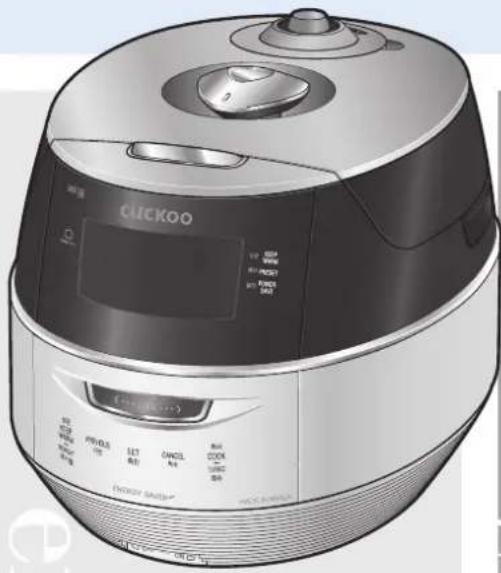
natural_image
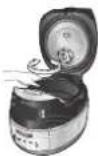
Illustration of a CLECKOO rice cooker with control panel and display (no visible text or symbols)design
Thank you very much for purchasing CUCKOO IH PRESSURE JAR COOKER
Read the following instruction manual before use. Save this instruction manual for future reference. This manual will be useful if you have any questions or have problems operating the rice cooker.
CUCKOO ELECTRONICS CO., LTD.
CONTENTS
CONTENTS
BEFORE USING
| Important safeguards | 3 |
| Specifications | 4 |
| Safety precautions | 5~6 |
| Name of each part | 11 |
| How to clean | 12~13 |
| Function operating part | 14 |
WHEN USING
| DAYTIME VOICE VOLUME SETTING FUNCTION | 14 |
| NIGHTTIME VOICE VOLUME SETTING FUNCTION | 14 |
| POWER SAVING / ENERGY EYE FUNCTION | 15 |
| VOICE SETTING FUNCTION | 15 |
| HOW TO SET CURRENT TIME / SIMPLE SOFT FUNCTION | 16 |
| BEFORE COOKING RICE / FOR THE BEST TASTE OF RICE | 17 |
| HOW TO COOK | 18~19 |
| MY MODE(CUCKOO Customized taste function) | 20 |
| MY MODE(CUCKOO Customized cooking function) | 20 |
| HOW TO USE GABA RICE / MULTI-COOK FUNCTION | 21 |
| HOW TO USE MY RECIPE FUNCTION / RECENT COOK FUNCTION | 22 |
| HOW TO USE HOME BAKERY | 23 |
| HOW TO USE PRESET COOKING | 24 |
| POWER-SAVING STANDBY FUNCTION | 24 |
| HOW TO USE POWER SAVE SCREEN LIGHT MODE | 25 |
| PRESET REHEATING FUNCTION | 25 |
| TO KEEP COOKED RICE WARM AND TASTY | 26 |
| REMAINING COOKING TIME DISPLAY / LOCK BUTTONS | 27 |
| PRODUCT INITIALIZATION / HELP FUNCTION | 27 |
BEFORE ASKING FOR SERVICE
| CHECK BEFORE ASKING FOR SERVICE | 28~30 |
| COOKING GUIDE | |
| RECIPE | 31~34 |
目录
使用前
- Read all instructions before using this appliance.
- Do not touch hot surfaces. Use handles or knobs.
- To protect against fire, electric shock and / or injury to persons do net immerse cord, plugs, or Pressure
- Close supervision is necessary when this appliance is used by or near children. This appliance is not intended for use by young children without supervision.
- Unplug from outlet when not in use and before cleaning. Allow appliance to cool before putting on or taking off parts, and before cleaning the appliance.
- Do not operate any appliance with a damaged cord or plug, after the appliance malfunctions, or has been damaged in any manner. Return the Appliance to the nearest authorized service facility for examination, repair or adjustment.
- The use of accessory attachments not recommended by the appliance manufacturer may result in fire, electric shock, and / or injury to persons.
- If the supply cord is damaged, it must be replaced by a special cord or assembly available from the manufacturer or your service agent.
- Do not use outdoors.
- Do not let the cord hang over the edge of a table or counter, or touch hot surfaces.
- Do not place on or near a hot gas, electric burner, or in a heated oven.
- Always attach the plug to the appliance first, then plug the cord into the wall outlet. To disconnect, or
- Do not use this appliance for other than its intended use.
- Extreme caution must be used when moving an appliance containing hot oil or any hot liquids.
- Oversized foods, metal foil packages, or utensils must not be inserted into the appliance as they are a risk of fire or electric shock.
- A fire may occur if the appliance is covered or touching flammable material, including curtains, draperies, walls, etc while in operation.
- To reduce the risk of electric shock, cook only in the provided removable container.
- This appliance cooks under pressure. Improper use may result in scalding injury. Before operating the unit, properly secure and close the unit. See “Operating Instructions.”
- Do not cook foods such as applesauce, cranberries, cereals, macaroni, spaghetti, or other foods. These foods tend to foam, froth, and sputter, and may block the pressure releasing device.
- Before use always check the pressure releasing device for clogging.
- Do not open the pressure cooker until the unit has cooled and internal pressure has been reduced. See "Operating Instructions."
- Do not use this pressure cooker to fry in oil.
- Be sure that handles are assembled and fastened properly before each use. Cracked, broken or charred handles should be replaced.
SAVE THESE INSTRUCTIONS THIS APPLIANCE IS FOR HOUSEHOLD USE ONLY
ADDITIONAL IMPORTANT SAFEGUARDS
WARNING : This appliance generates heat and releases steam during use. Use proper precaution to prevent risk of burns, fires, other injuries, or damage to property.
- Keep hands and face away from the Pressure Release Valve when releasing pressure.
- Take extreme caution when opening the Lid after cooking. Severe burns can result from steam inside.
- Never open the Lid while the unit is in operation.
- Do not use without the inner Pot in place.
- Do not cover the Pressure Valve with anything as an explosion may occur.
- Do not touch the inner pot nor any heating parts, immediately after use. Allow the unit to cool down completely first.
HOW TO USE EXTENSION CORD
Note :
A. A short power-supply cord (or cord set) is provided to reduce the hazards from entanglement by a longer cord.
B. Extension cord should be used properly.
C. Extension cord usage for the rice cooker :
(1) The correct rated voltage should be used for the rice cooker.
(2) If the appliance is set on the ground, the extension cord should also be set on the ground.
(3) The cord wires and extension cord should always be arranged to prevent hazards to children.
This appliance has a polarized plug : (one blade is wider than the other).
As a safety feature, this plug will fit in a polarized outlet only one way.
If the plug does not properly fit in the outlet, turn the plug over.
If it still does not fit, contact a qualified electrician.
Please, keep this safety feature.
| Model Name | CRP-FH10 Fuzzy Series | ||
| Power Supply | AC120V, 60Hz | ||
| Power Consumption | 1305W | ||
| Cooking Capacity | GLUTIN. RICE | 0.36~1.8L (2~10cups) | |
| HIGH | |||
| MIXED RICE | 0.36~1.44L (2~8cups) | ||
| HIGH | |||
| SOFT GLUTIN. SOFT | 0.36~1.08L (2~6cups) | ||
| TURBO GLUTIN. RICE | |||
| TURBO MIXED RICE | |||
| GABA RICE | |||
| BROWN RICE | |||
| NUTRI. RICE | |||
| Thick porridge | 0.18~0.36L (1~2cups) | ||
| Thin porridge | 0.09~0.27L (0.5~1.5cups) | ||
| Power Cord Length | 1.2m | ||
| Pressure | 98.0KPa(1.0kgf/cm2) | ||
| Weight | 9.5kg | ||
| Dimension | Width | 31.0cm | |
| Length | 42.3cm | ||
| Height | 32.6cm | ||
HOW SERVICE IS HANDLED
USA
The East and the Central Districts
Tel. No. 718 888 9144
The West and the Central Districts
Tel. No. 323 780 8808
TORONTO
Tel. No. 905 707 8224 / 416 878 4561
VANCOUVER
Tel. No. 604 540 1004 / 604 523 1004
SAFETY PRECAUTIONS

Read the following product safety guide carefully to prevent any accidents and/or serious danger.
'Warning' and 'Caution' are different as follows.
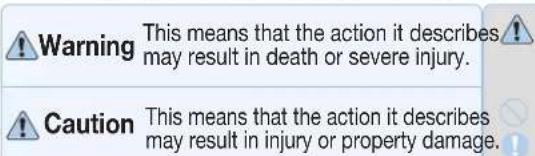
This sign is intended to remind and alert that something may cause problems under the certain situation.
Please read and follow the instruction to avoid any harmful situation.
Indicates a prohibition
Indicates an instruction

Warning Do not
| Do not cover the automatic steam outlet or pressure weight with your hand or face. | Do not use it without the inner pot. |
| shake it, please contact the dealer or service center. | |
| Do not use the cooker near hot things such as stove, gas stove or direct ray of light.discoloration. Please check the power cord and plug frequently. | Do not turn the Lock/Unlock Handle to "Unlock" while cooking.cause burns.by force until the steam is completely exhausted. |
| Do not alter, reassemble, disassemble or repair. | |
| Use a single socket with the rated current above 15A. | Do not over unplug and plug the power cord over and over. |
| or fire. Please check the power cord and plug frequently. | Do not insert metal objects such as pins and wires or any other external substances in the automatic steam exhaust outlet or any other slot. |
| Please pay careful attention against water and chemicals | |
| Do not use a rice cooker at a place where dust is trapped or chemical material is located.nearby a product. | Keep the cooker out of reach of children. |
| Don't spray or put any insecticides or chemicals. | |
| Do not use damaged power cord, plug, or loose socket. | a dealer or a service center. |
| Don't let foreign substances such as needle, cleaning pin, or metal get in or block the in let/out let pipe or gape. | |
| Do not clean the product with water or pour water in the product.dealer and service center. | product except when dearing a steam outlet. |
| Do not open the LID while in heating and cooking. | |
| Do not cover the automatic steam outlet or pressure weight with a duster, a towel, or apron, etc. | cancel button for 2 seconds and confirm internal steam released completely turning the pressure weight over. |
| Do not use pots that are not designed for the cooker.Do not use abnormal pot and do not use without the inner pot. | Remove a foreign substance on the cord and plug with a clean cloth.frequently. |
| Do not bend, tie, or pull the power cord by force.Please check the power cord and plug frequently. | Be careful that both the plug and power cord are not to be shocked by animal attack or sharp metal materials.Please check the power cord and plug frequently. |

SAFETY PRECAUTIONS

Caution Do not
| Do not use it on a rice chest or a shelf. | After you finish cooking, do not try to open the cooker by force until the steam is completely exhausted. |
| cause an electric shock resulting in fire. | cause burns. |
| Please check the power cord and plug frequently. | avoid dangerous steam and burns. |
| As it can cause damage, fire and and/or electric shock. | |
| Do not press heavy things on the power cord. | Do not place on rough top or tilted top. |
| Do not change, extend or connect the power cord without the advice of a technical expert. | Please call customer service if the inner pot coating peels off. Inner pot coating may wear away after long use. When cleaning the inner pot, do not use tough scrubber, metallic scrubber, brush, abrasive metallic etc. |
| Clean any dust or external substances off the temperature sensor and inner pot. | Do not hold the cooker by the inner pot handle. |
| Do not plug or pull out the power cord with wet hands. | handles on the bottom right and left side of the cooker. Hold the handles with both hands and move it carefully. |
| Do not move the product by pulling or using the power cord. | Always turn the Lock/Unlock Handle to "Lock" when not in use. It can cause deformation by remaining pressure. |
| Please contact a dealer or service center when there is a strange smell or smoke. | Wipe off any excessive water on the cooker after cooking. It can cause odor and discoloration. Wipe off water that is left behind from dew. |
| service center. | |
| Do not use over the maximum capacity. | Please contact dealer or service center when either a button of a product or a product itself is not working properly. |
| soup and congee. | In case of a blackout during cooking, steam from a rice cooker will be released automatically. Thus, the quality of rice is lower than normal. Please start cooking with an indicated amount of rice and water. indicated level of water usage. |
| Do not touch the metallic surface of the inner pot and pressure weight after cooking or warming. | |
| pressure weight while and right after the cooking. | |
| Don't use the cooker near a magnetic field. | Please clean the body and other parts after cooking. the smell may be absorbed. and inner pot every time you cook any of those. |
| Do not drop or impact the cooker. | |
| Please surely pull out the plug when not in use. | |
| Use product on a flat surface. Do not use on a cushion. Please avoid using it on an unstable location prone to falling down. | since rough scrub or metallic ones are abrasive to the coating. inner pot coating might rise. Please call the customer service for those cases. |
| cord and plug frequently. | |
| Don't use for various purpose for inner pot. And do not heat up the inner pot on the gas stove. | Be cautious when steam is being released. |
| Please pull out the plug when not in use. | If possible, only use warming function when cooking white rice. Other foods are easily discolored. |
| Please use the cooker for it's intended purpose. | When you pull out the power plug, don't pull the power cord. Please, safely pull out the power plug. shock or fire. |



| ⚠경고 | ⚠ |
| ⚠주의 | ○! |

| ? | |


[NO TEXT]
hat
B
安全警告

Always keep it horizontal. It stabilizes steam inside of the oven. Pressure weight is twisted, it release steam.
Automatic Steam Exhaust Outlet (Solenoid valve)
When finished cooking or during warming, steam is automatically released.
Lock/Unlock Handle (Set the handle to lock when cooking or warming the rice)
The handle has to turn to 'Lock' for operation.
Lid Clamp
Turn handle to 'Unlock', and then press Clamp knob to open.
Control Panel
Standby Power Blocking Switch
When the power is not supplied after the power cable is connected, check if the switch is (ON).
-Enabled: (ON) -Disabled: (OFF) (The standby power is blocked, saving the energy)
In case of a blackout during cooking, steam from a rice cooker will be released automatically.
Name of each part
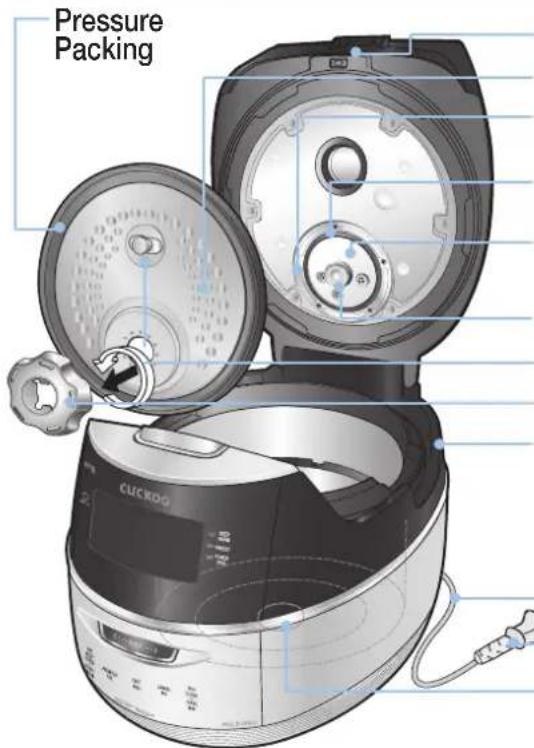
Lid Assy
DET. cover Control Plate Packing
Control Plate Packing Cover
Pressure Control Plate
Holder Guide Handle
DET. cover Holder
Drain Dish
Empty the water out of a dew dish after cooking or keep warming, Leaving the water in the dew dish resul
Power Cord
Power Plug
Temperature Sensor
Accessories
Manual&Cooking Guide

Rice Scoop

Rice Measuring Cup
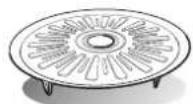
Steam Plate

Cleaning Pin (Attached on the bottom of the unit)

HOW TO CLEAN
rice cooker. The layer of starch, which is the residue from rice cooking, may appear on the detachable cover or inside of rice cooker. This layer does not cause any health risk.
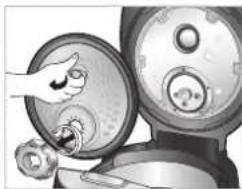
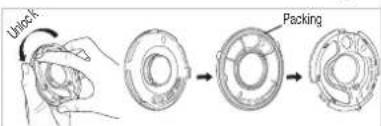
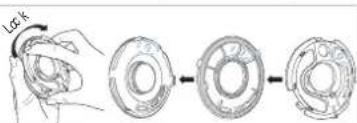
Detachable cover & Pressure packing
After cleaning detachable cover, put it back on the lid
Unless detachable cover is mounted, preset cooking cannot be done. (Alarm may sound while keeping warm.)
natural_image
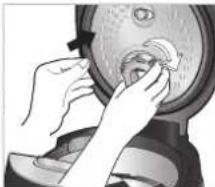
Illustration of a hand turning a circular component into a sink, with no visible text or symbolsclock wise, and the cover will be easily separated from the cooker and can be washed.
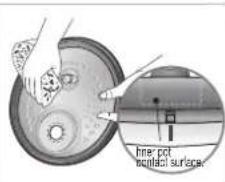
Wash the cover with cooking purposeneutral detergent and sponge frequently, and wipe off moisture with handkerchief. Please keep clean the edge of rubber packing, then the rice cooker last's longer.
natural_image
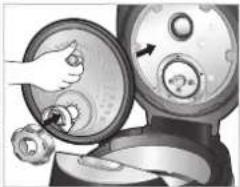
Illustration of a hand turning a circular component into a fan-like device (no text or symbols visible)When mounting the cover, grab separate cover handl attach it to hole, and after adjusting holder on top of packing stop tab, fix it by turning it clockwise.
natural_image
Illustration of hands cleaning a circular object with a lid (no text or symbols visible)It is easier to attach the cover holder when the power part of the detachable cover is pressed.
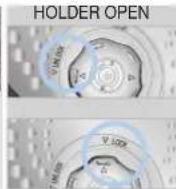
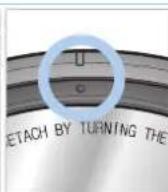
As depicted in the picture, please align holder with arrow mark to open and close.
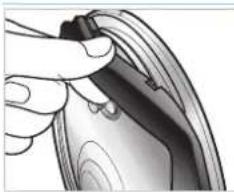
Please fir a rubber packing into the cover plate completely after washing or replacing the rubber packing.
natural_image
Close-up of a hand holding a small black object, possibly a device or tool, with no visible text or symbols.packing, please pull it out from the cover plate as shown in the picture.
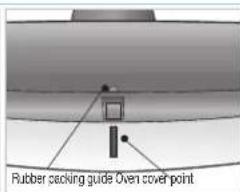
To put back the rubber packing, please fit it to each of 6 projections and holes as shown in the picture.
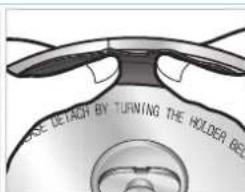
After fitting 6 projections to the holes, please press the rubber packing around the corner completely as shown in the picture.
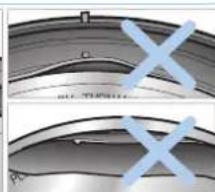
natural_image
Close-up of metallic curved surfaces with blue X marks, no visible text or symbolsPlease check that the rubber packing fits into the cover plate completely. If not, steam may be released from the crack between the packing and the plate.
Steam Vent Inner Pot
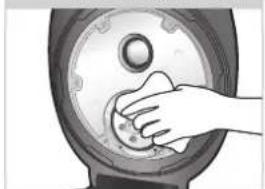
natural_image
Hand pressing down on a circular mechanical component (no text or symbols visible)Make sure to clean the clean steam went after/before use. Do not try to pull out the clean steam went and safety packing, clean it with care. Make sure the clean steam went and safety packing are installed completely after/before use. If the steam vent is detached, or not attached completely, please contact customer service.
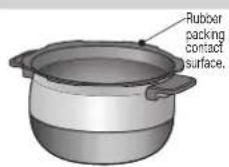
Wipe the water on the outside and bottom of the Inner Pot. A rough sponge, a brush or an abrasive can cause scratches on the coating. Use a dishwashing liquid and a soft cloth or a sponge.
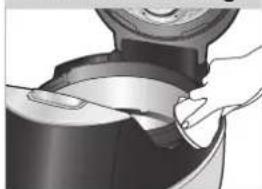
Pressure Packing
natural_image
Close-up of hands cleaning a dark container with a lid (no text or symbols visible)Wipe the main unit with a wet cloth that has been extracted out of all water
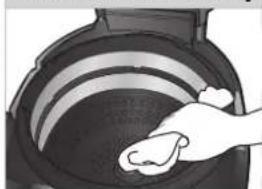
Inside of the Main body
natural_image
Illustration of a hand cleaning a circular object with concentric rings (no text or symbols)Make sure to clean the steam control went before and after use.
Keeping the contact area of the Inner Pot with the pressure packing always clean, increases the product's durability.
Detachable cover & Pressure packing
- Handle must be turned to “ ☑ ”(Lock) during Cooking. When the lamp is turned on it means that it is ready to cook.
- After cooking, turn the handle from “☐”(Lock) to “☐”(Unlock) turn the handle to open. If there is unreleased steam in the Inner pot it might be hard to turn the handle. In this case twist the pressure weight and let the excess steam out. Do not open by force.
Handle must be turned to “☐”(Unlock) when opening and closing.
Caution
Do not clean the inner pot with any sharp cutlery inside (fork, spoon, chopsticks, etc.).
- The coating of the inner pot may peel off.
operate the "COOK/TURBO" button. Make sure the handle is located in "☐" (Lock).


HOW TO CLEAN
How to clean the pressure weight nozzle.
If the valve of the pressure part is clogged, puncture it with the cleaning pin
If the valve hole of the pressure weight is blocked, the hot steam and hot content within the cooker can cause serious injury.
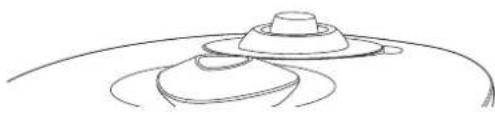
natural_image
Simple line drawing of a hat on a curved surface (no text or symbols)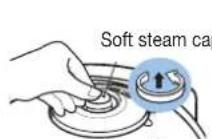
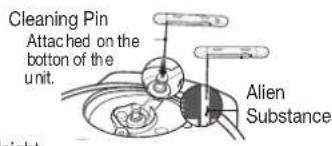
How to disassemble the pressure weight
clockwise while pulling it up, and pull it out.
How to use cleaning pin and brush kit
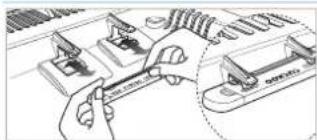
natural_image
Technical line drawing of a hand using a wrench to adjust or install a mechanical component (no text or symbols visible)on the bottom of the unit from main body as shown in picture.

the arrow points.
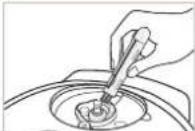
can easily clean a drain use the ditch cap and tough pat to clean.
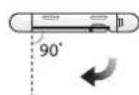
pin, pull out cleaning pin and make it meet at right angles.
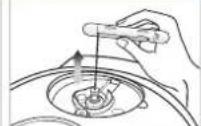
Only use for the vlave hole of the pressure weight.
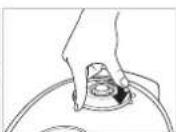
How to clean the soft steam cap
Do not touch the surface of the soft steam cap right after cooking. You can get burned.
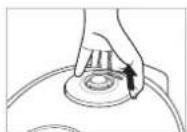
steam cap like the picture.
Press the hook in the back, and follow the arrow to detach and clean. Make sure you clean frequently with a sponge or a neutral detergent.
the groove perfectly.
steam cap to fit into the groove, press "A" part firmly to assemble the soft steam cap into the product.
How to clean dew dish
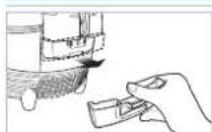
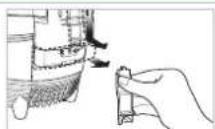
Separate the drain ditch cap by pushing it down.
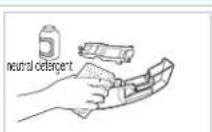
cap and dew dish with a neutral detergent.
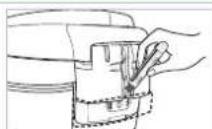
ditch cap with brush kit.
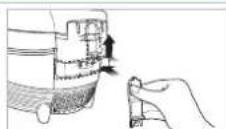
dew dish after cleaning.
When lid does not close perfectly
Do not try to close the lid by force. It can cause problems.
-
Check to make sure the inner pot is place correctly inside the main body.
-
To close the lid turn the handle to unlock, in shown in the picture on the right.

- If there is excess steam inside the inner pot it might be difficult to lock the handle. Twist the pressure weight and allow the excess steam to release. Then try to turn the handle again.

FUNCTION OPERATING PART / DAYTIME VOICE VOLUME SETTING FUNCTION / NIGHTTIME VOICE VOLUME SETTING FUNCTION
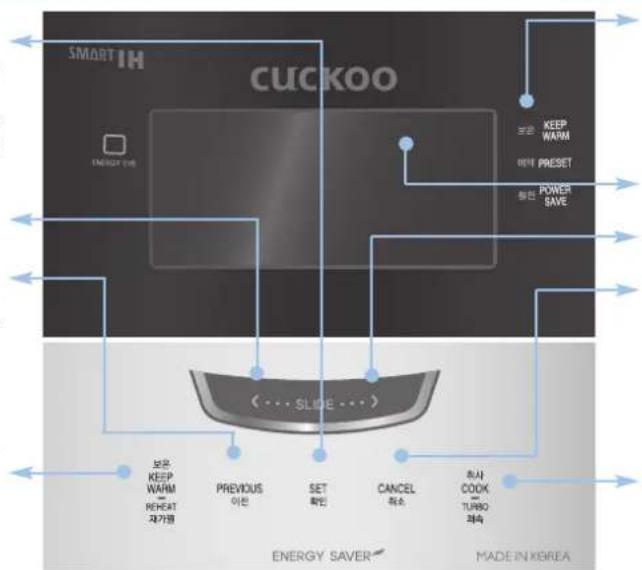
Set Button Use it when you move to the next mode. Use it when you save the current mode and turn OFF the product.
Move Left Button
Previous Button Use it when you move to the previous mode or the previous screen. And used to button-lock function.
Keep Warm/Reheat Button Use to warm or reheat. (Refer to page 26)
flowchart
graph TD
    A["SMART IH CUCKOO"] --> B["Energy Saver"]
    B --> C["BEGRAN KEEP WARM"]
    B --> D["BEGRAN RESET PRESET"]
    B --> E["BEGRAN POWER SAVE"]
    B --> F["BEGRAN POWER SAVE"]
    B --> G["BEGRAN POWER SAVE"]
    B --> H["BEGRAN POWER SAVE"]
    B --> I["BEGRAN POWER SAVE"]
    B --> J["BEGRAN POWER SAVE"]
    B --> K["BEGRAN POWER SAVE"]
    B --> L["BEGRAN POWER SAVE"]
    B --> M["BEGRAN POWER SAVE"]
    B --> N["BEGRAN POWER SAVE"]
    B --> O["BEGRAN POWER SAVE"]
    B --> P["BEGRAN POWER SAVE"]
    B --> Q["BEGRAN POWER SAVE"]
    B --> R["BEGRAN POWER SAVE"]
    B --> S["BEGRAN POWER SAVE"]
    B --> T["BEGRAN POWER SAVE"]
    B --> U["BEGRAN POWER SAVE"]
    B --> V["BEGRAN POWER SAVE"]
    B --> W["BEGRAN POWER SAVE"]
    B --> X["BEGRAN POWER SAVE"]
    B --> Y["BEGRAN POWER SAVE"]
    B --> Z["BEGRAN POWER SAVE"]
    B --> AA["BEGRAN POWER SAVE"]
    B --> AB["BEGRAN POWER SAVE"]
    B --> AC["BEGRAN POWER SAVE"]
    B --> AD["BEGRAN POWER SAVE"]
    B --> AE["BEGRAN POWER SAVE"]
    B --> AF["BEGRAN POWER SAVE"]
    B --> AG["BEGRAN POWER SAVE"]
    B --> AH["BEGRAN POWER SAVE"]
    B --> AI["BEGRAN POWER SAVE"]
    B --> AJ["BEGRAN POWER SAVE"]
    B --> AK["BEGRAN POWER SAVE"]
    B --> AL["BEGRAN POWER SAVE"]
    B --> AM["BEGRAN POWER SAVE"]
    B --> AN["BEGRAN POWER SAVE"]
    B --> AO["BEGRAN POWER SAVE"]
    B --> AP["BEGRAN POWER SAVE"]
    B --> AQ["BEGRAN POWER SAVE"]
    B --> AR["BEGRAN POWER SAVE"]
    B --> AS["BEGRAN POWER SAVE"]
    B --> AT["BEGRAN POWER SAVE"]
    B --> AU["BEGRAN POWER SAVE"]
    B --> AV["BEGRAN POWER SAVE"]
    B --> AW["BEGRAN POWER SAVE"]
    B --> AX["BEGRAN POWER SAVE"]
    B --> AY["BEGRAN POWER SAVE"]
    B --> AZ["BEGRAN POWER SAVE"]
    B --> BA["BEGRAN POWER SAVE"]
    B --> BB["BEGRAN POWER SAVE"]
    B --> BC["BEGRAN POWER SAVE"]
    B --> BD["BEGRAN POWER SAVE"]
    B --> BEGHEAT REPEAT 자가용
    BEGHEAT REPEAT 자가용
    BEGHEAT REPEAT 자가용
    BEGHEAT REPEAT 자가용
    BEGHEAT REPEAT 자가용
    BEGHEAT REPEAT 자가용
    BEGHEAT REPEAT 자가용
    BEGHEAT REPEAT 자가용
    BEGHEAT REPEAT 자가용
    BEGHEAT REPEAT 자가용
    FEET REPEAT 자가용
    FEET REPEAT 자가용
    FEET REPEAT 자가용
    FEET REPEAT 자가용
    FEET REPEAT 자가용
    FEET REPEAT 자가용
    FEET REPEAT 자가용
    FEET REPEAT 자가용
    FEET REPEAT 자가용
    FEET REPEAT 자가용
    FEET REPEAT 자가용
    FEET DEUT DEUT DEUT DEUT DEUT DEUT DEUT DEUT DEUT DEUT DEUT DEUT DEUT DEUT DEUT DEUT DEUT DEUT DEUT DEUT DEUT DEUT DEUT DEUT DEUT DEUT DEUT DEUT DEUT DEUT DEUT DEUT DEUT DEUT DEUT DEUT DEUT DEUT DEUT DEUT DEUT DEUT DEUT DEUT DEUT DEUT DEUT DEUT DEUT DEUT DE UTURO ROSE
Status LED It displays the current status of the product with the color of LED. (Refer to page 15)
Display Move Right Button
Cancel Button This function is used to cancel a selection or release remaining steam in the inner pot. (Refer to page 29)
Cook/Turbo Button Use to start cooking.
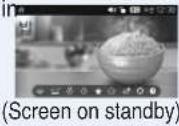
When you an image like one in the right side on your display, it means the rice cooker is
'Waiting' mode.
Press 'Cancel' button to enter ther 'Waiting' mode.
Press the button until you hear the buzzer sound.
The image of the plate may different.
Daytime voice volume setting function
The function which can control volume and cancel.
1 Enter 'Setting' in the home screen, select the 'volume setting', and press SET button.
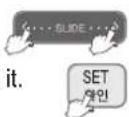
2 Select the 'Daytime Voice Volume' with the touch slider and Press SET button.
3 Set your desired volume with the touch slider. The volume increases/decreases by one step each time you slide it.
4 Press SET button and it will be saved.
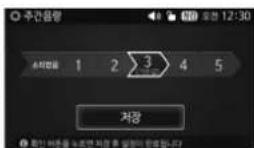
If it's left idle for 15 seconds or so during setting, you will hear voice guidance. In another 15 seconds after it's finished, it will be canceled without saving the changed value.
Nighttime voice volume setting function
Night volume setting function is for the set the voice volume during the night time (10:00 PM \~ 05:59 AM). This function only operates during the night time.
1 Enter 'Setting' in the home screen, select the 'volume setting', and press SET button.
2 Select the 'Nighttime Voice Volume' with the touch slider and Press SET button.
3 Set your desired volume with the touch slider.
The night volume is controlled depending on the volume set for the daytime and within the designated time period (10 p.m.-5:59 a.m.).
4 Press SET button and it will be saved.
POWER SAVING / ENERGY EYE FUNCTION / VOICE SETTING FUNCTION

Power save screen light
If you do not press any button for a certain period of time, this function reduces power consumption by lowering the screen brightness.
If you do not press any button for a certain period of time with the power on, the product will enter the screen saver mode.
It works for all screens.
You may to mon/off the mode with the Setting function. (Refer to page 25)
Power save screen automatic
If you do not press any button for a long time, this function turns OFF the screen to reduce power consumption.
If you want to manually enter the power-saving mode, select "Power-Saving" in the home screen, and press SET button.
If you do not press any button for a long time while keep warm mode and preset, the germination (Gaba Rice) is under way, the product will enter the screen saver mode automatically.
The color of the current mode is displayed in the Status LED.
keep warm mode : KEEP WARM LED
Preset / germination Gaba Rice mode : PRESET LED
2 If you do not press any button for a long time while standby mode or selecting menu is under way, the product will enter the screen saver mode utomatically.
The product will enter the power-saving mode after the preset standby time.
"Power-Saving LED" will be displayed.
3 In Cook or Reheat mode, the product will not enter the screen saver mode.
4 If you press a button during this mode or turn the Lock/Unlock handle, it will be canceled.
STATUS LED Display function
This function notifies the current status of the product with the lighting positions of the LEDs.
| Product status Status LED | |
| Keep Warm | Keep Warm LED |
| Preset / germination | Preset LED |
| Power save | Power save LED |
| Cook / Reheating / Auto clean | LED OFF |
During the COOK, REHEATING, AUTO CLEAN, it does not display the STATUS LED because the screen is always on.
Energy Eye function
The luminance sensor automatically recognizes ambient brightness during standby, cooking, warming and preset timer for minimizing power consumption of the product. If you want the power saving mode to start when it's darker than the current level(Step 2), set the mode to Step 1. If you want the mode to start when it's brighter than the current level, set the mode to Step 3.
1 Enter 'Setting' in the home screen, select the 'Energy Eye', and press SET button.
2 Select the step you want using the touch slider. ▶The default value is 'Step 2.'
3 Select the step you want using the touch slider.
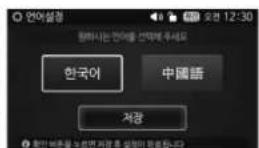
Voice setting function
You can select your preferred option for the screen and voice between Korean and Chinese.
1 Enter 'Setting' in the home screen, select the 'Voice setting', and press SET button.
2 Select the voice you want using the touch slider.
3 Select the step you want using the touch slider.
If it's left idle for 15 seconds or so during setting, you will hear voice guidance. In another 15 seconds after it's finished, it will be canceled without saving the changed value.


HOW TO SET CURRENT TIME / SIMPLE SOFT FUNCTION
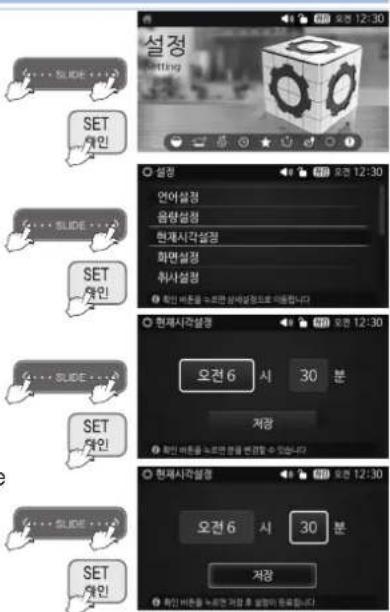
How to set current time
1 Enter 'Setting' in the home screen, select the 'current time setting', and press SET button.
2 You can set the hour with the touch slider and press SET button. After that you can set the minutes
3 Press SET button after it's finished to save the current setting.
Press BACK button to move from the 'minute' to 'hour' screen. In case of 12:00 it is 12:00 pm.
If you keep pressing the button, it will change continuously. The hour is changed with the unit of one hour, and the minute is changed with the unit of ten minutes.
If it's left idle for 15 seconds or so during setting, you will hear voice guidance.
In another 15 seconds after it's finished, it will be canceled without saving the changed value.
About Lithium battery
- This product contains lithium battery for improving blackout compensation and time. Lithium battery lasts for 3 years.
- When current time is not displayed on the screen, it means the battery is exhausted. It should be replaced.
What is blackout compensation
This product remembers and maintains previous condition and processes. After finishing blackout, it operates immediately.
- If blackout happens during cooking, the cooking time will be delayed depending on blackout time.
- If the rice became cold because of blackout, warming will be cancelled.
SIMPLE SOFT FUNCTION
You can soak grains before starting cooking by setting a desired time with this function.
1 Enter 'Rice' in the home screen, Select your desired menu and Press COOK/TURBO button.
CUCKOO started the menu for glutinous rice, mega heat glutious rice, mixed rice, mega geat mixed rice, nutritious rice, black bean rice.

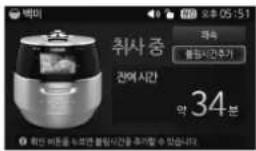
2 If you select Add Soaking Time in 5 seconds after starting cooking and then press SET button, it will enter the setting mode for the additional soaking time.
You can select among 0, 10, 30 and 60 minutes.

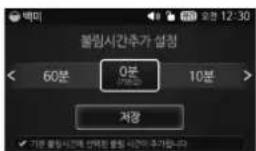
3 Adjust the soaking time with the touch slider.
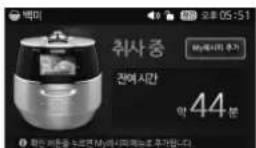
If you press SET button after setting the soaking time, the product will immediately show the cooking status screen.
If you press the 'CANCEL' button while setting the time, it will shift into the coo status screen without saving the set value.
If you press the 'CANCEL' button for a second or longer during soaking, it will cancel cooking and return to the home screen.
By adding soaking time, the selected value will be added to the default soaking time for each menu.
Soaking time is counted by 1 minuite unit.
The longer the soaking time, the melanoizing effeck.
If you unlock the Lock/Unlock Handle during the simloe Soaking Function, the cooking will be canceled.
BEFORE COOKING RICE / FOR THE BEST TASTE OF RICE
BEFORE COOKING RICE
1 Use a dry cloth to clean inner pot.
Use a soft scrubber to wash the inner pot.
2 Use measuring cup to measure desirable cooking amount.
Make the rice flat to the top of measuring cup and it is serving for 1 person. (ex: for 3 servings →3 cups, for 6 servings 6 cups)
3 Use another container to wash the rice.
4 Adjust water level.
Place inner pot on the flat surface to adjust water level. The marked lines in the inner pot are water level.
Glutinous rice for 8 people (8 cups) pour water to '8'.
Overcooked rice: pour less water than measured scale.
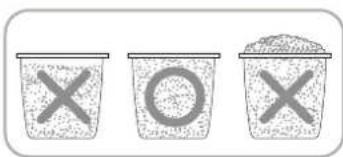
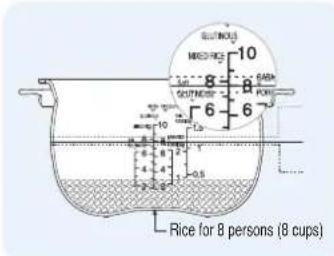
5 Please plug the power cord before inserting inner pot in the rice cooker.
Put the inner pot cerrctly.
Wipe off or remove any substances on the temperature senor or bottom of the inner pot.
Please place the inner pot correctly into the rice cooker.
6 Plug the power cord and turn the hand to "Lock".
Cautions for Cook
For the best taste of rice, check the following points carefully.
If possible, buy a small amount of rice and keep the rice some place where it ventilates well and avoids a direct ray of light. It can prevent evaporation of rice moisture.
If the rice has been unsealed for long, rice can be dry and stale. In this case, you should pour the half of water more. It's tastier.
If possible, do not use the preset time function when rice is too dry and pour the half of water more. If you cook over the 10 hours or dried rice, rice can be crisp or half cooked.
Even worse condition, rice can be cooked different tastes each level.
Cautions for Keeping Warm
It will be hard to open the lid during warming, or right after it has finished cooking. So push the pressure weight to the side and allow the steam to release.
Make sure the handle is in the "Lock" position during warming or reheating.
It would be better to warm the rice for less than 12 hours because of odors and color change. The cooked rice, which cooked by pressure cooker, is more prone to changing color than the rice cooked by general cooker.
After 24 hours of heat preservation, the lamp of heat preservation time lapse blinks, indicating that long time has passed in heat preservation condition.
If you have cooked rice with a separate electric heating appliance or fire with gas, put the cooked rice in the pot and start Keep Warm mode according to the warming instruction.
It is recommended to evenly stir the cooked rice after cooking. The rice taste is improved. (For a small quantity of rice, pile up the rice on the center area of the inner pot to keep warm)
The mixed and brown rice cannot be in such good condition as white rice while in warm function due to their characteristics.
Do not keep the scoop inside the pot while warming the rice. When using a wooden scoop it can create serious bacteria and odors.
During warm mode, the rice can rise and turn white. In this case, mix the rice.
Do not keep the rice spatula inside the pot while warming the rice. When using a wooden rice spatula, it can create serious bacteria and odors.
It is recommended to evenly stir the cooked rice after cooking. The rice taste is improved.
(For a small quantity of rice, pile up the rice on the center area of the inner pot to keep warm).
When Odors are Rising During the Warming Mode
Clean the lid frequently. It can cause growth of bacteria and odors.
Even though exterior looks clean, there might be germs and it can cause odor so please be sure to use automatic sterilization (steam cleaning) menu for cleaning. Clean the inner pot completely after automatic cleaning function is done. (Refer to page 18)
Clean the inner pot properly to prevent rice from smelling after you cook soups and steamed dishes.

HOW TO COOK
1 Press SET button in the home screen (Rice) and the 'Rice Menu' will appear.
Check if the removable cover is installed.
Before cooking, check that the Pressure weight well placed horiwontally. Each time you touch the slider on the right, the menu shifts from Glutin. rice→High Heat Glutin. rice→Soft glutin. Rice→Mixed Rice→High Heat mixed rice→Brown rice→High Heat brown rice→gaba rice→black bean rice→nutri. rice→five-frain rice→boiled barley→pea rice→boiled brown rice with red beans→rice prridge→chinese porridge in order.
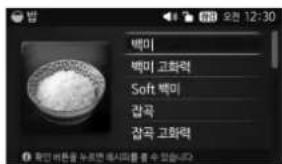
Ex) In case of selecting Glutious Rice. ▶You can hear a voice, Glutinous rice.
2 Press the 'COOK/TURBO' button after selecting your desired Rice menu, and the product will start cooking.
You must turn lid handle to lock before cooking. Then press the pressure Cook/Turbo button.
Unless lid handle is not turned to close, you get alarm with "E01", and sound "turn lid handle to lock"
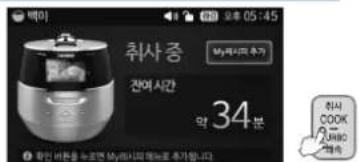
Ex) In case of cooking Glutinous.
If you select Turbo within 5 seconds in Glutinous or Mixed Rice mode and then press the 'COOK/TURBO' button or SET button, it will shift into the Turbo Glutinous or Turbo Mixed mode and will start cooking again. During cooking, the expected time will be displayed on the screen.
The actual cooking time may vary depending on the cooking capacity, water temperature, and cooking conditions.
2 Cooking thoroughly.
The cooktime remaining on the display is shown from cooking thoroughly. The cook time is different according to the menu.
- Be careful not to burn yourself from the automatic steam outlet.
Ex) When the steam starts to get discharged
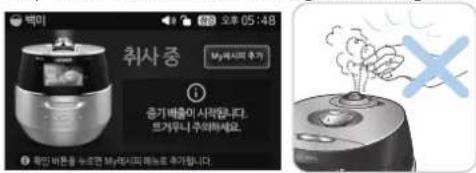
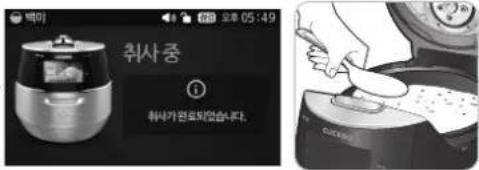
When cooking is completed, warming will start.
The status LED will get turned ON.
If you don't want to keep the cooked rice warm, press Cancel for 1 seconds.
When cooking ends, stir rice equally and immediately.
If you don't stir rice at once and keep it stagnant, rice will go bad and smell bad.
If the lid handle is not working well, take out the steam completely out of inner pot by turning over pressure weight. Do not press 'Cancel' button during cooking.
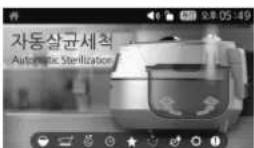
How to use AUTO CLEAN (Steam Cleaning)


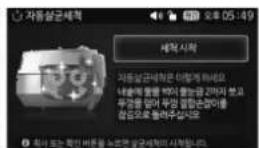

Pour water up to scale 2, make sure to close and lock the cover.
If you press the 'COOK/TURBO' Button after selecting the Automatic Sterilization mode, it starts cleaning immediately.
If you Press SET button after selecting the Automatic Sterilization mode, you will hear the voice guidance and then press SET or COOK/TURBO button to start automatic cleaning.
If you press the 'CANCEL' button in cleaning mode for about 1 second, the mode will be canceled and it will return to the home screen.
Melanoizing effect
The cooked rice can be light yellow at the bottom of the oven, because this product is designed to improve pleasant flavor and taste. Especially, melanoizing is more serious at the Preset cooking than just Cooking. It does not mean malfunction.
When mixing other rice with Glutinous, Melanoizing effect could increase more than Glutinous cook setting.
HOW TO COOK

How to use the cooking menu
| GLUTIN. RICE | Used to cook sticky and nutritious rice. | SOFT GLUTIN. RICE | Used to cook a little sticky and nutritive white rice than Glutinous rice. |
| MIXED RICE | Used to cook a variation of mixed or brown rice. | GABA RICE | Used to cook germinated brown rice. |
| BLACK BEAN RICE | Used to cook Black bean rice. | BROWN RICE RICE | Used to cook variation of brown rice. |
| BABY FOOD | It starts cooking baby food. | HOME BAKERY | This menu is used to either ferment or bake the bread. |
| RICE RORRIDGE | In this mode you can make thick porridge. | CHICKEN SOUP | This menu cooks samgyetang automatically. |
| CHINESE FORRIDGE | In this mode you can make thin porridge. | NUTRI. RICE | Used to cook nutritious rice. |
| AUTO CLEAN(Steam Cleaning) | This menu is used to eliminate small soaked after cooking or warming. | HIGH HEAT (GLUTIN RICE MIXED RICE/SHOWN RICE) | Used to cook more sticky and soothing cooked rice. |
| TURBO GLUTIN.RICE | Pressing ‘COOK/TURBO’ button twice will switch to quick cooking ‘PRESSURE COOK’ button twice will switch to quick cooking and shorten the cooking time. (It takes about 13 minutes when you cook the Glutinous rice for 2 persons.)Use this turbo cooking function only for cooking rice for less than 2persons. (The condition of the rice will not be good for more than 2 persons.)If you soak the rice in water for about 20minutes before cooking the rice and then cook the rice in turbo cooking course, the rice will taste good. | ||
| TURBO MIXED RICE | If selected turbo mixed rice, total cooking time will be reduced.(It takes about 26minutes for cooking mixed rice for 2 people.)Turbo mixed rice cooking lessens the quality of food, so only use for less than 6 people.If you soak the rice in water before cooking the rice and bean then cook, the rice will taste good. | ||
After cooking in white rice turbo mode or cooking of small serving, discard water. In case of small servings white rice turbo cooking, more water may be required than other menu.
| MENU CAPA | QUATEROCKENING TIME | ||
| GLUTIN. RICE | GLUTIN. RICE | 2 ~ 10 persons | Approx.27 ~ 36min |
| TURBO GLUTIN. RICE | 2 ~ 6 persons | Approx.13~21min | |
| HIGH HEAT GLUTIN. RICE | 2 ~ 10 persons | Approx.28~39min | |
| NUTRI. RICE | 2 ~ 6 persons | Approx.25~33min | |
| MIXED RICE | MIXED RICE | 2 ~ 8 persons | Approx.40~54min |
| TURBO MIXED RICE | 2 ~ 6 persons | Approx.26~36min | |
| HIGH HEAT MIXED RICE | 2 ~ 8 persons | Approx.41~55min | |
| BLACK BEAN RICE | 2 ~ 6 persons | Approx.40~49min | |
| SOFT GLUTIN. RICE | SOFT GLUTIN. RICE | 2 ~ 6 persons | Approx.47~59min |
| BROWN RICE RICE | BROWN RICE RICE | 2 ~ 6 persons | Approx.53~61min |
| HIGH HEAT BROWN RICE | 2 ~ 6 persons | Approx.54~62min | |
| RICE RORRIDGE (Thick Porridge) | Thick porridge | 1 ~ 2 cups | Approx.81~106min |
| CHINESE PORRIDGE (Thin Porridge) | Thin Porridge | 0.5 ~ 1.5 cups | Approx.83~106min |
| BABY FOOD | - | See detailed guide to cooking by the menus. | |
| HOME BAKERY | |||
| CHICKEN SOUP | GLUTIN. RICE | 1 Chicken (About 1kg) | Approx70min |
| AUTO CLEAN (Steam Cleaning) | Pour water up to the line 1 for GLUTIN. RICE | Approx 20min | |
When keeping warm, press Cancel to stop and select the desired function.
When you cook after using options like Multi Cook, Home bakery, Chicken soup and baby food the odor may stick. (refer to the product care method section to wipe the packing and cover and clean with the auto sterilization function). Cooking time for each option may vary depending on user's environment such as voltage, amount/temperature of water, etc. When you see "Edo" on display, turn the Lock/Unlock handle towards "☐" (Unlock), and then turn it back towards "☐" (Lock) for it to work properly. (This does not apply when you turned the handle towards "☐" (Unlock) once or more after finishing cooking in the previous cooking.)

MY MODE(CUCKOO Customized taste function) / MY MODE(CUCKOO Customized cooking function)
What is "MY MODE"?
CUCKOO's patented technology based on variable circuit design. User can select the degree of "softness" and "glutinosity & tastiness" to meet a user's desire.
MY MODE Function
Longer "SOFT" Time : rice becomes soft and glutinous. (selectable in 4 steps) Longer "SWEET" Time : rice becomes tastier(selectable in 4 steps) [melanoizing will occur] Both functions above can be selected simultaneously or separately
How to Use "MY MODE"
1 Enter 'Setting' in the home screen, select 'Cook Setting' and then select 'My Mode.'
'CUCKOO Customized taste function' applies to GLUTIN. RICE, HIGH HEAT GLUTIN. RICE, MIXED RICE, HIGH HEAT MIXED RICE, BROWN RICE, HIGH HEAT BROWN RICE, GABA RICE, BLACK BEAN RICE collectively.
2 Select your desired menu and Press SET button.
3 You may select your preferred level for each 'Soft' and 'Rich' taste with the touch slider.
- The level increases/decreases by one step each time you slide it. The higher the level, the softer and richer the taste gets.
- You may select your preferred level for the 'Soft' taste with the touch slider and then press SET button to select the level for the 'Rich' taste.
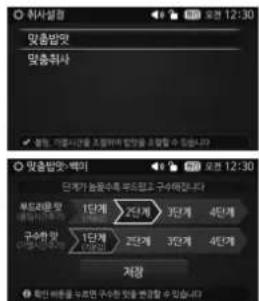
4 Press SET button after it's finished to save the current setting.
When setting your preferred taste, the cooking time may get longer depending on the selected time.
5 Disabling Customized Taste mode
Selecting the level 1 (default value) would disable My Mode
In another 15 seconds after it's finished, it will be canceled without saving the changed value.
Cuckoo customized cooking function
While cooking, you can control the heating temperature (both high and low) depending on your preference.
1 Enter 'Setting' in the home screen, select 'customized cooking' and then select 'My Mod
2 Select your desired menu and Press SET button.
3 Select the step you want using the touch slider.
The level increases/decreases by one step each time you slide it.
< melanoising prevention
be half-cooked prevention
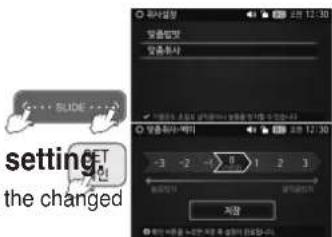
4 Press SET button after it's finished to save the current setting
In another 15 seconds after it's finished, it will be canceled without saving the changed value.
- 'CUCKOO customized cooking function' applies to GLUTIN. RICE, HIGH HEAT GLUTIN. RICE, SOFT GLUTIN. RICE, MIXED RICE, HIGH HEAT MIXED RICE, BROWN RICE, HIGH HEAT BROWN RICE, GABA RICE, BLACK BEAN RICE collectively.
- Set up the step of customized cooking function to taste. The scorch can occur when cooking in high level mode.
- Cook is subject to be set differently depending on the percentage of water content and the condition of rice.

HOW TO USE GABA RICE/MULTI-COOK FUNCTION
Using "GABA" Menu
1 Enter 'Rice' menu in the home screen, select the 'Gaba Rice' and press the 'COOK/TURBO' button.
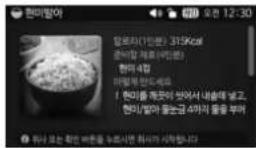
If you press the 'COOK/TURBO' button, it will start cooking immediately for the displayed germination time. Press SET button and then you can view the recipe.
Press the 'COOK/TURBO' or SET button in View Recipe mode and it will start cooking. When starting cooking, the remaining time will be displayed with the unit of minutes.

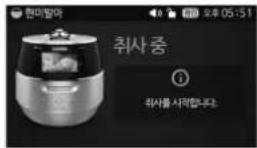
When the "GABA" is selected, "3H" is indicated in the display
If you don't want to grow the size of the sprout germinated and want to eat earlier, select the Gaba Rice while skipping the pre-germination phase, and then press the 'COOK/TURBO' button.
(nutrients ingredients do not vary significantly by the size of germ).
During hot seasons, longer germination time may generate odor. Reduce germination time.
GABA cooking feeds up to 6 people.
City water can be used for germination. However, filtered or drinkable water is recommended.
Germination may not be properly performed in hot or boiled water even after cooking.
Germination rate and germ growth may differ by the type of brown rice, condition, or period of storing.
- The brown rice should be within 1 year from harvest, and not long since pounded.
In GABA mode, preset on 3H may not be possible. If you want to preset the GABA, set up BROWN RICE menu.
The taste of rice could be different depending on a kind of brown rice.
Use customized taste function or control the amount of water for your taste. (Refer to Page 20)
Depending on the user's environment or the condition of the rice, the sprout may not be visible.
Multi-Cook Function
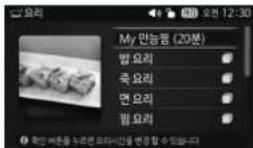
1 Enter 'dishes' menu in the home screen, select the 'MY multi-cook' and press the 'COOK/TURBO' button.
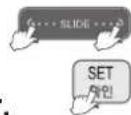
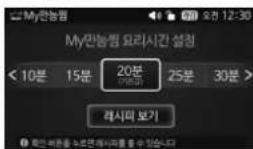
2 Set your desired cooking time with the touch slider.
Each time you press the right arrow ( > ), the steaming time will increase by one step.
Each time you press the left arrow ( < ), the steaming time will decrease by one step. (If you keep pressing the button, it will change continuously.)
You can set the time for Multi Cook from 10 minutes to 120 minutes.
You can set the time from 10 minutes to 90 minutes with the unit of five minutes, and can set the time from 90 minutes to 120 minutes with the unit of 10 minutes.
If you press the 'CANCEL' button, it will return to the home screen without saving the time.
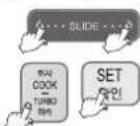
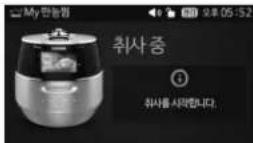
3 Press SET and then 'COOK/TURBO' button to start cooking.
In Multi Cook mode, the remaining time will be displayed.
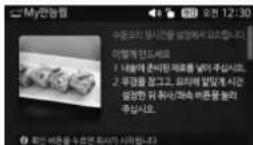
If you Press SET button after selecting the cooking time, the value will be saved and you can view the recipe.
Press the 'COOK/TURBO' or SET button in View Recipe mode and it will start cooking.

HOW TO USE MY RECIPE FUNCTION / RECENT COOK FUNCTION
My Recipe Function
This function allows you to add your favorite menu for which you could jump start cooking.
How to Use "My Recipe"
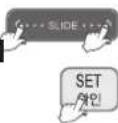
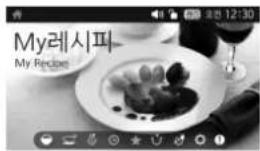
Select 'My Recipe' in the home screen, and press SET button.
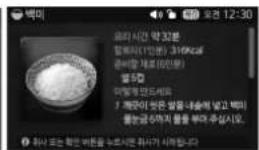
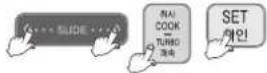
enter the mode. If you press SET button, the product will shift into the View Recipe mode, and then press the 'COOK/TURBO' button to start cooking.
(For Gaba Rice/Multi Cook/Bread Fermentation/Baking mode, default time value is applied and it does not offer personalized setting option)
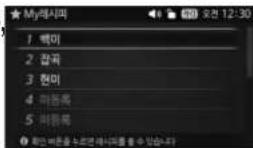
You can add up to 8 items to My Recipe.
You may delete the default Glutinous/Mixed/Brown rice options.
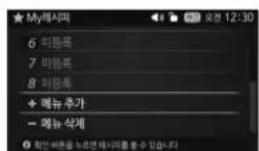
For any unsaved menu, the blank will be displayed as 'Add menu.'
Adding menu to My Recipe
In My Recipe mode, select 'Add Menu' and press SET button.
Menu : Rice, My multi-cook, Rice dishes, Porridges, Noodles, Steamed dishes, Home bakery, Stews, Baby food
For Multi Cook menu : Press SET button and you can change the cooking time.
For others : Press SET button and you can view more items.
You can add up to 8 items for My Recipe. In this case if you want to add another menu, please delete one first before adding it. In case it's overlapped, the current menu will replace the previous one.


Press SET button during cooking and you can add the menu to My Recipe
If you add a menu when your My Recipe list is full, it will replace automatically the one with low priority.
Delete a menu to My Recipe
Select My Recipe in the home screen and then press SET button. In My Recipe mode, select 'Delete Menu' and press SET button.
Select the menu you want to delete from My Recipe and press SET button.
Recent Cook Function
1 Press the 'COOK/TURBO' button in the home screen (Rice) to view the meals that are cooked recently.
Three recent items will be displayed with the most recent one being displayed on the top. If there is no menu cooked, the 'Glutinous rice' option will be displayed. Saving new options will automatically delete the ones at the bottom.
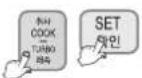
2 Select the menu you want using the touch slider.
Press SET button after selecting the menu and then you can view the recipe. Press the 'COOK/TURBO' or SET button in View Recipe mode and it will start co
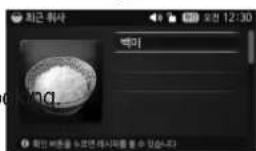
3 Press SET and then 'COOK/TURBO' button to start cooking.


HOW TO USE HOME BAKERY
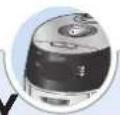
Using Fermentation
1 Enter 'Cook' in the home screen, select 'Home bakery' and then select 'Bread Fermentation.'
2 Select the Fermentation time you want using the touch slider.
Each time you press the right arrow ( > ), the Fermentation time will increase by one step.
Each time you press the left arrow ( < ), the Fermentation time will decrease by one step.(If you keep pressing the button, it will change continuously.)
You can set the time from 5 minutes to 90 minutes with the unit of five minutes, and can set the time from 90 minutes to 120 minutes with the unit of ten minutes
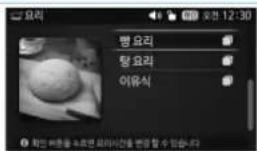

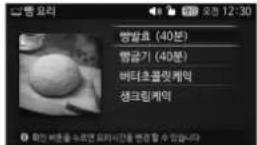
3 Press SET and then 'COOK/TURBO' button to start cooking.
If you Press SET button after selecting the Fermentation time, the value will be saved and you can view the recipe.
4 hen first fermentation is completed, press softly dough for remove gas and repeat process
2-3 for second fermentation.
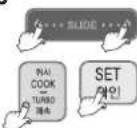
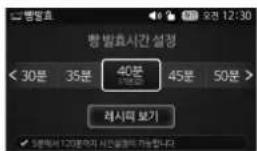
After the primary fermentation is done, select 'Cook,' 'Home baker y,' and 'Bread Fermentation' in order and Press SET button. Then, a pop upsaying "Move to the next phase." will show and the product shifts into the fermentation time setting mode. After second fermentation, open the lid and make sure dough size is 1.5 to 2 times.
After the secondary fermentation is done, you will hear the voice saying "Check the progress of fermentation first and then perform additional fermentation or select the baking mode."
Using Bread Baking
1 Enter 'Cook' in the home screen, select 'Home bakery' and then select 'bread Baking.'
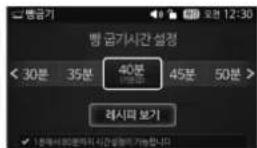
2 Select the Baking time you want using the touch slider.
Each time you press the right arrow ( ), the Fermentation time will increase by one step.
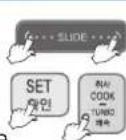
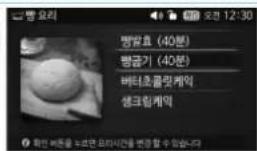
decrease by one step.(If you keep pressing the button, it will change continuously.) You can set the time for Baking from 1 minutes to 80 minutes.
You can set the time from 1 minutes to 20 minutes with the unit of one minutes, and can set the time from 20 minutes to 80 minutes with the unit of five minutes.
If you Press SET button during baking, it will be saved in My Recipe.
Once the baking begins, the cooking icon will be displayed along with the remaining time.
3 Press SET and then 'COOK/TURBO' button to start cooking.
If you Press SET button after selecting the Baking time, the value will be saved and you can view the recipe. Press the 'COOK/TURBO' or SET button in View Recipe mode and it will start cooking.
When the "Bread Baking" process is complete. Immediately remove the bread from inner pot.
After the "Bread Baking" is complete, the bread is hot and you should be careful.
If there is a problem of fermentation / bread baking, check the following details.
| Case | Chech point | Do the following | |
| DOUGH | flaccid? | well. | |
| BAKEDBREAD | Capacity of the material, the time set correctly? Fermentation time and kneading time set correctly? Did you set short fermentation time or baking time? Did you set long fermentation time or baking time? | fermentation and baking time. | |
| When the baked color of the Underside of the bread is not appeared. wrinkled. | inner pot. Did you set short baking time? | When the second fermentation is complete, the dough should be left in the middle of the inner pot. Extend their baking time. Immediately remove the bread from inner pot |
Please cook according to the Cooking Guide (Page 34) to ensure it's properly baked.
HOW TO USE PRESET COOKING / POWER-SAVING STANDBY FUNCTION
How to preset timer for cooking
1 Check if the current time and the menu are correct.
2 Enter 'Preset' in the home screen, select the Preset menu, and press SET button.
You can preset cooking only for the rice menu (Turbo Glutinous, Turbo Mixed and Gaba rice NOT included).
3 Select the Baking time you want using the touch slider.
You can set the hour first with the touch slider and press SET button. After that you can set the minutes.
Press BACK button to move from the 'minute' to 'hour' screen. The hour is changed with the unit of one hour, and the minute is changed with the unit of ten minutes. Please be careful no to change from AM to PM.
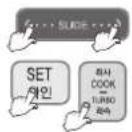
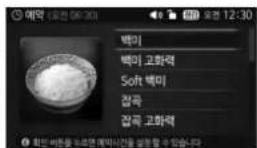
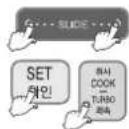
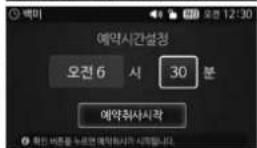
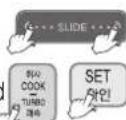
4 Press SET or 'COOK/TURBO' button to start cooking.
The preset cooking time is set for the maximum portion for each menu. Therefore, the smaller the quantities of ingredients, the earlier the cooking may be completed than the preset time.
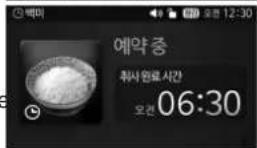
Precautions for Preset Cooking
1 In case of preset cooking
If the rice is old and dry, the result may not be good If the rice is not well cooked, add more water by about half-scale. If the preset time is longer, melanization could be increased.
PRESET COOKTIME
| MENU | GLUTIN RICE | HIGH-HEAT GLUTIN RICE | MIXED RICE | HIGH-HEAT MIXED RICE | 30'FT GLUTIN RICE | BROWN RICE | HIGH-HEAT BROWN RICE | NUTRI. RICE | BLACK BEAM RICE | FINE-GRAW RICE | BOILED BARLEY | PEA RICE | Bulged Brown Rice with Red Bears | RICE FORRIDGE (Truck Panbridge) | CHINESE FORRIDGE (Truck Panbridge) | Preset Reheating |
| PRESET COOK TIME | (41 min - 1/yr mode time) ~13hours | (42min + 1/yr mode time) ~12hours | (56 min + 1/yr mode time) ~13hours | (57 min - 1/yr mode time) ~13hours | 58min ~13hours | (63 min + 1/yr mode time) ~13hours | (64min + 1/yr mode time) ~13hours | 35min ~13hours | 53min ~13hours | 56min ~13hours | 56min ~13hours | 41 min ~13hours | 63min ~13hours | 110min ~13hours | 118min ~13hours | 180min ~13hours |
Power-Saving Standby mode
If the selected time has passed in the Standby status, it will automatically enter the power saving mode.
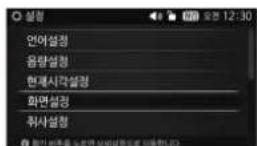
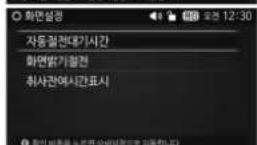
1 Enter 'Setting' in the home screen, select 'Screen Setting' and then select 'Power-Sacving Standby.'
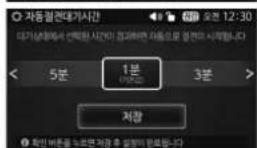
2 Select the Power-Saving Standby time you want using the touch slider.
"1 minute(default)", "3 minute", "5 minute"
3 Press SET button and it will be saved.
If it's left idle for 15 seconds or so during setting, you will hear voice guidance. In another 15 seconds after it's finished, it will be canceled without saving the changed value.
Disabling power saving mode
- If you press every button, the mode will be canceled and the product will return to the home screen.
- If you turn the handle, the power saving mode will be canceled and the product will return to the home screen.
- If the power is supplied again after blackout, it will return to the home screen.
- If the power cable is plugged out and then plugged in again in the power-saving mode, the mode will be canceled and the product will return to the Home Screen.





HOW TO USE POWER SAVE SCREEN LIGHT MODE PRESET REHEATING FUNCTION

Power Save Screen Light Mode
In Standby, Cooking, Keep Warm and Preset cooking mode, this function reduces power consumption by lowering the brightness of the screen after a certain amount of time has passed.
1 Enter 'Setting' in the home screen, select Screen Setting and then select Screen saver Power-Saving Standby.
2 Select 'Enable' or 'Disable' with the touch slider.
The default value is 'Enable'.
3 Press SET button and it will be saved.
If you press the 'CANCEL' button during setting, it will return to the home screen without saving the changed value.
If it's left idle for 15 seconds or so during setting, you will hear voice guidance. In another 15 seconds after it's finished, it will be canceled without saving the changed value.
It lowers the total brightness of the LCD to 50%.
Screen Saver On: If it's left idle for a certain amount of time, the screen will be darker.

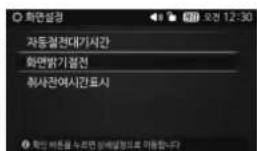
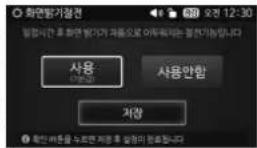
How to use Preset Reheating function
a hot meal at your convenience.
It takes 50 minutes before it's fully warmed up: Please use the function at least 50 minutes before you enjoy your meal.
1 Check if the current time and the menu are correct.
2 Enter 'Preset' in the home screen, select the Preset Reheating menu, and press SET button.
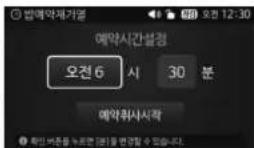
3 Press the touch slider to preset the completion time of reheati
You can set the hour first with the touch slider and press SET button. After that you can set the minutes.
Press BACK button to move from the 'minute' to 'hour' screen.
The hour is changed with the unit of one hour, and the minute is changed with the unit of ten minutes.
Please be careful no to change from AM to PM.
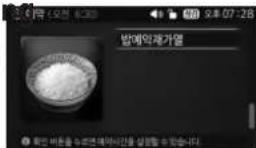
4 Press SET or 'COOK/TURBO' button to start cooking.
he preset time will be saved whether the preset reheat process is completed or canceled in the middle. (However, if it exceeds 13 hours, the previously memorized time will be maintained.)
When the preset reheat process is completed, the product will enter the Keep Warm mode.
Precautions for preset reheating
1 In case of preset reheating.
When leaving cooked rice at ambient temperature for a prolonged period of time, moisture is evaporated from cooked rice. In such a case, the reheating preset may cause dehumidifying or melanosis (slightly burnt) of cooked rice.
If there is an excessive amount of cooked rice in the pot, it may not sufficiently be reheated.
It is recommended to set reheating for no more than 5 people. (approx. half of the inner pot)
Reheating of cold- or frozen-stored cooked rice may cause insufficient heating, dehumidifying or melanosis (slightly burnt) after completion of reheating.
Reheating of frozen-stored cooked rice shall be performed only after thawing the rice.
2 Changing preset time.
Press 'CANCEL' button for more than 2 seconds and restart it to change the preset time.
3 If the preset time is shorter than available range.
If the preset time is shorter than the available range(50 minutes), reheating will begin immediately.
4 In case the preset time is over 13 hours.
"13Ho" will be displayed and the preset time will be changed to 13 hours automatically. If cooking is preset to AM07:00 of the following day at PM5:00 of the day, where preset time is 14 hours, "13Ho" will be displayed, and preset time

TO KEEP COOKED RICE WARM AND TASTY
How to Keep Warm
1 Press the Keep Warm/Reheat button or select the 'Keep Warm/Reheat' mode from the home screen. After that press SET or the 'COOK/TURBO' button.
2 In this mode, the screen will display 'Keep Warm'.
The warming time is displayed with the unit of one minute. If the power is supplied again after blackout, it will start from Keep Warm mode again. But, when the rice is cooled down, the mode will be canceled and the product will return to the home screen.
How to Reheating
If you want to have warm rixe, press the "REHEAT/KEEP WARM" button.
Reheating will be done for nine minutes, and then the Keep Warm mode begins again.
The frequent use of the "Reheat" function may cause the cooked rice to be discolored or dried. Use it once twice per day.
1 Press the 'COOK/TURBO', SET or the 'Keep Warm/Reheat' button during Keep Warm, and it will start reheating.
2 If you Press, however, SET or the 'Keep Warm/Reheat' button again in the middle, Reheating will be canceled and the product will return to the Keep Warm mode.
If the fid combining hand grip is turned to open status during reheating, function display will show "E01". At this time, reheating will be cancelled, and heat preservation will proceed.
Keep Warm Temperature Setting Function
If the temperature in the rice cooker is not set properly, an odor or the color of the rice may be even though it is cleaned frequently and boiled up. Temperature needs to be set.
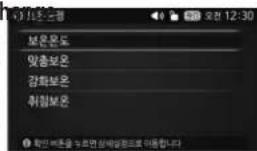
1 Enter 'Setting' in the home screen, select 'Keep Warm Setting' and then select 'Keep Warm Temperature'.
2 Select the temperature you want using the touch slider.
The default value is '74°C'
Each time you press the right arrow ( > ), the warming temperature will increase by one degree.
Each time you press the left arrow ( ≤slant ), the warming temperature will decrease by one degree.
The reference temperature programmed when the product is shipped may differ from the Instruction
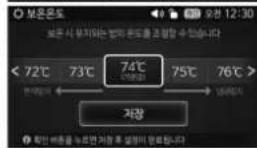
3 Press SET button and it will be saved.
When you smell bad odors and the rice is too watery: The keep warm temperature is too low. In this case, increase the "Keep Warm" temperature by 1-2. 2. When the rice has a yellowish color or is too dry: The Keep Warm temp is too high. In this case decrease the "Keep Warm" temperature by 1-2.
Customized Taste keep warm setting function
Use it while opening the lid when there is too much water or rice becomes too soft.
1 Enter 'Setting' in the home screen, select 'Keep Warm Setting' and then select 'Customized Taste keep warm.'
2 Select the temperature you want using the touch slider.
Each time you press the right arrow ( > ), the controlling temperature for top heater will increase by one degree, and you can set values from Step -2 to Step 2.(Use it when the water flows excessively when you open the lid.) Each time you press the right arrow ( < ) the controlling temperature for top heater will increase by one degree, and you can set values from Step -2 to Step 2. (Use it when you find that the rice is partially over cooked on the side.)
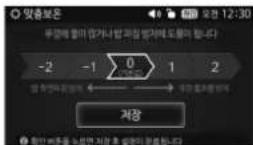
3 Press SET button and it will be saved.
How to setting "Sleeping" function
When keeping rice warm for a long time, set up the temperature low to prevent the following quality of riemelly, dry, change of color; from PM10:00 \~ AM 04:00.
1 Enter 'Setting' in the home screen, select 'Keep Warm Setting' and then select 'Sleeping keep warm'.
2 Select 'Enable' or 'Disable' with the touch slider.
The default value is 'Disable'
3 Press SET button and it will be saved.
If it enters the Keep Warm mode while you are sleeping, however, this function will be not applied. function will be not applied.
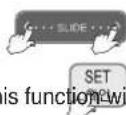
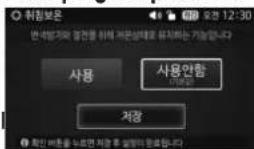
If you need to keep the rice warm during sleeping, do not use this function. This function makes the rice cooler than normal. In summer, the rice can be spoiled and may smell bad because of high temperature. If possible, do not use the "Custom-made warming" mode while sleeping.
REMAINING COOKING TIME DISPLAY / LOCK BUTTONS / PRODUCT INITIALIZATION / HELP FUNCTION

REMAINING COOKING TIME DISPLAY FUNCTION
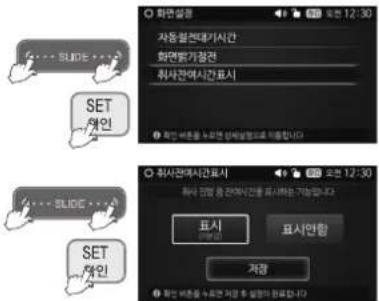
Enter 'Setting' in the home screen, select 'Screen Setting' and then select 'Remaining cooking time display.'
1 Enter 'Setting' in the home screen, select 'Screen Setting' and then select 'Remaining cooking time display.'
2 Select whether to display remaining time with the touch slider.
The default value is 'Disable'
3 Press SET button and it will be saved.
If it's left idle for 15 seconds or so during setting, you will hear voice guidance. In another 15 seconds after it's finished, it will be canceled without saving the changed value.
How to Set "LOCK BUTTONS"
Lock can be set for touch button to prevent accidental touch during cleaning or by children.
Setting Method
How to set and unset the mode
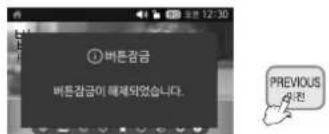
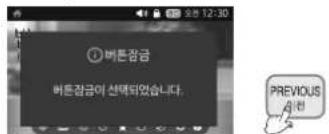
- If you press the 'BACK' button for three seconds or longer in Standby, Cooking, Presetting, and Keep Warm/Reheat mode, it will enter the Button Lock mode.
-
You will here the voice guidance that says "Button Lock Activated." Here, a lock icon will be displayed as " 🔊" on the top of the screen.
-
If you press the 'BACK' button for three seconds or longer in Standby, Cooking, Presetting, and Keep Warm/Reheat mode, it will enter the Button unLock mode.
- You will here the voice guidance that says "Button unLock Activated." Here, a lock icon will be displayed as "☐" on the top of the screen.
If you press any other button than the 'Back' button while the button lock is selected, a buzzer sound will be made, and the screen notifying that it is in the locked status will be displayed.
You may unlock the buttons by pressing the 'BACK' button for three seconds or longer.
If you pull out and put in the Power Plug again after setting the button lock, the Button Lock Function will be canceled.
How to use "Product initialization"
Use it to set the default value of multiple customization functions and user option functions.
How to initialize set values
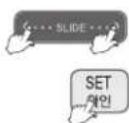
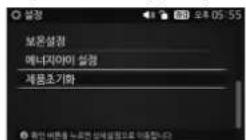
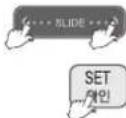
Enter 'Setting' in the home screen and select Product initialization, and Press SET button.
Select "Yes" when it says "the product will be reset to its factory default settings. Will you continue?", and press SET button. If you initialize the product, the current time will also be initialized. Therefore, set the current time before using the product. (Refer to Page 16)
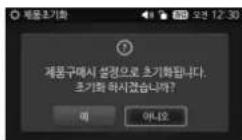
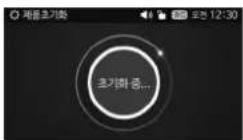
Help function
Enter 'Help' in the home screen and select your desired category, and Press SET button.
You may refer to the information listed in the selected category.
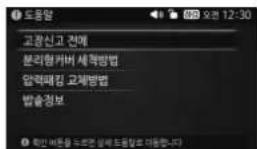
CHECK BEFORE ASKING : The items are classified according to the characteristics of the problem. When cooking is not well, When the warm is not well, When the reservation is not well, When the operation is not well, When errors occur. FOR SERVICE HOW TO CLEAN DETACHABLE COVER HOW TO REPLACE PRESSURE PACKING PTODUCTION INFOMATION : You can see the Model, Service Center, Phone numbers, Website address.
CHECK BEFORE ASKING FOR SERVICE
Sometimes the cooker may not operate as desired if used incorrectly.
| Case | Check points | Do the following |
| When the rice is not cooked. | ‘COOK/TURBO’ button is pressed?Is there power cut while in cooking? | Press the ‘COOK/TURBO’ button once.Refer to page 16 for blackout compensation. |
| When the rice is not well cooked. | Did you put proper amount of water?Did you rinse the rice before cooking?Did you put rice in water for a long time?Is the rice old or dry? | Refer to page 17Add water about half the notch and then cook. |
| Bean (other grains)is half cooked. | Is bean (other grains) too dry? | Soak or steam beans and other grains before cooking in the pressure cooker in order to avoid.partially cooked beans or grains. Beans should be soaked for -2-minutes or steamed for-2-minutes prior to cooking, depending on your taste. |
| Rice is too watery or stiff. | Is the menu selected correctly?Did you properly measure water?Did you open the top cover before cooking was finished? | Select the correct menu.Properly measure water.Open the top cover after cooking finished |
| When the water overflows. | Did you use the measuring cup?Did you use proper amount of water?Is the menu selected correctly? | Refer to page 17 |
| Brown rice is not germinated Properly. | Does the amount of rice exceed the specified maximum capacity?Is bean(other grains) too dry? | Put the specified maximum capacity of brown riceOld rice or contaminated rice may not be germinated properly. |
| When the rice is badly sticky. | Is there any rice or any other alien substance on the temperature sensor or the bottom surface of the inner pot? | Clean all the alien substances on the temperature sensor or the bottom surface of the inner pot. |
| When you smell after and before cooking? | Did you clean it after cooking? | Please clean it after cooking. |
CHECK BEFORE ASKING FOR SERVICE
Sometimes the cooker may not operate as desired if used incorrectly.
| Case Check points Do the following | ||
| When you smell odors while warming. | Did you close the top cover? Please check it the power cord is plugged. Did it warm over 12 hours? Is there any other substance such as rice scoop or cold rice? | Close the top cover perfectly. Always keep the power on while warming. As possible, keep warming time within 12 hours. Don't warm rice with other substance. |
| Warming passed time mark blinks during keeping warm. | 24 hours has not passed yet after Keeping warm | This function alarms if the rice remained warm for more than 24 hours. |
| Rice has gotten cold or a lot of water flow during Keeping warm | Keeping warm was set in "Sleeping" mode | Keep warm after cancelling or setting "Sleep Keeping Warm" mode depending on the necessity |
| Alarm sounds or reheating does not work while keeping warm | Detachable cover is not mounted | Mount detachable cover(Refer to page 12). |
| When the time cannot be preset. | Is the current time correct? Is AM or PM set properly? Did you set the reservation time over 13 hours? | Set the current time. Check the AM and PM. Maximum reservation time is 13 hours. |
| When the top cover cannot be closed. | Is the inner pot correctly inserted in the main body? Is the Lock/Unlock handle on the top cover set to "Lock"? Is there hot food in the inner pot? | Please put in the inner pot perfectly. Please turn the "Lock/Unlock" handle to "Lock". Pull the pressure handle to aside once. |
| When cannot turn to "Unlock". | Did you turn the "Lock/Unlock" handle while cooking? · Did you turn the "Lock/Unlock" handle before exhausting steam perfectly? | Don't open the top cover while cooking. If you want to open top cover while cooking, press the "Cancel" button more than 1 seconds and release the steam. Pull the pressure handle to the side once and allow the steam to release. |
| When the top cover cannot open although the Lock/Unlock handle is turned to "Unlock". | Because of the pressure. Pull the pressure handle to aside once and exhaust the steam perfectly. | |
| When the steam exhausted between the top cover. | Is there an external substance on the packing? Is packing too old? | Clean the packing with duster. Keep the packing clean. If the steam is exhausted through the top cover, please power off and contact the service center and dealer. Packing life cycle is 12 month, please replace the packing per 1 year. |
| When the "Cancel" button does not operate while cooking. | Is the inner pot hot? Is currently the setting to lock button mode? | Keep pressing the "Cancel" button for 1 seconds for safety reason if you want to cancel while cooking. Be careful of hot steam emission or hot contents spattered from the automatic steam outlet during cancellation. Please press "Set" button for over 3 seconds to release. |
CHECK BEFORE ASKING FOR SERVICE
Sometimes the cooker may not operate as desired if used incorrectly.
| Case | Check points | Do the following |
| When you hear weird noises during cooking and warming | Is there a wind blowing sound when cooking the rice? Is there a “Chi” sound when warming the rice? | This is the sound of the fan motor to cool the internal parts. This is normal. The “Chi” sound during the warming process is the sound of IH cooker operating. This is normal. |
| If “Edo” sign is appears. | It shows on the display when pressing “Start” button again, or when the cooking has finished and you ve never turned the handle to ‘Unlock’. | It can be solved by turning handle to ‘Unlock’ and then turn to ‘Lock’. |
| “Eco” sign shows up | Detachable cover is not mounted | Mount detachable cover(Refer to page 12) If “Eco” sign is displayed continuously even though you already installed detachable cover, please contact customer service. |
| When the button cannot operate with “LJ” | Is the inner pot inserted? Check the rated voltage? | Please insert inner pot. This product is 120V only. |
| When the Pressure “Cook/Turbo” Timer button does not operate with “EOI” | Did you turn the lid Handle to “Lock” Is “Lock” lamp on? | Please turn the “lid” handle to “Lock”. |
| If “E_u” sign is appears. | Micom power is out. | Please cut the power and contact customer service. |
| When “E_P” are shown on the LCD by turns | The sensor is broken | Please cut the power and contact customer service. |
| EuF, EuF1, EuF2 Signs show up. | Micom memory is out. | Please cut the power and contact customer service. |
| When “HF, HP” are shown on the LCD by turns | Is there power cut while in cooking? Please cut the power and contact customer service | |
| “E_”, “E_P”, “E_E” Signs show up. | Temperature sensor or fan motor does not work properly. | Unplug the power cord and call the Service center. |
| “E_F” sign shows up | fan motor does not work properly. | Unplug the power cord and call the Service center. |
| If “E_O” sign is appears. | Is there any foreign material other than inner pot inside the cooker? | Unplug the power cord and call the Service center. |
| If “EOY” sign is appears. | It appears when there is a problem with touch buttons. | Unplug the power cord and call the Service center. |
| If “E_OP” sign is appears. | It appears when there is a problem with MICOM transmission. | Unplug the power cord and call the Service center. |
| Nothing appears on LCD screen. All the buttons except the slide touch button are blinking, | It appears when there is a problem with LCD transmission. | Unplug the power cord and call the Service center. |
| The power is not on after plug in the power cord, | Please turn on the standby power switch button. |


RECIPE

| SELECT MENU | |||||
| RICE | GLUTIN.RICE | Rice 6 cupsThe cup in ingredients means a measuring cup in the rice cooker. 1 cup (180cc) is for one person. | 1.Put clean-washed rice in the inner pot and pour water up to the line 6 for Glutinous Rice.2.Close the lid, select the 'Rice' or 'High heat Glutinous Rice' menu in 'Rice' from the display panel, and press the 'COOK/TURBO' button. | ||
| HIGH HEAT GLUTIN. RICE | Rice 6 cups | ||||
| SOFT GLUTIN. RICE | Rice 6 cups | Put clean-washed rice in the inner pot and pour water up to the line 6 for SOFT Glutinous Rice.2.Close the lid, select the 'SOFT Glutinous rice' menu in 'Rice' from the display panel, and press the COOK/TURBO' button. | |||
| MIXED RICE | Rice 3 cups, Brown rice 3 cups | Put clean-washed rice in the inner pot and pour water up to the line 6 for MIXED Rice.2.Close the lid, select the 'Mixed Rice' or 'High Heat Mixed Rice'menu in 'Rice' from the display panel, and press the 'COOK/TURBO' button. | |||
| HIGH HEAT MIXED RICE | Rice 3 cups, Brown rice 3 cups | ||||
| BROWN RICE | Brown rice 4 cups | Put clean-washed rice in the inner pot and pour water up to the line 4 for Mixed Rice.2.Close the lid, select the 'Brown rice' or 'High hear Brown'menu in 'Rice' from the display panel, and press the 'COOK/TURBO' button. | |||
| HIGH HEAT BROWN RICE | Brown rice 4 cups | ||||
| GABA RICE | Brown rice 4 cups | Put clean-washed rice in the inner pot and pour water up to the line 4 for GABA Rice.2.Close the lid, select the 'GABA rlo menu in 'Rice' from the display panel, and press the COOK/TURBO' button. | |||
| BLACK BEAN RICE | Rice 1.5 cups, Black bean 1 cups, 1.5 tablespoons Of clear rice wine, 1.5 teaspoons of salt.*If you want softer beans, soak black beans in water or boil them.When cooking black rice, add 1/2 measuring cup of water for two people, 3/4 measuring cup for four and one cup for six people. | Put clean-washed rice in the inner pot and pour water up to the line 4 for Mixed Rice.Put washed black beans on top of that, additionally pour 3/4 cup of water, and mix the rice and the black beans.3.Close the lid, select the 'BLACK BEAN rlo menu in 'Rice' from the display panel, and press the JOK/TURBO' button. | |||
| NUTRI. RICE | 4 cups of rice, 4 roots of Fresh Ginsengs. 4 chestnuts, 4 jujubes, 12 grinko nuts, 2 tablespoons Of clear rice wine*Seasoning sauces: soy sauce 4 tablespoons, chopped scallion 2 tablespoons, crushed garlic 1/2 tablespoon, red pepper powder 1/2 teaspoon, ground sesame mixed with salt 2 teaspoons, sesame oil 1 teaspoon | Put clean-washed rice in the inner pot and pour water up to the line 4 for Glutious Rice.Close the lid, select the 'NUTRI. rlo menu in 'Rice' from the display panel, and press the JOK/TURBO' button. | |||
| FIVE-GRAIN RICE | 1.5 cup of rice, millet 1/3 cup, glutinous rice 1/2cup, red beans 1/3cup, sorghum 1/3cup and salt 1 teaspoon | Put clean-washed rice in the inner pot and pour water up to the line 3 for Mixed Rice.Close the lid, select the relevant menu' menu in 'Rice' from the display panel, and press the COOK/TURBO' button. | |||
| BOILED BARLEY | 2 cup of rice, 1 cup of barley | ||||
| PEA RICE | 3 cups of rice, 1/2 cup of pea, 1 tablespoons Of clear rice wine.1.5 teaspoonful of salt.*Boil pea before cooking. | Put clean-washed rice in the inner pot and pour water up to the line 3 for Glutinous Rice.Close the lid, select the 'Pea rice' menu in 'Rice' from the display panel, and press the COOK/TURBO' button. | |||
| Boiled Brown Rice with Red Beans | Brown rice 1 cup, rice 2 cup and red beans 1/3 cup | Put clean-washed rice in the inner pot and pour water up to the line 3 for GABA Rice.Close the lid, select the 'Boiled Brown Rice with Red Beans' menu in 'Rice' from the display panel, and press the 'COOK/TURBO' button. | |||
| Rice porridge | Rice 1 cup | Level depending on the quantity of food to be served. [Rice porridge: water up to the line 1 for Thick porridge. Chinese porridge: water up to the line 1 for Thin porridge]*Note: The maximum quantity for rice porridge is two cups, and the maximum quantity for Chinese porridge is 1.5 cups.2.Close the lid, select the 'Rice porridge' OR 'Chinese porridge' menu in 'Rice' from the display panel, and press the COOK/TURBO' button. | |||
| Chinese Rice porridge | Rice 0.5 cup | ||||
| COOKING | MY MULTI-COOK | MY MULTI-COOK | You can set the time for Multi Cook from 10 minutes to 120 minutes. | Put the prepared ingredients in the inner pot.Close the lid, select the 'My multi-cook' menu in 'Cooking' from the display panel, and press the 'COOK/TURBO' button. | |
| RICE COOKING | Nut Rice | 4 cups of rice, 4 walnuts, pine nut 2 tablespoon, almond 2 tablespoon, cashew nut 2 tablespoon, 15 ginkgo nuts*Seasoning sauces: soy sauce 4 tablespoons, chopped scallion 2 tablespoons, crushed garlic 1/2 tablespoon, red pepper powder 1/2 teaspoon, ground sesame mixed with salt 2 teaspoons, sesame oil 1 teaspoon | Put clean-washed rice in the inner pot and pour water up to the line 4 for Glutious Rice.2.Close the lid, select the 'Rice cooking' option in 'Cooking' from the display panel, and press the 'COOK/TURBO' button. | ||


RECIPE
| SELECT MENU | |||||
| COKING | RICE COOKING | Assorted Mushroom Rice | 4 cups of rice, 200g of beech mushroom, 40g of enoki mushroom, 4 button mushrooms | Put clean-washed rice in the inner pot and pour water up to the Line 4 for Glutinous Rice.2. Close the lid, select the 'Rice cooking' menu in 'Cooking' from the display panel, and press the 'COOK/TURBO' button.* Seasoning sauces: soy sauce 4 tablespoons, chopped scallion 2 tablespoons, crushed garlic 1/2 tablespoon, red pepper powder 1/2 teaspoon, ground sesame mixed with salt 2 teaspoons, sesame oil 1 teaspoon | |
| Mushroom Bamboo shoot Rice | 4 cups of rice, 200g of oyster mushroom, 100g of bamboo shoot, 10 ginkgo nuts | ||||
| Green Tea Rice Blended with Chicken Chest Flesh | 2 cups of brown rice, 5g of green tea leaf, 10g of green tea, powder, 4 nuggets of chicken chest flesh, a little bit of olive oil, a little bit of salt, a little bit of pepper, 5g of celery, a little bit of lime, a little bit of rosemary | Put clean-washed rice in the inner pot and pour water up to the Line 2 for Gaba Rice.Close the lid, select the 'Rice cooking' menu in 'Cooking' from the display panel, and press the 'COOK/TURBO' button.*Seasoning sauces: soy sauce 4 tablespoons, chopped scallion 2 tablespoons, crushed garlic 1/2 tablespoon, red pepper powder 1/2 teaspoon, ground sesame mixed with salt 2 teaspoons, sesame oil 1 teaspoon | |||
| Mushroom Tian | 2 cups of brown rice, 20g of brown gravy sauce, a little bit of salt, 2 sheets of sesame leaves. 10 pieces of pumpkin, a pack of shrmel mushroom | ||||
| Saessak Bibimbap (rice with sprout and vegetables) | 2 cups of brown rice and some sorouts and vegetables.* Seasoning red pepper paste: Red pepper paste 1/2 cup, beef (crushed)40g, sesame oil 1 tablespoon, honey 1 tablespoon and sugar 1 tablespoon, 1/3 cup of water | ||||
| PORRIDGE COOKING | Chicken Rice Porridge | 1 cups of rice, 200g of chicken, 600 cc of chicken broth, 'tea green chili, tea, red pepper, some salt'Seasening sauces: chopped scallion 1 tablespoons, crushed, garlic 1 tablespoons, soy sauce 2 tablespoons, red pepper powder 1/2 teaspoon, some ground sesame, sesame oil 2 teaspoon | Put the prepared ingredients in the Inner Pot and pour water up to the appropriate water level depending on the quantity of food to be served.[Chicken Rice Porridge, Pine Nut Porridge: water up to the line 1.5 for Thick porridge, Abalone Rice Porridge, Adzuki-Bean: water up to the line 1 for Thick porridge]Close the lid, select the 'Porridge cooking' menu in 'cooking' from the display panel, and press the 'COOK/TURBO' button. | ||
| Pine Nut Porridge | 1 cups of rice, 1 cups Pine Nut, some salt | ||||
| Alcaine Rice Porridge | 1 cups of rice, sesame oil 1 tablespoon, tea alacone, some salt | ||||
| Adzuki-Bean | 1 cups of rice, 1/3 cups Adzuki-Bean, 1 cups glutinous rice flour | ||||
| STEAM ED COOKING | Steamed Chicken | a chicken (1 kg), 100g of potato, 100g of carrot., Sugar 3 tablespoons, 1 teaspoons of chopped green onion, crushed garlic 1 tablespoon, soy sauce 6 tablespoons, ginger juice 1 tablespoon, ground pepper 1/2 teaspoons, ground sesame 1 tablespoons, sesame oil 1.5 tablespoon | 1. Put the prepared ingredients in the inner pot.2. Close the lid, select the 'STEAMED cooking' menu in 'cooking' from the display panel, and press the 'COOK/TURBO' button. | ||
| Steamed Rice Cake | 5 cups nonglutinous rice powder, 2 cups adzuki beans, salt 1 tablespoons, sugar tablespoons, water 3 tablespoons | ||||
| Braised Short Ribs | 1.2 kg of beef rib (pork rib), retired rice wine 3 tablespoons, soy sauce 5 tablespoons, chopped garlic 1 tablespoon, sesame oil 1 tablespoons, onion juice 3 tablespoons, pear juice 3 tablespoons, sugar 3 tablespoons, 5 tablespoons of chopped green onion, ground sesame 1 tablespoons, ground pepper 1/2 teaspoons, carrot 'tea, Chestnut 10ea, ginkgo nut 20ea, pine nut powder 1 tablespoons | ||||
| Five Spice Sliced Steamed Pork | 700g of pork, soy sauce 1/3 cups, sugar 2 tablespoons, water 1.5 cups, a little machine cotton five spices: six whole peppers, 7cm of three cinnamon, 4ea star rose | ||||
| Seamed POTATO | Potato 6EA (less than 200g) | 1. Pour 2 cups of water in the inner pot and place the steam plate. Put the prepared ingredients on top of the plate.2. Close the lid, select the 'STEAMED cooking' menu in 'cooking' from the display panel, and press the 'COOK/TURBO' button. | |||
| Steamed corn | Corn 4ea | ||||
| Steamed Clam | Clam 4ea, 30g of beef, an egg white, egg 1ea, 2 teaspoons of chopped green onion, 1 teaspoon of crushed garlic, salt 1/2 teaspoons, some ground pepper | ||||
| Steamed Blue Crab | blue crab 2ea, 150g of beef, a half piece of tofu, a half of green chili, a half of red pepper, a half of egg yolk, some flour | ||||
| Boiled Pork Slices | 400g of pork (shin fore shank or pork belly), ginger 1ea, some garlic, onion 1ea, spring onion, 1ea, some kimchi | ||||
| Multi-Flavor Glutinous Rice | 3 cups of glutinous rice, 60g of raisin, 15 chestnuts, 10 jujubes, pine nut 1 tablespoon, 100g of black sugar, thick soy 1 tablespoon, sesame oil 3 tablespoons, some salt, cinnamon powder 1/2 teaspoon | Put the prepared ingredients in the inner pot.2. Close the lid, select the 'STEAMED cooking' menu in 'cooking' from the display panel, and press the 'COOK/TURBO' button. | |||


RECIPE

| SELECT MENU | |||||
| COOKING | Steamed cook | Steak | Beef(for steak) 500g, some steak sauce, some salt, some ground pepper | Pour 1 cups of water in the inner pot and place the steam plate. Put the prepared ingredients on top of the plate. Close the lid, select the 'STEAMED cooking' menu in 'cook' from the display panel, and press the 'OK/TURBO' button. | |
| Steamed Sweet Potato | Sweet potato 5EA 'When sweet potato is large (more than 150g), cut it into two pieces. | Pour 2 cups of water in the inner pot and place the steam plate. Put the prepared ingredients on top of the plate. Close the lid, select the 'STEAMED cooking' menu in 'cooking' from the display panel, and press the 'COOK/TURBO' button. | |||
| Steamed Chestnut | Chestnut 30EA | ||||
| Steamed Fish | One sea bream, 50g of beef, One sea bream 3EA, manna lichen 2EA, red pepper 1EA, egg 1EA, some chopped green onion, some soy sauce, some sesame, some oil, some salt, some ground pepper | ||||
| Steamed Dumpling | Dumplings 20EA | ||||
| Rice Cake Gratin | 100g of rice cake for tteokguk, 2 boiled egg, 1 sweet potato, 80g of mozzarella cheese, 2 slice of cheddar cheese, some olive oil, 1 cup of white sauce, some parsley powder *White sauce : 20g of flour, 10g of butter, 200g of milk, pinch of salt and white pepper (Melt butter, add flour and stir it, add milk and boil it until it gets thick, and apply salt and white pepper for seasoning.) | Put the prepared ingredients in the inner pot. Close the lid, select the 'STEAMED cooking' menu in 'Cooking' from the display panel, and press the 'COOK/TURBO' button. | |||
| Rice Pizza | * Dough ingredients : 200g of rice. * Topping ingredients : 4 slices of ham, 4 button mushrooms, canned corn 4 tablespoons, 2 tick of crabmeat, 80 of mozzarella cheese, pizza sauce 8 tablespoons | ||||
| Boiled-Down Cuttlefish | * two squids, 140g of spinach, 150g of carrot, egg 2EA, some salt, some sesame oil, some wheat flour *Seasoning sauces : two tablespoons of red pepper paste, 2 tablespoons soy sauce, 1 tablespoons, 1 teaspoon of sesame oil, 1 teaspoon of pepper powder. | ||||
| Steamed Egg | 3 eggs, 1.5 cup of water or kelp water, salted shrimps 1/2 teaspoon, some salt, 15g of carrot, 15g of green onion | ||||
| Tteokbokki (spicy and sweet rice cake) | 300g of rice cake bars (soft), 3 pieces of fish cake, 1/3 onion, 1/3 green onion, 60g of carrot Seasoning sauce : red pepper paste 3 tablespoons, starch syrup 1.5 tablespoon, sugar 1.5 tablespoon, soy sauce 1/2 tablespoon, 1/2 cup of anchovy water, some sesame salt | ||||
| Shrimp stir the ketchup | Medium size shrimp 15EA, green onion 1/3EA, 30g of onion, 30g of carrot *Seasoning sauces : ketchup 4 tablespoon, sugar 1.5 tablespoon, Starch flour 1.5 tablespoon, some salt, some soy sauce, some ground pepper | ||||
| Steamed Tofu | ne and a half piece of tofu, some salt *Seasoning sauces : 1 tablespoon of chili powder, chopped garlic 1 tablespoon, one root of Welsh onion, some sesame salt, some shredded red pepper, thick soy 3 tablespoon | Pour 2 cups of water in the inner pot and place the steam plate. Put the prepared ingredients on top of the plate. 2. Close the lid, select the 'STEAMED cooking' menu in 'cooking' from the display panel, and press the 'COOK/TURBO' button. | |||
| Steamed Eggplant/ Steamed Pumpkin | Eggplant 2EA / Pumpkin 1EA | ||||
| Boiled Egg | 10 eggs, 4 cups of water, 1~2 drops of vinegar | Put the egg, vinegar and water in the inner pot. 2. Close the lid, select the 'STEAMED cooking' menu in 'cooking' from the display panel, and press the 'COOK/TURBO' button. | |||
| Bread Fermentation | 300g of wheat flour (strong flour), 5g of yeast, 8g of sugar, 3g of salt, 23g of butter, 12g of milk powder, 160g of water | [First fermentation] Sift wheat flour (strong flour). 2. Leave butter at the room temperature to make it softer. 3. Put wheat flour (strong flour) into a bowl, put nonfat dry milk, sugar, yeast, and water, butter, and knead the dough. | |||


RECIPE
| SELECT MENU | |||||
| CO K I N G | Bread cooking | Bread fermentation | 300g of wheat flour (strong flour), 5g of yeast, 8g of sugar, 3g of salt, 23g of butter, 12g of milk powder, 160g of water | (Knead the dough by repeating extending and folding the dough. Finish when the surface of the dough is smooth and is not cut, and when the dough can be extended to be thin.)4. Roll the dough and put it into the center of the Inner Pot.5. Close the lid, and select 'Bread Fermentation' in the 'Home baking' option in 'Cooking' from the display panel.6. Set your desired fermentation time, and press the 'COOK/TURBO' button.First fermentation]1. After the primary fermentation is done, open the lid, lightly press the dough, and discharge gas.2. Roll the dough again and put it into the center of the Inner Pot.3. Close the lid, and select 'Bread Fermentation' in the 'Home baking' option in 'Cooking' from the display panel.4. Set your desired fermentation time, and press the COOK/TURBO 'button. | |
| Bread baking | fermentation is completed daugh | 1. When the fermentation is completed by the 'Bread Fermentation' menu, open the lid to check if the dough is expanded to be around double the size before the second fermentation.2. Close the lid, and select 'Bread Baking' in the 'Home baking' option in 'Cooking' from the display panel.3. Set your desired baking time and press the 'COOK/TURBO' button.4. When the baking is completed, take the bread out and cool it down. | |||
| Cream cake | 1 cups of wheat flour (soft flour), Egg 4EA, 1 tablespoon butter, 1 tablespoon milk, some vanilla flavor | 1. Put the prepared ingredients in the inner pot.2. Close the lid, select the 'Bread cooking' menu in 'Cooking' from the display panel, and press the COOK/TURBO' button. | |||
| Butter Chocolate cake | 200g of butter, 90g of sugar, egg 2EA, 110g of pancake powder, 70g of chocolate | ||||
| noodle dishes | Japchae (stir-fried vegetables, and shredded meat) | 250g of cellophane, paprika (green, red) each 1EA, 100g of carrot, 100g of onion, some spinach 100g of enoki mushroom, oil 2 tablespoon, 1/2 cup water Seasoning sauce : some sugar, some soy sauce, some sesame oil, some sesame salt | 1. Put the prepared ingredients in the inner pot.2. Close the lid, select the 'Noodle dishes' menu in 'Cooking' from the display panel, and press the COOK/TURBO' button. | ||
| Stews | Chicken Soup | a chicken (1 kg) 2 root of fresh ginseng, Jujube 10EA, 1 cup glutinous rice, some ground pepper, some garlic | 1. Put the prepared ingredients in the inner pot.2. Close the lid, select the 'Stews' menu in 'Cooking' from the display panel, and press the COOK/TURBO' button. | ||
| baby food | Sweet Potato Apple Porridge | 100g of Sweet potato, 100g of apple, 1⁄4 cup water, some honey | 1. Put the prepared ingredients in the inner pot.2. Close the lid, select the 'Baby food' menu in 'Cooking' from the display panel, and press the 'COOK/TURBO' button. | ||
| Sweet Pumpkin Soup | 200g of sweet pumpkin, bread crumbs 2 tablespoon, 1/2 cup water, some salt, some milk | ||||
| Tuna- vegetable Soft Rice | 70g of rice, 40g of tuna(can), 15g of paprika, 15g of carrot, 2/3 cup of water, some butter, some laver powder | ||||
| Steamed Rice, Tofu, and Vegetables | 70g of rice, 40g of bean curd, 15g of carrot, 15g of green pumpkin, 2/3 egg, Milk 5 tablespoons | ||||
| Thin Vegetable Rice Gruel | 1/2 cup rice, 30g of broccoli, 1.5 cup water, some salt | ||||


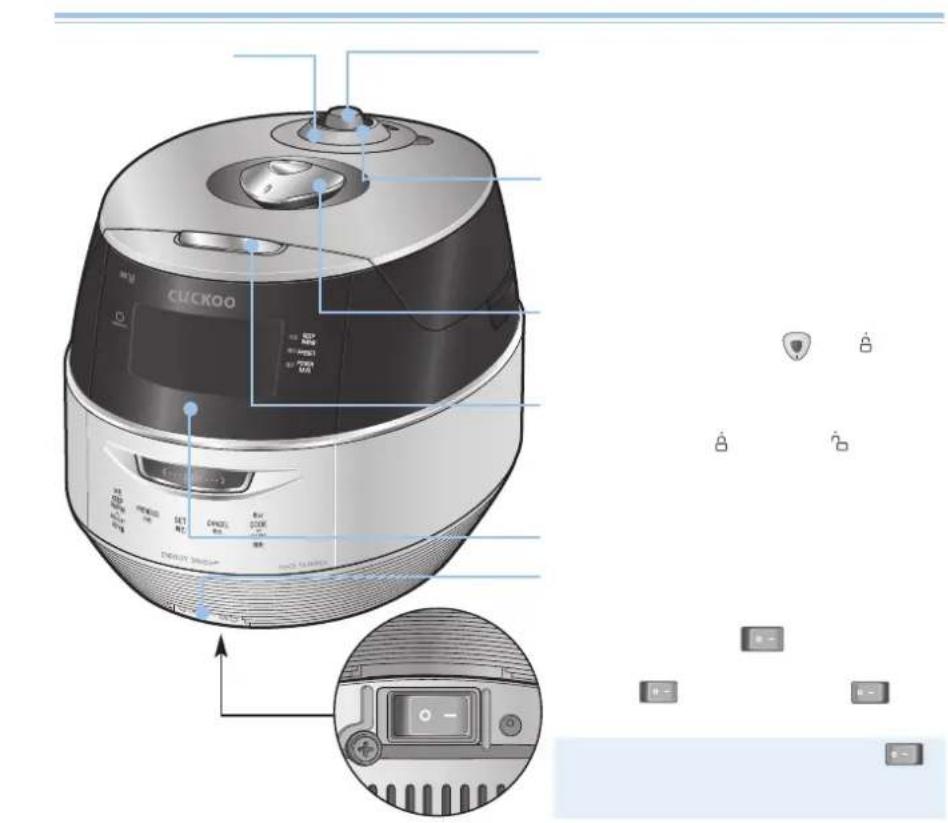

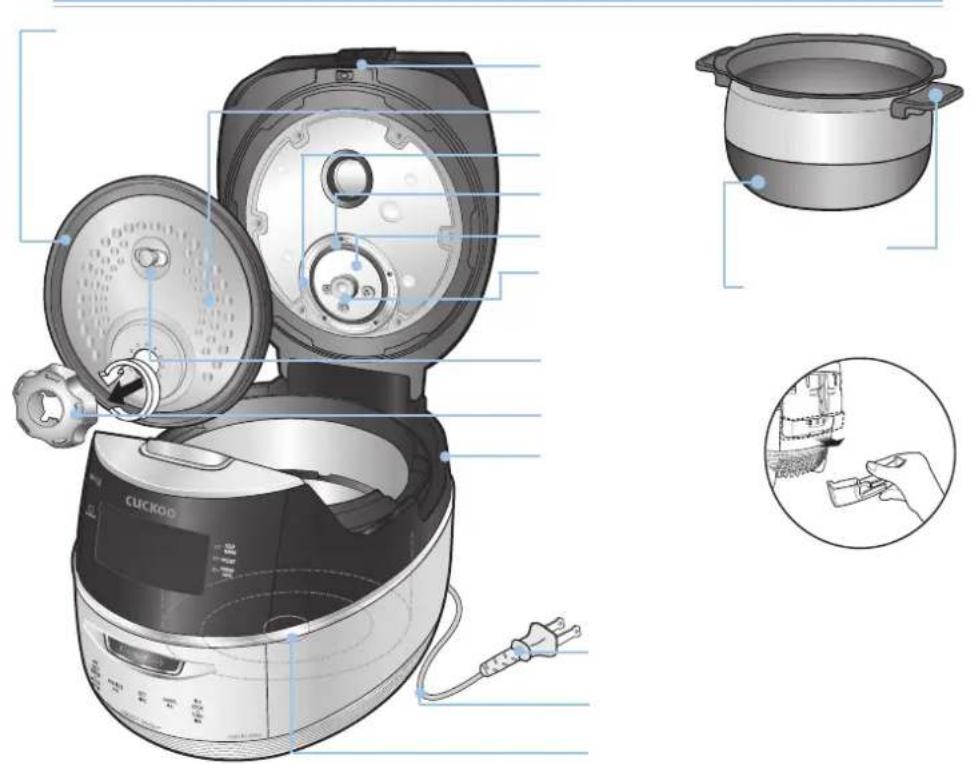

natural_image
Sequence of five-step industrial machine toolpath diagrams showing hand positioning and cleaning process (no text or symbols)
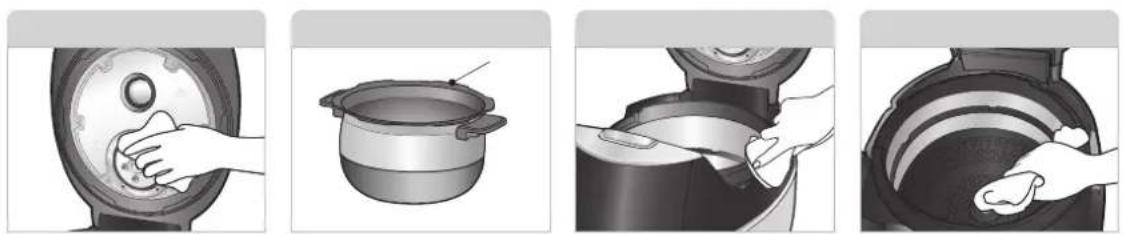
natural_image
Four-step cooking process showing hand pressing a pot, adding sauce, and cleaning a container (no text or symbols)잠김
natural_image
Abstract pattern of small geometric shapes arranged in scattered clusters (no text or symbols)잠김


[NO TEXT]
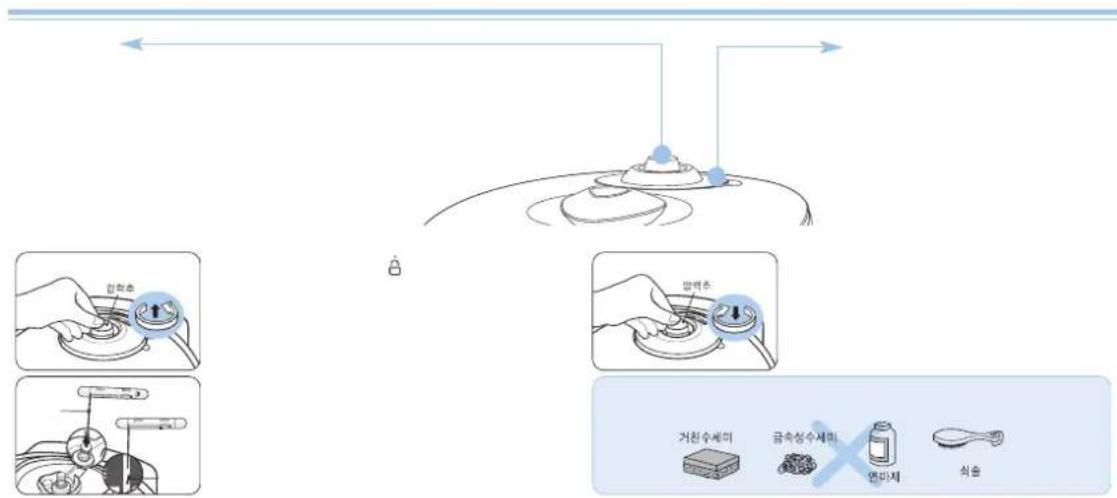

flowchart
graph LR
    A["Initial circular component"] --> B["Step 1: Disassembly with rotation arrow"]
    B --> C["Step 2: Inserted ring, then disassembly"]
    C --> D["Step 3: Disassembly with rotation arrow"]
    D --> E["Step 4: Inserted ring, then disassembly"]
    E --> F["Final assembled part"]

natural_image
Illustration of a hand using a tool to adjust or install a mechanical component, showing sequential steps from pressing down to holding the component (no text or symbols present)


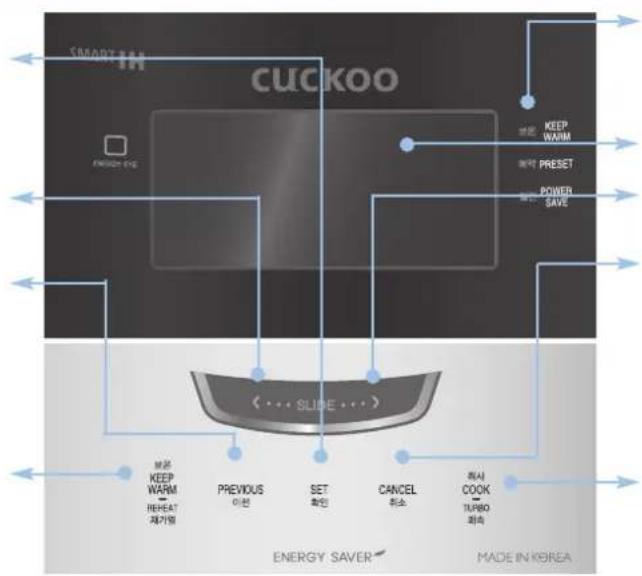
flowchart
graph TD
    A["SMART IN CUCKOO"] --> B["EXTRA-ONE"]
    B --> C["POWER SAVE"]
    C --> D["PRESET"]
    D --> E["KEEP WARM"]
    E --> F["BEET PEREASE"]
    F --> G["BEET PEREASE"]
    G --> H["BEET PEREASE"]
    H --> I["BEET PEREASE"]
    I --> J["BEET PEREASE"]
    J --> K["BEET PEREASE"]
    K --> L["BEET PEREASE"]
    L --> M["BEET PEREASE"]
    M --> N["BEET PEREASE"]
    N --> O["BEET PEREASE"]
    O --> P["BEET PEREASE"]
    P --> Q["BEET PEREASE"]
    Q --> R["BEET PEREASE"]
    R --> S["BEET PEREASE"]
    S --> T["BEET PEREASE"]
    T --> U["BEET PEREASE"]
    U --> V["BEET PEREASE"]
    V --> W["BEET PEREASE"]
    W --> X["BEET PEREASE"]
    X --> Y["BEET PEREASE"]
    Y --> Z["BEET PEREASE"]
    Z --> AA["BEET PEREASE"]
    AA --> AB["BEET PEREASE"]
    AB --> AC["BEET PEREASE"]
    AC --> AD["BEET PEREASE"]
    AD --> AE["BEET PEREASE"]
    AE --> AF["BEET PEREASE"]
    AF --> AG["BEET PEREASE"]
    AG --> AH["BEET PEREASE"]
    AH --> AI["BEET PEREASE"]
    AI --> AJ["BEET PEREASE"]
    AJ --> AK["BEET PEREASE"]
    AK --> AL["BEET PEREASE"]
    AL --> AM["BEET PEREASE"]
    AM --> AN["BEET PEREASE"]
    AN --> AO["BEET PEREASE"]
    AO --> AP["BEET PEREASE"]
    AP --> AQ["BEET PEREASE"]
    AQ --> AR["BEET PEREASE"]
    AR --> AS["BEET PEREASE"]
    AS --> AT["BEET PEREASE"]
    AT --> AU["BEET PEREASE"]
    AU --> AV["BEET PEREASE"]
    AV --> AW["BEET PEREASE"]
    AW --> AX["BEET PEREASE"]
    AX --> AY["BEET PEREASE"]
    AY --> AZ["BEET PEREASE"]
    AZ --> BA["BEET PEREASE"]
    BA --> BB["BEET PEREASE"]
    BB --> BC["BEET PEREASE"]
    BC --> BD["BEET PEREASE"]
    BD --> BET1
    BET1 --> BET2
    BET2 --> BET3
    BET3 --> BET4
    BET4 --> BET5
    BET5 --> BET6
    BET6 --> BET7
    BET7 --> BET8
    BET8 --> BET9
    BET9 --> BET10
    BET10 --> BET11
    BET11 --> BET12
    BET12 --> BET13
    BET13 --> BET14
    BET14 --> BET15
    BET15 --> BET16
    BET16 --> BET17
    BET17 --> BET18
    BET18 --> BET19
    BET19 --> BET20
    BET20 --> BET21
    BET21 --> BET22
    BET22 --> BET23
    BET23 --> BET24
    BET24 --> BET25
    BET25 --> BET26
    BET26 --> BET27
    BET27 --> BET28
    BET28 --> BET29
    BET29 --> BET30
    BET30 --> BET31
    BET31 --> BET32
    BET32 --> BET33
    BET33 --> BET34
    BET34 --> BET35
    BET35 --> BET36
    BET36 --> BET37
    BET37 --> BET38
    BET38 --> BET39
    BET39 --> BET40
    BET40 --> BET41
    BET41 --> BET42
    BET42 --> BET43
    BET43 --> BET44
    BET44 --> BET45
    BET45 --> BET46
    BET46 --> BET47
    BET47 --> BET48
    BET48 --> BET49
    BET49 --> BET50
    BET50 --> BET51
    BET51 --> BET52
    BET52 --> BET53
    BET53 --> BET54
    BET54 --> BET55
    BET55 --> BET56
    BET56 --> BET57
    BET57 --> BET58
    BET58 --> BET59
    BET59 --> BET60
    BET60 --> BET61
    BET61 --> BET62
    BET62 --> BET63
    BET63 --> BET64
    BET64 --> BET65
    BET65 --> BET66
    BET66 --> BET67
    BET67 --> BET68
    BET68 --> BET69
    BET69 --> BET70
    BET70 --> BET71
    BET71 --> BET72
    BET72 --> BET73
    BET73 --> BET74
    BET74 --> BET75
    BET75 --> BET76
    BET76 --> BET77
    BET77 --> BET78
    BET78 --> BET79
    BET79 --> BEBECOOK TURBO TAOSK
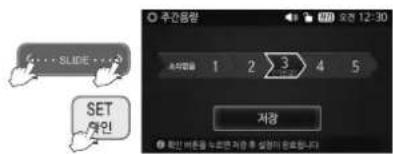
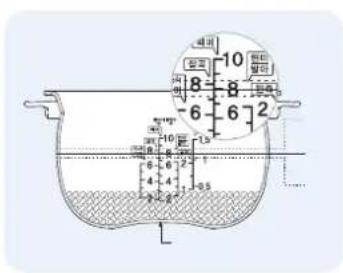


natural_image
Two identical light blue rectangular panels side by side, no text or symbols visible.

1
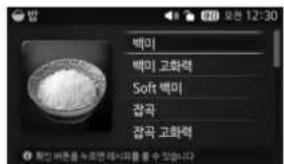
1
2
3
1
2
3
4
1
2
3
4
13Ho
13Ho
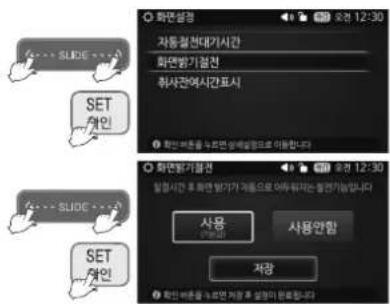
1
2
1
2
1
2
3
1
2
3
1
2
3
m = 311
1
2
3
1
2
3
1
2
3
m = 311
1
2
1
2
3
1
2
3
m = 311
1
2
3
m = 311
1
2
3
m = 311
1
2
m = 311
1
2
m = 311
1
2
3
m = 311
1
3
m = 311
1
3
m = 311
1
3
m = 311
1
3
m = 311
1
3
1
1
1
m = 311
m = 311
m = 311
1
2
1
2
m = 311
m = 311
1
2
1
2
m = 311
1
2
1
2
m = 311
m = 311
m = 311
m = 311
m = 311
m = 311
m = 311
m = 311
m = 311

1
2
3
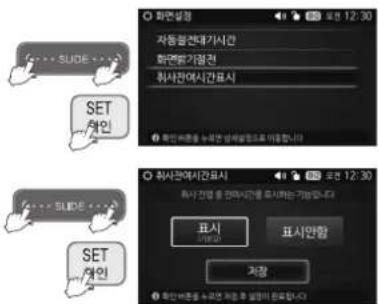
natural_image
Illustration of a hand turning a circular component into a bowl, with another bowl partially visible (no text or symbols)①反方向旋转锁扣卸下内锅盖清洗。
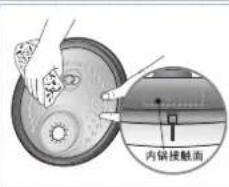
natural_image
Illustration of a hand turning a circular component with a knob, next to a mechanical device (no text or symbols visible)natural_image
Illustration of hands cleaning a circular object with a lid (no text or symbols visible)natural_image
Close-up of a hand holding a mechanical component, possibly a tire or connector (no visible text or symbols)①分离密封圈时如图向外拉动即可。
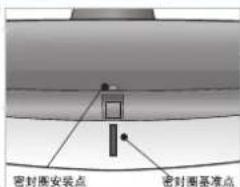
natural_image
Close-up of metallic curved surfaces with blue X marks, no visible text or symbols安装位置是否正确,密时会发生漏气现象。
安全密封圈
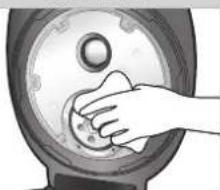
natural_image
Hand pressing a button on a circular mechanical component (no text or symbols visible)natural_image
Close-up of hands pressing down on a kitchen appliance (no visible text or symbols)natural_image
Illustration of a hand cleaning a large container with a cloth (no text or symbols visible)natural_image
Simple line drawing of a spacecraft or landing gear with two directional arrows indicating flight paths (no text or symbols)蒸汽帽
煮饭或料理结束后,要经常清洗蒸汽帽.清洗时.请用中性洗涤剂及海绵清洗.
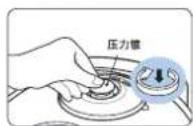
natural_image
Technical line drawing of a hand using a wrench to adjust or install components (no text or symbols visible)①卸下透气针及毛刷。 (附于产品底部)
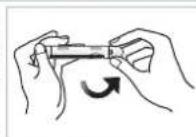
② 如图所示向箭头方向打开毛刷盖。
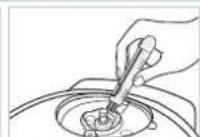
不易清理的部分请用毛刷清理。
KEY Company, P&K USA TRADING CORP and Cuckoo Trading Canada. will repair at its option replace, without charge, your product which proves to be defective in material or workmanship under normal use, during the warranty period listed below from the date of original purchase. This warranty is good only to the original purchaser of the product during the warranty period. P&K USA TRADING CORP covers the east and the central districts, KEY Company covers the west and the central districts, Cuckoo Trading Canada covers the whole Canada.
WARRANTY PERIOD
MODEL#
CRP-FH10
#LABOR
1YEAR
PARTS
1YEAR
HOW SERVICE IS HANDLED
The East and the Central Districts
Call:718 888 9144
Address: 5-48 46th Road Long Island City, NY 11101, USA
The West and the Central Districts.
Call:323 780 8808 Toll Free:877 481 9828
Address: 1137 E. 1st Street, L.A, CA 90033, USA
Canada (TORONTO)
Call: 416 878 4561 / 905 707 8224
Address : #D8-7398 Yonge Street
Thornhill Ontario Canada L4J 8J2
Canada (VANCOUVER)
Call : 604 540 1004 / 604 523 1004
Address : 945 Lougheed Hwy Coquitlam BC Canada V3K 3T4
No other express warranty is applicable to this product. THE DURATION OF ANY IMPLIED WARRANTIES, INCLUDING THE IMPLIED WARRANTY OF MERCHANTABILITY, IS LIMITED TO THE DURATION OF THE EXPRESS WARRANTY HEREIN. CUCKOO ELECTRONICS CO.,LTD, SHALL NOT BE LIABLE FOR THE LOSS, THE USE OF THE PRODUCT, INCONVENIENCE, LOSS OR ANY OTHER DAMAGES, DIRECT OR CONSEQUENTIAL, ARISING OUT OF THE USE OF, OR INABILITY TO USE, THIS PRODUCT OR FOR ANY BREACH OF ANY EXPRESS OR IMPLIED WARRANTY, INCLUDING THE IMPLIED WARRANTY OF MERCHANTABILITY APPLICABLE TO THIS PRODUCT.
Some states do not allow the exclusion or limitation of incidental or consequential damages or limitations on how long an implied warranty lasts: so these limitations or exclusions may apply to you. This warranty gives you specific legal rights and you may also have other rights which vary from state to state.
THE ABOVE WARRANTY DOES NOT APPLY IN THESE CASES :
* To damages problems which result from delivery or improper installation.
* To damages problems which result from misuse, abuse, accident, alteration, or incorrect electrical current or voltage.
* To serve call which do not involve defective workmanship or material and explaining the operation of the unit.
Therefore, these costs are paid by the consumer. Customer assistance numbers :
To Prove warranty Coverage : ▶ Retain your Sales Receipt to prove date of purchase
▶ Copy of your Sales Receipt must submitted at the time warranty service is provided.
To Obtain Product, Customer, or Service Assistance and Nearest Authorized service center, Parts Distributor or Sales Dealer:
The East and the Central Districts
Call:718 888 9144
Address : 5-48 46th Road Long Island City, NY 11101, USA
The West and the Central Districts.
Call:3237808808
Toll Free:877 481 9828
Address: 1137 E. 1st Street, L.A.
CA 90033, USA
Canada (Toronto)
Call: 416 878 4561 / 905 707 8224
Address : #D8-7398 Yonge Street
Thornhill Ontario Canada
L4J8J2
Canada (Vancouver)
Call:604 415 9858/604 524 8282
Address: 103-4501 North Road
Burnaby BC Canada
V3R 4R7