Polydactyl Versio - Synthesizer Noise Engineering - Free user manual and instructions
Find the device manual for free Polydactyl Versio Noise Engineering in PDF.


| Type | Multiband dynamics processor and saturator |
| Size | 10 HP |
| Depth | 1.5 inches (approx. 38 mm) |
| Power requirements | ±12V: 70mA (+12V) / 70mA (-12V) or 125mA (+12V) / 10mA (-12V) depending on revision; +5V not used |
| Audio inputs | 2x (In L, In R) – stereo, ¼" TRS or eurorack cable; R normalled to L if unpatched |
| Audio outputs | 2x (Out L, Out R) – stereo |
| CV inputs | All CV inputs accept 0-5V; pots act as offsets and sum with CV |
| Gate input (FSU) | Responds to signals above +2V |
| Frequency bands | 3 bands (Low, Mid, High) with adjustable crossover frequencies (250/1k, 500/2k, 1k/4k Hz) |
| Controls per band | Ceiling (input level to dynamic processor) and Room (bipolar compression/expansion) |
| Global controls | Sat (multiband saturation), Cut (noise gate: None/Some/Max), Hz (band frequency split), FSU (maxes all dynamics) |
| Indicators | LEDs show levels of Low, Mid, High bands and Sum output |
| Firmware | User-replaceable via micro USB; compatible with all Versio alternate firmwares (free, open-source) |
| Mounting | Eurorack; screws included; ensure secure mounting before power on |
| Warranty | 1 year against manufacturing defects (materials/workmanship); user pays shipping to Noise Engineering |
| Cleaning | Use dry cloth; avoid liquids and abrasives; unplug before cleaning |
| Safety | Do not connect other headers to power; turn off case before installation; avoid metallic contact |
| Designed for | Individual instrument processing or end-of-chain glue |
Frequently Asked Questions - Polydactyl Versio Noise Engineering
User questions about Polydactyl Versio Noise Engineering
0 question about this device. Answer the ones you know or ask your own.
Ask a new question about this device
Download the instructions for your Synthesizer in PDF format for free! Find your manual Polydactyl Versio - Noise Engineering and take your electronic device back in hand. On this page are published all the documents necessary for the use of your device. Polydactyl Versio by Noise Engineering.
USER MANUAL Polydactyl Versio Noise Engineering
Stereo-in, stereo-out multiband dynamics processor and saturator on a DSP platform
Overview
| Type Multiband dynamics processor | |
| Size 10 | HP |
| Depth 1.5 inches | |
| Power 2x5 Eurorack | |

Polydactyl Versio is Noise Engineering's take on a multiband dynamics processor. Designed for timbral processing on individual instruments as well as end-of-chain glue, Polydactyl takes inspiration from Librae Legio's unique and transparent algorithm and applies it across three bands for maximal dynamic impact. Add in the multiband saturation knob, limiter, and noise gate and you have a processor that gives you ultimate control over the color and dynamics of your sound.
Polydactyl Versio is also a DSP platform and can be transformed into a completely different effect by loading a growing number of alternate firmwares, completely free—or program your own firmware with open-source documentation.
Etymology
Polydactyl -- from Latin: "many, or more than the usual amount of, fingers or toes"
Versio -- from Latin: "versatile"
"Versatile Toes"
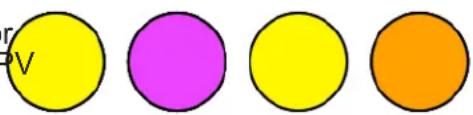
Color code
On boot, the PV's LEDs will shine with this color pattern to indicate that it is running the current P firmware.
Installation
To power your Noise Engineering module, turn off your case. Plug one end of your ribbon cable into your power board so the red stripe on the ribbon cable is aligned to the side that -12v and each pin on the power header is plugged into the connector on the ribbon. Make sure no pins are overhanging connector! If they are, unplug it and realign.
Line up the red stripe on the ribbon cable so that it matches white stripe and/or -12v indication on the board and plug in t connector.
Screw your module into your case BEFORE powering on the module. You risk bumping the module's PCB against somethi metallic and damaging it if it's not properly secured when powered on.
You should be good to go if you followed these instructions. Now go make some noise!
A final note. Some modules have other headers -- they may have a different number of pins or may say NOT POWER. In general, unless a manual tells you otherwise, DO NOT CONNECT THOSE TO POWER.

Warranty
Noise Engineering backs all our products with a product warranty: we guarantee our products to be free from manufacturing defects (materials or workmanship) for one year from the date a new module is purchased from Noise Engineering or an authorized retailer (receipt or invoice required). The cost of shipping to Noise Engineering is paid by the user. Modules requiring warranty repair will either be repaired or replaced at Noise Engineering's discretion. If you believe you have a product that has a defect that is out of warranty, please contact us and we will work with you.
This warranty does not cover damage due to improper handling, storage, use, or abuse, modifications, or improper power or other voltage application.
All returns must be coordinated through Noise Engineering; returns without a Return Authorization will be refused and returned to sender.
Please contact us for the current rate and more information for repairs for modules that are not covered by our warranty.
Power
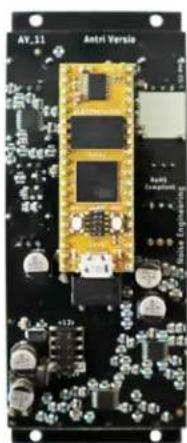
If your Versio looks like the left picture, it requires 70mA +12v and 70mA -12v. If it looks like the right picture, it requires 125mA +12v and 10mA -12v. Versio does not use the +5v rail.


Interface
Polydactyl Versio has two controls per band:
Ceiling: Increases the level of the signal into the dynamic processor, creating more aggressive limiting.
Room: This is a bipolar control: turning the knob to the expands the signal, and turning the knob to the right compresses it.
Adjust the Ceiling and Room controls for the Low, Mid, a High bands to change how processing is applied.
L/M/H/Sum (LEDs): The LEDs show the levels of the Lo Mid, and High bands, and the output (Sum) level.
Sat: Saturation control. As the knob is turned up, saturat is applied to both the individual bands and the master m
FSU: Maxes out all dynamics controls when pressed or when a high gate is sent to its input.
Cut: Noise gate.
• None: Noise gate is bypassed.
• Some: Some noise gating.
• Max: Aggressive noise gating.
![graph TD A["Ceiling"] --> B["Low"] B --> C["Mid"] C --> D["Room"] D --> E["Sat"] F["Noise Engineering"] --> G["In R"] G --> H["Out L"] H --> I["Out R"] J["L Room"] --> K["M Room"] K --> L["H Room"] L --> M["FSU"] N["250/1k 500/2k 1k/4k Hz"] --> O["None Some Max"] P["250/1k 500/2k 1k/4k Hz"] --> Q["N…](/content/2026/05/1058489/images/ab59c21290f625eb2a1ddb67a56b7b7570e57405398fe35e9303a912297e8f18.jpg)
Hz: Band-frequency splits. Changes frequency splits of low, mid and high bands.
| Low Mid High | |||
| 250/1k <250 Hz | 250Hz–1kHz >1kHz | ||
| 500/2k <500Hz | 500Hz–2kHz >2kHz | ||
| 1k/4k <1kHz | 1kHz–4kHz >4kHz |
In L/In R: Audio input. If R is not patched, the signal from L is normalled to both inputs.
Out L/Out R: Stereo output pair.
Input and output voltages
All CV inputs expect 0-5 V. All pots act as offsets and sum with the input CV. The FSU gate input responds to signals above +2 V. The audio inputs clip around 16 V peak to peak.
Patch tutorial
First patches:
For your first patch, use a simple, short sound, like a kid a snare. Patch to In L, and patch Out L and R to your Center the Ceiling and Room controls and turn Sat to minimum.
Experiment with different Room settings to change the dynamics of your sound. Try different Ceiling settings to change the frequency balance.
Turn up Sat to increase distortion and add some flavor to your sound.
If unwanted noise is accentuated by heavy compression, change the Cut setting to minimize it.
Hold the FSU button to squish your sound into oblivion.
Try modulating some parameters like Mid Room with a sequencer or other CV source to create accents on a sound or change its timbre over time.
As well as excelling at single-sound processing, Polydacty can be used for end-of-chain processing over a full patch. Patch your mix into the L and R inputs, and patch the L/R outputs to your mixer. Start with Room and Ceiling cor minimized, then tweak to taste.
![graph TD A["Ceiling"] --> B["L"] B --> C["M"] C --> D["H"] D --> E["Sum"] E --> F["High"] F --> G["Room"] G --> H["Sat"] H --> I["Sat"] I --> J["Out L"] J --> K["In R"] K --> L["Noise Engineering"] style A fill:#f9f,stroke:#333 style B fill:#ccf,stroke:#333 style C fill:#cfc,stroke:#333 style D fill…](/content/2026/05/1058489/images/264d2dea832d277a94bd68d8da03f17f3bd529267a6f077483e0e51e16c8ed06.jpg)
Swapping firmware
Polydactyl Versio's firmware can be changed to a growing number of alternate firmwares via our firmware webapp.
Webapp link: https://portal.noiseengineering.us/
To update the firmware on your Polydactyl Versio:
- Turn off the power to your case and unscrew PV.
- Remove the power connector on the back of PV.
- Plug a micro USB connector suitable for data transfer into the port on the pack of the module, and the other end into your computer.
- Follow the instructions in the webapp.
Design notes
We have wanted to make a multiband compressor forever, but never had the right hardware / CPU / etc., to do it, so it was just another idea that languished on our very long list of “someday” modules that were in some stage of development with notes and paper designs and concepts but no real hardware for them.
Polydactyl is a tale of two modules.
We announced Virt Iter Legio (then called just Virt Iter) and Desmodus Versio in 2020. We also announced that both products would be platforms, but we hadn't yet fully developed other items for either. Truth be told, we had many ideas for firmwares, but zero idea how this platform concept would fly. Would it be a flop? Would people like it? We were invested in the path, extremely hopeful, and kind of deer-in-the-headlights about the whole thing.
When we finally released the Legio hardware platform in June 2022, it had been in process for years prior to that, with a load of delays related to parts shortages and other things. By then, the Versio platform had been out for almost two years (ack!) and we knew that people were enjoying being able to change the module into different things, so we knew we wanted to launch with at least two different firmwares so we got to work on options.
It seemed like wrapping our heads around a compressor would be a great stepping stone to a multiband compressor, thus our first dynamics processor, Librae Legio, was born. Okay, it wasn't THAT simple—it turns out people here have opinions. There was a lot of arguing. But it's always good natured!
With Librae Legio built, a need for the next Versio firmware, and some major time constraints because of other things we have coming (!!), we decided to try our hand at the multiband thing. We often prototype in software because this process allows a fast revision time. We yanked the band-splitting code we wrote for Ruina and prototyped Polydactyl as a 4-band dynamics processor. We often try to prototype with a platform-agnostic approach so we don't shoehorn a concept into a platform when it really should be a standalone product. This was the case here: One look at the knobs on Versio will tell you this wasn't designed with the Versio in mind specifically. We played around a fair bit though, and realized that three bands on the Versio platform worked REALLY well.
This one, thankfully, came together based on the backs of a lot of our previous work, but was so much fun to make and play with. And while we know we just released a simpler 6hp version, we wanted to release this 3-band 10hp version too for a few reasons: first, we wanted Versio owners to get to try it without having to buy into a new ecosystem unless they wanted to, and second, because we use the two modules really differently! We love Librae Legio for end-of-chain processing. Polydactyl Versio also works for this, but we tend to put it on single sounds (or smaller mixes) rather than at the end of the chain. Most importantly, our main reason for launching Polydactyl is that it's just too much fun to keep to ourselves.
Special thanks
starthief


Brand : Noise Engineering
Model : Polydactyl Versio
Category : Synthesizer