quadroPOL - Uncategorized Vermona - Free user manual and instructions
Find the device manual for free quadroPOL Vermona in PDF.


| Product Type | Analog Polyphonic Synthesizer |
| Brand | Vermona |
| Model | quadroPOL |
| Dimensions (W x D x H) | 410 x 280 x 90 mm |
| Weight | 3.2 kg |
| Power Supply | 12V DC, 500 mA (center positive) |
| Polyphony | 4 voices |
| Oscillators per Voice | 2 VCOs with PWM |
| Filter | 24 dB/octave low-pass filter with resonance |
| Envelope Generators | 2 ADSR envelopes (filter & amplitude) |
| LFO | 1 LFO with triangle, saw, square, sample & hold |
| Effects | Built-in analog delay and reverb |
| Keyboard | 4-octave velocity-sensitive keyboard (49 keys) |
| MIDI | MIDI In, Out, Thru; USB-MIDI |
| Audio Outputs | 1 x 1/4" TRS mono output, 1 x 1/4" TRS headphone |
| Memory | 128 user presets |
| Maintenance & Cleaning | Use a soft, dry cloth to clean the surface. Do not use solvents or abrasive cleaners. |
| Safety | Operate only with the specified power adapter. Do not expose to moisture or extreme temperatures. |
| Spare Parts & Repairability | Contact Vermona support for spare parts. Device is designed for professional repair. |
| General Information | This analog synthesizer delivers warm, classic sounds with modern connectivity. |
Frequently Asked Questions - quadroPOL Vermona
User questions about quadroPOL Vermona
0 question about this device. Answer the ones you know or ask your own.
Ask a new question about this device
Download the instructions for your Uncategorized in PDF format for free! Find your manual quadroPOL - Vermona and take your electronic device back in hand. On this page are published all the documents necessary for the use of your device. quadroPOL by Vermona.
USER MANUAL quadroPOL Vermona
Actually, quadroPOL's operating manual could be really short. There are three connectors and a single control which leaves little to say, even if these elements are available four times.
However, despite its simple layout, quadroPOL can effect a lot of things and full multiple purposes: Mixer, Polarizer, Attenuator, Ring Modulator, VCA, CV-Source, Inverter.
Because of this, the application section in this manual is more comprehensive than usual. In order to achieve the best possible results, we recommend that you take the time and read this manual completely.
Your VERMONA crew from the Elektroakustischen Manufaktur, Erlbach
Unpacking
To ensure top quality, we carefully checked the quadroPOL module before packaging. Nevertheless, we cannot fully exclude damage during transportation. Therefore, we kindly ask you to inspect quadroPOL by yourself, once you receive the module. In case there is anything unusual about the unit or its packaging, do not hesitate to contact your dealer or us, to solve the problem.
You should find the following items in the box:
- the quadroPOL module
- one ribbon-cable (10-pole to 16-pole)
- four M-type screws 3 x 6 mm with matching plastic washers
- this operating manual
Setup
quadroPOL was designed to be mounted and used in Eurorack modular systems. Its power supply, connectors and dimensions match the typical specifications (VERMONA Modular Case, Doepfer A-100 and compatible systems). Mounting equals any other Eurorack module:
- Switch off the power supply! For safety reasons, also remove the detachable power cord from your frame before mounting the module!
- Connect the supplied ribbon-cable with its 10-pole connector to the corresponding multi-pin connector on quadroPOL's rear.
The corresponding plug socket is protected against reverse polarity. Therefore, the 10-pole connector of the ribbon-cable will only fit in one direction into the module. (See "Figure 1:
quadroPOL rear") The supplied ribbon-cable is color-coded at the -12 volts position. Note, that this may differ from other manufacturers. Therefore, only use the supplied ribbon-cable to connect quadroPOL to your frame's system bus!
- Connect the ribbon-cable's 16-pole connector to an empty plug-socket of your frame's system bus. Make sure the color-coded side of the cable points towards -12 volts!
Connecting the ribbon-cable with reverse polarity can lead to damage of your module or other modules when powering the system! Double-check the connections before continuing – safe is safe!
-
Mount quadroPOL to your modular frame using the supplied screws. To protect the unit's surface from scratches, use the supplied flat plastic washers.
-
Reconnect the power cord to your frame and switch on the power-supply. quadroPOL is now ready to operate.

text_image
-12 VFigure 1: quadroPOL rear
Control Elements
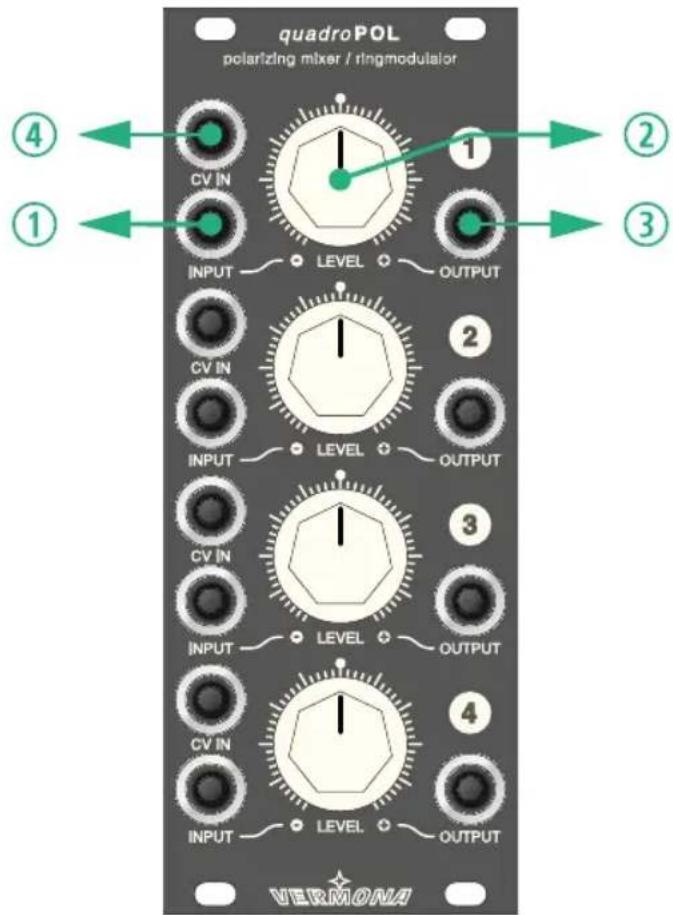
quadroPOL offers four identical channels, each with two inputs, one control and one output.
text_image
quadroPOL polarizing mixer / ringmodulator ① ② ③ ④ ① ② ③ ④ LEVEL OUTPUT ② LEVEL OUTPUT ③ LEVEL OUTPUT ④ LEVEL OUTPUT VERMONAFigure 2: quadroPOL front
INPUT
A signal applied to this input can be modified by LEVEL ② and a control voltage, being applied to CV IN ④.
LEVEL
LEVEL ② adjusts the level for the signal applied to INPUT ①. It works bipolar, meaning, that in its center position, the applied input signal is suppressed and the channel is closed. Turning this control to the right will increase the level. The level also increases when turning this control to the left, but in this case with reversed polarity. This function is called polarizer.
LEVEL ② has a dead-zone around its center position to make it easier finding and hitting zero.
In most cases there will be no audible differences between positive and negative amplitudes when using complex audio signals. When using sub-audio signals, i.e. LFO waveforms, the difference will be audible immediately at its modulation destination:
EN
Where you can hear the positive amplitude of the wave on the in-phase-signal (turning to the right), you will hear its negative amplitude when using reversed polarity (turning to the left).
With INPUT ① not being patched, LEVEL ② adjusts an internal generated control voltage. Here, the control also works bipolar. Turning this control clockwise generates a control voltage of up to +5 volts being provided at the OUTPUT ③ connector. Turning the control counterclockwise provides a negative control voltage of up to -5 volts.
OUTPUT
Here, you'll get the signal out of quadroPOL's channel.
A jumper on the module's circuit board selects, whether the channel's signal will automatically be forwarded to the following channel when OUTPUT ③ is not in use (see "Jumper" on page 6).
CV IN
The signal's level can be modulated with a control voltage, applied to CV IN ④. It will be added to the manually set LEVEL ② value. The signal will also be inverted, when the sum of LEVEL ② setting and CV IN ④ voltage is within a negative voltage range.
Jumper
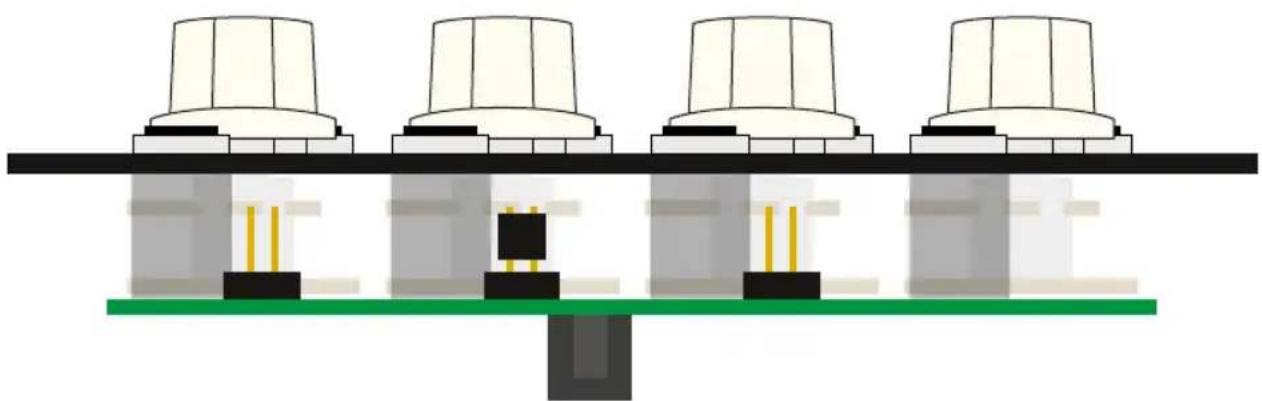
With the three jumpers on the module's circuit board you can select whether the output of one channel will be forwarded and summed up with the following channel (factory setting for all channels). With this feature activated, quadroPOL can for example be used as mixer (see "Mixer" on page 8).
natural_image
Diagram of four identical cylindrical components mounted on a green base, with no visible text or symbols.Figure 3: side view of quadroPOL
Here, channel 2 is forwarded to channel 3 as the jumper is set in channel 3.
Applications
For a better understanding of quadroPOL's possibilities, we have collected a few practical examples. These are meant primarily to serve as suggestions and encourage you to start experimenting with the module. Some applications are only slight variations or combinations of other examples, but they underline quadroPOL's flexibility in use. We are keen to learn how you are using quadroPOL. So don't hesitate to let us know about your patch. Send us an email or use the contact form on our homepage.
Attenuator
An external signal is applied to INPUT ① and is output at the same channel's OUTPUT ③. By using the channel's LEVEL ② control, the output level of the signal can be set between zero (center setting for LEVEL ②) and 100% (fully right).
quadroPOL can be used to attenuate control voltages as well as audio signals. It's an essential function in modular systems.
Inverter
A signal is applied to INPUT ① and output at the same channel's OUTPUT ③. The LEVEL ② control of this channel can vary the signal level between zero (center setting for LEVEL ②) and -100% (fully left).
By using this function, control voltages can easily be inverted and adjusted with variable level. Since not all envelope modules and only a few LFOs offer inverted outputs, quadroPOL may help you out four times.
It also lends itself for the use with audio signals. For Example: Some filters allow to tap the resonance signal and feed it through an external feedback path. Processing this signal with an inverter, the phase-inverted feedback leads to sounds not being available with conventional filter modules.
VCA
When being used as a VCA, quadroPOL offers a dynamic range of 80 dB. The type of control is linear.
A signal is applied to the INPUT ① and output at the same channel's OUTPUT ③. The corresponding LEVEL ② control remains in its center position, so that there initially is no output signal.
By applying a control voltage to the corresponding CV IN ④, the signal level can now be controlled dynamically. The most common application would be a control using an envelope generator. It is also possible to use a LFO for tremolo-effects or a step-sequencer for rhythmical control.
Please note that the amplitude will oscillate between the positive and negative range when using a LFO. This results in an output signal of quadroPOL that rotates between normal (in phase) and inverted (out of phase) states. To avoid this, you may either need to use a LFO that only provides a positive amplitude output or you need to apply a sufficient offsets to the LFO-signal. An offset, be it positive or negative, can easily be generated by setting LEVEL ② different to zero.
Mixer
The following examples only work if the jumper(s) on quadroPOL's circuit board are set (see "Jumper" on page 6).
Beside the use of individual channels, two to four channels may also be combined. To do so, signals have to be applied at the inputs. The summed-up signal is being tapped at the last of the outputs being used. Other outputs must not be patched in this case. Use the LEVEL ② controls of the channels to adjust the signal levels between 0 (center setting of LEVEL ②) and 100% (fully right).
quadroPOL's channels can be combined at will. The crucial factor is which channel's OUTPUT ③ is used as master output:
- channel 1 and 2 (OUTPUT ③ channel ②) and/or channel 3 and 4 (OUTPUT ③ channel ④) can be used as two 2-in-1-mixers.
- channel 1, 2 and 3 (OUTPUT ③ channel ①) can be used as 3-in-1-mixer while channel 4 can be used individually.
- channel 1 to 4 (OUTPUT ③ channel ④) can be used as 4-in-1-mixer.
Polarizing Mixer
The polarizing application resembles the mixer. The difference is the possible inversion of the signals. New shapes can be created when mixing for example LFO- or VCO-waveform-signals in- and out-of-phase.
VC-Mixer
By including the channel's CV INs ④, the mixing proportion can be altered dynamically. Thus you can create lively sounds using CV- or audio-source at the channels' INPUTs ①.
Ring Modulator
In case two continuous signals with consistently changing positive and negative amplitudes (waveforms) are fed into inputs CV IN ④ and INPUT ①, ring modulation will be applied. Ring modulation will multiply two signals including their harmonics, creating sums and differences. This can result in pretty complex signals. While the use of sine waves often leads to results being usable in a musical way, waveforms with stronger harmonic content usually lead to disharmonic signals. In audio applications, ring modulation is often used to create metallic and atonal sounds.
The signal being present at the INPUT ① connector is the carrier, while the signal fed to the CV IN ④ input is the modulator. To achieve mathematical correct results, set LEVEL ② to its center position. By moving the control to
the left and right, an offset is added to the signal source which will sonically influence the ring modulation. Feel free to experiment!
A ring modulator may as well be useful within the sub-audio range. If you feed two simple LFO-signals to the ring modulator, the result is a more diversified waveform that depends on the frequency ratio between both signals. This will lead to more lively sounding modulations.
CV-Source
With INPUT ① of a channel not being patched, OUTPUT ③ will provide a static DC-signal which can be manually adjusted in its intensity using LEVEL ②. The voltage covers a range of -5 volts (left) to +5 volts (right).
The control voltage can be used for multiple purposes:
- In case the tuning of a VCO or any other CV-controllable parameter needs to be adjusted more detailed as being possible from the module itself, quadroPOL's control voltage can be used to accurately adjust this function.
- In case a control voltage being generated by quadroPOL is distributed using a multiple module, several parameters of different modules can be modulated with a single control.
- quadroPOL's static control voltage is ideally suited to be used as an offset generator which can add fixed values to specific functions such as transpositions of a sequencer.
- If a control voltage (i.e. a LFO) is applied to CV IN ④, an positive or negative offset can be added by turning LEVEL ② to the right or to the left.
Technical Specifications
| Levels | |
| optimum input level INPUT ±5 V | |
| optimum input level CV IN ±5 V | |
| generated DC -5 V ... +5 V | |
| Power Consumption | |
| +12 V 45 mA | |
| -12 V 35 mA | |
| +5 V - | |
| Dimensions and Weight | |
| Width / Height 10 HP (129.00 mm) / 3 U | |
| Depth 30.00 mm | |
| Weight 130 g |



ELEKTROAKUSTISCHE MANUFAKTUR
HDB electronic GmbH
Badesteig 20