uniCYCLE - Synthesizer Vermona - Free user manual and instructions
Find the device manual for free uniCYCLE Vermona in PDF.


| Product Type | Desktop Analog Synthesizer |
| Dimensions (W x D x H) | 300 mm x 180 mm x 100 mm |
| Weight | 2.1 kg |
| Power Supply | 12 V DC, 1.5 A (center positive) |
| Sound Engine | Analog (fully discrete signal path) |
| Polyphony | Monophonic |
| Oscillators | 2 VCOs with saw, pulse, triangle, and sub oscillator |
| Filter | 4-pole low-pass ladder filter with resonance |
| Envelope | ADSR envelope generator |
| LFO | Dual LFOs with multiple waveforms |
| Sequencer | Built-in 16-step sequencer with CV/Gate outputs |
| Effects | Delay and reverb (digital, analog dry path) |
| Connectivity | 1/4" audio out, 1/4" headphone, CV/Gate in/out, MIDI in/out, USB |
| Display | OLED screen for parameter values |
| Controls | Knobs, switches, and touch-sensitive keyboard |
| Maintenance | Clean with dry cloth; avoid liquids |
| Safety | Use only provided power adapter; do not expose to moisture |
| Spare Parts & Repairability | Contact Vermona support; user-replaceable knobs and switches |
| General Information | Designed in Germany; limited two-year warranty |
Frequently Asked Questions - uniCYCLE Vermona
User questions about uniCYCLE Vermona
0 question about this device. Answer the ones you know or ask your own.
Ask a new question about this device
Download the instructions for your Synthesizer in PDF format for free! Find your manual uniCYCLE - Vermona and take your electronic device back in hand. On this page are published all the documents necessary for the use of your device. uniCYCLE by Vermona.
USER MANUAL uniCYCLE Vermona
An oscillator is not the only sound source in a synthesizer or modular system, but it is surely the most important one. Because of this, there is a good reason for it to be fully convincing. This was our approach for our synthesizers PERfourMER, Mono Lancet and '14 Analogsynthesizer. The very same demand and standards were true for the development of uniCYCLE.
Being a modular component, uniCYCLE has been equipped with a couple of special capabilities such as hard- and soft-sync as well as modulation options for its waveforms. As a result, uniCYCLE offers VERMONA's superior analogue sound quality and musicality as well as versatile possibilities that can fully unfold in a modular scenario.
Your VERMONA crew from the Elektroakustischen Manufaktur, Erlbach
Unpacking
To ensure top quality, we carefully checked the uniCYCLE module before packaging. Nevertheless, we cannot fully exclude damage during transportation. Therefore, we kindly ask you to inspect uniCYCLE by yourself, once you receive the module. In case there is anything unusual about the unit or its packaging, do not hesitate to contact you dealer or us, to solve the problem.
You should find the following items in the box:
- the uniCYCLE module
- one 16-pole ribbon-cable
- four M-type screws 3 x 6 mm with matching plastic washers
- this operating manual

You probably are curious about the sound and possibilities of your uniCYCLE. However, we recommend you to completely read this manual before trying out the module. The jumpers on the module's rear (see "Jumper" on page 11) can only be accessed with the module not being installed in a frame. It's worth, knowing their functions in before to set them up for your needs.
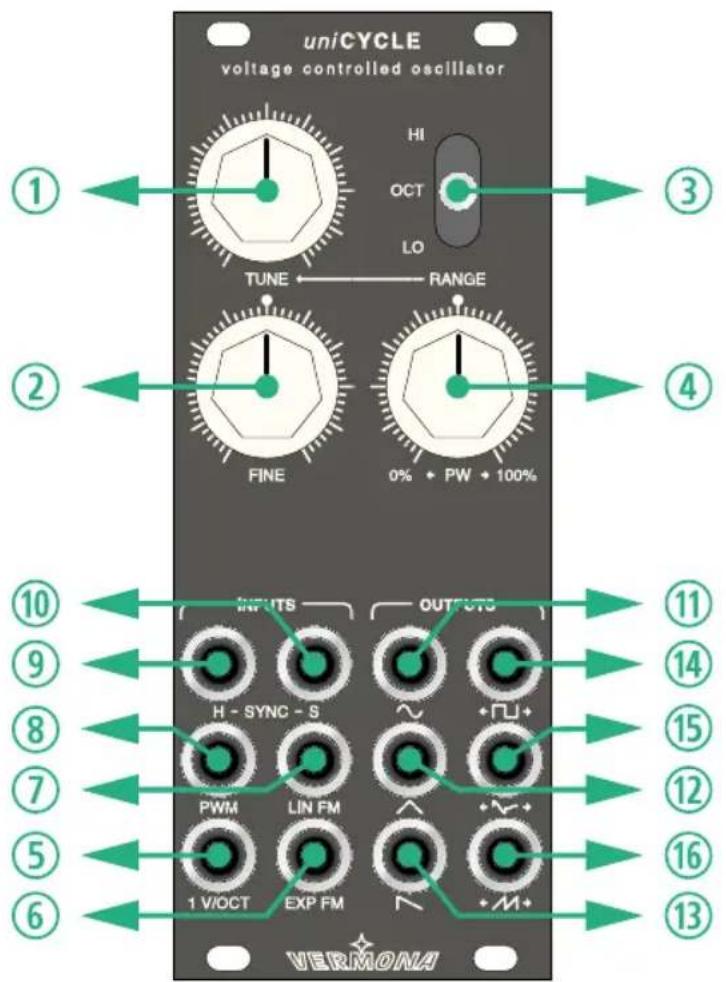
text_image
unicycle voltage controlled oscillator HI OCT LO TUNE ← RANGE FINE 0% + PW + 100% INPUTS OUTCUTS H - SYNC - S PWM LIN FM 1 V/OCT EXP FM VERMONA ① ② ③ ④ ⑤ ⑥ ⑦ ⑧ ⑨ ⑩ ⑪ ⑫ ⑬ ⑭ ⑮ ⑯ ⑰ ⑱ ⑲ ⑳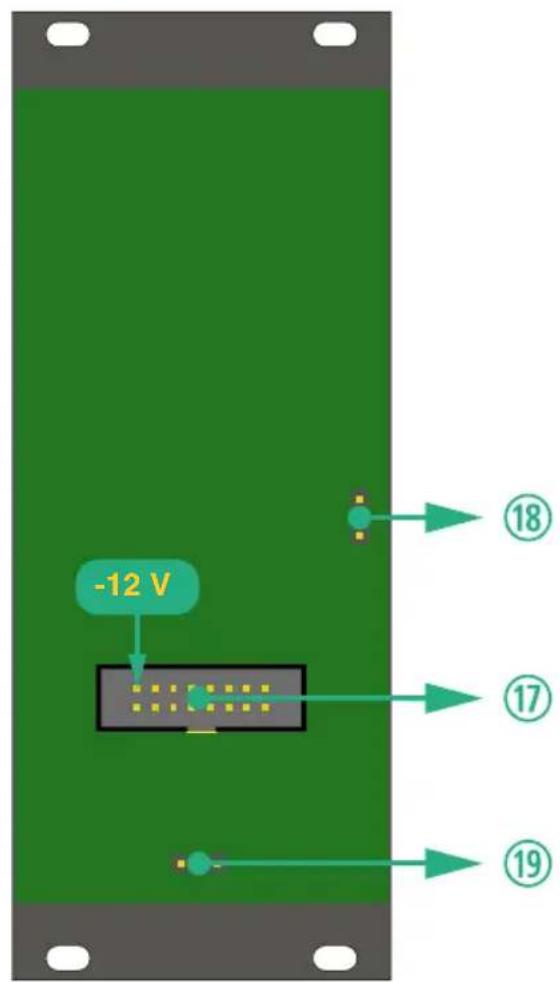
text_image
-12 V ⑱ ⑰ ⑰ ⑲uniCYCLE front and rear
Setup
uniCYCLE was designed to be mounted and used in Eurorack modular systems. Its power supply, connectors and dimensions match the typical specifications (VERMONA Modular Case, Doepfer A-100 and compatible systems). Mounting equals any other Eurorack module:
- Switch off the power supply! For safety reasons, also remove the detachable power cord from your frame before mounting the module!
- Connect the supplied ribbon-cable with its 16-pole connector to the corresponding multi-pin connector on uniCYCLE's rear.

The corresponding plug socket is protected against reverse polarity. Therefore, the 16-pole connector of the ribbon-cable will only fit in one direction into the module. The supplied ribbon-cable is color-coded at the -12 volts position. Note, that this may differ from other manufacturers. Therefore, only use the supplied ribbon-cable to connect uniCYCLE to your frame's system bus!
- Connect the ribbon-cable's other 16-pole connector to an empty plug-socket of your frame's system bus. Make sure the color-coded side of the cable points towards -12 volts!
EN

Connecting the ribbon-cable with reverse polarity can lead to damage of your module or other modules when powering the system! Double-check the connections before continuing – safe is safe!
- Mount uniCYCLE to your modular frame using the supplied screws. To protect the unit's surface from scratches, use the supplied flat plastic washers.
- Reconnect the power cord to your frame and switch on the power-supply. uniCYCLE is now ready to operate.

uniCYCLE offers a highly stable tuning. After a short warm-up-period, the oscillator stays fully in tune at room temperature. According to its specifications, the unit shall be used in an environmental temperature between 0^ C and 40^ C.
Control Elements
Controls and Switch
With just three controls and a single switch, uniCYCLE can be operated really easy and with high effectiveness.
TUNE ① sets the oscillator's pitch. The available range depends upon the setting of the RANGE ③ switch.
FINE ② allows pitch-adjustments within a range of plus/minus one semitone.
RANGE ③ calls up one of three different frequency ranges covered by TUNE ①.
| HI TUNE 1 covers the full audio range. | |
| OCT | TUNE 1 covers a range of plus/minus one octave. |
| LO | uniCYCLE works as LFO. TUNE 1 covers the full low frequency range. |

When in OCT-mode, TUNE ① offers a higher resolution around its center setting, allowing precise tuning of the oscillator. Moving the control further in this mode, the tuning reacts exponentially until reaching an octave at its furthest position.
PW ④ adjusts the pulsewidth of the three waveforms Square + ∩↓→, Even + ↘→ and Double Saw + M+.
In its center position the symmetry is 50%. The far left and far right position means 0% respectively 100%. (see "Waveform Outputs" on page 9).
CV Inputs
By using the INPUTS section, uniCYCLE's functions can be modulated by control voltages.
1V/OCT ⑤ This input allows control over the oscillator's pitch with accurate octave tracking. The principle corresponds to all common VCOs in eurorack: incoming control voltages change the pitch by one octave per volt.
This input is usually connected to the so-called key-CV, deriving from a keyboard, a step-sequencer or a MIDI/CV-interface.
There is a jumper on the module's rear for setting up if and how uniCYCLE received the key-CV from the system bus. (see "1V/OCT" on page 11)
EXP FM ⑥ This CV-input modulates uniCYCLE's frequency. It works with an exponential characteristic. By using this input audio-frequency sources the perceived pitch will change.
LIN FM ⑦ This CV-input works with a linear characteristic. As long as the modulation intensity doesn’t force uniCYCLE’s frequency below zero, there is no perceived pitch change with audio-frequency sources.
PWM ⑧ This CV-input modulates the pulsewidth/symmetry of the three waveforms Square ( ), Even ( ) and Double Saw ( ). The modulation will be added to the manual PW ④ setting.
There is a jumper on the module's rear for selecting if the pulsewidth-modulation will only affect the square wave ( ) (see "PW" on page 11)
Sync Inputs
uniCYCLE offers two inputs for being synchronized to external sources. One input is for hard-sync H ⑨, the other for soft-sync S ⑩.
H - SYNC ⑨ The hard-sync input H ⑨ works with signals with positive flanks like square-waves from oscillators, trigger- and gate-signals. With each incoming flank uniCYCLE's waveforms will be abruptly reset and started from zero. As a result the shapes will be cut and deliver more or less hard tones.
Beside classical sync-sounds, the H input ⑨ can be used for restarting the waveforms with gate-signals.
SYNC - S ⑩ The soft-sync input S ⑩ works with waveforms from oscillators, gate-signals or even d.c. voltages.
If the ratio between the signal applied to the S input ⑩ and uniCYCLE's frequency is integer, the oscillator locks in and generates pure waveforms. With ratios not being integer, the resulting waveforms are being cut, similar to hard-sync. The result of soft-sync also depends on the level of the incoming signal.
Waveform Outputs
Each of uniCYCLE's six waveforms offers an individual audio output, located in the OUTPUT section.
You will find the standard waveforms Sine ∼ ⑪, Triangle ∧ ⑫ and Saw ∧ ⑬ to the left. To the right, you will find the waveforms Square +□→ ⑭, Even +▽→ ⑮ and Double Saw +M→ ⑯ that can be modified by the PW control ④ or modulated by the PWM input ⑧.

The waveform shapes Even ⑮ and Double Saw ⑯ can be excluded from the PW/PWM-function by setting the corresponding jumper (see "PW" on page 11)

The width of the Square wave can be varied between 0% and 100% . With PW ④ being set to its center position, the pulsewidth is 50% . At settings of 0% resp. 100% , the waveform is inaudible.

Mirrored pulsewidth settings, e.g. 25% and 75%, deliver identical acoustic results. This is also true for the waveform shapes Even and Double Saw M and Double Saw M

Even is the opposite of the Square curve. Beside the base frequency it only offers even harmonics, while Square only offers odd harmonics. By using the PW ④ control resp. PWM ⑧ modulation, the harmonic content of the waveform is altered. Settings of 0% and 100% for the PW ④ control produce a sine-like fundamental note.
←M→⑯
This sawtooth-waveform has doubled pitch compared to all other waves in uniCYCLE, but only with PW ④ in center-position (50%). When altering the harmonic content using PW ④ resp. PWM ⑧, also the pitch is being changed. With 0% resp. 100% a triangle with the same frequency as the other waveforms is generated - with PW ④ set to 0% shifted by 180°.
Jumper
IV/OCT
uniCYCLE is able to receive key-CV via the system-bus if being applied to the same bus-circuit-board from a MIDI/CV-interface or a bus-access-module. Jumper ^19 (see "uniCYCLE front and rear" on page 3) allows setting whether and how uniCYCLE will react to key-CV via the bus.
| Bus-CV is being ignored (factory setting) | |
| Bus-CV is always applied, in parallel to the input 1V/OCT 5. | |
| Bus-CV is applied as long as the input 1V/OCT 5 is not in use. |

If you like using key-CV via the bus board we recommend using the third setting. With the setting two (right) control voltages from the system bus and the 1V/OCT ⑤ input will be summed up which can lead to unwanted results.
PW
The function of the PW ④ control as well as the corresponding modulation using the PWM ⑧ input can be limited to Square + ∩→ ⑭. The corresponding jumper ⑱ unit's rear (see "uniCYCLE front and rear" on page 3) allows two settings:
| PW 4 and PWM 8 only applies to the Square (← ∩→) waveform. | |
| PW 4 and PWM 8 applies to Square (← ∩→), Even (← ↗→) and Double Saw (← M→)(factory setting). |
Technical Specification
| Levels | |
| waveform output level ± 5 V | |
| optimal CV-input level ± 5 V | |
| Maximum Power Consumption | |
| +12 V 70 mA | |
| -12 V | 60 mA |
| +5 V - | |
| Dimensions / Weight | |
| Width / Height 10 HP (129,0 mm), 3 U | |
| Depth 45 mm | |
| Weight 160 g |


ELEKTROAKUSTISCHE MANUFAKTUR
HDB electronic GmbH
Badesteig 20