MMC 220 - Hi-Fi System MAC AUDIO - Free user manual and instructions
Find the device manual for free MMC 220 MAC AUDIO in PDF.


| Type de produit | Hi-Fi System |
| Marque | MAC AUDIO |
| Modèle | MMC 220 |
| Dimensions (approx.) | 300 x 150 x 250 mm |
| Poids (approx.) | 5 kg |
| Alimentation | AC 230V, 50Hz |
| Puissance de sortie | 2 x 50W RMS |
| Lecteur CD | Oui, compatible CD, CD-R, CD-RW |
| Radio | Tuner FM/AM avec 30 stations préréglées |
| Connectivité Bluetooth | Oui, version 5.0, streaming audio |
| Port USB | Oui, pour lecture MP3 |
| Entrée auxiliaire | Prise jack 3.5 mm |
| Sortie casque | Oui, prise jack 3.5 mm |
| Haut-parleurs | 2 voies, 2 x 5 pouces |
| Télécommande | Incluse, boutons de base |
| Affichage | Écran LCD rétroéclairé |
| Fonctions principales | CD, radio, Bluetooth, USB, AUX, horloge, minuterie |
| Entretien et nettoyage | Chiffon doux et sec, éviter les solvants |
| Sécurité | Ne pas exposer à l'eau, débrancher avant nettoyage |
| Pièces détachées et réparabilité | Contacter un centre de service agréé |
Frequently Asked Questions - MMC 220 MAC AUDIO
User questions about MMC 220 MAC AUDIO
0 question about this device. Answer the ones you know or ask your own.
Ask a new question about this device
Download the instructions for your Hi-Fi System in PDF format for free! Find your manual MMC 220 - MAC AUDIO and take your electronic device back in hand. On this page are published all the documents necessary for the use of your device. MMC 220 by MAC AUDIO.
USER MANUAL MMC 220 MAC AUDIO
The Bluetooth® word mark and logos are registered trademarks owned by Bluetooth SIG, Inc. and any use of such marks by Mac Audio is under license. Other trademarks and trade names are those of their respective owners.


At the end of the product's useful life, please dispose of it at appropriate collection points provided in your country.
D
4
GB
15
F
14 RDS/REPEAT/SHUFFLE:
FM-Betrieb:
Thank you for choosing the Mac Audio MMC 220.
Please read the following information carefully before starting to use the MMC 220.
IMPORTANT SAFETY PRECAUTIONS
- Please read the instruction manual carefully before use and keep it in a safe place.
- This device is only intended for use with 240 V/50 Hz AC voltage.
- Only operate the device at an ambient/room temperature between 10^ and 40^ .
- Make sure there is sufficient ventilation for the device. There must be a minimum gap of 10 cm between objects to the side, to the rear and above the device.
- The ventilation slots should not be covered by any items (e.g. curtains, newspaper, etc.) in order to ensure sufficient ventilation for the device. Please do not position any sources of heat, such as radiators, ovens, naked flames or other devices that generate heat in close proximity to the device.
- The device and the remote control should not be exposed to dripping or splash water or high levels of humidity.
- No naked flame sources, such as lighted candles, should be placed on the apparatus.
- No objects filled with liquids, such as vases, shall be places on the unit.
- In the event of contact with moisture or liquids remove the mains adapter immediately.
- Only clean the device using a dry cloth.
- Do not use any cleaning agents or chemical solvents when cleaning, as these could damage the surface of the device.
- Never open the device.
- The mains cable must always be suitable for operation and it should only ever be laid out in a manner that prevents it from being trodden on. It should not be pinched by objects either, as this can damage the cable. When using plugs and power strips it must be ensured that the cable is not kinked at the point where it emerges from the socket. Do not connect or remove the mains cable with damp hands.
- Do not connect or remove the mains cable with damp hands.
- The mains plug is used as the disconnecting device. Disconnecting devices shall remain readily operable.
- Danger of explosion if battery is incorrectly replaced. Replace only with the same or equivalent type.
- Batteries (battery pack or batteries installed) shall not be exposed to excessive heat, such as sunshine, fire and the like.
• Always refer to a qualified specialist for any maintenance or repair work.
- If the device is not going to be used for a prolonged period, remove the mains plug.
- Please remove the mains plug in the event of thunderstorms.
DAMAGE THAT MUST BE RECTIFIED BY A SPECIALIST:
If any of the following damage occurs, disconnect the device from the mains immediately and contact a specialist to conduct the repair work:
- Damage to the mains cable or the mains plug. A damaged cable should not be repaired, but must be replaced.
- If moisture or water has entered the device or foreign objects have fallen into the device.
- If the device has fallen and the housing is damaged.
- If the device does not work properly, even though all of the information in the instruction manual has been observed.
Only those subsequent alterations approved by the manufacturer may be conducted.
Only original spare parts should be used for repair.
After conducting any repairs the safety of device should be checked to ensure it is functioning correctly and safely.
Repairs must always be conducted by qualified specialists, as you might otherwise be exposed to dangerous high voltage levels or other hazards.

This symbol warns the user that high voltage is used within the device which can result in electric shock.

This symbol makes the user aware that there are important notes in the enclosed instruction manual which must be observed.
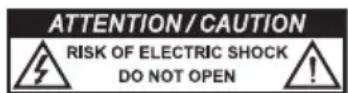
WARNING:DO NOT OPEN! RISK OF ELECTRIC SHOCK!
To reduce the risk of fire or electric shock, do not expose this unit to rain or moisture.

This symbol informs the user that there is a class 1 laser operating inside the device which does not pose any hazardous threat outside the device.
DECLARATION OF CONFORMITY
CE
Hereby, Magnat Audio-Produkte GmbH declares that the MMC 220 is in compliance with the essential requirements and other relevant provisions of directive 2014/53/EU. The Declaration of Conformity can be found at www.mac-audio.de in the download area of the device.
INSTRUCTIONS FOR DISPOSAL
In accordance with European Directive 2012/19/EU all electrical and electronic appliances must be disposed of separately via local collection points. Please observe the local regulations and do not dispose of your old appliances with normal household waste.
Battery disposal
Old batteries are hazardous waste and must be disposed of in accordance with current regulations.
REMOTE CONTROL
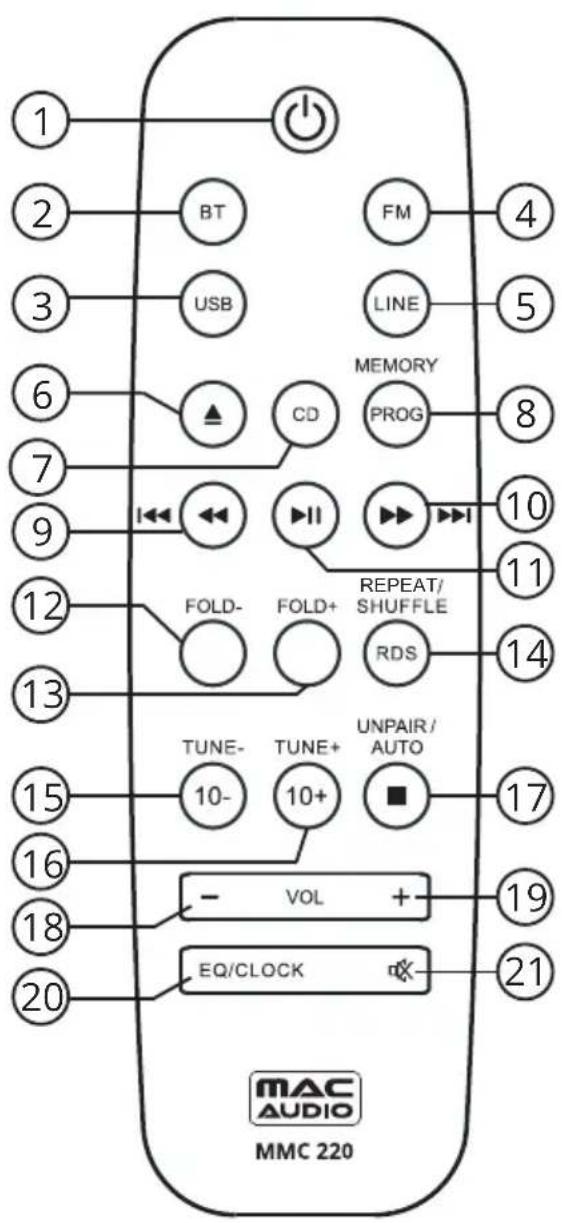
1 ON/STBY: Switches the device on when it is in the standby mode. Conversely the device can be switched from power operation to the standby mode.
2BT: Activates the input source Bluetooth.
Search for new Bluetooth sources with your phone or tablet. You will find the MAC AUDIO MMC 220. Connect your device with the MAC AUDIO MMC 220. If you are asked for a password, use "0000".
3 USB: Activates the input source USB.
4 FM: Activates radio operation.
5 LINE: Activates the input source LINE.
6 EJECT: Opens or closes the CD compartment.
7 CD: Activates the input source CD.
8 PROG/MEMORY: To select a memory preset or to store a station.
FM operation:
The current station is stored in the next free memory preset.
Use SKIP BACK or SKIP FORWARD to manually select the desired station preset. Use MEMORY to store the station.
CD operation:
Programming the playback sequence when not running playback from a CD:
- Press the PROG button.
- Press SKIP FORWARD or SKIP BACK to select the desired track.
- Press PROG to confirm your selection.
- Select the next track. Up to 20 tracks can be stored in the playlist.
- Press PLAY to start playback of the programmed list.
USB operation:
Programming the playback sequence when not running USB playback.
- Press the PROG button.
- Press SKIP FORWARD or SKIP BACK to select the desired track. Tracks from other folders can be added to the playlist by pressing FOLDER+ or FOLDER-.
- Press PROG to confirm your selection.
- Select the next track. Up to 99 tracks can be stored in the playlist.
- Press PLAY to start playback of the programmed list.
9 FAST REWIND/SKIP BACK:
FM operation:
Brief press: Skips backwards to the nearest station preset.
Press and hold: Switches between the radio stations that are stored in the previous station presets as long as the button is held.
CD operation:
Brief press: Playback starts from the beginning of the current or previous track.
Press and hold: Fast rewinds the current track.
USB operation:
Brief press: Playback starts from the beginning of the current or previous track.
Press and hold: Fast rewinds the current track.
10 FAST FORWARD/SKIP FORWARD:
FM operation:
Brief press: Skips forward to the nearest station preset.
Press and hold: Switches between the radio stations that are stored in the next station presets as long as the button is held.
CD operation:
Brief press: Playback starts from the beginning of the next track.
Press and hold: Fast forwards the current track.
USB operation:
Brief press: Playback starts from the beginning of the next track.
Press and hold: Fast forwards the current track.
11 PLAY/PAUSE:
CD operation:
Starts or pauses the playback from a CD.
USB operation:
Starts or pauses the playback.
12 FOLDER - (USB operation): Selects Folder-.
13 FOLDER + (USB operation): Selects Folder+.
14 RDS/REPEAT/SHUFFLE:
FM operation:
Switches between receiving frequency/Program Service (station name)/PTY (Program Type), Radio Text and CT (Clock Time), if supported by the station and/or the radio reception is sufficient.
CD operation:
Activates the repeat function: Repeat 1 track/repeat all tracks/random playback of the tracks on the CD/Off.
USB operation:
Activates the repeat function: Repeat 1 track/repeat the album/repeat all tracks/random playback of the USB tracks/Off.
15 10-/TUNE -:
FM operation:
Brief press: Decreases the receiving frequency stepwise.
Press and hold: Activates the search function (backwards).
CD operation:
Decreases the played track by -10.
USB operation:
Decreases the played track by -10.
16 10 +/TUNE +:
FM operation:
Increases the receiving frequency stepwise.
Press and hold: Activates the search function (forwards).
CD operation:
Increases the played track by -10.
USB operation:
Increases the played track by -10.
17 STOP/UNPAIR/AUTO:
FM operation:
Automatic station storing and search.
CD operation:
Press once: Stops the playback of the CD.
Press twice: Deletes the playlist.
USB operation:
Press once: Stops USB playback.
Press twice: Deletes the playlist.
Bluetooth operation:
Unpairs a paired phone.
18 VOLUME-: Decreases the volume.
19 VOLUME+: Increases the volume.
20 EQ/CLOCK:
EQ:
Use EQ to choose between the equaliser presets (FLAT/JAZZ/CLASSIC/ROCK/POP). CLOCK:
In standby mode, press and hold CLOCK to adjust the clock time.
- Use SKIP BACK or SKIP FORWARD to select the 24 or 12 hour clock mode.
- Press CLOCK to confirm your selection.
- Use SKIP BACK or SKIP FORWARD to adjust the hours.
- Press CLOCK to confirm your selection.
- Use SKIP BACK or SKIP FORWARD to adjust the minutes.
- Press CLOCK to confirm your selection.
21 MUTE: Switches the sound on and off.
FRONT PANEL
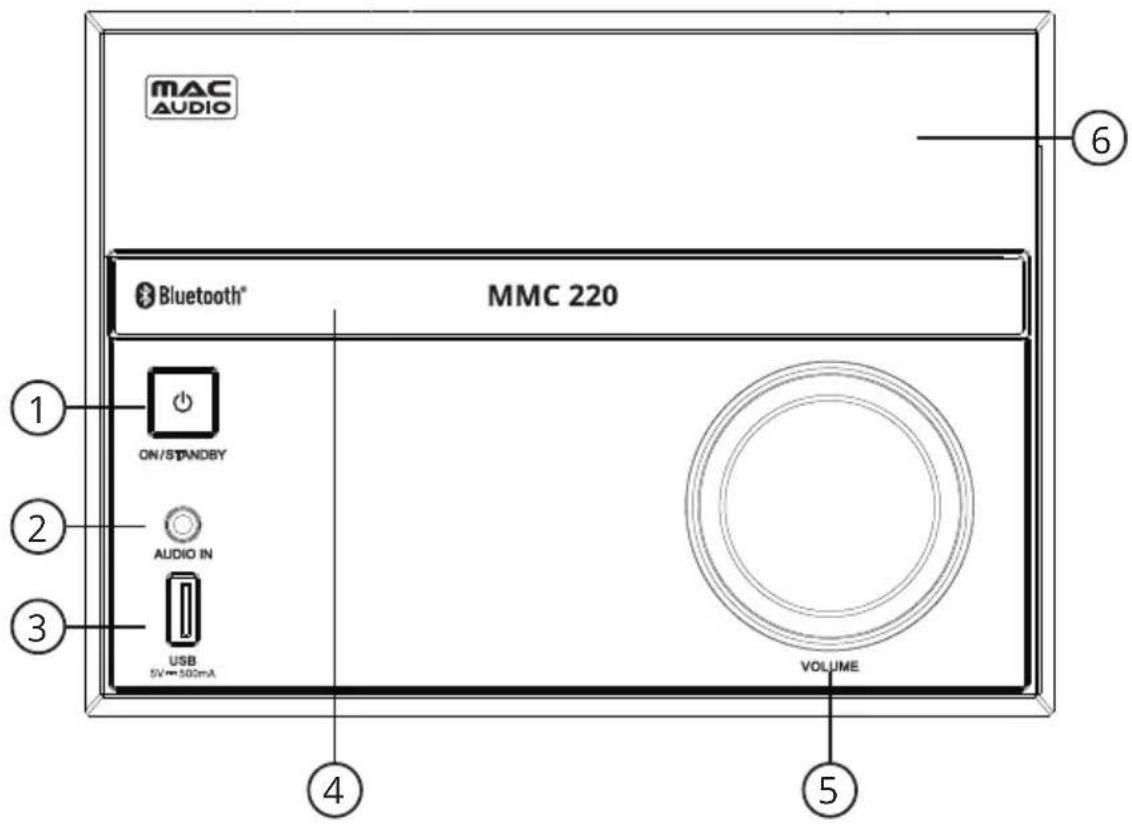
1 ON/STBY: Switches the device on when it is in the standby mode. Conversely the device can be switched from power operation to the standby mode.
2 AUDIO IN: 3.5 mm stereo input jack for an auxiliary audio device (e.g. MP3 player, etc.).
3 USB INPUT: For connecting USB storage media.
4 CD COMPARTMENT: Insert the CD into the compartment with the label facing upwards.
5VOLUME: Adjusts the volume. The volume is shown on the display. (VOL 00 - VOL 32/max).
6 DISPLAY: Displays the settings you have made.
TOP PANEL
flowchart
graph TD
    A["+"] --> B["7"]
    A --> C["8"]
    A --> D["9"]
    A --> E["10"]
    A --> F["12"]
    A --> G["11"]
    A --> H["11"]
    A --> I["11"]
    A --> J["11"]
    A --> K["11"]
    A --> L["11"]
    A --> M["11"]
    A --> N["11"]
    A --> O["11"]
    A --> P["11"]
    A --> Q["11"]
    A --> R["11"]
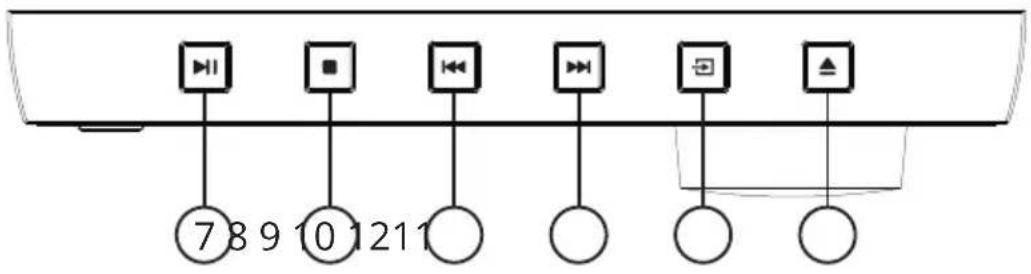
7 PLAY/PAUSE: Starts or pauses the playback from a CD/USB/Bluetooth.
8 STOP:
- Brief press: Stops a CD/USB that is playing.
- Press and hold: Disables Bluetoothpairing.
9, 10 SKIP
CD/USB/Bluetooth operation:
- Jumps to previous/next track.
Radio operation: - Brief press: Selects the next or previous station preset.
- Press and hold: Triggers a search for stations broadcasting on higher or lower frequencies.
11 SOURCE: Used for selecting the input source (CD, USB, FM, LINE IN, BT). This is indicated on the display briefly
12 ▲ EJECT: Opens or closes the CD compartment.
REAR PANEL
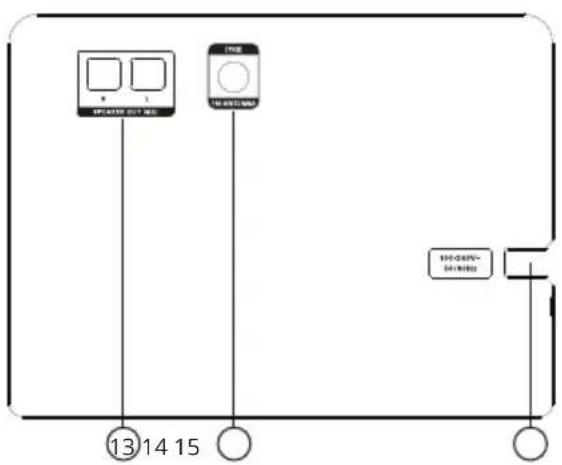
13 SPEAKER TERMINALS: Output for the connection of the supplied speakers.
14 FM ANTENNA CONNECTION: For connecting the supplied FM antenna or a house antenna.
15 MAINS SUPPLY: For connection to domestic power sockets.
INSTALLATION
LOUDSPEAKERS
The MMC 220 set includes two speakers. These speakers have been adapted to perfectly match the MMC 220. Only these speakers shall be used together with the MMC 220.
Positioning of the speakers
In the ideal configuration the speakers and the listening position should form an equilateral triangle. When the left and right speakers are the same distance from the listening position their sound arrives at the same time, resulting in a harmonious, natural music reproduction.
There should be a clear line of sight between the loudspeakers and the listening position. Any sound-absorbing or reflecting obstacles in the path will distort the sound.
The MMC 220 set comes with prefabricated speaker cables. These cables shall neither be extended nor shortened.
ANTENNA
Connect the FM antenna or a house antenna (provides better reception) to the rear of the device (14).
We recommend to install full length of the aerial antenna for best possible reception.
AUXILIARY AUDIO EQUIPMENT
Auxiliary audio devices are to be connected to the appropriate sockets before starting to use the MMC 220.
REMOTE CONTROL
When using the remote control aim it at the display on the MMC 220.
FUNCTIONS OF THE MMC 220
FUNCTIONS OF THE CD PLAYER
Playing a CD
- Open the CD compartment by pressing the EJECT button.
- Insert the CD into the compartment (with the label facing upwards).
- Close the compartment by pressing the EJECT button.
- Press PLAY to listen to the first track on the CD.
- The display shows the track number and the elapsed time of the current track.
Pausing a CD
- Press the PAUSE button to pause the playback of the CD.
- Press the PLAY button to resume playback of the CD.
Selecting the track
- You can select the next or previous track during playback by pressing the SKIP buttons on the MMC 220 unit (9, 10) or on the remote control (9, 10).
Searching within a track
- Press the right/left SEARCH button on the remote control (9, 10) to search forwards/backwards within a track respectively.
Stopping playback from a CD
- Press the STOP button.
CD repeat mode
- Repeating a track: Start the CD. The REPEAT button repeats the current track. The following appears in the display: REP ONE.
- Repeating the entire CD: Start the CD. Press the REPEANT button twice. The following appears in the display: REP ALL.
- Shuffle function: Plays all tracks on the CD in a random order.
- Stopping the repeat function: Keep pressing the REPEAT button until REP OFF appears in the display.
FUNCTIONS OF THE TUNER
Radio operation
- Select TUNER as the audio source using the SOURCE (MMC 220,11) or FM button (remote control, 4).
Station search
- Select TUNER as audio source (see above).
- Use the TUN+/TUN- buttons on the remote control (15, 16):
- Briefly pressing these buttons increases or decreases the tuning frequency by 50 kHz.
- Pressing and holding these buttons searches for the next or previous station.
Station presets
A total of 30 FM stations can be stored in the memory.
- Select the desired station (FM). Open the memory using the PROGRAM button on the remote control (8).
- Choose the desired station number.
- The station number flashes in the display.
- Press the PROGRAM button again to store the station.
- The station number stops flashing.
- Repeat this procedure to store other stations.
RDS (RADIO DATA SYSTEM) FUNCTIONS OF THE TUNER
RDS is a system which provides information about FM stations that is broadcast together with the station's signal. The MMC 220 can present this information (about the station, broadcast, etc.) in the display. The RDS functions can be set via the RDS button on the remote control (14).
- PS (Program Service Name): Displays the name of the programme.
- PTY (Program Type Identification): Displays the type of programme.
- RT (Radio Text): Displays all information for the programme.
- CT (Clock Time): Displays the clock time.
If one of these functions is not supported despite reception of an RDS signal, "NONE" will appear in the display.
SOUND SETTINGS
Setting the volume
The volume can be adjusted by using the VOLUME regulator on the front panel (5) or the VOLUME+/VOLUME- buttons on the remote control (18, 19). VOL and a value between 00 and MAX (32) then appears in the display.
EQ function
Various equaliser settings can be called up by pressing the EQ button on the remote control (20). The following settings can be selected: FLAT, JAZZ, CLASSIC, ROCK, POP. These can be selected by repeatedly pressing the EQ button.
TECHNICAL SPECIFICATIONS
Phone Connectivity
Wireless Bluetooth® 2.1 with EDR (Enhanced Data Rate)
Operating frequency: 2402 - 2480 MHz
Maximum power transmitted
acc. EN62479: 1.3 dBm
CD Player
Playable formats: CD/CD-R/CD-RW/MP3
USB
playable format: MP3 music
FM Tuner
RDS PLL Tuner (87.5 - 108 MHz)
30 station presets
FM aerial antenna (75 ohms)
Loudspeakers
1 x 87 mm fullrange bassreflex loudspeaker
Miscellaneous
Total power output 2 x 30 watts
Connections Front USB input: version 1.1 (5V/500mA), MP3 playback
Front audio input (Line In): 3.5 mm jack
FM antenna connection (75 ohms)
Mains voltage 100 - 240 V AC/50 - 60 Hz, built-in linear power mains adapter
Electricity consumption 30 W
Standby: < 1 W
Display/Settings 8 digit display (color: amber)
12/24 hour clock format
5x equalizer: FLAT/JAZZ/CLASSIC/ROCK/POP
Weight Electronics: 1.82 kg
Loudspeaker: 1.1 kg
Dimensions (wxhxd) Electronics: 179 x 140 x 253 mm
Loudspeaker: 154 x 252 x 127 mm
Subject to technical modifications.
GB Congratulations! You have made a wise selection in becoming the owner of a MAC AUDIO product. We grant a 2-years warranty for this product.
The equipments are checked and tested continuously during the entire production process. In case you have problems with your MAC AUDIO equipment, kindly observe the following:
-
The warranty period commences with the purchase of the component and is applicable only to the original owner.
-
During the warranty period we will rectify any defects due to faulty material or workmanship by replacing or repairing the defective part at our discretion. Further claims, and in particular those for price reduction, cancellation of sale, compensation for damages or subsequential damages, are excluded.
-
Unauthorized tampering with the equipment will invalidate this warranty.
-
Consult your authorized dealer first, if warranty service is needed. Should it prove necessary to return the component to the factory, please insure that • the component is packed in original factory packing in good condition • your enclose your receipt as proof of purchase.
-
Excluded from the warranty are: • Illuminates • Wear parts • Shipping damages, either readily apparent or concealed (claims for such damages must be lodged immediately with forwarding agent, the railway express office or post office). • Scratches in cases, metal components, front panels, etc. (You must notify your dealer directly of such defects within three days of purchase.) • Defects caused by incorrect installation or connection, by operation errors (see operating instructions), by overloading or by external force. • Equipments which have been repaired incorrectly or modified or where the case has been opened by persons other than us.
- Consequential damages to other equipments. • Reimbursement of cools, without our prior consent, when repairing damages by third parties • Batteries and battery packs.
MAC AUDIO
Lise-Meitner-Str. 9 • D-50259 Pulheim • Germany Tel. +49 (0) 2234/807 - 0 • Fax +49 (0) 2234/807 - 399
Internet: http://www.mac-audio.de