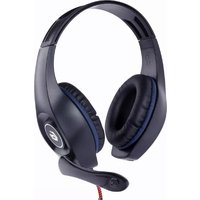
MIC-D-02 - Headphones Gembird - Free user manual and instructions
Find the device manual for free MIC-D-02 Gembird in PDF.


Pick your language and provide your email: we'll send you a specifically translated version.
| Type | Over-ear headset with microphone |
| Connectivity | Wired, 3.5 mm audio jack |
| Microphone | Built-in, omnidirectional |
| Driver diameter | 40 mm |
| Frequency response | 20 Hz – 20 kHz |
| Impedance | 32 Ω |
| Sensitivity | 105 dB ± 3 dB |
| Cable length | 1.2 m |
| Weight | 150 g |
| Dimensions (W x D x H) | 180 x 160 x 70 mm |
| Color | Black |
| Compatibility | PC, laptop, smartphone, tablet with 3.5 mm port |
| Controls | Inline volume control and microphone mute |
| Ear cushion material | Leather-like padded ear cups |
| Headband adjustment | Adjustable, padded headband |
| Warranty | 1 year |
| Package contents | Headset, user manual |
Frequently Asked Questions - MIC-D-02 Gembird
How do I connect the Gembird MIC-D-02 headset to my computer?
Plug the 3.5 mm audio jack into the headphone port and the microphone jack (if separate) into the microphone port. For combined ports, use the single plug.
Does this headset work with smartphones?
Yes, it is compatible with smartphones and tablets that have a 3.5 mm headphone jack.
How can I adjust the volume?
Use the inline volume control on the cable to increase or decrease the volume.
What should I do if there is no sound?
Check that the plug is fully inserted. Make sure the volume is not muted on your device. Try another device to isolate the issue.
How do I clean the headset?
Wipe the ear cups and headband with a soft, dry cloth. Do not use liquids or abrasive cleaners.
Is the microphone detachable?
No, the microphone is built-in and not removable.
What is the warranty period for this product?
The Gembird MIC-D-02 comes with a 1-year limited warranty.
Can I use this headset for gaming?
Yes, it is suitable for gaming, voice chat, and multimedia use thanks to its integrated microphone.
Why is the microphone not working?
Ensure the microphone is not muted via the inline control. Check your device's audio settings to select the correct input device. Try plugging into a different port.
How do I store the headset?
Store in a cool, dry place. Avoid wrapping the cable tightly around the headset to prevent damage.
User questions about MIC-D-02 Gembird
0 question about this device. Answer the ones you know or ask your own.
Ask a new question about this device
No questions yet. Be the first to ask one.
Download the instructions for your Headphones in PDF format for free! Find your manual MIC-D-02 - Gembird and take your electronic device back in hand. On this page are published all the documents necessary for the use of your device. MIC-D-02 by Gembird.