PREA86BTH - Receiver Pyle - Free user manual and instructions
Find the device manual for free PREA86BTH Pyle in PDF.


| Product Type | Bluetooth Stereo Receiver Amplifier |
| Model | PREA86BTH |
| Brand | Pyle |
| Audio Output Power | 2 x 15 Watts RMS |
| Bluetooth Version | 5.0 |
| Bluetooth Range | 30+ feet |
| Input Connectivity | USB, SD Card, AUX, FM Antenna, Bluetooth |
| Output Connectivity | Speaker terminals (2 channels), RCA line out, Headphone jack |
| FM Radio | 87.5-108 MHz |
| USB/SD Playback | MP3, WMA, WAV files |
| Dimensions (W x H x D) | 7.5 x 2.5 x 6.5 inches |
| Weight | 1.6 lbs |
| Power Supply | AC 110-240V, 50/60Hz |
| Power Consumption | 30W max |
| Remote Control | Included |
| LED Display | Blue front panel display |
| Material | Aluminum front panel, metal chassis |
| Maintenance & Cleaning | Wipe with soft dry cloth; avoid solvents and moisture |
| Safety Precautions | Do not expose to rain or humidity; ensure proper ventilation |
| Spare Parts & Repairability | Contact Pyle customer service for replacement parts |
| General Information | 1-year limited warranty against defects |
Frequently Asked Questions - PREA86BTH Pyle
User questions about PREA86BTH Pyle
0 question about this device. Answer the ones you know or ask your own.
Ask a new question about this device
Download the instructions for your Receiver in PDF format for free! Find your manual PREA86BTH - Pyle and take your electronic device back in hand. On this page are published all the documents necessary for the use of your device. PREA86BTH by Pyle.
USER MANUAL PREA86BTH Pyle
VISIT US ONLINE: Have a question? Need service or repair? Want to leave a comment? PyleUSA.com/ContactUs
Questions? Issues?
We are here to help!
Phone: (1) 718-535-1800
Email: support@pyleusa.com
PYLE
PyleUSA.com
text_image
PYLE PTELEPHONE PYLE OPT 1 PYLE Power OFF Control knobs USB USB USB USB USB USB USB USB USB USB USB USB USB USB USB USB USB USB USB USB USB USB USB USB USB USB USB USB USB USB USB USB USB USB USB USB USB USB USB USB USB USB USB USB USB USB USB USB USB USB US US US US US US US US US US US US US US US US US US US US US US US US US US US US US US US US US US US US US US US US US US US US US US US US US US☆☆☆☆☆☆☆
◆◆▲◆□□◆◆□◆□★◆◆○□◆◆◆
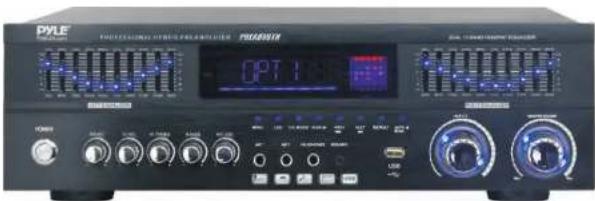
Built-in USB Playback with Radio Antenna,
BT/FM/Optical/Coaxial/HDMI & Dual 10 Band EQ
USER MANUAL
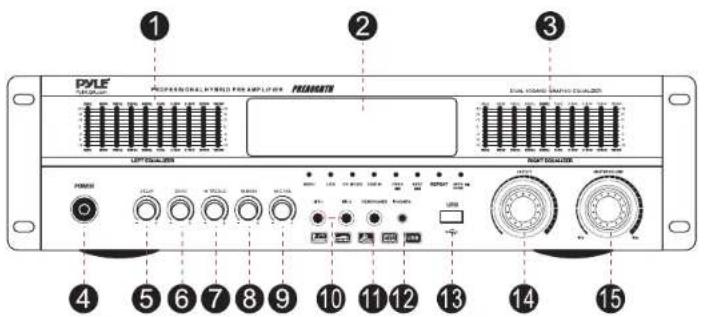
Front and Back Panel
text_image
PYLE PROFESSIONAL PHELO FOR EQUITYER PEELENT 1 2 3 4 5 6 7 8 9 10 11 12 13 14 15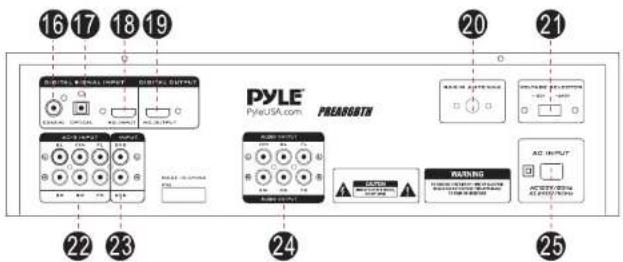
flowchart
graph TD
    A["16"] --> B["Digital INPUT"]
    C["17"] --> D["Digital INPUT"]
    E["18"] --> F["Digital INPUT"]
    G["19"] --> H["Digital INPUT"]
    I["20"] --> J["PreARGOTH"]
    K["21"] --> L["PreARGOTH"]
    M["22"] --> N["Control Panel"]
    O["23"] --> P["Control Panel"]
    Q["24"] --> R["Control Panel"]
    S["25"] --> T["Control Panel"]
- Left Equalizer
- LED Digital Display
- Right Equalizer
- Power ON/OFF Switch
- Delay Control
- Echo Control
- Treble Volume Control
- Bass Volume Control
- Mic Volume Control
- Mic 1 & Mic 2 Input
- Headphones Input
- IPOD/MP3 Inputs Jack
-
USB Reader
-
Input Selection
- Master Volume Control
- Coaxial Input Jack
- Optical Input Jack
- HDMI Input
- HDMI Output
- FM Radio Antenna
- 120V/240V Voltage Selector
- AC-3 Inputs
- DVD Input ( L/R)
- Audio Output
- AC 120V/240V Input
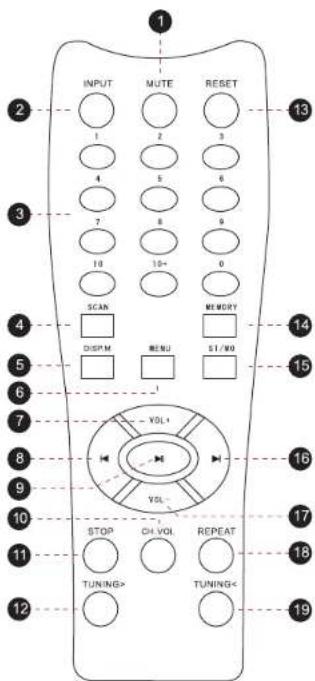
Remote Control Functions
- Mute button
- Input button: Switch between input sources.
- Numeric key pad: In USB mode, use to manually select tracks. In radio mode use to manually select stored stations.
- Scan button: Scan between stations.
- Spectrum display mode.
- Menu button: Controls function of Master Volume (Volume, Bass, Treble, Balance)
- Master Volume + button: Increases volume level.
- Previous button: Move back through tracks from USB Input
- Play/Pause button: Play and pause music from USB Input
- Channel mode volume
- Stop button: Stops music playing from USB input
- Tuning Forward button: Move forward through radio stations.
- Reset button: Resets volume to 20dB
- Memory button: Allows user to save selected stations.
- Stereo/Mono button: Toggles between Stereo and Mono modes.
- Next button: Move forward through tracks from USB input
- Master Volume - button: Decreases volume level.
- Repeat button: Repeats current track from USB Input
- Tuning Back button: Move back through radio stations.
text_image
INPUT MUTE RESET 1 2 3 4 5 6 7 8 9 10 10+ 0 SCAN MEMORY DISPM MENU ST/WO VOL+ VOL- STOP CH VOL REPEAT TUNING> TUNING< 12 13 14 15 16 17 18 19WIRELESS BT STREAMING OPERATION INSTRUCTION:
External devices which have a built-in Wireless BT feature can be connected to this amplifier wirelessly to play through the amplifier's speakers. If your amp is connected to speakers, you will hear audible tones which will help for connecting.
- Press the "INPUT" button located on the front panel and select "BT" mode.
- Turn ON the Wireless BT of your external device.
- Search for available BT devices and make sure to be within range of your amp, and wait for your device to select "Pyle Speaker" on the pairing devices lists of Wireless BT networks.
- The unit is automatically ready to pair with your devices when you hear audible tones.
- Now you can play music on your external device through the amplifier.
Features:
• Built-in USB Playback
- USB Flash Drive
• FM Radio with LED Digital Display
• IPOD/MP3 (3.5mm) Input
- MIC/OPTICAL/COAXIAL/HDMI/AC-3/DVD Inputs
- Desktop Stereo Pre-Amplifier
- Compact Home Theater-Stereo Receiver Style
• Built-in BT for Wireless Music Streaming
• Optical/Coaxial Digital Signal Inputs
• MP3/WAV Audio Files Support
- Connect & Stream Audio from External Devices
• Front Panel Audio Control Center
• Radio Station Auto-Search Scan
- Repeat Audio File Functions
• Treble, Bass, Master & Microphone Volume Adjustable
Wireless BT Connectivity:
- Receives Wireless Signal for Audio Streaming
• Simple & Hassle-Free Pairing Setup - Integrated Antenna for Extended Wireless Range
- Works with All of Today's Latest Devices (Smartphones, Tablets, Laptops, Computers, etc.)
• Wireless BT Version: 5.0
• Wireless BT Network Name: 'Pyle Speaker'
• Wireless Range: 40'+ Ft.
What's in the Box:
- Desktop Stereo Amplifier
- Remote Control
- FM Antenna
- Handles
Technical Specs:
• Power Output: 0 Watts
• Operating Voltage: 120V240V
- Remote Control Battery: Need 2x 'AAA' Battery (not included)
• MAX Power Output: 0 Watt (@ 4 Ohm)
• RMS Power Output: 0 Watt x 2 (@ 8 Ohm)
• Tone Control: Bass, f=100Hz +/-12dB, Treble, f=10 KHz +/-12dB
• Tone Control for Mic: Bass, f=100Hz +/-8dB, Treble, f=10 KHz +/-8dB
• Frequency Response: 20Hz-20 kHz
• Frequency Adjustment: +/-2dB
• Signal to Noise Ratio: >73dB
• T.H.D.: <0.5%
• Radio Station Presets: Up to 40 Stations
• Separation Degree: >48dB
• Power Supply: 120V/240V, Switchable
- Dimensions (L x W x H): 16.93" x 7.87" x 4.72" -inches

This product can expose you to a chemical or group of chemicals, which may include "Lead (PB)" which is known in the state of California to cause cancer, birth defects, or other reproductive harm. For more info, go to https://www.p65warnings.ca.gov/.