
Fluance ATN95E - Audio Equipment

ATN95E - Audio Equipment Fluance - Free user manual and instructions

Find the device manual for free ATN95E Fluance in PDF.

📄 1 pages English EN Download 💬 AI Question 10 questions ⚙️ Specs
Notice Fluance ATN95E - page 1
Pick your language and provide your email: we'll send you a specifically translated version.
Product Type Replacement Stylus
Compatible Cartridge Audio-Technica AT95E
Stylus Tip Elliptical
Tracking Force Range 2.0 – 2.5 grams
Output Voltage 4.0 mV (at 1 kHz, 5 cm/sec)
Channel Separation >20 dB at 1 kHz
Frequency Response 20 Hz – 20,000 Hz
Dimensions 0.5 x 0.3 x 0.2 inches
Weight 0.5 grams
Material Aluminum cantilever with diamond tip
Installation Easy snap-on replacement
Compatible Turntables Fluance RT80, RT81, RT82, RT83, RT84, RT85
Care Instructions Clean with a stylus brush before each use
Replacement Interval Every 300 – 500 hours of play
Warranty 1 year limited warranty

Frequently Asked Questions - ATN95E Fluance

Is the ATN95E compatible with my Fluance turntable?
Yes, the ATN95E is a direct replacement stylus for the Audio-Technica AT95E cartridge, which is pre-installed on most Fluance turntables including RT80, RT81, RT82, RT83, RT84, and RT85.
How do I install the ATN95E stylus?
Installation is simple: carefully align the stylus with the cartridge body and gently push it upward until it clicks into place. Ensure the stylus is fully seated before use.
What tracking force should I use?
The recommended tracking force for the ATN95E is between 2.0 and 2.5 grams. Set your tonearm's counterweight accordingly for optimal performance.
How do I clean the stylus?
Use a soft stylus brush in a back-to-front motion. For deeper cleaning, a stylus cleaning solution applied to the brush can remove stubborn debris. Always clean before each play.
What is the typical lifespan of the ATN95E?
Under normal use, the stylus should last between 300 and 500 hours of play. Regular cleaning and proper tracking force extend its lifespan.
Can I use the ATN95E with other cartridge brands?
The ATN95E is specifically designed for the Audio-Technica AT95E cartridge (and its variants). It may not fit other cartridges properly.
What is the difference between ATN95E and ATN95EX?
The ATN95E has an elliptical stylus tip, while the ATN95EX features a bonded Shibata tip for improved high-frequency tracking. Both fit the same cartridge.
Why is the sound distorted after replacing the stylus?
Check that the stylus is fully seated and the tracking force is set correctly. Also ensure the cartridge alignment is correct. Distortion can indicate improper setup or a damaged stylus.
Does the ATN95E come with a warranty?
Fluance offers a 1-year limited warranty against defects in materials and workmanship. Keep your receipt for warranty claims.
Where can I find the user manual?
The user manual for the ATN95E is available for free download on the Fluance website or at notice-facile.com. It includes installation and care instructions.

User questions about ATN95E Fluance

0 question about this device. Answer the ones you know or ask your own.

Ask a new question about this device

The email remains private: it is only used to notify you if someone responds to your question.

No questions yet. Be the first to ask one.

Download the instructions for your Audio Equipment in PDF format for free! Find your manual ATN95E - Fluance and take your electronic device back in hand. On this page are published all the documents necessary for the use of your device. ATN95E by Fluance.

USER MANUAL ATN95E Fluance

Avoid touching the tip of the Stylus itself when replacing.

For additional assistance, please visit:

www.fluance.com

Removing the Stylus

  1. Remove the Headshell 2. Remove the Stylus protector 3. Pull down on the Stylus to release

Fluance ATN95E - Removing the Stylus - 1

natural_image Diagram of a mechanical connector with a cylindrical shaft and arrow indicating rotation (no text or symbols)
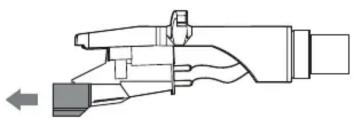
Fluance ATN95E - Removing the Stylus - 2

natural_image Technical line drawing of a mechanical component with no visible text or symbols

and remove

Fluance ATN95E - Removing the Stylus - 3

Installing the new Stylus

to install

Fluance ATN95E - Installing the new Stylus - 1

natural_image Diagram of a mechanical tool with an arrow indicating force or movement (no text or symbols present)
  1. Install the Stylus protector 3. Install the Headshell1. Insert the new Stylus and press up
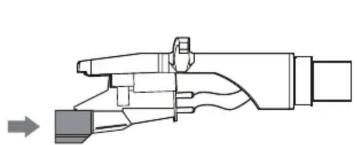
Fluance ATN95E - Installing the new Stylus - 2

natural_image Mechanical assembly diagram showing a lever mechanism with no visible text or symbols
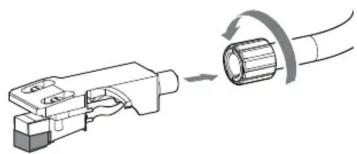
Fluance ATN95E - Installing the new Stylus - 3

natural_image Diagram showing a cable being inserted into a connector, with no text or symbols present.
Table of contents Click a title to access it
Manual assistant
Powered by Anthropic
Waiting for your message
Product information

Brand : Fluance

Model : ATN95E

Category : Audio Equipment