RL360di - Detector K40 - Free user manual and instructions
Find the device manual for free RL360di K40 in PDF.


| Product Type | Radar/Laser Detector |
| Brand | K40 |
| Model | RL360di |
| Detection Technology | Superheterodyne with digital signal processing |
| Radar Bands Detected | X, K, Ka (including POP radar) |
| Laser Detection | Yes, multiple laser guns |
| 360° Protection | True 360° around the vehicle |
| Voice Alerts | Audible voice prompts and tones |
| Filter Modes | City / Highway / Auto modes, false alert filtering |
| Power Source | 12V DC cigarette lighter adapter |
| Voltage | 12V (cigarette lighter, hardwire optional) |
| Dimensions | Approx. 120 x 70 x 30 mm |
| Weight | Approx. 150 g |
| Mounting Type | Dashboard or windshield suction cup mount |
| Display | LED indicator lights and digital display |
| Color | Black |
| Operating Temperature | -30°C to 70°C |
| Warranty | 1 year limited warranty |
| Manual Languages | English, French, Spanish, German (depending) |
| Included Accessories | Power cord, suction mount, user manual |
Frequently Asked Questions - RL360di K40
User questions about RL360di K40
0 question about this device. Answer the ones you know or ask your own.
Ask a new question about this device
Download the instructions for your Detector in PDF format for free! Find your manual RL360di - K40 and take your electronic device back in hand. On this page are published all the documents necessary for the use of your device. RL360di by K40.
USER MANUAL RL360di K40
Don't like to read manuals?
Call our experienced K40 Consultants.
We'll explain the whole thing.
800.323.5608
K40 ELECTRONICS
600 Tollgate Rd., Suite A
Elgin, IL 60123
K40.com
Wake-Up Sequence 4
Receiving Alerts 5-6
Radar Alert Sequence ....5
Laser Alert Sequence ....5
Laser Settings 6
Non-Police Alerts 6
K-Band Filter 6
Traffic Sensor Filter 6
Special Features / Functions 7-13
Dim 7
City/Hwy/Filter (Sensitivity) 7
Quiet Ride....8
Mute Function 8
Mark to Mute 9
Mark to Alert 10
Speed Monitor 10-11
Customizable Settings 11-13
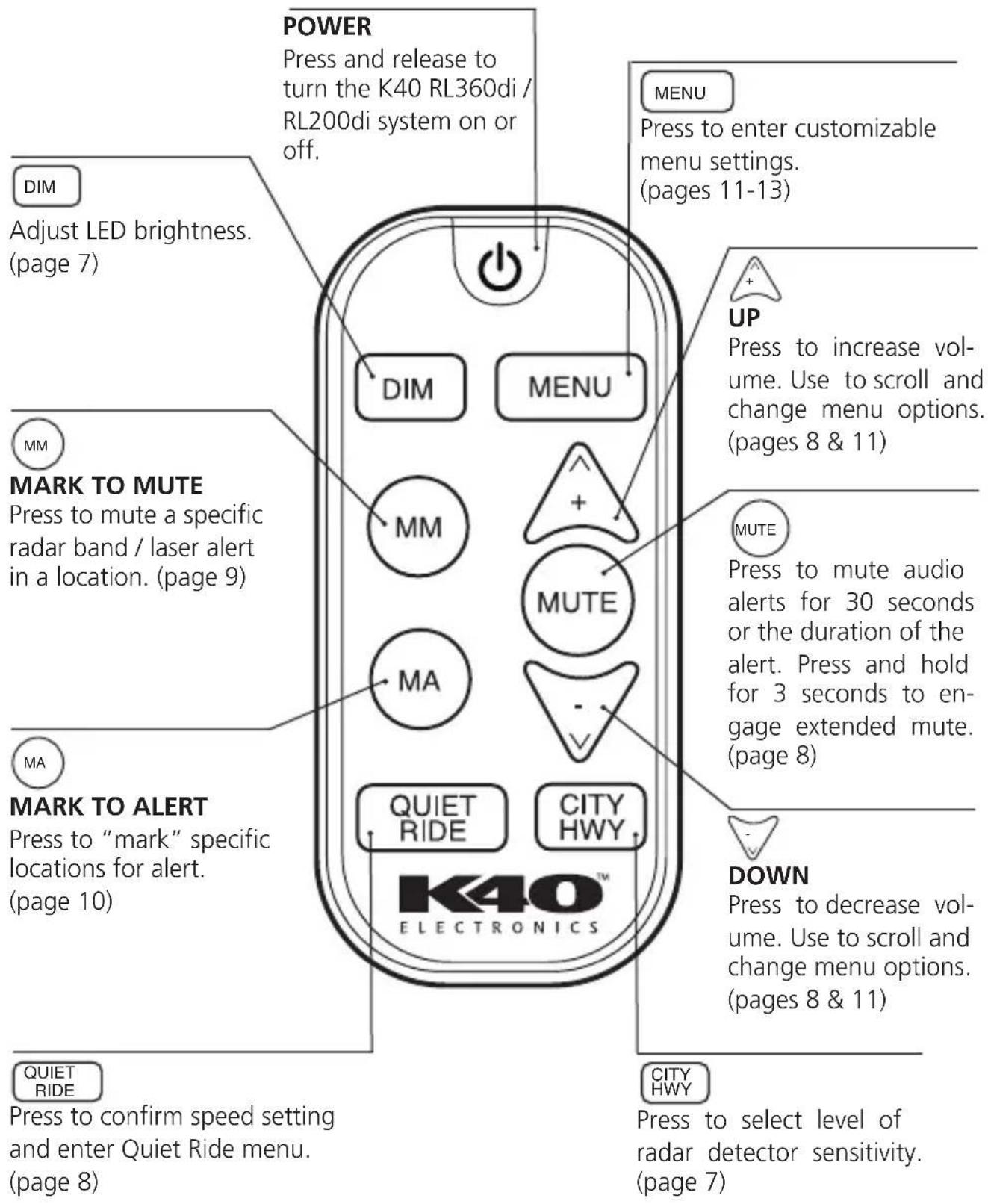
Remote Control 14-15
Warranty / Guarantees .....16
Your K40 system will be ready for use following this automatic wake-up sequence:
- Start your vehicle – Your K40 system is designed to turn on automatically every time your vehicle is started.
- Listen for Wake-Up Sequence – Both front and rear alert lights in your dash will flash (front only radar receiver systems have one alert light). The voice will announce, "K40 Scan, Active," then you will hear alerts for all bands.
NOTE: If you don't hear the wake-up sequence, press and release.
- GPS Connection – After locating available satellites, the unit will announce, "GPS Connected."
NOTE: If you are in a location that prevents connection with GPS satellites (e.g. parking garage), your system will still protect you from all radar / laser threats. Once you drive to an unobstructed location, the GPS will connect and you will hear, "GPS Connected."
Your K40 system provides a combination of audio and visual alerts to warn you when radar is detected.
Radar Alert Sequence
Your K40 system detects all North American police radar bands (X, K, and Ka-Band). When a signal is detected:
- A voice alerts which band was identified. (This assumes the factory default “Voice On” setting has not been changed.)
- The K40 RL360di will announce the direction of the signal's source, either front or rear, along with the band detected. K40 RL200di systems will only announce the band detected.
- Signal strength and proximity to the radar source will be identified as a series of Geiger counter-like tones. The faster the tone pattern, the closer you are to the source. Each band has its own distinctive tone.
Laser Alert Sequence
(only for K40 systems that include one or more Laser Defusers®)
When your K40 system detects a laser signal:
- A voice announces, “Laser.” (This assumes the factory default “Voice On” setting has not been changed.)
- You will then hear a distinct and urgent audio tone.
- LED(s) will pulse rapidly.
Laser Settings
The Laser Defuser can be configured to one of three different operational settings:
| Laser Settings | Description Recommended Use | |
| Constant Upon receiving a laser signal, the Laser Defuser will continuously transmit a jamming signal for the duration of the laser encounter. This is the factory default setting. | • Gives the driver more time to decelerate.• Higher potential for jamming all the way to the laser gun location. | |
| Pulse Transmit | Upon receiving a laser signal, the Laser Defuser will transmit a jamming signal for 5 seconds and then cease firing for the duration of that encounter. | • Gives you time to reduce speed. Officer will then be able to obtain speed to eliminate the suspicion of “jamming”. |
| Receive Only | The Laser Defuser will only detect laser. No jamming signal will be emitted. | • For notification only. Officer will immediately obtain a speed reading on your vehicle in this setting. |
-Alerts from Non-Police Signals
Your K40 system is sensitive enough to detect signals generated by non-police equipment, such as automatic doors. To learn how to minimize these signals, please read about FILTER options (page 7), Quiet Ride function (page 8), and Mark to Mute (page 9).
K-Band Filter
Your K40 system rejects alerts from vehicles on the road (including your own) equipped with radar-based safety features, such as collision avoidance. Police radar reception and detection range is unaffected by this feature.
- Traffic Sensor Filter
Your K40 system will reject alerts from traffic flow sensors usually encountered during highway driving. Enable this filter through the menu (pages 11-13).
DIM
- Press and release DIM on the remote control to adjust LED brightness to accommodate various driving environments. Your setting will automatically be saved with the exception of "Off." The "Off" setting will revert to "Night" upon system wake-up.
The 5 options include:
- "Day" (Bright)
- "Dusk" (Medium / factory default)
- "Night"(Dim)
- "Auto" (LED(s) adjust automatically from 3 seconds in "Day," 3 seconds in "Dusk," and the duration of the alert in "Night")
- "Off" (No light(s), still receive full audio alerts)
CITY/HWY/FILTER Operation
(i.e. signal sensitivity)
- Press and release CITY HWY on the remote control to change the setting at any time. Your K40 system offers three levels of radar sensitivity settings to accommodate various driving situations.
| Settings Sensitivity Recommended Use | ||
| 1. Highway Detects all North American For high highway travel or in any factory default police radar signals at full area in which you are unfam- setting. sensitivity.iliar with the types of radar used. | ||
| 2. City | 50% reduction in X-Band sen-sitivity. | When traveling in an urban area with minimal non-police radar signals. |
| 3. Filter | X-Band off. 50% reduction in K and Ka-Band sensitivity. | When traveling in a congested traffic area with a high con-centration of non-police radar signals. |
Quiet Ride
The Quiet Ride function will automatically silence all radar / laser alerts when traveling under a speed setting of your choice between 5-75 mph in 5 mph increments or 10-120 kph in 10 kph increments.
Visual alerts are unaffected by Quiet Ride settings.
The factory default setting for Quiet Ride is "Off."
Activating / Adjusting Quiet Ride
- Press and release QUIET RIDE on the remote control to activate the Quiet Ride menu. Voice will announce the current setting e.g., “Quiet Ride Off,” or the current speed setting, “Quiet Ride, 25, 30, 35...”
- Press and release + or - to adjust the speed settings on Quiet Ride. Any selected speed setting indicates Quiet Ride is on.
- When you have made your desired Quiet Ride speed selections, stop scrolling and voice will announce, "Quiet Ride Set."
NOTE: Locations that you have "Marked to Alert" (page 10) are unaffected by Quiet Ride settings.
Mute Functions
- Press and release MUTE for 30 second mute (or duration of alert).
- Press and hold MUTE for 3 seconds to engage extended mute (5 minutes or duration of alert).
To turn the voice / tone audio alerts off:
- Press and release - until voice confirms, "Volume Off."
In both Mute settings and Volume Off settings, you will continue to receive flashing visual alerts.
Mark to Mute
The Mark to Mute function allows you to mute any radar band / laser alert from a non-police source (i.e. an automatic door) in a specific GPS location.
Using Mark to Mute
- Press and release ^MM to mute a specific radar band / laser alert.*
- A voice announces that a specific radar band / laser alert has been muted (i.e. "K Muted").
- You will no longer receive audible alerts for the muted radar band / laser alert when within a 1,500 ft. radius of the muted location.
- You will still receive visual alerts from the alert LED(s).
- All other radar bands / laser alerts remain unaffected.
To remove a previously muted radar band / laser alert from your database:
- Press and release MM while in the marked location.
- Voice announces that a specific radar band / laser alert has been removed (i.e. "K Muted Removed").
To remove allstored muted radar bands / laser alerts:
- Press and hold MM for 10 seconds at any time.
- Voice announces, "All Muted Locations Cleared."
The Mark to Alert function allows you to add specific GPS locations to your personal database, alerting you to any point of interest you choose (such as school zones, speed traps, or red light cameras).
- Press and release MA on the remote control when you want to mark a location for alert.
- Voice will announce, "Marked to Alert."
In the future, you will be alerted as follows:
| When you arrive... You will | hear... |
| ...within a radius of 750 feet ...“Approaching marked location” of a marked location and the alert light(s) will flash twice | |
| ...at a marked location ...a single “Bing” tone and the alert light(s) will flash once | |
To remove a previously marked location from your database:
- Press and release MA while in the marked location.
- Voice announces, "Marked Location Removed."
To remove allstored locations:
- Press and hold MA for 10 seconds at any time.
- Voice announces, "All Alert Locations Cleared."
Speed Monitor
The Speed Monitor function alerts the driver when a preselected speed is exceeded. Speed Monitor can be set to any speed between 40-100 mph in 5 mph increments or 60-160 kph in 10 kph increments.
The factory default setting for Speed Monitor is "Off."
Activating / Adjusting Speed Monitor
- Press and release MENU until voice announces, "Speed Monitor."
- Press and release or to adjust the Speed Monitor speed setting. When you have chosen your desired Speed Monitor setting, stop scrolling and voice will announce, "Exit."
When driving and the Speed Monitor speed is exceeded:
- Your K40 system will emit a continuous “Bing Bong” tone and the LED(s) will remain lit.
- The alerts will continue until the vehicle's speed is reduced to below the Speed Monitor speed setting.
To change the factory preset features and optimize your K40 system for the way you drive, follow the instructions below, or call a K40 Consultant at 800.323.5608. Rest assured your call will be answered immediately and personally.
To change settings:
- Press and release MENU to enter Menu Mode. The voice will announce, "Menu," and then announce the first customizable option and its current status.
- Press and release MENU to scroll through the options until you get to the feature you want to change.
- Press and release + or to change an existing setting.
To save your settings and exit:
- Press and hold MENU for 3 seconds, or wait 10 seconds and the system will automatically save your preferences.
• The voice will announce, "Exit."
| Menu Options(in sequential order) | Default Setting(voice confirmations) | Description | ||
| RL200di System | RL360di System | |||
| 1 | Voice Type "Female | Voice" "Female | Voice" Choose male or female voice for audio alerts. | |
| 2 | Audible Voice "Voice On" "Voice On" For all initial audio alerts: "Voice On" uses voice; "Voice Off" uses tones only. | |||
| 3 | Wake-Up "Wake-Up Long" "Wake-Up Long" Controls length of startup sequence after powering on unit. "Wake-Up Long" is standard five second sequence. "Wake-Up Sho uses an abbreviated sequence. | |||
| 4 | Auto Mute "Auto Mute Off" "Auto Mute Off" Automatically reduces volume after five seconds. | |||
| 5 | Traffic Sensor "Traffic Filter" "Speed Monitor Off" "Speed Monitor Off" selected filtration of K-Band radar signals from traffic flow sensors. | |||
| 6 | mph / kph | "mph" | "mph" Choose mph or kph. | |
| 7 | Speed Monitor | "Speed Monitor Off" | "Speed Monitor Off" selected | Alerts the driver when a pre- |
| 8 | Front Radar | "Radar On" | "Front Radar On" | Allows user to turn off front radar (important when traveling in states or countries where radar detectors are illegal). |
| 9 | Front X-Band "X-Band On" | "Front X-Band On" | Enables the detection of X-Band radar from front receiver. "Off" disables this detection. | |
| 10 | Front K-Band "K-Band On" | "Front K-Band On" | Enables the detection of K-Band radar from front receiver. "Off" disables this detection. | |
| Menu Options(in sequential order) | Default Setting(voice confirmations) | Description | ||
| RL200di System | RL360di System | |||
| 11 | Front Ka-Band "Ka-Band On" "Front Ka-Band Enables the detection of Ka-Band On" radar from front receiver."Off" disables this detection. | |||
| 12 | Rear Radar "Rear Radar On" Allows user to turn off rear radar (important when traveling in states or countries where radar detectors are illegal). | |||
| 13 | Rear X-Band "Rear X-Band On" Enables the detection of X-Band N/A radar from rear receiver. | |||
| 14 | Rear K-Band "Rear K-Band On" Enables the detection of K-Band N/A radar from rear receiver. | |||
| 15 | Rear Ka-Band "Rear Ka-Band Enables the detection of Ka-Band N/A On" radar from rear receiver."Off" disables this detection. | |||
| 16 | Laser Defuser | "Laser On" | "Laser On" | Enables the Laser Defuser. "Off" disables the Laser Defuser. |
| 17 | Laser Settings | "Laser Constant Transmit" | "Laser Constant Transmit" | Enables Laser Defuser for constant transmit, pulse transmit, or receive only. |
| 18 | Factory Reset | "Factory Reset" | "Factory Reset" | Returns the system to its original factory default settings. |
natural_image
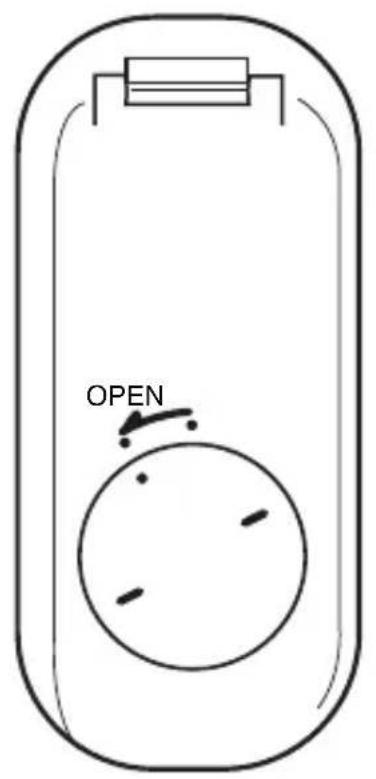
Simple line drawing of a mechanical part with an arrow indicating downward motion (no text or symbols)To Change Remote Battery:
Unlock and remove battery door by turning the cover counterclockwise as shown.
Insert battery with + symbol side facing the + symbol side of the battery door cover.
Requires use of a CR2032 cell battery.
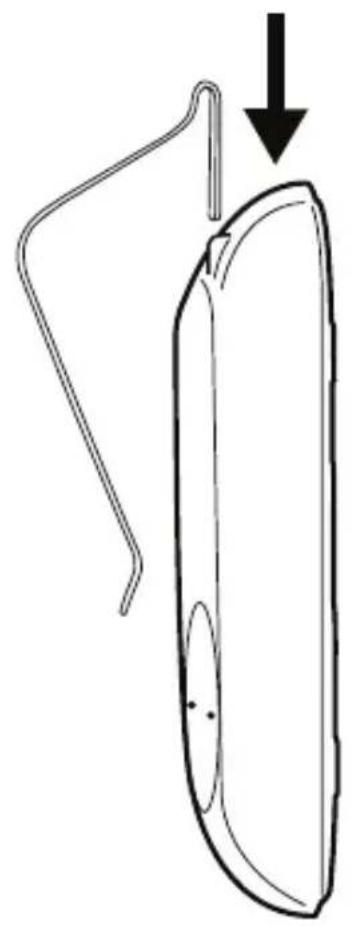
To Use Supplied Visor Clip:
Insert the supplied clip into the back of the remote control as shown. Press firmly until it clicks.
Register your K40 system today to activate your guarantees:
Guaranteed immunity from speeding tickets
If you get a radar speeding ticket within one year of purchase, we'll reimburse you for the full cost of the ticket.*
Guaranteed performance
If your K40 system does not outperform any other radar detector you've owned, return it within 30 days for a full product credit.
Guaranteed from theft
If your K40 RL360di / RL200di is ever stolen, we'll replace the stolen product.**
One-year warranty
K40 offers a one-year “repair or replace” warranty if your K40 system fails to work properly.
*Offer not valid for speeding ticket violations incurred in school or construction zones, or connected with a DUI or DWI.
**Requires proof of purchase and a police report.
Register your K40 system online today by visiting K40.com
Product subject to one or more of the following patents:
U.S. Patents 7,298,248 B2
5,001,777
RE39,038
RE40,653
RE41,905
Other patents pending
FCC IDS: W75-M2K-Y24 W75-RL-RCU II
This device complies with part 15 of the FCC Rules. Operation is subject to the following two conditions: (1) This device may not cause harmful interference, and (2) this device must accept any interference received, including interference that may cause undesired operation.
In addition, any changes or modifications to this product, which are not expressly approved by K40 Electronics in writing, could void the user's authority to operate this product.
TO EXCEED...
Customer expectations through the pride and dedication of our strong team of caring and talented employees by being the “Model of Excellence” in the entire industry on every level — from innovative product design and flawless manufacturing to knowledgeable sales and total customer service.
TO PROVIDE...
The most superior and progressive radar detectors and laser jamming solutions on the worldwide market with guaranteed performance by delivering tomorrow's solutions today through the most advanced technology systems and state-of-the-art radar detection defense.
TO ENSURE...
The total commitment of our entire staff to all customers before, during, and after the sale with personalized direct “24/7” customer support — and going the extra mile with product selection and usage assistance in step with individual needs to achieve the most dependable radar detection performance and success.
Thank you very much for your recent purchase of the most progressive radar and laser solution available on the market today.
Our ultimate goal is that you, our valued customer, is empowered with peace of mind and unparalleled radar protection.
Because we care about you, we're still the only company that stands behind every product with a comprehensive speeding ticket guarantee. If you get a ticket, we pay for it! That's right, guaranteed!
Whether you are a first-time customer or a lifelong friend, we sincerely appreciate your confidence. We'll always go that extra mile to provide you with what's new and the latest in leading-edge radar and laser technology.
Our products are detailed and customized to specifically serve the needs of every vehicle and driver. We promise you that there never is a cookie-cutter approach here.
Again, thank you for your business. Your safety and protection is what we're all about!
Sincerely,
Peggy Finley
Owner/President

ELECTRONICS
Elgin, IL 60123
800.323.5608
Learn more at K40.com