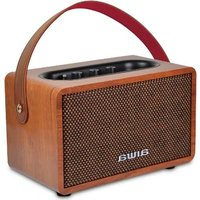
MI-X100 Retro X - Loudspeaker AIWA - Free user manual and instructions
Find the device manual for free MI-X100 Retro X AIWA in PDF.


Pick your language and provide your email: we'll send you a specifically translated version.
| Product Type | Portable Bluetooth Speaker |
| Model | MI-X100 Retro X |
| Brand | Aiwa |
| Dimensions (Approx.) | 400 x 200 x 200 mm |
| Weight (Approx.) | 2.5 kg |
| Power Supply | AC 100-240V 50/60Hz or Internal Rechargeable Battery (7.4V 2000mAh) |
| Bluetooth Version | 5.0 |
| Max Output Power | 20W (RMS) |
| Frequency Range | 80Hz - 20kHz |
| Radio | FM Digital Tuner |
| Playback Media | USB, MicroSD, AUX, Bluetooth |
| Controls | Rotary Knob (Volume/Function), Play/Pause, Skip, Pairing Button |
| Carrying Handle | Retractable Handle on Top |
| Battery Life (Approx.) | Up to 6 hours at medium volume |
| Charging Time (Approx.) | 3 hours |
| Care & Cleaning | Wipe with a soft, dry cloth. Do not use liquids or solvents. |
| Safety Warnings | Do not expose to rain or moisture. Keep away from heat sources. |
| Spare Parts & Repairability | Contact Aiwa support for parts. User-serviceable parts: none. |
| Country of Origin | China |
Frequently Asked Questions - MI-X100 Retro X AIWA
How do I pair my phone with the AIWA MI-X100 Retro X via Bluetooth?
Turn on the speaker. Press the Bluetooth pair button (or set the function to Bluetooth). On your phone, enable Bluetooth and select 'AIWA MI-X100' from the list. If prompted, enter 0000 as the PIN.
How can I reset the speaker to factory settings?
With the speaker on, press and hold the Pairing button for about 10 seconds until you hear a confirmation tone. The speaker will restart and all paired devices will be cleared.
What is the battery life and how do I charge it?
The built-in rechargeable battery provides up to 6 hours of playback at moderate volume. Charge using the included USB-C cable connected to a 5V/2A adapter. Charging time is about 3 hours.
How do I listen to FM radio?
Press the Mode button to select FM radio mode. The speaker will automatically scan for stations. Use the Skip buttons to browse saved stations. For best reception, extend the antenna wire at the back.
Can I play music from a USB drive or SD card?
Yes. Insert a USB drive or microSD card (FAT32 format) into the corresponding slot. The speaker will automatically start playing supported audio files (MP3, WMA, etc.). Use the Skip/Play buttons to control playback.
Is there an AUX input for connecting non-Bluetooth devices?
Yes, there is a 3.5mm AUX input on the side. Use a standard audio cable to connect your device. The speaker will automatically switch to line-in mode when a cable is inserted.
How do I adjust the volume and change tracks?
Rotate the Volume knob to adjust the volume. To skip tracks, press the Forward/Backward buttons. For FM radio, these buttons change stations.
How should I clean and maintain the speaker?
Unplug the speaker and ensure it is turned off. Wipe the exterior with a soft, dry cloth. Do not use abrasive cleaners or get moisture into openings.
What should I do if the speaker doesn't turn on?
First, charge the battery for at least 30 minutes. If still not powering on, try a different charging cable/adapter. If the issue persists, reset the speaker (see FAQ) or contact support.
Is the speaker covered by a warranty?
Yes, the AIWA MI-X100 Retro X comes with a 1-year limited warranty against manufacturing defects. Retain your receipt. For warranty claims, contact Aiwa customer service.
User questions about MI-X100 Retro X AIWA
0 question about this device. Answer the ones you know or ask your own.
Ask a new question about this device
No questions yet. Be the first to ask one.
Download the instructions for your Loudspeaker in PDF format for free! Find your manual MI-X100 Retro X - AIWA and take your electronic device back in hand. On this page are published all the documents necessary for the use of your device. MI-X100 Retro X by AIWA.
USER MANUAL MI-X100 Retro X AIWA
| AIWA AIWA AIWA®AIWA AIWA® | Important Safety Instructions1. Level of power and power in the power system2. Level of power and power in the power system3. Level of power and power in the power system4. Level of power and power in the power system5. Level of power and power in the power system6. Level of power and power in the power system7. Level of power and power in the power system8. Level of power and power in the power system9. Level of power and power in the power system10. Level of power and power in the power system11. Level of power and power in the power system12. Level of power and power in the power system13. Level of power and power in the power system14. Level of power and power in the power system15. Level of power and power in the power system16. Level of power and power in the power system17. Level of power and power in the power system18. Level of power and power in the power system19. Level of power and power in the power system20. Level of power and power in the power system21. Level of power and power in the power system22. Level of power and power in the power system23. Level of power and power in the power system24. Level of power and power in the power system25. Level of power and power in the power system26. Level of power and power in the power system27. Level of power and power in the power system28. Level of power and power in the power system29. Level of power and power in the power system30. Level of power and power in the power system31. Level of power and power in the power system32. Level of power and power in the power system33. Level of power and power in the power system34. Level of power and power in the power system35. Level of power and power in the power system36. Level of power and power in the power system37. Level of power and power in the power system38. Level of power and power in the power system39. Level of power and power in the power system40. Level of power and power in the power system41. Level of power and power in the power system42. Level of power and power in the power system43. Level of power and power in the power system44. Level of power and power in the power system45. Level of power and power in the power system46. Level of power and power in the power system47. Level of power and power in the power system48. Level of power and power in the power system49. Level of power and power in the power system50. Level of power and power in the power system51. Level of power and power in the power system52. Level of power and power in the power system53. Level of power and power in the power system54. Level of power and power in the power system55. Level of power and power in the power system56. Level of power and power in the power system57. Level of power and power in the power system58. Level of power and power in the power system59. Level of power and power in the power system60. Level of power and power in the power system61. Level of power and power in the power system62. Level of power and power in the power system63. Level of power and power in the power system64. Level of power and power in the power system65. Level of power and power in the power system66. Level of power and power in the power system67. Level of power and power in the power system68. Level of power and power in the power system69. Level of power and power in the power system70. Level of power and power in the power system71. Level of power and power in the power system72. Level of power and power in the power system73. Level of power and power in the power system74. Level of power and power in the power system75. Level of power and power in the power system76. Level of power and power in the power system77. Level of power and power in the power system78. Level of power and power in the power system79. Level of power and power in the power system80. Level of power and power in the power system81. Level of power and power in the power system82. Level of power and power in the power system83. Level of power and power in the power system84. Level of power and power in the power system85. Level of power and power in the power system86. Level of power and power in the power system87. Level of power and power in the power system88. Level of power and power in the power system89. Level of power and power in the power system90. Level of power and power in the power system91. Level of power and power in the power system92. Level of power and power in the power system93. Level of power and power in the power system94. Level of power and power in the power system95. Level of power and power in the power system96. Level of power and power in the power system97. Level of power and power in the power system98. Level of power and power in the power system99. Level of power and power in the power system100. Level of power and power in the power system101. Level of power and power in the power system102. Level of power and power in the power system103. Level of power and power in the power system104. Level of power and power in the power system105. Level of power and power in the power system106. Level of power and power in the power system107. Level of power and power in the power system108. Level of power and power in the power system109. Level of power and power in the power system110. Level of power and power in the power system111. Level of power and power in the power system112. Level of power and power in the power system113. Level of power and power in the power system114. Level of power and power in the power system115. Level of power and power in the power system116. Level of power and power in the power system117. Level of power and power in the power system118. Level of power and power in the power system119. Level of power and power in the power system120. Level of power and power in the power system121. Level of power and power in the power system122. Level of power and power in the power system123. Level of power and power in the power system124. Level of power and power in the power system125. Level of power and power in the power system126. Level of power and power in the power system127. Level of power and power in the power system128. Level of power and power in the power system129. Level of power and power in the power system130. Level of power and power in the power system131. Level of power and power in the power system132. Level of power and power in the power system133. Level of power and power in the power system134. Level of power and power in the power system135. Level of power and power in the power system136. Level of power and power in the power system137. Level of power and power in the power system138. Level of power and power in the power system139. Level of power and power in the power system140. Level of power and power in the power system141. Level of power and power in the power system142. Level of power and power in the power system143. Level of power and power in the power system144. Level of power and power in the power system145. Level of power and power in the power system146. Level of power and power in the power system147. Level of power and power in the power system148. Level of power and power in the power system149. Level of power and power in the power system150. Level of power and power in the power system151. Level of power and power in the power system152. Level of power and power in the power system153. Level of power and power in the power system154. Level of power and power in the power system155. Level of power and power in the power system156. Level of power and power in the power system157. Level of power and power in the power system158. Level of power and power in the power system159. Level of power and power in the power system160. Level of power and power in the power system161. Level of power and power in the power system162. Level of power and power in the power system163. Level of power and power in the power system164. Level of power and power in the power system165. Level of power and power in the power system166. Level of power and power in the power system167. Level of power and power in the power system168. Level of power and power in the power system169. Level of power and power in the power system170. Level of power and power in the power system171. Level of power and power in the power system172. Level of power and power in the power system173. Level of power and power in the power system174. Level of power and power in the power system175. Level of power and power in the power system176. Level of power and power in the power system177. Level of power and power in the power system178. Level of power and power in the power system179. Level of power and power in the power system180. Level of power and power in the power system181. Level of power and power in the power system182. Level of power and power in the power system183. Level of power and power in the power system184. Level of power and power in the power system185. Level of power and power in the power system186. Level of power and power in the power system187. Level of power and power in the power system188. Level of power and power in the power system189. Level of power and power in the power system190. Level of power and power in the power system191. Level of power and power in the power system192. Level of power and power in the power system193. Level of power and power in the power system194. Level of power and power in the power system195. Level of power and power in the power system196. Level of power and power in the power system197. Level of power and power in the power system198. Level of power and power in the power system199. Level of power and power in the power system200. Level of power and power in the power system201. Level of power and power in the power system202. Level of power and power in the power system203. Level of power and power in the power system204. Level of power and power in the power system205. Level of power and power in the power system206. Level of power and power in the power system207. Level of power and power in the power system208. Level of power and power in the power system209. Level of power and power in the power system210. Level of power and power in the power system211. Level of power and power in the power system212. Level of power and power in the power system213. Level of power and power in the power system214. Level of power and power in the power system215. Level of power and power in the power system216. Level of power and power in the power system217. Level of power and power in the power system218. Level of power and power in the power system219. Level of power and power in the power system220. Level of power and power in the power system221. Level of power and power in the power system222. Level of power and power in the power system223. Level of power and power in the power system224. Level of power and power in the power system225. Level of power and power in the power system226. Level of power and power in the power system227. Level of power and power in the power system228. Level of power and power in the power system229. Level of power and power in the power system230. Level of power and power in the power system231. Level of power and power in the power system232. Level of power and power in the power system233. Level of power and power in the power system234. Level of power and power in the power system235. Level of power and power in the power system236. Level of power and power in the power system237. Level of power and power in the power system238. Level of power and power in the power system239. Level of power and power in the power system240. Level of power and power in the power system241. Level of power and power in the power system242. Level of power and power in the power system243. Level of power and power in the power system244. Level of power and power in the power system245. Level of power and power in the power system246. Level of power and power in the power system247. Level of power and power in the power system248. Level of power and power in the power system249. Level of power and power in the power system250. Level of power and power in the power system251. Level of power and power in the power system252. Level of power and power in the power system253. Level of power and power in the power system254. Level of power and power in the power system255. Level of power and power in the power system256. Level of power and power in the power system257. Level of power and power in the power system258. Level of power and power in the power system259. Level of power and power in the power system260. Level of power and power in the power system261. Level of power and power in the power system262. Level of power and power in the power system263. Level of power and power in the power system264. Level of power and power in the power system265. Level of power and power in the power system266. Level of power and power in the power system267. Level of power and power in the power system268. Level of power and power in the power system269. Level of power and power in the power system270. Level of power and power in the power system271. Level of power and power in the power system272. Level of power and power in the power system273. Level of power and power in the power system274. Level of power and power in the power system275. Level of power and power in the power system276. Level of power and power in the power system277. Level of power and power in the power system278. Level of power and power in the power system279. Level of power and power in the power system280. Level of power and power in the power system281. Level of power and power in the power system282. Level of power and power in the power system283. Level of power and power in the power system284. Level of power and power in the power system285. Level of power and power in the power system286. Level of power and power in the power system287. Level of power and power in the power system288. Level of power and power in the power system289. Level of power and power in the power system290. Level of power and power in the power system291. Level of power and power in the power system292. Level of power and power in the power system293. Level of power and power in the power system294. Level of power and power in the power system295. Level of power and power in the power system296. Level of power and power in the power system297. Level of power and power in the power system298. Level of power and power in the power system299. Level of power and power in the power system300. Level of power and power in the power system301. Level of power and power in the power system302. Level of power and power in the power system303. Level of power and power in the power system304. Level of power and power in the power system305. Level of power and power in the power system306. Level of power and power in the power system307. Level of power and power in the power system308. Level of power and power in the power system309. Level of power and power in the power system310. Level of power and power in the power system311. Level of power and power in the power system312. Level of power and power in the power system313. Level of power and power in the power system314. Level of power and power in the power system315. Level of power and power in the power system316. Level of power and power in the power system317. Level of power and power in the power system318. Level of power and power in the power system319. Level of power and power in the power system320. Level of power and power in the power system321. Level of power and power in the power system322. Level of power and power in the power system323. Level of power and power in the power system324. Level of power and power in the power system325. Level of power and power in the power system326. Level of power and power in the power system327. Level of power and power in the power system328. Level of power and power in the power system329. Level of power and power in the power system330. Level of power and power in the power system331. Level of power and power in the power system332. Level of power and power in the power system333. Level of power and power in the power system334. Level of power and power in the power system335. Level of power and power in the power system336. Level of power and power in the power system337. Level of power and power in the power system338. Level of power and power in the power system339. Level of power and power in the power system340. Level of power and power in the power system341. Level of power and power in the power system342. Level of power and power in the power system343. Level of power and power in the power system344. Level of power and power in the power system345. Level of power and power in the power system346. Level of power and power in the power system347. Level of power and power in the power system348. Level of power and power in the power system349. Level of power and power in the power system350. Level of power and power in the power system351. Level of power and power in the power system352. Level of power and power in the power system353. Level of power and power in the power system354. Level of power and power in the power system355. Level of power and power in the power system356. Level of power and power in the power system357. Level of power and power in the power system358. Level of power and power in the power system359. Level of power and power in the power system360. Level of power and power in the power system361. Level of power and power in the power system362. Level of power and power in the power system363. Level of power and power in the power system364. Level of power and power in the power system365. Level of power and power in the power system366. Level of power and power in the power system367. Level of power and power in the power system368. Level of power and power in the power system369. Level of power and power in the power system370. Level of power and power in the power system371. Level of power and power in the power system372. Level of power and power in the power system373. Level of power and power in the power system374. Level of power and power in the power system375. Level of power and power in the power system376. Level of power and power in the power system377. Level of power and power in the power system378. Level of power and power in the power system379. Level of power and power in the power system380. Level of power and power in the power system381. Level of power and power in the power system382. Level of power and power in the power system383. Level of power and power in the power system384. Level of power and power in the power system385. Level of power and power in the power system386. Level of power and power in the power system387. Level of power and power in the power system388. Level of power and power in the power system389. Level of power and power in the power system390. Level of power and power in the power system391. Level of power and power in the power system392. Level of power and power in the power system393. Level of power and power in the power system394. Level of power and power in the power system395. Level of power and power in the power system396. Level of power and power in the power system397. Level of power and power in the power system398. Level of power and power in the power system399. Level of power and power in the power system400. Level of power and power in the power system401. Level of power and power in the power system402. Level of power and power in the power system403. Level of power and power in the power system404. Level of power and power in the power system405. Level of power and power in the power system406. Level of power and power in the power system407. Level of power and power in the power system408. Level of power and power in the power system409. Level of power and power in the power system410. Level of power and power in the power system411. Level of power and power in the power system412. Level of power and power in the power system413. Level of power and power in the power system414. Level of power and power in the power system415. Level of power and power in the power system416. Level of power and power in the power system417. Level of power and power in the power system418. Level of power and power in the power system419. Level of power and power in the power system420. Level of power and power in the power system421. Level of power and power in the power system422. Level of power and power in the power system423. Level of power and power in the power system424. Level of power and power in the power system425. Level of power and power in the power system426. Level of power and power in the power system427. Level of power and power in the power system428. Level of power and power in the power system429. Level of power and power in the power system430. Level of power and power in the power system431. Level of power and power in the power system432. Level of power and power in the power system433. Level of power and power in the power system434. Level of power and power in the power system435. Level of power and power in the power system436. Level of power and power in the power system437. Level of power and power in the power system438. Level of power and power in the power system439. Level of power and power in the power system440. Level of power and power in the power system441. Level of power and power in the power system442. Level of power and power in the power system443. Level of power and power in the power system444. Level of power and power in the power system445. Level of power and power in the power system446. Level of power and power in the power system447. Level of power and power in the power system448. Level of power and power in the power system449. Level of power and power in the power system450. Level of power and power in the power system451. Level of power and power in the power system452. Level of power and power in the power system453. Level of power and power in the power system454. Level of power and power in the power system455. Level of power and power in the power system456. Level of power and power in the power system457. Level of power and power in the power system458. Level of power and power in the power system459. Level of power and power in the power system460. Level of power and power in the power system461. Level of power and power in the power system462. Level of power and power in the power system463. Level of power and power in the power system464. Level of power and power in the power system465. Level of power and power in the power system466. Level of power and power in the power system467. Level of power and power in the power system468. Level of power and power in the power system469. Level of power and power in the power system470. Level of power and power in the power system471. Level of power and power in the power system472. Level of power and power in the power system473. Level of power and power in the power system474. Level of power and power in the power system475. Level of power and power in the power system476. Level of power and power in the power system477. Level of power and power in the power system478. Level of power and power in the power system479. Level of power and power in the power system480. Level of power and power in the power system481. Level of power and power in the power system482. Level of power and power in the power system483. Level of power and power in the power system484. Level of power and power in the power system485. Level of power and power in the power system486. Level of power and power in the power system487. Level of power and power in the power system488. Level of power and power in the power system489. Level of power and power in the power system490. Level of power and power in the power system491. Level of power and power in the power system492. Level of power and power in the power system493. Level of power and power in the power system494. Level of power and power in the power system495. Level of power and power in the power system496. Level of power and power in the power system497. Level of power and power in the power system498. Level of power and power in the power system499. Level of power and power in the power system500. Level of power and power in the power system501. Level of power and power in the power system502. Level of power and power in the power system503. Level of power and power in the power system504. Level of power and power in the power system505. Level of power and power in the power system506. Level of power and power in the power system507. Level of power and power in the power system508. Level of power and power in the power system509. Level of power and power in the power system510. Level of power and power in the power system511. Level of power and power in the power system512. Level of power and power in the upper line (lower line) (lower line) (upper line) (lower line) (upper line) (lower line) (upper line) (lower line) (upper line) (lower line) (upper line) (lower line) (upper line) (lower line) (upper line) (lower line) (upper line) (lower line) (upper line) (lower line) (upper line) (upper line) (lower line) (upper line) (upper line) (lower line) (upper line) (upper line) (upper line) (upper line) (upper line) (upper line) (upper line) (upper line) (upper line) (upper line) (upper line) (upper line) (upper line) (upper line) (upper line) (upper line) (upper line) (upper line) (upper line) (upper line) (upper line) (upper line) (upper line) (upper line) (upper line) (lower line) (lower line) (lower line) (lower line) (lower line) (lower line) (lower line) (lower line) (lower line) (lower line) (lower line) (lower line) (lower line) (lower line) (lower line) (lower line) (lower line) (lower line) (lower line) (lower line) (lower line) (lower line) (lower line) (lower line) (lower line) (upper line) (upper line) (upper line) (upper line) (upper line) (upper line) (upper line) (upper line) (upper line) (upper line) (upper line) (upper line) (upper line) (upper line) (upper line) (upper line) (upper line) (upper line) (upper line) (upper line) (upper line) (upper line) (upper line) (lower line) (upper line) (upper line) (upper line) (upper line) (upper line) (upper line) (upper line) (upper line) (upper line) (upper line) (upper line) (upper line) (upper line) (upper line) (upper line) (upper line) (upper line) (upper line) (upper line) (upper line) (upper line) (lower line) (upper line) (upper line) (lower line) (upper line) (upper line) (upper line) (upper line) (upper line) (upper line) (upper line) (upper line) (upper line) (upper line) (upper line) (upper line) (upper line) (upper line) (upper line) (upper line) (upper line) (upper line) (lower line) (upper line) (upper line) (upper line) (upper line) (upper line) (lower line) (upper line) (upper line) (upper line) (upper line) (upper line) (upper line) (upper line) (upper line) (upper line) (upper line) (upper line) (upper line) (upper line) (upper line) (upper line) (upper line) (upper line) (upper line) (lower line) (upper line) (upper line) (lower line) (upper line) (upper line) (lower line) (upper line) (upper line) (upper line) (upper line) (upper line) (upper line) (upper line) (upper line) (upper line) (upper line) (upper line) (upper line) (upper line) (upper line) (upper line) (upper line) (lower line) (upper line) (upper line) (upper line) (upper line) (upper line) (upper line) (upper line) (lower line) (upper line) (upper line) (upper line) (upper line) (upper line) (upper line) (upper line) (upper line) (upper line) (upper line) (upper line) (upper line) (upper line) (upper line) (upper line) (upper line) (lower line) (upper line) (upper line) (upper line) (upper line) (lower line) (upper line) (upper line) (upper line) (upper line) (upper line) (upper line) (upper line) (upper line) (upper line) (upper line) (upper line) (upper line) (upper line) (upper line) (upper line) (upper line) (upper line) (upper line) (upper line) (lower line) (upper line) (upper line) (upper line) (upper line) (lower line) (upper line) (upper line) ( |

Manual assistant
Powered by Anthropic
Waiting for your message
Product information
Brand : AIWA
Model : MI-X100 Retro X
Category : Loudspeaker