
MTIDM042611 - Security Camera MOTOROLA - Free user manual and instructions
Find the device manual for free MTIDM042611 MOTOROLA in PDF.


| Product Type | Security Camera |
| Brand | Motorola |
| Model | MTIDM042611 |
| Dimensions | 7.5 x 7.5 x 12.5 cm |
| Weight | 280 g |
| Power Supply | 5V DC via USB cable (included) |
| Resolution | 1080p Full HD (1920 x 1080) |
| Night Vision | Up to 10 m with infrared LEDs |
| Field of View | 110° diagonal |
| Motion Detection | Yes, with push notifications |
| Two-Way Audio | Built-in microphone and speaker |
| Storage | MicroSD card up to 32 GB (not included) or cloud subscription |
| Connectivity | Wi-Fi 802.11 b/g/n, 2.4 GHz |
| Mounting | Magnetic base or adhesive pad |
| Indoor/Outdoor Use | Indoor only |
| Operating Temperature | 0°C to 40°C |
| Smart Home Compatibility | Works with Alexa and Google Assistant |
| App Support | Motorola Home app (iOS and Android) |
| Cleaning Instructions | Wipe with a dry, soft cloth. Do not use abrasive cleaners. |
| Safety Precautions | Avoid exposure to extreme temperatures and moisture. |
| Spare Parts & Repairability | Contact Motorola support for spare parts; not user-serviceable. |
Frequently Asked Questions - MTIDM042611 MOTOROLA
User questions about MTIDM042611 MOTOROLA
0 question about this device. Answer the ones you know or ask your own.
Ask a new question about this device
Download the instructions for your Security Camera in PDF format for free! Find your manual MTIDM042611 - MOTOROLA and take your electronic device back in hand. On this page are published all the documents necessary for the use of your device. MTIDM042611 by MOTOROLA.
USER MANUAL MTIDM042611 MOTOROLA
- Please, read carefully these instructions before operating your camera and save this as reference.
- All examples and images used in this guide are only for reference.
- The content of this guide is subject to changes without previous notice.
1. Precautions
- If the product does not work properly, please contact your dealer or the nearest service center. Never attempt to disassemble the camera yourself. Your warranty will be voided if any problems are caused by unauthorized repair or maintenance.
- Handle with care and prevent dropping the camera.
- When the product is mounted on a wall or ceiling, ensure that the device is properly firmly fixed.
- Prevent touching the lens of the camera.
- If cleaning is necessary, please use a clean cloth to wipe it gently. If the device will not be used for a long time, please cover the lens cap to protect the device from dust.
- Prevent aiming the camera directly to the sun or to very bright environments.
- Do not place the camera in extremely hot or cold environments (operating temperature is -20^ - 50^ ), dusty or damp locations.
- Para evitar exceso de calentamiento To avoid increase in heat of product, good ventilation is required.
2. Contents
IP DOME CAMERA

Camera

Quick guide
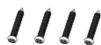
4 Tapping screws
PA 4X25

CD

Drill template
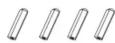
4 Screw plastic plugs
IP DOME VARIFOCAL CAMERA

Camera

Quick guide
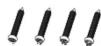
4 Tapping screws
PA 4X25

CD

Wrench

4 Screw plastic plugs

Drill template
- Product overview

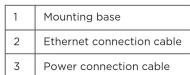


▶ Connecting the ethernet network cable

- Loosen the cap nut from the main part.
- Run the network cable (without RJ45 connector) through the both parts. Then crimp the cable with RJ45 connector.
- Screw back and tighten cap to create a hermetic seal.
4. Installation
Please make sure that the wall or ceiling is strong enough to withstand 3 times the weight of the camera. Please install and use the camera in the dry environment.
- Loosen the lock screw to disassemble the camera from the mounting base.

- Drill the screw holes and the cable hole on the mounting surface using the available drill template.

- Fix the mounting base to the mounting surface.
- Route the cables through the cable hole and finally connect the cables as needed.

.5. Adjust the camera to obtain an optimum angle. Then secure the camera to the mounting base by tightening the lock screw.
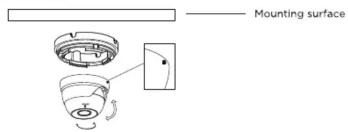
- foAdjust the Zoom screw and the cus screw with a screwdriver until you get the optimum image.


Note: Step 6 only applies to varifocal dome cameras.
5. Network connection
There are two ways to access camera through LAN:
- Access using IPTools App.
- Access through browser, IE. (Explorer)
• IP Tools
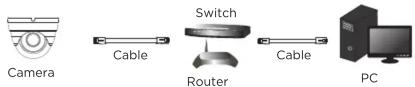
- Make sure that the camera and the PC are well connected via LAN and in the same network.
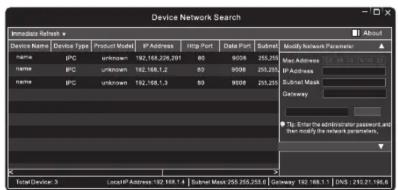
- Find the IP-Tool from the CD and then install it in the computer. After that, run the IP-Tool as shown in this section.


Brand : MOTOROLA
Model : MTIDM042611
Category : Security Camera