
GAP5B - Air purifier GEMINI - Free user manual and instructions
Find the device manual for free GAP5B GEMINI in PDF.


| Product Type | Air Purifier |
| Brand | Gemini |
| Model | GAP5B |
| Dimensions (H x W x D) | 40 cm x 30 cm x 20 cm |
| Weight | 3.5 kg |
| Power Supply | 220-240 V ~ 50/60 Hz |
| Power Consumption | 35 W (max) |
| Coverage Area | Up to 30 m² |
| Filtration System | Pre-filter, HEPA H13, Activated Carbon |
| CADR (Smoke) | 150 m³/h |
| Noise Level | ≤ 55 dB (high speed) |
| Airflow Speeds | 3 (Low, Medium, High) |
| Timer | 1 / 2 / 4 / 8 hours |
| Control Type | Touch panel with LED display |
| Filter Replacement Indicator | Yes |
| Maintenance | Clean pre-filter every month; replace HEPA filter every 6-12 months |
| Safety Features | Auto shut-off when front cover is removed; overheat protection |
| Operating Temperature | 0°C to 40°C |
| Certifications | CE, RoHS |
| Accessories Included | Remote control, user manual |
Frequently Asked Questions - GAP5B GEMINI
User questions about GAP5B GEMINI
0 question about this device. Answer the ones you know or ask your own.
Ask a new question about this device
Download the instructions for your Air purifier in PDF format for free! Find your manual GAP5B - GEMINI and take your electronic device back in hand. On this page are published all the documents necessary for the use of your device. GAP5B by GEMINI.
USER MANUAL GAP5B GEMINI
Personal Ionic HEPA filtration Air Purifier
個人負離子HEPA過濾 空氣淨化機
MODEL NO.: GAP5B
3W
A GILMAN GROUP BRAND
Please read and retain for future reference.
SAFETY INSTRUCTION - GENERAL
- Use this appliance solely in accordance with these instructions.
- This appliance is for household use only, not for commercial purpose.
- Remove all packaging material from the appliance before use.
- This appliance shall not be used by children of 0 to 8-year old.
- This appliance can be used by children older than 8-year old and persons with reduced physical, sensory or mental capabilities or lack of experience and knowledge, but only if they have been given supervision or instruction concerning use of the appliance in safe way and understand the hazards involved.
- Children should be supervised to ensure that they do not play with the appliance.
- Cleaning and maintenance must not be done by children.
- Have any repairs carried out solely by a qualified electrician. Never try to repair the appliance yourself.
- Do not handle the plug or appliance with wet hands.
- Do not immerse the main body in water.
• Children shall not play with the appliance. - Do not leave the appliance unattended when connected to the mains supply.
- Only use the attachments/accessories supplied with the product.
SAFETY INSTRUCTION - ELECTRICITY AND HEAT
- Ensure the appliance is in placed on a horizontal, even and stable surface.
- Verify that the mains voltage is the same as that indicated on the rating plate on the appliance before use.
- Never use the extension cord as power connection.
- Make sure that the appliance, the USB cable do not make contact with water.
- Make sure that the appliance, the USB cable do not make contact with hot surface, such as a hot hob or naked flame.
- Check the appliance's USB cable regularly to make sure it is not damaged.
- Do not use the appliance if the USB cable is damaged. If the USB cable is damaged in order to avoid any hazards.
- Never use the appliance in the vicinity of flammable material.
SAFETY INSTRUCTION – DURING OPERATION
- Do not pick up the appliance if falls into water. Remove the plug from the socket immediately. Do not use the appliance again.
- Never immerse the appliance, the power cord or the plug in water or any liquid.
- Do not move the appliance while its switched on.
- Do not use the liquids, such as water or flammable solvents to clean the product, please use a soft cloth to clean when product not in running.
- Please keep air circulation and do not cover detect air quality sensor, air inlet and outlet when the product is running.
- Please close the car and room window when product running to improve the purification, and please adjust to lowest air-conditioning power when you turn on the air-conditioner.
- To keep safety, please DO NOT open the product top cover when it is running.
- Please install the purifier firmly on the car cup holder, and prohibit to place it on the car dashboard to avoid any accidents.
- For your safety, DO NOT adjust the product when driving.
- Do not use other type power adapters, keep use the original accessories which accompany with the package.
- Please refer to "Cleaning and Maintenance" section to clean the appliance.
PRODUCT OVERVIEW
- Gradient LED lights(Decoration purpose) (Red/ yellow/ blue/ green/ white/ orange/ purple)
- Air outlet
- Main body
- LED touch panel & display screen
- Air inlet
- Detect air quality sensor
- USB cable (1.5 metre)

natural_image
Circular black object with a grid pattern, resembling a perforated or meshed surface (no text or symbols visible)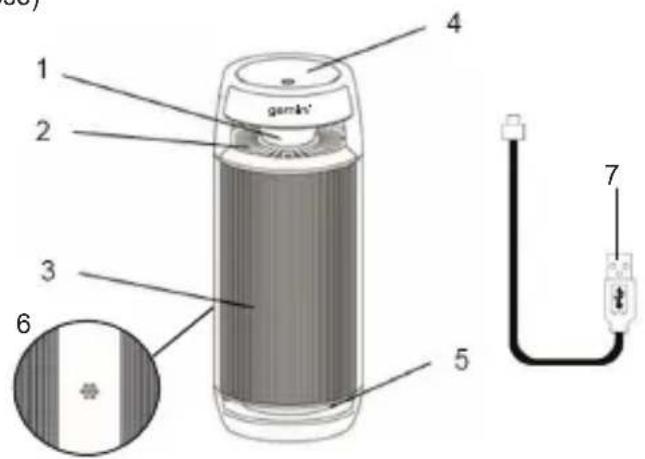
Filter
(Pre-filter, HEPA filter & Activated carbon filter)
LED Display Screen
-
The purification wind speed indication
1a. Primary purification (low speed)
1b.Rapid purification (medium speed)
1c. High-efficiency purification (high speed
1d.Automastic mode -
Temperature indicator
- Humidity indicator
- Air quality indicator (blue/ yellow/ red)
- On/ Off / Purification wind speeds button (LOW-MED-HIGH, Automatic mode can not be selected manually)
- Current room temperature display
- Current room humidity display

HOW TO USE
- Connect the power source (5V) to the product with the provided USB cable.
• Automastic mode on touch panel:
Connect to the power source, the product will turn on automatically and enters into the automatic mode if there is no input operation by user in 2 seconds. The On/ Off/Purification wind speeds button ⬇remains blue at the beginning. The appliance will detect automatically based on detect air quality sensor to adjust suitable purification wind speeds (LOW-MED-HIGH) around 2 minutes.
Blue light-> Good air quality
Yellow light-> Poor air quality
Red light -> Bad air quality
If good air quality, the purification speed starts at LOW. (LOW & AUTO)
If poor air quality, the purification speed starts at MED. (MED & AUTO)
If bad air quality, the purification speed starts at HIGH. (HIGH & AUTO)
*This automatic mode cannot select on touch panel by manual. The purifier will defect the air quality when connect to the power supply under this mode.
- Manually Mode on touch panel:
Connect to the power source, touch the On/ Off / Purification wind speed button ⏻ to adjust the 3 purification speeds.
Touch once: Turn on Primary purification (low speed)
Touch twice: Turn on Rapid purification (medium speed)
Touch three times: Turn on High-efficient purification (high speed), as a cycle
Press it and hold about 3 seconds, product will turn-off.
- How to turn on and off the gradient LED lights:
When connect the power source, the decoration LED lights will be automatically turned on. When touching the On/ Off / Purification wind speeds button around 2 seconds, the lights will turn off. Need restart the appliance to turn on the LED lights again.
FILTER REPLACEMENT
In order to keep the best purify performance, we suggest it is better to replace the filter after 3-5 months of use. If need to replace filter, the On/ Off/ Purification wind speeds button will automatically warning as red light flicker 3 times and 3 "Dee" sounds during operation. After replace filter, press and hold the On/ Off/ Purification wind speeds button for 8 seconds to start resetting till the green light flicker will start, then it will reset and start to work normally.
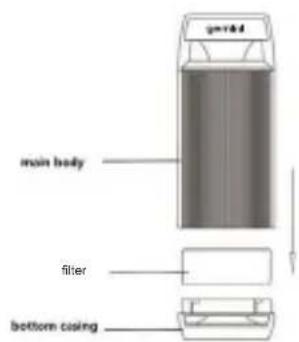
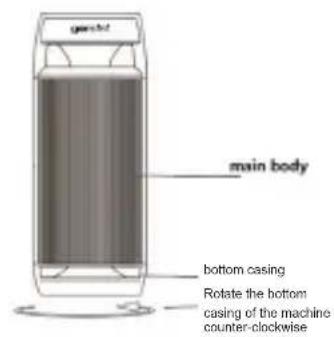
Shutdown the power first, then rotate the bottom casing of the machine at clockwise direction, and then loosen naturally after turning to the position (Fig.1). Take out the filter in the middle, and then replace in a new one (Fig.2). Rotate the base at counterclockwise direction and twist it into place (Fig.3).

Fig.1 Fig.2 Fig.3
CLEANING AND MAINTENANCE
- Do not use the liquids, such as water or flammable solvents to clean the product, unplug and please use a soft cloth to clean.
- Keep the product at a cool and dry place.
TROUBLESHOOTING
| Problem Cause | Solution | |
| Purifier not works | Did not press On / Off button Press On / Off button | |
| Abnormal supply voltage, over/under voltage protection | Check if the supply voltage is 5V | |
| Power source is disconnected or loose the USB cable | Connect the USB cable / switch on the power source again | |
| The On/ Off/ Purification wind speeds button ⏻ warning as red light flicker 3 times and 3 “Dee” sounds | Need to replace filter | Refer to the “FILTER REPLACEMENT” on P.6 |
PRODUCT SPECIFICATIONS
Model no.: GAP5B
Voltage / Current: DC5V 1A
Power: 3W
Accessory: 1.5 M USB cable
Product dimensions: ∅72 (diameter) × 180 (H) mm
natural_image
Circular black object with a grid pattern, resembling a perforated or meshed surface (no text or symbols visible)
過濾網
(前置過濾網、HEPA高效過濾網及活性炭過濾網)
LED 顯示屏
- 風速指示燈
Proudly Serviced by:
ToolBox
a Gilman Group Company
太平家庭電器


- Personal Ionic HEPA filtration Air Purifier
- 個人負離子HEPA過濾 空氣淨化機
- SAFETY INSTRUCTION - GENERAL
- SAFETY INSTRUCTION - ELECTRICITY AND HEAT
- SAFETY INSTRUCTION – DURING OPERATION
- PRODUCT OVERVIEW
- Filter
- LED Display Screen
- HOW TO USE
- FILTER REPLACEMENT
- CLEANING AND MAINTENANCE
- PRODUCT SPECIFICATIONS
- 過濾網
- LED 顯示屏
- 太平家庭電器
Brand : GEMINI
Model : GAP5B
Category : Air purifier