UH35-3 - Radio UNIDEN - Free user manual and instructions
Find the device manual for free UH35-3 UNIDEN in PDF.


User questions about UH35-3 UNIDEN
0 question about this device. Answer the ones you know or ask your own.
Ask a new question about this device
Download the instructions for your Radio in PDF format for free! Find your manual UH35-3 - UNIDEN and take your electronic device back in hand. On this page are published all the documents necessary for the use of your device. UH35-3 by UNIDEN.
USER MANUAL UH35-3 UNIDEN
For more exciting new products please visit our website:
Australia: www.uniden.com.au
OWNER'S MANUAL
Included in your Package
• UH35 Series Radio
- Operating Guide
- Belt Clips
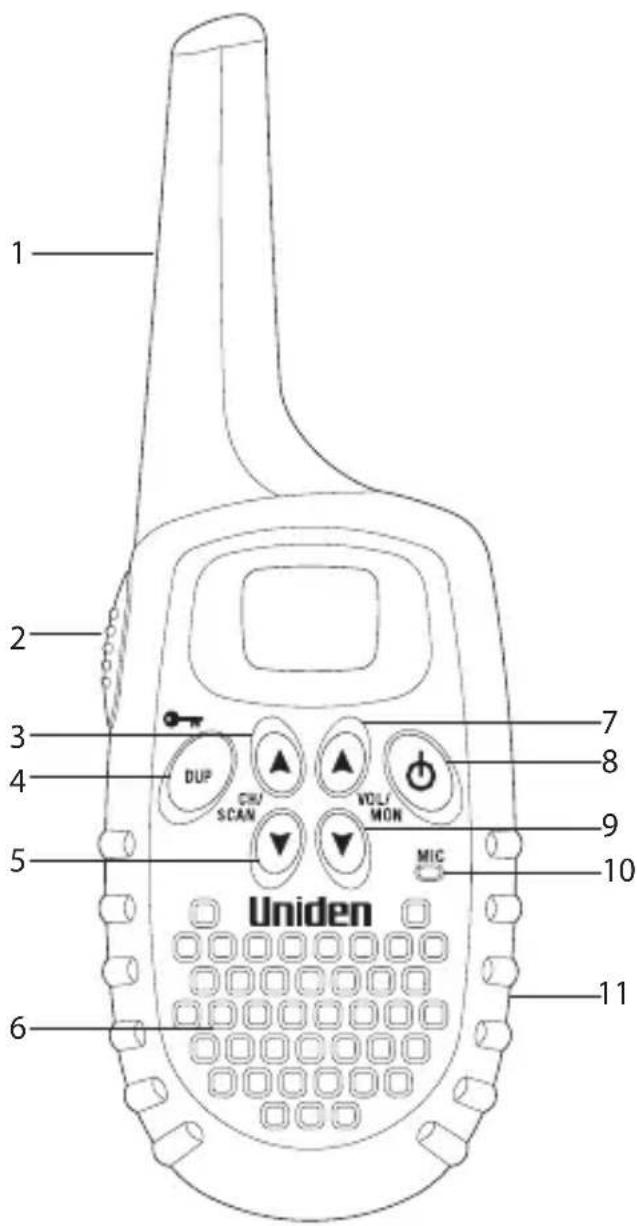
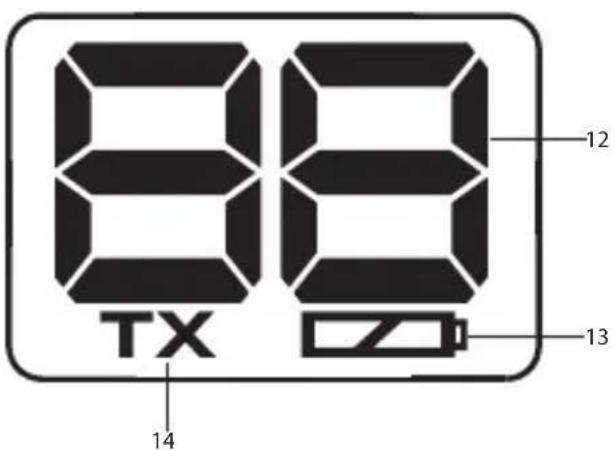
1 Antenna
2 PTT (Push-To-Talk) Button
3 Channel/Scan up Key
4 Duplex/Keylock Key
5 Channel/Scan down Key
6 Speaker
7 Volume up/Mon (monitor) Key
8 Power On/Off Key
9 Volume down/Mon (monitor)
Key
10 Microphone
11 Battery Compartment Door
12 Channel Indicator
13 Battery Low Indicator
14 Transmit Indicator

NOTE
BATTERY WARNING
To prevent the batteries from running down, remove them from the radio if the UH35 Series will not be used for long periods.
Battery Installation
Your UH35 Series radio uses 3 AAA ALKALINE batteries for power. Use only good quality alkaline batteries for maximum life and range. Note: Batteries are not supplied.

To avoid damage to the unit do not mix old and new batteries.
- Make sure your radio is off.
- Remove the battery cover.
- Insert 3 AAA ALKALINE batteries according to the polarity symbols inside the battery compartment.
- Replace the battery cover.
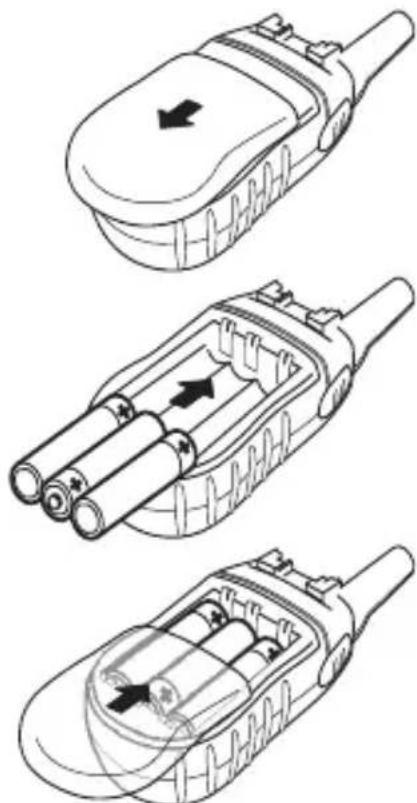
natural_image
Three technical line drawings of a mobile phone device with internal components and directional arrows indicating movement (no text or symbols present)
WATER WARNING
Uniden does not represent this product to be waterproof. Do not expose this product to Rain or Moisture.
Belt Clip
To attach the belt clip:
Slide the belt clip until it snaps into place.
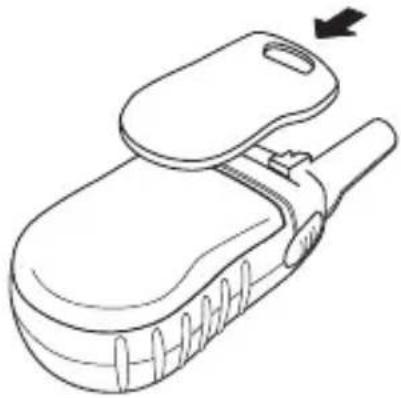
natural_image
Line drawing of a medical or surgical device with a handle and internal structure, no text or symbols presentPinch Belt Clip and Latch
To remove the belt clip:
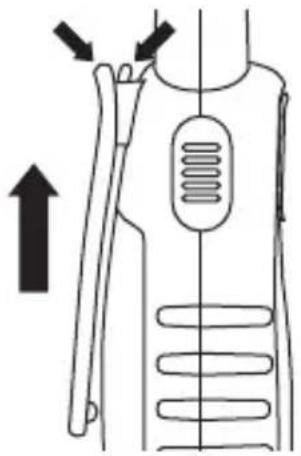
To remove the belt clip. Pinch and hold belt clip and latch (see arrows indicated) and slide the belt clip in the direction shown.
natural_image
Diagram of a human torso with arrows indicating movement or force direction (no text or symbols)Low Battery Alert
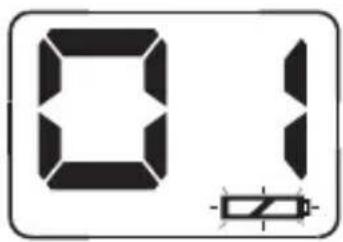
If the Battery level becomes low, the battery indicator icon will appear on the LCD and begin flashing.
The unit will go into a Battery Low Mode. The Transmit Mode is disabled. Replace the batteries immediately to continue using the radio.
Power On/Off
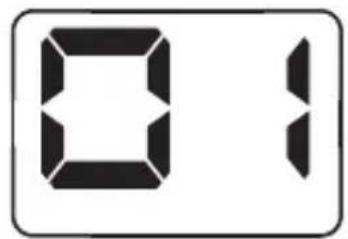
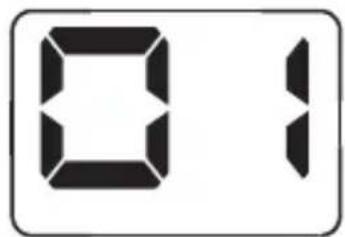
Press and hold ⏻ to turn the Radio ON. The channel number will appear on the display.
Press and hold ⏻ to turn the Radio OFF.
Volume
Press volume ▲ or ▼ to increase or decrease the volume level. The Channel indicator will flash when the volume is being adjusted.
Adjusting the Key Beeps
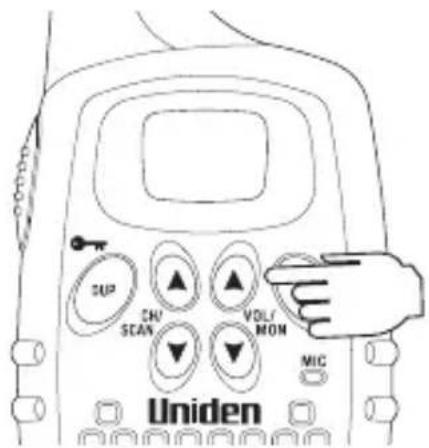
Your radio emits a beep each time one of the keys (except for the PTT button) is pressed.
To turn OFF the beep: Press and hold the DUP Key while turning ON the Radio.
To turn ON the beep: Turn the radio OFF and then ON again.

NOTE
The key beeps cannot permanently be disabled.
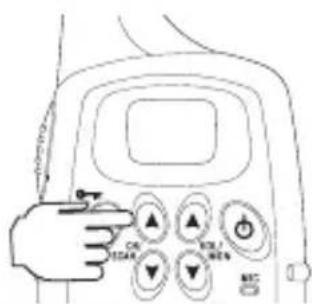
Selecting a Channel
Press channel ▲ or ▼ to select the desired channel.
To Transmit and Receive
The UH35 Series uses the UHF-CB Channels. Refer to page 9 for UHF channel usage. (Channels 22 and 23 are for telemetry and telecommand applications. Transmit is inhibited on these channels).
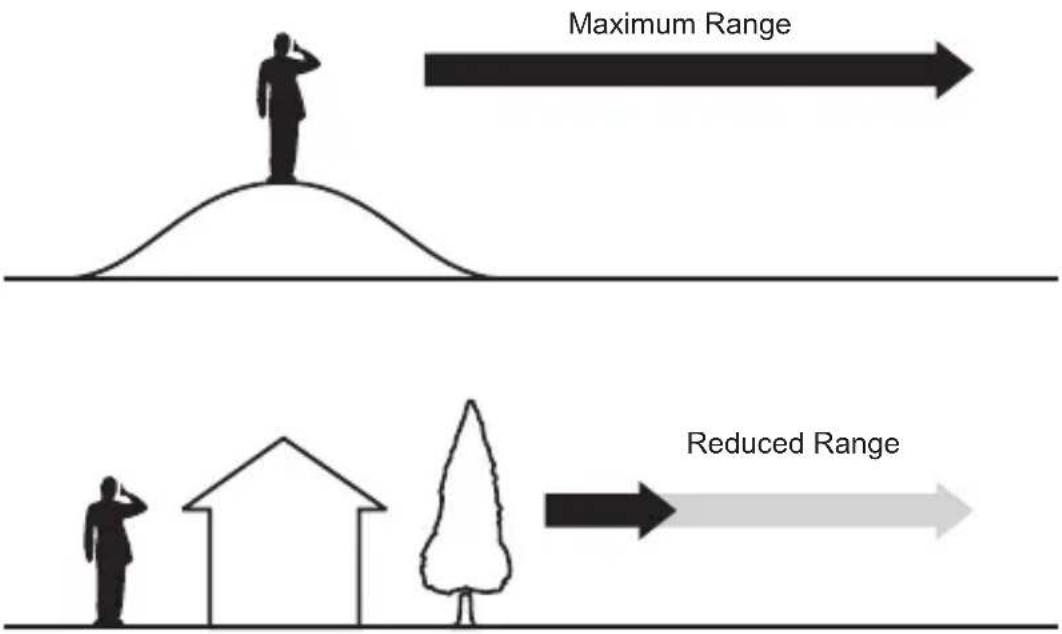
- The transmit power of the UH35 Series is 500mW which will provide a range of up to 3+Km.
- Before you transmit, listen for activity on the selected channel.
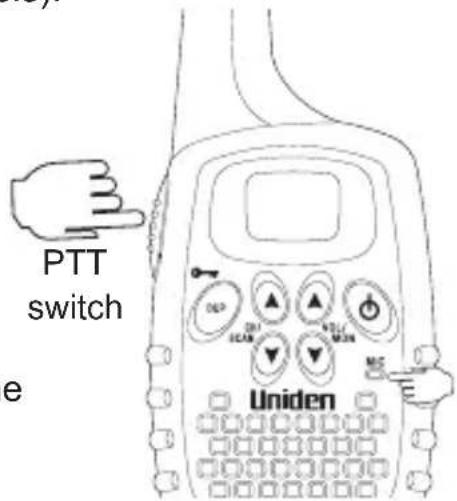
- When the channel is clear, press and hold the PTT to transmit. TX appears on the LCD.
Hold the radio with microphone approximately 5 cm in front of your mouth with the antenna at approximately 45° angle away from your head. Speak in a clear, normal conversational voice.
- When you have finished speaking, release the PTT. TX then disappears on the LCD. Listen for a response.

NOTE
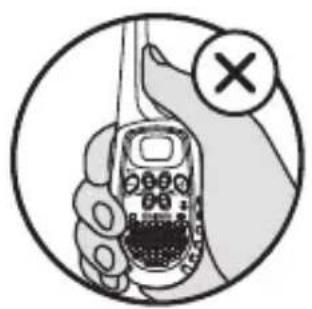
For maximum range and extended the life of the batteries, avoid touching the antenna with your hand when transmitting.
natural_image
Illustration of a hand holding a mobile phone with a cross symbol indicating cancellation or error (no text or symbols present)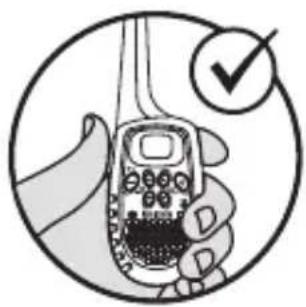
natural_image
Illustration of a hand holding a mobile phone with a checkmark indicating approval (no text or symbols present)Operation
Range
Automatic Squelch Feature
TheUH35 Series is equipped with an Automatic Squelch system which mutes the audio in the presence of weak transmissions and unwanted noise.
Monitor
This feature enables users to listen in for weak signals on the current channel at the press of a button.
To use monitor
- Press and hold Volume▲ or▼ for 2 seconds. When Monitor is on you will hear noise if there is no signal.
- For continuous listening, the receiver circuit will stay open, letting in both the noise and weak signals.
- To return to normal receive mode press and hold Volume▲ or▼ for 2 seconds or press ⏻ key once.
To Operate in Duplex Mode (Repeaters)
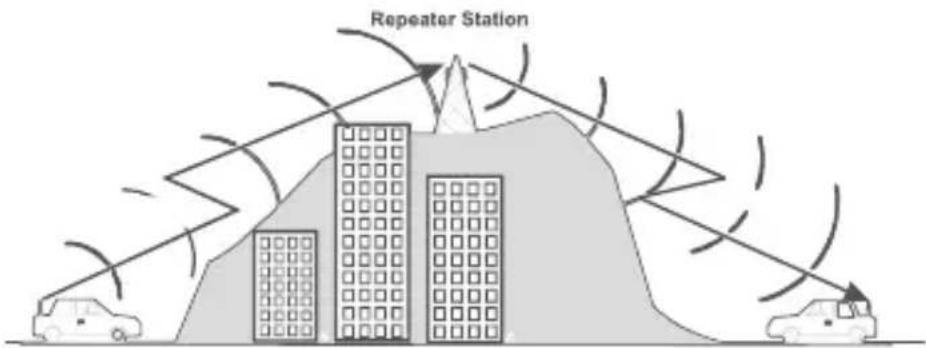
The Duplex function enables you to access local repeater stations. You can only activate Duplex from CH01-CH08 and CH41-CH48. UHF CB Repeaters are used to retransmit or relay your signal. Repeaters will extend the range of your radio and overcome the shielding effect caused by solid obstructions.

NOTE
Contact your retailer for a list of repeaters available in your area.
Operation With the Aid of a Repeater
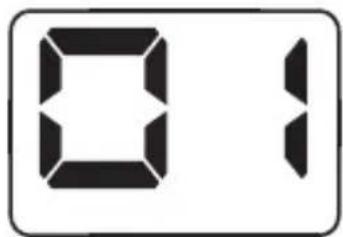
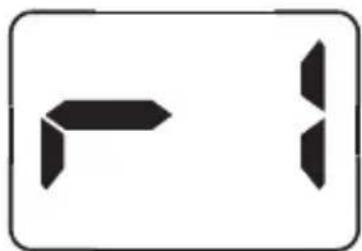
Eg. CH1 is being used in your area for repeater use.
Press DUP momentarily. Appears for CH01-CH08 and appears for CH41-CH48 when duplex is selected.
Press DUP again to deactivate the duplex operation. UH35 Series will return to normal operation.
natural_image
Two abstract geometric shapes, one left-pointing and one right-pointing, enclosed in a rounded rectangle (no text or symbols)Power Save
Your UH35 Series has a unique circuit designed to dramatically extend the life of the batteries. If there is no transmission nor an incoming call within 3 seconds, your Radio switches to the Power Save mode. The Radio is still able to receive transmissions in this mode.
Key Lock
Press and hold DUP to lock or unlock the keypad. and keys remain functional when key lock is on. When key lock setting is turned on, appears momentarily and will appear when an inactive key is pressed.
Scanning
The scan function scans all channels and stops at an active channel. When the signal stops, the UH35 Series waits 2 seconds (Drop-Out Delay) before scanning resumes.
To initiate scanning
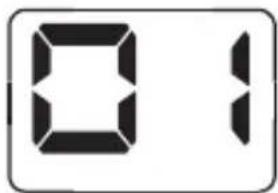
- Assuming the unit is on CH1 when switched on.
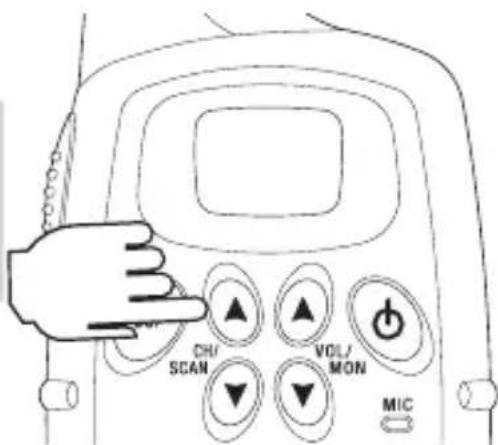
- Press and hold Channel ▲ or ▼ for 3 seconds and scanning starts
- Press ⏻ or PTT to cancel scanning.

NOTE
If Channel ▲ or ▼ is pressed while the unit is paused on a channel, scanning will be resumed.
Drop Out Delay
While scanning, the UH35 Series stops at a busy channel and receives a transmission. When the received signal is over, the unit will wait for 2 seconds for the return of the signal, otherwise, the radio resumes scanning.

NOTE
USER LICENSE INFORMATION
The citizen band radio service is licenced in Australia by ACMA Radio-communications (Citizen Band Radio Stations) Class Licence and in New Zealand by MBIE General User Licence for Citizen Band Radio and operation is subject to conditions contained in those licenses.
UHF Channels and Frequencies

NOTE
Always listen on a channel (or observe the receive signal level meter) to ensure it is not already being used before transmitting.
Channels 5 and 35 are used for emergency channels.
CTCSS will not operate on these channels.
Please follow these guidelines for channel use in Australia:
- Channels 05 and 35 are Emergency Channels.
• Channel 11 is a Calling Channel. - Channels 22 and 23 are for telemetry and telecommand applications, channels 61, 62 and 63 are for future use and TX is inhibited on these channels.
General communication is accepted on all other channels with these guidelines:
- Channel 40 - road channel (Australia).
- Channels 01-08 (and 31-38), and Channels 41-48 (and 71-78) are repeater channels.

NOTE
Important information - 80 Channel UHF-CB channel expansion
To provide all users additional channel capacity within the UHF-CB Band. The ACMA will change the majority of the current wideband 40 channel use to narrowband channel use. This allows for additional channels to be added, up to 80 Channels.
This simply means that the new narrowband radio you have purchased will have more channels than older radios. Please refer to the guidelines above and the channel chart for further channel information.
A list of currently authorised channels can also be obtained from the ACMA website in Australia and the MBIE website in New Zealand.
Interference / Poor Audio
When a new narrowband radio receives a signal from an older wideband radio the speech may sound loud.
Narrowband radios operating on CH41 - CH80 may encounter interference from a nearby wideband radios transmitting on high power on an adjacent channel (frequency).
When an older wideband radio receives a signal from a new narrowband radio the speech may sound quiet - the wideband radio user simply adjusts their radio volume for best performance.
The above situations are not a fault of the radio but a symptom of mixed wideband and narrowband radios in current use. It is expected that as older wideband radios are phased out this issue will be eliminated.
UNIDEN UH35 Series UHF CB Transceiver
IMPORTANT: Satisfactory evidence of the original purchase is required for warranty service
Please refer to our Uniden website for any details or warranty durations offered in addition to those contained below.
Warrantor: The warrantor is Uniden Australia Pty Limited ABN 58 001 865 498.
Terms of Warranty: Uniden Aust warrants to the original retail purchaser only that the UH35 Series (“the Product”), will be free from defects in materials and craftsmanship for the duration of the warranty period, subject to the limitations and exclusions set out below.
Warranty period: This warranty to the original retail purchaser is only valid in the original country of purchase for a Product first purchased either in Australia or New Zealand and will expire one (1) year from the date of the original retail sale.
If a warranty claim is made, this warranty will not apply if the Product is found by Uniden to be:
(A) Damaged or not maintained in a reasonable manner or as recommended in the relevant Uniden Owner's Manual;
(B) Modified, altered or used as part of any conversion kits, subassemblies or any configurations not sold by Uniden Aust;
(C) Improperly installed contrary to instructions contained in the relevant Owner's Manual
(D) Repaired by someone other than an authorized Uniden Repair Agent in relation to a defect or malfunction covered by this warranty; or
(E) Used in conjunction with any equipment, parts or a system not manufactured by Uniden.
Parts Covered: This warranty covers the Product and included accessories.
User-generated Data: This warranty does not cover any claimed loss of or damage to user-generated data (including but without limitation phone numbers, addresses and images) that may be stored on your Product.
Statement of Remedy: If the Product is found not to conform to this warranty as stated above, the Warrantor, at its discretion, will either repair the defect or replace the Product without any charge for parts or service. This warranty does not include any reimbursement or payment of any consequential damages claimed to arise from a Product's failure to comply with the warranty.
Our goods come with guarantees that cannot be excluded under the Australian Consumer Law. You are entitled to a replacement or refund for a major failure and for compensation for any other reasonably foreseeable loss or damage. You are also entitled to have the goods repaired or replaced if the goods fail to be of acceptable quality and the failure does not amount to a major failure.
This warranty is in addition to and sits alongside your rights under either the COMPETITION AND CONSUMER ACT 2010 (Australia) or the CONSUMER GUARANTEES ACT (New Zealand) as the case may be, none of which can be excluded.
Procedure for obtaining warranty service: Depending on the country in which the Product was first purchased, if you believe that your Product does not conform with this warranty, you should deliver the Product, together with satisfactory evidence of your original purchase (such as a legible copy of the sales docket) to Uniden at the address shown below. You should contact Uniden regarding any compensation that may be payable for your expenses incurred in making a warranty claim. Prior to delivery, we recommend that you make a backup copy of any phone numbers, images or other data stored on your Product, in case it is lost or damaged during warranty service.
UNIDEN AUSTRALIA PTY LTD
Service Division
345 Princes Highway,
Rockdale, NSW 2216
Phone: 1300 366 895
Email: custservice@uniden.com.au