
KJF400KBAA - Air purifier HAIER - Free user manual and instructions
Find the device manual for free KJF400KBAA HAIER in PDF.


| Product Type | Air Purifier |
| Brand | Haier |
| Model | KJF400KBAA |
| Dimensions (L x W x H) | 400 x 200 x 500 mm |
| Weight | 6.5 kg |
| Power Supply | 220-240 V, 50 Hz |
| Power Consumption | 50 W |
| Noise Level | 25-50 dB(A) |
| CADR (Dust) | 400 m³/h |
| Filter Type | Pre-filter + HEPA + Activated Carbon |
| Fan Speeds | 3 (Low, Medium, High) |
| Timer | 1-8 hours |
| Air Quality Indicator | Yes (PM2.5 sensor) |
| Coverage Area | Up to 40 m² |
| Filter Replacement Indicator | Yes |
| Maintenance | Clean pre-filter every 2 weeks; replace HEPA/carbon filter every 6-12 months |
| Safety Features | Child lock, tip-over shut-off, overheat protection |
| Spare Parts Availability | Filters available from Haier service centers |
| Repairability | Modular design, replaceable fan motor and filters |
| Operating Temperature | 0-40 °C |
| Certifications | CE, RoHS, Energy Star |
Frequently Asked Questions - KJF400KBAA HAIER
User questions about KJF400KBAA HAIER
0 question about this device. Answer the ones you know or ask your own.
Ask a new question about this device
Download the instructions for your Air purifier in PDF format for free! Find your manual KJF400KBAA - HAIER and take your electronic device back in hand. On this page are published all the documents necessary for the use of your device. KJF400KBAA by HAIER.
USER MANUAL KJF400KBAA HAIER
- Please read this manual carefully before use.
The company reserves the right of final interpretation on this manual.
- Photos may not match the product you have ordered exactly.
·After reading it, please keep this manual together with the invoice.
·Product technology or software may upgrade from time to time without notice.
Thank you for purchasing our products. For better and safer use, please read this manual carefully before operation and keep it properly for future reference.
Contents
Instructions for safe operation 2
Main parts and components 4
Product specifications 5
Safety warning 6
Precautions before use ....7
Getting Started 8
Operation panel description 9
Operation instructions 10
Display status description 13
Remote controller description 14
Product maintenance 17
Troubleshooting 18
After-sales service 19
When using this product, please follow the basic warnings as follows:
- Read all warnings before use
⚠️ Warnings - To reduce the risk of fire, electric shock, damage, please observe the following requirements:
- Disconnect the air purifier from the power source when you do not use it or before maintenance.
2 To reduce the risk of electric shock, do not use outdoors or on wet surfaces.
- Please use the product in accordance with this manual and use only the functions recommended in this manual.
- It is recommended to use a separate power outlet instead of a multi-outlet socket to avoid the danger due to overheating.
- Please place the product on a stable table or floor, and do not use it on the edge of the table or an inclined surface to avoid accidental damage to the product.
6 Before using the product, please remove the packages of the main body of air purifier and all its filters, and ensure that the filters are installed correctly according to this manual.
- To open the front panel and replace the filter, be sure to turn off the power.
- Do not block the air inlet and outlet when using the appliance, so as to avoid damage caused by overheating of the appliance. Do not use it near a soft object, such as curtains. And please ensure that there is 30cm clearance around the appliance.
- Do not use non-original accessories or parts to avoid damage to the product. If non-original parts or accessories are used, the applicable after-sales terms will be invalid.
- If the power cord is damaged and it is necessary to replace the power cord, it must be done by a professional or in a designated maintenance station.
- This product cannot replace the ventilation fan, vacuum cleaner or range hood in the kitchen.
- Do not insert your fingers or other objects into the air outlet of the appliance to avoid damage to the appliance or personal injury.
- If the dominant air quality of the room is bad (such as oil fumes and unusual smell in newly decorated apartment), it is highly recommended that you open the windows at the same time when your use this product for better effect. 14 When the product has an unusual smell or noise, disconnect the power supply and contact the after-sales service station. 15 Do not use flammable cleaning agents such as gasoline; otherwise there is a risk of fire.
- Do not use the product in an environment where explosive materials, flammable liquids, or flammable gases are in close proximity, and do not use it near heating or high-temperature objects. This may result in an explosion.
- Unplug the power cord before cleaning, maintenance and repair.
- Do not pull the power cord while unplugging it. The correct way is to hold the plug and pull it out.
- When unplugging the power cord and moving the appliance, please keep your hands dry. 20 When lifting or moving the appliance, use the handle on the product. 21 When the product is not in use, please put it back in the box and store it in a safe and cool place. Keep it away from direct sunlight.
- This product is for home use only. If you need to give the product to someone else, please send the manual together.
- Please keep this manual properly. This product is not suitable for some special groups of people, such as children, people with disabilities and mental illness, or people who lack relevant use experience and knowledge unless they are using the product under supervision to ensure safety. Please ensure that children do not use this product as a toy.
List of major components:
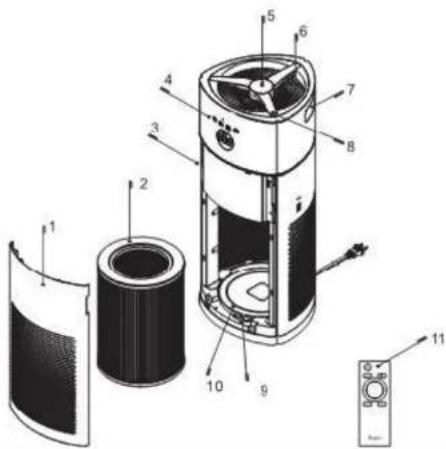
List of major components:
- Front panel
- Integrated filter
- Dust sensor
- Function display panel
- Power, filter reset button
- Air outlet
- Handle
- Fan speed, child lock, filter reset button
- Slide switch
- Filter lifting bracket
- Remote controller
Product specifications
| Product model | KJF400KBAA | Rated voltage | 220V |
| Rated power | 40W | Frequency | 50Hz |
| CADR Particulates | 350m3/h | Noise level | 65dB |
| CCM Particulates | P2 | Energy efficiency Particulates | High efficiency |
| Effective area | 24-42m2 | ||
| Weight (net weight/gross weight) | 7.8kg/8.8kg | ||
| Product size | 305×306×604mm | ||
Safety warning
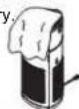
Do not cover the air outlet with a towel or other object to avoid damage to the appliance and personal injury.
①
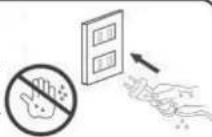
When plugging in the power cord, please make sure your hands are dry. Only use dry hands to insert the plug into the socket. Do not handle air cleaners or plugs with wet hands.
②
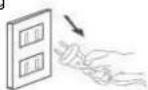
Do not pull the power cord while unplugging it. The correct way is to hold the plug and pull it out to avoid damage to the cord.
3
Precautions before use
- If the air purifier does not start when you press the On button, please check if the filter and the front panel have been installed properly. If the filter and the front panel are not properly installed, the air purifier with the safety design will not work normally.
- Do not use this product in a humid environment, such as a toilet, because use of the product in a humid environment may accelerate filter loss and cause damage to components.
- If the product is used in an environment with smoke or oil fumes, the filter of the product will be covered by the tar of the cigarette or oil fumes. Clean the filter often with a vacuum cleaner so as not to affect the filtering effect.
- When using the remote controller for the first time, install two AAA batteries before use.
Getting Started
- Remove the front panel: a. Use both hands to gently press the upper snap-fastened position; b. Pull the front panel outwards; c. Lift the front panel upwards.
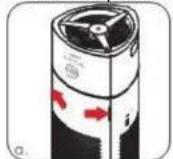
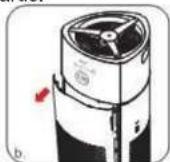
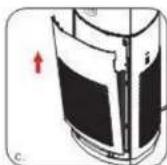
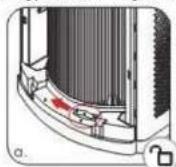
- Replacement and maintenance of filter: a. Drag the slide switch to the left to release the filter lock; b. Remove the filter (Note: For the first time use, remove the filter packaging plastic bag); c. d. Drag the slide switch to the right to lock the filter;
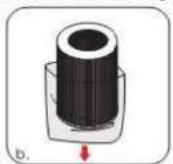
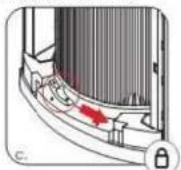
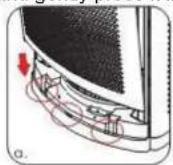
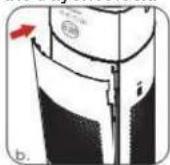
- Installation of front panel: a. Insert the front panel into the bottom slot; b. Gently push it inwards; c. Align with the snap hole and gently press it into the bayonet lock.
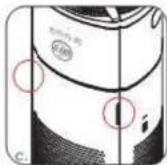
Operation panel description
Description of buttons
| Icons | Description of buttons |
 | Power switch (Touch the power switch button to turn the power on and off) |
 | Fan speed cycle buttonPress and hold for 3s to enter child lock function |
 + +  | Press this button for 3s to reset the filter |
Definitions of icons:
| Icons | Description | Icons | Description |
| [W340] | Timer indicator | Smart mode indicator | |
| [220T] | Air quality indicator | ||
 | Anion indicator |  | PM 2.5 value display |
 | Filter replacement indicator | Extreme fast purification indicator | |
Operation instructions
Note: After the power is turned on, a "beep" sound is heard. The power button light is half on, indicating that the power is normal, and it enters the standby state: PM2.5 detection module enters the working state.
1. ⏻ Switch function:
Touch the power switch button to turn the power on and off.
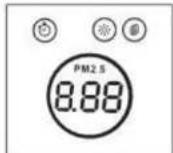
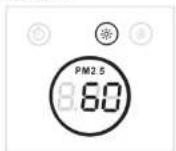
Note: after powering on and entering into smart mode, the fan speed 1 is enabled, anion module started; lighted icon indicators: the power indicator is full bright and indicators of anion module and PM2.5 detection module are lighted (PM2.5 value is displayed after the 60 seconds countdown from power-on for the first time). The display screen is shown below:
2. ⏻ + ⏱ Filter reset function
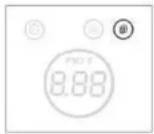
When the power is turned on and the indicator 🔒 is lighted, it means that the filter needs to be replaced; after the replacement, press the power switch button and the fan speed button for 3 seconds, the buzzer will ring once, the filter indicator light will be off, and the filter use time will be reset.
3. Child lock function (fan speed button):
When the power is turned on, long press the fan speed button for 3 seconds to enable and disable the child lock function. When the child lock mode is enabled, the buzzer will sound once and the power button indicator will flash. Other functions except the power button will be disabled.
4. ○ Fan speed cycle button
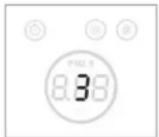
Press the fan speed button to switch between fan speeds A→1→2→3→A. The fan speeds are displayed for 5 seconds. Afterwards, the PM2.5 display will be restored. If you need to check the current fan speed, press the fan speed button again.
5. Automatic light sensor
The appliance enters sleep mode only when it is in dark for more than one minute in smart mode. (The automatic light sensor is only enabled in smart mode; if there is foreign object blocking above the switch button, the appliance will enter this mode.)
Display status description
How do you know the status of PM2.5 in the air? PM2.5 value display, as shown below:

| Smart display | PM2.5 | Range | Colour | Position |
| Excellent | 000-075 | Green | 1 | |
| Good | 076-150 | Yellow | 2 | |
| Bad | >150 | Red | 3 |
PM2.5 value is displayed after the 60 seconds countdown from power-on for the first time.
Remote controller description
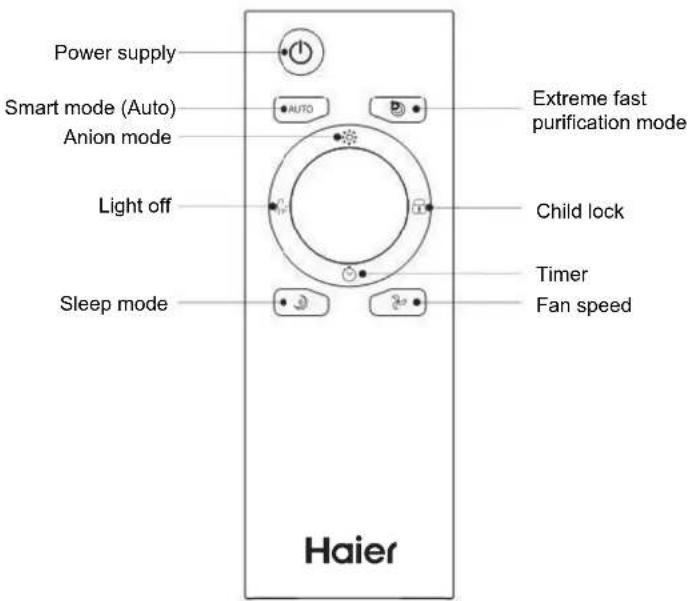
Note: When using the remote controller, the distance from the appliance cannot exceed 6 meters (without foreign object blocking).
- ⏻ Power supply
Used to turn on and off the appliance.
- AUTO AUTO
When the appliance is turned on, press the smart mode button to enter the smart mode (letter A is displayed on the screen), and the appliance may automatically adjust the fan speed according to the air quality. Then you may press the smart mode button to exit smart mode and return to the previous mode.

- Anion mode
When the appliance is turned on, press the anion mode button to enable and disable the anion function. When the anion function is enabled, the anion indicator light is on, and the indicator light is off when the anion function is disabled.
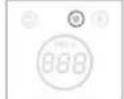
- Light off
When the appliance is turned on, press this button once, the power indicator light is half on and flashes slowly, the other lights turn off, and other functions remain unchanged. Press this button again and all lights return to its original state.
- Sleep mode
When the appliance is turned on, press the sleep button to enter the sleep mode. In addition to the power button and sleep button, other buttons are disabled. When the fan speed enters the sleep mode, the power indicator light is half on and all other lights are off, and the buzzer turns off. Press the sleep button again to exit the sleep mode and return to the previous mode.
- Fan speed
Press the fan speed button to switch between speeds 1→2,→3→1, and 1. The fan speeds are displayed for 5s. Afterwards, the PM2.5 display is restored. If you need to check the current fan speed, press the fan speed button again.
- Timer
When the appliance is turned on, press the timer button to set the 0-24 hour power off function. The time is increased by one hour when you press this button each time. Press the timer button to check the current time setting. Please note that the countdown is on an hourly basis on the appliance and on a minute basis on the APP. (When the timer is set and you need to cancel the setting, press and hold the timer button for 3s to cancel the timer setting. At this time, "00" will be displayed on the screen.
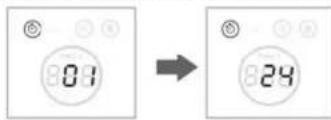
* The speed display time is 5s.
- Child lock
When the appliance is turned on, press the child lock button to enable and disable the child lock function. When the child lock mode is turned on: the power button blinks, and other buttons except the power button are disabled.
- Extreme fast purification mode
When the appliance is turned on, press the button to turn on and off the extreme fast purification mode. This mode is indicated by H and the display time is 5s.
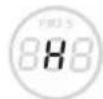
Product maintenance
- The appliance has a filter replacement remainder function. When the icon on the appliance flashes, the filter should be replaced.
- Turn off the appliance, then pull the plug out of the socket before replacing the filter 15 minutes later.
- Before replacing the filter, remove the front panel. Refer to the "Getting Started" chapter for specific procedure.
- After the filter is replaced, install the front panel by referring to "Getting Started" chapter.
- After replacing the new filter, press the power switch button and the fan speed button for 3 seconds simultaneously to clear the accumulated use time of the filter, and at the same time, the buzzer sounds "beep". The timing starts again.
Troubleshooting
In the face of the following general problems, the users may inspect by themselves. (Note: If you find a problem, please immediately turn off the appliance to prevent damage to the appliance and other hazards.)
| Problem phenomenon | Possible causes | Solution |
| Startup fails | Plug is not inserted in place | Plug in the power cord again and make sure it is plugged into the correct place |
| There is no electricity in the socket | Change to another socket and try to plug in again. | |
| Filter or front panel is not correctly installed. | Install the filter and front panel by referring to the "Getting Started" chapter. | |
| The product emits abnormal noise. | The appliance may operate under overload for excessively long time or air inlet or outlet is obstructed. | Please turn the appliance off and restart it 15 minutes later. |
| Rurification capacity is reduced. | Filter is dirty or its service life comes to an end. | Remove and replace the filter by referring to the previous detailed instructions). |
| Remote controller fails | 1. The battery's service life has come to an end.2. The remote controller is too far from the appliance. | 1. Replace the battery.2. Move it closer to the appliance. |
| The appliance automatically enters sleep mode in non-dark conditions. | Check if there any foreign matter on the switch. | Remove the foreign matter. |

- CONTENTS
- LIST OF MAJOR COMPONENTS
- SAFETY WARNING
- ①
- ②
- PRECAUTIONS BEFORE USE
- GETTING STARTED
- OPERATION PANEL DESCRIPTION
- OPERATION INSTRUCTIONS
- ⏻ SWITCH FUNCTION
- ⏻ + ⏱ FILTER RESET FUNCTION
- CHILD LOCK FUNCTION (FAN SPEED BUTTON)
- ○ FAN SPEED CYCLE BUTTON
- AUTOMATIC LIGHT SENSOR
- DISPLAY STATUS DESCRIPTION
- REMOTE CONTROLLER DESCRIPTION
- PRODUCT MAINTENANCE
- TROUBLESHOOTING
Brand : HAIER
Model : KJF400KBAA
Category : Air purifier