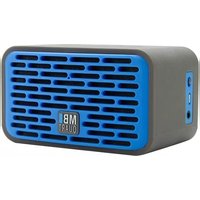
QUBTwo - Loudspeaker MB QUART - Free user manual and instructions
Find the device manual for free QUBTwo MB QUART in PDF.


| Product Type | Bookshelf Speaker |
| Brand | MB Quart |
| Model | QUBTwo |
| Dimensions (H x W x D) | 30 x 20 x 25 cm |
| Weight | 4.2 kg |
| Power Output (RMS) | 60 W |
| Frequency Response | 45 Hz - 20 kHz |
| Impedance | 4 Ω |
| Sensitivity | 88 dB |
| Connectivity | Bluetooth 5.0, AUX input, Optical |
| Drivers | 1” tweeter, 5.25” woofer |
| Enclosure Type | Bass-reflex (ported) |
| Power Supply | AC 100-240V, 50/60Hz |
| Standby Power Consumption | <0.5 W |
| Main Functions | High-fidelity audio, Bluetooth streaming, remote control |
| Cleaning Instructions | Wipe with a soft, dry cloth. Do not use solvents. |
| Safety Precautions | Keep away from moisture and heat sources. Do not block ventilation. |
| Spare Parts Availability | Contact manufacturer for replacement parts. |
| Warranty | 2 years (varies by region) |
| User Manual Included | Yes (downloadable PDF) |
Frequently Asked Questions - QUBTwo MB QUART
User questions about QUBTwo MB QUART
0 question about this device. Answer the ones you know or ask your own.
Ask a new question about this device
Download the instructions for your Loudspeaker in PDF format for free! Find your manual QUBTwo - MB QUART and take your electronic device back in hand. On this page are published all the documents necessary for the use of your device. QUBTwo by MB QUART.
USER MANUAL QUBTwo MB QUART
natural_image
Line drawing of a rectangular electronic device with a grid-patterned front panel and a central logo (no text or symbols)MBI
QUART
CONTENTS
Page 3 Important Safety Instructions
4 Controls
5 Charging
6-7 Bluetooth Connection
8 Auxiliary Input
9 Receiving and Making Calls
10 Specifications
11 Warranty
IMPORTANT SAFETY INSTRUCTIONS
- Read, follow and keep these instructions.
- Do not use this product near water or wet surfaces.
- Clean only with a dry cloth.
• Do not expose to extreme high or low temperatures.
• Only use the supplied cables for charging and playback.

CHARGING
The first time you use your Bluetooth speaker, please charge it for at least 3 hours. During the first charge, do not turn on the device.

natural_image
Line drawing of a portable electronic device with ventilation grilles and a connector (no text or symbols)Using the supplied USB cable connect to a USB power source (eg. a computer).
While charging, the power switch on the side of the unit will turn red.
When fully charged, the power switch light will turn off.
After the first charge, you can play and charge at the same time.
BLUETOOTH CONNECTION
When the speaker is turned on, you should hear a beep and the pairing LED on the front of the speaker will flash indicating that pairing mode is activated and it is searching for a Bluetooth source.
Go to the Bluetooth menu of your source device and connect to QUBTwo from the list of devices. If asked for a code, enter 0000.
Once the connection is achieved, the pairing LED will stop flashing and the speaker will emit two short beeps.
You are now connected and can play from your source.
6
TROUBLE CONNECTING?
Make sure that no other source in range is connected. Only one connection can be made at a time, The speaker may automatically connect to a source it has been paired with in the past.
Turn off the speaker, then on again. Try pairing again.
Make sure the source is Bluetooth compatible and that the Bluetooth is activated.
Review your source device documentation for Bluetooth pairing instructions.
AUXILIARY INPUT CONNECTION

natural_image
Line drawing of a portable electronic device with ventilation grille and cable (no text or symbols)Insert the supplied 3.5mm cable into the speaker's AUX input.
Connect the other end to the output of your source device.
The power switch light will turn off. You can now play your content.
The Bluetooth will be disabled anytime a 3.5mm cable is inserted into the AUX input.
RECEIVING AND MAKING CALLS
Your speaker will allow you to make hands free calls provided your phone is connected via Bluetooth. The AUX connection cannot be used for this function.
To make a call: Use the phone as normal, select the Bluetooth speaker when prompted.
To receive a call: Either push the FUNCTION button on the top of the speaker or answer the call with the phone making sure to select the Bluetooth speaker when prompted.
Ending a call: Either push the FUNCTION button on the top of the speaker or hang up using the phone as you normally would.
Rejecting a call: Push the FUNCTION button for three seconds.
To switch from the Bluetooth speaker to the phone during a call: Press the FUNCTION button twice.
9
SPECIFICATIONS
Active Drivers: 2 - 40mm (1.57 Inches)
Passive Drivers: 1
Amplifier Power: 6 Watts
Frequency Response: 75Hz - 17KHz
Battery Type: Lithium-ion Polymer
Battery Capacity: 1050mAh
Play Time: 6 to 8 Hours
Recharge Time: 3.0 Hours
Bluetooth Profiles: HFP-A2DP/ARVCP
Bluetooth Range: 10 meters in open space
Dimensions: 62 x 110 x 72 (mm)
Weight: 270 grams
WARRANTY
Maxxsonics USA Inc. warrants this product, to the original consumer purchaser, to be free from defects in material and workmanship for a period of one (1) year from the date of purchase. Maxxsonics USA Inc. will, at its discretion, repair or replace defective products during the warranty period. Components that prove to be defective in materials or workmanship must be returned to the original authorized Maxxsonics USA Inc. retailer from where it was purchased. A photocopy of the original receipt must accompany the product being returned. This warranty is limited to defective parts and specifically excludes any incidental or consequential damages connected therewith. To view the full warranty, please visit the website.
The Bluetooth ^™ word mark and logos are registered trademarks owned by Bluetooth SIG, Inc. and any use of such marks by MB Quart is under license.
MBQuart.com
#MUSIC DEFINED



MBQuart products are designed and engineered in the USA by
MAXXSONICS®
847-540-7700
www.maxxsonics.com

Brand : MB QUART
Model : QUBTwo
Category : Loudspeaker