
ION681 - Dehumidifier Ionmax - Free user manual and instructions
Find the device manual for free ION681 Ionmax in PDF.


| Product Type | Dehumidifier |
| Brand | Ionmax |
| Model | ION681 |
| Dimensions (W x D x H) | 34.5 x 24.5 x 56 cm |
| Weight | 13.5 kg |
| Power Supply | 220-240 V, 50 Hz |
| Power Consumption | 290 W |
| Dehumidification Capacity | 20 L/day (at 30°C, 80% RH) |
| Water Tank Capacity | 2 L |
| Continuous Drainage | Yes, via hose |
| Noise Level | 44 dB(A) |
| Air Flow | 150 m³/h |
| Refrigerant | R290 (Propane) |
| Operating Temperature Range | 5°C to 35°C |
| Filter Type | Washable pre-filter |
| Defrost Function | Automatic |
| Timer | 1-24 hours |
| Display | LED digital |
| Safety Features | Auto shut-off when tank full, overheat protection |
| Maintenance | Clean filter every 2 weeks; drain and clean tank monthly |
| Spare Parts | Filter, water tank, drainage hose |
| Accessories Included | Continuous drainage hose, user manual |
Frequently Asked Questions - ION681 Ionmax
User questions about ION681 Ionmax
0 question about this device. Answer the ones you know or ask your own.
Ask a new question about this device
Download the instructions for your Dehumidifier in PDF format for free! Find your manual ION681 - Ionmax and take your electronic device back in hand. On this page are published all the documents necessary for the use of your device. ION681 by Ionmax.
USER MANUAL ION681 Ionmax
The Ionmax Ion681 helps to monitor the humidity and remove excess moisture from the air. This helps protect your home from the formation of mould, spots and corrosion. The integrated humidistat sensor automatically turns the unit ON/OFF and ensures unmonitored, ongoing operation for efficient dehumidification in your home.
Please read this manual carefully before use to ensure proper usage. Save these instructions for future reference.
This package includes:
- lonmax lon681
- User manual
CONTENTS
IMPORTANT SAFETY INSTRUCTIONS
FEATURES 5
SPECIFICATIONS 5
PRODUCT DIAGRAM 6
OPERATING INSTRUCTIONS 7
MAINTENANCE INSTRUCTIONS 9
STORAGE INSTRUCTIONS 9
TROUBLESHOOTING GUIDE 10
WARRANTY DETAILS 11
WARRANTY REGISTRATION 12
PLEASE READ ALL INSTRUCTIONS CAREFULLY BEFORE OPERATING.
WARNING - This appliance is intended for use in a domestic environment only. Any other use is not recommended by the manufacturer and may cause fire, electrical shocks or other injury to person or property.
When using electrical appliances, basic safety precautions should always be followed.
- Do not operate the unit with a damaged cord or plug, after it malfunctions or has been dropped or damaged in any way. Return to an authorised service facility for examination and repair.
- This unit should always be kept in an upright position to avoid any damage. The appliance must be placed on a level, flat surface during operation.
- Check the household voltage to ensure it matches the units rated specification before operating.
- Ensure that the air inlets and outlets are not blocked or covered.
- Do not place the unit too close to curtains or other objects - min 40cm.
- Never place anything on top of the unit and do not cover with any kind of material while in use.
- This product is intended for domestic and light office use ONLY and not for commercial, industrial or outdoor use.
- To protect against electrical shocks, do not immerse unit, plug or cord in water, or spray with liDuids.
- Never unplug the power cord with the unit turn on.
- Always unplug the unit when not in use or moving location. To disconnect from the power supply, grip the plug and pull from the power socket. Never pull by the cord.
- Always empty the water tank before storing the unit away.
- Close supervision is necessary when any appliance is used by or near children and pets.
- Do not run power cord under carpeting, or cover with rugs or runners. Arrange the cord away from areas where it may be tripped over.
- Never operate or store the unit in direct sunlight.
- To repair the unit, take it to a Dualified service engineer. Repairs carried out by unDualified people may cause damage to the unit or injury to persons or property and void the warranty.
- Where possible, avoid the use of an extension cable as they may overheat and cause a risk of fire. Only use an extension cord after ensuring it is in perfect condition.
- Do not use the unit without the air filter.
This appliance is not intended for use by persons (including children) with reduced physical, sensory or mental capabilities, or lack of experience and knowledge, unless they have been given supervision or instruction concerning use of the appliance by a person responsible for their safety. Children should be supervised to ensure that they do not play with the appliance.
FEATURES
- Whisper Duiet
- Swiss Innovative compact design for easy portability
- Filter in the unit traps big particles such as hair and dust from the air
- Two dehumidification modes:
- Manual mode - for ongoing operation
- Auto mode - dehumidifies the room when Relative Humidity (RH) level is above 65% and stops when RH is below 55%
- Auto switch off when unit overheats and resumes operation upon temperature recovery
- Timer setting for 6, 8, and 12 hours
• Water tank full warning - Auto switch off when water tank is full or removed
TO AVOID ELECTRICAL SHOCK, DO NOT TAMPER WITH THE UNIT. TAMPERING WITH THE UNIT WILL VOID THE WARRANTY.
SPECIFICATIONS
| Model Ionmax ION681 | |
| Dehumidifying Rate Approximately 600ml/day (at 30°C, 80%RH) | |
| Tank Capacity 2.2L | |
| Rated Voltage 220-240V, 50HM | |
| Power Consumption 100W | |
| Temperature Range 5~40°C | |
| Weight 2.6 KG | |
| Dimensions 154 (L) x 249 (W) x 352.5 (H) mm | |

- On / Off button
- Auto / Manual mode button (On Auto mode, unit will only operate when RH P 65% and stop when RH < 55%. On Manual mode, unit will operate continuously.)
- Timer setting (6 / 8 / 12 hours)
-
Humidity sensor / Indicator (When the tank is full, the unit will automatically turn off and the indicator will turn Red)
-
Dry air outlet (Both sides)
- Carry handle
- Air inlet
- Screw (Unscrew this to clean the filter (11) every 6 months)
- Removable water tank
- Water tank cover
- Filter
- Plug with power cord
Plug in the unit's power supply into a 220-240V AC electrical outlet.
- Please use an AC electrical outlet as stated on the label. A higher voltage may lead to malfunction causing fire or electric shock.
- Do not use the unit when the power cord or plug is broken, or the socket is loose.
- Do not switch the unit on when the water tank is full or when the unit is upside down.
CONTROL PANEL
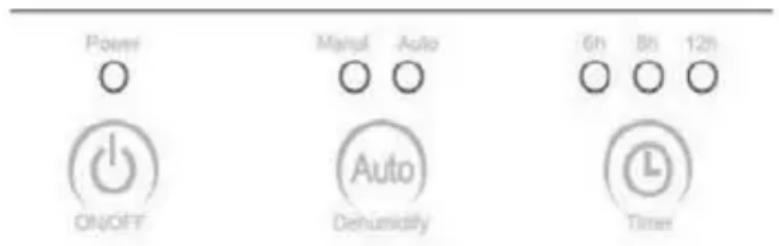
- ON and OFF: Connect the power plug to the appropriate electrical socket outlet. Press the "Power" button to turn the appliance ON. Press the "Power" button again to turn the appliance OFF
- AUTO MODE: When the unit is powered on, it will be in manual mode. Press the “Auto” button for automatic dehumudification. When in Auto mode, the unit will start operating when the Relative Humidity (RH) level is more than 65%. The unit will automatically turn off when the RH level falls below 55%
- To set the timer: Use the "Timer" function to set the unit to automatically turn off after a set period of time. The unit can be set to turn off after 6, 8 or 12 hours. Press the Timer button to cycle between the time periods.
WHEN TANK IS FULL OF WATER
The dehumidifier will stop working when the water tank is full and the indicator will turn red. To continue using the unit, remove the water tank, empty it, and replace the water tank into the unit, as shown in the diagram below.
ATTENTION
- Do not re-use or consume the water collected in the tank as it may contain germs, bacteria, fungi, and microorganisms.

REPLACING THE FILTER
The filter is washable and will not reDuire replacement unless damaged.
To replace the filter:
- Unscrew the screw (as shown in the diagram). Remove the filter, put in a new one and screw the screw back in tightly.
- Please contact your nearest distributor or authorised service center to purchase the filter.

CLEANING THE UNIT
Before cleaning the unit, turn the unit off and unplug it from the power socket to prevent electric shock or accidents.
Wait until the unit has cooled down before unscrewing the screw and removing the filter for cleaning.
MAINTAINING THE EXTERIOR OF THE UNIT
Use a wet and soft cloth to wipe the outside of the unit.
Clean only the exterior of the unit. Attempting to clean the inside of the unit may cause electric shock.
MAINTAINING THE WATER TANK
Clean the water tank and water tank cover under running water after emptying the tank.
Do not re-use or consume the water collected in the tank as it may contain germs, bacteria, fungi, and microorganisms.
MAINTAINING THE FILTER
Clean the filter using a vacuum cleaner or under running water every three months, or every one or two months if indoor air Duality is bad.
Please make sure the filter is completely dry before you put it back into the dehumidifier to avoid malfunction, electric shock or accident.
PLEASE NOTE! Do not use solvents, gasoline, xylene or talcum powder to clean the unit, water tank or filter as this may cause deterioration or corrosion.
STORAGE INSTRUCTIONS
If the unit will not be used for long time:
- Empty and clean the water tank. Wipe it dry with a clean, dry cloth, and reinstall it into the unit.
- Clean the filter and ensure that it is completely dry before reinstalling it into the unit.
- Pack the dehumidifier into a box or its original packaging to avoid dust from collecting on the unit. Store in a cool and dry place.
| Problem Probable Cause Solution | ||
| Unit not powering on | Power cable not plugged in | Plug in the power cord |
| Household circuit breaker | Reset your circuit breaker. If necessary, contact a licensed electrician. | |
| Unit is damaged or in need of repair | Stop operating and unplug the power source. Contact Customer Service for assistance. | |
| The water tank is full or the tank is not put in correctly. | Empty the water tank and put it back, or reinstall the tank correctly | |
| Stop dehumidification / No air comes out from air outlet. | Fan has overheated causing the unit to stop operation | The unit will start working automatically when the fan has cooled down |
| Filter is too dirty and is blocked. | Clean the filter according to the Maintenance Instructions | |
| Air inlet or air outlet is blocked. | Remove any blockage from the air inlet or outlet | |
| Too Noisy. | Unit is not on a stable surface | Move the unit to a stable, flat surface. |
| Filter is too dirty and is blocked | Clean the filter according to the Maintenance Instructions | |
andatech
WARRANTY DETAILS
Congratulations on your purchase! It is our aim to provide you with quality products that you can trust. Our products come with guarantees that cannot be excluded under the Australian Consumer Law. You are entitled to a replacement or a refund for a major failure and for compensation for any other reasonably foreseeable loss or damage.
You are also entitled to have the goods repaired or replaced if the goods fail to be of acceptable quality and the failure does not amount to a major failure.
The Guarantee
The product is guaranteed to be free from defects in workmanship and parts for a period of 12 months from date of purchase for domestic use and 3 months for commercial use. Defects that occur within this warranty period, under normal use and care, will be repaired, replaced or refunded at our discretion, solely at our option with no charge for parts and labour. The benefits conferred by this warranty are in addition to all rights and remedies in respect of the product that the consumer has under the Trade Practises Act and similar state laws.
Proof of Purchase
This warranty is valid for the original purchase and is not transferable. Please keep your purchase docket or receipt as proof of purchase and as proof of date on which the purchase was made. The purchase docket (or a copy) or receipt must be presented with the warranty when making a claim under this warranty.
Service during the Warranty Period
Please ensure that the RA# (Return Authorisation Number) is clearly stated on the outside of the packaging. Don't have one? Call us on 1300 800 200 and we'll get you one. Please ensure the product is properly packaged so as to ensure that no damage occurs to the product during transit.
Extent of Warranty
This warranty is limited to defects in workmanship or parts. All defective products or parts will be repaired or replaced. This warranty does not cover manuals and packaging.
Normal Wear and Tear
This warranty does not cover normal wear and tear to the product or parts.
Exclusions
This warranty does not cover:
- Any defect caused by an accident, misuse, abuse, improper operation, lack of reasonable care, unauthorised modification, loss of parts, tampering or attempted repair by a person not authorised by the distributor.
- Any product that has been damaged by a lightning strike either directly or indirectly or a mains power surge or liquid ingress.
• The product if it is located outside of Australia. - Any damage caused by improper power input or improper cable connection.
WARRANTY REGISTRATION
Register your lon681 online at my.andatech.com.au or fill out this form and forward to the address below with a copy of your proof of purchase. Contact us on 1300 800 200 or visit www.andatech.com.au for options to extend your warranty.
Andatech Corporation Pty Ltd PO Box 3038, Nunawading VIC 3131, Australia.
Date of Purchase : ____
Place of Purchase : ____
Serial No. :
Surname :
Given Name :
Address :
Suburb :
Postcode :
State :
Contact No. :
Email :


- CONTENTS
- PLEASE READ ALL INSTRUCTIONS CAREFULLY BEFORE OPERATING
- FEATURES
- TO AVOID ELECTRICAL SHOCK, DO NOT TAMPER WITH THE UNIT. TAMPERING WITH THE UNIT WILL VOID THE WARRANTY
- WHEN TANK IS FULL OF WATER
- ATTENTION
- REPLACING THE FILTER
- CLEANING THE UNIT
- MAINTAINING THE EXTERIOR OF THE UNIT
- MAINTAINING THE WATER TANK
- MAINTAINING THE FILTER
- STORAGE INSTRUCTIONS
- ANDATECH
- WARRANTY DETAILS
- THE GUARANTEE
- PROOF OF PURCHASE
- SERVICE DURING THE WARRANTY PERIOD
- EXTENT OF WARRANTY
- NORMAL WEAR AND TEAR
- EXCLUSIONS
- WARRANTY REGISTRATION
Brand : Ionmax
Model : ION681
Category : Dehumidifier