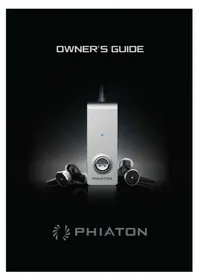
PS 202 NC - Earphones Phiaton - Free user manual and instructions
Find the device manual for free PS 202 NC Phiaton in PDF.


User questions about PS 202 NC Phiaton
0 question about this device. Answer the ones you know or ask your own.
Ask a new question about this device
Download the instructions for your Earphones in PDF format for free! Find your manual PS 202 NC - Phiaton and take your electronic device back in hand. On this page are published all the documents necessary for the use of your device. PS 202 NC by Phiaton.
USER MANUAL PS 202 NC Phiaton
1. Safety and General Issues
1) Use a standard USB charging cable (included), with or without a charging adaptor (5V, over 500mA). * Adapter Not Included
2) Lower the volume prior to listening to audio to prevent potential damage to eardrums caused by sudden loud sound.
3) Listening to loud music for extended periods of time may cause hearing damage.
4) Do not store the device in places with a temperature higher than 113 °F/45 °C .
5) Keep the device dry. If the device becomes wet, turn the power off, dry the device with a dry towel and contact Phiaton Customer Service for an inspection.
(For more information, refer to the contact us page within our website – phiaton.com).
6) Do not attempt to disassemble, modify or repair the device.
7) Do not cause shock to the device.
8) Keep out of the reach of children and pets.
9) Do not tug on cords or touch power plugs with wet hands.
10) When the product is not being used, set the device power switch to 'OFF'.
11) When storing the device, place the device within the provided carrying case.
12) When cleaning the device, use a clean dry cloth to wipe the device clean.(Do not use solvents).
13) Remove the ear tips from the earphones, wash them with warm water, dry completely and check for any debris before reattaching.
(Please use a clean cloth to clean the Comply™ Foamtips).
14) Replacement ear tips can be purchased from Phiaton Customer Service.
15) Use while driving or walking will prevent outside noise, such as signals or alarms, from being heard and may be dangerous to yourself and others. Heed caution during use.
* Use the earphones only for its intended purposes.
2. Charging & Everplay-X 3
Charging
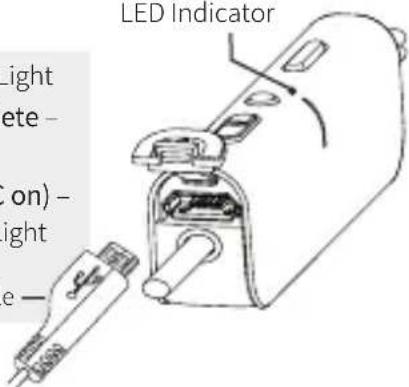
Charging – Red Light
Charging complete –
Blue Light
Low Battery (NC on) -
Flashing Green Light
USB Charging Cable —
LED Indicator
text_image
LED Indicator Light ete - ( on ) - light e -Everplay-X
Everplay-X technology allows you to continue calling or listening to your music even if the battery runs out.
Music Playing
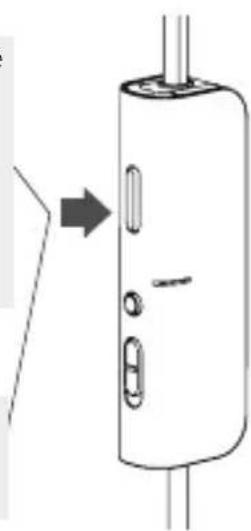
Click once : Play/ Pause
Click twice: Next Song
Click 3 times :
Previous Song
The previous song feature will only work on IOS based devices.
Call Function
Click once:
Accepting a Call /
Ending a Call
natural_image
Diagram of a cylindrical device with internal components and an arrow pointing to it (no text or symbols)4. Monitor & Noise Cancelling Function
Monitor
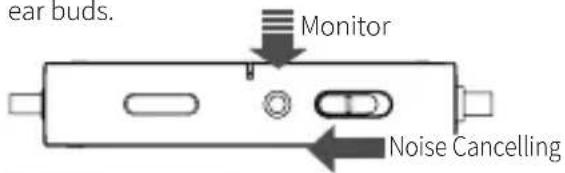
The monitor button allows you to mute your music and noise cancelling so you can hear the surrounding sounds without removing the ear buds.
text_image
ear buds. Monitor Noise CancellingNoise Cancelling
Slide the button to 'On' to turn on the noise cancelling feature.
With NC Feature ON*
| Status Function | |
| Music - On | Mute Music & Monitor |
| Music - OFF Monitor | |
*Monitor Button is only enabled with NC ON.
5. Wire Clip
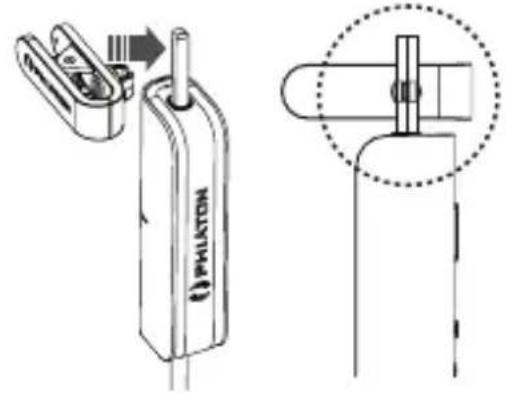
text_image
(i) PHILATONIf the clip is needed, please attach as shown in the picture above.
6. How to Use the Comply™ Foam Tips
① First remove silicon tips
② Place the bottom side of a foam tip to the end of a waveguide.
③ Press the foam tip until it reaches the middle of a wave guide.
④ Apply pressure on the foam tip to minimize its size.
⑤ Insert it carefully into the ear.
⑥ The foam tip will gradually expand for about 10 seconds, blocking external noise. (You can purchase addition foam tips at www.complyfoam.com)
7. More Functions and Information
For more functions and information, please refer to 'PS 202 NC Owner's Guide' on the product page at phiaton.com. http://www.phiaton.com/ps-202-nc

text_image
QR code image containing encoded data, no visible human-readable text8. FCC Compliance Information
This device complies with part 15 of FCC Rules. Operation is subject to the following two conditions:
(1) This device may not cause harmful interference, and (2) this device must accept any interference received, including interference that may cause undesired operation.
Information to the user:
NOTE: This equipment has been tested and found to comply with limits for a Class B digital device, pursuant to part 15 of the FCC Rules. These limits are designed to provide reasonable protection against harmful interference in a residential installation. This equipment generates, use and can radiate radio frequency energy and, if not installed and used in accordance with the instructions, may cause harmful interference to radio communications.
However there is no guarantee that interference will not occur in a particular installation, If this equipment does cause harmful interference to radio or television reception, which can be determined by turning the equipment off and on, the user is encouraged to try the correct interference by one or more of the following measures:
- Reorient or relocate the receiving antenna.
- Increase the separation between the equipment and receiver.
- Connect the equipment into an outlet on a circuit different from that to which the receiver is connected.
- Consult the dealer or an experienced radio/TV technician for help.
CAUTION TO USER: Changes or modifications not expressly approved by the party reasonable for compliance could void the user's authority to operate the equipment.
9. IC Compliance Information
This device complies with Industry Canada license-except RSS standard(s). Operation is subject to the following two conditions:
(1) This device may not cause interference, and (2) this device must accept any interference, including interference that may cause undesired operation of the device.
This equipment complies with IC radiation exposure limits set forth for an uncontrolled environment and meets RSS-102 of the IC Radio Frequency (RF) Exposure rules. This equipment has very low levels of RF energy that are deemed to comply without testing of specific absorption ratio (SAR).
10. CE Compliance Information
Phiaton, hereby declares that this PS 202 NC is in compliance with the essential requirements and other relevant provisions of Directive 1999/5/EC.
한국어
1.사용 시 주의 사항
natural_image
Diagram of a device with a right-angle arrow pointing to a vertical panel, showing internal components (no text or symbols)text_image
QR code image containing encoded data, no visible human-readable text8.인증사항
적합성평가 인증표시
상호명:크레신 주식회사