AER OPEN - Headphones NZXT - Free user manual and instructions
Find the device manual for free AER OPEN NZXT in PDF.


| Product Type | Open-back headphones |
| Brand | NZXT |
| Model | AER OPEN |
| Driver Size | 50 mm |
| Frequency Response | 20 Hz – 20 kHz |
| Impedance | 32 Ω |
| Sensitivity | 98 dB SPL (1 kHz, 1 mW) |
| Connection | 3.5 mm wired |
| Cable Length | 1.5 m (braided) |
| Weight | 250 g |
| Dimensions (W x D x H) | 200 x 180 x 80 mm |
| Materials | Steel headband, mesh ear cups, memory foam padding |
| Color | Black (with optional white trim) |
| Compatibility | PC, Mac, consoles, mobile devices (with adapter) |
| Microphone | Detachable boom microphone (inline mute) |
| Controls | Volume wheel, mute switch on mic |
| Power Source | No battery required (passive) |
| Cleaning Instructions | Wipe ear pads with a damp cloth; avoid liquids in drivers |
| Safety Warnings | Keep away from water; do not use at high volumes for prolonged periods |
| Spare Parts Availability | Replacement ear pads, cable, and microphone available from NZXT |
Frequently Asked Questions - AER OPEN NZXT
User questions about AER OPEN NZXT
0 question about this device. Answer the ones you know or ask your own.
Ask a new question about this device
Download the instructions for your Headphones in PDF format for free! Find your manual AER OPEN - NZXT and take your electronic device back in hand. On this page are published all the documents necessary for the use of your device. AER OPEN by NZXT.
USER MANUAL AER OPEN NZXT
natural_image
Close-up of a white and black N2XT head with earbuds and microphone (no visible text or symbols)AER OPEN
WIRED STEREO HEADSET
AER OPEN WIRED STEREO HEADSET
CONTENTS
01 INTRODUCTION 01
02 ABOUT THE NZXT HEADSET....02
03 PACKAGE CONTENTS & DESCRIPTION 03
04 SETTING UP THE NZXT HEADSET 04
05 CONNECTING THE HEADSET TO AN AUDIO SOURCE 07
06 BASIC TROUBLESHOOTING....10
07 HAZARDOUS SUBSTANCES 11
08 NZXT WARRANTY, SUPPORT & SERVICE....13
AER OPEN WIRED STEREO HEADSET
INTRODUCTION
Congratulations on your purchase of an NZXT Headset! Whether you are a professional streamer, a casual player, or a hardcore gamer; we'd like to welcome you to the NZXT family of high-end gaming peripherals.
The NZXT AER Headset comes with audio cables to connect virtually any type of audio product or gaming device, and the swappable/removeable cable and microphone offer unique versatility not found on any other headset. This manual will help you set up your headset, and sort out any trouble with a troubleshooting guide. It also contains important warranty information.

text_image
u set up your a troubleshooting my information. NZXTAER OPEN WIRED STEREO HEADSET
ABOUT THE NZXT AER HEADSET
The NZXT AER Open Headset was designed to be a highly comfortable and long-wearing headset thanks to its soft, oversized circumaural earcups and lightweight, breathable design. The unidirectional microphone and high-tech neodymium drivers provide exceptional performance no matter what your favorite game genre might be.
This headset is designed around the "Open" audio principle: the outer earcups are open/perforated and the earpads are designed to softly surround your ears.
This provides you with an “airy” audio experience which presents itself as having a wide soundstage that enables identifying effects within the sound field possible with pinpoint accuracy. The open backed earcups also enable you to hear what’s going on within your environment (it also may enable others to hear your audio, so be aware of close quarters).
The NZXT Open Headset design also benefits by having an enhanced midrange and high end, thanks to the audiophile grade Hi Res certified drivers.
ABOUT USING THE NZXT HEADSET WITH THE NZXT AUDIO SYSTEM
The complete NZXT Audio System consists of the NZXT Headset (described in this guide), the NZXT MXER, and NZXT STND. All of the NZXT Audio System components are high-end desktop PC gaming audio products by themselves, but combined together, they unlock additional functionality and performance. Learn more about the NZXT Audio System at www.nzxt.com.
AER OPEN WIRED STEREO HEADSET
PACKAGE CONTENTS & DESCRIPTION
THE NZXT AER HEADSET AND CABLE SYSTEM
A AER Open Wired Stereo Headset
B Detachable Microphone Boom with Adjustable Directional Microphone
Audio Cable with Volume/Mute Remote Control
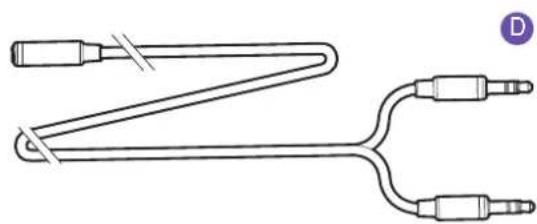
D PC Dual Jack Adapter
E USB Adapter

text_image
R Open Wired Stereo Headset achable Microphone Boom with Adjustable sectional Microphone Bio Cable with Volume/Mute Remote Control Dual Jack Adapter B Adapter A B CPC DUAL JACK ADAPTER USB ADAPTER
natural_image
Pure electrical circuit lines without any symbols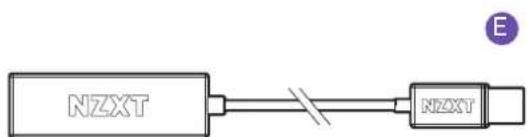
text_image
NZXT NZXTAER OPEN WIRED STEREO HEADSET
SETTING UP THE NZXT HEADSET
STEP 01
CONNECT 4-POLE CABLE WITH VOLUME/MUTE REMOTE
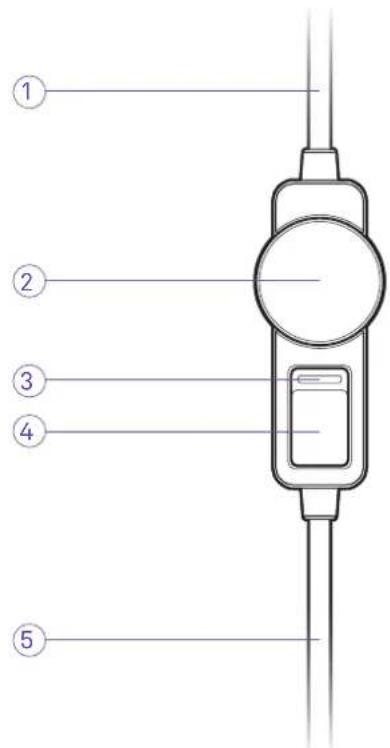
The NZXT AER Headset comes with a headset cable with Mute/Volume controls included in-line on the cable. The cable can be installed in either direction, and on either side of the headset.
The Volume Wheel controls the volume of the headset – turn the wheel clockwise to increase volume and counter-clockwise to decrease. Note that the inline volume control acts as a master – if the wheel is set to a low volume (or off), sound will not be heard.
The mute control has a bright red indicator when in the mute (Voice OFF) position.
This cable is mobile-friendly and can be used in a variety of PCs, laptops, mobile phones, portable gaming, and music devices if they have a 3.5mm headphone connector.

IMPORTANT: Keep the headset cable fully inserted and seated into the 3.5mm connector on the bottom of the headset downtube for proper operation. An incorrectly seated cable may cause feedback or other interference.
WARNING: Always adjust the volume of the NZXT Headset to a safe level BEFORE putting it on! Permanent hearing loss may occur if headphones or earbuds are used at a high volume for an extended period of time.
① To Headset / Audio Input
② Volume Up/Down
③ Mute Indicator (RED = Mute ON)
④ Microphone Mute Switch
⑤ To Headset / Audio Output
text_image
Diagram of a traffic meter with numbered labels pointing to its components.STEP 02
You'll find 3.5mm audio jacks at the bottom of both headset "downtubes" (at the bottoms of each of the earcups). These can both be used for either the headset cable or microphone boom interchangeably (or in other words, you may connect the cable and mic to the side you prefer).

IMPORTANT: For proper performance of the MICROPHONE BOOM, make sure that it is FULLY SEATED in the headset receptacle. Insert the BOOM's connector into the socket while making sure the positioning key is aligned properly. Check to make sure that it is fully seated.
The microphone boom is flexible, so after connecting the microphone and making sure that it is fully seated in the 3.5mm jack, position the microphone by bending it about 1-2 inches away from the corner of your mouth for best performance.

text_image
Technical diagram of a multi-band headphones with labeled parts including head, ear, and microphone⑥ Size Adjustment
⑦ Connect Mic and Audio Cable to either side of headset
⑧ Flexible Microphone Boom Arm
⑨ Rotate tip of microphone towards mouth
STEP 03
CONNECT THE PC DUAL JACK ADAPTER (OPTIONAL, IF NECESSARY)
If the laptop or desktop PC has a legacy dual jack connection for headsets (with two separate audio and microphone 3.5mm jacks), use this accessory cable to connect your headset.
⑩ Headset Input
⑪ Audio Output (Green)
⑫ Microphone Input (Pink)

text_image
⑩ ⑪ ⑫ ⑫STEP 04
CONNECT THE PC DUAL JACK ADAPTER (OPTIONAL, IF NECESSARY)
If the laptop or desktop PC does not have a 3.5mm output, or if it is located in an inconvenient location, use this accessory cable to connect your headset.
⑬ Headset Input
⑭ To USB port on PC

flowchart
graph LR
    A["13"] --> B["NZXT"]
    B --> C["NZXT"]
    C --> D["14"]
AER OPEN WIRED STEREO HEADSET
CONNECTING THE NZXT AER OPEN HEADSET TO AN AUDIO SOURCE
FIGURE A
USING THE NZXT AER HEADSET WITH THE MXER
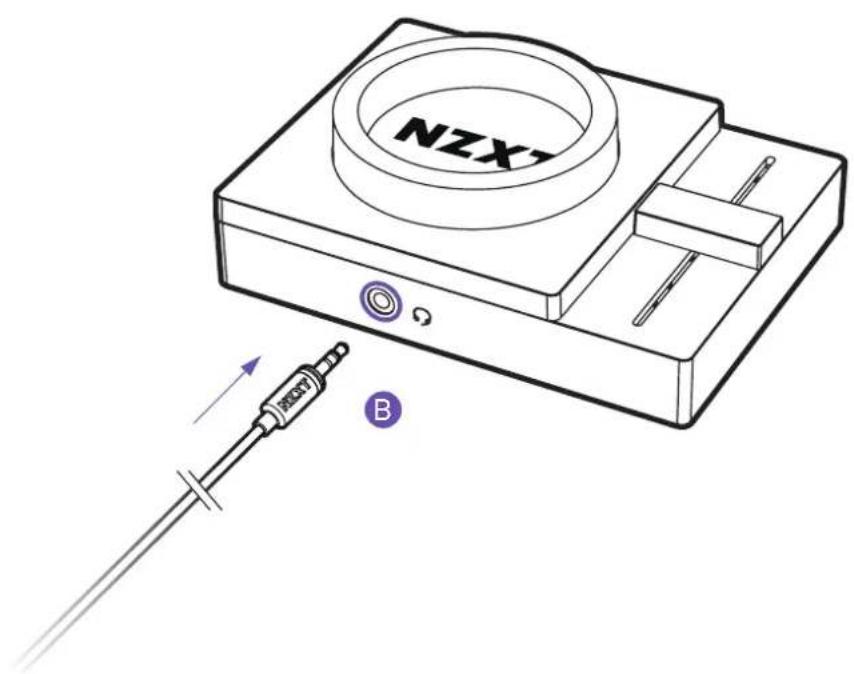
Connect the HEADSET CABLE into the front 3.5mm female audio connection on the front of the MXER. Both the headset cable and the 3.5mm jacks have purple rings to help inform you where to make the connection. Make sure that the connector is fully inserted and seated into the jack.
text_image
NZX BFIGURE B
USING THE NZXT AER HEADSET WITH A PC
If you are gaming with a PC that has a legacy dual jack (separate audio and microphone connectors), be sure to use the included Dual Jack adapter cable in order to connect the headset to your PC. Remember that the audio cable must be inserted to the audio connector, and the microphone cable into the mic connector – or you will experience a malfunction. Usually these are pink (for microphone) and green (for audio).

text_image
Diagram showing cable installation with labeled components and directional arrows, including a purple circle labeled 'D' pointing to a component.Additionally, if your PC does not have an audio output, or if it is located in an inconvenient location, insert the included audio cable into the 3.5mm female side of the USB Adapter and the USB connector into your USB port. Your PC should immediately begin to configure the driver for the adapter. Consult your PC's motherboard and/or sound card manual for further information.

text_image
NEXT EFIGURE C
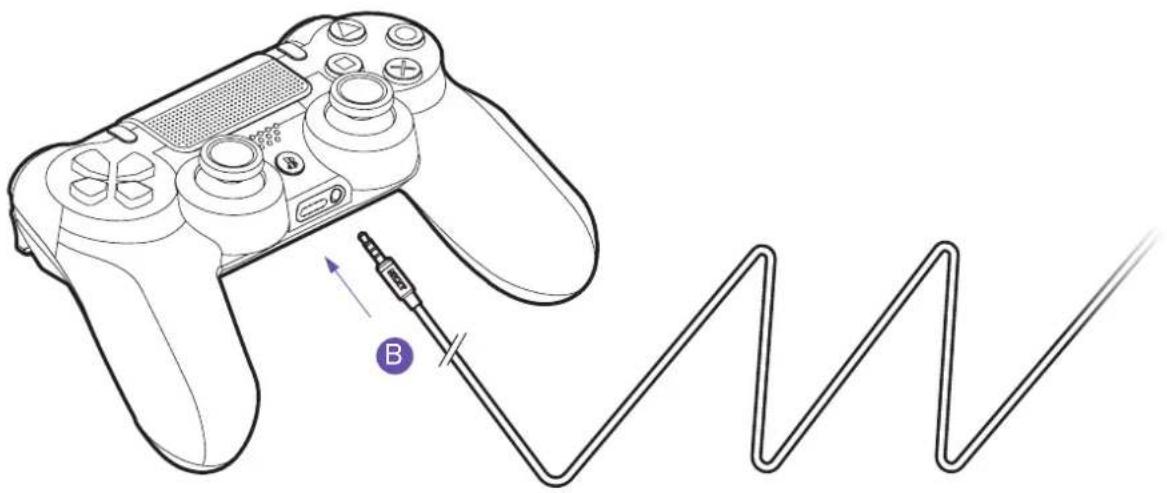
USING THE NZXT AER HEADSET WITH A STANDARD AUDIO SOURCE OR PS4 CONTROLLER
When using the 4-pole HEADSET CABLE, any device that has a 3.5mm stereo output like mp3 players, portable gaming systems, and mobile devices can be connected and the NZXT headset can be used as a normal headset.
When connecting with the PlayStation PS4 game controller, you may connect the headset directly to the 3.5mm audio connection on the back of the PS4 controller. Be sure and fine tune your voice input level using the PS4 audio setup menu. Remember that the PlayStation button on the middle of the controller doubles as an additional mute switch.
natural_image
Line drawing of a game controller connected to a Wavy line, with a purple 'B' mark indicating a cable or connector (no text or symbols present)AER OPEN WIRED STEREO HEADSET
BASIC TROUBLESHOOTING
IF YOUR NZXT HEADSET HAS NO SOUND, CHECK...
- Are both ends of the headset audio cable firmly pushed into their 3.5mm audio connectors?
- Is the volume level of the device you are connected to set to minimum or muted?
- Is the volume level of the inline control set to minimum or muted (all the way counter-clockwise)?
- If you are connected to a PC with the Dual Jack adapter:
Are the microphone and audio jacks (pink and green connectors) properly inserted? Make sure that the microphone connector is plugged into the proper jack (usually pink in color). The audio connector should also be connected to its corresponding jack (usually green in color).
- If you are connected to a PC with the USB adapter:
Is the audio cable properly inserted into the 3.5mm input (female) on the USB adapter? Make sure the cable is fully inserted and the volume of the inline control is properly adjusted. Also, check your PC's audio output settings to make sure it's selected to the USB Adapter.
IF THE MICROPHONE DOES NOT OPERATE PROPERLY, CHECK...
- Is the MUTE on the inline Mute/Volume control engaged? (the switch indicates RED when the mic is muted)
- Is the MICROPHONE BOOM properly inserted and seated? (check the alignment of the positioning key, and firmly insert the microphone boom)
- Are both sides of the headset cable firmly pushed into their 3.5mm connectors?
- If you are connected to a PC with the Dual Jack adapter:
Are the microphone and audio jacks (pink and green connectors) properly inserted? Make sure that the microphone connector is plugged into the proper jack (usually pink in color). The audio connector should also be connected to its corresponding jack (usually green in color).
有毒有害物质及元素

产品名称:
有线耳机(型号:AP-1OP40-W1/AP-1OP40-B1/AP-1CL40-W1/AP-1CL40-B1/AP-1CL40-P1)USB音源转换器(型号:AP-1USBA-B1)
AER OPEN WIRED STEREO HEADSET
USB ADAPTER INFORMATION
NZXT AER USB AUDIO ADAPTER
NZXT AER USB 音源轉換器
NZXT AER USB 音源转换器
Model no. (型號/型号): AP-1USBA-B1
Input (输入額定/输入額定): DC 5V


D33E84
RoHS


Designed in Los Angeles, California. Made in China 中國製造 中国制造
This device complies with Part 15 of the FCC Rules. Operation is subject to the following two conditions: (1) This device may not cause harmful interference, and (2) this device must accept any interference received, including interference that may cause undesired operation.
CAN ICES-3 (B) / NMB-3 (B)
AER OPEN WIRED STEREO HEADSET
NZXT GLOBAL WARRANTY POLICY
This NZXT Global Warranty Policy governs the sale of products by NZXT to you.
I. WARRANTY LENGTH
New NZXT Product Warranty Length for Parts
Computer Cases 2 Years
Temperature Meters 2 Years
Fans 2 Years
Lighting 2 Years
Accessories 2 Years
Headset/Headphone 2 Years
Headset/Headphone Storage 2 Years
Mixer 2 Years
Kraken M Coolers
3 Years
Motherboards 4 Years
Power Supply
10 Years
Kraken Coolers
6 Years
Refurbished NZXT Product Warranty Length for Parts
All NZXT Certified Refurbished Products
1 Year
Any replacement product will be covered under warranty for the remainder of the warranty period or thirty days, whichever is longer. Proof of purchase is required for warranty service.
II. WHO IS PROTECTED
The Warranty covers only NZXT products purchased by the original consumer.
III. WHAT IS AND IS NOT COVERED
Please note that our warranty is not an unconditional guarantee. If the product, in NZXT's reasonable opinion, malfunctions within the warranty period, NZXT will provide you at its sole discretion with a repaired or replacement product, either new or refurbished, with a similar function that is equal or greater in value depending on supply. Our warranty does not cover the following:
- any product or serial number/warranty sticker modification applied without permission from NZXT;
- any damage that is not a manufacturing defect;
- damage, deterioration or malfunction resulting from: accident, abuse, misuse, neglect, fire, water, lightning, or other acts of nature, unauthorized product modification or failure to follow instructions included with the product;
- improper installation, unauthorized alterations or modifications, or repair or attempted repair by anyone not authorized by NZXT;
- shipping or transport damage (claims must be made with the carrier);
• normal wear and tear.
NZXT does not warrant that this product will meet your requirements. It is your responsibility to determine the suitability of this product for your purpose. For NZXT Store orders, we cover two way return shipping for all exchanges and returns. For all other authorized dealers, NZXT Support does not cover return shipping and only covers one way shipping from NZXT back to the end user for exchanges. Two way expedited shipping is provided for all PSUs covered under the Less Than Three program, indiscriminate of purchase location, provided the location is an approved NZXT reseller.
IV. EXCLUSION OF DAMAGES (DISCLAIMER)
NZXT's sole obligation and liability under this warranty is limited to the repair or replacement of a defective product with either a new or refurbished product with a similar function that is equal or greater in value at our option. NZXT shall not, in any event, be liable for any incidental or consequential damage, including but not limited to damages resulting from interruption of service and loss of data, business, or for liability in tort relating to this product or resulting from its use or possession.
V. LIMITATIONS OF IMPLIED WARRANTIES
There are no other warranties, expressed or implied, including but not limited to those of merchantability or fitness for a particular purpose. The duration of implied warranties is limited to the warranty length specified in Paragraph I.
VI. TO OBTAIN TECHNICAL SUPPORT
If you have already referenced your product owner's manual and still need help, you may contact us by phone at +1 (800) 228-9395, by email at service@nzxt.com, or visit the NZXT Support site at nzxt.com/customer-support.
VII. HOW TO OBTAIN A WARRANTY SERVICE FROM NZXT
To receive a warranty service for your product when purchased directly from NZXT, you must submit a request via the NZXT Support site outlining the problem. If a technician deems the product defective or requiring testing, you will be required to provide a copy of your proof of purchase, which will enable you to submit a Return Merchandise Authorization "RMA" request.
Once approved, you'll receive an RMA number, upon which you will be asked to ship the defective item back to NZXT with the RMA number clearly marked or labelled on the package. NZXT recommends that appropriate measures are taken to safeguard the product from damage during shipping.
VIII. APPLICABLE LAW AND ADDITIONAL LEGAL RIGHTS FOR CONSUMERS
This warranty gives you specific legal rights. These conditions are governed and construed in accordance with the laws of California (with exception of its conflict of law provisions), and the application of the United Nations Convention of Contracts for the International Sale of Goods is expressly excluded. The non-exclusive jurisdiction of the courts of California is agreed, which means that you may bring a claim to enforce your consumer protection rights in connection with this Global Warranty in the country which you have your habitual residence where you may have additional rights. These rights may vary.
For original consumers who are covered by consumer protection laws or regulations in their country, state, or province of purchase or, if different, their country, state, or province of residence, the benefits conferred by this warranty are in addition to all rights and remedies conveyed by such consumer protection laws and regulations. To the extent that liability under such consumer laws can be limited, NZXT's liability is limited, and its sole option, to repair or replacement, either new or refurbished, with a similar function that is equal or greater in value depending on supply.
In the United Kingdom:
- For NZXT products sold to customers in the UK, during the expected lifespan of your product your legal rights entitle you to the following:
Up to 30 days: if your goods are faulty, then you can get an immediate refund.
Up to six months: if your goods can't be repaired or replaced, then you're entitled to a full refund, in most cases.
Up to six years: if your goods do not last a reasonable length of time you may be entitled to some money back.
- If the person seeking to rely on the guarantee is not the original consumer, the NZXT Warranty will cover the product in relation to that person provided that they are able to provide proof of the transfer of the benefit of the guarantee from the original consumer.
- The implied warranties under the Consumer Rights Act 2015 says that your goods must be as described, fit for all purposes for which such goods are usually supplied, and of satisfactory quality.
In the EU:
- If you are a consumer and have your habitual residence in the EU, you additionally enjoy the protection afforded to you by provisions that cannot be derogated from by agreement by virtue of the law where you have your habitual residence.
IX. WARRANTY SERVICE FROM RESELLERS
In the event that a warranty service is sought, you must provide proof of purchase (store receipt or invoice) in order to receive the service and if deemed necessary, repair or replacement product.
In North America:
Within the first 60 days after purchase, please return your product (or for power supplies installed within our enclosures, just the failed power supply) to your dealer or reseller for a replacement. If the product is still within warranty and you can no longer return it to your dealer, please contact NZXT Customer Support (see above) for assistance and instructions. NZXT will not accept returns without prior approval and an RMA number.
In Europe:
Within the first year after purchase, please return your product (or for power supplies installed within our enclosures, just the failed power supply) to your dealer or reseller for a replacement. If the product is still within warranty and you can no longer return it to your dealer, please contact NZXT Customer Support (see above) for assistance and instructions. NZXT will not accept returns without prior approval.
In Australasia:
Within the first two years after purchase, please return your product (or for power supplies installed within our enclosures, just the failed power supply) to your dealer or reseller for a replacement. If the product is still within warranty and you can no longer return it to your dealer, please contact NZXT Customer Support (see above) for assistance and instructions. NZXT will not accept returns without prior approval.
The cost of shipping will be borne at the first instance by you; however, if the purchased item is defective, NZXT will reimburse reasonable postage or transportation of costs.
Outside North America, Europe, and Australasia:
If your product needs to be returned within the warranty period, please contact the retailer or distributor from whom you purchased the product.
X. NZXT.COM STORE RETURNS/EXCHANGE POLICY
Eligible products under this NZXT Warranty qualify for a full refund or exchange only with an authorized RMA number and if the item is returned to the NZXT.com store inventory within 30 days of purchase. Returns are not allowed beyond 30 days of the purchase date. The NZXT.com Store reserves the right to deny any return or exchange. Refunds will be credited to the original method of payment. To initiate a return, simply submit a request via NZXT support site.
AER OPEN WIRED STEREO HEADSET
SUPPORT AND SERVICE
If you have any questions or problems with the NZXT product you purchased, please don't hesitate to contact us using our support system. support.nzxt.com
Please include a detailed explanation of your problem and your proof of purchase. For comments and suggestions, you can e-mail our design team, designer@nzxt.com. Lastly we would like to thank you for your support by purchasing this product.
For more information about NZXT, please visit us online. NZXT Website: nzxt.com
Visit support.nzxt.com for information on warranty coverage and service.
Visite el sitio Web support.nzxt.com para obtener información sobre la cobertura y el servicio de la garantía.
Visitez support.nzxt.com pour les informations de la couverture de la garantie et du service.
Informationen zu Geltungsbereich und Service der Garantie finden Sie unter support.nzxt.com.
Visitare il sito support.nzxt.com per informazioni sulla copertura e sul servizio della garanzia.
Visite support.nzxt.com para obter informações sobre a cobertura da garantia e assistência.
Подробную информацию об условиях гарантийного обслуживания см. на веб-сайте support.nzxt.com.
보증 범위와 서비스에 대한 자세한 내용은 support.nzxt.com을 참조하십시오.
保証範囲およびサービスに関する情報については、support.nzxt.com にアクセスしてください。
请造访support.nzxt.com了解保修范围和服务的信息。
請訪問 support.nzxt.com 了解產品保固範圍和更多服務訊息。
NZXT, Inc.
15736 E Valley Blvd, City of Industry, CA 91744, USA
NZXT Europe GmbH
Industriering Ost 66 47906 Kempen Germany
+1 (800) 228-9395
service@nzxt.com
nzxt.com